Product Demo Video Script + Free Template
TL;DR
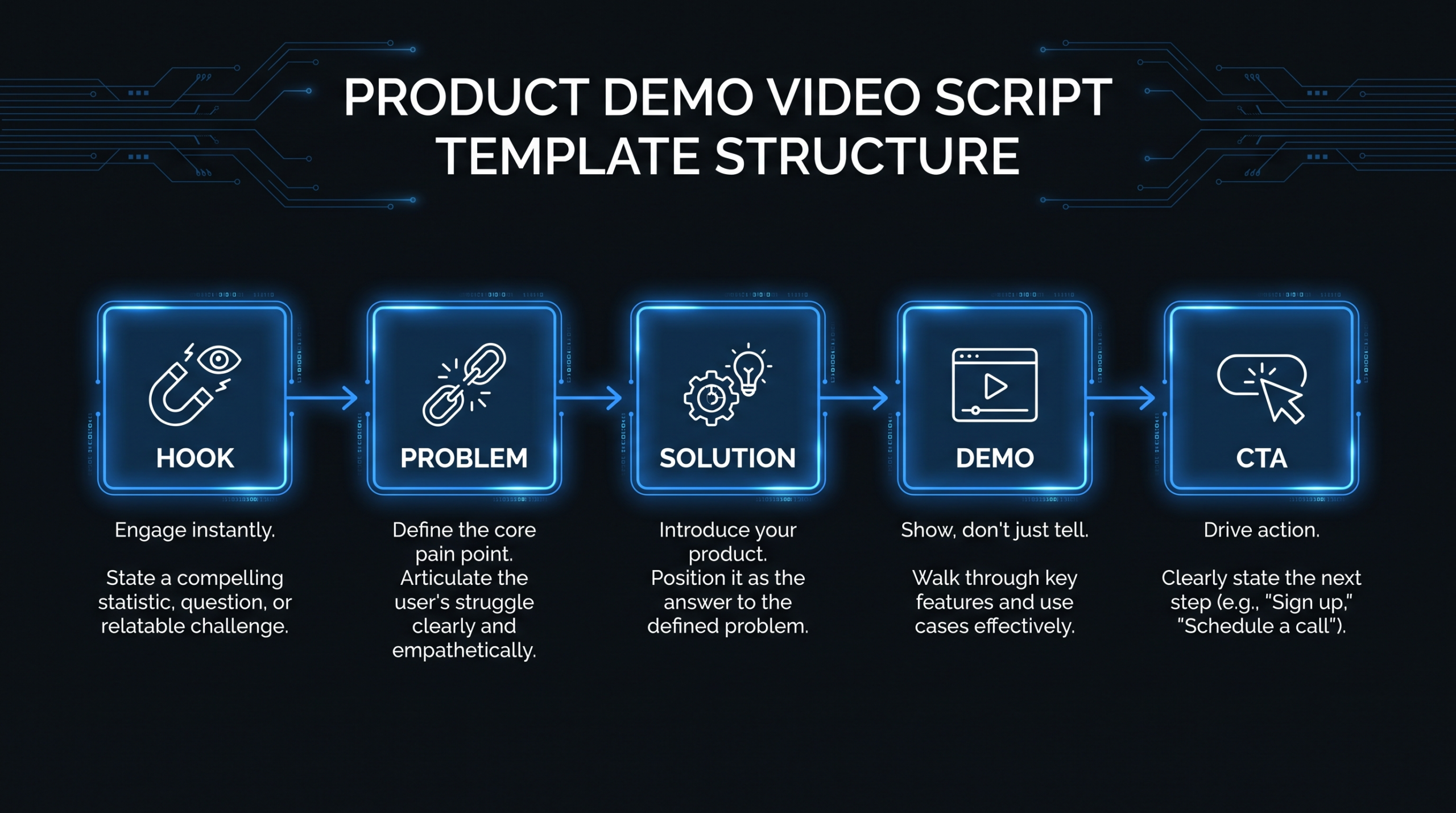
- A strong product demo script follows a 7-part structure: Hook → Problem → Agitation → Solution reveal → Feature walkthrough → Proof → CTA.
- Script length should match your stage: 60–90 sec for social/ads, 2–3 min for website landing pages, 5–8 min for sales-assisted demos.
- The free copy-paste template below covers all 7 sections with fill-in-the-blank prompts and guidance notes.
- The #1 mistake SaaS teams make: starting with features instead of the buyer's pain point. Fix that first.
Table of Contents
- What Makes a Product Demo Video Script Different
- The 7-Part Product Demo Script Structure
- Free Product Demo Video Script Template (Copy-Paste Ready)
- How to Write Each Section
- Script Length and Timing by Use Case
- Script vs. Outline: Which Works Better?
- 6 Script Mistakes That Tank Demo Video Performance
- Production Notes for Your Editing Team
- FAQ
Your demo video is working before your sales team even shows up. For most Series A–C SaaS companies, the product demo video on the website — or in the outbound sequence — determines whether a prospect books a call or moves on. And the video's quality comes down almost entirely to the script.
A weak script makes even great screen recordings feel like a training manual. A strong script makes the same footage feel like a conversation with a peer who understands exactly what you're dealing with. This guide gives you the structure, the template, and the guidance to write the second kind — plus real notes on how to brief your video editing team so the final output matches what you wrote.
What Makes a Product Demo Video Script Different
A product demo video script is a word-for-word (or scene-by-scene) document that directs everything that happens in a product demonstration video: what's said on camera or in voiceover, what's shown on screen, which features are highlighted and in what order, and where the viewer is directed at the end.
What makes it different from a general marketing video script is the tension between showing and selling. Most marketing scripts can lead with emotion or brand. Demo scripts have to do both simultaneously — you're showing a real product in real motion while keeping the narrative moving forward. Every second of screen recording that doesn't advance the buyer's understanding is dead weight.
Who Watches Product Demo Videos
In B2B SaaS, demo video audiences split into roughly three segments, each with different expectations:
- Self-serve evaluators: Prospects actively comparing tools. They want to see the core workflow quickly — usually in under 3 minutes. They'll rewind and pause. They're evaluating fit, not just features.
- Sales-assisted viewers: Prospects who received the video as part of an outbound sequence or post-demo follow-up. They already know what you do — they want specifics. Longer format is fine.
- Internal champions: Someone inside the company who's sold on your product and shares the video with their manager or IT. They need the video to make the case without them in the room.
Your script should be written with one specific viewer type in mind. The mistake most teams make is trying to serve all three simultaneously — and ending up useful to none.
The 7-Part Product Demo Script Structure
After working through dozens of product demo video productions, the structure that consistently performs across SaaS categories follows these seven sections. Each section has a specific job. Skip or rush one and the whole thing falls apart.
7-Part Demo Script Architecture
| # | Section | Job | Typical Length |
|---|---|---|---|
| 1 | Hook | Stop the scroll; state who this is for in one sentence | 5–8 seconds |
| 2 | Problem Statement | Name the pain the product solves — with specificity | 10–20 seconds |
| 3 | Agitation | Make the problem feel real — consequences, friction, cost | 10–15 seconds |
| 4 | Solution Reveal | Introduce the product and its core promise in one sentence | 5–10 seconds |
| 5 | Feature Walkthrough | Show 2–4 core workflows — each tied to a buyer outcome, not a feature name | 60–180 seconds |
| 6 | Proof | A real result, a customer quote, or a credibility signal | 10–15 seconds |
| 7 | Call to Action | One clear next step — no multiple options | 5–8 seconds |
The feature walkthrough is where most demo videos spend 80% of their runtime. The mistake is treating it as a feature tour. Every feature shown should be framed around a buyer problem: "Here's the problem → here's how [Product] solves it → here's what that means for your team." If you can't complete that sentence for a feature, that feature doesn't belong in the script.
Free Product Demo Video Script Template (Copy-Paste Ready)
The template below works for a 2–4 minute product demo video — the most versatile length for website landing pages, email sequences, and LinkedIn. Adapt timing for shorter (social) or longer (sales-assisted) versions using the length table in the next section.
✦ Product Demo Video Script Template — Copy & Customise
Section 1 — Hook (5–8 sec)
[VOICEOVER / ON-CAMERA]: "If you're a [JOB TITLE] at a [COMPANY TYPE] struggling with [SPECIFIC PAIN POINT], this is for you."
Tip: Name the role and the pain specifically. "Marketing manager" is okay. "Head of content at a Series B SaaS trying to scale video output without hiring" is much better. Vague hooks lose the audience in the first 3 seconds.
Section 2 — Problem Statement (10–20 sec)
[VOICEOVER]: "Right now, [DESCRIBE THE CURRENT STATE — what they're doing today that isn't working]. You're spending [TIME/MONEY/EFFORT] on [WORKAROUND], and it still [DOESN'T DELIVER THE OUTCOME THEY WANT]."
Tip: Use their language, not yours. Talk to 2–3 customers before writing this section. The exact words they use to describe the problem are more persuasive than any copy you'll write from scratch.
Section 3 — Agitation (10–15 sec)
[VOICEOVER]: "The problem isn't just [SURFACE SYMPTOM]. It's [DOWNSTREAM CONSEQUENCE — missed revenue, lost time, team frustration, risk]. And the longer it takes to solve, the [MORE IT COSTS / FURTHER BEHIND YOU FALL]."
Tip: Don't manufacture urgency. If the consequence is real, state it plainly. If it isn't, skip agitation entirely — buyers can tell when they're being manipulated, and it destroys trust.
Section 4 — Solution Reveal (5–10 sec)
[VOICEOVER + PRODUCT FIRST APPEARANCE ON SCREEN]: "[PRODUCT NAME] is [ONE-SENTENCE DESCRIPTION OF WHAT IT DOES AND FOR WHOM]. Here's how it works."
Tip: "Here's how it works" is the strongest transition line in a demo script. It's a contract with the viewer — they know exactly what comes next. Use it verbatim or a close variant.
Section 5 — Feature Walkthrough (60–180 sec depending on total length)
Feature 1:
[SCREEN RECORDING]: Show the workflow for [FEATURE 1].
[VOICEOVER]: "Instead of [OLD WAY], you [NEW WAY WITH PRODUCT]. That means [BUYER OUTCOME — save X hours, reduce Y errors, ship Z faster]."
Feature 2:
[SCREEN RECORDING]: Show the workflow for [FEATURE 2].
[VOICEOVER]: "When you need to [USER GOAL], [PRODUCT] lets you [DO IT IN X CLICKS / AUTOMATICALLY / IN REAL TIME]. Your team [BENEFIT]."
Feature 3 (optional for longer demos):
[SCREEN RECORDING]: Show the workflow for [FEATURE 3].
[VOICEOVER]: "[FEATURE 3 NAME] gives you [CAPABILITY]. So [PERSONA] can [DO SPECIFIC THING] without [FRICTION THEY CURRENTLY FACE]."
Tip: Aim for 2 features in a 90-second demo, 3 features in a 3-minute demo. More than 4 features and you're making a training video, not a sales tool. Prioritise the features that map directly to the pain you named in Section 2.
Section 6 — Proof (10–15 sec)
[VOICEOVER + TEXT ON SCREEN or CUSTOMER CLIP]: "[CUSTOMER NAME] at [COMPANY] [ACHIEVED SPECIFIC RESULT] after [TIMEFRAME]. / Teams using [PRODUCT] commonly report [HEDGED RANGE RESULT]."
Tip: One real result beats three vague claims. If you have a named customer with a measurable outcome, use it. If not, hedge: "teams typically report…" — never invent a percentage. A fabricated stat that sounds too good will make skeptical buyers distrust your other claims.
Section 7 — Call to Action (5–8 sec)
[VOICEOVER + ON-SCREEN CTA CARD]: "Ready to [DESIRED OUTCOME]? [START YOUR FREE TRIAL / BOOK A DEMO / SEE PRICING] at [URL]."
Tip: One CTA only. "Start a free trial or book a demo or see our case studies" is three CTAs and converts like zero. Pick the one action that best matches where your viewer is in their buying journey.
This template is intentionally sparse — the brackets are deliberate placeholders. A script that's 80% filled with your specific product details, your customer's language, and your real proof will outperform any fully pre-written generic script. The structure is the gift; the specificity is your job.
How to Write Each Section
Writing the Hook
The hook's job is audience qualification, not attention-grabbing in the broad sense. Your best prospects should hear the first line and immediately think "that's me." Your worst-fit prospects should hear it and opt out. Both outcomes are wins.
The fastest way to write a hook that works: take the exact job title and situation from your highest-converting customer, and name them directly. If your best customers are consistently VP Marketing at HR tech SaaS companies, your hook is "If you're a VP Marketing at an HR tech company trying to [specific pain]…" — not "If you want to grow faster…"
Writing the Problem Statement
Use the before-after framework. "Before [Product], teams had to [painful workflow]. After, they can [improved state]." But in the script's problem section, you only set up the before — the after comes in the feature walkthrough. Keep the problem statement to 2–3 sentences maximum.
What makes a strong problem statement: specificity and recognition. The viewer should nod. If they're not nodding in the first 20 seconds, the script isn't talking to the right person, or it's not describing the real problem.
Writing the Feature Walkthrough
This is the hardest section to write well and the easiest to write badly. The bad version describes features: "Our dashboard shows you real-time data across all your campaigns." The good version describes outcomes: "Instead of pulling five platform reports every Monday morning, your team gets a single view that's ready when they open their laptop."
For each feature you plan to show, write the voiceover line before you record the screen. The script should drive the recording, not the other way around. If you record first and then try to write voiceover to match, the script will follow the product tour — and a product tour is not a sales asset.
Writing the Proof Section
Social proof in a demo video has a higher credibility bar than social proof in a long-form article. The viewer is already looking at your product — they're evaluating whether it actually works. A fabricated or suspiciously round number ("increased revenue by 300%") triggers skepticism at exactly the wrong moment.
Use real, verifiable numbers with hedged language. "One team we work with reduced their review cycle from 5 days to same-day" is more credible than "teams report 80% faster workflows" — because the first one sounds like something a real person actually said.
Writing the CTA
Match the CTA to the viewer's readiness level. Website demo video viewers on a pricing or product page are closer to decision — "Start your free trial" or "Book a demo" makes sense. Viewers in an outbound email sequence are earlier in the journey — "See how [specific feature] works" or "Watch the 3-minute walkthrough" is a softer, higher-converting ask.
Script Length and Timing by Use Case
There's no universally correct demo video length. The right length depends on where the video is placed in the buyer's journey and how much context the viewer already has when they press play. See our full product demo video production guide for how length decisions affect production complexity and cost.
Demo Video Length by Placement and Intent
| Placement | Target Length | Script Focus | CTA Type |
|---|---|---|---|
| Social media / paid ads | 30–60 sec | Hook + 1 feature + CTA only | Free trial / Landing page |
| Homepage hero | 60–90 sec | Hook + problem + 2 features + CTA | Book demo / Start trial |
| Product / Features page | 2–3 min | Full 7-part structure | Book demo / Pricing |
| Sales outbound email | 60–90 sec | Hyper-specific hook + 1–2 features for their use case | Reply / Book call |
| Sales-assisted / post-demo | 4–8 min | Full 7-part + deeper feature detail + objection handling | Pricing / Next steps |
| In-app onboarding | 60–90 sec | Specific workflow — no problem/solution framing needed | Try it now (in-app) |
The most common mistake with length: producing a single 4-minute demo video and trying to use it everywhere. A 4-minute video is too long for a homepage hero, too short for a sales-assisted follow-up, and completely wrong for paid social. Budget for at least two length versions — typically a 60–90 second "awareness cut" and a 2–3 minute "evaluation cut."
If you're budgeting for multiple cuts, our video production cost calculator can help you model the difference between producing them together (significantly cheaper) versus producing them separately after the fact.
Script vs. Outline: Which Works Better?
A common debate in video production teams: should you write a full word-for-word script, or a scene-by-scene outline that leaves room for natural delivery?
The honest answer depends on your presenter and your production process.
Full Script vs. Scene Outline: When to Use Each
| Factor | Full Script | Scene Outline |
|---|---|---|
| On-camera presenter | Harder — sounds scripted unless well-rehearsed | Better — conversational, natural energy |
| Voiceover-only | Ideal — professional VO talent reads from script | Risky — VO without a script often rambles |
| Screen recording without narration | N/A | Outline of which flows to capture, in what order |
| Translation / localization | Required — translators need the original text | Not suitable |
| Editing team brief | Cleaner — editors know exactly what should appear on screen when | Leaves interpretation to editors, can cause rework |
| Legal / compliance review | Required — compliance teams need the exact words | Not suitable |
For most SaaS demo videos, the recommendation is a hybrid approach: write a full script for the voiceover or spoken sections, and use a scene outline (with specific beats noted) for the screen recording portions. This gives your editors clarity and gives your presenter or VO talent the words they need — while leaving the product walkthrough loose enough to capture the actual UX naturally.
6 Script Mistakes That Tank Demo Video Performance
1. Leading with the Product, Not the Problem
Opening with "Hi, I'm [Name] from [Company], and today I'm going to show you [Product]" is the fastest way to lose 40% of your audience in the first 10 seconds. The viewer doesn't care about your product yet — they care about their problem. Lead with the problem; earn the right to show the product.
2. Showing Too Many Features
More features in a demo video doesn't signal more value — it signals unclear positioning. The most effective SaaS demo videos show 2–4 features with enough depth to create genuine desire. The viewer should leave thinking "I need that specific thing," not "that seemed like a lot of stuff."
3. Using Internal Feature Names Instead of Outcome Language
Every SaaS product has internal names for features that mean nothing to an outside buyer. "The [ProductName] Workflow Orchestration Engine" is how you describe it internally. "The part that automatically routes approvals so your team isn't waiting on Slack replies" is how a buyer understands it. Translate every feature name before the script is final.
4. Burying the CTA
A CTA that appears only at the very end of a demo video is assuming 100% view-through rate. Most video platforms report 40–60% of viewers watch to completion on even high-performing demo videos. Include a secondary soft CTA mid-video (for videos over 2 minutes) and a clear final CTA. Both should be the same action.
5. Mismatching Voiceover Energy and Screen Content
If your script says "in seconds, you can do X" and the screen recording shows a 45-second workflow, the viewer registers the mismatch immediately — and it reads as deceptive. Make sure every timing or ease claim in the voiceover matches what's actually visible on screen. This is something your editing team should flag during review.
6. Skipping a Production Notes Column
A script with no production notes forces your editors and post-production team to interpret your intent. For every voiceover line, add a notes column indicating what should be visible on screen, any text overlays or callouts needed, and any specific transitions or zoom cues. This single addition cuts your revision rounds in half.
Production Notes for Your Editing Team
A great script only becomes a great video with a briefed editing team. If you're working with an outside video editing team, the script is only half the brief. Here's what to include alongside the script when handing off to post-production.
Required Elements in Every Script Handoff
- Screen recording files: Label them to match the script sections (e.g., "SECTION5-FEATURE1-workflow.mov"). This alone saves 30–60 minutes of editor time per video.
- Text overlay specs: If your script includes callout text or labels, write the exact copy in the notes column. Don't let editors paraphrase your product's value propositions.
- Brand kit reference: Link to or attach your brand kit — fonts, colors, approved logo files. For ongoing series, this should be pre-loaded in your editor's template library.
- Timing notes: If a voiceover line says "instantly," the corresponding screen recording cut should show exactly that. Flag any discrepancies before the recording phase.
- Music and tone brief: "Energetic, modern, upbeat" means different things to different editors. Reference a specific track style or use a reference video from a competitor you like.
- Delivery format requirements: Specify every final format you need — 16:9 master, 9:16 for vertical social, 1:1 for LinkedIn, closed captions file. Getting these in the initial brief avoids separate revision requests later.
Teams producing demo videos on a regular cadence — monthly or more frequently — often work with a dedicated video editing team that has your brand kit, transition style, and voice pre-loaded. This dramatically reduces per-video brief time and revision rounds. If you're still working with one-off contractors for each demo, see our pricing page for how a structured retainer compares in both cost and turnaround time.
Script Handoff Checklist — What to Send Your Editing Team
| Item | Format | Why It Matters |
|---|---|---|
| Script with production notes column | Google Doc or PDF | Gives editors screen-sync cues; reduces interpretation |
| Labeled screen recordings | .MOV or .MP4 per section | Cuts file-hunting time; fewer wrong clips in timeline |
| Brand kit link | Shared drive URL | Consistent fonts, colors, and logo usage without back-and-forth |
| Voiceover file or VO brief | .WAV or notes doc | Editors build the timeline around the VO track, not vice versa |
| Text overlays and callouts list | Inline in script | Exact copy means no paraphrased value props in final video |
| Music reference | Link + tone description | Removes ambiguity about energy level and style |
| Delivery specs | Inline in brief | All format variants completed in one pass, not separate requests |
For a deeper dive into the full production process — including recording setup, voiceover direction, and post-production workflow — see our complete guide on product demo video production. If you're also evaluating what a professionally produced demo video costs to benchmark your in-house or outsourced options, our video production cost calculator gives you a range based on your specific requirements.
Frequently Asked Questions
How long should a product demo video script be?
For a 2-minute demo video, a full script typically runs 250–350 words of spoken content — roughly 125–175 words per minute of finished video at a natural speaking pace. A 90-second script is around 180–230 words. Write to the audio, not the page count: read it aloud, timed, before you hand it off. Anything that sounds rushed or cramped when read aloud at a comfortable pace will play that way in the final video.
Should I write the script before or after recording the screen?
Write the script first, always. Recording first and scripting to match inverts the process — you end up writing voiceover that describes what's on screen rather than voiceover that advances a sales narrative. Write the script, use it as a shot list for what to record, then capture the screen. This sequence produces tighter, more persuasive videos and reduces editing rework significantly.
Can I use the same demo script for sales outreach and my website?
You can use the same script as a starting point, but the CTA and hook should differ. A website demo video is viewed by someone who chose to visit your page — they need less warm-up and a direct CTA. A sales outreach demo is cold — the hook needs to earn attention from a skeptical stranger. The feature walkthrough can stay similar; the framing around it should shift to match the context of where it's being watched.
How many features should I include in a product demo script?
For a 2–3 minute demo, 2–3 features is the practical ceiling. Each feature needs problem framing, a screen walkthrough, and an outcome statement — that's roughly 30–45 seconds per feature done well. Going deeper on fewer features consistently outperforms trying to cover more ground. Pick the 2–3 features that most directly address the pain you named in your problem statement, and cut the rest.
What's the difference between a product demo video and an explainer video script?
An explainer video script introduces a concept or category — often using animation to visualize an abstract idea. It doesn't need to show real product UI. A product demo video script shows the actual product in motion and is inherently tied to specific workflows. The script structure is similar (problem → solution → proof), but a demo script requires scene notes for screen recordings while an explainer script requires animation direction. For more on these distinctions, see our guide on product demo video production.
If your product needs more brand context before showing the interface, the explainer video script template covers the hook-problem-solution structure that works best for unfamiliar or complex products.
Ready to Turn This Script Into a Finished Demo Video?
VEC's dedicated editing teams work with B2B SaaS companies producing demo videos, product walkthroughs, and sales enablement content. We handle post-production — you handle the strategy. Most teams double their video output within the first 90 days.
Book a Free Strategy Call See PricingFor broader corporate video script structures — brand films, company overviews, onboarding, and explainers — see our guide to corporate video script examples and templates, including a free 4-column production format.
For marketing-focused video scripts — brand awareness, product launches, and paid social ads — see our marketing video script examples and template guide, including a modular 60/90-second framework and 5 annotated B2B examples.