Explainer Video Script Template + 5 Examples
An effective explainer video script follows a six-scene structure: hook (0–15 sec), problem agitation (15–30 sec), solution intro (30–45 sec), how-it-works walkthrough (45–90 sec), social proof (90–105 sec), and CTA (105–120 sec). The template below is ready to fill in — and the five real examples show exactly how top B2B brands execute each scene.
Key Takeaways
- 60–120 seconds is the target runtime. Scripts for explainer videos perform best in this window — longer scripts lose viewers before the CTA, shorter scripts don't build enough context to convert.
- Problem-first scripting outperforms feature-first scripting. Every high-performing example in this post opens with a pain point the viewer already feels, not with a product name or logo.
- The hook must work in 5 seconds. Viewers decide whether to keep watching almost immediately. A specific pain point, a provocative statement, or a visual surprise earns the next 60 seconds.
- One core message per video. Scripts that try to cover three or more features convert worse than scripts built around a single transformation — before state to after state.
- Production cost for a 60–120 second explainer typically ranges from $3,000 to $25,000, depending on animation style, voice talent, and revision rounds. See our full explainer video cost breakdown for current figures.
TL;DR
This post gives you a complete, copy-paste explainer video script template with scene-by-scene guidance, plus breakdowns of 5 real videos showing the template in action. It also covers script formats by video type, production cost ranges, and a FAQ. The cross-links to our product demo video script template and case study video script cover the other two B2B script formats you'll need.
Table of Contents
- Key Takeaways
- What Does an Explainer Video Script Need?
- The Explainer Video Script Template
- 5 Explainer Video Script Examples (With Breakdowns)
- Which Script Format Works for Different Video Types?
- How Much Does an Explainer Video Cost to Produce?
- How Do You Write an Explainer Video Script That Converts?
- FAQ
What Does an Explainer Video Script Need?
Most explainer video scripts fail at the same point: they start with the product instead of the problem. A marketing manager who watches your video doesn't care what your software does — they care whether it solves the thing keeping them up at night. The script is where you prove that you understand their situation before you ask for their attention.
Every effective explainer video script contains six structural elements, regardless of video type or industry:
The 6 Elements of Every High-Converting Explainer Script
| Element | Timing | Job | Common Mistake |
|---|---|---|---|
| Hook | 0–15 sec | Earn the next 60 seconds of attention | Opening with the brand name or logo |
| Problem | 15–30 sec | Name the pain the viewer already feels | Using company language instead of customer language |
| Solution Intro | 30–45 sec | Introduce the product as the fix — one sentence | Listing too many features at once |
| How It Works | 45–90 sec | Show the workflow or 2–3 key capabilities | Over-explaining UI instead of showing outcomes |
| Social Proof | 90–105 sec | Build credibility — a customer result, stat, or logo | Generic "thousands of customers" language |
| CTA | 105–120 sec | Direct the viewer to one next action | Giving two or more CTAs at once |
Tone and Voice
Before you write a single line of voiceover, decide whose voice you're writing in. Customer-facing explainers for B2B SaaS should sound like a smart colleague talking to a peer — not a product manager reading release notes. Rewrite any sentence that uses the phrase "robust," "seamless," or "end-to-end solution" until it sounds like how a real person describes a frustrating problem.
Word Count and Runtime
A 120-word-per-minute delivery rate is the industry standard for voiceover. For a 90-second explainer, you have roughly 180 words of usable voiceover copy. For a 60-second video, you have 120 words. Write tight. Every word that stays in the script costs production time and viewer attention. For more context on how this maps to project scope, see our guide to what's included in a professional video editing engagement.
Visual Directions
A script that only contains voiceover copy isn't a production-ready script — it's a voiceover spec. Include a visual direction for every scene so the animation or live-action team isn't guessing. Visual directions sit alongside the voiceover copy and describe what appears on screen, not how to produce it.
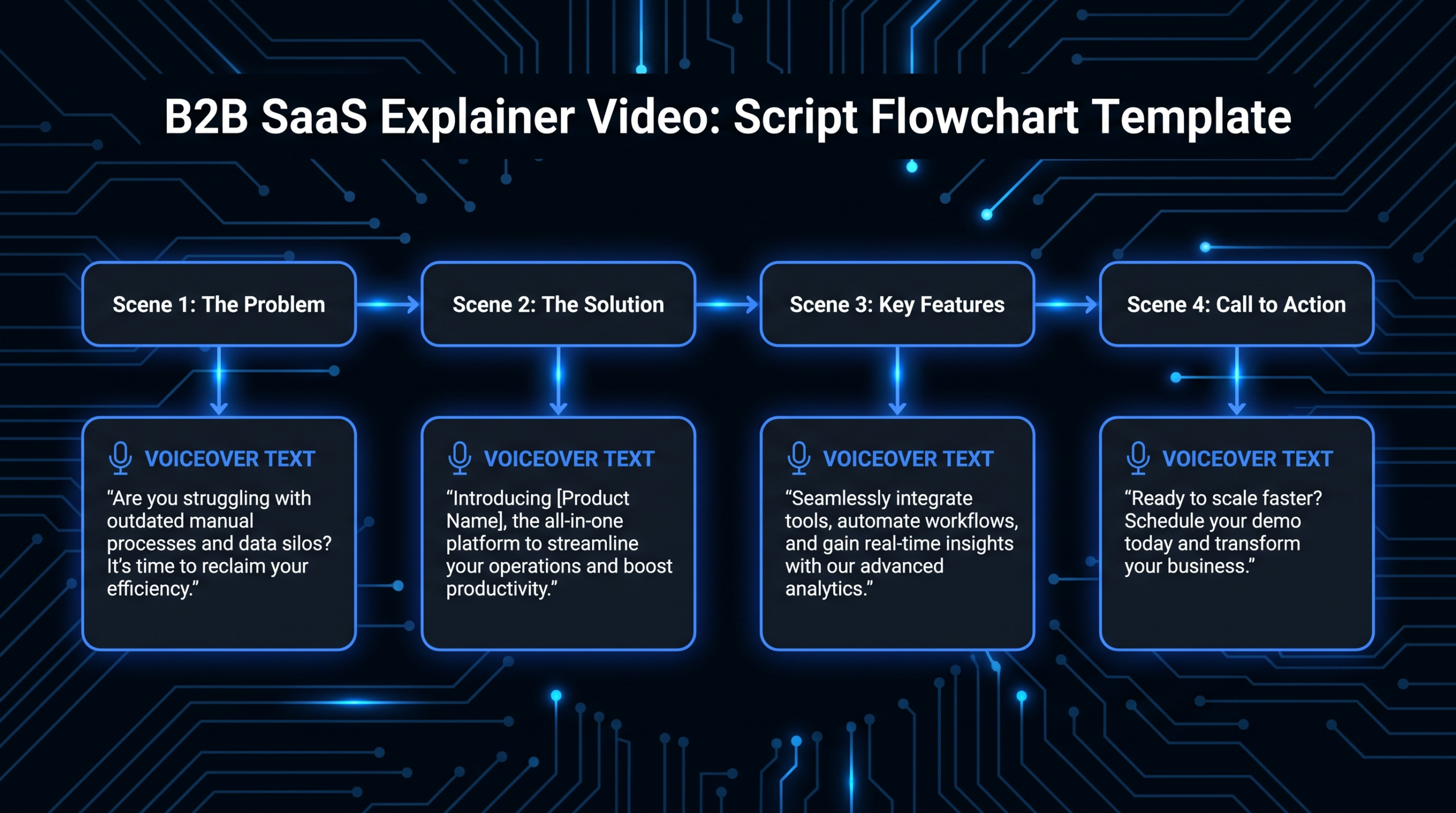
The Explainer Video Script Template
Copy this template directly into your brief. Fill the bracketed fields with your product details. The word counts per scene are guides — adjust based on your target runtime.
Script Template: Completed Example
Here's the template filled in for a hypothetical B2B SaaS project management tool to show how each scene sounds when complete:
For product demos specifically, where the script structure differs (features-forward vs problem-forward), see our product demo video script template. For documentary-style proof content, the case study video script guide covers the interview-and-result structure in detail.
5 Explainer Video Script Examples (With Breakdowns)
The following five videos each demonstrate a distinct scripting approach. For each one, we've broken down exactly which scene structure they use, what the script does right, and the technique you can lift directly into your own brief. Every video is embeddable and publicly available.
DigitalOcean App Platform (by Vidico)
Script approach: Outcome-led animation — opens on the developer's world, not on cloud infrastructure jargon. The script translates a technically complex product into a "push code, it just works" message.
What the script does right: The hook names a developer frustration ("configuring servers every time you deploy") before any product mention. The "how it works" section shows outcomes — app live, traffic scaling — rather than UI buttons. The CTA is a single, low-friction action.
The technique to steal: When your product is technical, write the script from the outcome backwards. Start with what the user has after they use the product, then work back to what they have to do to get there. This video drove 3.7M+ YouTube views and measurable CPA reduction — not because the animation was beautiful, but because the script was structured around the buyer's goal, not the product's feature set.
Dollar Shave Club (2012)
Script approach: Founder-as-character. The CEO delivers the entire script as a deadpan monologue while walking through a warehouse. The script's structure is classic problem-solution, but the voice is irreverent and specific.
What the script does right: The hook opens with a direct challenge to the viewer's existing behavior ("Are your blades really worth $20?"). The problem agitation uses humor to lower the viewer's defenses. The solution is stated in six words: "Our blades are f***ing great." The CTA is specific and memorable.
The technique to steal: Write the script the way your best salesperson talks, not the way your brand guidelines dictate. The video reportedly cost about $4,500 to produce and drove 12,000 orders in its first 48 hours. The script — not the production quality — was the variable that made it work.
Slack — "So Yeah, We Tried Slack"
Script approach: Testimonial-style live-action documentary. The script is structured as authentic-sounding first-person accounts from people experiencing the problem, then experiencing the solution. No narrator — the product is sold through character transformation.
What the script does right: The problem is shown through realistic character dialogue, not voiceover. Viewers recognize their own team dynamics ("email reply-all is the worst thing that ever happened to us") before Slack appears. The social proof is built into the characters' transformation arc — no separate proof section needed.
The technique to steal: Replace your product description with a realistic customer character who experiences the before-and-after. A viewer who sees their team in the before state will project themselves into the after state without being told to. For B2B products where the buyer needs to sell the tool to their team, this format also works as internal change management content.
HubSpot — "What Is HubSpot?"
Script approach: Teacher-not-seller. The script explains the product the way a knowledgeable colleague would, using a layered concept delivery (what it is → what each part does → why it connects). No aggressive CTA until the final five seconds.
What the script does right: The script teaches at the viewer's pace, not the marketing team's pace. Color-coded sections map product components to specific buyer roles (marketing, sales, service), so each viewer self-selects the part relevant to them. The closing CTA is contextual: "see how the tools work together" — a low-commitment next step for a top-of-funnel viewer.
The technique to steal: If your product is complex with multiple components, structure the "how it works" section by the specific job the viewer is hired to do, not by your product's architecture. This approach is especially effective for B2B SaaS video production where the buying committee includes multiple roles with different priorities.
Grammarly — "What Is Grammarly?"
Script approach: Audience-segmented live-action + UI overlay. The script targets specific use cases (job applications, professional emails, academic writing) rather than describing the product for everyone at once. Each 15-second segment is a mini explainer for one persona.
What the script does right: Every scene starts with a specific writing context the viewer recognizes (the cover letter, the client email). The product UI appears as an overlay on a real document in a real situation — showing the product working on the viewer's actual problem, not a demonstration environment. The script avoids the word "writing assistant" for the first 30 seconds.
The technique to steal: If your product serves multiple distinct personas, write 2–3 micro-scripts (one per persona) and intercut them. Each persona sees their exact use case. The product ties them together. This approach also makes it easy to break the video into platform-specific cuts — a 15-second Instagram ad targeting the "job seeker" scene, a 30-second YouTube pre-roll targeting the "professional communicator" scene.
Which Script Format Works for Different Video Types?
The six-scene template above is the default for 60–120 second explainers. Longer or more complex videos use the same structural logic but with an expanded "how it works" section or a more detailed social proof segment. The table below maps script format to video type:
Explainer Script Format by Video Type
| Video Type | Target Runtime | Script Emphasis | Key Difference from Base Template |
|---|---|---|---|
| SaaS Product Explainer | 60–90 sec | Problem + workflow | How-it-works shows UI outcomes, not features |
| Animated Brand Explainer | 90–120 sec | Hook + transformation | Social proof is built into the narrative arc, not a separate scene |
| Live-Action Founder Video | 60–180 sec | Voice + credibility | Hook is the founder's personal credibility moment; CTA is personal |
| Product Demo Video | 2–5 min | Feature walkthrough | Expanded scene 4 with step-by-step UI; see our demo script template |
| Case Study Video | 2–4 min | Proof + narrative | Scene 5 (social proof) becomes the full structure; see the case study script guide |
| Whiteboard/Educational | 90–150 sec | Concept clarity | Scene 3 leads with the concept framework, not product name |
The biggest execution mistake when adapting the template is expanding the wrong scene. Most teams overextend scene 4 ("how it works") when the real problem is an underdeveloped scene 2 (problem agitation). If viewers drop off in the first 20 seconds, tighten the hook — don't add more product detail.
For visual style guidance on which animation format pairs best with each script structure, see our breakdown of motion graphics vs. live-action for B2B video production.
If you're deciding between in-house scripting and an agency brief, our B2B SaaS demo video guide covers the production decision framework in detail — including how to hand off a script so the editing team can execute without back-and-forth.
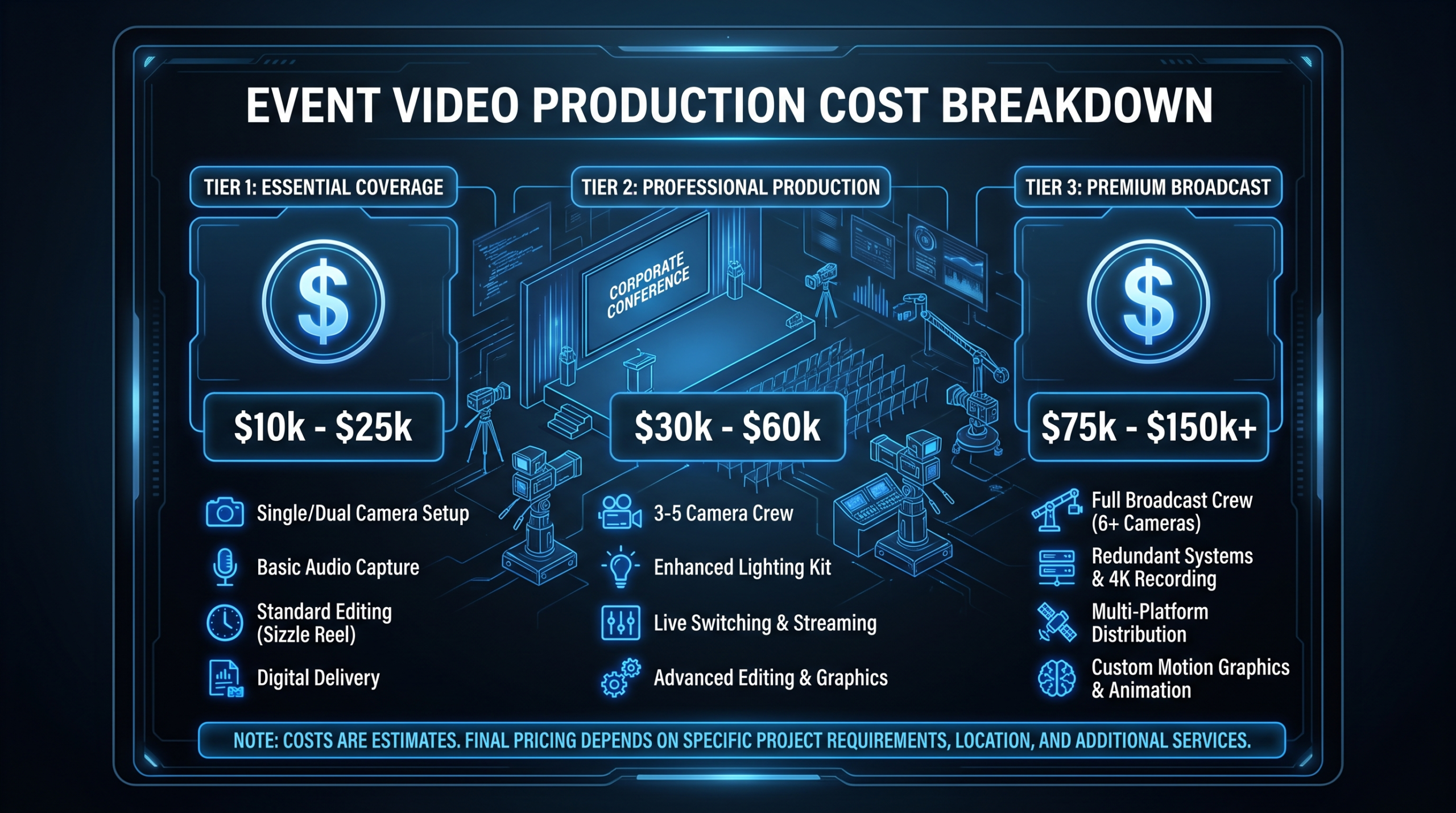
How Much Does an Explainer Video Cost to Produce?
Once your script is ready, production cost depends on four variables: animation style, video length, number of revision rounds, and whether you use a freelancer, an agency, or a dedicated editing team. Here are current market ranges for a fully produced 60–90 second explainer:
Explainer Video Production Cost by Hiring Model (2026)
| Hiring Model | Typical Cost Range | Best For | Key Trade-off |
|---|---|---|---|
| Freelancer (Upwork/Fiverr) | $800–$4,000 | Tight budgets, simple 2D animation | Quality variance, no brand consistency |
| Boutique animation studio | $5,000–$15,000 | One-off brand video, founder launch | Slower turnaround, per-project pricing |
| Full-service video agency | $10,000–$35,000 | High-production campaigns, broadcast | Highest cost per video; not ideal for ongoing programs |
| Dedicated editing team (VEC) | $5,000–$16,000/mo | Ongoing SaaS content, 5+ videos/quarter | Requires retainer commitment; per-video cost drops sharply at volume |
VEC's Growth plan ($5,000/month) and Core plan ($9,500/month) both include explainer video production as part of a dedicated editing team arrangement. Unlike per-project pricing, you're not paying a new setup fee each time — the team already knows your brand, motion style, and voiceover preferences from previous projects.
For the full cost breakdown by scene count, animation style, and revision rounds, see our explainer video cost breakdown — it covers current market rates with real ranges sourced from agency pricing pages, not industry surveys.
Related: for comparing different billing models (per-project vs. retainer vs. dedicated team) in context of your total video output, the video retainer vs. project pricing comparison has the actual math laid out by monthly video volume. And if you're still scoping what production actually includes beyond the script, our video editing services breakdown covers deliverables line by line.
How Do You Write an Explainer Video Script That Converts?
The mechanics of the template are simple. The execution is where most scripts stall. These five principles apply to every script — from a 60-second animated SaaS explainer to a two-minute live-action founder video.
1. Interview a Real Customer Before You Write Scene 1
The most common cause of a weak hook is that the writer described the product's problem instead of the customer's problem. Spend 15 minutes on a call asking your most recently churned customer or a recently converted trial user: "What were you searching for right before you found us?" Their exact words — not your marketing copy — belong in scene 1. This approach is central to how we brief the outsourced video teams we manage for SaaS clients.
2. Write the CTA First, Then Work Backwards
Know exactly what action the video needs to drive before you write scene 1. A script targeting a free trial signup has a different problem agitation and how-it-works sequence than a script targeting a demo booking. The CTA determines the buying stage — and the buying stage determines every scene's tone and depth. For B2B video content strategy, our B2B video content ideas guide covers how to align script intent with funnel stage across your full content calendar.
3. Read the Script Out Loud Before Sending to Production
Time it with a stopwatch. If it runs over 150 seconds at a conversational pace, it's too long. Cut anything that doesn't add new information or advance the story. The phrases "In today's world," "We understand that," and "That's why we built" are cut candidates on every first draft. Reading aloud also catches rhythm problems that look fine on paper but sound awkward when voiced.
4. Write Visual Directions That Constrain the Creative Team
Vague visual directions ("Show the product working") create expensive rework cycles. Specific visual directions ("Show the project dashboard auto-updating as a team member marks their task complete — no additional clicks") give the animation team exactly what they need. This specificity also helps when you're working with a product demo video production team who needs to storyboard from your brief. The tighter the visual direction, the fewer revision rounds you need.
5. Test the Script Against This Single Question
After every draft: "Does a viewer who has never heard of our company understand exactly what problem we solve and for whom — within the first 20 seconds?" If the answer is no, the hook and problem scenes need another pass. If the answer is yes, move to production. B2B video research consistently shows that explainers lose the majority of dropoff in seconds 5–20 — not in the CTA. Wistia's analysis of over 13 million videos found that videos under 60 seconds retain roughly 68% of viewers to completion; videos over 2 minutes drop to around 25%.
For the production phase, see our video production agency pricing models guide and our overview of 2D animation production costs if you're choosing between animation styles. Once the script is approved, our process page shows exactly how a dedicated VEC team moves from brief to delivered video.
Frequently Asked Questions
How long should an explainer video script be?
For a 60-second video, your voiceover copy should be 100–130 words. For a 90-second video, 150–180 words. For a 120-second video, 200–240 words. The standard delivery rate for professional voiceover is 120–140 words per minute at a conversational pace. Scripts that run long force either rushed delivery or a video that exceeds its target runtime — both hurt conversion.
What is the best explainer video script structure?
The problem-solution structure works best for nearly every format: hook → problem → solution intro → how it works → social proof → CTA. The only common exception is educational content, where the concept-framework-application structure (explain the idea → show the framework → demonstrate with your product) builds more credibility for complex or unfamiliar categories. The six-scene template above covers the standard structure with word counts and visual direction guidance for each scene.
Should I write the voiceover first or the visual directions first?
Write the voiceover first — it's the story. Visual directions describe what appears on screen to support what's being said, so they can only be written once you know the story. The exception is when the visual itself carries meaning that voiceover would undercut (opening shots, brand identity moments, UI demonstrations). In those cases, write the visual direction first with a note that the voiceover plays under it, not over it.
Can I use this template for a product launch video?
Yes, with one adjustment: scene 5 (social proof) is harder for a launch video where you don't yet have customer results. Replace it with a credibility statement — the team's background, a founding insight, or a beta result. For product launches specifically, our B2B product launch video guide covers how to structure a script when the proof is the promise rather than the track record.
How do I brief a production team from this script template?
Fill in the template, then add three context documents: a one-page brand brief (logo files, color hex codes, approved typefaces, do-not-use phrases), a competitor reference sheet (2–3 videos you like and 2–3 you don't, with notes on why), and a usage context note (where the video will live — homepage hero, paid ad, email nurture — because placement affects cut length and CTA aggressiveness). With those three documents plus the completed script, a production team can storyboard from your brief without a discovery call. See our client case studies for examples of brief-to-final-video turnaround timelines.
Need a Dedicated Team to Produce Your Explainer Videos?
VEC provides dedicated video editing teams for B2B SaaS companies — senior editor, junior editor, PM, and creative director assigned to your account. Our teams have produced explainer videos, product demos, and customer story content for Series A–C SaaS companies across the US, UK, and Australia.
See Pricing Book a Free Strategy Call