Corporate Video Script Examples + Template
Key Takeaways
- 3 corporate video script formats account for the majority of B2B corporate videos: the problem-solution explainer, the story-led brand film, and the product walkthrough — each with a distinct structure you can copy.
- A 2-minute corporate video script typically runs 240–300 words of spoken voiceover — shorter than most marketing teams expect.
- 5 real corporate video examples below (Dollar Shave Club, Dove, Google, Dropbox, HubSpot) break down exactly how leading brands structure their scripts, from hook to CTA.
- The 4-column script format (Scene | Visual | Audio/VO | Notes) is the production-ready standard used by agencies and in-house teams at every budget level.
- Production-stage script changes are among the most expensive mistakes in corporate video — getting the script right before a camera rolls is where budgets are won or lost.
Table of Contents
- Key Takeaways
- What Is a Corporate Video Script?
- 5 Corporate Video Script Examples That Work
- How Much Does a Corporate Video Cost?
- Free Corporate Video Script Template
- How Do You Write a Corporate Video Script?
- What Types of Corporate Video Scripts Work Best?
- How Long Should a Corporate Video Script Be?
- Frequently Asked Questions
A corporate video script is the difference between a video that moves people and one that gets filed away and never watched. The best ones — Dollar Shave Club's launch video, Dove's "Real Beauty Sketches," Dropbox's original explainer — all follow repeatable structures. This guide shows you exactly what those structures look like, with real examples you can adapt and a production-ready template to start from.
What Is a Corporate Video Script?
A corporate video script is a written document that specifies everything that will appear on screen and everything that will be heard — spoken dialogue, voiceover narration, sound effects, and music cues — along with descriptions of the corresponding visuals. It is the master blueprint for any video production, whether that video is a 60-second product demo, a 3-minute brand film, or a 10-minute employee training module.
A well-structured corporate video script has two parallel tracks running simultaneously:
- The visual track: What the camera sees. Each shot, scene transition, graphic element, and on-screen text.
- The audio track: Everything heard. Spoken dialogue, voiceover, interview clips, music, and ambient sound.
This two-column or four-column structure is the production industry standard because it maps exactly to how editors and directors work during production. When the script is clear, the entire team — from the director on set to the video editor in post-production — can work from the same shared reference without ambiguity.
Corporate video scripts differ from screenplays or broadcast TV scripts in one important way: the primary goal is always a business outcome. Every scene, every line of voiceover, every visual choice should serve a specific purpose — building trust, explaining a product, driving a click, or advancing an internal objective. When a corporate script loses sight of that goal, the video becomes expensive decoration.
5 Corporate Video Script Examples That Work
These five examples span different corporate video types — brand launch, emotional brand film, SaaS explainer, data-driven storytelling, and B2B education. Each illustrates a distinct approach to structure and tone that you can adapt.
Example 1: Dollar Shave Club — The Personality-Led Launch Script
Dollar Shave Club's 2012 launch video is the most studied example of a personality-driven corporate video script. It opens with an immediate, direct hook ("Hi, I'm Mike, founder of DollarShaveClub.com"), establishes the problem in 10 seconds, demolishes the competition in the next 20, and closes with a CTA. The entire 93-second script was written to feel like a conversation, not a commercial. Every line serves a purpose: build trust, undermine the incumbents, make the viewer smile, sell the subscription.
Script structure to steal: Problem in 1 sentence → founder credibility in 1 sentence → product benefit in 10 seconds → demolish objection → visual proof → hard CTA. Works for any B2B company with a clearly defined incumbent they're disrupting.
Example 2: Dove "Real Beauty Sketches" — The Emotional Insight Script
Dove's 2013 Cannes Titanium Grand Prix winner demonstrates how a corporate video script can anchor itself entirely in a single powerful insight — "women are their own harshest critics" — and build an emotionally resonant narrative around it. The script structure is pure documentary: real participants, real reactions, no voiceover until the closing frame. The strategic decision to hold the brand reveal until the final seconds is the script's most powerful structural choice.
Script structure to steal: Establish the experiment → show participant 1 → contrast with how others see them → show participant 2 → emotional revelation → brand message in final 5 seconds. Effective for any corporate brand film built around a human truth your customers share.
Example 3: Dropbox — The SaaS Explainer Script
Dropbox's original "What is Dropbox?" explainer is textbook SaaS corporate video scripting. The script opens by naming the pain (files scattered across devices), immediately introduces the solution by name, shows the solution in action within the first 20 seconds, then addresses three specific objections in sequence. No jargon. No feature listing. Every line is written from the user's perspective, not the product team's. This script drove Dropbox's beta signups from 5,000 to 75,000 overnight — a testament to what a correctly structured SaaS script can do.
Script structure to steal: Name the pain → introduce the solution → show the hero moment → objection 1 → objection 2 → objection 3 → CTA. This structure is directly applicable to any SaaS product video or product demo video.
Example 4: Google "Year in Search 2024" — The Data-Driven Brand Narrative Script
Google's annual "Year in Search" series shows how corporate video scripts can turn data into emotion. The script structure is a montage narrative — no single protagonist, no voiceover dialogue, just a carefully curated sequence of search queries that tell a story about human curiosity and resilience. The script's job here is not to write words, but to select and sequence the search queries so they build emotional momentum. The music choice and edit rhythm are written into the brief. This is an example of a script that functions more as a creative brief and editorial structure than a word-for-word document.
Script structure to steal: Establish the year → rising tension (searches about problems and questions) → turning point → resolution and hope → brand message in silence. Use this framework for any brand retrospective, customer impact story, or annual report video.
Example 5: HubSpot — The B2B Educational Script
HubSpot's explainer on inbound marketing demonstrates the educational corporate video script format that B2B SaaS companies use extensively for demand generation and onboarding content. The script defines a new concept, explains why the old approach is broken, shows the better approach in steps, and ends with a call to learn more. It's structured like a tight executive summary: problem → outdated approach → new framework → proof → action. The tone is authoritative but accessible — written for someone who already knows marketing, not a beginner.
Script structure to steal: Define the problem with the current approach → introduce the concept → explain the 3-step framework → evidence that it works → CTA to learn more. This structure works for any B2B education video, product category explainer, or category creation content.
How Much Does a Corporate Video Cost?
Before you start scripting, understanding the production budget shapes every creative decision — from script complexity to number of scenes to whether you need on-camera talent or a voiceover actor. For a detailed breakdown by video type and production level, see the corporate video production cost guide. Here's the summary:
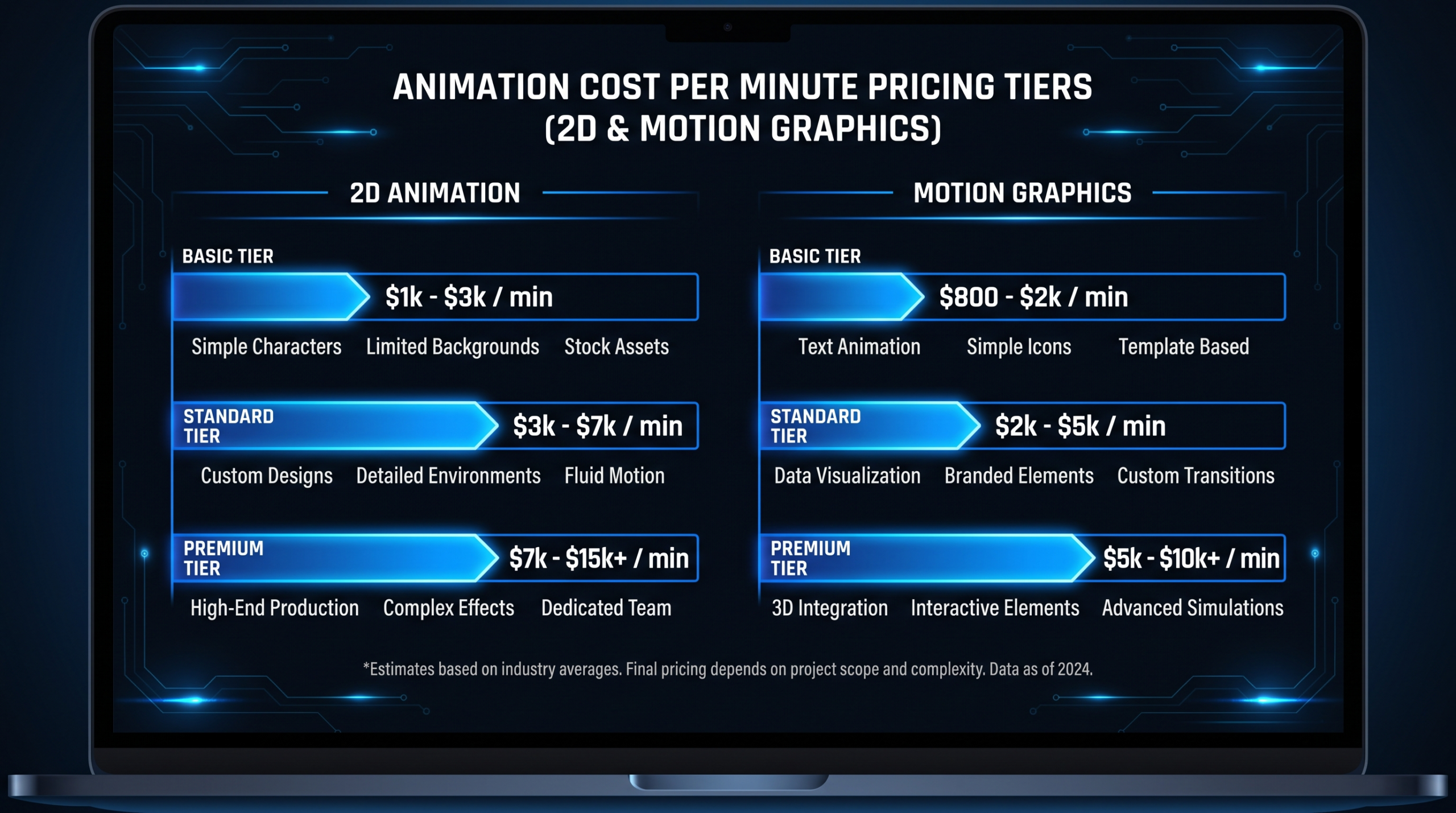
Corporate Video Production Cost by Approach
| Approach | Typical Budget Range | Script Complexity | Best For |
|---|---|---|---|
| In-house (DIY) | $500–$3,000 | Simple, presenter-led | Internal comms, onboarding |
| Freelancer team | $2,000–$8,000 | Moderate, 1–3 scenes | Product demos, testimonials |
| Mid-range agency | $8,000–$30,000 | Full script, multi-scene | Brand films, SaaS explainers |
| Premium production | $30,000–$100,000+ | Complex, director-driven | Campaign hero videos, IPO films |
| Subscription team (VEC) | $5,000–$16,000/mo | Ongoing editorial cadence | SaaS companies, 8–30 videos/mo |
The subscription model, like VEC's Growth ($5K/mo), Core ($9.5K/mo), and Scale ($16K/mo) plans, makes the most financial sense for B2B SaaS companies producing video consistently. Instead of paying retail per script and per production, you get a dedicated editing team that learns your style, voice, and brand standards — and gets faster and better every month. See pricing →
For more on how agencies price their services, see our guide to video production agency pricing models. If you're weighing the cost per finished minute, see our video editing cost per minute breakdown. For corporate video costs specifically by video length, see average corporate video cost by length.
Free Corporate Video Script Template
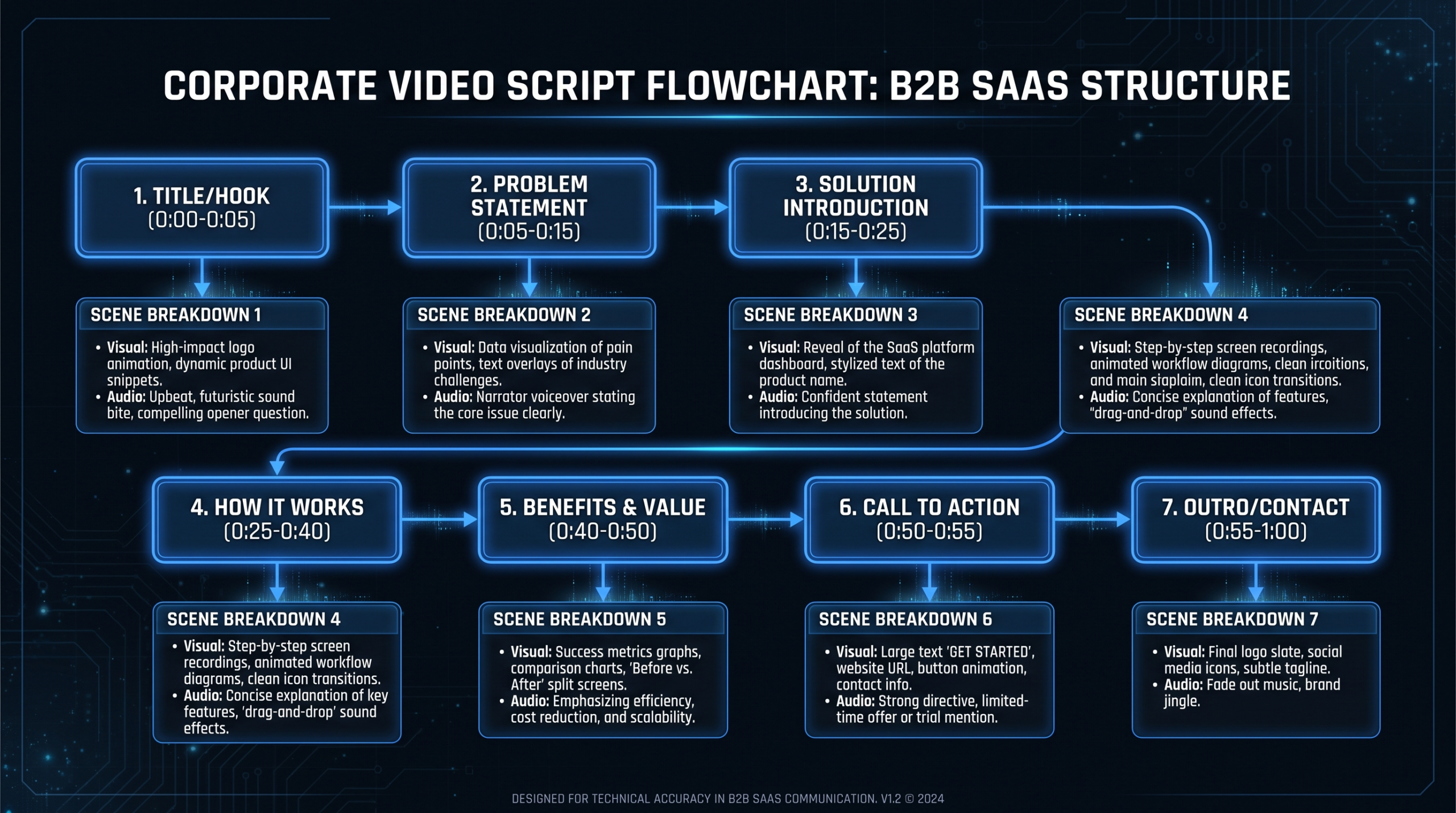
The 4-column script format below is the production-ready standard used by agencies and in-house teams at every budget level. Each row is one scene or segment. Print it, copy it into a Google Doc, or use it in any scriptwriting tool.
| Scene # | Visual (What the camera sees) | Audio / VO (What is heard) | Notes / Direction |
|---|---|---|---|
| HOOK Scene 1 |
Close-up of the problem in action. No product yet. | VO: "If you're still [doing X the old way], you're leaving [specific cost/time/risk] on the table." | Duration: 5–10 sec. Hook must earn the next 10 seconds. |
| PROBLEM Scene 2 |
Wide shot showing the pain point at scale. Data graphic or B-roll. | VO: Narrate the problem with specifics. Name the cost. Name who it affects. | Avoid generic. The more specific the pain, the more real it feels. 10–15 sec. |
| INTRODUCE SOLUTION Scene 3 |
Product or service reveal. Clean screen recording, logo, or spokesperson intro. | VO or On-cam: "[Product] is [one sentence description]. Here's what it does." | Say the product name clearly. First time viewers hear it. 5–8 sec. |
| DEMO / PROOF Scenes 4–6 |
3 sequential shots showing the solution solving the problem step by step. | VO: "With [Product], you [Benefit 1]. [Benefit 2]. [Benefit 3]." Keep each to 1 sentence. | Show, don't tell. Screen recordings, real data, real customers. 20–30 sec. |
| SOCIAL PROOF Scene 7 |
Customer quote card, testimonial clip, or logos of recognizable clients. | On-cam or VO: One specific, measurable result from a real customer. Avoid vague superlatives. | "Teams like [X] use [Product] to [measurable outcome]." 8–12 sec. |
| CTA Scene 8 |
Clean end card with logo, URL, and one action button. | VO: "Ready to [benefit]? [Action] at [URL]." | One CTA only. Never list multiple actions. 5–8 sec. |
Total runtime: this template structures a 60–90 second video. For longer formats (2–5 min), expand the Demo/Proof section with additional H3-level scenes. For shorter formats (15–30 sec), compress the Problem and Solution into a single scene.
This same structural logic underpins every high-performing corporate video script — from the Dollar Shave Club example above to the product demo video script template and the case study video script format covered in other guides on this site.
How Do You Write a Corporate Video Script?
Writing a corporate video script that actually gets produced — without revision spirals, production delays, or on-set surprises — follows a repeatable five-step process.
Step 1: Define the One Job This Video Has
Every corporate video must have exactly one primary goal. Not "build brand awareness and drive signups and educate prospects." One. Write it in one sentence before you write the first word of the script: "This video will convince a Head of Content at a Series B SaaS company to book a demo within 48 hours of watching it." Every scene, every line, every frame should serve that sentence. If a scene doesn't serve it, cut it.
Step 2: Write the VO First, Visuals Second
Most teams make the mistake of writing visuals first. Write the voiceover or dialogue first — it forces clarity of message. Once the spoken script is tight, the visuals almost write themselves: every claim wants a proof shot, every emotion wants a face, every concept wants a visual metaphor. The voiceover is the backbone. Visuals are the flesh.
Step 3: Time Your Script Before Production
Read your VO aloud at a natural speaking pace (roughly 130–150 words per minute for a corporate voiceover). A 2-minute video needs 260–300 words of narration. If your script runs 500 words, your video runs 3–4 minutes — whether or not that was your intention. Time it before you book any crew or equipment.
Step 4: Write the Edit, Not the Shoot
Describe what the editor needs, not what the director does. "Show the dashboard loading quickly" is more useful than "camera slowly pans across three monitors while the editor watches from across the room." The former tells the editor what to find in the footage; the latter tells the director what to shoot — these are two different documents. The script for a SaaS marketing video should read like an editor's brief, not a film school project.
Step 5: Lock the Script Before Pre-Production
No production should start without a locked script. Script changes after cameras roll are among the most expensive budget leaks in corporate video production. Every change that happens on set — a rewritten VO line, a new product feature added, a rebrand mid-project — costs crew time, re-edits, and sometimes reshoots. The script approval sign-off is a financial document as much as a creative one. Treat it accordingly. For guidance on what's included in a professional video editing and production service, see our full breakdown.
What Types of Corporate Video Scripts Work Best?
Different corporate video goals require different script structures. Here's a reference table of the most common types, their structural patterns, and the known-good script templates for each.
Corporate Video Script Types
| Video Type | Script Structure | Avg. Script Length | Primary Goal |
|---|---|---|---|
| Brand / Company Overview | Mission → Values → Proof → Invitation | 150–300 words VO | Trust-building, investor/partner audience |
| SaaS Product Demo | Pain → Solution → Feature Demo → CTA | 200–350 words VO | Conversion, trial signups |
| Explainer Video | Problem → Old Way → New Way → How It Works → CTA | 150–250 words VO | Category education, top-of-funnel |
| Customer Testimonial | Before → Turning Point → After → Specific Result | 75–150 words VO + interview | Sales enablement, proof |
| Employee Onboarding | Welcome → Culture → Role Context → What's Next | 300–500 words VO | Retention, culture transmission |
| Event / Campaign Highlight | Energy montage → Key Moments → Metrics → Invitation | Minimal VO, music-driven | Brand exposure, social sharing |
Each of these types has a dedicated script guide on this site. For demo video scripts, see the product demo video script template. For onboarding scripts, see the onboarding video script guide. For case study video scripts, see the case study video script format.
Understanding what type of video — and therefore what type of script — each stage of your funnel needs is the foundation of any B2B SaaS video strategy. If you're deciding which video types to prioritize based on your current resources, our how it works page explains how VEC structures ongoing editorial programs for SaaS companies.
External research consistently shows that explainer videos on landing pages increase conversion rates significantly — platforms like Wistia and HubSpot publish detailed benchmarks on video engagement rates by type and length. Always apply these benchmarks in context — industry averages hide significant variance by audience segment, distribution channel, and video quality.
How Long Should a Corporate Video Script Be?
The right script length depends on the video's job, its distribution channel, and where in the funnel it sits. There is no universal answer — but there are strong norms by video type that should inform your brief.
Corporate Video Length + Script Word Count Guide
| Video Type | Recommended Length | VO Word Count | Distribution Context |
|---|---|---|---|
| Social media ad / clip | 15–30 seconds | 40–75 words | Paid social, organic feed |
| Website hero video | 60–90 seconds | 130–220 words | Homepage above-the-fold |
| Product explainer / demo | 90 sec – 3 min | 195–450 words | Product pages, email, demos |
| Brand / company overview | 2–4 minutes | 260–600 words | About page, pitch decks, LinkedIn |
| Case study / testimonial | 2–5 minutes | 130–350 words VO + interview | Sales outreach, website, events |
| Training / onboarding | 3–10 minutes | 390–1,500 words | Internal LMS, new hire portals |
For a detailed breakdown of how runtime affects production cost and what the optimal length is for different corporate video goals, see our full guide: how long should a corporate video be?
The most common mistake in corporate video scripting is writing too much. A 4-minute VO script means a 4-minute video — even if the brief said "2 minutes." Word count is runtime, and runtime is budget. Write lean, time aloud, cut mercilessly.
For related context on how production complexity affects pricing, see the video production agency pricing models guide and our explainer video cost breakdown. If you're comparing offshore vs. US-based editing rates for post-production, the video editing hourly rate by country guide has current market data.
Companies producing ongoing corporate video content — weekly product updates, monthly thought leadership, quarterly brand campaigns — benefit significantly from having a dedicated outsourced video editing team rather than re-briefing freelancers per project. VEC's case studies show what consistent script-to-publish workflows look like for Series A–C SaaS marketing teams.
Frequently Asked Questions
What is the standard format for a corporate video script?
The industry-standard format is a two- or four-column document: Scene number, Visual description, Audio/VO copy, and Production notes. Each row covers one scene or segment. The visual column describes what the camera sees; the audio column contains the exact spoken words or narration. This format maps directly to how editors and directors work, reducing miscommunication and on-set improvisation.
How many words per minute should a corporate video voiceover be?
A professional corporate voiceover typically runs at 130–150 words per minute for a conversational, trust-building tone — slightly slower for formal or technical content (120 wpm), slightly faster for energetic product demos (155–165 wpm). At 140 wpm, a 2-minute video needs roughly 280 words of scripted voiceover. Always time your script aloud at your intended pace before sending it to production.
Who writes corporate video scripts — the agency or the client?
It depends on the production model. Full-service agencies typically include scriptwriting in their production fee. Subscription-based editing teams like VEC work from a brief provided by the client — so the marketing team writes the script or approves it, and the editing team executes the post-production. Hybrid arrangements (agency drafts the script, client approves and marks up) are also common. Whoever writes the script, the client must own the final version — you know your product, your customer, and your regulatory constraints better than any agency does.
What's the difference between a corporate video script and a storyboard?
A script is the written document — it specifies what will be said and high-level descriptions of the visuals. A storyboard is a visual document — it shows, panel by panel, exactly how each scene will look, including camera angles, framing, and on-screen graphics. Scripts come first and are written by copywriters or strategists. Storyboards come second and are created by directors, art directors, or motion designers. Both are standard deliverables in a full production workflow; for simpler corporate videos, the script alone is often sufficient to brief the production team.
How do I write a corporate video script for a company overview or "about us" video?
Start with the mission: what does your company exist to do, and for whom? Then move to values: what principles guide how you work? Then show proof: a specific customer result, a quantified impact, or a team moment that makes the values real. End with an invitation: what do you want the viewer to do or feel? The whole script should run 150–300 words. The most common mistake is trying to say everything — pick the three things that most honestly differentiate your company and build the entire script around those three points.
Related Guides
Ready to Scale Your Corporate Video Program?
VEC provides dedicated video editing teams for B2B SaaS companies — same editors, same quality, every video. Growth ($5K/mo), Core ($9.5K/mo), and Scale ($16K/mo) plans include post-production, motion graphics, and a 90-day output guarantee.
Book a Free Strategy Call See Pricing