How to Create a Video Style Guide for Your Brand
Your marketing team just produced three videos this month. One is a product demo with modern electronic music, clean typography, and fast cuts. Another is a customer testimonial with acoustic guitar, handwritten fonts, and slow pans. The third is a social clip with no music, a completely different color palette, and a different intro animation. They're all "on brand" according to whoever made them. None of them feel like they came from the same company.
This is what happens without a video style guide. And it's costing you more than just visual inconsistency — it's eroding brand recognition, confusing your audience, and making every new video feel like you're starting from scratch. A video style guide solves this permanently. It's the document that ensures every video your company produces feels cohesive, professional, and unmistakably yours, regardless of who made it.
This guide walks you through creating a comprehensive video style guide: every section to include, the decisions you need to make, and a framework for keeping it practical enough that people actually follow it.
Table of Contents
- Why Your Brand Needs a Video Style Guide
- Section 1: Visual Identity Standards
- Section 2: Audio & Music Standards
- Section 3: Motion Graphics & Animation
- Section 4: Typography & Text On-Screen
- Section 5: Tone of Voice & Scripting
- Section 6: Format Specifications by Platform
- Section 7: Templates & Reusable Assets
- How to Implement Without Killing Creativity
- FAQ
Why Your Brand Needs a Video Style Guide
A video style guide delivers four tangible business outcomes:
1. Brand Recognition Compounds
When every video shares visual DNA — same color treatment, same typography, same motion language — viewers start recognizing your content before seeing your logo. This is how companies like Stripe, Notion, and Linear built instantly recognizable video presences. Each video reinforces the last.
2. Production Speed Increases 2-3x
Without a style guide, every new video involves decisions about colors, fonts, music, pacing, and format. With one, those decisions are pre-made. Your editors work from templates and specs rather than guessing. Production time per video drops dramatically because the creative framework already exists.
3. Quality Stays Consistent Across Teams
Whether your videos are produced by an in-house team, a freelancer, or a dedicated editing partner, the style guide ensures consistent output. New team members onboard faster. External partners deliver work that matches your standards without endless revision cycles.
4. Prevents "Design by Committee" Debates
When someone says "I don't like the font" or "Can we try a different color?" — the style guide is the answer. Decisions were made intentionally and documented. This eliminates subjective feedback loops that slow down production.
Video Style Guide: The 7 Essential Sections
Section 1: Visual Identity Standards
Color Palette
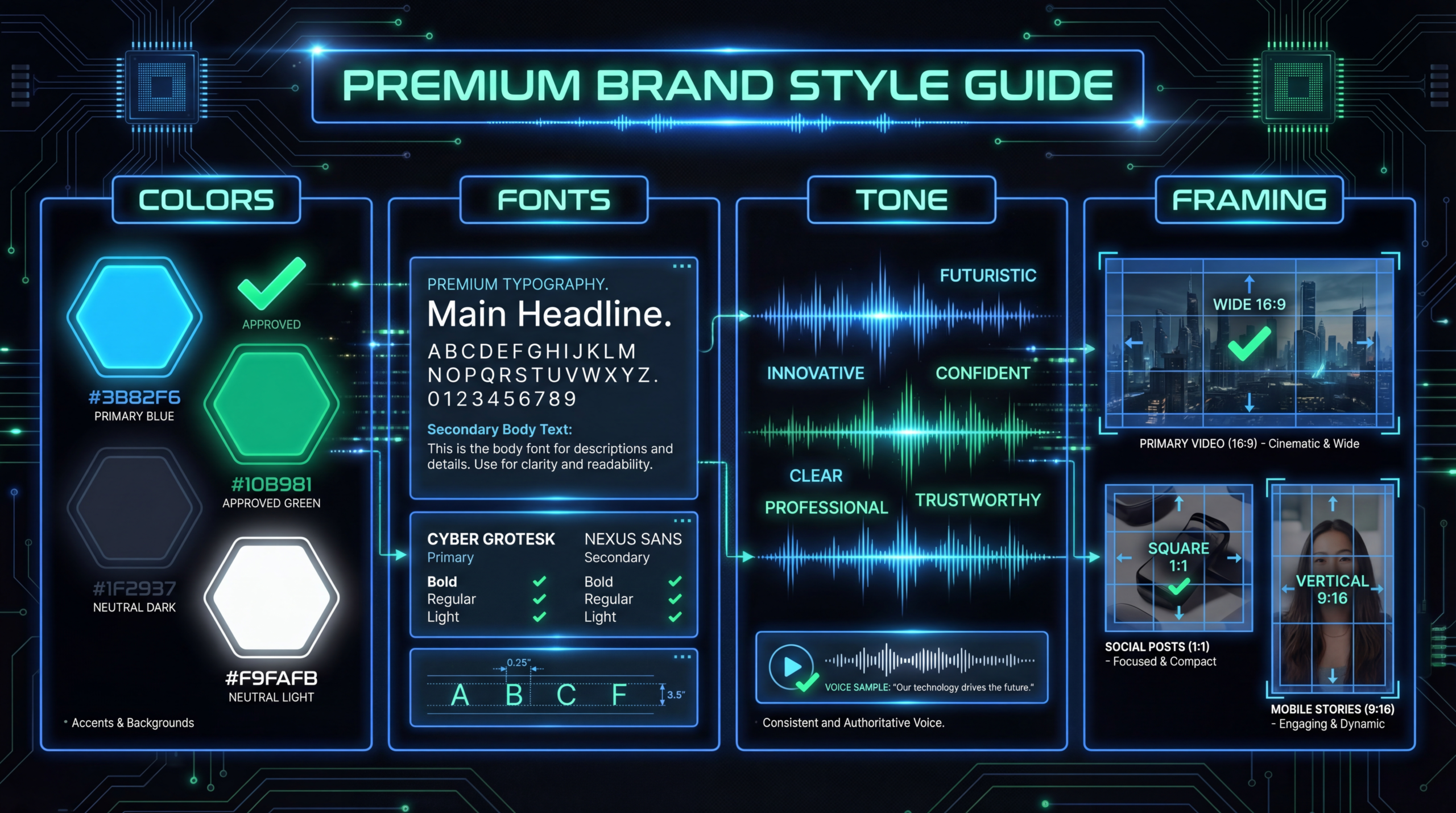
Define your primary and secondary colors with exact hex codes, plus how they're used in video:
- Primary brand color: Used for CTAs, headers, key highlights
- Secondary colors: Used for accents, backgrounds, data visualization
- Background colors: Light/dark modes for different video types
- Color grading profile: The specific look applied to all footage (warm/cool, saturation level, contrast curve)
Include a LUT (Look-Up Table) file if you have a specific color grade. This ensures every piece of footage gets the same treatment, regardless of who edits it.
Camera Framing Rules
- Talking head: Head-and-shoulders framing, camera at eye level, rule of thirds positioning
- Interview: Two-person framing, consistent eye-line direction across all interviews
- Product shots: Screen recording resolution, cursor behavior, zoom levels
- B-roll: Style (handheld vs stabilized, slow-motion usage, focus pulls)
Lighting Standards
Define the lighting mood: bright and airy, moody and dramatic, or clean and neutral. Include reference images. This matters especially when multiple people record videos in different locations — a consistent lighting approach creates visual cohesion even across different spaces.
Background Requirements
Specify acceptable backgrounds: branded backdrop, clean office, home office guidelines, or blurred background rules. For remote-recorded content (like podcast episodes), provide a setup guide that guests and internal team members can follow.
Section 2: Audio & Music Standards
Music Library
Curate a library of 10-20 pre-approved music tracks organized by mood and tempo. Define which tracks are used for which video types:
| VIDEO TYPE | MUSIC MOOD | TEMPO | EXAMPLE USE |
|---|---|---|---|
| Product demo | Clean, modern, minimal | Medium (100-120 BPM) | Background under voiceover |
| Customer story | Warm, inspirational | Slow-medium (80-100 BPM) | Emotional underscore |
| Social clip | Upbeat, energetic | Fast (120-140 BPM) | Driving energy, attention-grabbing |
| Explainer | Light, curious | Medium (100-110 BPM) | Complements narration |
| Brand film | Cinematic, bold | Builds throughout | Emotional arc support |
Sound Effects
Define your sound effect palette: UI sounds for screen recordings, transition whooshes (or explicitly no whooshes), notification chimes, and ambient textures. Less is usually more for B2B. Over-designed sound effects feel consumer-grade.
Voiceover Guidelines
- Preferred voice characteristics (if using VO artists): gender, age range, accent, energy level
- Recording specs: sample rate, bit depth, noise floor requirements
- Mixing levels: voiceover vs music balance (-6dB VO peaks, music at -18dB under speech)
Section 3: Motion Graphics & Animation
Animation Language
Define how things move in your videos:
- Easing curves: Smooth ease-in-out vs snappy bounce vs linear (be specific)
- Speed: Fast/punchy (tech, modern) vs slow/elegant (premium, enterprise)
- Direction: Elements enter from left/bottom/center — pick a consistent direction
- Complexity: Minimal (clean fades, slides) vs elaborate (particle effects, 3D elements)
Intro/Outro Animations
Create standard intro and outro animations with locked-down timing and branding. The intro should be 5 seconds maximum — anything longer and you lose viewers. The outro should be 10-15 seconds with subscribe/CTA elements.
Lower Thirds & Name Cards
Design a standard lower-third template with your brand fonts and colors. Include specs for name, title, and company fields. Define animation timing: 0.5s fade in, 4s hold, 0.5s fade out is a solid default.
Transitions
Pick 2-3 transition types and stick to them. Common choices: straight cut (default for 80% of edits), cross dissolve (topic changes), and one branded transition (logo wipe, color flash). Don't use elaborate transitions for every cut — it's distracting.
Section 4: Typography & Text On-Screen
Font Selection
- Primary heading font: Used for titles, section headers, key callouts
- Body/subtitle font: Used for captions, descriptions, smaller text
- Accent font (optional): Used sparingly for emphasis or data callouts
Include the specific weights, sizes, and letter-spacing for each use case. On-screen text needs larger sizes than print or web: minimum 24px for captions, 48px for headers at 1080p resolution.
Subtitle/Caption Standards
Define your subtitle style — this creates significant brand recognition since captions appear in almost every video:
- Font, size, color, and background (semi-transparent bar, word-by-word highlight, or no background)
- Position (bottom center, bottom-left, or dynamic positioning)
- Maximum characters per line (32-42 characters for readability)
- Animation style (pop-on, typewriter, or word-by-word highlight)
Section 5: Tone of Voice & Scripting
Brand Personality in Video
Define 3-5 personality traits that should come through in every video. For example:
- Confident, not arrogant: We know our stuff and share it generously
- Clear, not dumbed-down: We respect the audience's intelligence
- Human, not corporate: We sound like people, not a brand voice committee
- Specific, not vague: We use numbers, examples, and concrete details
Scripting Do's and Don'ts
| DO | DON'T |
|---|---|
| Lead with the viewer's problem | Start with company history or mission |
| Use specific numbers and data | Use vague superlatives ("amazing," "game-changing") |
| Address the viewer as "you" | Use third-person language about "customers" |
| End with a clear, single CTA | Pile multiple CTAs at the end |
| Use industry terms your ICP knows | Over-explain basics your audience already understands |
| Keep sentences under 20 words for VO | Write complex, compound sentences |
Section 6: Format Specifications by Platform
| PLATFORM | ASPECT RATIO | RESOLUTION | MAX LENGTH | CAPTIONS |
|---|---|---|---|---|
| YouTube (long-form) | 16:9 | 1920x1080 min, 4K preferred | No limit (aim 5-15 min) | CC file upload |
| YouTube Shorts | 9:16 | 1080x1920 | 60 seconds | Burned-in |
| LinkedIn (native) | 16:9 or 1:1 | 1920x1080 or 1080x1080 | 10 min (aim 1-3 min) | Burned-in |
| Instagram Reels | 9:16 | 1080x1920 | 90 seconds | Burned-in |
| Website/Landing Page | 16:9 | 1920x1080 | 60-180 seconds | Optional |
| Email thumbnail | 16:9 | 600x338 px | GIF or static | N/A |
Section 7: Templates & Reusable Assets
The style guide is only as useful as the templates that come with it. Create and maintain:
- Premiere Pro/DaVinci project templates: Pre-configured with brand colors, fonts, lower thirds, intro/outro
- After Effects motion graphics templates: Editable MOGRT files for titles, transitions, data visualizations
- Thumbnail templates: Photoshop/Figma templates with brand layout, font styles, and color scheme
- Music library: Organized folder of pre-approved, licensed tracks
- Sound effects pack: Your standard UI sounds, transitions, and ambient textures
- Color grading LUTs: Pre-built LUT files for consistent color treatment
- Brand assets: Logo files (all formats), icon sets, approved stock footage
How to Implement Without Killing Creativity
The 80/20 Rule for Style Guides
Your style guide should lock down 80% of decisions (colors, fonts, music mood, framing, intros/outros) and leave 20% open for creative interpretation. The locked-down elements create brand consistency. The flexible elements prevent every video from feeling identical and boring.
Start With a Minimum Viable Guide
You don't need a 50-page document to start. Create a one-page reference with: brand colors (hex codes), 2 approved fonts, intro/outro animation, 5 approved music tracks, and subtitle style. Expand the guide as you produce more videos and encounter new decisions.
Create Reference Reels
For each video type you produce, include 2-3 reference examples in the style guide. "This is what a good product demo looks like" is more useful than paragraphs of specifications. Include timestamps pointing to specific elements: "Notice the lower third at 0:15," "This is our standard color grade."
Review Quarterly
Your style guide should evolve as your brand matures. Review it quarterly: what's working well? What feels outdated? What new video types have you added that need specifications? Update the guide and templates accordingly.
Need Help Implementing Your Video Style Guide?
Our dedicated teams work within your brand guidelines to produce consistent, on-brand video content. We also help create style guides for companies starting from scratch.
Book a Free Strategy Call See PricingFrequently Asked Questions
How long does it take to create a video style guide?
A minimum viable guide (one page with key specs) takes 2-4 hours. A comprehensive guide with templates, reference reels, and detailed specifications takes 2-3 weeks. Start with the MVP and expand over time as you identify what needs documenting.
Do we need a separate video style guide if we already have brand guidelines?
Yes. Brand guidelines cover logos, colors, and print design. Video introduces unique elements: motion, audio, pacing, framing, and platform-specific formatting. Your video style guide should reference and extend your brand guidelines, not replace them.
Should the style guide be strict or flexible?
Lock down the elements that create brand recognition (colors, fonts, logo usage, intro/outro, subtitle style). Leave creative flexibility on elements that benefit from variety (music selection within mood guidelines, B-roll choices, pacing, storytelling structure). Too strict and every video is boring. Too loose and there's no consistency.
How do we enforce the style guide with external video partners?
Include the style guide in your onboarding packet for any external video partner. Provide templates (Premiere/AE project files) so they don't need to rebuild elements from scratch. Request a 30-second test edit before committing to a full project to verify they can match your standards.
What if our team pushes back on the style guide being too restrictive?
Frame it as "decisions already made" rather than "creative restrictions." The style guide eliminates time spent on repetitive decisions so the team can focus creative energy on storytelling, messaging, and content strategy — the parts that actually need creative thinking.
How often should we update the video style guide?
Review quarterly, update as needed. Major updates happen when your brand identity evolves (rebrand, new product line, market repositioning). Minor updates happen as you add new video types, platforms, or production standards. Version-number your guide so everyone knows they're using the latest edition.
📋 B2B Video Brief Template
Start building your video style guide and production briefs with our template — covers brand standards, creative specifications, and production checklists for every video type.
Download the Free Template →Build Consistency, Build Recognition
A video style guide isn't a creative constraint — it's the foundation that lets your brand be recognized across every touchpoint. The companies with the strongest video presences (Stripe, HubSpot, Notion) all have rigorous style guides that ensure every video feels like a natural extension of their brand.
Start with the basics: colors, fonts, intro/outro, and subtitle style. Document them, share them with your team, and iterate as you produce more content. Within 3-6 months, your video library will have a cohesive look and feel that builds instant brand recognition with your audience.
Working with an external video team? Learn how our dedicated teams follow brand guidelines or check our pricing to see what a production partnership looks like.