How-To Video Production: Tutorial Videos That Convert
"How to" is the second most common phrase in YouTube search queries. Behind every search is someone with a problem — and the company that solves it on video earns trust, traffic, and eventually revenue.
For SaaS companies, how-to videos serve double duty. They attract top-of-funnel prospects searching for solutions and reduce support tickets from existing customers. One video can drive pipeline while simultaneously cutting costs.
But producing tutorial videos that actually convert — not just educate — requires a specific approach. This guide covers the entire process: planning, scripting, recording, editing, and distributing how-to videos that drive real business results.
Table of Contents
Why How-To Videos Are a Growth Engine
How-to videos sit at the intersection of three business objectives: acquisition (attracting new prospects), activation (helping users succeed), and retention (reducing churn through better product understanding).
SEO and discovery
Google increasingly surfaces video results for how-to queries. A well-optimized tutorial video can rank on both Google and YouTube — giving you two channels of organic discovery from a single piece of content.
Trust building at scale
When you teach someone how to solve a problem — even before they're a customer — you establish expertise and goodwill. That person remembers you when they're ready to buy. It's the "give first" principle applied to content marketing.
Support cost reduction
Companies that create comprehensive how-to video libraries see 30–50% reductions in support tickets for covered topics. Each video you create is a support agent that works 24/7 without a salary.
Types of How-To Videos for SaaS
| TYPE | AUDIENCE | GOAL | LENGTH |
|---|---|---|---|
| Product tutorials | Current users | Feature adoption, reduce churn | 3–8 min |
| Industry how-tos | Prospects | SEO traffic, brand awareness | 5–15 min |
| Quick tips | Users + prospects | Engagement, social sharing | 30–90 sec |
| Workflow tutorials | Power users | Deeper adoption, expansion revenue | 8–20 min |
| Troubleshooting | Users with issues | Support deflection | 2–5 min |
The content-product spectrum
Your how-to videos should span a spectrum from pure educational content (no product mention) to product-specific tutorials:
Planning Videos That Rank and Convert
Topic research
Start with three data sources:
- Support tickets: What do customers ask most often? Each recurring question is a video waiting to be made.
- Search data: Use YouTube's autocomplete, Google Trends, and tools like Ahrefs to find how-to queries in your space.
- Competitor gaps: What tutorials do competitors have? Where are theirs weak or outdated?
The conversion bridge
Every how-to video needs a bridge — a moment where the educational content naturally connects to your product. This isn't a hard sell. It's showing how your tool makes the process easier:
- "You can do this manually, but here's how [product] automates it..."
- "The hardest part of this process is [X]. That's exactly what we built [product] to solve."
- "Here's the spreadsheet way to do this... and here's how it looks in [product]."
Outline structure
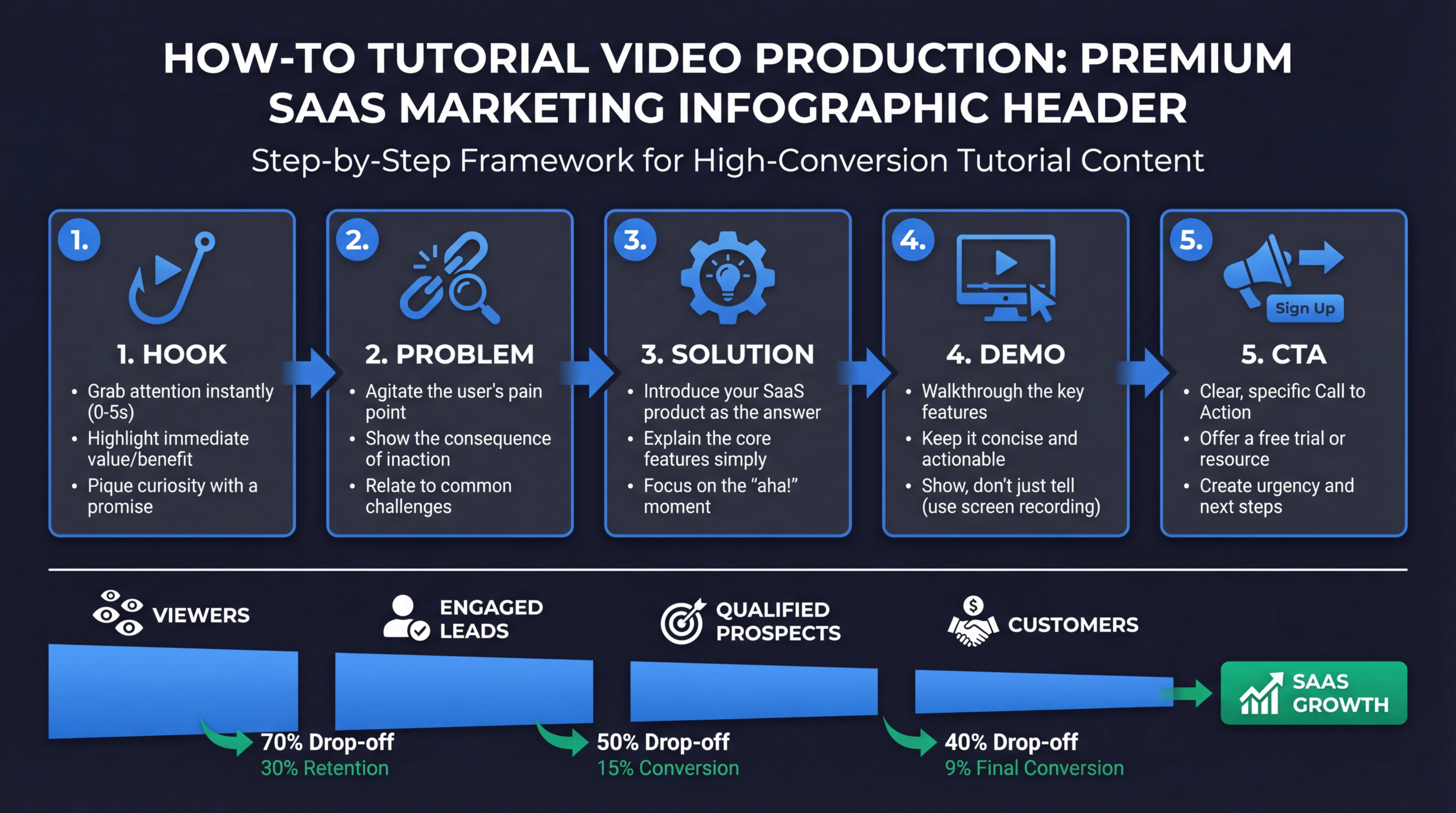
- Hook (15 sec): State the problem and promise the solution
- Context (30 sec): Why this matters and who should watch
- Prerequisites (30 sec): What they need before starting
- Step-by-step tutorial (main body): The actual how-to content
- Conversion bridge (30 sec): Natural product mention
- Summary + CTA (30 sec): Recap key steps, link to resources
Scripting for Clarity and Retention
Write for spoken delivery
Tutorial scripts should read like clear conversation, not technical documentation. Use short sentences. Use "you" and "your" constantly. Avoid jargon unless your audience expects it.
The "one thing per screen" rule
Each visual change (screen, slide, camera angle) should communicate one concept. When you try to explain multiple things while showing one screen, viewers get confused. When you show multiple screens while explaining one thing, they get lost.
Signposting
Tell viewers where they are in the process constantly:
- "Step 1 of 5..."
- "Now that we've set up the basics, let's move to the advanced configuration..."
- "The hardest part is done. The last two steps are straightforward..."
Anticipate mistakes
Where do people commonly get stuck? Address it proactively: "At this point, you might see an error that says [X]. If you do, just [fix]. That's normal and happens because [reason]."
Recording Setup and Best Practices
Screen recording fundamentals
- Resolution: Record at 4K (3840×2160), export at 1080p for crisp text at any zoom level
- Frame rate: 30fps for screen recordings (60fps is overkill and increases file size)
- Clean desktop: Close notifications, clear bookmarks bar, use a fresh browser profile
- Mouse discipline: Move the cursor slowly and deliberately. Park it when not clicking.
Audio setup
Tutorial audio should be crystal clear with zero room echo. A USB condenser microphone (Blue Yeti, Rode NT-USB) in a quiet room beats a $500 studio mic in a noisy office.
Camera (optional but recommended)
Adding a presenter on camera — even as a small picture-in-picture window — increases engagement by 30–40% compared to screen-only recordings. Viewers connect with faces.
Tools
| TOOL | BEST FOR | COST |
|---|---|---|
| Loom | Quick internal tutorials, async communication | Free–$15/mo |
| ScreenFlow | Mac screen recording + editing | $175 one-time |
| Camtasia | Windows screen recording + editing | $250 one-time |
| OBS Studio | Free, powerful, complex setup | Free |
| Professional production | Polished tutorials at scale | $2K–$10K per video |
Editing for Maximum Engagement
Pacing
Tutorial videos should move faster than you think. Cut every pause, "um," and unnecessary transition. Viewers can rewind if they miss something — they can't get time back from a slow video.
Visual enhancements
- Zoom and highlight: Use post-production zoom to draw attention to specific UI elements
- Annotations: Add arrows, circles, or text callouts for key clicks and buttons
- Chapter markers: Add YouTube chapters so viewers can jump to specific steps
- Progress indicators: Show "Step 3/5" on screen so viewers know where they are
Thumbnail and title optimization
Your tutorial won't convert if nobody clicks on it. Thumbnails should show the end result ("after") with clear text overlay. Titles should match search intent exactly.
🔗 Related guide: If your how-to videos are specifically software product walkthroughs, see our dedicated software tutorial video production guide — covers recording formats, editing techniques, and cost benchmarks specific to SaaS tutorial content.
Want Professional How-To Videos?
Our team produces tutorial videos that drive traffic, reduce support tickets, and convert viewers into customers.
Book a Free Strategy Call See PricingDistribution and SEO Strategy
YouTube optimization
- Title: exact-match keyword + benefit (e.g., "How to Set Up [Feature] in 5 Minutes")
- Description: 200+ words with keywords, timestamps, and links
- Tags: primary keyword, secondary keywords, competitor product names
- Chapters: timestamps for each major step
- End screens: link to related tutorials and channel subscription
Website embedding
- Embed tutorials on relevant product pages and help center articles
- Create a searchable video library organized by topic
- Add structured data (VideoObject schema) for Google rich results
Repurposing
- Extract key steps as GIF tutorials for documentation
- Create 30-second clips for social media
- Transcribe for blog posts (tutorial + video = double SEO value)
- Use in email sequences for customer onboarding
Free: Video Production Workflow Template
Streamline tutorial video production with our step-by-step workflow template. From script to publish in half the time.
Download the TemplateReady to get started? Explore our case studies.
Frequently Asked Questions
How long should a how-to video be?
As long as it needs to be, but not a second longer. Simple tutorials: 2–5 minutes. Complex workflows: 8–15 minutes. Use YouTube chapters so viewers can skip to specific sections.
Should we script the entire video or improvise?
Use a detailed outline with exact steps, but deliver conversationally. Full scripts sound robotic. Full improvisation misses steps. The outline approach gives you both accuracy and authenticity.
How do we balance education with product promotion?
The 80/20 rule works well: 80% pure educational value, 20% product mention. The product reference should feel like a natural extension of the tutorial, not a sales pitch.
What tools do we need to get started?
Minimum viable setup: a USB microphone ($50–$150), screen recording software (free OBS or $15/mo Loom), and basic editing software. Professional results require professional editing but the recording setup can be simple.
How many tutorials should we produce?
Start with 5–10 covering your most common support questions. Then expand to industry how-tos for SEO. Aim for 2–4 new tutorials per month for consistent growth.