Tutorial Video Script Template + Examples
Key Takeaways
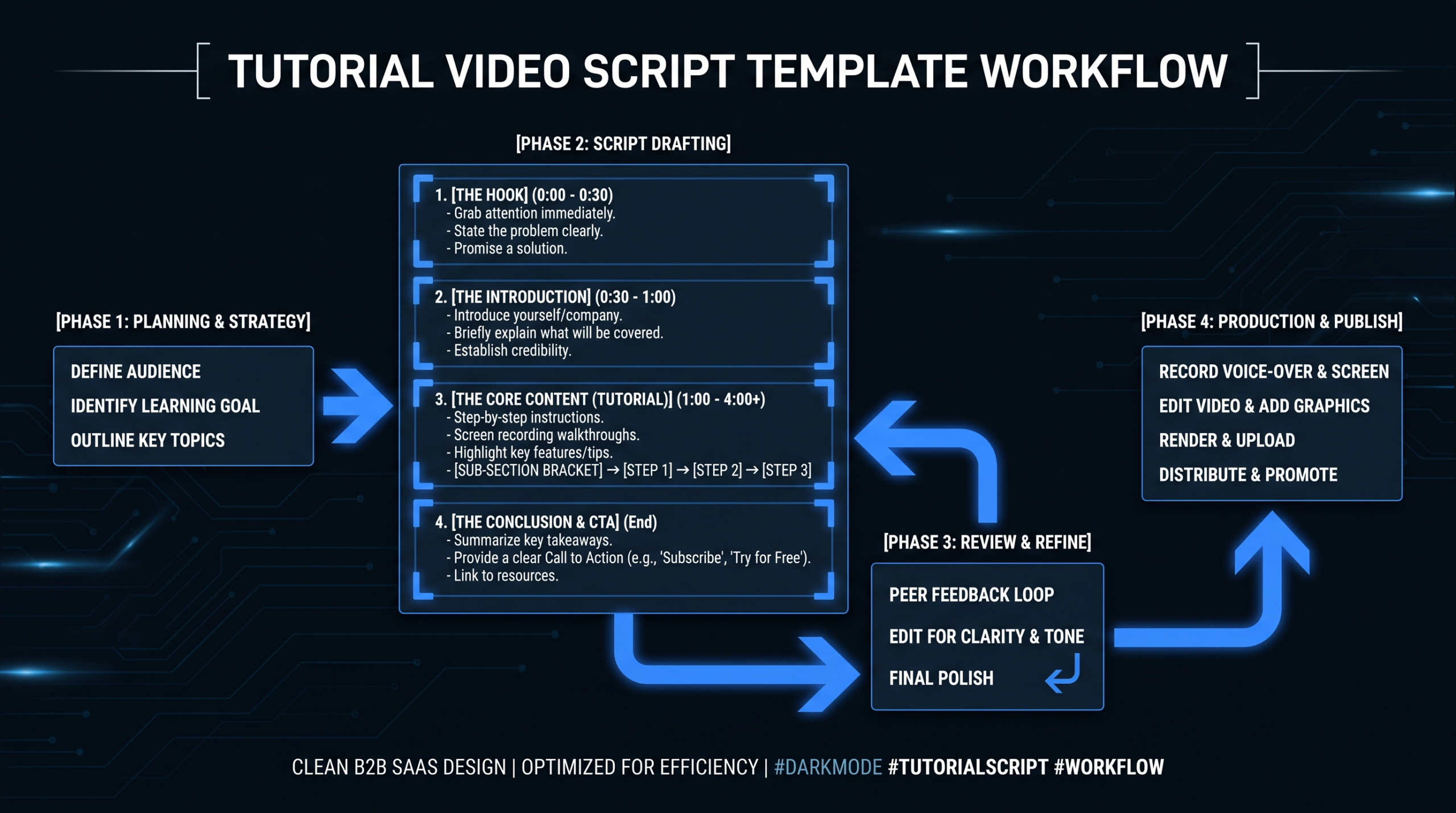
- 6 sections every tutorial script needs: Hook (0–20 sec), Context (20–60 sec), Step-by-Step Walkthrough, Troubleshooting, Summary, and CTA.
- 1 minute of finished video = 3–5 minutes of recording time when everything goes smoothly — script length directly controls production cost.
- 80/20 rule: 80% pure educational value, 20% product mention. Viewers who learn something are significantly more likely to convert than those who feel sold to.
- Tutorial video production costs range from $500 for a basic screen recording to $8,000+ per video for fully produced talking-head tutorials with motion graphics.
- The most common failure: scripts that skip the “Why This Matters” context block, causing viewers to drop off before the core teaching moment.
TL;DR
A tutorial video script that converts has 6 core sections: hook, context, walkthrough, troubleshooting, summary, and CTA. This guide gives you a copy-paste template for each section, five real-world SaaS examples to study, and a production cost breakdown so you can budget your tutorial program. Jump to the template below or read through the full framework.
Table of Contents
What Is a Tutorial Video Script?
A tutorial video script is a word-for-word document that maps what the narrator says against what appears on screen, timed to the second. It is not a slide deck, not an outline, and not a rough talking-point list. It is the precise transcript that drives both the recording session and the editing brief.
Tutorial scripts differ from promotional scripts in one fundamental way: the viewer’s goal is the center, not the product. A product demo script sells. A tutorial video script teaches — and earns trust by doing so. The product mention is a natural byproduct of delivering value, not the destination.
B2B SaaS teams use tutorial videos across four high-ROI contexts:
- Customer onboarding — walk new users through setup and first-use milestones to reduce time-to-value
- Feature adoption — drive activation for underused features that are already paid for
- Self-service support — replace repetitive tier-1 support tickets with a 3-minute video answer
- SEO content — “how to do X with [your product]” captures high-intent search traffic with relatively low competition
For the production workflow behind these videos, see our how-to video production guide. For employee-facing training scripts specifically, our training video production guide for SaaS teams covers the structural differences.
The 6-Part Tutorial Video Script Template
This template works for screen-recorded walkthroughs, talking-head explanations, and hybrid formats. Copy it directly; fill in the brackets for your specific product and workflow.
Section 1: The Hook (0–20 seconds)
Script Template — Hook
[OPEN ON SCREEN RECORDING OR TALKING HEAD]
“If you’ve ever [SPECIFIC FRUSTRATION THE VIEWER HAS], you’re not alone — and in the next [TIME ESTIMATE], I’ll show you exactly how to [SPECIFIC OUTCOME] using [PRODUCT/FEATURE].”
[CUT TO: Product interface or demo environment]
The hook has one job: tell the viewer exactly what they will get and how long it will take. Numbers work. “3 minutes” beats “quickly.” The specific frustration beats the generic promise. Every word after the hook either earns the viewer’s continued attention or loses it.
Section 2: Context (20–60 seconds)
Script Template — Context
“Before we dive in, here’s what you’ll need: [PREREQUISITES — tools, access levels, settings, integrations].”
“Here’s why this matters: [1–2 SENTENCES on business impact or time saved].”
“This works for [SPECIFIC AUDIENCE SCENARIO], not [SCENARIO WHERE IT DOESN’T APPLY].”
Most tutorial scripts skip context and jump straight to steps. This is the most common drop-off point — viewers who do not know why they are watching leave before the value arrives. Spend 40 seconds earning the next three minutes.
Section 3: Step-by-Step Walkthrough
Script Template — Walkthrough
“Step 1: [ACTION] — [NARRATE what you click, type, or configure while doing it on screen].”
“You’ll notice [CALLOUT for anything non-obvious]. That matters because [REASON].”
“Step 2: [ACTION] — [NARRATE]. If you see [COMMON VARIANT], [WHAT TO DO].”
[REPEAT FOR EACH STEP. Aim for 3–7 steps. More than 7 = split into a second video.]
The script here doubles as your editing brief. Every callout note (“you’ll notice X”) becomes a motion graphics annotation. Every step transition is a natural cut point. Write it to direct the editor, not just to narrate to the viewer.
Section 4: Troubleshooting (Optional but High-Value)
Script Template — Troubleshooting
“A few things that can trip people up here:”
“If you see [ERROR MESSAGE or UNEXPECTED BEHAVIOR], it usually means [CAUSE]. Fix it by [SOLUTION].”
“If [ALTERNATE SCENARIO], try [WORKAROUND] instead.”
This section is what separates tutorial videos that rank for long-tail support queries from those that do not. “How to fix [error]” searches are high-intent and low-competition. Build the troubleshooting section in, even if it adds only 30 seconds to the runtime.
Section 5: Summary (30 seconds)
Script Template — Summary
“Let’s recap what we covered: [3-BULLET SUMMARY of the key steps].”
“You now have [SPECIFIC OUTCOME — what they can do that they could not before].”
Section 6: CTA (20–30 seconds)
Script Template — CTA
“Next, [NATURAL NEXT STEP for the viewer — a logical progression, not a product pitch].”
“If you want to [RELATED GOAL], check out [NEXT VIDEO or HELP DOC LINK shown on screen].”
[OPTIONAL: “If your team produces [X TYPE] of tutorial videos regularly, [BRIEF VEC MENTION] — [book-call link or pricing link on screen]”]
The CTA should feel like a helpful handoff, not a commercial break. “What should they watch next?” is a better prompt for writing CTAs than “what do we want them to buy?” Save the commercial ask for the very end, after the viewer has already received their value.
5 Tutorial Video Script Examples from Real SaaS Companies
The best tutorial video scripts share a structure: promise a specific outcome in the first 10 seconds, deliver it in 3–7 steps, and hand off to a logical next action. Here are five examples worth studying, with the specific script techniques that make each one work.
Example 1: Loom — “How to Record Your First Loom”
Loom’s onboarding tutorials are a masterclass in script economy. The hook is 8 seconds: a specific frustration (“sending long emails just to explain something simple”), a concrete outcome (“record it in 90 seconds”), and an immediate screen transition. No presenter intro, no logo animation, no scene-setting. The walkthrough covers exactly 4 steps, each narrated in real time with the action. The CTA is internal: “Next: share your Loom with your team.”
What to steal: Their step narration mirrors the on-screen action precisely — “I’ll click Record, select Screen and Camera, and hit start.” No abstractions. The viewer knows exactly where to look before the cursor moves there.
Example 2: HubSpot — CRM Onboarding Tutorial Series
HubSpot’s tutorial series handles a complex product by scoping each video to a single workflow. The context block specifies who the tutorial is for (“if you are importing contacts for the first time”) and states a time estimate upfront (4 minutes). Steps use numbered callouts on screen that match the script — a lower-third graphic appears for each step number, letting skimmers jump directly to what they need.
What to steal: The numbered step overlay is not a production decision — it comes from the script. The script includes annotations like “[STEP 3 OVERLAY] Click Import → Contacts.” That one script annotation drives the motion graphics brief. Editors should never have to guess where step overlays go.
Example 3: Canva — Getting Started Tutorial
Canva’s beginner tutorials structure the script backwards: the finished output appears in the first 30 seconds, then the tutorial rewinds to show how to build it. This answers the viewer’s implicit question (“is this worth my time?”) immediately, before a single step is explained. The context block is compressed to 15 seconds because the output already answered the “why this matters” question visually.
What to steal: Start your script by writing the finished-state screen annotation first. Show the completed workflow, the configured feature, or the finished output — before the walkthrough begins. It re-frames the tutorial from “here is how to do X” to “here is what you get when you do X.”
Example 4: Notion — Feature Deep-Dive Tutorial
Notion’s tutorial scripts handle an unusually open-ended product by applying a rigid script structure: PROBLEM → SOLUTION → DEMONSTRATION → COMMON VARIANTS. Every tutorial answers a single question: “How do I do [specific task] in Notion?” The troubleshooting section is always present, usually taking the form: “If you are on a free plan, here is the equivalent workflow.”
What to steal: The “Common Variants” block is underused in most tutorial scripts. It is the section that says “if you are on plan X, do this instead” or “if your data looks like Y, use this path.” Including it reduces support tickets and dramatically increases tutorial completion rates.
Example 5: Google Workspace — Admin Tutorial Series
Google Workspace’s admin tutorials are built for a technically sophisticated audience (IT admins managing production systems), but the script structure is identical to the others: hook with specific outcome, prerequisites clearly stated, numbered steps with screen callouts, troubleshooting block, and next-step handoff. The difference is the context block — Google spends 45–60 seconds on prerequisites because the cost of a wrong step is high. The script treats every viewer as if they are doing this for the first time on a live production system.
What to steal: High-stakes tutorials need longer context blocks. If getting a step wrong has real consequences — billing changes, data loss, permission escalations — your script should flag this explicitly: “Before you proceed — confirm that [SAFEGUARD].” Omitting this in the script guarantees support tickets.
How Much Does Tutorial Video Production Cost?
Tutorial video production costs range from $500 for a basic screen recording with voiceover to $8,000+ per video for a fully produced talking-head tutorial with motion graphics and professional sound design. The cost drivers are format, complexity, and whether you are paying per-project or building a scalable program.
Tutorial Video Production Cost by Format
| Format | What’s Included | Cost Range | Turnaround |
|---|---|---|---|
| Screen recording + voiceover | Script review, recording, basic edit, captions | $500–$1,500 | 3–5 days |
| Screen recording + motion graphics | Above + animated callouts, step overlays, zoom cuts | $1,500–$3,500 | 5–10 days |
| Talking head + screen share hybrid | Camera setup, presenter recording, professional editing | $2,000–$4,500 | 5–8 days |
| Fully produced (animated + VO) | Custom animation, professional voiceover, SFX | $4,000–$8,000+ | 10–20 days |
| Ongoing library (10+ videos/mo) | Dedicated team, consistent brand template | $5,000–$16,000/mo | 48–72 hrs/video |
The biggest cost variable is not the format — it is volume and production consistency. Teams producing one or two one-off tutorials per quarter pay per-project rates of $2,000–$6,000 per video. Teams with ongoing programs (onboarding libraries, monthly feature update series) who commit to a production cadence typically bring that cost down to $800–$1,500 per finished video at scale.
For a broader view of what drives these costs, see our video production agency pricing models guide. For what is actually included in a professional editing engagement, our video editing services guide covers exactly what you are buying.
Tutorial Program: In-House vs. Freelance vs. Dedicated Team
| Model | Monthly Cost (10 videos) | Quality Ceiling | Ramp Time |
|---|---|---|---|
| In-house editor hire | $6,000–$9,000 (salary + tools + overhead) | High (if experienced) | 4–8 weeks |
| Freelancer, per project | $8,000–$15,000 | Variable | 1–2 weeks/video |
| Agency retainer | $5,000–$10,000 | High | 2–4 weeks |
| Dedicated team (e.g. VEC) | $5,000–$16,000 | Highest (brand consistency) | ~2 weeks |
If your tutorial program needs to scale beyond 8–10 videos per month, see how VEC’s dedicated team model works — the per-video cost drops significantly once you move off per-project rates. The cost per finished minute is a useful metric for normalizing quotes from different production models.
What Makes a Great Tutorial Video Script?
Great tutorial scripts do three things: they promise a specific outcome, deliver it efficiently, and close the loop on what comes next. Scripts that fail usually break on the second — the delivery becomes bloated, unfocused, or written for the wrong audience level.
Specificity Over Generality
“Learn how to use our reporting features” is not a tutorial. “Pull a Q3 revenue attribution report and export it to Salesforce in under 4 minutes” is. The specific framing tells the viewer within the first sentence whether this video is for them. It also forces the scriptwriter to scope the tutorial properly — you cannot write an efficient script for a vague topic.
On-Screen Action Drives the Narration
Amateur tutorial scripts describe what is happening on screen. Professional scripts anticipate what the viewer needs to know before the action occurs. The narration should be 2–3 seconds ahead of the screen, so the viewer knows where to look before the cursor moves. This creates guided confidence rather than scramble-to-keep-up anxiety. It is also what makes the recording session faster — the scriptwriter has already solved the pace problem before the camera turns on.
The 80/20 Educational Rule
Wistia’s video engagement research consistently shows that educational content generates higher completion rates than promotional content. The 80/20 rule — 80% educational value, 20% product mention — is not a constraint on sales effectiveness. It is the mechanism by which tutorial videos convert at higher rates than product demos. A viewer who learned something from you trusts you more than a viewer who was pitched at. For how leading SaaS teams build entire video programs around this principle, see our SaaS video production guide.
Length Calibration
Tutorial length should match task complexity. A 3-step workflow belongs in a 2–3 minute video. A complex configuration with branching steps and troubleshooting belongs in 6–8 minutes. The mistake is the inverse: 3-step tutorials stretched to 10 minutes to seem thorough, or 6-step complex processes crammed into 2 minutes with crucial context stripped. A simple rule: 1 minute of finished video requires 4–5 minutes of on-screen recording time when everything goes smoothly. Script length controls runtime. Budget accordingly.
How to Write a Tutorial Video Script in 4 Steps
These steps apply whether you are scripting a 90-second onboarding clip or a 10-minute advanced feature tutorial.
Step 1: Define the Single Viewer Outcome
Write one sentence before you open a document: “After watching this video, the viewer will be able to [SPECIFIC ACTION].” If you cannot complete that sentence, you do not have a tutorial topic — you have a tour. Delete every section that does not serve the single outcome. A tutorial that tries to teach three things teaches none of them well.
For complex products, build a tutorial map first: a spreadsheet listing every outcome your product enables, one per row. Prioritize by support ticket frequency (high frequency = high ROI), feature adoption gap (low adoption + high declared value = high ROI), and organic search volume for “[product] + [task]” queries.
Step 2: Storyboard the Screen, Then Write the Words
Open the product. Perform the workflow yourself. Screenshot each key moment. Then write the narration against those screenshots — not the other way around. When the script is written to match the actual screen state, the narration never lags behind the action, revision cycles on the recording are minimal, and the editing brief is essentially written for you.
Step 3: Edit for Time — Cut 30% of the First Draft
Most first-draft tutorial scripts are 30–40% longer than they need to be. High-yield cuts that almost always improve a tutorial:
- Remove presenter introductions (“Hi, I’m [name] and today I’m going to…”) — the hook already handles this
- Remove “in this video we’ll cover…” previews at the top — the hook already handles this too
- Cut transition phrases (“Now, let’s move on to Step 3…”) — just go to Step 3
- Cut hedge phrases (“You might want to consider possibly…”) — be direct
- Remove context blocks that explain things the audience already knows at their experience level
Step 4: Add the Production Notes
A tutorial script delivered without production annotations forces the editor to guess — and guesses cost revision rounds. Add inline annotations for every editorial decision:
- [CALLOUT] — on-screen annotation should highlight a specific UI element
- [ZOOM] — editor should push in on a specific area of the screen
- [B-ROLL] — screen recording needs supplementary footage here
- [CAPTION: Step 2] — lower-third step number or key term should appear here
This is what separates a script from a transcript. The production notes are the brief that transforms a recording into an edited tutorial. Teams that use this annotation system consistently report fewer revision rounds and faster delivery cycles. For the full editorial workflow — from annotated script to final delivery — see our software tutorial video production guide. For script templates in other video formats, our explainer video script template and corporate video script examples follow the same annotation-driven approach.
Tutorial Script Mistakes to Avoid
Vague Hooks That Do Not Make a Promise
“In this video, I’ll walk you through our reporting dashboard” is not a hook. “In 4 minutes, you will be able to pull your Q3 revenue attribution report and export it to Salesforce” is. Vague hooks consistently see 40–60% viewer drop-off in the first 15 seconds. The specific framing is not just more compelling — it is respectful of the viewer’s time.
Skipping Prerequisites
Nothing ends a tutorial session faster than a viewer who is 2 minutes in and realizes they do not have the required access level, do not have a necessary integration connected, or are on a plan that excludes the feature being demonstrated. List prerequisites explicitly in the context block. Every time. The one tutorial that assumes the viewer knows is the one that generates a wave of support tickets.
Scripting to the Wrong Audience Level
A tutorial for power users that over-explains every UI element loses its audience to boredom. A tutorial for new users that assumes familiarity with product jargon loses its audience at the first technical term. The fix is a single-sentence audience qualifier at the top of the context block: “This tutorial assumes you have completed initial setup” or “This is for users who are new to [feature area].” One sentence eliminates the wrong viewers early and keeps the right ones engaged longer.
Treating the CTA as an Ad Break
“Book a demo” is not a natural next step after a tutorial on a specific workflow. “Next: see how this connects to [RELATED WORKFLOW]” is. The CTA should be a handoff from one solved problem to the next logical one. Commercial asks — if they belong at all — come last, after the viewer has received their full value. A viewer who learned something from you is a warm lead. A viewer who felt sold to midway through a tutorial is gone. See the five examples above for how Loom, HubSpot, Canva, Notion, and Google all structure their tutorial CTAs as educational handoffs, not ad breaks.
Forgetting That the Script Is the Editing Brief
Your script is the most important briefing document your video editor receives. A production-annotated script tells the editor where to cut, where to add callouts, when to zoom, and what the motion graphics need to do. A script with only narration forces the editor to guess. Our client case studies consistently show that teams who move from narration-only scripts to annotated scripts cut their revision rounds in half. The annotation work is minutes of effort that saves hours of back-and-forth. See our editing services breakdown for what a fully briefed tutorial edit delivers compared to a narration-only handoff. If you are considering scaling your tutorial program to a dedicated production team, our guide to outsourcing video editing covers the handoff process in detail.
Ignoring the Training-vs-Tutorial Distinction
Tutorial scripts teach a viewer how to accomplish a specific task. Training scripts teach foundational knowledge, compliance content, or onboarding flows. The 6-section structure works for both — but training scripts include assessment questions, compliance callouts, and completion-tracking instructions that tutorial scripts do not need. Mixing the formats produces videos that satisfy neither goal. See our SaaS training video production guide for the training-specific template and see our product demo video production guide for the demo-specific structure.
Frequently Asked Questions
How long should a tutorial video script be?
For a 3–5 minute tutorial, your narration script should be 450–750 words — roughly 150 words per finished minute of video. A 2-minute onboarding clip needs about 300 words. If your script is longer than this ratio, your finished video will be too long — decide whether the length serves the outcome or simply feels thorough. Bloat in the script becomes bloat on screen.
What is the difference between a tutorial video script and a video tutorial script?
They are the same thing. Both terms refer to the word-for-word document mapping narration to on-screen actions for an instructional video. “Tutorial video script” and “video tutorial script” are used interchangeably in production teams. The distinction that does matter: a tutorial script (for customers learning your product) differs structurally from a training script (for employees learning a process or compliance requirement). See Section 6 above and our training video guide for the differences.
Can I use AI to write a tutorial video script?
AI produces a workable first-draft skeleton if you prompt it with the specific outcome, the target audience, and the numbered steps. The main limitation is production annotations — AI does not know your product’s UI well enough to specify callout moments, zoom points, or motion graphics cues. Use AI for the narration structure, then add the production annotations manually before handing the script to your editor. Skipping the annotations step is what causes the most common tutorial production problem: revision round three on a video that was budgeted for one round.
How many tutorial videos should we make before outsourcing production?
If you are producing 3–5 tutorial videos per month consistently, outsourcing post-production pays off against per-project rates. Below that threshold, a freelancer on a per-video basis is more cost-efficient. At 8–10 tutorials per month, a dedicated editing team delivers better per-video cost and brand consistency than per-project pricing. VEC’s plans start at $5,000/month and include a dedicated senior editor plus project manager who learns your product’s UI and style. See our full guide to outsourcing video editing for the decision framework and checklist.
What is a training video script example versus a tutorial video script?
A tutorial script teaches a customer how to accomplish a specific product task — customer-facing, typically conversion-oriented. A training script teaches internal knowledge, compliance content, or onboarding flows — employee-facing, typically completion-and-assessment-oriented. The 6-section structure from this guide works for both, but training scripts add assessment questions, compliance flagging, and tracking instructions that tutorial scripts do not require. See our SaaS training video production guide for the training-specific template and structural differences.
Need Tutorial Videos That Actually Convert?
VEC produces tutorial video libraries for B2B SaaS teams — from script review to final delivery. Dedicated editing teams, 48–72 hour turnaround, and a 90-day output guarantee.
Book a Free Strategy Call See Pricing Plans