Training Video Production for SaaS Customer Success
Your customer success team runs the same training session three times a week. Each session takes 45 minutes, covers the same material, and reaches 3-5 customers. That's 135 minutes per week — over 100 hours per year — spent repeating content that could be recorded once and delivered on demand to every customer, at every time zone, at their own pace.
Training videos are the most operationally efficient investment in customer success. They scale your team's knowledge delivery infinitely, ensure consistent quality regardless of which CSM is available, and let customers learn on their schedule instead of yours. SaaS companies with comprehensive training video libraries report 25-40% reduction in support tickets and 20% higher Net Promoter Scores.
This guide covers how to build a training video program for SaaS customer success: content planning, production approaches, hosting and delivery, and measuring impact on customer health and retention.
Table of Contents
The Business Case for Training Videos
Training videos generate ROI across four dimensions:
Training Video ROI: 4 Dimensions
The most compelling metric: CS team scalability. Without training videos, adding 100 new customers means hiring another CSM. With a comprehensive video library, those 100 customers self-serve 80% of their training needs, and your existing team handles the remaining 20% with higher-value strategic conversations instead of repetitive demos.
Training Video Content Types
1. Getting Started Series (Extends Onboarding)
Building on your onboarding videos, the getting started series covers the first 30 days of product adoption. Topics include workspace setup, team invitation, permissions configuration, and first project completion. 5-8 videos, 2-4 minutes each.
2. Feature Deep-Dive Library
One video per major feature, each going deeper than onboarding content. Cover advanced configuration, edge cases, best practices, and common mistakes. Organize by feature area (Reporting, Integrations, Automation, etc.). 15-30 videos, 3-8 minutes each.
3. Workflow/Use Case Tutorials
Task-oriented videos that show complete workflows from start to finish. "How to set up automated monthly reporting," "How to build a custom dashboard for your team," "How to configure approval workflows." These match how users actually think — in tasks, not features. 10-20 videos, 3-10 minutes each.
4. Admin & Configuration Guides
Targeted at account administrators: user management, SSO setup, security configuration, billing management, API setup. These reduce the most time-consuming support requests because admin issues often require escalation. 5-10 videos, 3-5 minutes each.
5. What's New / Release Training
Short videos accompanying each product release that train users on new capabilities. These extend your feature announcement videos with more detailed how-to content. Published alongside each significant release. 1-3 minutes each.
6. Best Practices & Pro Tips
Advanced content for power users: keyboard shortcuts, automation recipes, reporting tricks, and optimization techniques. These drive deeper adoption and turn good users into product champions who advocate for renewal and expansion. 10-15 videos, 2-5 minutes each.
Designing Your Training Curriculum
Step 1: Audit Current Training Pain Points
Interview your CS team. Which questions do they answer most frequently? Which training sessions are most repetitive? Which topics generate the most support tickets? This gives you the priority list for your first training videos.
Step 2: Map to Customer Journey Stages
| JOURNEY STAGE | TRAINING FOCUS | VIDEO TYPES | PRIORITY |
|---|---|---|---|
| Week 1-2 | Setup & first value | Getting started, core features | P0 |
| Month 1-2 | Expanding usage | Feature deep-dives, use cases | P0 |
| Month 3-6 | Advanced adoption | Admin guides, integrations, automation | P1 |
| Month 6+ | Optimization & mastery | Best practices, pro tips, certification | P2 |
| Ongoing | Product evolution | Release training, what's new | P0 |
Step 3: Define Learning Paths
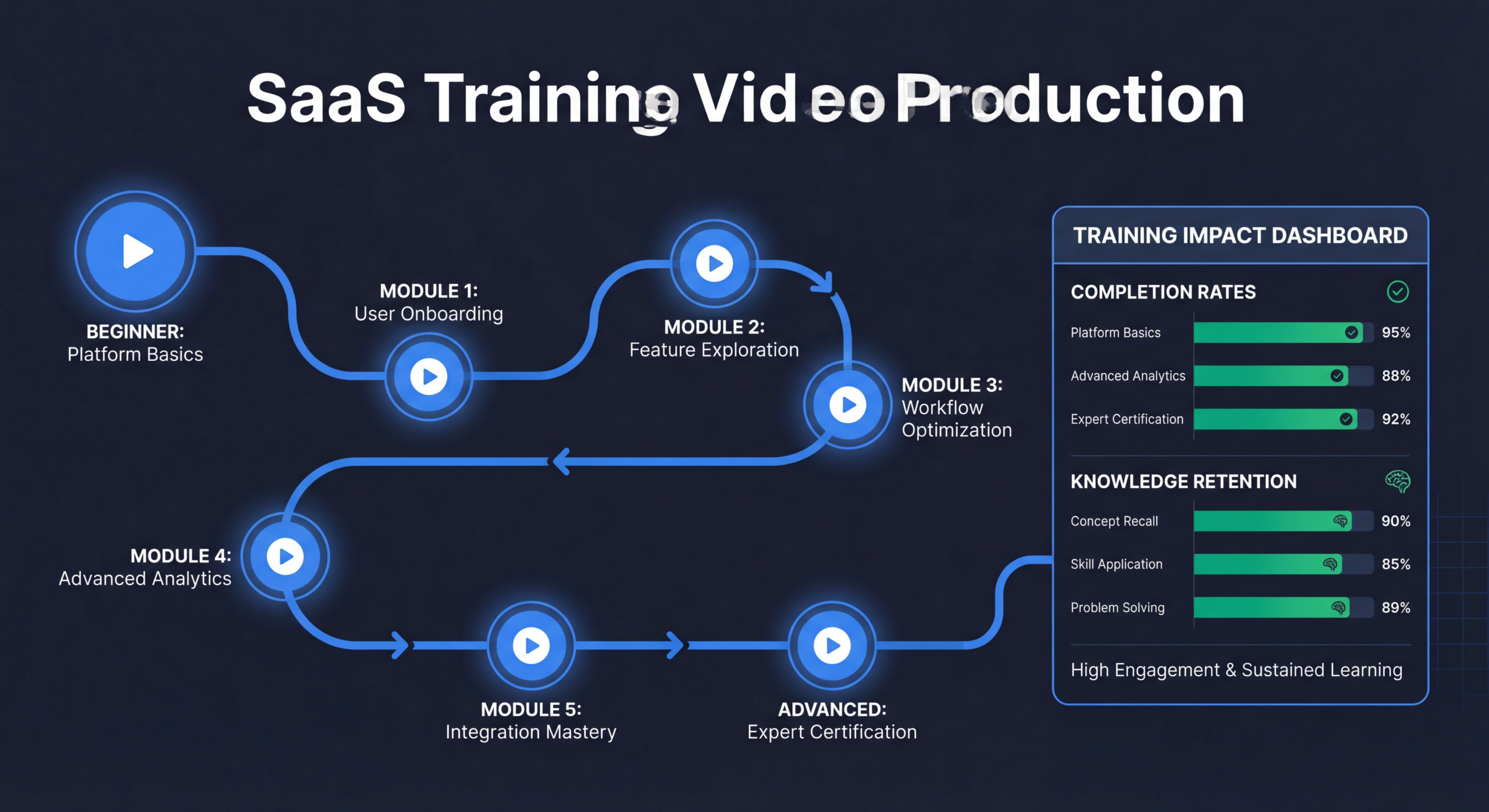
Create structured learning paths by role: "Marketing Manager Path," "Admin Setup Path," "Developer/API Path." Each path includes a curated sequence of videos in recommended order. Completion of a path means the user has the knowledge to be fully productive in their role.
Production Approach and Standards
Screen Recording Standards
- Resolution: 1920x1080 minimum, 4K preferred for zooming in post
- Cursor: Highlighted/enlarged cursor with click effects
- Zoom: Zoom to 150-200% on key interaction areas
- Pacing: Natural speed with slight acceleration (1.2x) during navigation between steps
- Annotations: Step numbers, callout boxes, and highlighted areas for key elements
Voiceover Guidelines
- Professional, friendly, and clear — not robotic or overly casual
- Consistent speaker across the series (builds familiarity)
- Script reviewed by PM for accuracy and CS for common question coverage
- Captions always included (many users watch without sound at work)
Modular Design
Build every video as a self-contained module that can be watched independently or as part of a learning path. Avoid "in the previous video, we covered..." references that create dependencies. Each video should state its goal, deliver the content, and confirm completion. This makes maintenance dramatically easier — when one feature changes, you re-record one video instead of a series.
Hosting, Delivery & Learning Paths
Hosting Options
| PLATFORM | BEST FOR | PRICE | KEY FEATURE |
|---|---|---|---|
| YouTube (unlisted) | Budget-friendly, easy embedding | Free | Universal player, no limits |
| Wistia | Analytics + in-app embedding | $19+/month | Engagement heatmaps, CTAs |
| Loom | Quick production + sharing | $12.50+/month | Easy recording + hosting |
| Skilljar / Northpass | Full learning management (LMS) | $500+/month | Courses, quizzes, certifications |
In-Product Delivery
Embed training videos directly in the product using help widgets (Intercom, Zendesk) or product tour tools (Appcues, Pendo). Contextual training — showing the right video at the right moment — is 3-5x more effective than a standalone knowledge base.
Help Center Integration
Create a dedicated training/academy section in your help center. Organize by learning paths with clear progression. Include video thumbnails, estimated completion times, and a table of contents for each path. Make it visually inviting — not a wall of text with embedded videos.
Measuring Training Video Impact
Engagement Metrics
- Video completion rates: Target 70%+ for videos under 5 minutes
- Learning path completion: % of users who finish an entire learning path
- Video plays per user: Average number of training videos watched in first 30 days
Product Impact Metrics
- Feature adoption post-training: % increase in feature usage after video consumption
- Time to proficiency: How quickly users reach full productivity with vs without training videos
- Support ticket volume: Track "how to" tickets before and after video deployment
Customer Health Metrics
- Health score correlation: Do accounts that engage with training videos have higher health scores?
- Retention rate: 90-day and annual retention for trained vs untrained users
- NPS by training engagement: NPS scores segmented by training video consumption
Scaling: Academy Programs & Certification
Building a Customer Academy
Once your training video library reaches 30+ videos, formalize it into a "Product Academy" with structured courses, progress tracking, and completion certificates. Use a lightweight LMS (Skilljar, Northpass, or even Teachable) to manage enrollment and progress.
Certification Programs
Certification creates multiple benefits: users invest more deeply in learning (sunk cost motivates completion), certified users have 40% higher retention rates (they've invested in the product), and certification badges create social proof that attracts new users. Structure: video courses → quizzes → hands-on projects → certification badge.
Community-Driven Content
As your academy grows, power users can contribute training content: recorded workflows, tips videos, and use case demos. This user-generated content supplements your official training library and builds community engagement.
Need a Professional Training Video Library?
We produce complete training video series for SaaS products — from getting started guides to advanced workflow tutorials. Consistent quality that scales your CS team's impact.
Book a Free Strategy Call See PricingFrequently Asked Questions
How many training videos does a SaaS product need?
Start with 10-15 covering the most frequently asked questions and repeated training topics. Expand to 30-50 over 6-12 months covering all major features, workflows, and admin tasks. Enterprise SaaS products with complex configurations often need 75-100+ videos for comprehensive coverage.
Should training videos replace live CSM training entirely?
No. Videos handle repetitive, standardized content delivery. Live CSM sessions should focus on strategic conversations, custom configuration advice, and relationship building — high-value activities that video can't replicate. The goal is to free up CSM time for higher-impact work, not eliminate the human connection.
What's the ideal length for training videos?
2-5 minutes for most training topics. Under 2 minutes for quick tips. Up to 8-10 minutes for complex workflow tutorials. Never exceed 10 minutes — split long topics into multiple videos. Research shows attention drops significantly after 6 minutes for instructional content.
How do we keep training videos up to date?
Build modular videos (one topic per video) so updates are surgical. Track which videos reference specific UI elements. Budget for quarterly maintenance: plan to update 3-5 videos per quarter. Assign a "video owner" (usually someone in product marketing or CS ops) responsible for flagging outdated content after each release.
Loom recordings vs professional production — which is better?
Loom works for quick, informal internal training and fast-turnaround updates. For customer-facing training that represents your brand, professional production is worth the investment. The quality difference affects perceived product quality. A compromise: record in Loom for speed, then have a video editing team polish the output with branded elements, clean audio, and captions.
📋 Video Production Workflow Template
Plan your training video production process with our workflow template — includes content planning, recording checklists, editing specs, and deployment timelines.
Download the Free Template →Training Videos Are Customer Success Infrastructure
Every training session your CS team delivers live is valuable — once. The same training delivered as a video is valuable thousands of times. Training videos scale your CS team's knowledge delivery infinitely, ensure consistent quality across every customer interaction, and create a permanent asset that improves customer outcomes year after year.
Start with the 10 most-repeated training topics. Produce them professionally. Deploy in-app and in your help center. Measure the impact on support tickets and feature adoption. Then expand systematically based on what your CS team and your customers need most.
Need help producing your training video library? See how our dedicated teams work or check our pricing for ongoing video production.
Looking for real examples across every training video format? Our training videos for employees guide covers 10 verified examples — from onboarding screencasts to animated compliance — with a production cost breakdown.
Ready to script your next training video? Our tutorial video script template gives you a copy-paste 6-section framework and five real SaaS examples to model — covering hook, context, walkthrough, troubleshooting, summary, and CTA.