
You've been producing 5 videos a month and the results are promising. Leadership wants more. The demand gen team needs more ad creative. Sales wants personalized videos. The product team wants launch content. Your social media manager is begging for short-form clips. Everyone wants more video, and they want it yesterday. The question isn't whether to scale video production—it's how to 10x output without 10x-ing your budget, burning out your team, or watching quality crater.
Scaling from 5 to 50 videos per month is not a linear problem. You can't just do what you're doing ten times. The workflows that work at 5 videos break at 15. The team structure that works at 15 breaks at 30. And the quality control that works when one person reviews everything breaks the moment volume exceeds their capacity. Each scaling milestone requires different systems, tools, and mindsets.
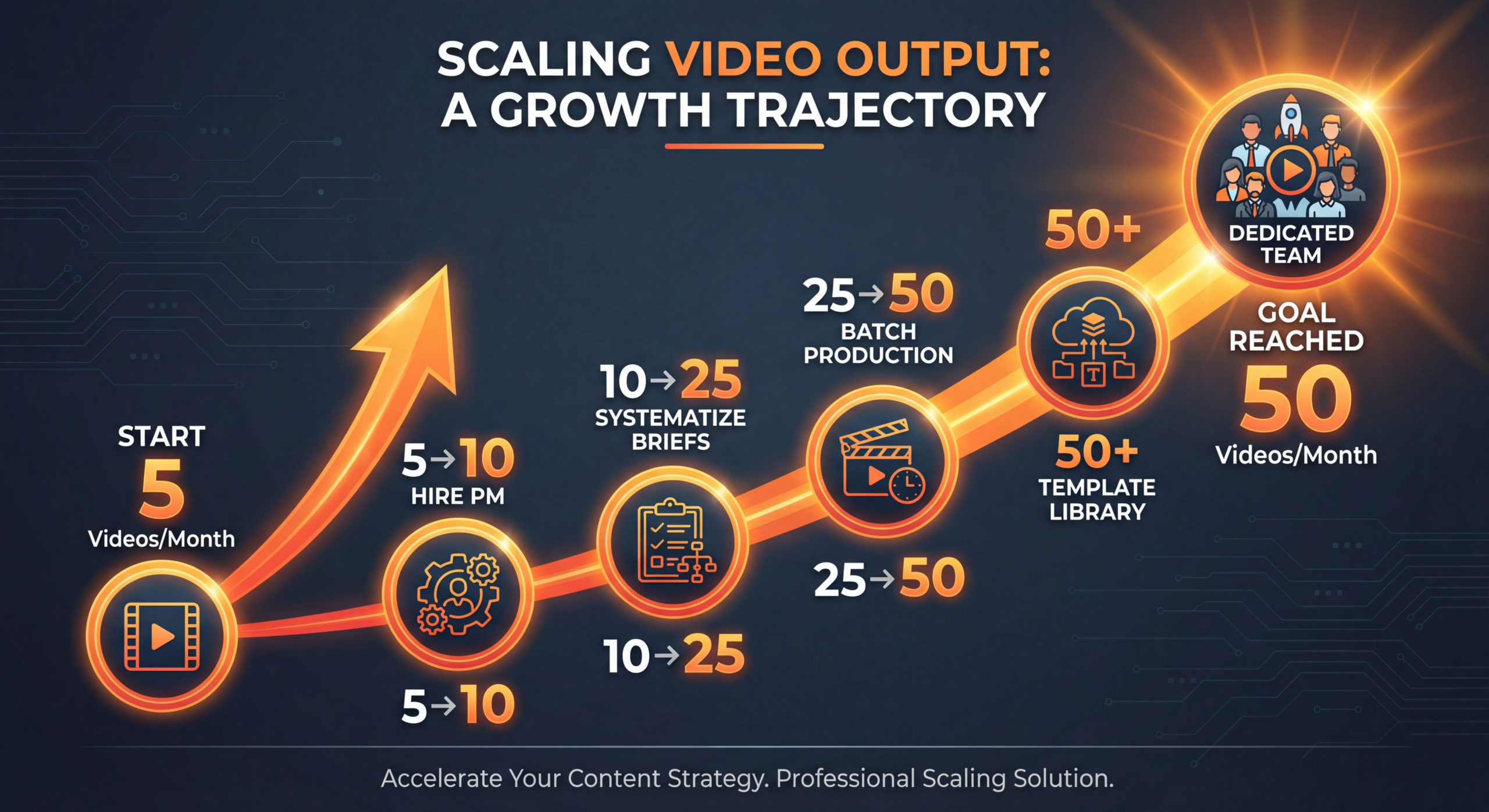
This guide provides the complete playbook for scaling video content production from 5 to 50 videos per month, including the specific milestones where things break and how to redesign your process at each stage.
Most companies try to scale video production by simply adding resources—more editors, more cameras, more shooting days. This approach fails because video production is a coordination-intensive activity. Every additional person, location, and deliverable adds complexity exponentially, not linearly.
Consider what goes into a single video: topic ideation, research, scripting, talent scheduling, location booking, equipment prep, filming, ingesting footage, editing, graphics creation, color correction, sound mixing, review, revisions, format adaptation, thumbnail creation, metadata, upload, and distribution. That's 18+ steps for one video. Now multiply by 50.
The companies that successfully scale video production don't just add people—they redesign their entire production operating system around four pillars: standardization, parallelization, automation, and quality gates.
At 5 videos per month, you can get by with hustle and talent. At 10, you need systems. This is the most important scaling milestone because the habits you build here compound through every subsequent stage.
Stop filming one video at a time. The biggest efficiency gain you can make at this stage is batching 3-5 recordings into a single session. Set up once, film multiple pieces, tear down once. This alone can double your output without increasing costs.
A typical batch recording day looks like:
Five videos recorded in half a day versus five separate sessions across five days. The time savings are enormous.
At this stage, standardize three things:
Move from ad-hoc scheduling to a production calendar that maps every video from ideation to publication. At 10 videos per month, a simple spreadsheet or Notion board works fine. Track: topic, status, assigned creator, recording date, edit deadline, review deadline, publish date.
Twenty videos per month is where most companies hit a wall. The informal processes that worked at 10 create chaos at 20. This stage is about replacing human coordination with systems and documentation.
Every repeatable process needs a standard operating procedure (SOP). Create detailed SOPs for:
These SOPs accomplish two critical things: they make quality consistent regardless of who does the work, and they allow you to onboard new team members or production partners quickly.
At 20 videos per month, you can't afford to produce videos sequentially—one video moving through all stages before the next one begins. Instead, implement parallel tracks:
This pipeline approach means every stage of production is active simultaneously, maximizing throughput without overwhelming any single stage.
If you haven't already, this is the stage where a video production partner becomes essential. A good partner absorbs the most time-intensive work (filming, editing, motion graphics) while your internal team focuses on strategy, scripting, and review. This is far more cost-effective than hiring 3-4 additional full-time employees.
At 20 videos per month, you're generating hundreds of files: raw footage, project files, exports, graphics, thumbnails, scripts, briefs. Without a centralized DAM system, you'll waste hours searching for files and risk publishing outdated versions. Tools like Frame.io, Dropbox Business, or Google Drive with strict folder structures solve this.
At this volume, generalists become a liability. You need specialists—people and partners who are exceptional at specific tasks rather than decent at everything.
Break your production team into specialized functions:
At 20-35 videos per month, AI tools become force multipliers:
The goal isn't to replace human creativity with AI. It's to offload repetitive tasks so your team can focus on the creative and strategic work that actually moves the needle.
Not every video needs the same production quality. At scale, define three quality tiers:
This tiered approach lets you allocate resources where they matter most while maintaining volume across the board.
Fifty videos per month is a content machine. At this point, you're producing more than two videos every working day. The operational challenges are significant, but so is the competitive advantage. Very few companies operate at this volume with consistent quality.
Think of your production operation as a supply chain with inputs, processes, and outputs. Map every input (topics, talent, scripts, equipment, footage) and ensure you have a reliable supply of each. The most common failure point at scale is running out of topics or talent—not running out of editing capacity.
Build a topic backlog of 50-100 validated ideas. Develop a stable of on-camera talent (6-10 people minimum) so no single person becomes a bottleneck. Create a content production calendar that extends 6-8 weeks into the future.
At 50 videos per month, no single person can review every video thoroughly. Implement automated and semi-automated quality checks:
At 50 videos per month, relying on a single production source is risky. Build a partner ecosystem:
At 50 videos per month, you're generating enough data to make intelligent production decisions. Build dashboards that track:
Use this data to continuously optimize your production mix. Double down on what works. Cut what doesn't. This feedback loop is what separates a content machine from a content factory.
How much does it cost to scale video production from 5 to 50 videos per month? Here's a realistic budget framework:
Notice something important: the cost per video actually decreases as you scale. At 5 videos per month, you're paying $1,000-$2,000 per video. At 50 videos, that drops to $740-$1,460 per video. That's the power of standardized systems, batch production, and efficient workflows. Scale creates cost advantage.
The most common mistake. Teams try to produce 30 videos using the same process they used for 10. The result is missed deadlines, inconsistent quality, burned-out team members, and eventually a retreat back to lower volume. Build the systems first, then increase volume gradually.
Your first instinct when you need more video content is to hire another editor or videographer. But full-time employees come with overhead (benefits, equipment, management time, office space) and limited flexibility. Production partners give you the same output with less overhead and the ability to scale up or down month to month. Hire when you have consistent, proven demand—not when you have a hypothesis about demand.
When scaling video production, applying the same level of effort to every video is the fastest path to burnout and budget overruns. Not every video deserves 40 hours of editing. Define your quality tiers and allocate resources accordingly. A social clip should take 1-2 hours of editing, not 8.
Producing 50 videos per month without measuring which ones work is like running 50 experiments per month without recording results. Implement a weekly review process where you analyze performance data and feed insights back into the production process. The best content machines are learning machines.
Scaling production without scaling distribution is pointless. If you're making 50 videos but only posting them to YouTube, you're leaving 80% of the value on the table. Every video should be distributed across multiple channels in format-appropriate versions. Video repurposing is not optional at scale—it's the entire point.
Here's the insight that makes 50 videos per month achievable: you don't need to record 50 separate videos. You need to record 8-12 primary videos and repurpose them into 50+ deliverables. The repurposing math:
Add in reformatted versions for different platforms (horizontal → vertical, long → short, video → audio), and you easily exceed 50 unique video assets per month from just 10 recording sessions. That's 2-3 recording sessions per week—completely manageable for a focused production operation.
The right technology stack makes 50 videos per month feel like 20. Here are the must-have tools at each scaling stage:
The #1 concern when scaling video production: "Won't quality suffer?" It doesn't have to—if you build quality into the system rather than relying on individual heroics.
Document every visual and editorial standard in detail:
Not everyone needs to review every video. Create a review matrix that assigns reviewers based on content type and quality tier:
Implement a quality scoring system where every published video receives a 1-10 quality score from the review team. Track average quality scores weekly. If quality dips below your threshold, slow down production and address the root cause before resuming volume goals.
For most companies, expect 6-12 months. The recommended pace: 5→10 in months 1-2 (build foundation), 10→20 in months 3-4 (systematize), 20→35 in months 5-7 (specialize), 35→50 in months 8-12 (optimize). Rushing this timeline usually results in quality problems that force you to scale back down.
Not necessarily dedicated full-time employees. You need 3-5 internal people focused on strategy, scripting, and review, plus 1-2 production partners handling the heavy lifting of filming, editing, and graphics. Many companies producing 50+ videos per month operate with leaner internal teams than you'd expect by leveraging partner ecosystems effectively.
Three things: a comprehensive video brand guide that documents every visual and editorial standard, template-based production that enforces consistency by design, and a quality scoring system with regular calibration. The brand guide is the constitution. Templates are the laws. Quality scoring is the enforcement mechanism.
It shifts at each stage. At 5→10 videos, it's recording capacity. At 10→20, it's editing throughput. At 20→35, it's coordination and review. At 35→50, it's creative freshness and talent availability. Anticipating the next bottleneck before you hit it is the key to smooth scaling.
Absolutely, but strategically. AI excels at transcription, caption generation, clip identification, metadata optimization, and first-draft scripting. AI is not yet reliable for creative decision-making, brand voice consistency, or quality judgment. Use AI to accelerate the 60% of production work that's mechanical, freeing humans for the 40% that requires creativity and judgment.
A hybrid model is typically most cost-effective. Internal team for strategy, scripting, and quality control (~40% of costs). Production partners for recording, editing, and graphics (~50% of costs). Tools and technology (~10% of costs). Pure in-house requires significant capital expenditure for equipment and carries more fixed-cost risk. Pure outsource sacrifices brand knowledge and strategic control.
Lead with data from your current 5-video output. Show the cost-per-lead, conversion lift, and sales cycle impact of existing video content, then project those numbers at 10x volume. The math usually speaks for itself: if 5 videos generate X leads at $Y cost-per-lead, 50 videos should generate significantly more at a lower per-unit cost due to production efficiencies.
The exact workflow document we use to help companies scale from 5 to 50 videos per month. Includes SOPs, quality checklists, and production calendar templates.
Download the Workflow Template → See PricingScaling video production from 5 to 50 videos per month is not about working harder—it's about building smarter systems at each growth stage. Standardize at 10, systematize at 20, specialize at 35, and optimize at 50. The companies that master this progression build an insurmountable content advantage that compounds every month. The content machine doesn't just produce videos. It produces competitive moats.
Ready to scale your video production? Book a free strategy call View Pricing and we'll map out a custom scaling plan based on your current output, team, and growth targets.