
Most SaaS companies create a video, post it once, and move on. That single-use approach wastes 90% of the content's potential value. Video repurposing for SaaS is the practice of systematically transforming one video into multiple content formats — clips, blog posts, social graphics, email content, and more — that reach different audiences on different platforms at different stages of the buyer journey.
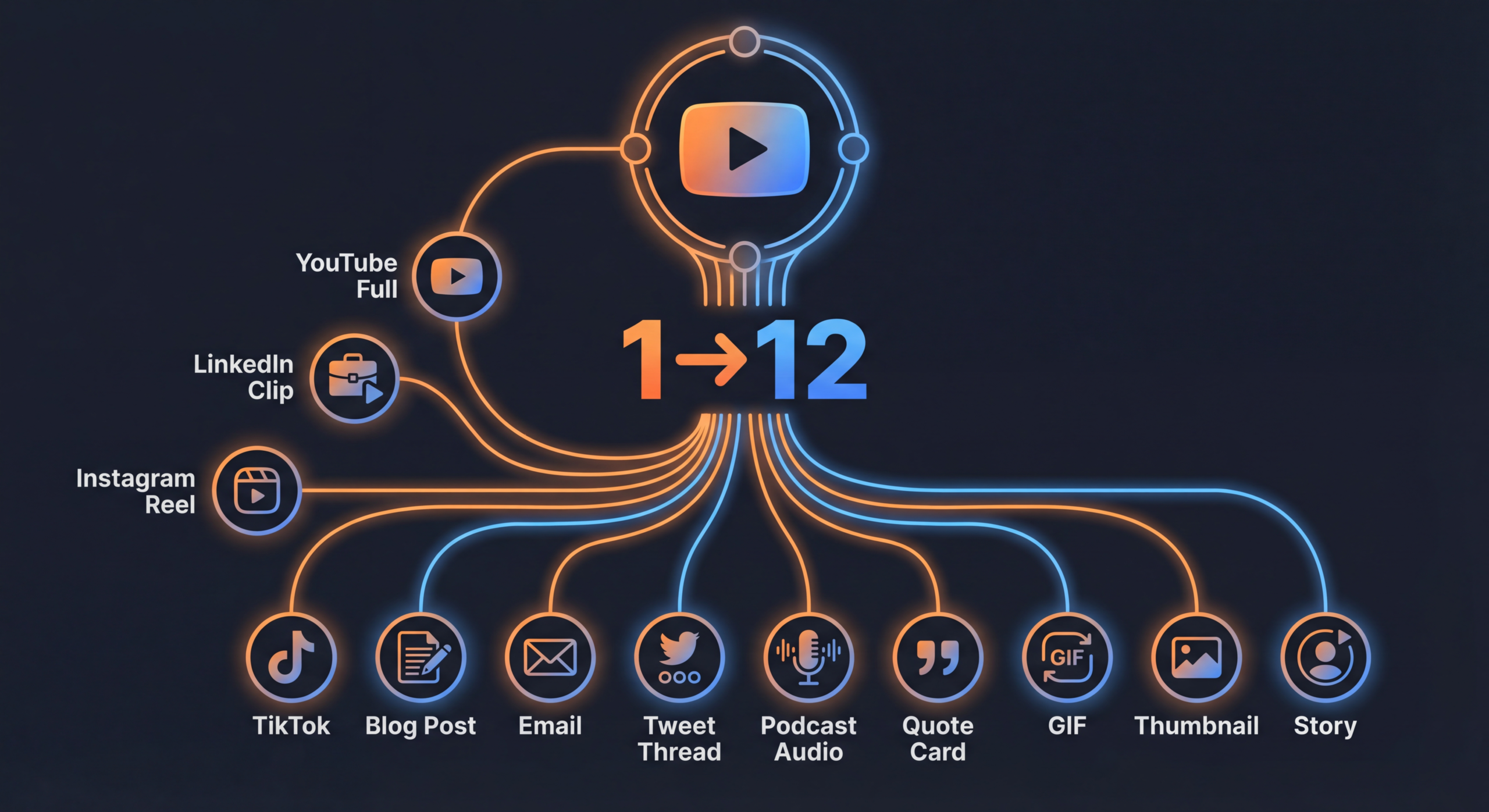
The math is compelling. One well-planned 15-minute video can realistically produce 12 or more distinct content pieces. If that original video costs $500—$2,000 to produce and edit, the per-piece cost drops to $40—$170 when you repurpose effectively. For SaaS companies operating with tight content marketing budgets and aggressive growth targets, this is the highest-leverage content strategy available.
This guide provides the complete framework: what to repurpose, how to repurpose it, which platforms to target, and how to build a repeatable system that turns every video into a content multiplication engine.
SaaS companies face a unique content marketing challenge: they need to educate complex audiences across long buying cycles, maintain a constant content presence across multiple platforms, and do it all with leaner teams than their content volume demands. Video repurposing directly solves all three problems.
B2B SaaS buyers consume an average of 13 pieces of content before engaging with a sales rep, according to Forrester research. That means your marketing team needs to produce a relentless stream of content — blog posts, social updates, email sequences, webinar content, product updates — just to stay in consideration.
Creating each piece from scratch is unsustainable. A single blog post takes 4–6 hours to write. A social media graphic takes 1–2 hours to design. A video takes 8–20 hours from concept to publish. But if you can repurpose one video into a blog post, 5 social clips, 3 social graphics, an email sequence, and a podcast episode, you've created 11 pieces of content from one production session.
Your prospects aren't on one platform. They're on LinkedIn during work hours, YouTube for research, Twitter for industry conversations, and email throughout the day. A single video on YouTube only reaches YouTube users who happen to search for (or get recommended) your content.
Repurposing puts your message in front of prospects wherever they are, in the format each platform rewards. LinkedIn rewards native video. Twitter rewards short clips with captions. Email rewards embedded GIFs and links. The message is the same; the delivery is optimized for each channel.
Repurposed content compounds over time. The blog post derived from your video captures search traffic for months. The social clips generate engagement for weeks. The email sequence nurtures leads for quarters. One video becomes an always-running content engine that continues delivering value long after the original publish date.
Here's the complete repurpose video content framework. For each video you create, systematically extract these 12 content pieces:
Let's break down each piece and how to create it efficiently.
This is your anchor content — the original, fully edited video. For SaaS, this is typically a 10–20 minute educational video, product walkthrough, customer interview, or thought leadership piece. Publish on YouTube for SEO and embed on your website or blog.
Extract the two strongest standalone moments from your full video and reformat as vertical Shorts (under 60 seconds). Look for:
Add dynamic captions (tools like Descript or OpusClip automate this), a hook in the first 2 seconds, and a clear end screen CTA pointing to the full video.
Create 30–90 second clips optimized for each platform's native format:
This is where video to blog conversion becomes a content marketing superpower. Transcribe the full video using AI transcription (Descript, Otter.ai, or Whisper), then restructure the transcript into a proper blog post:
A 15-minute video typically produces a 1,500—2,500 word blog post. With light editing and SEO optimization, this is a 2–3 hour task — far less than writing a blog post from scratch.
Extract the core insight from the video and write a LinkedIn text post (1,300 characters max for optimal visibility). Structure: hook ? context ? insight ? actionable takeaway → CTA to watch the full video. LinkedIn text posts often outperform video posts in reach, so use the text to drive traffic to the video.
Write a 150–300 word summary of the video's key insights for your email newsletter. Include a compelling thumbnail image or GIF that links to the full video. Segment the email based on the video's topic relevance to different audience segments.
Distill the video's main framework, steps, or comparison into a visual carousel (LinkedIn, Instagram) or infographic (blog, Pinterest). A video about "5 Mistakes in SaaS Onboarding" becomes a 6-slide carousel (cover + 5 mistake slides) that stands alone as a sharable asset.
Strip the audio from the video, clean it up, add an intro/outro, and publish as a podcast episode. If your video features a conversation (interview, panel, co-hosted discussion), the audio often works as a podcast with zero additional editing. For solo presentations, add brief audio transitions between sections.
Pull 3 standout quotes or statistics from the video and design them as shareable social graphics. Use consistent brand templates so they're instantly recognizable. These are perfect for Twitter, LinkedIn, and Instagram Stories — low-effort, high-engagement content.
Repurposing isn't just about cutting clips — it's about optimizing each piece for the platform's technical requirements and audience behavior. Here's the complete spec sheet:
Key insight: Burned-in captions are non-negotiable for social platforms. Up to 85% of social video is watched without sound. If your repurposed clips don't have captions, they're invisible to most of your audience.
One-off repurposing is good. A systematized repurposing workflow is transformative. Here's how to build one:
The biggest mistake in video repurposing SaaS teams make is treating repurposing as an afterthought. Instead, plan for it before you hit record:
After every video is published, run through a standardized checklist:
In a typical SaaS content team:
Timeline: All 12 pieces should be created within 5 business days of the original video's publish date. Front-load video clips (same day as video publish) and stagger written content over the following week.
Map repurposed pieces to a publishing calendar. Don't publish everything at once — stagger across 2–3 weeks to maximize reach and avoid audience fatigue. A single video recorded in January can fuel content through February.
Track which repurposed formats drive the most engagement, traffic, and pipeline for your specific audience. Many SaaS companies find that LinkedIn text posts and blog posts derived from video outperform the original video in terms of measurable business impact — the video is the content engine, but the repurposed formats are the distribution engine.
The right tools turn a manual, time-intensive process into a streamlined workflow. Here's the stack we recommend:
Here's how a mid-stage SaaS company (Series B, 80 employees, 3-person content team) implemented the 1–12 framework:
A 20-minute interview with a customer (CTO of a mid-market company) discussing how they used the product to reduce their data infrastructure costs by 40%. Total production cost: $800 (remote recording + professional editing).
Instead of repurposing individual videos ad hoc, organize your content around monthly pillars. Each pillar is a theme (e.g., "Data Security for SaaS") supported by:
This model creates topical authority (great for SEO), messaging consistency (great for brand), and campaign-level measurement (great for proving ROI).
Some videos have evergreen value — product tutorials, thought leadership, foundational educational content. These should be repurposed not just once at launch but periodically re-clipped, re-shared, and re-promoted. Set a quarterly review to identify evergreen videos worth re-entering the distribution cycle with fresh clips or updated blog posts.
Repurpose customer stories and product demos specifically for sales use:
Webinars are the single richest source of repurposable video content for SaaS. A 60-minute webinar can yield:
Total: 12–16 content pieces from one webinar recording.
Even SaaS teams that embrace repurposing often stumble on these common errors:
How long does it take to repurpose one video into 12 content pieces?
With a systematized workflow, expect 12–20 hours of total effort spread across your team. Video clipping and reformatting (outsourced to an editing company) takes 3–5 hours. Blog post writing takes 3–4 hours. Social posts, email copy, and quote graphics take 4–6 hours. Scheduling and publishing takes 2–3 hours. As your team builds muscle memory, this timeline shortens.
What type of video is best for repurposing?
Interviews and conversations are the richest repurposing sources — they naturally contain multiple standalone moments, quotable statements, and diverse perspectives. Educational content and webinars are close seconds. Highly produced brand films are harder to repurpose because they're designed as single narratives, not modular content.
Should I repurpose every video I create?
No. Repurpose videos that have strong educational value, compelling stories, or insights your audience cares about. Product update videos, internal announcements, and time-sensitive content often don't warrant the full 12-piece treatment. Apply the 1–12 framework to your top 30–50% of video content.
Can AI tools fully automate video repurposing?
AI tools like OpusClip and Descript significantly speed up clipping, transcription, and caption generation. But fully automated repurposing still produces mediocre results. AI is great for the first 70% (identifying clips, generating transcripts, drafting posts), but human editing is essential for the final 30% (ensuring quality, brand voice, and strategic alignment). Use AI to accelerate, not replace, your repurposing workflow.
How do I convince my team to invest in video repurposing?
Run a pilot. Take one existing video and repurpose it into 12 pieces. Track the additional reach, engagement, and (if possible) pipeline influence. Compare the cost per content piece ($40—$170 when repurposing vs. $500—$2,000+ when creating from scratch). The data almost always makes the case on its own.
What's the difference between repurposing and cross-posting?
Cross-posting is sharing the exact same content on multiple platforms. Repurposing is transforming content into native formats optimized for each platform. Cross-posting a horizontal YouTube video to Instagram is lazy and ineffective. Repurposing that video into a vertical Reel with burned-in captions and platform-native formatting is strategic and effective.
Download our complete repurposing matrix template — includes the 1–12 framework, platform specs, publishing calendar, and tracking dashboard. Built for SaaS content teams.
Get the Matrix → See PricingVideo repurposing for SaaS isn't a nice-to-have — it's the difference between a content strategy that struggles to keep up and one that consistently generates more reach, more engagement, and more pipeline from every dollar spent on video.
Start simple. Take your next video and commit to creating at least 5 repurposed pieces. Measure the results. Then scale to the full 12-piece framework. Within a quarter, you'll wonder how you ever published a video without repurposing it.
Need help building your repurposing workflow? Book a strategy call View Pricing and we'll map out a system tailored to your SaaS content operation.