How Do You Create Training Videos at Scale?
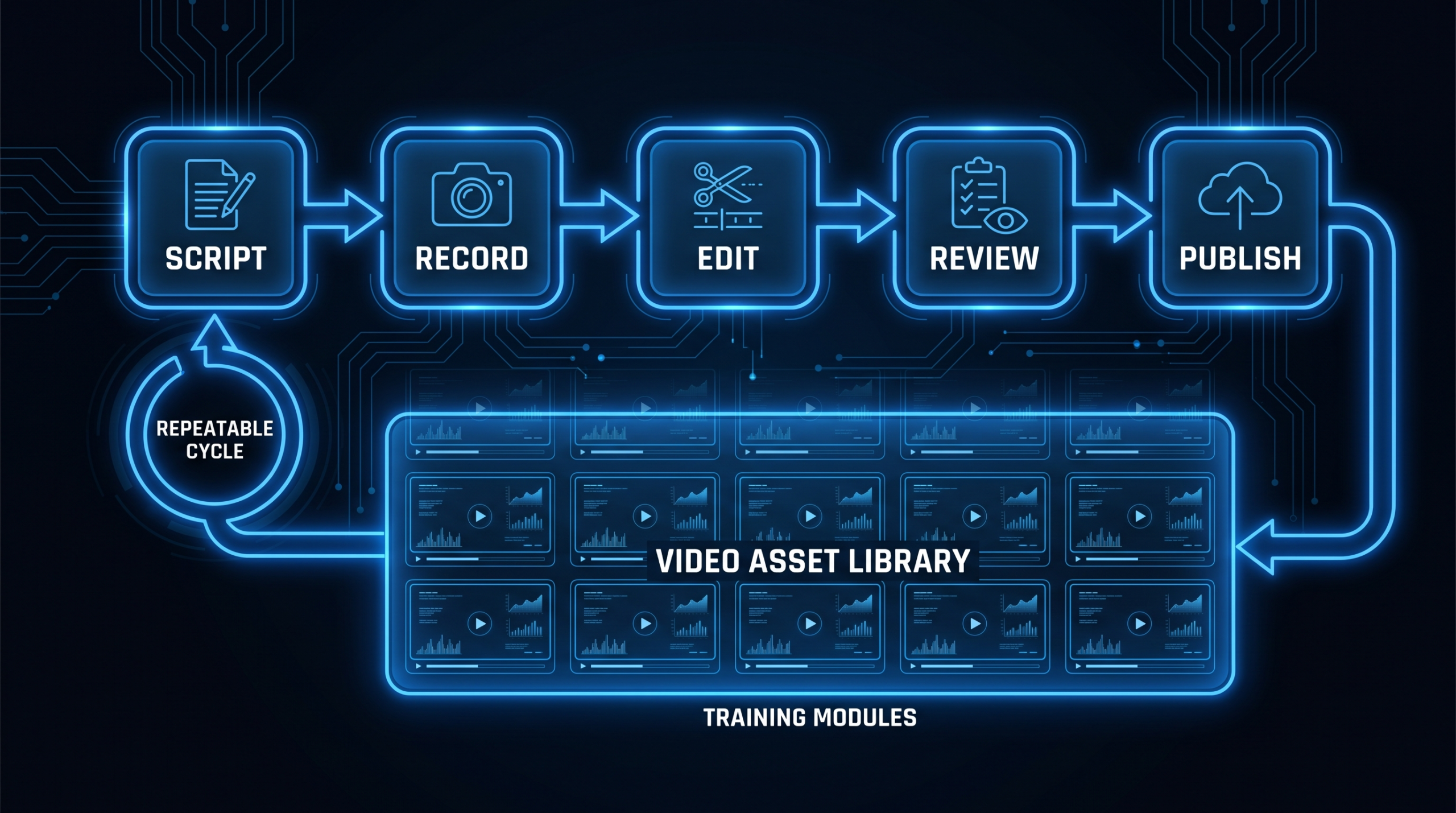
You create training videos at scale by turning each video into the output of a repeatable pipeline (a script template, a reusable visual kit, batched recording sessions and a fixed review loop) instead of treating every video as a separate project.
Key Takeaways
- Scale is a systems problem, not a talent problem. The teams that ship dozens of training videos a quarter standardise the script, the visual kit and the review path, then batch the work.
- Pick one or two formats and stay in them. Screencasts and slide-plus-voiceover videos are the cheapest to produce and update; reserve filmed or animated formats for the few topics that justify them.
- Subject-matter experts are your bottleneck. Capture their knowledge in a 20-to-30-minute recorded walkthrough and let someone else script and edit it.
- Plan for change on day one. Short, single-objective modules are the easiest to keep current.
- Cost is mostly editing hours, not cameras. Measure hours per finished minute on a five-video pilot before you commit to a headcount or a retainer.
Table of Contents
- What Does Creating Training Videos at Scale Actually Mean?
- Which Training Video Formats Scale Best?
- How Do You Build a Repeatable Training Video Pipeline?
- Who Do You Need on a Training Video Team?
- How Do You Get Subject-Matter Experts to Deliver Usable Source Material?
- Which Tools Fit Each Production Volume?
- How Do You Keep Dozens of Videos Visually Consistent?
- Captions, Localization and Accessibility Checklist
- How Do You Keep a Training Library Current?
- How Much Does Training Video Production Cost at Scale?
- When Should You Hand Production to a Dedicated Team?
- Frequently Asked Questions
What Does Creating Training Videos at Scale Actually Mean?
"At scale" means you are producing a library, not a video. Instead of one onboarding clip, you need a catalogue: customer product training, process training for support and sales, compliance modules, and refreshes whenever something changes.
That shift changes what matters. For a single video, the question is what looks best. For a library, the questions are how fast the next video ships, whether video number 40 looks like video number 4, and who updates the whole set when your UI changes in March. If you only need a handful of examples to learn from, our guide to training videos for employees covers formats and real examples. This article is the operating manual for the next step: running production as a system.
A practical test: if you ship more than one new or updated video a week, several experts contribute source material, or the same content must exist in more than one audience or language, a pipeline will pay for itself quickly.
Which Training Video Formats Scale Best?
The formats that scale best are the ones where changing a single sentence or screen does not force a re-shoot. Screencasts, slide-plus-voiceover and AI-presenter videos can be re-edited or re-rendered in minutes; filmed interviews and animation cannot. Match the format to how often the content will change, not to how impressive the result looks.
Training Video Formats Compared by Production Effort and Update Effort
| Format | Production effort | Cost to update | Best for |
|---|---|---|---|
| Screencast with voiceover | Low | Low (re-record a segment or swap a clip) | Software walkthroughs, internal tools, release training |
| Slides plus voiceover | Low | Low (edit a slide, re-record a line) | Policy, process and concept explanations |
| AI presenter or avatar | Low to medium | Low (edit the script and re-render) | High-volume, multi-language modules |
| Talking-head instructor video | Medium | Medium to high (re-record or patch with b-roll) | Leadership messages, sales coaching, culture content |
| 2D animated explainer | High | High (scene-level rework) | Compliance, safety and abstract concepts that stay stable |
| Filmed on-location or scenario video | High | Very high (re-shoot) | Hands-on safety, customer-service role-play |
A useful default: build roughly the bulk of your library in the first three rows, and spend filmed or animated budget only on the handful of topics where emotion, risk or complexity justify it. Canva's guide to making training videos walks through the same plan, record and edit sequence if you want a vendor-neutral refresher. Source checked October 24, 2026.
How Do You Build a Repeatable Training Video Pipeline?
You build a repeatable pipeline by defining the same seven stages for every video, assigning an owner to each stage, and writing down the exit condition that lets a video move to the next one. The stages below work for a team producing anywhere from five to several hundred videos.
The Seven-Stage Training Video Pipeline
| Stage | Owner | Output | Exit condition |
|---|---|---|---|
| 1. Brief | Training owner | One-page brief: audience, one learning objective, source material, target length | Objective fits in one sentence |
| 2. Source capture | SME | Recorded walkthrough or annotated slides | Every step in the objective is covered |
| 3. Script | Scriptwriter or training owner | Script in the standard template | SME signs off on accuracy |
| 4. Record or render | Presenter, voice talent or AI tool | Raw footage, audio or avatar render | Audio is clean, screen is legible |
| 5. Edit | Editor | Assembled video using the visual kit, with captions | Passes the style checklist |
| 6. Review | SME and training owner | Consolidated change list | One consolidated round, one revision, then approval |
| 7. Publish and log | LMS or enablement admin | Video live, version and review date logged | Entered in the content register |
Batch by stage, not by video
The single biggest throughput gain is batching. Instead of taking one video from brief to publish, run five briefs together, hold one recording session for all five scripts, and send the editor one folder. Context-switching is the hidden tax in video work, and batching removes most of it.
Cap the review loop
Uncontrolled review is where scaled programs stall. Set a rule that every video gets one consolidated feedback round from a single person who collects comments from stakeholders, followed by one revision. Anything beyond that is a new request, the same discipline we describe in how our dedicated-team process works,.
Keep a content register
A spreadsheet is enough: one row per video with title, objective, owner, version, publish date, next review date and source file location. When the product changes, you filter instead of searching memory.
Who Do You Need on a Training Video Team?
You need six roles, but they rarely need to be six people. At small volume one person can hold three of them; at large volume the editor role is usually the first one worth dedicating or outsourcing, because it consumes the most hours.
The roles are: a training owner who prioritises topics and owns the content register; a subject-matter expert who supplies source material and checks accuracy; a scriptwriter (often the training owner at low volume); a presenter or voice (an SME, a trainer or an AI voice); an editor who assembles, brands and captions; and a publisher who uploads and logs versions. Keep SME time short and scheduled, and expect the editor seat to be the first one worth dedicating or outsourcing.
If you are weighing whether the editor seat should sit inside the company, our comparison of how to outsource video editing walks through the trade-offs, and what video editing services include clarifies what you can hand over and what you still own.
How Do You Get Subject-Matter Experts to Deliver Usable Source Material?
You get usable material by making the SME's job a short conversation instead of a writing assignment. Experts rarely have time to write scripts, but they can talk through a process while sharing their screen, which yields accurate source material fast.
- Send the one-page brief first. The SME should know the audience and the single learning objective before the call.
- Record a 20-to-30-minute walkthrough. Screen share, think aloud, and cover mistakes people commonly make. This is raw material, not the final video.
- Let someone else script it. The scriptwriter turns the transcript into the template and sends back a short script, not a document to proofread for an hour.
- Ask for a yes/no accuracy check. Limit the SME review to "Is every step correct?" and "Is anything missing?" Style comments go to the training owner.
- Offer a standing weekly slot. A fixed 45-minute block beats ad hoc requests and makes batching possible.
Atlassian's guide to creating engaging training videos makes a related point from the tooling side: showing a process on screen can replace a lengthy written manual, which is exactly why the SME walkthrough works as a source format. Source checked October 24, 2026.
A script template that removes decisions
Every script can follow one skeleton: a one-line outcome hook ("By the end you will be able to approve an invoice"), a short context beat, the numbered steps, a common-mistake callout, and a one-line recap pointing to the next module. Writers and editors then know the shape of every video.
Which Tools Fit Each Production Volume?
The right toolset depends on volume and on how much polish your audience expects. Below roughly a few videos a month, a screen recorder and a basic editor are enough. As volume grows, the constraint shifts from capturing footage to editing, branding, captioning and version control, which is where templates, AI-assisted rendering or a dedicated editing team start to matter.
Toolset by Production Volume (Planning Guide)
| Volume | Typical setup | Where it breaks |
|---|---|---|
| A few videos per month | Screen recorder plus a template-based editor, one person doing everything | Quality varies by who recorded it |
| Roughly 10 to 30 per month | Shared script template, brand kit in the editor, a named editor, a content register | Editing becomes the bottleneck; reviews drift |
| 30 or more per month, or multi-language | AI presenter or voice for stable content, a dedicated editing team for the rest, an LMS with version control | Maintenance and localisation overhead |
Volume bands are planning thresholds, not benchmarks. Adjust them to your own pilot data.
For a quick walkthrough of a low-cost workflow that fits the first row of that table, this Riverside video covers the end-to-end basics (it also appears among the video results Google shows for this search):
Video: Riverside, YouTube. Embed verified October 24, 2026.
Where AI presenters fit
AI-presenter tools are most useful for high-volume, text-driven modules where the content changes often and you need several languages. SundaySky's guide to making training videos using AI describes the same use cases: automated scripting help, localisation and generated captions. Treat them as one format in your mix: scripting, review and version control are identical whether a person or a model speaks the words. Source checked October 24, 2026.
How Do You Keep Dozens of Videos Visually Consistent?
You keep videos consistent by making the style decisions once, in a reusable kit, and removing them from the per-video workflow. If every editor chooses fonts, intro length and music for each project, the library will look like it was made by twelve different companies.
A workable visual kit contains:
- Project templates for each format you use, with the intro, lower-third, caption style and outro already placed.
- Brand tokens: exact colours, fonts, logo lockups and safe margins.
- Screen-capture rules: resolution, cursor highlighting, redaction of personal data.
- A one-page style checklist that the editor ticks before sending to review.
The strongest consistency lever, though, is continuity of people. When the same editor or pod handles your account month after month, they absorb your conventions without being told twice. That is the main reason teams moving past a few videos a month look at a dedicated editor model instead of a rotating pool of freelancers, a point we expand on in our write-up of training video production for SaaS customer success.
Captions, Localization and Accessibility Checklist
Captions and accessibility should be built into the pipeline as an edit-stage requirement, not added later as a project. At scale, retrofitting hundreds of videos is far more expensive than adding a caption step to stage 5. The W3C Web Accessibility Initiative's guidance on captions and subtitles is the reference to point your team at. Source checked October 24, 2026.
- Captions on every video. Generate automatically, then proof the product names, acronyms and numbers a machine will misspell.
- Transcripts available for every module, stored with the source files.
- Localisation by script, not by re-edit. Keep a master script and translate that, then re-render or re-voice. Design templates with extra room for text expansion.
How Do You Keep a Training Library Current?
You keep a library current by making each video small enough to replace and by scheduling reviews before anyone complains. Long videos that cover five topics force a full re-edit whenever one topic changes. Modular videos let you swap a single module.
- One objective per video, so a change affects one file, not five.
- A review date on every video, logged in the content register.
- Tag each video with its product area, so a release triggers a targeted refresh.
- Keep editable project files beside each export, so updates take minutes, not a rebuild.
- Retire what has no owner; outdated videos erode trust in the whole library.
Track outcomes, not just output: LMS completion, assessment results and related support-ticket volume. Pick two before launch so you know which videos earn their upkeep.
How Much Does Training Video Production Cost at Scale?
Cost at scale is driven mainly by editing hours per finished minute, multiplied by how many finished minutes you produce each month, plus the cost of any SME time and tools. Camera and studio costs matter far less once most of your library is screencast and voiceover. There is no single reliable price per training video, so the honest approach is to measure your own numbers on a pilot.
Run a five-video pilot to get your own number
- Pick five topics of typical complexity and run them through the full pipeline.
- Log the real hours at each stage, including SME time and review time.
- Divide total hours by total finished minutes to get hours per finished minute.
- Multiply by the finished minutes you plan to produce per month, then compare to the options below.
The formula is simple: videos per month × average finished minutes (for example, 20 videos × 4 minutes = 80 finished minutes) × your pilot's hours per finished minute = monthly production hours, which you then compare to one editor's available hours. Borrow the structure, not another company's hours figure.
Common ways to staff the editing seat
Staffing Models for Training Video Editing
| Model | How it is priced | Strength | Watch out for |
|---|---|---|---|
| In-house editor | Salary plus software, equipment and management time | Close to the team and the product | Single point of failure; idle time in slow months |
| Freelancers | Per project or per hour; varies widely by region and seniority | Flexible for spikes | Style drift when editors rotate |
| AI presenter platforms | Usually a subscription priced by seats or generated minutes (check the vendor's pricing page) | Fast updates and languages | Still needs scripting, review and an editor for polish |
| Dedicated external team | Flat monthly retainer; VEC plans are Growth $5K, Core $9.5K and Scale $16K per month | Continuity and capacity without hiring | Needs a clear intake process on your side |
For market ranges by video type, see our breakdown of training video production cost, and for editing-only benchmarks use video editing cost per minute. VEC's own plans are published on the pricing page.
When Should You Hand Production to a Dedicated Team?
Hand production to a dedicated team when editing hours exceed what one person can reliably deliver, when quality keeps drifting between editors, or when your internal experts are spending more time on production logistics than on the subject itself. Until then, keep the pipeline in-house and invest in templates.
Typical signals: monthly finished minutes regularly exceed one editor's capacity, the backlog grows month over month, several editors cause visible style drift, or product and policy updates arrive faster than one person can turn them around.
Be clear about the division of labour before you outsource. At VEC, the team handles post-production: editing, motion graphics, captions and formatting from the raw recordings and scripts you supply. We do not shoot footage or produce 3D, and your SMEs still provide the source material and the accuracy sign-off. That boundary is what makes a dedicated team fast: your side supplies clean inputs through a single intake channel, and the team returns finished edits against the template.
If you want to see what that looks like in practice, our case studies show the kind of work we deliver for SaaS teams, and the earlier guide to onboarding video production for SaaS applies the same pipeline to customer onboarding content.
Frequently Asked Questions
How many training videos should we make first?
Start with a five-video pilot on topics of typical complexity. That is enough to prove the pipeline, measure your hours per finished minute and test the review loop before you commit budget to a full library.
Can AI presenters replace a human editor?
They can replace the presenter and speed up localisation, but not the pipeline around it. You still need scripts reviewed by an expert, a consistent visual template, captions checked for errors and a process for updates. Many teams use AI presenters for stable text-driven modules and a human editor for everything that needs polish.
What is the best way to measure whether training videos work?
Pick two or three outcome signals before launch, such as LMS completion, assessment results and related support-ticket volume, and review them per video. Views alone tell you little; changes in task success or support load tell you whether the video taught anything.
Should we outsource only the editing and keep recording in-house?
Often yes. Recording requires product and policy expertise your team already has, while editing is the most hours-intensive stage and the easiest to hand over. Define the handoff (raw recordings, approved script, brand kit) and keep one internal owner for review. See our how it works page for how that handoff runs.
Ready to Put Your Training Videos on a Pipeline?
Tell us your monthly volume and formats, and we will show you what a dedicated editing team would look like for your library.
Book a Free Strategy Call See Pricing