Training Video Production Cost: 2026 Guide
TL;DR — Key Numbers
- Screen-recorded tutorials: typically $300–$2,500 per finished video depending on length and complexity
- Animated explainer modules: commonly $3,000–$12,000 per video for professional motion graphics
- Live-action training modules: post-production alone ranges $1,500–$8,000 per video; full production runs $5,000–$25,000+
- Remote post-production retainer: $3,000–$12,000/month for ongoing training video programs
- Biggest cost driver: production format, not length — animation and live-action cost 5–10× more than screen recording per minute
Table of Contents
- What Does Training Video Production Cost?
- The 7 Cost Drivers That Move the Number
- Cost by Training Video Type
- Production Models: In-House vs. Freelance vs. Agency vs. Remote Post
- Budget Scenarios for Different Team Sizes
- LMS-Ready Deliverables, Localization, and Captioning
- How to Reduce Training Video Costs Without Cutting Quality
- Frequently Asked Questions
Training video budgets have a reputation for spiraling. An HR team budgets $10,000 for a compliance series, then discovers SCORM packaging costs extra. An L&D director approves a six-module onboarding program, then gets hit with captioning, localization, and LMS-compatibility fees they never anticipated.
This guide gives you the full picture — realistic cost ranges for every major training video type, the seven variables that move the number up or down, production model comparisons, and practical budget scenarios. Every figure here is a hedged market range, not a guaranteed quote — actual pricing depends on your vendor, market, and project scope.
What Does Training Video Production Cost?
Training video production cost depends almost entirely on three things: the production format, the length, and how much post-production is included. A straightforward screen-recorded product walkthrough can be turned around for $500 or less. A fully animated compliance course module with voiceover, captions, and SCORM packaging can run $8,000–$15,000 for a single 10-minute lesson.
Here's the honest short answer before we go deeper:
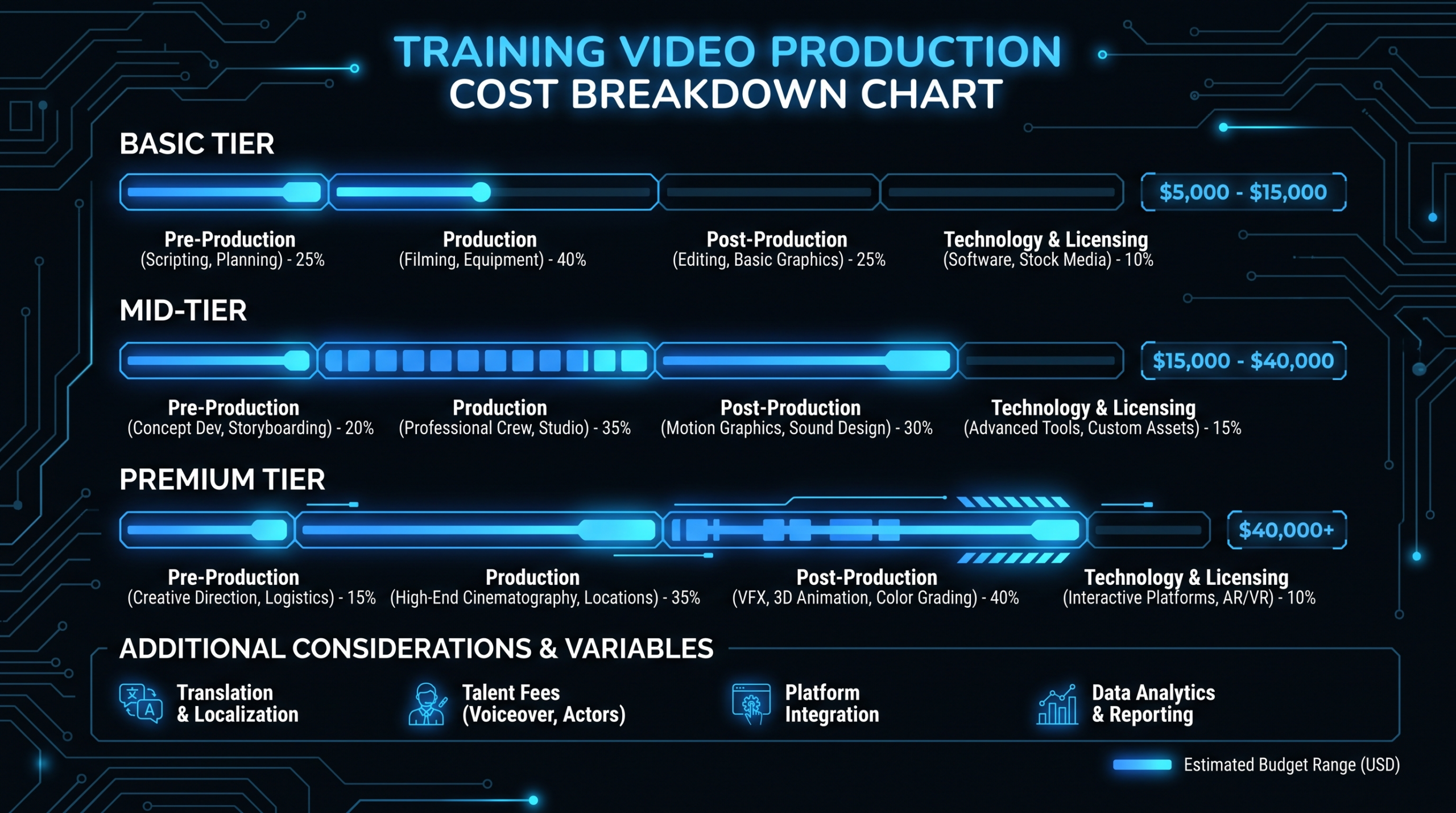
Training Video Cost at a Glance — 2026 Market Ranges
| Format | Typical Cost Per Video | What's Included |
|---|---|---|
| Screen-recorded tutorial (basic edit) | $300–$1,500 | Cuts, captions, simple lower thirds |
| Screen-recorded tutorial (polished) | $1,500–$4,000 | Motion graphics, branded intro/outro, professional VO |
| Animated explainer (2D motion graphics) | $3,000–$12,000 | Script, storyboard, animation, VO, music |
| Live-action training module (post only) | $1,500–$8,000 | Edit, color, audio, graphics, captions |
| Live-action training module (full production) | $5,000–$25,000+ | Filming, set, talent, full post-production |
| Compliance/regulatory video | $4,000–$18,000 | Script, legal review buffer, narration, accessibility |
| Customer education series (ongoing) | $1,500–$5,000 per episode | Template-driven, consistent branding, LMS-ready |
These ranges reflect what B2B organizations are commonly budgeting in 2026 — not the cheapest possible option and not top-tier broadcast quality. They represent the zone where you get professional output that works for corporate audiences without unnecessary production overhead.
The 7 Cost Drivers That Move the Number
Format sets the baseline, but these seven variables are what push a $3,000 estimate to $9,000 or pull a $12,000 quote down to $6,000.
1. Production Format
This is the single biggest lever. Screen recording costs a fraction of animation, which costs a fraction of live-action studio production. Teams that default to live-action for every training module are spending 5–10× more per minute than they need to for content that would perform equally well as a polished screen recording or motion graphic.
2. Duration
Longer videos cost more, but not linearly. Post-production is front-loaded — setup, templating, and rough cut work is similar whether the video is 3 minutes or 8 minutes. A 2-minute module and a 5-minute module from the same script source often cost 30–50% more, not 150% more. This makes batching longer content relatively more efficient than batching short clips.
3. Voiceover and Narration
Professional voiceover adds $300–$1,500 per video depending on length, language, and whether you're sourcing a marketplace voice, a dedicated voice talent, or a studio session with direction. Using internal narrators (a subject matter expert recording their own script) reduces this cost to near zero but adds quality variability and revision cycles.
4. Revision Rounds
Every additional revision round after the initial two costs time. For video, that time is expensive — re-editing a 6-minute training module after scripts change mid-production can cost as much as the original edit. The revision workflow you negotiate upfront determines whether your $5,000 video stays at $5,000 or drifts to $8,000.
5. Captions and Accessibility
Captions are often priced separately from the main edit. Professional caption creation (not auto-generated) adds $75–$250 per video depending on length and language. For regulated industries (healthcare, financial services, government contractors) where WCAG compliance is required, this isn't optional — budget for it upfront.
6. LMS Packaging and Delivery Format
A video file and an LMS-ready module are not the same thing. SCORM or xAPI packaging — adding quiz questions, completion tracking, and LMS-compatible metadata — typically adds $500–$2,000 per module over raw video production costs. If your organization uses Articulate 360, TechSmith Camtasia, or similar authoring tools, you may handle packaging in-house, but the video post-production still needs to be budgeted separately.
7. Localization and Multilingual Delivery
Translating and re-narrating a training video into a second language typically adds 60–80% of the original production cost per language. Subtitle-only localization is cheaper ($200–$600 per language per video) but doesn't deliver the same learner experience as full dubbing or on-screen-text adaptation.
Cost Driver Impact Summary
| Cost Driver | Typical Cost Impact | Can You Control It? |
|---|---|---|
| Format: screen recording → animation | +200–500% per video | Yes — match format to learning goal |
| Professional voiceover | +$300–$1,500 per video | Yes — internal VO if quality is acceptable |
| Each additional revision round | +$200–$800 per round | Yes — lock scripts before edit begins |
| Captions (professional) | +$75–$250 per video | No — required for accessibility compliance |
| SCORM/xAPI packaging | +$500–$2,000 per module | Partial — depends on your authoring stack |
| Localization (full dubbing, per language) | +60–80% of base cost | Yes — subtitle-only is a lower-cost option |
| Rush delivery (<5 business days) | +25–50% premium | Yes — plan timelines early |
Cost by Training Video Type
Training videos serve different learning objectives, and each type has its own production complexity — and therefore its own cost profile.
Employee Onboarding Videos
Onboarding series are among the most cost-efficient training investments because they're evergreen and reusable across large populations. A typical 5–8 module onboarding series (covering culture, tools, processes, and compliance) commonly runs $15,000–$50,000 for a professional production. Individual modules typically range $2,000–$8,000 each, depending on format and whether narration and branded graphics are included.
The ROI calculus is straightforward: if 200 employees complete onboarding per year and a polished video program reduces ramp time by even one week, the math works at almost any budget. The mistake most L&D teams make is overproducing onboarding videos with expensive live-action shoots — content that becomes outdated within 18 months. Screen recording plus motion graphics holds up longer and costs less to update.
Product Training Videos (SaaS Walkthroughs)
Product training videos — showing internal teams or customers how to use software — are the natural home for screen-recorded content. These benefit from high screen clarity, step-by-step narration, and professional callout graphics. Expect to budget $800–$3,500 per finished video for a polished screen recording with branded graphics and professional captions. Teams that record their own footage and outsource the edit typically spend $500–$1,500 per video in post-production costs alone.
SaaS companies running ongoing customer education programs at scale typically move to a post-production retainer — a monthly arrangement with a dedicated video team — to avoid per-video quoting overhead. See our guide to SaaS video production for how these programs are typically structured.
Customer Education Videos
Customer education content (how-to videos, feature announcements, onboarding flows for users) shares production characteristics with internal product training but has a higher quality bar — these are customer-facing. Expect to budget $1,500–$5,000 per video for a professional result. For teams producing these at velocity (10+ per quarter), the per-video cost drops significantly with a retainer arrangement compared to per-project pricing.
Compliance and Regulatory Training
Compliance videos carry hidden costs that catch teams off guard. Beyond standard production, compliance content often requires legal or HR review at multiple script stages, adding revision rounds that weren't budgeted. Accessibility requirements (captions, audio descriptions, WCAG compliance) are non-negotiable. And the content typically needs to be airtight on accuracy — which means more approval cycles.
Budget $5,000–$18,000 per compliance module for a professional result, with the upper end reserved for animated or mixed-media modules that need strong engagement to hold learner attention. Purely narrated screen recordings for compliance training can land at $3,000–$6,000 per module.
Screen-Recorded Tutorials
Screen recordings are the workhorse of technical training. When done well — with clean audio, professional callout graphics, and consistent pacing — they're indistinguishable from expensive live-action in terms of learning outcomes for software topics. The cost gap, however, is enormous.
A raw screen recording with basic editing runs $300–$800. Add professional voiceover, branded intro/outro, chapter markers, and captioning, and you're at $1,500–$3,500 per video. This is the most budget-efficient format for technical product training, SaaS onboarding, and tool-specific how-tos. For a detailed breakdown of what drives cost at this level, see our video editing cost per minute analysis.
Animation and Motion Graphics Modules
Animation is the highest-cost format but delivers unique value for abstract concepts, process visualization, and content that needs to be language-neutral for multi-market deployment. Professional 2D motion graphics animation runs $3,000–$12,000 for a 2–4 minute video. Character animation and 3D environments push costs to $15,000–$40,000 per video and are rarely justified for standard B2B training unless brand presentation is a primary goal.
Teams trying to add animation on a budget should look at hybrid approaches: motion graphics overlaid on screen recordings, or template-driven animation (PowerPoint-to-animation workflows via tools like Vyond) rather than fully custom production. These hybrid formats typically run $1,500–$4,000 per video while preserving much of the visual engagement benefit.
Live-Action Training Modules
Live-action is appropriate for interpersonal skills training, culture content, leadership messaging, and any scenario where human presence matters — sales coaching, customer service scenarios, manager training. Post-production for a live-action training module (assuming footage is already shot) typically runs $2,500–$8,000 per finished video. Full production — filming, location, talent, and post — commonly starts at $8,000 and scales to $25,000+ for multi-scene, scripted productions.
The biggest cost efficiency gain for live-action training is batching shoot days. Shooting 6–8 modules in a single two-day production run dramatically reduces the per-video cost of footage capture. Post-production can then be delivered in parallel, further reducing timeline and total cost.
Production Models: In-House vs. Freelance vs. Agency vs. Remote Post
The production model you choose affects not just cost but also quality consistency, turnaround time, and your team's workload. Here's an honest comparison of each approach for training video programs.
Production Model Comparison for Training Video Programs
| Model | Typical Monthly Cost | Best For | Main Trade-Off |
|---|---|---|---|
| In-house editor (hire) | $6,000–$9,000/mo (salary + overhead) | High-volume, high-consistency programs | Single point of failure; full overhead when not at capacity |
| Freelancer (per project) | $500–$3,000 per video | Occasional or one-off training modules | Quality varies; no brand consistency across projects |
| Full-service agency | $5,000–$25,000/mo | High-production-value series, compliance animation | High cost; often slow turnaround for L&D volume needs |
| Remote post-production team | $3,000–$12,000/mo (retainer) | Ongoing programs: record in-house, outsource editing | You own raw footage creation; team handles everything post |
The remote post-production model is particularly well-matched to L&D and customer success teams that already capture their own raw footage — screen recordings, recorded instructor sessions, Zoom captures — but don't have the editing resources to turn that footage into professional training content at scale. You record, they edit: it's a clean division of labor that keeps costs predictable and output consistent.
Video Editing Company operates on exactly this model. Teams on the Growth plan ($5K/month) typically deliver 8–12 training videos per month; the Core plan ($9.5K/month) handles 15–20 per month at higher complexity. The guarantee — double your video output in 90 days or month 4 is free — makes the ROI calculation straightforward for programs that are currently bottlenecked on post-production capacity. See the pricing page for plan details.
For teams evaluating whether to hire in-house or outsource, our outsourcing video editing guide walks through the decision framework in detail.
Budget Scenarios for Different Team Sizes
Abstract ranges are useful; concrete budget scenarios are more useful. Here's what three common organizational profiles are typically spending on training video production in 2026.
Scenario A: Small Team (10–30 employees, 8–15 training videos per year)
This is the HR generalist or operations manager who needs to professionalize onboarding and product training without a dedicated L&D function. Budget reality: $15,000–$40,000 per year, typically split between a 4–6 module onboarding series produced once and individual training videos created quarterly.
Best approach: per-project pricing with a single trusted freelancer or boutique agency. Consistency is manageable at this volume without a retainer. Screen recording for product/tool content; simple animation or professionally edited talking-head for culture and compliance.
Scenario B: Growth-Stage SaaS (50–200 employees, 2–4 training videos per month)
This is the Head of Customer Success or VP of Product who needs consistent customer education content — how-to series, feature launch walkthroughs, onboarding flows — alongside internal product training for sales and support teams. Budget reality: $5,000–$15,000/month, depending on format mix and whether the team is handling its own recording or outsourcing full production.
Best approach: a monthly post-production retainer with a dedicated team. At 2–4 videos per month, the overhead of per-project quoting and briefing new freelancers each time becomes the real cost — measured in L&D manager time, not just invoices. A retainer with a team that knows your product, brand, and LMS requirements cuts that overhead dramatically.
Scenario C: Enterprise L&D Program (500+ employees, 8–20 training videos per month)
This is the L&D Director or Chief People Officer running a formal training program across multiple departments and potentially multiple markets. Budget reality: $10,000–$35,000/month, with the lower end representing screen-recording-heavy programs and the upper end covering mixed live-action/animation programs with localization.
Best approach: dedicated post-production team with localization and accessibility services bundled in. At this volume, ad-hoc vendor relationships introduce unacceptable quality variance. The enterprise programs that run most efficiently treat video post-production like any other production infrastructure — contracted capacity, SLAs, and a clear revision workflow that doesn't require senior L&D manager involvement on every video.
Annual Budget Estimate by Scenario
| Scenario | Videos/Year | Estimated Annual Budget | Recommended Model |
|---|---|---|---|
| Small team (onboarding + quarterly updates) | 8–15 | $15,000–$40,000 | Per-project, freelancer or boutique agency |
| Growth-stage SaaS (customer education + internal) | 24–48 | $60,000–$120,000 | Post-production retainer |
| Enterprise L&D program (multi-format, multi-market) | 100–240 | $120,000–$420,000 | Dedicated team + localization services |
LMS-Ready Deliverables, Localization, and Captioning
The biggest hidden cost in training video production isn't the editing — it's the delivery layer. Getting a video file into a working LMS module involves several steps that many production vendors don't include in their standard quote.
LMS-Ready Deliverables and SCORM Packaging
Most LMS platforms (Cornerstone, Workday Learning, Docebo, TalentLMS, and others) can ingest standard MP4 files, but for tracking completion, quiz scores, and learner progress, you typically need SCORM 1.2, SCORM 2004, or xAPI (Tin Can) packages. Converting a finished video into a tracked LMS module requires either an authoring tool like Articulate Storyline or Rise, or a standalone SCORM wrapper.
If you're outsourcing video production, confirm upfront whether LMS packaging is included or priced separately. Most dedicated video teams deliver polished MP4s; SCORM packaging is typically either handled in-house by your L&D team or priced as a separate service at $500–$2,000 per module. For detailed information on authoring tool options, Articulate 360 is one of the most commonly used platforms for corporate e-learning packaging.
Captioning and Accessibility
Auto-generated captions (from tools like YouTube's auto-captions or Premiere Pro's speech-to-text) are a useful starting point but rarely accurate enough for professional training content without a human review pass. Professional captioning — human-reviewed, time-coded, formatted correctly — adds $1.00–$3.00 per minute of finished video, or roughly $75–$250 per standard training module.
For regulated industries, accurate captions aren't a nice-to-have — they're a compliance requirement. Budget for professional captioning on all compliance and HR training content. For general product training, a hybrid approach (auto-captions reviewed by someone familiar with the product's terminology) keeps costs reasonable.
Localization and Multilingual Programs
Localizing training video content for international markets typically involves three distinct workstreams: translation of the script, re-narration with local voice talent, and time-coded subtitle files in each target language. Full localization (translated script + dubbed voiceover) for a 5-minute training video commonly runs $800–$2,500 per language. Subtitle-only localization runs $150–$500 per language for the same video.
Teams managing training programs in 5+ languages should evaluate whether their production vendor has localization capabilities built in or whether they'll need a separate localization vendor. Coordinating these relationships adds significant project management overhead; bundling production and localization with one vendor (even at a small price premium) often saves more in management time than the cost difference.
Multi-Format Exports for Different Delivery Channels
The same training video often needs to be delivered in multiple formats: 16:9 for desktop LMS, 9:16 for mobile microlearning apps, square for internal Slack or Teams channels. Each format adaptation typically adds $150–$400 to the base production cost. For high-volume programs, establish a format package upfront — most production vendors will bundle this at a discount rather than treating each adaptation as a new project.
How to Reduce Training Video Costs Without Cutting Quality
Cost reduction in training video production usually comes from structural workflow decisions, not from squeezing vendor margins. Here's where the real savings are.
Record Raw, Outsource Post-Production
The most impactful cost-reduction strategy for SaaS and ops teams is separating footage capture from post-production. Subject matter experts, CS managers, and product leads can record high-quality raw content using tools like TechSmith Camtasia or Loom. A professional post-production team then handles everything from rough cut to final delivery — editing, graphics, audio cleanup, captions, and export.
This division of labor cuts costs in two ways: you're not paying production-rate billing for the footage capture phase, and your internal SMEs don't need production skills — just domain knowledge and a decent recording setup.
Batch Your Modules
Batching is the single most underused efficiency lever in training video production. When you brief a production team on 6 modules simultaneously instead of one at a time, you get: shared setup costs amortized across all modules, a consistent visual style established once and reused, and a smoother production cadence. Teams that move from ad-hoc single-module production to quarterly batches typically reduce their per-video cost by 20–35%.
Build and Reuse a Template System
The first video in any new training series is the most expensive because it establishes the visual language — intro/outro, lower thirds, font system, graphic style. Once a template is built and approved, every subsequent video in that series is 30–50% cheaper to produce. If you're working with an agency or dedicated team on a retainer, ask them to develop a branded template on day one and amortize that cost across the full program.
Lock Scripts Before Production Starts
More revision cycles are caused by script changes mid-production than by any other single factor. A 15-minute script revision meeting before editing begins costs nothing. The same change discovered after the rough cut is complete costs $200–$800 in re-editing time. L&D teams that implement a two-stage script approval process (SME review → L&D manager sign-off before footage is touched) dramatically reduce their total post-production spend.
Use Post-Production Retainers for Ongoing Programs
If your organization is producing 6+ training videos per quarter, per-project pricing is almost certainly costing you more than a retainer. The overhead of briefing new vendors, negotiating individual quotes, and onboarding editors to your brand standards on every project adds up — both in direct cost and in the L&D manager time spent coordinating. A dedicated team on a monthly retainer handles all of that operationally, and the per-video cost at retainer rates is commonly 25–40% lower than comparable per-project pricing at the same quality level.
Teams that are serious about scaling their training video program without proportionally scaling L&D headcount should evaluate what's included in a professional video editing service before pricing their next batch of modules — the scope difference between a basic edit and a fully-serviced production engagement is significant.
The teams that get the most out of their training video budget aren't necessarily spending more — they're spending more strategically. Batch production, template reuse, and outsourced post-production typically deliver higher quality at lower per-unit cost than one-off agency projects.
Frequently Asked Questions
How much does a single training video cost to produce professionally?
A single professionally produced training video typically costs $1,500–$8,000 depending on format, length, and what's included. Screen-recorded tutorials with professional editing and captions land at the lower end ($1,500–$3,500). Animated modules or polished live-action training content typically run $4,000–$15,000. The widest cost variable is production format — not length.
Is it cheaper to produce training videos in-house or outsource them?
It depends on volume. For fewer than 10 videos per year, outsourcing per-project is almost always cheaper than the fully loaded cost of an in-house editor (salary, benefits, software, equipment). Above 20–30 videos per year, a dedicated post-production arrangement often costs the same or less than in-house while delivering consistent professional quality and eliminating management overhead for recruitment, equipment, and coverage. The break-even point typically sits around 15–25 finished videos per year.
What does LMS-ready video production actually cost extra?
LMS-ready delivery — SCORM or xAPI packaging, quiz integration, completion tracking — typically adds $500–$2,000 per module on top of standard video production costs, depending on complexity. If you're using an authoring tool like Articulate or Lectora in-house, your team handles the packaging and the video production cost is the only external line item. If you need the vendor to deliver a fully packaged LMS module, confirm this is explicitly in scope before signing.
How much does training video localization cost per language?
Full localization — translated script, re-recorded voiceover in the target language, and updated on-screen text — typically costs $800–$2,500 per language per video, depending on duration and the languages involved. Subtitle-only localization runs $150–$500 per language per video and is a reasonable compromise for content where learner comprehension doesn't depend heavily on the audio-visual sync. Build localization costs into your upfront budget rather than treating them as optional add-ons after production.
What's the most cost-efficient training video format for SaaS product teams?
Screen-recorded tutorials with professional post-production are the most cost-efficient format for SaaS product training. They're faster to produce, easier to update when the product changes, and perform equivalently to live-action for software how-to content. A well-edited screen recording with professional voiceover, branded graphics, and captions typically costs $1,000–$3,000 — compared to $5,000–$15,000 for a comparable live-action or animated production. Reserve animation for concepts that genuinely require visualization, not for every module in the series.
Building a Training Video Program and Need a Cost Estimate?
VEC works with L&D, customer success, and operations teams to deliver professional training video content on a predictable monthly retainer — from screen-recorded tutorials to polished animated modules. Tell us your volume and format mix; we'll tell you which plan fits.
Book a Free Strategy Call See Pricing PlansNeed real examples to calibrate your quality benchmark before setting a budget? Our training videos for employees guide includes 10 real embedded examples across every major format — onboarding, compliance, animated explainer, and software tutorial.