B2B Product Launch Videos: 2026 Playbook
TL;DR
A strong B2B product launch video turns a release into a revenue event. This playbook covers the five video types that consistently drive B2B pipeline, what separates enterprise launches from consumer ones, real examples from companies including Slack, Notion, and Figma, a week-by-week production timeline, budget ranges by format, distribution sequencing that works across LinkedIn and email, and the ROI metrics that your revenue team will actually care about.
Table of Contents
- Why B2B Launch Videos Are Fundamentally Different
- The 5 B2B Product Launch Video Types
- Real B2B Launch Video Examples That Worked
- Production Timeline and Pre-Launch Checklist
- Budget Ranges by Video Type (2026)
- Where to Publish Your Launch Video
- Measuring Launch Video ROI
- When to Outsource Production
- FAQ
Why B2B Launch Videos Are Fundamentally Different
A B2B product launch video is not a consumer commercial. Your buyer watches it at their desk between three other browser tabs, has already read your release notes, and is silently evaluating whether this change justifies a renewal conversation or a budget ask. Emotion still matters in B2B — but it serves logic, not the other way around.
The core challenge is audience complexity. Consumer launches target one buyer making one decision. B2B launches routinely move through a six-to-twelve-person buying committee where the end user, the IT lead, procurement, and the CFO all want different things from the same asset. A great B2B product launch video resolves that tension: it gives each stakeholder exactly enough to forward it upward with confidence.
For a general overview of the full teaser-to-demo sequence, see our product launch video guide. This playbook focuses on the B2B-specific strategy layer — buying committee dynamics, distribution sequencing, and revenue-tied measurement — that generalist guides miss.
The B2B Attention Problem
B2B buyers watch launch videos differently than consumers. They skip to timestamps. They screenshot comparison tables. They forward specific clips into Slack channels. This means your video needs to be structured, not just produced. Every section must be independently useful — the kind of content each stakeholder can lift out of context and still understand clearly.
This is also why the standard 2–4 minute product tour format fails in B2B. A video that requires sequential viewing to make sense is a video most of your buying committee will never finish. The formats that consistently work in B2B are short, modular, and answer-first.
What B2B Buyers Actually Need to See
Based on what works across the SaaS categories that Video Editing Company serves, B2B buyers consistently respond to the same four elements:
- The "what changed and why it matters" hook — lead with the problem solved, not the feature built. No one buys a feature; they buy a better outcome.
- Workflow context — show the feature inside real daily use, not a pristine blank demo environment. The more your demo environment looks like the buyer's environment, the lower the translation cost for them.
- Quantified outcomes with honest hedging — ranges work ("teams on our platform typically reduce review cycles from days to hours"), invented precision doesn't. A hedged real-world benchmark is more credible than a round number sourced to nothing.
- Next-step clarity — end with one clear action. Not three options, one. Book a call, start a trial, or read the documentation — pick the one that fits your funnel stage.
The 5 B2B Product Launch Video Types
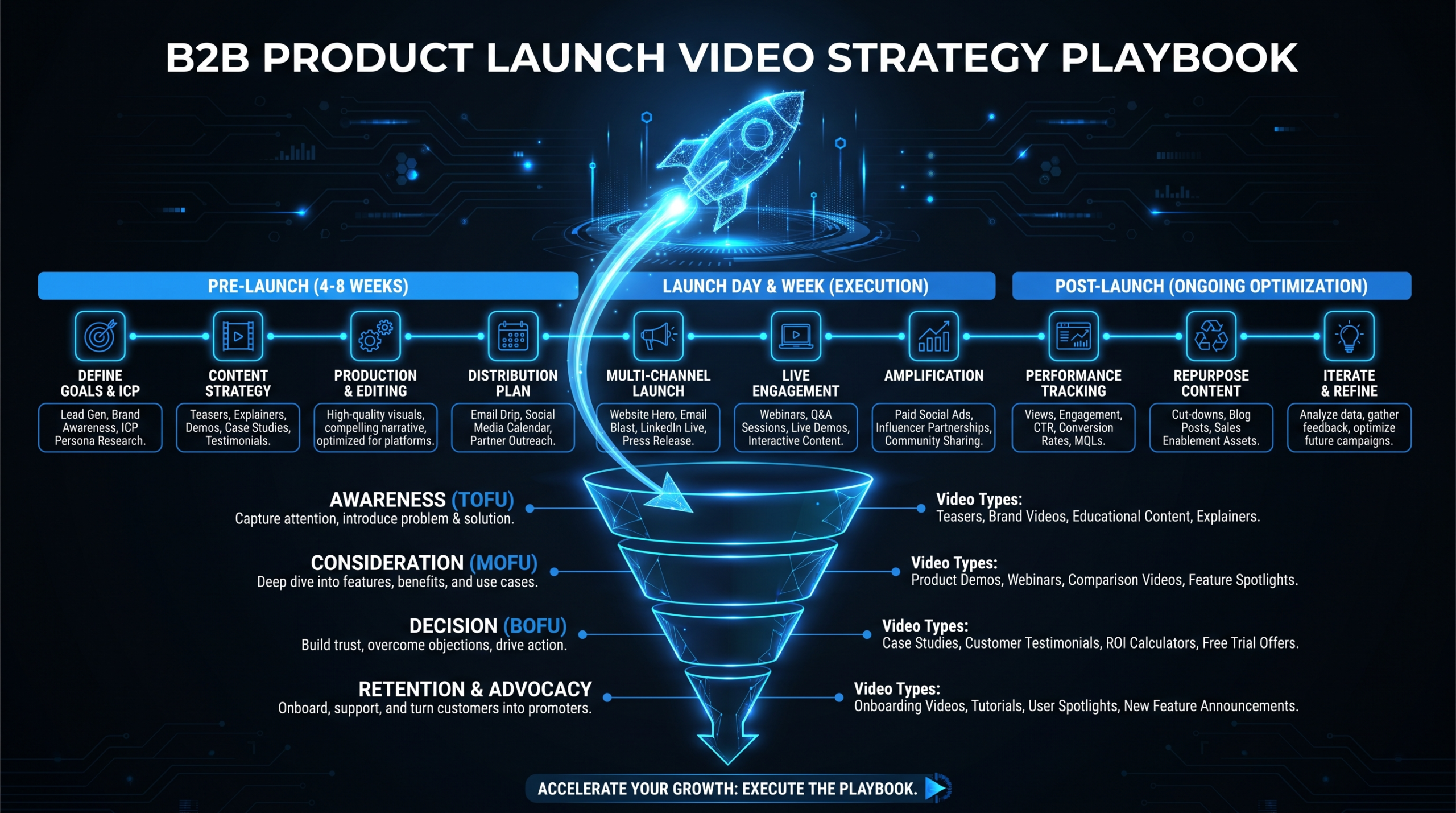
Effective B2B product launch video programs use multiple formats in sequence, not just one hero asset. Each format serves a different moment in the buyer journey. Using them in the right order compounds the launch's impact; using only one misses most of the buying committee.
| Video Type | Runtime | Funnel Stage | Primary Goal |
|---|---|---|---|
| Teaser / Pre-launch | 15–30 sec | Top of funnel | Create anticipation, capture opt-ins |
| Hero Launch Video | 60–90 sec | Launch day | Explain the "why" + drive trial sign-ups |
| Feature Walkthrough | 2–5 min | Consideration | Show full capability to evaluators |
| Customer Story | 60–120 sec | Decision | Prove real-world outcomes, reduce risk |
| Internal Enablement | 3–8 min | Post-launch | Equip Sales and CS to pitch the launch |
1. Teaser Videos (15–30 Seconds)
A teaser creates surface-area before you're ready to show everything. The goal isn't to explain — it's to get your audience to opt into hearing more. Effective teasers leave one deliberate question unanswered. The best ones use visual tension: show the problem getting worse, cut before the solution appears.
Distribute teasers 10–14 days before launch day via LinkedIn posts, email subject lines ("Something's coming — here's a 20-second preview"), and the top of your product changelog page. Measure email click-through on the teaser as a leading indicator of launch day engagement.
2. Hero Launch Videos (60–90 Seconds)
Your hero video is the launch day centerpiece. It must answer three questions in 90 seconds or less: what problem does this solve, how does it work at a surface level, and what should I do next. This is the asset that gets embedded in launch emails, posted natively to LinkedIn, and referenced in press releases.
Production quality matters more here than anywhere else in the launch sequence. If your hero video looks like an internal screen recording with ambient office noise, the launch reads as a minor update — even if the feature is a significant one. The hero video sets the perceived importance of everything that follows.
3. Feature Walkthroughs (2–5 Minutes)
Feature walkthroughs serve the buyer who has already bought into the "why" and now needs the "how." These live on your product page, in your help center, and on YouTube. They're rarely shared externally but earn a surprisingly long shelf life — teams reference them for 12–18 months after launch.
The key structural difference from a hero video: feature walkthroughs can go deep because the viewer is already sold on the concept. Don't compress — show the actual workflow. See our full guide to product demo video production for the complete walkthrough framework, including how to structure chapters for search and timestamp navigation.
4. Customer Story Videos (60–120 Seconds)
A launch-day customer story is the most powerful trust signal available in B2B, because it proves the new feature was valuable enough that a real customer agreed to go on record before general availability. Even a 60-second clip with hedged outcomes ("we moved from about three hours of prep down to 45 minutes") consistently outperforms polished marketing copy in the evaluation stage of a B2B sales cycle.
The production challenge: customer story videos require relationship access, legal sign-off, and scheduling — none of which can be compressed into a two-week window. If you want a customer story on launch day, the production timeline starts eight to ten weeks before the launch date.
5. Internal Enablement Videos (3–8 Minutes)
The most consistently underused launch asset in B2B. When Sales and CS teams don't know how to pitch a new feature, every customer conversation undersells the launch. An internal walkthrough that covers the value prop, the objections they'll hear, and where to find supporting materials directly improves pipeline velocity.
It also scales in a way that live kickoff calls don't: one 5-minute video reaches every rep, every new hire, and every partner — not just the people who attended the original training session. Internal enablement videos are also the least expensive format to produce, which makes them the highest-ROI item in the launch sequence when measured against pipeline impact per dollar spent.
Real B2B Launch Video Examples That Worked
The following examples illustrate what successful B2B product launch video strategies look like across different product categories and buying audiences. Each one took a distinct approach based on its market maturity and audience expectations.
For a broader look at what's working across categories and stages, see our roundup of B2B marketing video examples.
Slack's Original Launch Video (2013)
Slack launched with a short walkthrough video that focused entirely on communication problems being solved in real time — not on announcing features or celebrating engineering milestones. The video used a real-looking team environment, showed actual conversation threads, and ended with a direct call to sign up. It became a reference case in SaaS launch marketing because it ignored the standard product tour format entirely and led with pain recognition rather than capability demonstration.
Notion's Feature Announcement Model
Notion has built a repeatable launch video format: short (typically under 2 minutes), high visual quality, minimal voiceover for major feature launches. Their videos use on-screen text and ambient sound rather than narration. This works for their audience — knowledge workers who associate restraint with quality — but requires extremely tight editing to land the message without spoken explanation. It's a high-skill format that's frequently misread as a low-effort one.
Figma's Config Conference Launches
At their annual Config conference, Figma releases polished product launch videos for each major announcement. These run longer (3–5 minutes) because the audience is already engaged and technically sophisticated — they opted into a product conference, not a marketing channel. Figma uses live demo footage captured under controlled conditions and cuts with motion graphics callouts that highlight specific UI interactions. Worth studying for any SaaS team launching into a developer or designer audience where credibility is earned through precision, not polish.
HubSpot's Feature-Launch Email and Video Pairing
HubSpot consistently pairs launch emails with a thumbnail image that links to a full walkthrough video on a dedicated landing page — not an embedded player in the email itself. This matters because autoplay video in email depresses deliverability and blocks open tracking in many clients. The formula (thumbnail in email linking to hosted video on a landing page) gives them both a clean click-to-video metric and a landing page conversion event that ties to pipeline. It's the highest-converting B2B launch email structure for mid-market tools.
These examples connect directly to the patterns documented in our guide to feature announcement videos for SaaS — a format that rewards clarity and penalizes over-production regardless of company size.
Production Timeline and Pre-Launch Checklist
Most B2B marketing teams underestimate how long a launch video takes because they conflate recording time with production time. A polished 90-second hero video requires approximately four to five weeks from approved brief to final export — even with an experienced team. Teams that start production two weeks before launch day either ship a video that undersells the feature or delay the launch.
Weeks 1–2: Pre-Production
- Lock the brief: who is this video for, what single action do we want, what is the one message
- Script and approve all messaging through legal or compliance review if required
- Confirm the product is stable enough to record — this kills more timelines than any other single factor
- Cast internal talent or book external voiceover; align on on-camera presenters if needed
- Set up a controlled demo environment with clean data and representative workflows
- Gather all existing brand assets: logo files, brand kit, approved font stack, color palette
Week 3: Production
- Record all screen capture footage using a high-resolution tool such as Loom, Camtasia, or CleanShot at 2x resolution minimum
- Capture on-camera footage (talking heads, interview segments) in a controlled light environment
- Record voiceover tracks in a quiet environment — remove all HVAC noise and keyboard audio before sending to edit
- Capture b-roll if needed: team shots, office environment, product in context
Weeks 4–5: Post-Production and Review
- Rough cut assembly — pacing is the single most important variable in a 90-second B2B hero video
- Motion graphics pass: lower thirds, UI callouts, animated transitions between sections
- Color grade and audio mix — even a simple grade (contrast, saturation, color temperature) meaningfully increases perceived production quality
- One internal review round — not three; scope it tightly (messaging accuracy + legal only, not style preferences)
- Closed captions and chapter timestamps for YouTube and LinkedIn
- Export in required formats: 1080p for email/LinkedIn, 4K for YouTube and website, compressed square crop for Stories
Launch Day Checklist
- Hero video live on product page — click-to-play, not autoplay
- Teaser already distributed 10–14 days prior to this date
- Feature walkthrough accessible from in-app release notes or help center
- Internal enablement video sent to all Sales and CS 48 hours before public launch
- Launch email uses thumbnail link to video, not embedded player
- LinkedIn post uses native video upload (not YouTube link) for organic reach advantage
- Press kit includes teaser embed and full video link, not the full video attachment
- YouTube chapter timestamps added, description optimized for product name search
Budget Ranges by Video Type (2026)
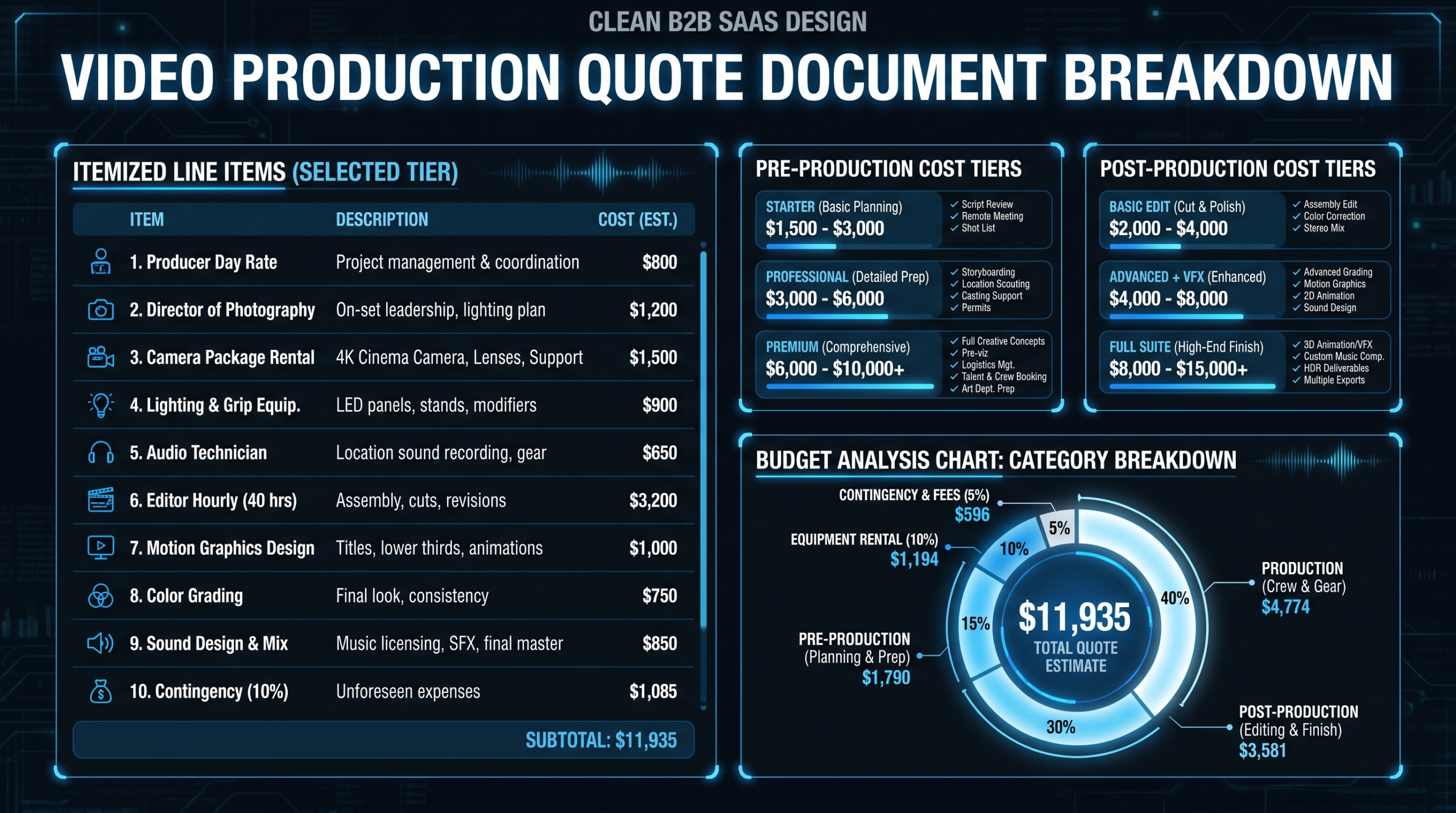
B2B launch video budgets vary significantly based on quality level, talent requirements, and post-production complexity. The ranges below reflect current market rates for B2B SaaS launch content — not broadcast or consumer campaigns.
| Video Type | In-House (Time + Tools) | Mid-Market Agency | Premium Production |
|---|---|---|---|
| Teaser (15–30 sec) | $0–$2K | $3K–$6K | $8K–$15K |
| Hero Video (60–90 sec) | $2K–$5K | $8K–$18K | $20K–$45K+ |
| Feature Walkthrough (2–5 min) | $500–$3K | $4K–$10K | $12K–$25K |
| Customer Story (60–120 sec) | $1K–$4K | $6K–$14K | $15K–$30K |
| Internal Enablement (3–8 min) | $200–$1.5K | $2K–$6K | $8K–$16K |
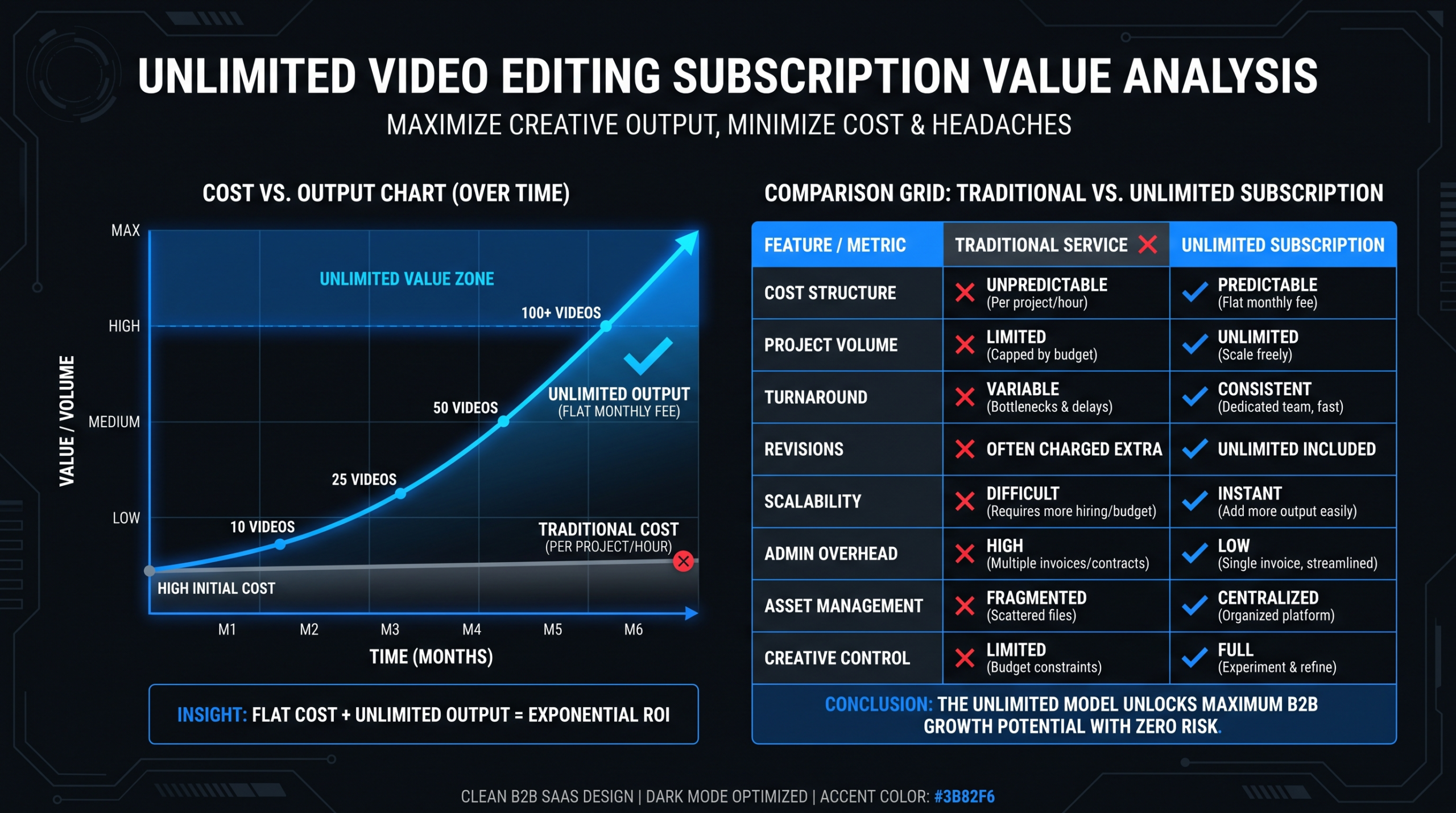
If you're launching quarterly or more frequently, a dedicated editing retainer is almost always more cost-effective than per-project pricing — you remove the negotiation overhead, keep a consistent team on your brand, and compound quality over time rather than starting from scratch at each launch. See our analysis of video production agency pricing models for a full breakdown of when retainers beat per-project billing.
At Video Editing Company, Series A–C SaaS teams on our Growth plan ($5K/month) commonly produce two to three launch assets per launch cycle — a hero video, a feature walkthrough, and an internal enablement piece — within that single retainer budget. Teams with higher launch frequency move to our Core ($9.5K/month) or Scale ($16K/month) plans once the Growth slot becomes the bottleneck.
Where to Publish Your B2B Product Launch Video
Distribution is where most B2B launch video strategies fall apart. Teams produce a strong hero video, post it to YouTube, and measure it against a consumer content benchmark. The result looks disappointing. The problem is almost never the video — it's the distribution sequence.
LinkedIn: Native Upload First
Native LinkedIn video uploads receive significantly more organic reach than YouTube links shared as posts in the LinkedIn feed. Upload the hero video file directly to LinkedIn, use the first line of the post to state the value explicitly (never "Excited to announce…"), and pin the post to your company page for the launch window. For founder-led brands, a personal post from the CEO or CPO consistently outperforms the company page in reach — and triggers more meaningful comments from the decision-maker audience.
Email: Thumbnail Plus Click
Never embed autoplay video in a launch email. Instead, use a static thumbnail image with a play button overlay that links to a hosted landing page or YouTube. This preserves deliverability — many corporate email clients block embedded video or flag it as a tracking risk — and gives you a clean click metric that identifies who is interested enough to leave their inbox.
The thumbnail itself matters. A frame from the video mid-gesture or mid-diagram outperforms a branded title card by a wide margin in most A/B tests, because it communicates that something is actually happening in the video, not just being announced.
In-Product Placement: Release Notes and Tooltips
For SaaS products, in-product placement is the most underused distribution channel in B2B launch strategy. A tooltip linking to the feature walkthrough from the new UI element, or a release notes page with the video embedded inline, catches users at the moment of first contact with the feature. Conversion from in-product placement is typically much higher than email because the buyer is already inside the product and the intent is active, not passive.
YouTube: For Search, Not Launch Day
YouTube is a search engine first and a social platform second. Your launch video will earn its YouTube impressions over 6–18 months as people search for your product name or the feature category keywords — not in the 48 hours after you publish it. Optimize the title, description, and chapter timestamps for keyword-qualified search, then let it compound. Measuring YouTube success at week one is the wrong benchmark entirely.
Press and Partner Distribution
If your launch includes a media moment — a funding announcement, a major partnership, or a significant platform upgrade — pitch journalists with the teaser embed (20 seconds), not the full video. A short clip is more likely to earn placement because the editor can evaluate it in 20 seconds. Include the full video link in the press kit for reference. Partners distributing the launch should receive the hero video, a short clip for social, and a pre-written post they can adapt — lower friction means higher amplification.
Measuring Launch Video ROI
Most teams track views. Views don't pay salaries. These metrics connect launch video performance to pipeline in a way your revenue team will find credible and useful — which is the only way video gets more budget at the next planning cycle.
Primary Metrics: Tie to Revenue Events
- Opportunity creation in the 30 days post-launch, broken out by source channel (email, LinkedIn, in-product, direct). This tells you where the video distribution actually moved pipeline, not just impressions.
- Demo book rate on the launch landing page, measured before and after the video was added. This is the cleanest single variable for video's conversion impact.
- Feature activation rate for users who watched the walkthrough versus those who didn't. If users who watch the feature walkthrough activate the feature at a meaningfully higher rate, the video is reducing onboarding friction — which ties directly to retention.
- Sales cycle length on deals where the hero video was shared. If reps sharing the video on outbound close faster, the video is functioning as a sales accelerant, not just marketing collateral.
Leading Indicators: Predict Future Revenue
- Watch-through rate past 50% of the hero video — below 40% indicates the hook is failing, not the production quality
- Comment and share rate on the LinkedIn native post — social proof that the message is resonating with the target audience, not just the algorithm
- Organic search impressions for the product name in the 60 days post-launch, as a proxy for launch awareness lift
- Internal enablement video completion rate across Sales and CS — below 60% means reps aren't watching it, and the field messaging problem is not solved
A B2B video that generates 10,000 views but zero qualified pipeline is a vanity metric. A video that generates 400 views and six discovery calls is a revenue asset. Measure accordingly.
According to Wyzowl's annual State of Video Marketing report, video marketers consistently rank increased product understanding as their top outcome metric — a leading indicator that maps directly to B2B conversion and retention. HubSpot's research on video landing pages supports the case for embedding launch videos on dedicated pages rather than relying solely on social distribution.
For a deeper framework on tying video output to SaaS funnel metrics, see our guide to SaaS video production strategy.
When to Outsource B2B Launch Video Production
The core question isn't whether to outsource — it's which parts to outsource and what kind of partner fits your launch cadence. In-house teams are usually better at capturing raw footage of their own product: they have inside access to the build environment, the subject matter experts, and the brand context. External teams are almost always better at making that footage look and sound like a launch video, not an internal demo.
Signs You Need Outside Production Help
- Your last three product videos had the same talking head in the same room with the same slides, and they all performed below benchmarks
- Post-production consistently takes longer than writing and recording combined, delaying launches
- Your video library has more than five assets but they look like they came from four different companies
- You're launching quarterly but shipping only one polished video per launch — the rest are screen recordings with stock music
- Your internal editor is good at what they do, but they're also doing graphic design, social, and web updates — video is never the priority
What to Keep In-House
- Messaging strategy — only your team knows what's true about the product and what the market is ready to hear at this moment
- Raw screen recordings — internal access to the build environment beats any external capture
- Customer relationships — if a customer story is in the launch sequence, your CS or marketing team owns the relationship and the timeline
- First-pass brief — the more specific the brief, the faster and cheaper the production
What a Dedicated Video Editing Team Delivers
A dedicated B2B video editing partner removes the post-production bottleneck without requiring you to rebuild your brand context from scratch at each launch. The best-fit model for SaaS teams launching frequently is a monthly video editing retainer rather than per-project billing. It eliminates negotiation overhead, keeps the same team on your brand assets, and enables the consistency that makes your video library feel like it came from one company.
Video Editing Company's dedicated teams for B2B SaaS handle the full post-production stack — edit, motion graphics, color, audio, captions, and format exports — while your internal team focuses on messaging and raw capture. Growth plan teams ($5K/month) routinely double their launch video output in the first 90 days. The guarantee is built into the model: double your video output in 90 days or month 4 is free.
FAQ
How long should a B2B product launch video be?
The hero launch video should be 60–90 seconds for maximum distribution reach across LinkedIn and email. Feature walkthroughs can run 2–5 minutes because they serve a different audience — buyers who are already sold on the "why" and now need the "how." Never combine both jobs in one video; you'll lose both audiences. The internal enablement video is the only format where 5–8 minutes is consistently appropriate.
What is the most common mistake in B2B product launch videos?
Leading with the feature instead of the problem it solves. B2B buyers do not buy features; they buy better outcomes for their team. Start with the pain point — the specific situation that was frustrating or slow before — then show the solution resolving it. Every B2B launch video that has earned outsized results follows this sequence without exception.
Do B2B launch videos need professional voiceover?
Not always. Authentic internal voices — a product manager, a founder, or a customer — can outperform polished voiceover for technical B2B audiences because they signal insider credibility rather than marketing distance. What matters more than the voice is the script: tight, plain-language, outcome-focused. If your narrator sounds like a press release, re-script before touching the audio production quality.
How far in advance should production start for a B2B launch video?
Six weeks minimum for a hero launch video, assuming the product is stable enough to record by the end of week two. Teams that start four weeks out typically either ship low-quality video or delay the launch date. If you're producing a customer story alongside the hero video, the customer production track needs to start 8–10 weeks before launch due to relationship, legal, and scheduling lead time.
Should B2B launch videos include pricing?
Only if your pricing is public and the video lives on a pricing-adjacent page where the viewer is already in evaluation mode. If the launch video is gated behind a demo request, avoid naming specific prices — it complicates the discovery conversation that follows. For products with transparent public pricing, including a price anchor ("Growth plans start at $5K/month") can accelerate self-selection and reduce unqualified pipeline before it enters your sales process. See our pricing page for an example of transparent retainer-model pricing in a B2B SaaS context.
Need a Dedicated B2B Video Editing Team?
Video Editing Company provides dedicated editing teams for Series A–C SaaS companies. Growth plan from $5K/month. We guarantee double your video output in 90 days — or month 4 is free.
Book a Free Strategy Call See Pricing Plans