Case Study Video Script: Structure + Template
A case study video script follows a five-act structure: hook → customer context → problem → solution → quantified results → CTA. The best ones open with the result ("We cut sales cycle time in half") and work backward to earn the claim. This post gives you the complete framework and a fill-in-the-blank template you can use today.
TL;DR
- Case study video scripts have five core acts: Hook, Context, Problem, Solution, Results + CTA.
- Open with the outcome, not the company background — viewers decide in the first 10 seconds whether to keep watching.
- Ideal length: 90–120 seconds for social/ads, 2–3 minutes for website/sales enablement.
- The script drives the edit — tight narration structure prevents the "talking heads" problem that kills retention.
- Use the fill-in-the-blank template in Section 3 directly; adapt length per platform (Section 4).
Table of Contents
- Why Case Study Videos Outperform Other Content Types
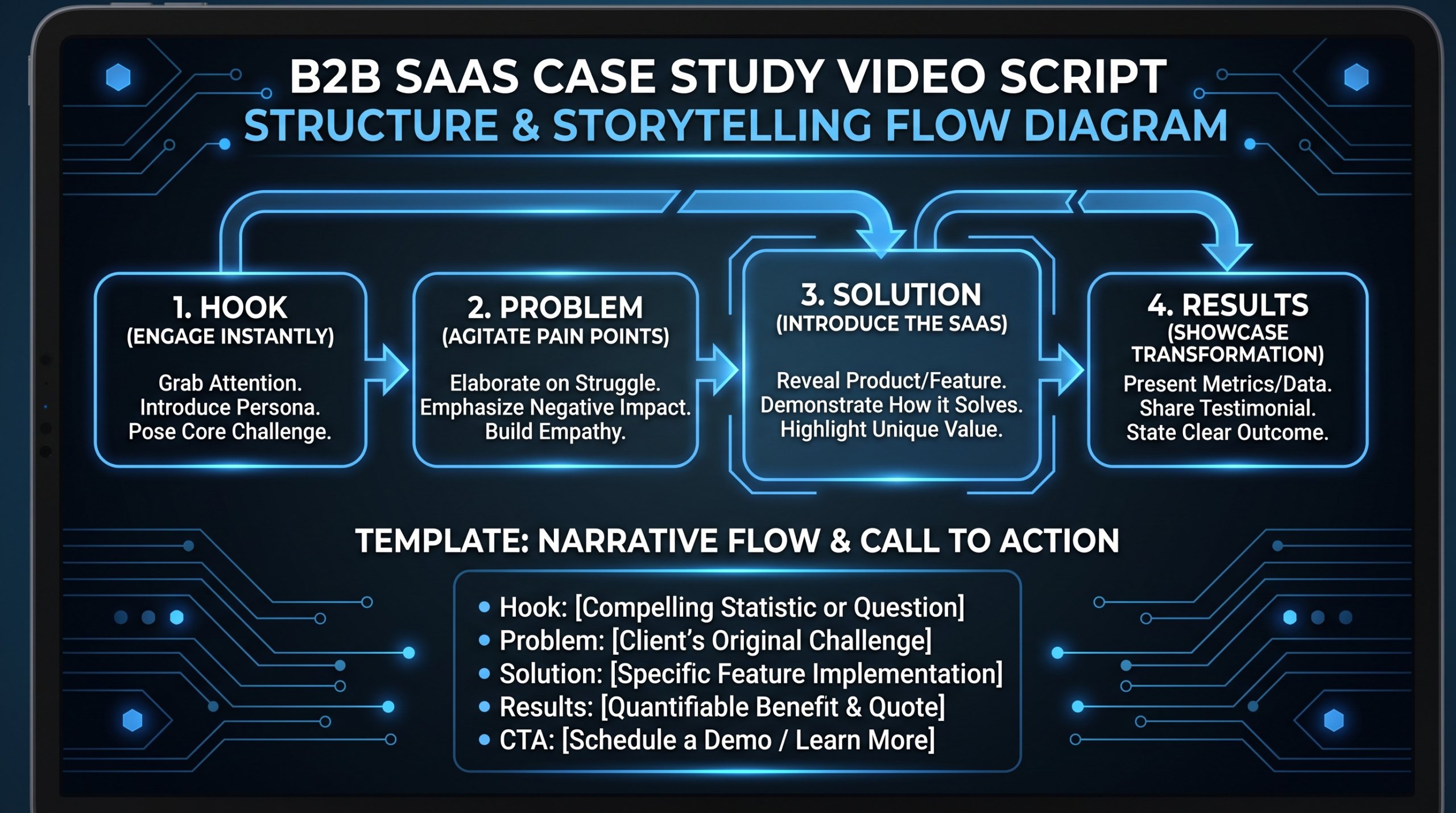
- The 5-Act Anatomy of a Case Study Video Script
- The Complete Fill-in-the-Blank Case Study Video Script Template
- Script Length and Format by Platform
- 5 Common Case Study Script Mistakes (and How to Fix Them)
- From Script to Screen: Production Notes for SaaS Teams
- FAQ
Why Case Study Videos Outperform Other Content Types
Case study videos consistently rank as one of the highest-converting content formats in B2B SaaS marketing. A prospect in evaluation mode trusts a peer's story over any claim you make about your own product — and video makes that story credible in ways a PDF never can. Facial expressions, tone of voice, and genuine emotion convey authenticity that written testimonials can't replicate.
The production investment pays off because the content is multi-purpose: the same shoot becomes a hero video for your homepage, a cut-down for LinkedIn ads, a sales deck asset, and a follow-up email attachment. A well-edited case study video can stay relevant for 12–18 months before the customer's metrics need refreshing.
Where most B2B teams fail is at the script stage. They brief their customer interview without a structured script, get 45 minutes of talking-head footage, and hand it to an editor with no narrative arc to work from. The editor patches together something passable, but the result is a 4-minute video that loses 70% of viewers by the 90-second mark because the story never clearly took shape.
The fix is structural: write the script before you film. Even a "documentary-style" case study video benefits from a tight story outline that tells the customer what to say and in what order. The interview captures the authentic emotion; the script ensures the story is there to capture.
"The script is the edit — it just hasn't been filmed yet. If you can't read the script aloud and feel momentum building, the finished video won't have it either."
For more on how to structure the overall production process, see our guide to SaaS video production — it covers the full pipeline from brief to delivery.
The 5-Act Anatomy of a Case Study Video Script
Every high-performing B2B case study video script shares the same underlying architecture. Five acts, each with a specific job to do.
Act 1: The Hook (0–10 seconds)
The hook's job is to stop the scroll. Open with the most impressive result or the most relatable problem — never with company introductions. "Hi, I'm Sarah, Head of Marketing at Acme Corp" is a 4-second skip prompt. "We reduced onboarding time by 60% in the first month" is a reason to stay.
Hook formats that work:
- Result-first: Lead with the metric. "We doubled our demo-to-close rate in 90 days."
- Problem-first: Open on the pain. "We were spending 3 hours per week manually formatting reports. That's 150 hours a year — gone."
- Quote-first: Start mid-sentence with the most compelling quote from the interview. Cut in before the customer explains context.
Act 2: Customer Context (10–25 seconds)
Now that you've earned attention, briefly establish who this customer is. Company type, size, industry, role — enough for the viewer to self-identify. "Acme Corp is a Series B HR tech company with 80 employees across four offices." Two sentences maximum. This section exists to let prospects think "that's my situation."
Act 3: The Problem (25–55 seconds)
The problem section is the emotional core of the script. It needs to be specific and visceral — not abstract. "Our processes were inefficient" is forgettable. "Every Monday morning, our team spent two hours manually pulling data from three different dashboards and pasting it into a spreadsheet. We'd still have errors by the time the report hit the CEO's desk" is something viewers feel.
Elements of a compelling problem section:
- What specific workflow or situation was broken?
- What was the downstream impact? (Time lost, revenue missed, team frustration)
- Why couldn't they fix it internally?
- What made this moment the breaking point?
Act 4: The Solution (55–90 seconds)
The solution section is not a product demo. It describes the experience of implementing and using your product, told from the customer's perspective. The emphasis is on what changed about their workflow and how the team felt — not feature lists.
The best solution narration touches three things: the decision moment (why they chose you), the onboarding experience (what it was like to get started), and the shift (what working life looks like now, post-adoption).
Act 5: Results + CTA (90–120 seconds)
Return to quantified outcomes. Specific metrics beat vague superlatives every time. "Our team saves about six hours per week" lands harder than "we're so much more efficient." Where possible, include two or three metrics across different dimensions: time saved, revenue impact, team adoption, customer satisfaction.
Close with a short, direct CTA that matches where this video will live. For website placement: "See how we can do the same for your team." For paid ads: "Book a 20-minute call." For sales enablement: no CTA needed — let the sales rep handle the next step.
Case Study Video Script: Act-by-Act Breakdown
| Act | Timecode (2-min video) | Primary Job | Key Question Answered |
|---|---|---|---|
| 1 — Hook | 0:00–0:10 | Stop the scroll | Why should I keep watching? |
| 2 — Context | 0:10–0:25 | Self-identification | Is this company like mine? |
| 3 — Problem | 0:25–0:55 | Emotional resonance | Do they understand my pain? |
| 4 — Solution | 0:55–1:30 | Credibility + hope | Could this work for me? |
| 5 — Results + CTA | 1:30–2:00 | Decision momentum | What's the next step? |
The Complete Fill-in-the-Blank Case Study Video Script Template
The template below is structured for a 90–120 second video — the sweet spot for website case studies and LinkedIn ads. Expand Act 3 and Act 4 for longer-form versions. Words in [brackets] are your fill-in placeholders.
ACT 1 — HOOK (0:00–0:08)
[CUSTOMER NAME + TITLE]: "We [specific result — e.g., 'cut our onboarding time by 40%'] in the first [timeframe — e.g., '60 days']. I didn't think that was possible."
DIRECTOR NOTE: Start mid-sentence or use a title card with the metric. Do not open on company logo.
ACT 2 — CONTEXT (0:08–0:20)
NARRATOR (VO) or ON-SCREEN TEXT: "[Company name] is a [industry/type] company with [size/scope]. [Customer name] leads the [team/department] — responsible for [key outcome their role drives]."
DIRECTOR NOTE: B-roll of office, product UI, or team in this section. Keep it short — 2 sentences max.
ACT 3 — THE PROBLEM (0:20–0:50)
[CUSTOMER]: "Before [your product/company name], we were [describe the specific broken workflow in concrete terms]. Every [time period], that meant [downstream consequence — time lost, revenue missed, errors made]. We tried [what they attempted to fix it] but [why it didn't work]. It was costing us [real cost — hours, money, headcount] and nobody had a good answer."
DIRECTOR NOTE: Cut to B-roll of the painful workflow (screen recording, spreadsheet, team meeting) as customer speaks.
ACT 4 — THE SOLUTION (0:50–1:25)
[CUSTOMER]: "We started working with [your company] in [month/year]. What stood out was [specific differentiator — not a feature, but an experience]. The onboarding was [describe in 1 sentence]. Within [timeframe], the team was [what changed about their daily workflow]. Now, instead of [old process], we [new process]."
DIRECTOR NOTE: Screen recordings of the product in use are powerful here. Mix with customer talking head for authenticity.
ACT 5 — RESULTS + CTA (1:25–2:00)
[CUSTOMER]: "Since switching, we've [result 1 with metric], [result 2 with metric], and [result 3 — team or qualitative]. Honestly, [1-sentence emotional closer — what this means to them personally or for the team]."
CTA (VO or title card): "[Action-specific CTA matched to video placement]"
DIRECTOR NOTE: Finish on the customer's face — a smile or confident look. Metric overlays (text on screen) boost impact of the results section.
Script Interview Questions That Feed the Template
The template works best when you brief your customer on what to cover before the interview. Share these questions in advance — you're not looking for memorized answers, just warmed-up thinking so they speak naturally on camera.
- Before working with us, what was the specific thing that wasn't working? Walk me through a typical Monday morning.
- What made you decide to look for a solution when you did?
- What made you choose us over other options you looked at?
- What was the first thing you noticed after we started working together?
- If you had to put a number on what's changed, what would it be?
- What would you tell someone at a similar company who's considering working with us?
These questions map directly to the five acts. Question 1 feeds Act 3. Questions 3–4 feed Act 4. Question 5 feeds Act 5. The interview becomes a structured story-gathering session, not an open-ended conversation you'll spend hours trying to edit into shape.
If you're working with a professional video team, share the script template and these questions together. A strong editor can reverse-engineer great footage from a clear story structure — but they can't manufacture the story from raw footage. For a detailed look at what goes into a full production engagement, visit our case studies page to see how other SaaS teams have approached this.
Script Length and Format by Platform
The five-act structure scales up and down. The template above is calibrated for 90–120 seconds. Here's how to adapt it by platform:
Case Study Video Script: Length Guide by Platform
| Platform / Use Case | Ideal Length | Script Adjustments | CTA Format |
|---|---|---|---|
| LinkedIn paid ad | 45–60 sec | Hook + Problem + single metric result; cut Context and Solution to 1 sentence each | Title card: "See how [Company] did it →" |
| YouTube pre-roll (skippable) | 15–30 sec (hook) + 90 sec (full) | First 5 seconds must stand alone as a hook; full version plays for those who don't skip | End-screen button to landing page |
| Website homepage hero | 60–90 sec | All 5 acts compressed; prioritize the metric and the emotional closer | Button overlay: "Book a Call" |
| Website dedicated case study page | 2–4 min | Full template; expand Act 3 and Act 4 with a second interview subject (e.g., end user + manager) | Inline CTA or no CTA (let the page carry it) |
| Sales enablement (email/deck) | 60–120 sec | Trim CTA; sales rep handles next step. Focus on the metric and the peer-identification moment | None or soft ("ask us how") |
| Conference / event screen | 90–120 sec | Closed captions mandatory (no audio in most conference environments); emphasize text overlays | URL or QR code on final frame |
Adjusting Word Count for Length
A general benchmark: spoken narration at a natural pace runs about 130–150 words per minute. A 90-second script is roughly 195–225 words of spoken content. A 2-minute script is 260–300 words. Use these as your script-trimming benchmarks — if the script reads long at pace, cut from Act 2 and Act 4 first, never from the hook or the results.
For SaaS product demo scripts specifically, the structure differs slightly — see our product demo video production guide for the adapted framework. Case study scripts prioritize customer voice; demo scripts prioritize feature clarity.
5 Common Case Study Script Mistakes (and How to Fix Them)
These are the recurring patterns that prevent case study videos from converting — and the specific fixes for each.
Mistake 1: Starting With Company Context
What it looks like: "Hi, I'm Sarah Chen, VP of Operations at Acme Corp. We're a B2B SaaS company founded in 2018, and we work with enterprise clients across North America…"
Why it fails: Viewers decide in 8 seconds whether to keep watching. Company context before a hook is an 8-second timer counting down to a skip.
The fix: Record the context section, but edit it to appear after the hook. Even in the interview, tell the customer: "I'll ask you to introduce yourself, but we'll likely use that later in the edit — first, let's get the results out on the table."
Mistake 2: Vague Problem Descriptions
What it looks like: "We had a lot of inefficiencies in our workflow and it was slowing us down."
Why it fails: Abstract pain doesn't create empathy. Viewers can't picture themselves in the story.
The fix: In the pre-interview briefing, ask for a "Monday morning walkthrough." Make them describe a specific moment, not a general situation. "Walk me through what you actually did to get that report ready" yields specific, visual, quotable content.
Mistake 3: Turning the Solution Section Into a Feature List
What it looks like: "The platform's automated workflow engine, combined with its real-time dashboard and Slack integration, allowed us to…"
Why it fails: Feature language puts the product at the center instead of the customer. It reads like a press release, not a story.
The fix: Reframe every feature mention as a workflow change. Instead of "the automated workflow engine," ask: "What does a Tuesday morning look like now compared to before?" The customer's answer describes the feature's value in human terms.
Mistake 4: Unverifiable or Vague Metrics
What it looks like: "We've seen massive improvements across the board" or "We're saving a ton of time."
Why it fails: Vague metrics signal that the customer didn't actually track the impact — or that the numbers weren't impressive enough to share. Either reading undermines credibility.
The fix: Ask the customer to bring specific numbers to the interview. "Can you put a time or dollar figure on what changed?" If they genuinely don't know, coach them: "Roughly, if you had to estimate how many hours per week you saved, what would you guess?" An honest estimate ("probably 5–6 hours per week") beats a vague superlative every time.
Mistake 5: No Clear CTA or Wrong CTA for the Placement
What it looks like: A 2-minute case study video embedded in a sales email that ends with "Learn more about our Enterprise plan."
Why it fails: The CTA doesn't match where the prospect is in the journey or what the sales rep wants them to do next.
The fix: Script the CTA last, after you know exactly where the video will live. A video in a cold LinkedIn ad needs a different CTA than one attached to a sales proposal. Consider producing two versions of the final 15 seconds with different CTAs — the edit cost is low, the impact on conversion is high.
Understanding how professional video editing services work helps you brief your post-production team to nail these moments — the hook cut, the metric overlay, the CTA card — in the edit.
From Script to Screen: Production Notes for SaaS Teams
A strong case study video script is the foundation, but the edit is where the story gets told. Here's what to consider as the script moves into production.
Interview Setup
Film in a quiet, well-lit space that reflects the customer's professional context — their office, a meeting room, or even a clean home office works. Avoid busy backgrounds and HVAC noise. If you're producing remotely, record at 4K via Zoom or Riverside.fm and record locally on both ends — the compression artifacts on cloud recordings are more forgiving at 4K.
Capture more than you think you need. A 15-minute interview for a 90-second video gives your editor enough to work with. Less than 5 minutes of footage and the editor is forced to use takes that don't fully land.
B-Roll That Actually Helps the Editor
The difference between a good case study video and a great one is almost always B-roll quality. The script identifies what B-roll you need — capture it deliberately, not as an afterthought. For each act:
- Act 2 (Context): Office environment, team at work, company logo/product in context.
- Act 3 (Problem): The old workflow — spreadsheets, manual processes, team looking frustrated. Recreate this if needed; it's worth it.
- Act 4 (Solution): Screen recordings of the product UI, team using the product, communication tools (Slack, Zoom) if relevant.
- Act 5 (Results): Charts, dashboards showing the metrics, team looking satisfied, customer smiling after delivering the result line.
Briefing Your Editor
Share the script template alongside the footage, not just the raw clips. Mark which interview takes correspond to which script act. An editor who understands the intended story arc will make structural decisions that serve the narrative — not just technical decisions that serve the footage.
If you're outsourcing editing, the brief should include: the five-act script outline, the intended placement (website hero vs. LinkedIn ad), the CTA, and any metric overlays you want animated on screen. A dedicated team like Video Editing Company assigns senior editors who own the story arc from first assembly to final delivery — which is especially valuable for case study content where narrative pacing determines whether the emotional arc lands.
Review and Revisions
Case study videos typically need two rounds of revisions: one for the narrative cut (is the story arc working?) and one for the polish pass (motion graphics, color, audio, captions). Don't mix feedback across both passes — it creates rework.
Share the script template with your reviewers alongside the video. It helps them evaluate the video against its intended structure rather than reacting subjectively to the footage. "The problem section doesn't feel specific enough" is actionable feedback. "I think it needs more energy" is not.
Case Study Video Production Comparison: DIY vs. Agency
| Approach | Typical Cost | Turnaround | Story Consistency | Best For |
|---|---|---|---|---|
| In-house editing | Staff time ($3,000–6,000/video fully loaded) | 2–4 weeks | Variable (depends on editor experience) | Teams with a dedicated in-house video editor and capacity |
| Freelance editor | $500–2,000/video | 1–2 weeks | Variable (depends on briefing quality) | One-off case study videos, limited budget |
| Dedicated agency team (e.g., VEC) | Included in retainer ($5K–$16K/mo for full content program) | 5–7 business days | High (same editors, story-first workflow) | SaaS teams producing 3+ case study videos per quarter |
| Full-service production agency | $5,000–25,000/video | 3–6 weeks | High (creative direction included) | Flagship case study videos, investor or event context |
For teams producing multiple case study videos per quarter, the economics of a retainer or dedicated team arrangement improve significantly versus per-video pricing. Our pricing page breaks down how the Growth, Core, and Scale plans structure case study video production for different output volumes.
For a detailed breakdown of what agencies charge per video format, see our case study video pricing guide. Teams still evaluating which production partner to work with will find our roundup of the best case study video companies useful for comparing story-first agencies against full-service production houses.
For external resources on storytelling in B2B video, Wistia's B2B video marketing guide and HubSpot's case study examples offer useful benchmarks for what strong customer storytelling looks like across different formats.
Frequently Asked Questions
How long should a case study video script be?
For website and sales enablement use, a 90–120 second video is the standard — that's roughly 200–280 words of spoken content. For LinkedIn paid ads, compress to 45–60 seconds (100–140 words). For a dedicated case study page with multiple subjects, 2–3 minutes (350–500 words) is acceptable. The rule: cut everything that doesn't build toward the results moment or the emotional hook.
Should the customer follow the script word-for-word?
No — the script is a story outline, not a teleprompter. Share the five-act structure and the interview questions with the customer in advance, but let them speak naturally in the interview. Your editor will find the best takes. Scripted word-for-word delivery reads as rehearsed, which undercuts the authenticity that makes case study videos work. The exception: metric quotes. Ask customers to confirm the specific numbers you'll use and, if possible, re-state them clearly on camera for clean audio.
What metrics make the strongest case study video results section?
Metrics that combine volume and time-to-result are most convincing: "We saved 8 hours per week within the first 30 days" outperforms "we're much more efficient now." Prioritize time-to-value (how fast did the impact arrive?), magnitude (by how much did things improve?), and scope (which team or process was affected?). If the customer only has one strong metric, build the results section around it with qualitative support — a metric plus an emotional quote outperforms three weak metrics.
Do I need a professional video crew for a case study video?
Not necessarily — but you need good audio. Viewers forgive slightly soft visuals; they won't tolerate echoey, clipped, or inconsistent audio. A $150 lapel mic and a quiet room will outperform a $5,000 camera in a noisy space every time. Remote filming via Riverside.fm or Squadcast with a local recording option produces usable footage for case study videos at any scale. Where crews add clear value: when you need specific B-roll of the customer's physical environment, when the video will be used at a conference or investor event, or when the customer's company is also a key visual asset (facility, product, retail environment).
How many customers should appear in one case study video?
One subject per video is almost always the right answer. A single story told well outperforms three stories told superficially — viewers don't have time to invest in multiple narratives in a 90-second window. For longer-form case study content (3–5 minutes), a second subject can add depth: typically a different role at the same company (the manager + the daily user), which broadens the self-identification moment for different viewer personas. Multi-company "sizzle reels" work for social proof on homepages but function differently from case study videos — they're credibility signals, not conversion tools.
Need Help Producing Your Case Study Videos?
VEC's dedicated teams handle the full case study video pipeline — from script review and interview direction to editing, motion graphics, and multi-format delivery. Our clients typically ship 2–4 case study videos per quarter at consistent quality, without rebuilding the production process each time.
Book a Free Strategy Call View Pricing Plans