
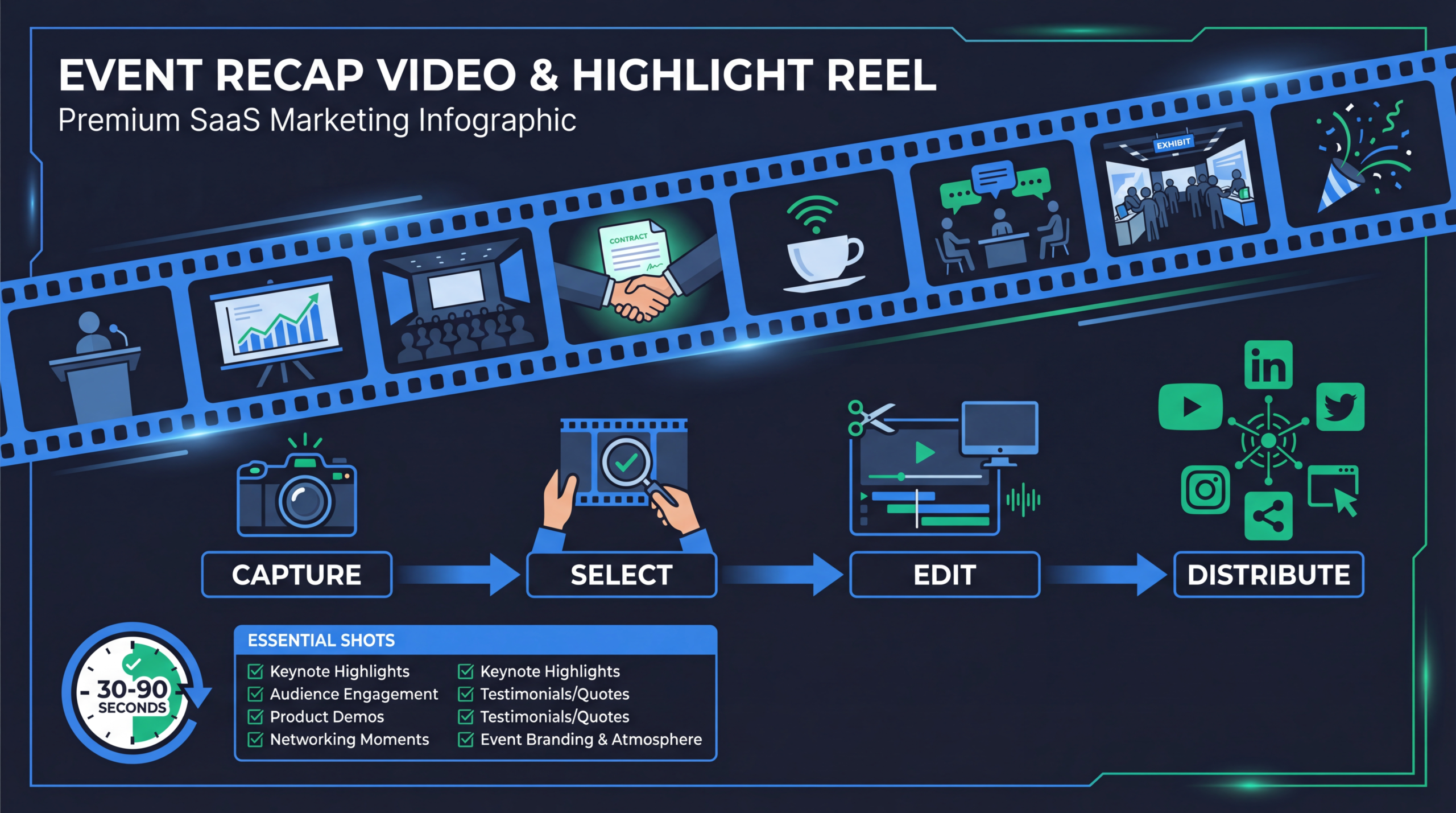
Event Recap Video: How to Film & Edit a Highlight Reel
Your company just hosted a 200-person user conference. Your team organized it for months. It was incredible — packed sessions, great networking, standing ovations during the keynote. And the only proof it happened? A few iPhone photos and a LinkedIn post that got 47 likes. Two weeks later, nobody remembers it happened.
An event recap video changes that. A well-produced highlight reel turns a one-day event into a months-long marketing asset that drives attendance for next year, builds social proof for prospects, energizes your community, and gives your marketing team content for weeks. The best SaaS conferences, product launches, and customer events all invest in professional event video — because the ROI extends far beyond the event itself.
This guide covers how to plan, film, and edit an event recap video from start to finish: pre-event preparation, filming strategy, editing workflow, and distribution plan.
Table of Contents
Why Event Recap Videos Are Worth the Investment
Event recap videos serve five strategic purposes:
- Next-year attendance driver: A 2-3 minute highlight reel is the single most effective promotional asset for next year's event. It shows the energy, caliber of speakers, and networking quality that text descriptions can never convey.
- Social proof for prospects: Prospects evaluating your company see a vibrant community, respected industry speakers, and happy customers. That's brand trust you can't buy.
- Content engine: One event generates dozens of content assets: the highlight reel, speaker clips, customer interview snippets, behind-the-scenes footage, and social clips that fuel your marketing for 2-3 months.
- Team morale: Your team worked hard on this event. A polished recap video validates their effort and creates shareable pride across the organization.
- Sponsor value: If your event has sponsors, a professional recap video (featuring their branding) justifies their investment and increases sponsorship renewal rates.
5 Types of Event Videos
Event Video Types & Timing
Pre-Production: Planning Before the Event
Shot List Creation
Create a detailed shot list 2 weeks before the event. Every event recap needs these shots:
- Establishing shots: Venue exterior, signage, branded elements, setup process
- Crowd energy: Registration line, packed rooms, networking conversations, laughing groups
- Speaker moments: Key slides, audience reactions, standing ovations, panel discussions
- Detail shots: Name badges, swag tables, screens, branded materials, food/drinks
- Candid moments: Natural conversations, handshakes, group photos, hallway interactions
- Tech/product: Demo stations, product displays, interactive booths
- Interviews: Pre-planned attendee and speaker interviews (see section below)
Equipment Checklist
| ITEM | PURPOSE | MINIMUM SPEC |
|---|---|---|
| Camera(s) | Primary event footage | 2+ cameras (mirrorless or cinema), 4K capable |
| Audio recorder | Room audio capture | Wireless lavs for interviews, shotgun mic for ambient |
| Stabilizer/gimbal | Smooth movement shots | DJI RS or equivalent for walk-and-shoot |
| Lighting (portable) | Interview setup | 1-2 LED panels for controlled interview lighting |
| Memory cards | Storage | Minimum 1TB total (events generate massive footage) |
| Batteries | All-day shooting | 4+ camera batteries, fully charged |
Crew Size by Event Scale
- Small event (50-100 attendees): 1 videographer (run-and-gun style)
- Medium event (100-500): 2 videographers (one for sessions, one for B-roll/interviews)
- Large event (500+): 3+ videographers plus a producer/director to coordinate shots and interviews
Filming Strategy: What to Capture
The First Hour
Capture registration, early arrivals, and setup. These shots show energy building. Film from multiple angles: wide shots of the registration area, close-ups of name badges being handed out, groups greeting each other. The first hour footage sets the "beginning" tone of your highlight reel narrative.
Sessions and Keynotes
For the highlight reel, you need reaction shots more than content shots. Film the audience from the side or back: faces watching intently, heads nodding, people leaning forward, laughing at jokes, taking photos of slides. Combine these with wide shots showing packed rooms and speaker close-ups during their strongest moments.
Networking and Hallways
Some of the best footage comes between sessions. Two people having an animated conversation. A group gathered around a demo station. The lunch line with everyone checking their phones while chatting. These candid shots communicate the community energy that makes people want to attend.
The Closing Moment
Always capture the final keynote, closing remarks, standing ovation, or group photo. This is the emotional climax of your highlight reel. If possible, capture the venue emptying out — there's a satisfying narrative arc in seeing the event space go from buzzing to quiet.
On-Site Interviews: Questions That Work
Pull attendees aside for 60-90 second interviews throughout the day. These interviews provide the voiceover and testimonial material that gives your highlight reel emotional depth.
Questions for Attendees
- "What brought you to [event name] this year?"
- "What's been the highlight of the event so far?"
- "What's one thing you've learned today that you're going to implement immediately?"
- "Would you recommend this event to a colleague? Why?"
Questions for Speakers
- "What was the key message of your session?"
- "What surprised you about the audience today?"
- "What's the one thing you want attendees to remember?"
Interview Production Tips
- Find a quiet corner with a clean background and decent lighting
- Use a lavalier mic on the interviewee (essential for usable audio in noisy events)
- Keep each interview to 2-3 minutes of raw footage (you'll use 10-15 seconds in the final edit)
- Film 8-12 interviews throughout the day for variety in your edit
Editing the Highlight Reel
Structure: The 3-Act Highlight Reel
- Act 1: Energy & Arrival (30-45 seconds): Setup, registration, early excitement, establishing the venue. Music builds from quiet to energetic. Interview soundbites about anticipation.
- Act 2: The Experience (60-120 seconds): Sessions, keynotes, demos, networking, laughing, learning. Quick cuts between the best moments. Interview soundbites about insights and highlights. This is the meat of the reel.
- Act 3: The Impact (30-45 seconds): Closing moments, emotional reactions, group photos, goodbyes. Interview soundbites about takeaways and recommendations. Music reaches a crescendo. End with your event logo and "See you next year" CTA.
Editing Principles
- Cut to the beat: Every edit should land on a music beat. This creates satisfying visual rhythm. Pick your music first, then edit to it.
- Variety in shot types: Alternate between wide, medium, and close-up shots. Never put two similar shots back-to-back.
- Maximum 3-second shots: For a highlight reel, most shots should be 1-3 seconds. Longer shots kill momentum. Save 4-5 second holds for the most impactful moments.
- Soundbite weaving: Weave 3-5 interview soundbites throughout the reel as voiceover, with corresponding B-roll covering the audio. This adds narrative depth beyond just a music montage.
- Color grading: Apply a consistent color grade that matches your brand. Slightly warmer tones tend to communicate energy and positivity for event content.
Music Selection
Music is 50% of an event highlight reel's emotional impact. Choose a track that:
- Builds energy progressively (starts subtle, builds to a peak)
- Has a clear beat structure for editing
- Matches your brand personality (electronic/modern for tech, orchestral for enterprise)
- Is properly licensed (use Epidemic Sound, Artlist, or Musicbed for commercial licensing)
Timeline
| DAY | TASK | DELIVERABLE |
|---|---|---|
| Event day | Filming + offload footage to drives | Raw footage organized |
| Day +1-2 | Footage review, selects, music choice | Edit plan + selected clips |
| Day +3-5 | Rough cut assembly | First cut for review |
| Day +5-7 | Revisions + final polish | Final highlight reel |
| Day +7-10 | Social clip creation + distribution | 5-8 social clips + reel published |
Distribution Strategy
Week 1: Core Assets
- Publish the highlight reel on YouTube (SEO-optimized title and description)
- Post natively on LinkedIn with a text hook recapping the event's theme
- Email to all attendees + registrants who didn't attend
- Embed on your event landing page (this becomes next year's promo page)
Week 2-4: Clip Distribution
- Post 2-3 short clips per week on LinkedIn, Instagram, YouTube Shorts
- Share speaker clips tagged with the speaker (they'll reshare to their audience)
- Send attendee interview clips to the individuals featured (they'll share too)
Ongoing: Evergreen Use
- Use in next year's event promotion campaigns
- Include in sales enablement materials as social proof
- Feature on your company "About" page or community page
- Submit to award programs and industry publications
Budget Guide by Event Size
| EVENT SIZE | CREW | DELIVERABLES | BUDGET RANGE |
|---|---|---|---|
| Small (50-100) | 1 videographer | Highlight reel + 3-5 social clips | $3,000-$6,000 |
| Medium (100-500) | 2 videographers | Highlight reel + 8-10 clips + interviews | $6,000-$15,000 |
| Large (500+) | 3+ crew + director | Highlight reel + clips + session recordings | $15,000-$40,000 |
Need Event Video Production?
We produce event highlight reels, speaker session recordings, and social clips for B2B SaaS events — from intimate customer dinners to 500+ person conferences.
Book a Free Strategy Call See PricingFrequently Asked Questions
How long should an event recap video be?
The highlight reel should be 2-4 minutes. Under 2 minutes and you can't tell a story. Over 5 minutes and you lose viewers. For social platforms, create 30-60 second versions of the best moments. Full session recordings can be any length (they serve a different purpose).
Can we use phone footage for an event recap?
For social-first, casual recaps — yes, phone footage works. For a professional highlight reel that represents your brand and promotes future events, invest in professional videography. The quality difference is significant, especially in challenging event lighting conditions that phones handle poorly.
How quickly should the recap be published after the event?
Same-day social clips: publish during and immediately after the event. The full highlight reel: within 7-10 days for maximum relevance. Waiting more than 2 weeks means the event's momentum has faded. Some companies publish a rough cut within 48 hours and a polished version within 10 days.
Should we record full sessions or just capture highlights?
Both. Full session recordings serve as on-demand content for attendees who missed sessions and for non-attendees. The highlight reel is a separate production that captures the event's energy. They serve different purposes and shouldn't be treated as the same deliverable.
What's more important: video quality or capturing the right moments?
Capturing the right moments wins every time. A slightly shaky shot of a genuine emotional reaction is worth 10x more than a perfectly framed shot of an empty stage. That said, professional videographers are skilled at being in the right place at the right time while maintaining quality — which is why hiring pros matters for important events.
How do we handle attendee consent for video recording?
Include a media consent clause in your event registration terms. Place signage at the entrance ("This event is being recorded for promotional purposes. By entering, you consent to be filmed."). For on-camera interviews, get verbal consent before recording. Most attendees are happy to be featured — just ask before filming close-ups.
📋 Video Production Workflow Template
Plan your event video production with our workflow template — includes shot lists, equipment checklists, day-of schedules, and post-production timelines.
Download the Free Template →Don't Let Your Event Die After One Day
Every hour your team spent planning the event, every dollar spent on the venue and speakers, every attendee who took time out of their schedule — all of that investment deserves more than a LinkedIn photo carousel. A professional event recap video preserves the energy, extends the reach, and turns a one-day event into a year-long marketing asset.
Start planning video production the moment you book the venue. Create your shot list, hire your crew, and build distribution into your post-event timeline. The highlight reel you produce will be the single most effective tool for promoting next year's event and building the community your company deserves.
Need a video production team for your next event? See how our teams work or explore our pricing for event video production.
Budgeting for your event? Our dedicated guide covers full event video production cost — from crew day rates and equipment to all-in budgets by event type (conference, gala, trade show, hybrid).
Looking to showcase your event with a high-energy highlight video? Our sizzle reel examples and cost guide breaks down the production approaches B2B brands use to turn event footage into compelling short-form video assets — and what to budget for each format.

