Motion Graphics for SaaS: When & Why to Use Them
Motion graphics sit at the intersection of design and video. They transform static concepts — data flows, system architectures, abstract processes — into visual stories that audiences understand instantly. For SaaS companies, they solve a problem that live action often can't: making the invisible visible.
But motion graphics aren't always the right choice. They're expensive, time-consuming, and sometimes a simple screen recording or talking-head video would be more effective. This guide helps you decide when motion graphics make sense and how to execute them well.
Table of Contents
What Motion Graphics Actually Are
Motion graphics are animated graphic design elements — text, shapes, icons, data visualizations, and illustrations that move with purpose. They differ from:
| FORMAT | WHAT IT IS | BEST FOR |
|---|---|---|
| Motion graphics | Animated design elements and typography | Concepts, data, processes, UI animation |
| 2D animation | Character animation, illustrated stories | Narratives, explainers with characters |
| 3D animation | Rendered 3D objects and environments | Product visualization, hardware, spatial concepts |
| Live action | Filmed footage of real people and places | Testimonials, culture, founder stories |
| Screen recording | Captured UI interactions | Tutorials, demos, walkthroughs |
In practice, most SaaS videos blend formats. A product demo might use live-action talking heads with motion graphic overlays showing data flows. An explainer might combine 2D character animation with motion graphic UI mockups.
When to Use Motion Graphics (And When Not To)
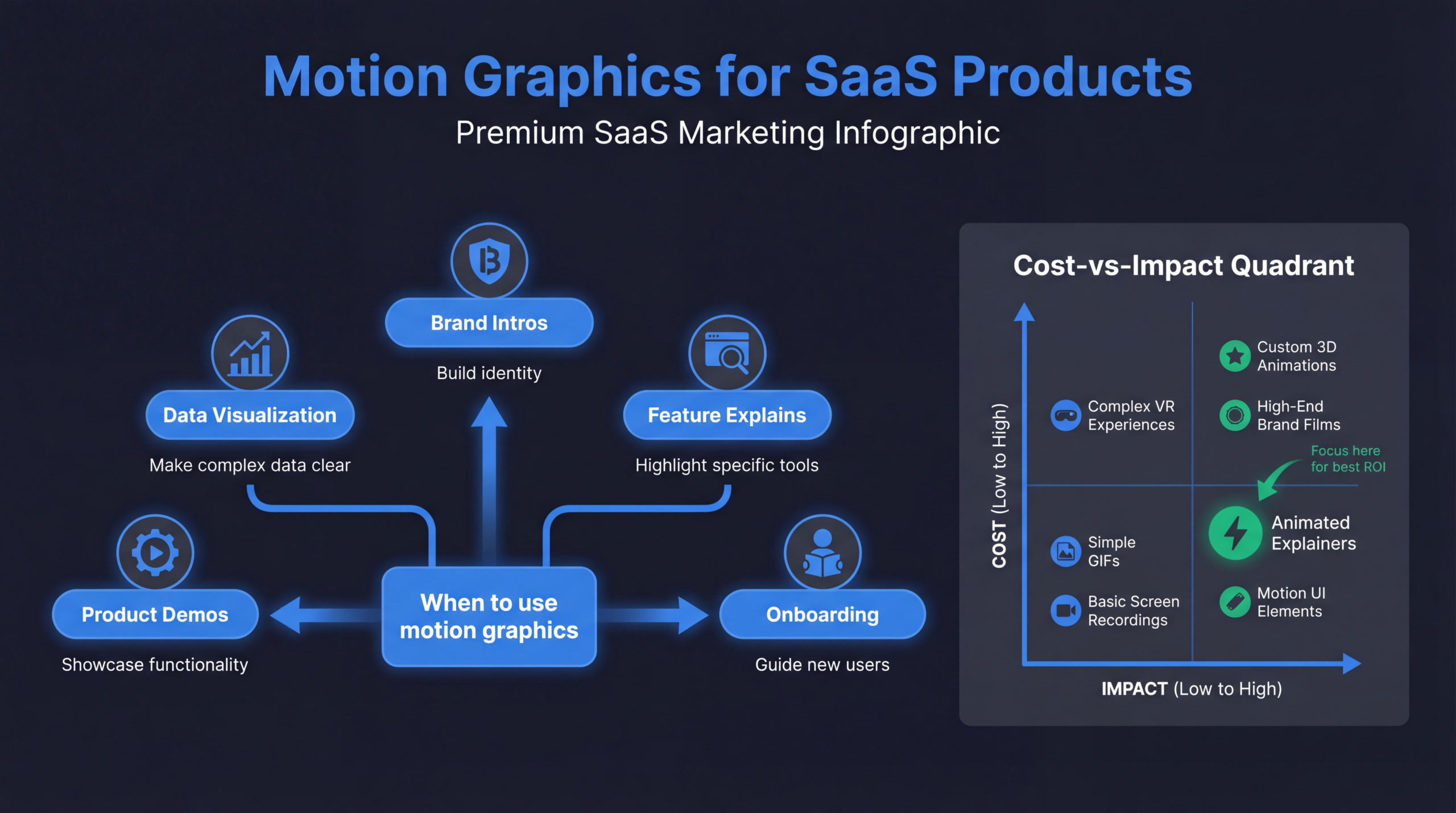
Use motion graphics when...
- ✓ Explaining abstract concepts — API integrations, data pipelines, security protocols, AI/ML processes
- ✓ Visualizing data and metrics — Before/after statistics, ROI projections, comparison charts
- ✓ Simplifying complex workflows — Multi-step processes, system architectures, integration maps
- ✓ Product is pre-launch or under NDA — You can't show the real product yet but need to communicate the concept
- ✓ Brand-level content — Homepage hero videos, event intros, branded social content
Skip motion graphics when...
- ✗ You need to show the real product — Screen recordings are more credible and faster to produce
- ✗ Building trust and authenticity — Real people on camera build more trust than animated characters
- ✗ Speed is critical — Motion graphics take 2–6 weeks; a talking-head video can ship in days
- ✗ Your product UI is the selling point — Prospects want to see the actual interface, not a stylized version
Decision framework: If a prospect says "just show me the product," a motion graphic is the wrong format. If they say "explain how this works," motion graphics might be exactly right.
Types of Motion Graphics for SaaS
1. Explainer videos
60–90 second animated videos that explain your product's value proposition. The classic SaaS motion graphic. Best on homepage, landing pages, and social ads.
2. Product feature animations
Short animations (15–30 seconds) highlighting specific features. Often used in product launches, feature announcement emails, and social media.
3. Data visualization videos
Animated charts, graphs, and metrics that bring data to life. Extremely effective in investor pitches, quarterly reports, and case study videos.
4. UI/UX animation
Animated mockups of your product interface showing user interactions. Useful when the real product isn't photogenic or when you want to highlight a specific flow without surrounding UI clutter.
5. Process and workflow animations
Step-by-step animated diagrams showing how a process works. Perfect for technical products, integration workflows, and onboarding sequences.
6. Social media motion graphics
Short-form animated content optimized for LinkedIn, Twitter, and Instagram. Often used for stat callouts, tip carousels, and branded content series.
The Production Process
Timeline expectations
| PROJECT TYPE | DURATION | TIMELINE |
|---|---|---|
| Social media animation | 15–30 seconds | 3–5 days |
| Feature highlight | 30–60 seconds | 1–2 weeks |
| Explainer video | 60–90 seconds | 3–4 weeks |
| Complex explainer | 2–3 minutes | 4–6 weeks |
| Full campaign package | Multiple assets | 6–8 weeks |
The revision trap
Animation is expensive to change after the fact. Moving a character's hand position might require re-rendering entire scenes. Protect yourself:
- Lock the script before storyboarding begins
- Approve storyboards before animation starts
- Define 2–3 revision rounds in the contract
- Provide consolidated feedback (one round, not drip-fed comments)
Cost Benchmarks
| QUALITY LEVEL | PER FINISHED MINUTE | INCLUDES |
|---|---|---|
| Template-based | $1,000–$3,000 | Pre-built templates, minimal custom design |
| Custom mid-range | $3,000–$8,000 | Custom design, professional animation, VO |
| Premium | $8,000–$15,000 | Unique art direction, complex animation, sound design |
| Studio-quality | $15,000–$30,000+ | Agency-level creative, multiple revisions, multi-format |
For most SaaS companies, the $5,000–$12,000 per minute range delivers the best ROI. This gets you custom design, professional animation, and quality voiceover without the agency markup.
Need Motion Graphics for Your SaaS?
Our team produces motion graphics, animated explainers, and product animations for SaaS companies.
Book a Free Strategy Call See PricingTools and Software
| TOOL | USE CASE | SKILL LEVEL |
|---|---|---|
| After Effects | Industry standard for motion graphics | Advanced |
| Lottie/Bodymovin | Web animations exported from After Effects | Developer integration |
| Rive | Interactive web and app animations | Intermediate |
| Figma + Jitter | Design-to-animation for social media | Beginner–Intermediate |
| Cinema 4D | 3D motion graphics | Advanced |
| Canva | Simple social media animations | Beginner |
Working With Motion Graphics Teams
What to include in your brief
- Brand guidelines: Colors, fonts, logo usage, existing visual language
- Reference videos: 3–5 examples of styles you like (and don't like)
- Script or talking points: At minimum, the key messages to communicate
- Technical requirements: Aspect ratios, file formats, delivery platforms
- Timeline and budget: Be upfront so the team can scope appropriately
Review process
- Script approval → proceed to storyboard
- Storyboard approval → proceed to design key frames
- Key frame approval → proceed to animation
- First draft review → consolidated feedback
- Revised draft → final approval and delivery
Free: SaaS Video Swipe File
50+ examples of SaaS motion graphics and animated videos with production notes. See what works and adapt for your brand.
Download the Swipe FileReady to get started? Explore our case studies.
Frequently Asked Questions
How long should a SaaS explainer animation be?
60–90 seconds for a product overview. 30 seconds for a feature highlight. Attention drops sharply after 90 seconds for animated content. Shorter is almost always better.
Should we use character animation or abstract motion graphics?
For SaaS, abstract motion graphics and UI animations typically perform better than character animation. Characters can feel childish for enterprise audiences. Use characters only if your brand is playful and consumer-facing.
Can we update motion graphics when our product changes?
Yes, but it depends on the source files. Ensure you own the project files (After Effects, Figma, etc.) and that the animation is built modularly. This lets you update specific sections without re-creating the entire video.
Motion graphics or screen recording for a product demo?
Screen recording for audiences who want to see the real product (late-stage prospects, trial users). Motion graphics for audiences who need to understand the concept first (early-stage awareness, complex workflows).
How do we find good motion graphics talent?
Look for portfolios with SaaS or B2B tech work specifically. General motion graphics artists may create beautiful work that doesn't communicate technical concepts well. Ask for case studies showing business results, not just pretty animations.