How to Measure Video ROI: The Full Formula
TL;DR
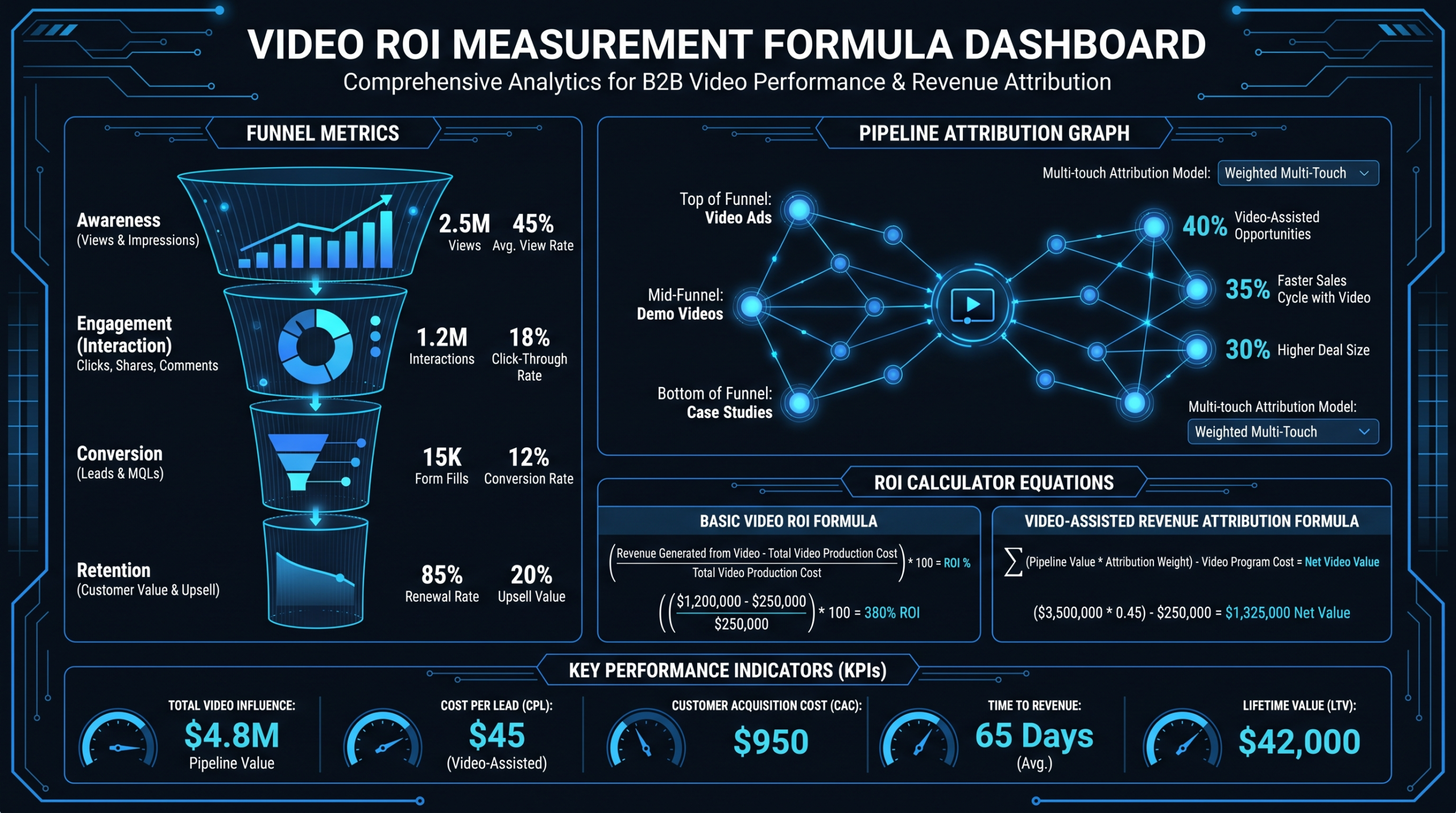
Video ROI = [(Revenue Attributed to Video – Video Costs) / Video Costs] × 100. In practice, that means choosing the right attribution model, tracking cost per qualified view and cost per video-influenced opportunity, and measuring both direct and assisted conversions. This guide walks through every formula, attribution model, and dashboard metric — with labeled example calculations — so you can build a defensible ROI case for any video program.
Table of Contents
- Why Video ROI Is Hard to Measure (and Why That's No Excuse)
- The Core Video ROI Formula
- Choosing an Attribution Model for Video
- Direct vs. Assisted Video Conversions
- Cost Metrics: Per View, Per Lead, Per Opportunity
- Pipeline Influence and Revenue Attribution
- Retention and Customer Education ROI
- Content Repurposing ROI
- Dashboard and KPI Framework
- Common Measurement Mistakes
- How Production Retainers Affect Long-Term ROI
- FAQ
Why Video ROI Is Hard to Measure (and Why That's No Excuse)
Video's impact on revenue is almost never direct. A prospect watches a product demo on a Tuesday, reads a case study on Thursday, joins a live demo the following Monday, and converts two weeks later. Under most basic analytics setups, the conversion credit goes to whatever touchpoint happened last — which is typically a sales rep follow-up email, not the video that sparked the interest in the first place.
This attribution gap is the primary reason video ROI looks weaker than it actually is. It isn't a problem with video as a channel; it's a problem with how most teams measure it. And it's solvable.
The B2B and SaaS teams that measure video ROI accurately don't necessarily use fancier tools — they use clearer definitions, consistent tracking, and the right attribution model for their sales cycle. Here's what you need before any formula makes sense:
- A video hosting platform that reports view duration and engagement events (Wistia, Vimeo Pro, or YouTube Analytics all work)
- UTM parameters or embed-level tracking on every video placed in a trackable context
- A CRM that logs content touchpoints in the deal timeline (HubSpot, Salesforce, Pipedrive)
- Defined thresholds for what counts as a "qualified view" — most B2B teams use 50%+ completion as a baseline signal of genuine engagement
Without these inputs, your ROI number will be a guess. With them, it becomes a defensible business case you can bring to leadership.
The Core Video ROI Formula
The foundation for any video ROI calculation is the same as any marketing investment: return minus cost, divided by cost, expressed as a percentage.
Where:
- Revenue Attributed to Video — closed revenue from deals where video was a documented touchpoint, or a pipeline-influence figure if you're using multi-touch attribution
- Video Costs — production costs + hosting + distribution + internal team time spent managing the process
Example calculation (hypothetical, for illustration only):
A B2B SaaS company spends $10,000/month on a video production retainer. Over a quarter ($30,000 total), their CRM identifies $90,000 in closed revenue from deals where at least one video was viewed at 50%+ completion before the opportunity closed.
That's a conservative calculation using only closed/won deals with a confirmed video touchpoint. In practice, most teams find their actual video impact is higher once they layer in pipeline influence (in-progress deals touched by video) and retention savings from customer education content — both covered below.
The formula is simple. The hard work is filling in the inputs accurately, which depends entirely on your choice of attribution model.
Choosing an Attribution Model for Video
Attribution models determine which touchpoints get credit for a conversion. Your choice of model materially changes how video ROI is calculated — sometimes by a factor of 3–5×. There is no universally correct model; the right one depends on your sales cycle length and where video plays its primary role in the buyer journey.
Attribution Models for Video — Comparison
| Model | How Credit Is Assigned | When to Use It | Video ROI Implication |
|---|---|---|---|
| First-Touch | 100% to the first touchpoint (could be a video ad or gated video) | Awareness campaigns; measuring top-of-funnel video investment | Overvalues awareness video; undervalues late-stage demo/sales video |
| Last-Touch | 100% to the last touchpoint before conversion | Short sales cycles; direct-response video with hard CTAs | Typically undercounts video — most deals don't end on a video view |
| Linear (Multi-Touch) | Equal credit split across all touchpoints in the journey | Long B2B cycles with multiple video interactions per deal | Most balanced starting point for 30–90 day sales cycles |
| Time-Decay | More credit to touchpoints closer to conversion | Sales cycles where recent content (demos, case studies) is most decisive | Rewards late-funnel video; may undervalue awareness content |
| Position-Based (U-Shaped) | 40% first touch, 40% last touch, 20% distributed to middle | When both awareness video and closing-stage video matter equally | Good for programs investing heavily at both top and bottom of funnel |
| Data-Driven | Algorithmic, based on observed conversion patterns in your data | High-volume programs with sufficient conversion history | Most accurate but requires statistical volume to be reliable |
For most B2B SaaS teams with 30–90 day sales cycles, linear multi-touch attribution gives the most honest starting picture. It prevents video from being systematically undervalued (a common outcome under last-touch, where a discovery call or sales email typically closes the deal, not the video that built interest three weeks earlier).
Implementing Multi-Touch Video Attribution in Practice
You don't need a sophisticated ABM platform to do this. The basic workflow:
- Assign every video a unique tracking ID via your video host (Wistia does this natively; YouTube requires UTM-tagged watch pages)
- Fire a CRM event when a prospect reaches your qualified-view threshold (e.g., 50% completion) — most marketing automation platforms support this via video platform integrations or JavaScript embed callbacks
- Tag the open opportunity record with a "video touchpoint" field whenever this event fires during an active deal
- At deal close, query all tagged opportunities and sum the contract values weighted by your attribution model — that's your video-influenced revenue this period
Most HubSpot and Salesforce setups can support this within existing data structures. The investment is configuration time, not additional tooling.
Direct vs. Assisted Video Conversions
Understanding the difference between direct and assisted video conversions is critical to avoiding the most common video ROI mistake: measuring only what's easy and concluding video doesn't work.
Direct conversions are leads or sales where video was the last documented action before a conversion event — a form fill, a demo request, a purchase. These are measurable with basic analytics and look good in simple reports.
Assisted conversions are deals where video appeared somewhere in the buyer journey but wasn't the final touch. These are frequently ignored and, in most long B2B cycles, represent the majority of video's actual contribution.
Direct vs. Assisted Video Conversions — What Each Tells You
| Metric | What It Measures | Best Video Types | Attribution Method |
|---|---|---|---|
| Direct Conversions | Video's immediate conversion power — last-touch impact | Product demo, sales enablement video, paid video ad | Last-touch or time-decay |
| Assisted Conversions | Video's influence on the buyer journey — mid-funnel impact | Explainer video, thought leadership, customer testimonial | Linear multi-touch or position-based |
| View-Through Conversions | Conversions by users who saw (but didn't click) a video ad | Brand awareness video, paid social video | View-through window (typically 24–72 hrs B2B) |
Example (hypothetical, for illustration): A VP of Marketing reviews Q1 video metrics. Direct video conversions: 9 leads. On its own, that number looks underwhelming. When assisted conversions are layered in, the picture reverses: 52 leads had a video touchpoint at 50%+ completion somewhere in their journey before becoming an MQL. Video was involved in more than half of the quarter's inbound pipeline — the direct metric captured less than 20% of its actual contribution.
If your team reports only direct conversions, you are systematically undervaluing video. Fix this before making budget decisions.
Cost Metrics: Per View, Per Lead, Per Opportunity
The top-line ROI formula is the right summary metric. But to optimize your video program — to know which video types to invest in more, and which to cut — you need granular cost metrics at each stage of the funnel.
Cost Per Qualified View (CPQV)
Qualified views are a more honest numerator than raw views, which include accidental plays and 3-second bounces. CPQV lets you compare the efficiency of different video types and distribution channels on an apples-to-apples basis.
Cost Per Video Lead (CPVL)
If you're using multi-touch attribution, divide video's allocated share of each lead — not full credit — to avoid double-counting. For example, under linear attribution in a 5-touchpoint journey, video gets 20% of the lead credit.
Cost Per Video-Influenced Opportunity (CPVO)
This is often the most credible metric for leadership conversations, because it maps directly to pipeline — a number executives already track and trust. It also helps you make the case for video budget in terms they use daily.
Illustrative Cost Metrics by Video Type (Hypothetical Benchmarks — Actual Results Vary)
| Video Type | Typical Production Cost | Qualified View Potential | Primary Conversion Type | Key Cost Metric |
|---|---|---|---|---|
| Awareness / Brand Video | $5K–$15K | High (wide distribution) | Assisted — top of funnel | CPQV |
| Product Demo Video | $3K–$8K | Medium (intent-targeted) | Direct — high conversion signal | CPVL, CPVO |
| Customer Testimonial | $2.5K–$7K | Medium | Assisted — mid-funnel trust | CPVO |
| Explainer Video | $5K–$15K | Medium–High | Assisted — awareness and consideration | CPQV, CPVL |
| Sales Enablement Video | $1K–$5K | Low (highly targeted) | Direct — very high intent | CPVO, close rate delta |
| Educational / Onboarding Video | $2K–$8K | Medium (existing customers) | Retention impact (post-sale) | Churn delta, support ticket deflection |
These ranges are illustrative — actual results depend heavily on distribution quality, targeting, production quality, and the strength of the underlying offer. Use them as a starting framework, then replace with your own data within 60–90 days of consistent tracking.
Pipeline Influence and Revenue Attribution
Pipeline influence is the most powerful ROI metric for B2B video — and the most commonly skipped. It's also the metric most likely to convert a skeptical CFO, because it speaks the language of the sales org.
The important nuance: "influenced" doesn't mean "caused." You're measuring correlation — video was present in the buyer journey. You can strengthen the causal argument by asking a secondary question: do video-touched deals close at a higher rate, or in a shorter timeframe, than non-video-touched deals? Many teams find they do, though you should validate this against your own CRM data rather than assuming it.
Building a Pipeline Influence Report in Your CRM
- Create a deal-level field: "Video Touchpoint" — boolean or multi-select by video type
- Populate it via automation: when a contact associated with an open opportunity views 50%+ of a video, tag the deal record
- Run a Closed/Won report filtered by "Video Touchpoint = true" — that's your video-influenced revenue this period
- As a secondary analysis, compare close rate and average deal size between video-touched and non-video-touched opportunities — this is your qualitative evidence for the causal claim
Video ROI by Business Model: SaaS, B2B, Ecommerce, Paid Media, and Sales Enablement
The right attribution approach varies significantly by business model and the role video plays in each:
- SaaS: Focus on demo videos, free trial activation sequences, and onboarding videos. Primary metrics: video-to-trial-activation rate, video-to-paid-conversion rate. Use direct attribution for high-intent demo views; linear multi-touch for awareness content.
- B2B (long cycle): Multi-touch attribution across the full deal timeline is essential. Primary metric: video-influenced opportunity value. Secondary: close rate delta for video-touched deals.
- Ecommerce: Product explainer videos, how-to content, and user-generated review videos drive direct conversion. Use last-touch or time-decay attribution. Measure video-to-add-to-cart rate and video-assisted purchase rate with your ecommerce platform's attribution window.
- Content / Thought Leadership: Track downstream pipeline contribution — which educational videos generate the most MQLs over 60–90 day windows. Attribution is harder but cohort analysis (leads who viewed vs. didn't) works well.
- Paid Media Video: Use view-through conversion windows (typically 24–72 hours for B2B video ads). Compare view-through and click-through conversions separately to understand awareness vs. intent contribution.
- Sales Enablement Video: Track send rate, view rate (did the prospect actually open it?), and deal-stage progression after video was sent. Deals where reps share video and the prospect views it often show shorter time-to-close — measure this as a close-rate signal within your sales cycle data.
For a deeper dive into SaaS-specific video ROI framing, see the related resource on video content ROI for SaaS on this site. The two posts cover complementary ground: this guide focuses on the full measurement methodology and formulas; that one focuses on SaaS-specific benchmarks and content strategy implications.
Retention and Customer Education ROI
Post-sale video generates measurable ROI — but most video ROI analyses stop at acquisition. Customer onboarding videos, feature adoption walkthroughs, and customer education libraries all affect the metrics that matter most for SaaS and subscription businesses: time-to-value, support costs, and churn rate.
Time-to-Value Reduction
Onboarding video programs can meaningfully reduce the average time for new customers to complete their first key action (account setup, first report run, first team invite — whatever your product's activation event is). Measure this by comparing time-to-activation for cohorts with video onboarding vs. without. The value of a faster activation timeline compounds: faster time-to-value typically correlates with lower early churn and higher likelihood of expansion.
Support Ticket Deflection
Customer education videos targeting your most common support topics can reduce inbound ticket volume for those categories. To measure this, track monthly ticket volume for topics you've published video on — before and after publishing — controlling for overall user base growth. Multiply deflected tickets by your fully-loaded cost per ticket (total support spend divided by total tickets handled in the period) to get a hard dollar value.
Churn Rate Impact
Track monthly churn rates for customers who engage with your educational video library vs. those who don't. This requires integrating your video analytics data with your CRM or product analytics tool, but is achievable in most modern SaaS stacks using tools like Segment, Amplitude, or native HubSpot video integrations.
Hypothetical example (for illustration only): A SaaS company with 400 customers and an average monthly contract value of $350 publishes a 6-video onboarding series. If video-engaged customers churn at 2.5% per month vs. 4.5% for non-engaged customers, the math looks like this:
Note: These numbers are for illustration only. The actual churn delta in your business will depend on your product, customer segment, and how the videos are deployed in the onboarding flow. But the methodology is the same regardless of the specific numbers.
Content Repurposing ROI: Multiplying Video Value
A single long-form video asset is source material for 10–20 derivative content pieces. When you factor repurposing into your ROI calculation, the effective cost per final asset drops dramatically — and the total platform value of a single production investment multiplies.
Example (hypothetical): A 30-minute webinar recording costs $2,000 to produce and edit. The post-production repurposing workflow generates:
- 1 full recording (YouTube / gated asset)
- 4 short highlight clips (LinkedIn, YouTube Shorts)
- 1 blog post built from key takeaways
- 1 email newsletter segment with embedded clip
- 4 branded quote graphics for social
- 1 audiogram for podcast distribution
That's 12 final assets at approximately $167 per asset — compared to $2,000+ if each were briefed and produced independently. The repurposing ROI multiplier is roughly 12× in this example.
Repurposing Multipliers by Source Asset Type (Illustrative)
| Source Asset | Derivative Assets | Repurposing Multiplier | Primary Distribution Channels |
|---|---|---|---|
| Long-form webinar (30–45 min) | Clips, blog post, newsletter, audiogram, quote cards | 8–15× | YouTube, LinkedIn, email, podcast |
| Product demo (5–10 min) | Social clips, LinkedIn posts, sales email embeds | 4–8× | LinkedIn, email sequences, website |
| Customer testimonial (3–5 min) | Quote graphics, short social cuts, proposal embed | 4–6× | LinkedIn, sales decks, website |
| CEO / expert interview (20–30 min) | Clips, blog post, podcast episode, LinkedIn series | 10–20× | YouTube, podcast, LinkedIn, blog |
| Feature walkthrough (5–8 min) | Support article video, onboarding clip, short ad | 3–6× | Help docs, onboarding flow, paid channels |
For a full framework on building a systematic repurposing workflow, see VEC's guide to video repurposing for SaaS — covering how to turn a single production investment into a month's worth of multi-channel content.
Dashboard and KPI Framework
A practical video ROI dashboard tracks three layers of metrics — efficiency, influence, and outcome — and rolls them up into a single ROI view that leadership can act on.
Layer 1 — Efficiency KPIs (Operations View)
- Cost per video produced — total spend divided by videos delivered; tracks production efficiency over time
- Production cost per finished minute — normalizes across video lengths; useful for benchmarking agencies and internal teams
- Average turnaround time per video type — tracks workflow health and team capacity
- Repurposing multiplier — derivative assets produced per source video; tracks content leverage
Layer 2 — Influence KPIs (Marketing View)
- Qualified view rate — views at 50%+ completion as a percentage of total video impressions; tracks content quality and audience relevance
- Cost per qualified view (CPQV) — by video type and distribution channel
- Video-assisted MQL rate — percentage of MQLs that had a video touchpoint; tracks video's role in the funnel
- Direct vs. assisted conversion ratio — monitors whether video is pulling its weight at the top and middle of funnel, not just the bottom
Layer 3 — Outcome KPIs (Revenue View)
- Video-influenced pipeline ($) — total open opportunity value where video was a touchpoint
- Video-influenced closed revenue ($) — the headline number for leadership
- Cost per video-influenced opportunity (CPVO) — the most credible metric for budget justification conversations
- Retention impact — churn rate delta for video-engaged vs. non-engaged customers (where measurable)
- Overall video ROI (%) — the top-line formula, calculated monthly and trended quarterly
For most teams starting from scratch, Layer 2 and Layer 3 metrics are the most immediately actionable. Layer 1 is your operational health view — important for production team management but less useful for the board-level ROI conversation.
Common Mistakes in Video ROI Measurement
These are the errors that most commonly cause video programs to look underperforming when they're actually delivering significant value.
Using view count as a success metric. View count is an exposure metric, not a performance metric. A video with 50,000 views and zero qualified leads has generated no measurable business value. Replace "views" with "qualified views" (50%+ completion) as your primary engagement denominator.
Using too-short attribution windows. B2B deals commonly take 60–180 days to close. If your attribution window is 7 or 30 days, you are systematically and severely undercounting video's contribution. Set your attribution window to match your average sales cycle length.
Measuring only direct conversions. As covered in section four, direct conversions typically capture 10–20% of video's actual contribution in long B2B cycles. Including assisted conversion data is not optional if you want an accurate number.
Benchmarking all video investment identically. A $500 social clip and a $12,000 brand film should not be evaluated against the same success criteria. Define ROI targets and measurement approaches by video type, not by total video budget.
Not tracking video at the deal level in the CRM. If your CRM has no field logging video touchpoints in the deal timeline, you're making ROI claims without evidence. Fix the tracking infrastructure before the next reporting cycle.
Comparing video ROI to single-channel benchmarks. Video frequently works in combination with email, paid search, and sales outreach. Attribution analysis should account for the multi-channel nature of B2B buying — video's strongest ROI case is often its additive impact on top of your existing channels, not a standalone comparison.
Ignoring post-sale video ROI entirely. Customer education video, onboarding sequences, and feature adoption content all generate measurable ROI through reduced churn and support cost savings. Leaving this out systematically understates your video program's total value.
How Production Retainers Affect Long-Term Video ROI
The structure of your video production engagement directly shapes your ROI curve — not just your cost per video, but how ROI compounds (or doesn't) over time.
Per-project production delivers a fixed asset at a point in time. The ROI of that asset decays as the content ages, with no systematic effort to refresh, repurpose, or build on what was produced. Each project is an isolated transaction.
Production retainers — like the dedicated team arrangements offered through VEC's Growth, Core, and Scale plans — create a compounding ROI dynamic. With consistent monthly production capacity, teams can build an evergreen library that generates qualified views for 12–24+ months, run systematic repurposing pipelines, and refresh top-performing assets before they decay rather than after.
The ROI improvement isn't only about cost per video (though retainers typically reduce the effective per-video cost by 20–40% vs. per-project pricing at equivalent volume — see a full breakdown in the video production agency pricing models guide). It's about the library effect: each month of production adds to a growing content platform, and the total value of that platform compounds.
Illustrative example: A company producing 8 videos/month at $10,000/month builds a library of 96 videos over one year. If each video generates an average of 40 qualified views/month over its 12-month useful life, the platform delivers approximately 3,840 qualified views/month by end of year — without any increase in budget. On a per-project model, the same $120,000 annual spend might produce 15–20 videos with no systematic repurposing or library strategy, meaning qualified view volume likely peaks shortly after each launch and then declines with no compounding.
This long-tail ROI effect — where consistent production creates compounding returns over time — is one of the most underappreciated arguments for committing to a monthly production cadence rather than episodic campaigns. For teams evaluating what a production retainer actually delivers, the SaaS video production page outlines what's typically included across different engagement tiers.
VEC's guarantee — double your video output in 90 days or month 4 is free — is specifically designed to let teams test this compounding hypothesis with a defined downside limit. If the library doesn't build as planned in the first 90 days, you don't pay for the fourth month. That's as close to a measurable performance commitment as the industry offers.
Frequently Asked Questions
What is the basic formula for video ROI?
Video ROI (%) = [(Revenue Attributed to Video – Video Costs) / Video Costs] × 100. In practice, "revenue attributed to video" requires an attribution model (multi-touch is recommended for B2B) and a definition of what counts as a video touchpoint (50%+ completion is a common threshold). Video costs should include production, hosting, distribution, and internal management time.
What's a good video ROI benchmark for B2B or SaaS companies?
There is no reliable universal benchmark because video ROI depends heavily on sales cycle length, attribution model, content quality, and how deeply video is integrated into the buyer journey. As a general orientation, teams with mature video programs and solid multi-touch attribution commonly target video-influenced pipeline of 3–5× their annual video production spend. Your first priority isn't hitting a benchmark — it's establishing an accurate baseline so you can improve it systematically.
Which attribution model should B2B teams use for video ROI?
Linear multi-touch attribution is the most balanced starting point for B2B teams with sales cycles longer than 30 days. It prevents the systematic undervaluation of top-of-funnel content that last-touch attribution causes, without requiring the statistical volume that data-driven models need to be reliable. As your program matures and you accumulate more conversion data, data-driven attribution becomes worth investigating.
How do you measure video ROI without direct revenue attribution?
If your sales cycle is too long or complex for direct attribution in the near term, use proxy metrics as leading indicators: cost per qualified view, video-to-MQL conversion rate, and video-touched vs. non-video-touched deal close rates. These don't prove causation, but they build a defensible directional case and give you metrics to improve against while you build out the full attribution infrastructure.
Does video ROI improve over time, and how quickly?
Yes, through two mechanisms: the library effect (a growing body of evergreen content compounds qualified view volume each month without additional spend) and team familiarity (dedicated production teams build deeper brand knowledge over time, reducing revision cycles and increasing output quality). Most teams see meaningful ROI improvement between months 3–6 of a consistent production program, once the library effect starts to accumulate and the production team is fully calibrated to the brand.
Want to Build a Video Program That's Actually Measurable?
VEC works with Series A–C SaaS and B2B marketing teams to build consistent, measurable video programs — dedicated editing teams, strategic repurposing frameworks, and the production cadence that makes ROI compound over time. We guarantee you'll double your video output in 90 days, or month 4 is free.
Book a Free Strategy Call See Pricing Plans