How to Make a Case Study Video: 2026 Guide
TL;DR
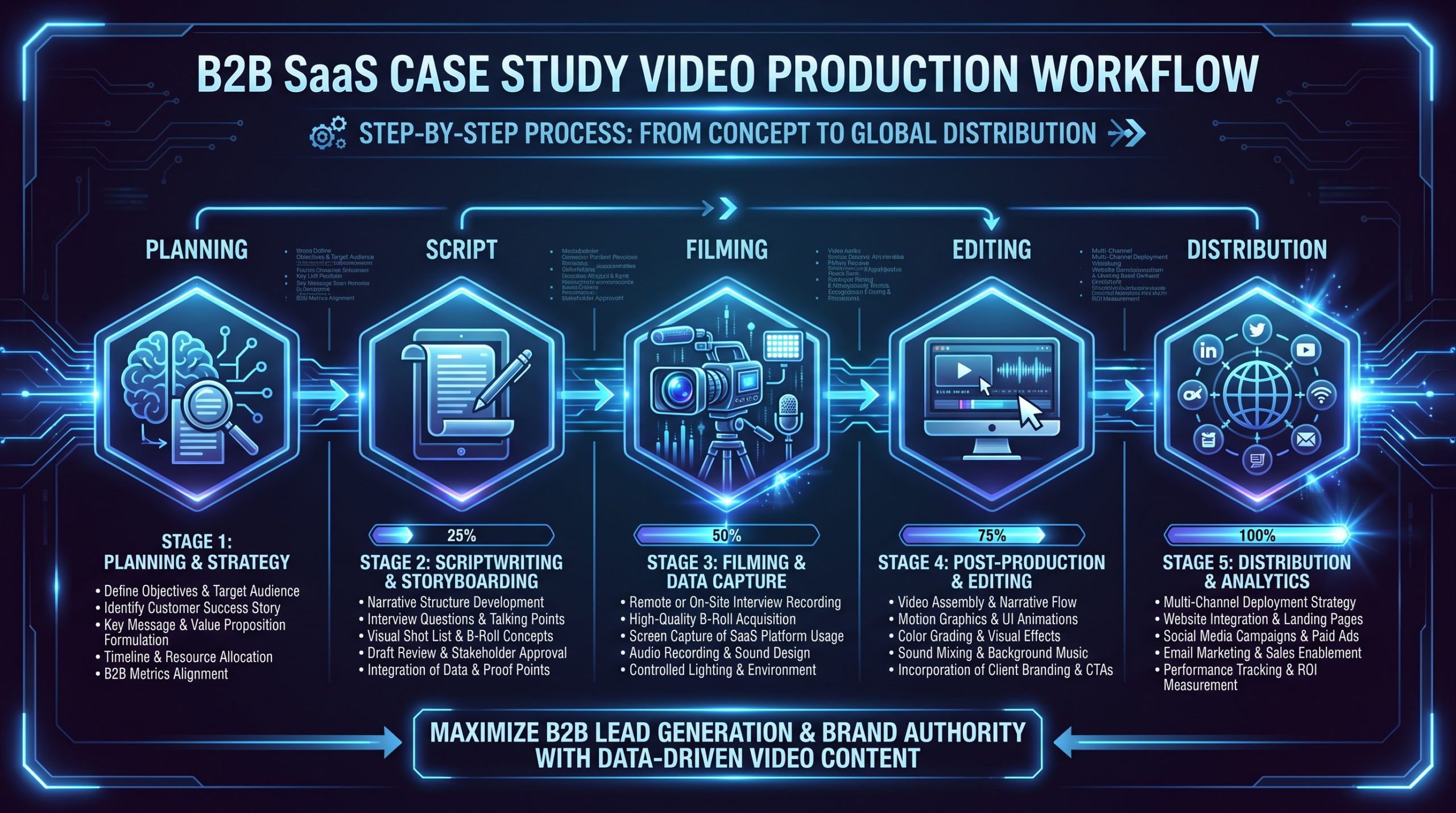
To make a case study video, you need four things: the right customer story (specific, measurable outcome), a structured script (problem → solution → result), clean interview footage plus b-roll, and a distribution plan tied to your sales funnel. Most B2B SaaS teams underinvest in planning and over-invest in production value. Budget roughly $2,500–$10,000 for a single professionally produced video, or move to a dedicated editing team if you’re producing three or more per quarter — that’s where per-video cost drops significantly.
Table of Contents
- What Is a Case Study Video — and Why It Converts
- Step 1: Planning — Choose the Right Story
- Step 2: Scripting — Structure the Narrative
- Step 3: Filming — Interview Setup and B-Roll
- Step 4: Editing — Assembly to Final Cut
- Step 5: Distribution — Put It to Work
- Case Study Video Production Costs
- Common Mistakes That Kill Results
- FAQ
What Is a Case Study Video — and Why It Converts
A case study video is a short-form customer documentary — typically 2–4 minutes — in which a real customer explains the problem they faced, why they chose your solution, and what measurable results they achieved. Done right, it is the single highest-converting asset in a B2B SaaS content library.
Written case studies ask buyers to read and imagine. Video case studies make them feel. Prospects hear real voices, see real people, and process the story faster than any PDF can deliver. The format also works well for AI-powered search: each self-contained section is extractable and citable by tools like Google AI Overviews and ChatGPT when buyers ask “does this product work for companies like mine?”
The difference between a case study video that closes deals and one that collects digital dust is almost entirely in planning and scripting — not production budget. That’s where most teams get it wrong, and that’s where this guide starts.
Before diving in, see our collection of real B2B case study video examples that sell for proven format inspiration. And if you’re evaluating production partners, our guide to the best case study video production companies covers what to look for.
Step 1: Planning — Choose the Right Story
The most expensive mistake in case study video production is filming the wrong customer. Great production cannot rescue a weak story. Planning comes first, every time.
How to Choose the Right Customer
Not every happy customer makes a strong case study subject. You are looking for three things:
- A specific, measurable result. “Our team saves about eight hours per week” beats “we love using it.” Real numbers — even rough ranges the customer volunteers — give prospects something to anchor on.
- A recognizable company or ICP persona. Buyers pattern-match to case subjects. A Series B SaaS fintech using your platform reads more credibly to another fintech buyer than a solo founder in an unrelated industry.
- A willing, articulate spokesperson. The world’s best customer story falls flat with a nervous or stilted on-camera presence. Do a short pre-call to assess comfort level before committing to a shoot.
Ideal candidates have achieved results within 60–180 days (recent enough to feel current), have already given a verbal testimonial or positive review, represent your target ICP precisely, and have an executive-level contact — VP, Director, Head of — who is comfortable on camera.
Setting the Business Goal First
Before you touch a camera, define what business outcome this video needs to drive. The goal determines format, length, placement, and what the customer needs to say on screen.
Case Study Video Goal Framework
| Business Goal | Ideal Format | Target Length | Primary Distribution |
|---|---|---|---|
| Late-stage deal acceleration | Full case study | 2–4 min | Sales outreach, proposal decks |
| Website conversion | Testimonial highlight | 60–90 sec | Landing pages, homepage |
| Paid social / retargeting | Social cut-down | 15–30 sec | LinkedIn, YouTube pre-roll |
| Event / conference | Full case study | 3–5 min | Booth screen, presentation |
| SEO content hub | Extended documentary | 5–8 min | Blog embed, YouTube |
Most production teams film one long master interview and cut down to multiple formats. That is the right approach — but only if you plan the distribution strategy before writing the shot list, not after the edit is locked.
Pre-Production Checklist
- Confirm legal and communications clearance with the customer (some cannot appear on camera)
- Get written approval from their legal or comms team — budget 2–3 weeks for enterprise accounts
- Align on what can and cannot be disclosed (specific revenue figures, competitor mentions)
- Scout the filming location or arrange a high-quality remote recording setup
- Send the subject a prep guide 3–5 days before filming
Step 2: Scripting — Structure the Narrative
A case study video script is not a list of interview questions. It is a narrative arc — the same arc used in every compelling story: problem, journey, resolution. Your job is to design that arc and guide the customer through it in conversation, so the footage cuts together into a tight three-act story.
The Three-Part Structure That Works
- Problem (30–45 seconds). The customer describes life before your product: the pain, the inefficiency, the stakes. This is your buyer recognition moment. If prospects do not see themselves in the problem, they disengage immediately.
- Solution (60–90 seconds). How they found you, why they chose you over alternatives, how onboarding went. This is where trust is built — not through your marketing claims but through the customer’s own words.
- Outcome (30–60 seconds). Specific, measurable results. Plus the emotional resolution: how does the team feel now? What changed about day-to-day work? This is the section salespeople clip and send during deal cycles.
For word-for-word script templates and opening/closing frameworks, read our full case study video script guide.
Key Interview Questions to Capture on Camera
You do not read from a script during the interview. You use a question set designed to elicit the exact language you need in post. Each of these questions is engineered to generate quotable soundbites:
- “Walk me through what was happening in your workflow before you found us.”
- “What made you decide this was urgent enough to fix?”
- “What alternatives did you consider, and what made [Product] the right choice?”
- “Can you describe a specific moment when you realized it was working?”
- “If you had to put a number on it — what has changed?”
- “What would you tell someone at a similar company who is evaluating this?”
For a complete set of 40+ questions organized by narrative arc, see our case study video interview questions guide.
The Answer-First Principle
Brief your subject before filming: start every answer by restating the question as a statement. “What was the main problem?” becomes “Our main problem was…” This makes footage self-contained, eliminates the need for an interviewer voice in the cut, and produces sections that AI summarization tools can extract independently as citable answers.
Step 3: Filming — Interview Setup and B-Roll
Production quality in case study videos comes primarily from camera stability, lighting, and audio — not equipment price. A mid-range mirrorless camera with a prime lens and a good lavalier mic will consistently outperform an improvised smartphone setup in a reverberant office.
Equipment Essentials
Minimum Setup for a Professional Case Study Video
| Category | Recommended Setup | What It Solves |
|---|---|---|
| Camera | Sony ZV-E10 or Canon R50 | Shallow depth of field, clean 4K |
| Lens | 50mm f/1.8 | Subject separation, natural look |
| Audio | Rode Wireless GO II (lav) | Clean subject audio, eliminates room noise |
| Lighting | 2x LED panel lights (Aputure AL-MC or similar) | Even, flattering light; removes harsh shadows |
| Stabilization | Tripod for interview; gimbal for b-roll | Locked interviews, smooth b-roll motion |
| Background | Clean office space or branded virtual background | Brand context without distractions |
Interview Setup
Place your subject off-center — about one-third from the edge of frame. Eye line should sit just above the camera, directed at the interviewer rather than the lens. This creates a more natural, conversational look than direct-to-camera delivery, which requires teleprompter training to execute well.
Film 30–60 minutes of raw interview even if your target final video is three minutes. You need 10–15 times more raw footage than finished product to have enough usable soundbites and natural pauses to construct a tight narrative. Always do a second pass — re-ask your three or four most important questions after 20 minutes of footage. Subjects are consistently more natural in the second half of an interview session.
B-Roll Strategy
B-roll is what separates a talking-head video from a compelling mini-documentary. Plan your b-roll before arriving on site. Every major claim in the interview should have corresponding visual evidence:
- The team using your product (screen recordings work perfectly for SaaS)
- The work environment where the problem was felt (office walkthrough, team meeting room)
- Product results made visual (dashboard views, output comparisons, before/after)
- The customer’s own product or service (their website, their office, their team at work)
Budget 2–3 hours for b-roll capture at the customer site. For remote productions, request pre-recorded screen recordings and any existing marketing assets the customer is willing to share. Most SaaS companies have product demo footage already — ask for it.
Step 4: Editing — Assembly to Final Cut
Editing a case study video is a four-stage process. Rushing any stage produces a video that feels choppy, slow, or incoherent. Budget the time accordingly.
Stage 1: Transcript and Paper Edit
Transcribe the interview first — tools like Descript or Otter.ai handle this in minutes. Read through the transcript and highlight the best soundbites without watching the footage. This pure narrative pass, done before you touch a timeline, is called the paper edit. Identify your opening hook, your problem section, your outcome quote, and your closing line. Build the story on paper. The edit that follows will be faster and sharper.
Stage 2: Rough Cut
Pull selected soundbites into a timeline in narrative order. Do not worry about jump cuts yet — get the story flow right first. A rough cut of a three-minute final video typically runs five to seven minutes with obvious trims remaining. Watch it cold: does the problem feel real? Does the outcome feel earned? Fix the narrative before fixing the cuts.
Stage 3: Fine Cut and B-Roll Layering
Tighten every pause, every “um,” every dead second. Then layer b-roll to cover jump cuts, add visual context, and maintain viewing momentum. A useful rule of thumb: no single talking-head shot should run longer than 8–12 seconds without a cut to b-roll. The rule keeps pacing tight and lets you hide the inevitable awkward clips from the raw interview.
Stage 4: Color, Audio Mix, Graphics
This is where production quality is finalized. For case study videos, the key decisions are:
- Color grade: Match your brand palette. Subtle correction that makes the subject look natural and professional — avoid heavily stylized cinematic grades that look out of place in corporate video.
- Audio mix: Subject voice at approximately -6 to -3 dBFS; background music at -24 to -18 dBFS. Music sits under the voice, not competing with it.
- Lower thirds and graphics: Customer name and title, both company logos, data callout cards for key stats. Keep it clean — the story is the star, not the motion graphics.
If your team produces case study videos on a regular cadence, build an editing template in Premiere Pro, DaVinci Resolve, or Final Cut Pro. Every new case study starts from the template: brand graphics pre-built, color preset loaded, audio routing set. This is one reason growing SaaS content teams move toward dedicated editing partnerships — templates are built once and applied across every delivery without re-briefing each time.
For a detailed breakdown of what professional editing typically includes at each budget tier, see our guide on what video editing services include.
Step 5: Distribution — Put the Video to Work
A case study video with no distribution plan is a production expense, not a revenue asset. Distribution is not an afterthought — plan it before the shoot, execute it the week the video is approved. The first two weeks after launch are when engagement is highest.
Primary Distribution Channels
- Sales enablement — highest ROI: Add to your CRM (Salesforce, HubSpot) as a linked asset with ICP tags. Brief sales on which story fits which deal stage and which buyer persona. This is where case study videos drive the most direct revenue impact.
- Website case studies page: Embed with a written companion summary for SEO. Place above the fold with a prominent play button. See how VEC structures this at our own case studies page.
- LinkedIn — native upload only: Upload the video file directly; do not paste a YouTube link. Native uploads get significantly more organic reach than external link posts. Tag the customer company with their permission. Post from the company page and ask the featured customer to reshare.
- Email sequences: A 30-second social cut is the highest-performing mid-funnel email asset for SaaS ABM campaigns. Use the short version in outbound sequences; link to the full video on landing.
- YouTube — for long-term reach: Upload the full version with a keyword-rich title, detailed description, and chapter markers. This builds a credibility library and drives long-tail search traffic over time.
Mapping the Video to Your Sales Funnel
Case Study Video by Sales Stage
| Stage | Video Format | Primary Use Case |
|---|---|---|
| Awareness | Social cut (15–30 sec) | LinkedIn paid, YouTube pre-roll retargeting |
| Consideration | Full case study (2–4 min) | Website, SDR outbound email follow-up |
| Evaluation | Full case study + written companion | Proposal decks, AE deal rooms, Mutual Action Plans |
| Negotiation | Outcome highlight (30–60 sec) | Champion shares with economic buyer internally |
| Post-close / Expansion | Full case study | Onboarding, upsell conversations, referral asks |
VEC clients typically produce three to six case study videos per quarter as part of a demand generation program. The goal is coverage: at least one video per major ICP segment, so any prospect can find a story that mirrors their company type and use case. When you hit that coverage threshold, case study videos begin compounding — each new story strengthens all the others.
Case Study Video Production Costs
Production cost depends on format (in-person vs. remote), edit complexity, and who is doing the work. The ranges below reflect typical market conditions in 2026, based on common agency and freelancer rate structures.
Case Study Video Production Cost Ranges (2026)
| Approach | Typical Cost Range | Best For | Main Trade-Off |
|---|---|---|---|
| DIY (in-house + freelance editor) | $500–$2,500 | Startups with limited budget and internal bandwidth | High time cost; inconsistent quality |
| Freelance videographer + editor | $2,500–$6,000 | 1–2 videos per quarter | No brand consistency across projects |
| Full-service agency (per project) | $6,000–$15,000 | High-stakes flagship stories | Expensive at scale; slower turnaround |
| Dedicated editing team (retainer) | $5,000–$16,000/mo | 3+ case studies per quarter on a consistent cadence | Requires a steady pipeline of customer stories |
If you are producing case study videos more than once per quarter, a dedicated team model shifts the economics significantly. A per-project agency for four case study videos per year might total $24,000–$48,000. A dedicated editing team through VEC’s Growth plan handles the same volume plus additional video types — social cuts, product demos, explainers — for comparable or lower total annual spend. See our full video editing pricing page for plan details.
For guidance on building vs. buying the editing function, our guide to outsourcing video editing walks through the full cost and capacity comparison, including how to evaluate whether a dedicated team or a freelance arrangement fits your content volume. Industry research from Wistia’s video marketing benchmarks consistently identifies testimonial and case study formats as top performers for engagement and conversion in B2B contexts — making them a strong ROI candidate even at the upper end of the production cost range. For distribution best practices, HubSpot’s video marketing resources offer a practical companion on measuring video impact across the funnel.
Common Mistakes That Kill Case Study Video Results
Most underperforming case study videos fail for the same reasons. Here is what to watch for before you invest in production.
Mistake 1: Choosing the Customer for Relationship, Not for Story
Your happiest and most loyal customer is not automatically your best case study subject. You need the customer whose story most closely mirrors your target buyer’s situation — even if they are a smaller account or a newer customer with fewer tenure months.
Mistake 2: Letting the Customer Pre-Script Their Answers
Customers often want to review questions and arrive with polished, PR-approved answers. This produces stilted language that does not connect. Give them topic areas — not scripted lines. The best soundbites come from honest, unprepared moments. Brief them on what to expect; do not hand them a script.
Mistake 3: Opening with the Logo, Not the Problem
Most corporate case study videos open with a branded logo animation and a generic intro about the company. Cut it. Start with the customer’s voice saying something specific and real: “We were losing a full business day every week to manual reporting.” Hook attention before the viewer identifies this as a marketing video.
Mistake 4: Vague Outcome Claims
“We are much more productive now” does not move deals. Coach your customer before filming to be specific. “We cut video production turnaround from three weeks to six days” is concrete and credible. If they cannot give you a precise number, use a volunteered range or ask how they would describe the change to a colleague at another company.
Mistake 5: No Distribution Plan at Launch
Teams commonly spend weeks on production and twenty minutes on distribution. Build a launch plan with specific actions: sales enablement brief sent to AEs, website embed live, LinkedIn post scheduled, email sequence segment updated, YouTube upload completed. Execute all of this within the same week the video is approved.
Mistake 6: Producing Only One Version
Edit the full 2–4 minute version and a 60-second highlight and a 15–30 second social cut from the same master footage. Incremental editing cost is low; distribution leverage is high. One interview shoot, three usable assets across different channels and buyer stages.
The most common feedback we hear from marketing teams that come to VEC: “We have a case study video, but nobody uses it.” Almost always, there is no social cut for SDRs to send, and the full video is buried on a page nobody visits. Distribution is not a launch-week afterthought — it is part of the product.
Frequently Asked Questions
How long should a B2B case study video be?
For late-stage sales use, 2–4 minutes is the standard length. Shorter cuts (60–90 seconds) work for website homepages and LinkedIn ads. Longer formats (5–8 minutes) work for conference presentations or detailed SEO content. Always produce a short-form version alongside the full video — different lengths serve different channels and buyer stages.
Can I produce a case study video remotely without an on-site shoot?
Yes. Remote case study videos have become standard in B2B SaaS. Use platforms like Riverside.fm or Squadcast for high-quality remote recording — avoid standard video call software for anything you intend to publish, since compression artifacts are visible at full resolution. Ask the subject to film in a well-lit, clean space and provide a branded virtual background as a fallback. The result will not match an on-site shoot, but it is fast, scalable, and performs well across most distribution channels.
How do I get customers to agree to appear in a case study video?
Make the ask easy and make participation worthwhile. Write the request so they only need to say yes — your team handles scheduling, prep materials, legal paperwork, and production. Offer to share the finished video for their own marketing use. The strongest ask comes from the Account Executive who owns the relationship, not a mass marketing email. Some companies offer a token of appreciation (a gift card or donated contribution), though many customers participate gladly in exchange for the visibility and content asset.
What should a case study video script include?
Your script should cover: an opening hook in the customer’s own words (the problem), brief company context (who they are and their use case), the solution journey (why they chose you and how onboarding went), the specific outcome (metric, time frame, business impact), and a closing endorsement (what they would tell a peer). You use this structure to build your interview question set — not to read from on camera. Full templates and word-for-word examples are in our case study video script guide.
How much does it cost to produce a professional case study video?
A professionally produced case study video typically runs $2,500–$10,000 for a single project, depending on on-site vs. remote format, the number of interview subjects, and edit complexity. For companies producing case study videos consistently — three or more per quarter — a dedicated editing team is significantly more economical. VEC’s Growth plan starts around $5,000 per month and covers case study videos plus additional video formats, with the same editors learning your brand over time. Visit our pricing page for current plan details.
Need a Dedicated Team for Case Study Videos?
VEC builds dedicated video editing teams for B2B SaaS companies — same editors, same brand standards, scalable output. If you are producing three or more case study videos per quarter, a dedicated team costs less per video than per-project production and delivers faster turnaround as the team learns your brand.
Book a Free Strategy Call See Pricing Plans