
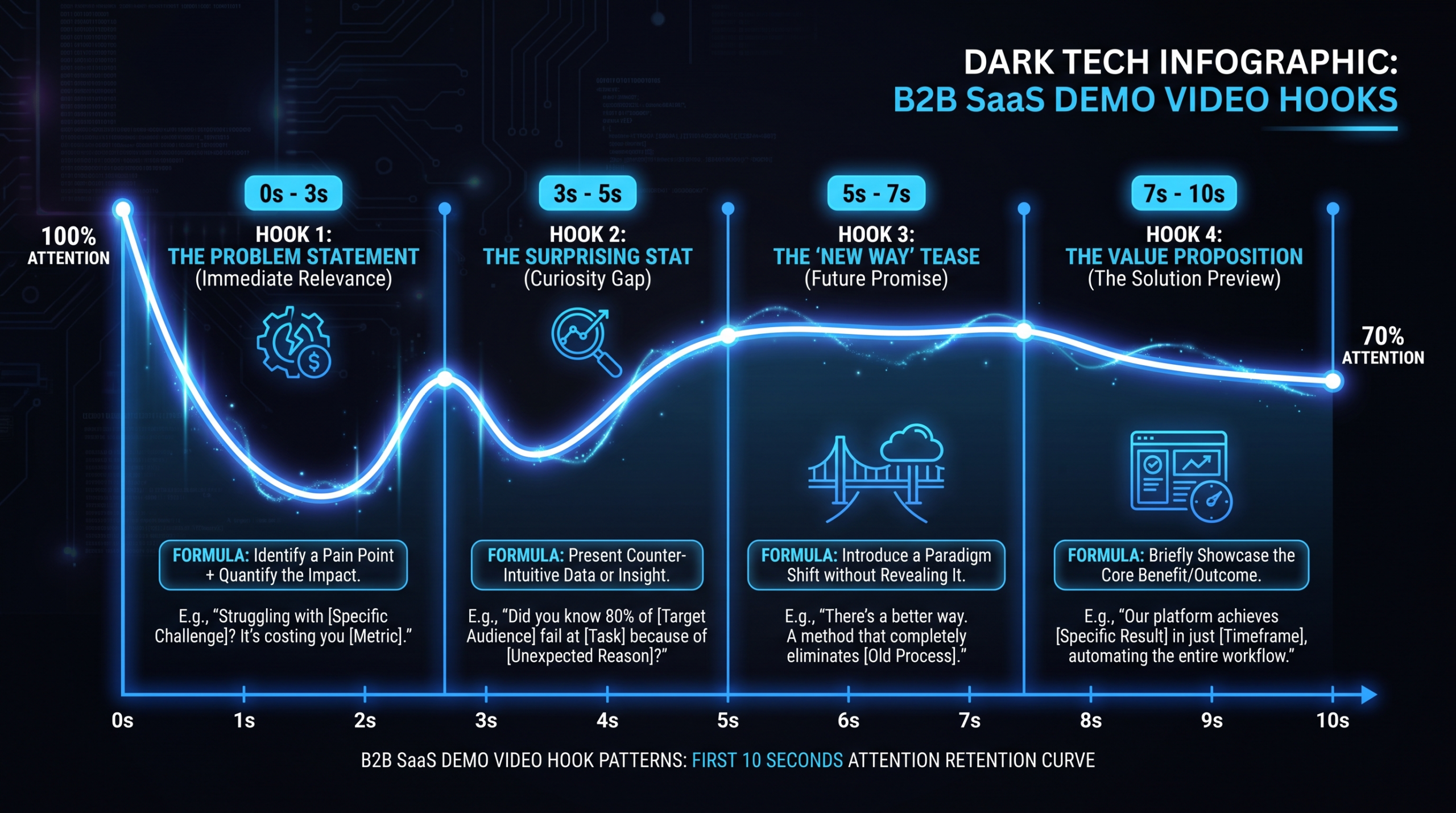
The First 10 Seconds: Demo Hooks That Hold
TL;DR
- The first 10 seconds of a B2B demo video determine whether a viewer stays or clicks away — no amount of quality in the middle rescues a slow start.
- Four cold-open patterns consistently hold B2B attention: problem statement, bold claim, result-first, and workflow-in-motion.
- What kills retention fast: logo animations, slow intros, “Hi I’m from [company]”, and agenda slides — all before value is shown.
- Platform matters: homepage autoplay, LinkedIn feed, and YouTube pre-roll each demand a different hook strategy.
- This guide includes a table of 10 concrete hook formulas with when to use each.
Table of Contents
Your demo video is doing more work than you probably realize. It is not just explaining a product — it is making a first impression, qualifying the viewer, and either earning 90 more seconds of attention or losing them to the back button. That judgment call happens in the first 10 seconds.
Most SaaS marketing teams know their demo could be better but are not sure what specifically to fix. The script is solid. The screen recording is clean. The voiceover is professional. And yet engagement data consistently shows that drop-off is heavily front-loaded — viewers who do not find a reason to stay within the first 10–15 seconds rarely make it to the product moments that would have converted them. Nine times out of ten, the problem is the hook — or the absence of one.
This guide focuses specifically on demo video hooks: the cold-open patterns that work in B2B, the mistakes that silently kill retention before viewers see anything valuable, and a set of concrete formulas you can apply to your next demo. No invented engagement statistics — just honest frameworks drawn from patterns that hold across B2B SaaS video.
Why the First 10 Seconds Decide Everything in B2B Demo Videos
Attention in video is not linear. Viewers do not watch 50% of a demo and then decide to bounce. Drop-off is heavily front-loaded. If someone does not find a reason to keep watching within the first 10–15 seconds, most of them are gone. This is true on platforms you would expect — YouTube, LinkedIn — and on your own homepage, where autoplay begins without any deliberate intent from the visitor.
B2B adds a specific wrinkle. Your viewer is likely a VP of Marketing, a Head of Content, or a product-led growth manager watching this demo between meetings, probably with notifications active in the background. They are not a casual consumer settling in for entertainment. They have a single question they are trying to answer: Is this relevant to my problem? The hook’s only job is to answer that question with a hard yes before they form a different answer.
The challenge is that most demo videos are built by teams who already know the product deeply. They feel a natural pull toward context-setting — explaining what the product does, what the company does, who it is for. This is instinctive from an insider’s perspective. From the viewer’s perspective, it reads as delay. Every second spent building context is a second not spent showing value.
The Retention Cliff Pattern
Demo videos commonly exhibit what video analytics teams call a retention cliff: a sharp drop in audience somewhere between 5 and 20 seconds. Viewers who make it past that cliff tend to watch significantly longer — sometimes to completion. What separates videos with a gradual slope from those with a cliff is almost always how quickly value is communicated in the opening.
The practical implication: the opening 10 seconds of your demo video is the highest-leverage point to invest editing time and creative effort. A well-produced product demo that opens poorly will underperform a rougher demo that opens with a strong hook. Getting the hook right before optimizing anything else in the video is the correct order of operations.
Context vs. Value: The Core Tension
Every demo video is balancing two things: giving the viewer enough context to understand what they are watching, and showing enough value quickly enough that they want to understand it. The temptation is to front-load context. The hook formulas that work consistently flip this: they lead with value — or pain, or a provocative claim — and let context follow organically.
This is counterintuitive for product marketers who have spent months on positioning, ICP definitions, and messaging frameworks. The hook is not the place to deploy that messaging architecture. It is the place to earn the attention that lets you deploy it in the next 60–90 seconds.
The 4 Cold-Open Patterns That Work in B2B
Four distinct cold-open approaches consistently hold B2B attention across product categories and audience segments. Each works for different reasons and suits different products and audiences. The best demo teams know which pattern fits their product and apply it with conviction rather than mixing approaches randomly.
1. Problem Statement Cold Open
Open with the pain point — no preamble, no company intro. The viewer hears (or reads on screen): “Your team is manually copying data from your CRM into spreadsheets every week. Here is what that looks like when it stops.”
This pattern works because it activates immediate recognition. If the viewer has this problem, they self-select and lean in. If they do not, they have been efficiently qualified out — which is genuinely useful. A problem statement cold open is most effective when your ICP has a specific, recognizable pain that is distinct from generic SaaS friction. “Your team wastes time” is too broad to land. “Your RevOps lead spends six hours a week rebuilding the same pipeline report” is specific enough to create recognition.
When to use: When your product solves a named, identifiable pain. Works especially well for productivity tools, data operations platforms, and anything replacing a manual workflow that the target buyer performs or manages directly.
2. Bold Claim Cold Open
State the outcome upfront — the specific result the product enables. “We reduced our onboarding-to-activation time by 40%. This is what changed.” Or: “Most teams spend two days building a pipeline report. Ours takes seven minutes. Here is how.”
The bold claim pattern works because it creates a cognitive commitment: the viewer now needs to see how the claim is justified. It opens a mental loop the brain wants to close. The risk is credibility. Overstated claims — percentages that feel like marketing inflation — backfire on skeptical B2B buyers. Hedged, specific claims consistently outperform dramatic generalities. “Can cut” is weaker than “reduced ours” paired with a specific number from a real implementation.
When to use: When you have a genuine, demonstrable outcome improvement and can show it in the demo itself. Works well for automation tools, analytics platforms, and any product where time-to-value is measurable and demonstrable on screen.
3. Result-First Cold Open
Show the end state before the process. Open on the output — the finished dashboard, the completed workflow, the customer-facing deliverable — before showing how you get there. “This is what your account health reporting looks like 30 days after implementation. Let us build backward.”
The result-first pattern works because it anchors the viewer’s mental model before the demo begins. Instead of watching and wondering “what is this building toward?”, they already know the destination. Every step in the demo becomes evidence that the destination is reachable. This is particularly effective for B2B SaaS products with visually compelling outputs: reporting dashboards, customer portals, automated workflow summaries.
When to use: When the product’s output is visually impressive and the path to get there looks complex from the outside. Works well for BI tools, CRMs, customer success platforms, and project management software where the end state sells itself better than any feature explanation.
4. Workflow-in-Motion Cold Open
Jump immediately into the product doing something interesting — no narration setup, no intro frame, just the interface in action. The voiceover follows what is happening on screen rather than preceding it. The first frame shows the product mid-workflow.
This pattern is underused and highly effective when the product’s UI is genuinely impressive in motion. It signals confidence: you are showing the product before explaining it, implying you trust it to speak for itself. It eliminates the “context tax” entirely by making context implicit in the workflow being demonstrated rather than stated in narration.
When to use: When the product’s interface is clean, the primary workflow is immediately legible to the target buyer, and the UX is a genuine differentiator. Works especially well for developer tools, design platforms, and workflow automation products where the product’s fluency is visible in motion.
What Kills Demo Retention in the First 10 Seconds
Knowing what not to do is often more immediately actionable than knowing what to do. The following patterns appear across a significant share of SaaS demo videos and consistently drive early abandonment. Most of them feel natural from an internal perspective — which is exactly why they persist.
Logo Animations
A 3–7 second animated logo intro communicates nothing to the viewer except that you have a brand guidelines document. From the viewer’s perspective, it is pure delay before any value appears. If your logo needs to be present, use a corner overlay or a brief end card. The first frame of a demo video should show something the viewer cares about — not your wordmark animating in.
The Slow Context Build
“In today’s fast-moving SaaS landscape, teams are facing unprecedented challenges around...” — this kind of opening is a retention killer. Broad context-setting before any specific value is the written equivalent of clearing your throat before speaking. If context is genuinely necessary, make it specific to the viewer’s situation and reach a concrete point within two sentences. Generic scene-setting cannot earn attention; it only costs it.
“Hi, I’m [Name] from [Company]”
Personal introductions at the start of a demo video push the viewer into passive reception mode before any value has been established. This pattern is borrowed from webinars and live demos, where rapport-building serves a different social function. In recorded demos — particularly short-form demos for homepage or LinkedIn — personal introductions add 10–20 seconds of friction with no conversion payoff. If a presenter appears on camera, the opening line should be the hook, not a greeting. Lower-third titles handle the name attribution.
Agenda Slides
“In this video, we are going to cover: first, an overview of the platform... then, a walkthrough of the dashboard... and finally...” Agenda slides belong in 45-minute webinars, not 90-second demos. Every second spent listing what you are about to show is a second not spent showing it. If a viewer needs an agenda to decide whether to keep watching, the hook has already failed its job.
Low-Energy Openings
A flat, monotone opening line paired with a static title card signals to viewers that this video will be a slog. Energy in the opening — whether through editing pace, voiceover delivery, or the visual dynamism of the first frame — sets expectations for everything that follows. Starting slow and building energy later is significantly harder than starting with energy and maintaining it. Viewers form impressions of a video’s pacing within the first two or three seconds.
Mismatched ICP Framing
Opening with pain points or use cases that do not match the viewer arriving from a specific channel is a subtle retention killer that is easy to miss. A viewer arriving from a LinkedIn post about RevOps who encounters a demo framed around marketing team workflows will disengage immediately — they will correctly determine this demo is not for them. For products serving multiple buyer segments, separate demo variants per channel typically outperform a single generic hook applied everywhere.
Platform Context: Homepage vs. LinkedIn vs. YouTube Pre-Roll
The same hook does not perform equally across distribution contexts. The viewer’s situation — how they arrived, what they expected, whether sound is on, how much intent they brought — changes what the first 10 seconds need to accomplish.
Demo Hook Requirements by Platform
| Platform | Viewer Context | Sound Default | Hook Priority | First 3 Seconds Must Do |
|---|---|---|---|---|
| Homepage (autoplay) | Evaluating product; moderate intent | Muted | Visual retention | Show compelling product UI or outcome — no dependence on audio |
| LinkedIn feed | Mid-scroll; low initial intent | Off | Thumb stop + ICP signal | Text overlay identifying the target problem or audience |
| YouTube pre-roll | About to watch something else; minimal intent | On | Skip prevention (5 sec) | Provocative opening line before the skip button appears |
| Sales email embed | Sent directly by a rep; high intent | Usually on | Personalization signal | Reference the specific use case or pain point from the outreach sequence |
| G2 / Capterra profile | Active category evaluation; high intent | Variable | Credibility + product clarity | Show product working on the use case that matches the category’s primary buyer question |
The practical takeaway: a single master demo will almost always be suboptimal for at least two or three of your distribution contexts. Teams that repurpose one recording across all channels commonly find performance gaps that a channel-specific hook would close. For teams serious about demo performance across channels, HubSpot’s video marketing research consistently supports the case for platform-specific variants rather than a single universal cut.
This is one of the reasons production workflows that include platform cut-downs as standard deliverables — rather than add-ons — tend to produce better channel-level results. VEC’s dedicated team model is structured around exactly this: a primary demo plus channel-specific variants produced in the same production sprint, so the ICP framing and hook energy match the distribution context.
The Muted Homepage Problem
Homepage autoplay is one of the most important and most misunderstood demo contexts. Most browsers autoplay with sound muted by default, and many visitors never unmute. A demo that relies entirely on voiceover to communicate value in the first 10 seconds is effectively silent for a substantial portion of its homepage audience. The fix is not just adding subtitles — though subtitles help — it is building a visual narrative that communicates the hook through UI action, text overlays, and intentional screen-capture composition before audio plays any role. The video should make a viewer think “I want to know what this does” before they unmute, not after.
LinkedIn’s Thumb-Stop Requirement
LinkedIn video in the feed competes with text posts, carousels, thought leadership articles, and other videos. A viewer who does not see something professionally recognizable within the first 2–3 seconds scrolls past. Text overlays in the first frame that signal the ICP and the core problem — “For RevOps teams tired of two-day reporting cycles” — create an immediate qualification signal that holds the right viewer and releases the wrong one. The best LinkedIn demo hooks feel like a native post that happens to be a video, not a repurposed ad.
YouTube Pre-Roll: The 5-Second Constraint
YouTube pre-roll gives you approximately five seconds before the skip button appears. Everything before that window must make the viewer want to skip less than they want to watch whatever they came for. That is an aggressive bar. Bold claim and contrast hooks tend to perform best here — they create a cognitive commitment before the skip option arrives. Problem statement hooks require slightly more setup and can struggle to land within the five-second window unless the problem is extremely specific and immediately recognizable.
10 Hook Formulas for B2B SaaS Demos
The following formulas cover the range of approaches that consistently hold B2B attention. Each includes the formula pattern, when to use it, a sample opening line, and the tone it requires. The sample lines are illustrative — adapt them to your product’s actual outcomes and your buyer’s actual language, not the generic versions below.
Demo Video Hook Formulas
| # | Formula | When to Use | Sample Opening | Tone |
|---|---|---|---|---|
| 1 | Problem Statement | Clear, named pain the ICP recognizes immediately | “Your team is still rebuilding the same pipeline report every Monday. Here is what happens when that stops.” | Empathetic, direct |
| 2 | Bold Claim | Demonstrable, specific outcome you can show in the demo | “Our onboarding flow cut trial-to-activation time in half. This is exactly what changed.” | Confident, verifiable |
| 3 | Result-First | Visually impressive end state; complex workflow to explain | “This is what your account health view looks like 30 days in. Let us build backward from here.” | Calm, assured |
| 4 | Workflow-in-Motion | Clean UI, legible primary workflow, product UX is a differentiator | [No narration — open on the product in action; voice follows 3–5 seconds in] | Confident, visual-led |
| 5 | Before / After | Workflow transformation where the contrast is stark and recognizable | “Before: two-day reporting cycle. After: seven minutes. Here is the difference.” | Punchy, contrast-driven |
| 6 | Specific Number | Process with measurable steps or timeframe worth quantifying | “Three steps. Ninety seconds. No setup required.” | Precise, credibility-forward |
| 7 | The Question | Aspiration-driven product; buyer is exploring possibilities | “What if your CS team could identify churn risk before the QBR, without pulling a single report?” | Curious, aspirational |
| 8 | Customer Voice | Strong customer language captures the pain better than internal copy | “Our Head of RevOps told us: ‘I was rebuilding the same dashboard every week.’ This is what fixed it.” | Social proof, credible |
| 9 | The Contrast | Crowded category where most solutions add complexity instead of removing it | “Most reporting tools require three integrations to show what yours should show by default. Here is ours.” | Competitive, category-aware |
| 10 | The Time-Stamp | Short demo where pacing is itself a selling point; skeptical or time-pressed buyer | “In the next 90 seconds, you will see exactly how a new account goes from signup to live dashboard.” | Transparent, efficient |
Three principles for using these formulas effectively in practice:
- Pick one and commit. Mixing a problem statement with a bold claim with a time-stamp in the same opening creates noise, not impact. The strongest hooks commit to a single angle and execute it cleanly.
- Match the formula to funnel stage. Time-stamp and specific number hooks perform better for bottom-funnel viewers who already understand your category. Problem statement and customer voice hooks typically outperform for top-of-funnel contexts like LinkedIn, where viewers may not yet know your product.
- Test rather than assume. B2B audiences vary widely by product category and buyer persona. A bold claim that converts well for a RevOps tool may underperform for a security product, where skepticism of marketing claims is structurally higher. Two or three hook variants tested over 6–8 weeks typically reveals a clear winner without requiring large sample sizes.
After the Hook: Keeping Momentum Through the Demo
A strong hook earns 20–30 additional seconds of attention. What you do with those seconds determines whether the viewer watches to the end or still drops off in the middle. Hooks and demo structure are inseparable — a hook that promises more than the next 60 seconds delivers creates a trust deficit that compounds through the rest of the video.
The Hook-to-Proof Bridge
The 10–30 second window after the hook is where you need to deliver immediate evidence for whatever the opening claimed or implied. If you opened with a problem statement, the next 20 seconds should show that problem being solved — concretely, inside the product. If you opened with a bold claim, you should be inside the workflow that justifies the claim within 30 seconds. The longer the delay between hook and proof, the more attention bleeds away.
This has practical implications for script structure. Many demo scripts front-load feature context and product explanation before getting to the core workflow moment. That structure is logical but fails on attention management. The revision is to identify the single highest-value workflow moment in your demo — the one that makes viewers think “oh, that is genuinely useful” — and move it as early in the video as the narrative will allow.
Pacing and Edit Rhythm
Demo videos that hold attention through the middle tend to run at a faster edit rhythm than most internal teams expect when they first watch the cuts. B2B viewers are acclimated to fast-cut content across platforms and have developed genuinely low tolerance for lingering screen-recording moments where nothing meaningful changes on screen. Keep cuts moving. If a workflow step takes 8 seconds in real time but can be communicated in 2 seconds of edited footage with a voiceover bridge, cut it to 2 seconds.
This is where production quality genuinely earns its cost — not in expensive visual effects, but in the editing discipline of removing every frame that is not earning its place. Teams that produce demos at consistent volume, like SaaS companies working through dedicated production partners, typically develop informal “seconds per workflow step” guidelines that keep demos tight without sacrificing legibility.
Short-Form vs. Long-Form Demo Hook Strategy
Hook approach differs meaningfully depending on whether you are producing a 60–90 second short-form demo clip or a 3–5 minute product walkthrough. The table below maps hook budget and formula recommendations to format.
Hook Strategy by Demo Format
| Format | Total Length | Hook Budget | Best Hook Formulas | What Follows the Hook |
|---|---|---|---|---|
| Social clip / LinkedIn | 45–90 sec | 3–5 sec | Workflow-in-Motion, Before/After, Specific Number | One core workflow moment, CTA |
| Homepage hero demo | 60–120 sec | 5–8 sec | Result-First, Problem Statement, Workflow-in-Motion | Core product value → outcome proof → CTA |
| Sales email / SDR send | 90–180 sec | 8–12 sec | Customer Voice, Bold Claim, The Contrast | Tailored use case → social proof moment → meeting CTA |
| Full product walkthrough | 3–5 min | 10–15 sec | Problem Statement, Time-Stamp, The Question | Multi-workflow coverage → feature depth → CTA |
| YouTube pre-roll | 15–30 sec | 3–5 sec (pre-skip) | Bold Claim, The Contrast, Specific Number | Brand recall moment → URL or next step |
For companies running multiple demo formats simultaneously — which describes most SaaS companies with any content maturity — the most efficient workflow is to produce the long-form walkthrough first, then purpose-build hooks for each short-form variant rather than cutting down the long-form opening. A long-form hook that works inside a 4-minute walkthrough will typically be too slow for a 90-second social clip. Each format needs a hook that was written for it, not borrowed from a different context.
For a broader look at how demo production fits into a SaaS content system, the product demo video production guide covers the full workflow from brief to final deliverable, including how to structure a production sprint that outputs multiple formats efficiently.
Looking for hooks in the wild? Our SaaS demo video examples break down how Loom, Notion and Slack open their demos.
Once you have picked a hook, drop it into a full script: the product demo video script template shows where the hook sits in the 7-part structure.
Frequently Asked Questions
How long should a B2B demo video hook be?
For most formats, the hook window — the time before your first concrete piece of value appears — should run between 3 and 10 seconds. Short-form content for LinkedIn or homepage autoplay demands the faster end. Longer product walkthroughs can invest up to 12 seconds in the opening. The practical test: if you skip the first 10 seconds of your video, can the viewer still understand what they are watching? If yes, the hook is probably too long.
Should demos open with a speaker on camera or with a screen recording?
It depends on format and intent. For short-form demos designed for LinkedIn or homepage embeds, screen recordings with voiceover typically outperform on-camera presenters because the product appears immediately. For sales email demos or longer product walkthroughs where personal connection matters, a brief on-camera intro — under 5 seconds — before cutting to the product can work, but the speaker should open with the hook line, not a greeting. Avoid any format that opens with a static on-camera shot before value has been established.
What is the most common hook mistake in B2B SaaS demos?
Starting with company or product context before showing value. This appears in many forms: animated logo intros, “welcome to [product] where we help teams” narration, or agenda slides listing what the demo will cover. The common root cause is the same in all cases — the production team is more interested in explaining the product than in immediately showing it doing something useful. The fix is identifying the single most compelling moment in the demo and moving it to the first 10 seconds, then building the surrounding context afterward.
Can the same demo hook work for cold outreach and warm inbound leads?
Not usually with equal effectiveness. Warm inbound leads — people who arrived from your website or searched your category — respond better to product-led hooks like result-first and workflow-in-motion, which assume some baseline awareness. Cold outreach audiences need stronger problem framing first: problem statement and customer voice hooks tend to outperform because the viewer does not yet have a reason to care about your specific product. Teams running significant outbound volume often maintain separate 60–90 second demo variants for cold and warm contexts rather than using one master file across both.
How do I measure whether a new hook is actually performing better?
The most accessible metric is average view duration for the first 30 seconds, available in video analytics tools like Wistia and Vidyard as well as YouTube Analytics. Compare two hook variants applied to the same core demo content against the same traffic source over a consistent period — ideally 3–4 weeks with enough views to have meaningful signal. Completion rate past the 60-second mark is the second metric worth watching. A hook that improves 30-second retention but does not improve 60-second completion may be winning attention without earning it — a pattern that appears most often with bold claim hooks that do not deliver on their promise quickly enough in the footage that follows.
Want Demos That Hook and Hold?
VEC builds B2B SaaS demo videos engineered for retention — from hook craft to platform-specific cut-downs. Dedicated teams, flat retainer, 90-day output guarantee. Plans from $5K/month.
Book a Free Strategy Call See How It Works See Pricing
