Customer Onboarding Video Strategy (Reduce Churn)
Table of Contents
The Onboarding-Churn Connection
Here's the uncomfortable math: most SaaS churn happens in the first 90 days. Not because the product is bad, but because users never experience the value they signed up for. They get lost in the UI, skip key setup steps, and slowly drift away before they ever reach their "aha moment."
Video is the most effective tool to close this gap because it shows rather than tells. A 2-minute walkthrough video gets users to their first success faster than a 10-page help doc that nobody reads. And faster time-to-value directly correlates with lower churn, higher expansion revenue, and stronger NPS scores.
This isn't about replacing your onboarding flow with videos. It's about using video strategically at the moments where users most commonly get stuck, drop off, or misunderstand how to extract value from your product.
Why text-based onboarding fails
- Help docs are searched, not read: Users don't proactively browse your knowledge base. They search for a specific problem, scan for an answer, and leave. Video intercepts them before they need to search.
- Screenshots go stale: Every UI update makes existing screenshots inaccurate. Users see a different interface than the docs show, creating confusion and support tickets. Video is easier to update and provides clearer context.
- Context is lost: Text instructions describe steps. Video demonstrates workflows - including the thinking behind each step, common pitfalls, and what success looks like. This contextual understanding is what creates confident users.
Video Types for Onboarding
Welcome video (personal touch)
A 60-90 second video from the CEO, product lead, or CS team welcoming the new user and setting expectations. This human connection at the start of the relationship sets the tone. Include: who to contact for help, what to expect in the first week, and one exciting thing their product can do once set up.
Quick-start walkthrough
A 3-5 minute guided tour of the essential setup steps. Not every feature - just the critical path to first value. For a project management tool, that's: create a workspace ? invite a team member ? create a task ? set a due date. For an analytics tool, that's: connect a data source ? create a dashboard ? share with stakeholders.
Feature-specific tutorials
2-3 minute videos focused on a single feature, triggered when the user first encounters that feature or shows signs of struggling. These are not product tours - they're "here's how to do the specific thing you're trying to do right now."
Use case videos
3-5 minute videos showing complete workflows for specific personas. "How marketing managers use [Product] for campaign tracking" or "How engineering leads use [Product] for sprint planning." These help users see themselves in the product and discover use cases they hadn't considered.
Milestone celebration videos
15-30 second videos triggered when users hit key milestones: first integration connected, first report generated, first team member invited. These create positive reinforcement and dopamine hits that encourage continued engagement.
| VIDEO TYPE | LENGTH | TRIGGER | PRIMARY GOAL |
|---|---|---|---|
| Welcome video | 60-90 sec | Account creation | Build connection, set expectations |
| Quick-start walkthrough | 3-5 min | First login | Drive core setup completion |
| Feature tutorials | 2-3 min | Feature first-use or struggle | Reduce friction at specific points |
| Use case videos | 3-5 min | Role/persona identified | Show relevant workflows |
| Milestone celebrations | 15-30 sec | Key action completed | Positive reinforcement |
Building Your Video Onboarding Strategy
Step 1: Map the critical path
Identify the 5-7 actions a user must complete to experience core product value. For each action, document: the current completion rate, where users drop off, common support tickets, and the average time from signup to completion.
Step 2: Identify friction points
Look at your analytics for the steps with the lowest completion rates and highest support ticket volume. These are your priority videos. Don't try to create videos for every feature - focus on the moments where users most need help.
Step 3: Create your video library
Start with the minimum viable library:
- 1 welcome video
- 1 quick-start walkthrough
- 3-5 feature tutorials for your highest-friction points
- 2-3 use case videos for your top personas
This is typically 7-10 videos totaling 20-35 minutes of content. Use our demo script template to structure each video consistently.
Step 4: Embed strategically
Videos should appear in context - inside the app, at the moment of need. Options include:
- In-app modals: Triggered on first login or first encounter with a feature. Use tools like Appcues, Pendo, or Chameleon.
- Onboarding email sequence: Drip videos over 7-14 days, timed to the typical user journey. Video in email gets 65% higher click rates.
- Resource center: A dedicated "Getting Started" section in your app with organized video content.
- Tooltip triggers: Small "watch video" links next to complex features that expand into embedded players.
Step 5: Measure and iterate
Track video-specific onboarding metrics (see Metrics section) and update videos quarterly based on product changes and user feedback. A video with outdated UI hurts trust more than no video at all.
Scripts & Frameworks
The SHOW framework for onboarding videos
- S - Situation: "You just signed up for [Product] and want to [specific outcome]."
- H - How: "Here's exactly how to do it, step by step."
- O - Outcome: "Once you complete these steps, you'll be able to [specific result]."
- W - What's Next: "Your next step is [link to next video or action]."
Scripting tips for onboarding videos
- Start with the outcome, not the feature. "Let's get your first report built" beats "This video covers the Reports feature."
- One video = one task. Never combine multiple workflows into a single video. Users will skip the whole thing if the first 30 seconds aren't relevant to their immediate need.
- Acknowledge the learning curve. "This might look complex at first, but you'll have it down in about 2 minutes." Setting expectations reduces frustration.
- Include common mistakes. "One thing to watch out for: make sure you select 'Active' before saving, otherwise..." This prevents support tickets and builds trust.
Automation & Triggers
The most effective onboarding video strategies deliver the right video at the right time based on user behavior. Here's how to set up behavioral triggers:
Time-based triggers
- Day 0: Welcome video (immediate after signup)
- Day 1: Quick-start walkthrough (if core setup not completed)
- Day 3: Use case video matched to persona
- Day 7: Advanced feature tutorial (if user is active)
- Day 14: ROI/value recap + expansion feature teaser
Behavior-based triggers
- Hasn't completed setup step X after 48 hours: Send targeted video for that specific step
- First time accessing feature Y: Show feature tutorial modal
- Used feature Z for the first time: Show advanced tips video
- Login frequency dropping: Send re-engagement video highlighting unused features
- Completed core workflow: Celebrate + suggest next workflow
Measuring Onboarding Video Impact
| METRIC | WHAT IT TELLS YOU | TARGET |
|---|---|---|
| Video completion rate | Are videos the right length/quality? | >60% for <3 min, >40% for 3-5 min |
| Setup completion rate (video viewers vs. non-viewers) | Does video accelerate setup? | 20-40% higher for video viewers |
| Time to first value | Does video speed up activation? | 30-50% faster for video viewers |
| Day-7 retention | Are video-onboarded users stickier? | 15-25% higher for video viewers |
| Day-30 retention | Sustained impact on engagement? | 10-20% higher for video viewers |
| Support ticket volume | Does video reduce confusion? | 20-35% fewer tickets from video viewers |
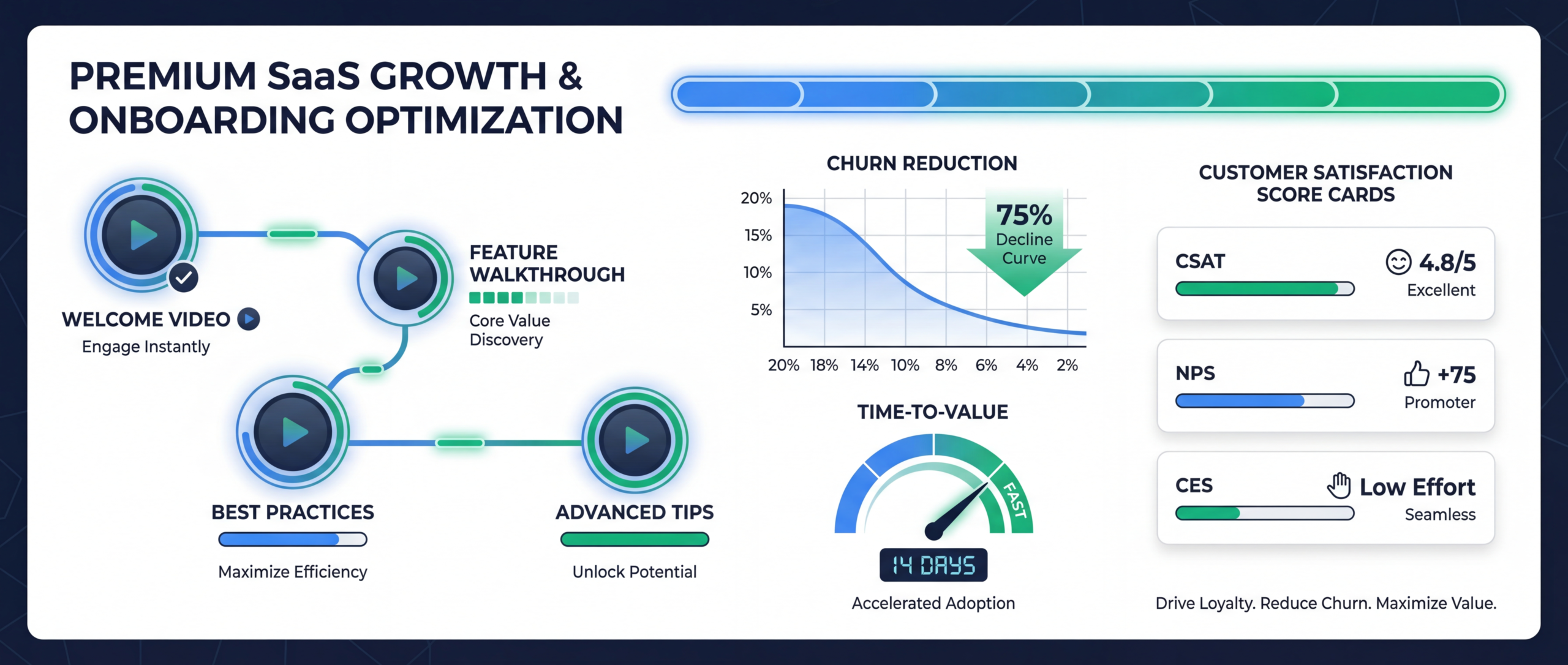
| NPS / CSAT at day 14 | User satisfaction with onboarding? | 10-15 point NPS lift with video |
What Good Looks Like
Slack's onboarding approach
Slack uses short, contextual videos embedded in the product rather than a single long onboarding tutorial. Each video addresses one action (creating a channel, setting up notifications, connecting an integration) and appears only when relevant. Result: one of the highest activation rates in SaaS.
Notion's template walkthroughs
Notion pairs video tutorials with pre-built templates. Users don't just watch how to build a project tracker - they start from a template and the video shows how to customize it. This dramatically reduces time-to-value because users start from something rather than nothing.
Loom's "Loom to learn Loom" approach
Loom uses its own product for onboarding - sending Loom video messages that teach users how to create their first Loom. This is both practical and brilliant product marketing: the onboarding experience demonstrates the product's value simultaneously.
Ready to Level Up Your Video Strategy?
Talk to our team about your video production needs. No commitment required.
Book a Free Strategy Call See PricingReady to get started? View our pricing.
Frequently Asked Questions
How many onboarding videos do I need?
Start with 7-10 videos covering the critical path to first value. Most SaaS products have 5-7 essential setup steps and 2-3 primary use cases. Create one video per step/use case. You can expand later based on data showing where users still struggle.
Should onboarding videos be in-app or via email?
Both. In-app videos (modals, tooltips) catch active users at the moment of need. Email videos catch users who signed up but haven't returned. The most effective strategy layers both: in-app guidance for active sessions and email nurture for re-engagement.
How often should I update onboarding videos?
Review every quarter and update after any significant UI change. A video showing an outdated interface creates more confusion than no video at all. Some teams record quarterly update videos as a scheduled production task. Budget for 2-3 re-recordings per quarter.
What's the ROI of onboarding videos?
Calculate: (churn reduction x average customer lifetime value) + (support ticket reduction x cost per ticket) + (faster activation x impact on expansion revenue). For a SaaS with $500/month ARPU and 10% monthly churn, reducing churn by just 2 percentage points saves $120K per 1,000 customers annually.
Can I use AI-generated onboarding videos?
For screen recordings with voiceover, AI voices are increasingly viable (Eleven Labs, WellSaid). For face-to-camera welcome videos, real humans still build more trust. A hybrid approach works: AI voiceover for tutorials, real people for welcome and milestone videos.
Product Demo Script Template
Craft compelling onboarding and demo videos with our battle-tested script template.
Download Free