Training Videos for Employees: Examples + Cost
Key Takeaways
- 72% of employees say they find video-based training more effective than text, per a joint TalentLMS and Vyond study — making format choice the single highest-leverage decision in your training program design.
- 5 main formats cover the full range of corporate training needs: onboarding/orientation, software screencast, compliance/safety, sales coaching, and animated explainer — each suited to a distinct learning goal and audience.
- Production costs typically range from $300 per freelance-edited screencast to $15,000+ for a professionally animated compliance video; ongoing monthly programs with a dedicated editing team run $5,000–$16,000/month.
- 10 real examples below span every major training format and are embedded directly — watch them now to set your internal quality benchmark before briefing a production team.
- The break-even point for a dedicated video team vs. per-project pricing is roughly 8–10 videos per month — below that, freelancers or one-off agency quotes typically cost less.
TL;DR
Training videos for employees reduce onboarding time, ensure policy consistency, and scale institutional knowledge without scheduling friction. This guide covers the 5 most effective formats with real examples you can watch today, an honest cost breakdown by production model, and a practical framework for choosing between DIY, freelancer, and agency production.
Table of Contents
- Key Takeaways
- What Types of Training Videos Work Best for Employees?
- 10 Real Employee Training Video Examples
- What Makes an Employee Training Video Effective?
- How Do You Create Training Videos for Employees?
- How Much Do Employee Training Videos Cost?
- DIY, Freelancer, or Agency: Which Model Is Right for You?
- Frequently Asked Questions
Your new VP of Sales just hired three reps. Your compliance deadline is two weeks out. Your SaaS customer success team is handling 40% more accounts than last quarter. At every inflection point, the same question surfaces: how do you get people up to speed without the whole team stopping to train them?
The business case is clear. The LinkedIn 2024 Workplace Learning Report found that companies with strong learning cultures report significantly better employee retention and engagement — while untrained or under-trained employees cost organizations in performance gaps that compound over time. Training videos are how scalable learning programs are built.
Training videos for employees solve exactly that problem. When produced correctly, they turn institutional knowledge into scalable, on-demand learning — consistent every time, available whenever someone needs it, and measurable in ways that in-person sessions rarely are.
This guide covers the formats that actually work, 10 real examples you can watch today, an honest cost breakdown, and a clear framework for deciding how to produce yours.
What Types of Training Videos Work Best for Employees?
The format of your training video determines whether it gets watched once or referenced repeatedly. Here are the five formats that consistently deliver results across B2B and SaaS environments:
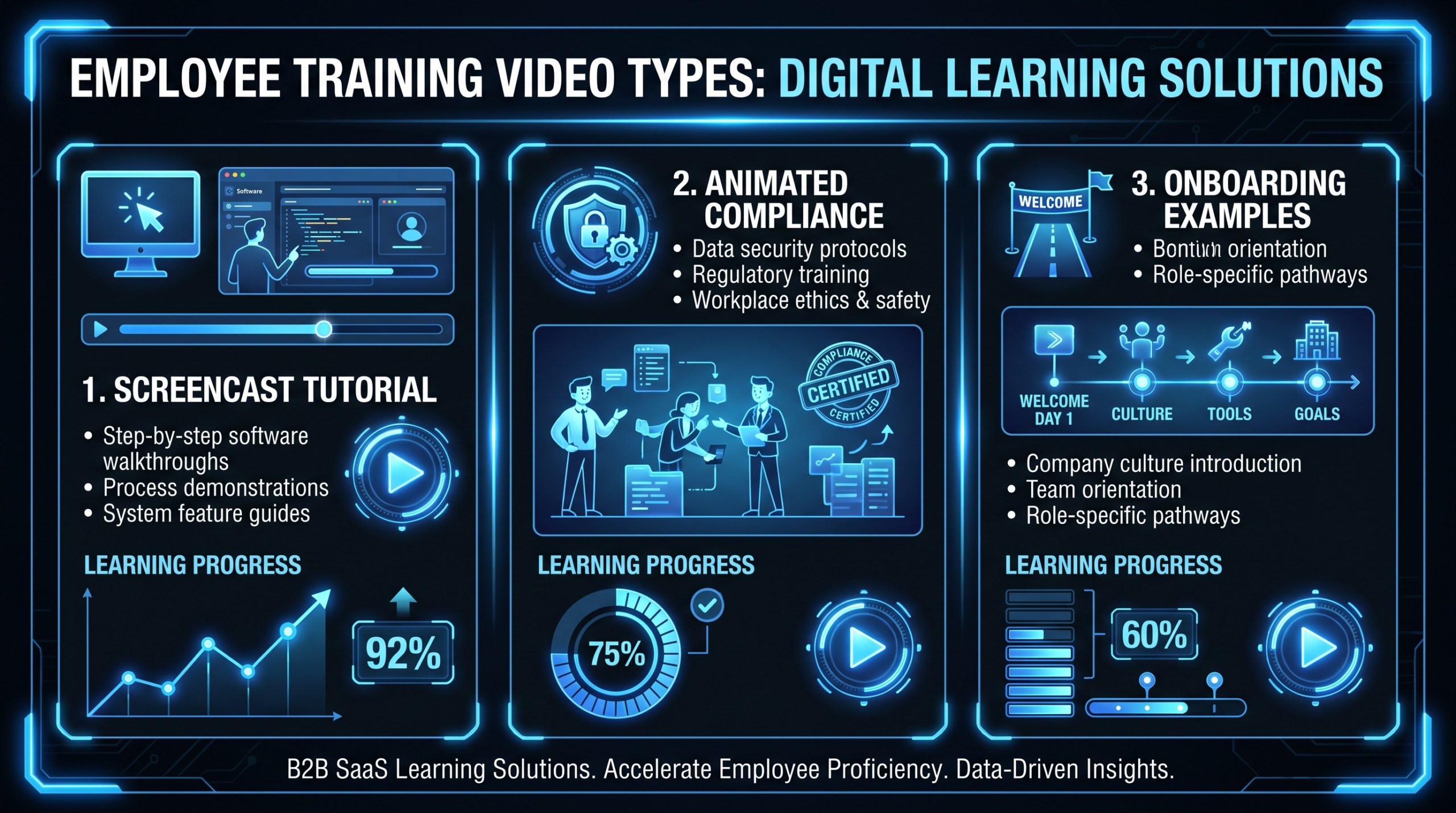
1. Onboarding and Orientation Videos
Welcome videos, culture overviews, team introductions, and day-one logistics. These are typically the first training videos a new hire encounters. Done well, they reduce time-to-productivity and set cultural expectations before a manager has time to schedule a first call. The best onboarding videos mix live-action (CEO welcome, team walk-throughs) with screencast (system access, tool tutorials). For SaaS companies building both employee and customer onboarding content simultaneously, a specialized approach to training video production for SaaS can serve both programs from a single production workflow.
2. Software Tutorial and Screencast Videos
Step-by-step walkthroughs of your internal tools — CRM, project management software, billing systems, custom platforms. Screen recordings with a voiceover are often sufficient; animated callouts highlight key actions. These videos have the highest reuse value in any training library: one solid Salesforce walkthrough can train hundreds of reps across dozens of cohorts without a single live session. The production investment is low relative to the time it saves in repeated training calls.
3. Compliance and Safety Training Videos
HR policy, data security, workplace safety, anti-harassment, OSHA requirements. Video ensures every employee receives identical information — a standard you cannot guarantee with live sessions. Animated formats perform especially well here because they sidestep the awkwardness of dramatizing sensitive scenarios with live actors, while making it easy to update specific sections when policies change without re-shooting the entire piece.
4. Sales and Customer Service Coaching
Objection handling, product pitches, customer call frameworks, escalation scripts. These work best as short, modular clips — typically 3–7 minutes — that reps can revisit before a call or debrief after a difficult interaction. The most effective examples use real call recordings (anonymized) alongside scripted frameworks, not just scripted roleplays that feel disconnected from the actual customer experience.
5. Animated Explainer and Process Videos
Visualizing complex workflows, products, or systems that are difficult to show with a camera. Animated explainers are especially effective for product knowledge training — explaining how something works conceptually, not just how to click through it. They also update more cleanly than live-action content when the underlying system changes. For budget context, see our detailed explainer video cost breakdown.
A sixth format is growing in adoption: microlearning modules — sub-3-minute videos designed for in-the-moment reference rather than front-loaded learning. These perform well when embedded directly into Slack, your LMS, or your internal wiki, available at the exact moment someone needs to apply a skill.
10 Real Employee Training Video Examples
Each example below covers a different format and use case. Watch them directly to calibrate your quality benchmark before briefing a production team.
Example 1: SaaS Product Onboarding Walkthrough
FORMAT: SCREENCAST / ONBOARDING
A clean screencast-style tutorial showing new users how to navigate a SaaS platform. Note how it opens with a direct outcome statement rather than a company introduction — that structure alone reduces early drop-off. The annotation callouts and step-pacing are benchmarks for any software tutorial your team produces internally.
Example 2: Employee Onboarding Platform Demo
FORMAT: PRODUCT DEMO / TOOL WALKTHROUGH
A walkthrough of how modern onboarding tools deliver training at scale. Worth watching to understand what the learner experience looks like inside an LMS or onboarding platform — useful context when deciding whether your own content should live inside a tool or be distributed as standalone video links.
Example 3: SaaS Onboarding Method — B2B Instructional Format
FORMAT: TALKING HEAD + MOTION GRAPHICS
A B2B-style instructional video explaining onboarding improvement frameworks. The production quality here — clean presenter, light motion graphics overlay, structured pacing with chapter cues — is a realistic benchmark for an agency-produced corporate training video in the $3,000–$6,000 range. This is the format most SaaS companies use for sales enablement and product knowledge training.
Example 4: How to Create Employee Onboarding Videos
FORMAT: TUTORIAL / PROCESS WALKTHROUGH
A practical tutorial from Riverside covering the end-to-end process of creating onboarding video content — from scripting to recording to distribution. Watch this to benchmark a clear, no-frills process tutorial structure. The format works equally well for documenting internal SOPs as it does for external onboarding content.
Example 5: Software Training Demo — Wistia Platform
FORMAT: SCREEN RECORDING + VOICEOVER + CALLOUTS
Wistia's platform tutorial demonstrates software training at a professional production level. The combination of precise screen recording, annotation callouts on key UI elements, and clear authoritative voiceover is the formula for any tool-training video. Achieving this quality with a professional video editing service typically costs $1,500–$4,000 per finished 5-minute video, depending on the complexity of callout animation.
Example 6: LMS Platform Overview — TalentLMS
FORMAT: PLATFORM WALKTHROUGH / REVIEW
A comprehensive walkthrough of TalentLMS, one of the most widely-used LMS platforms for corporate training delivery. Useful both for evaluating hosting options and for understanding what a structured software review video looks like when produced at scale. The pacing — overview, then feature deep-dives, then use-case demonstrations — is a reliable template for any multi-feature software training video.
Example 7: Industrial Safety Training — 3D Animation
FORMAT: 3D ANIMATION / SAFETY COMPLIANCE
A professional 3D animated safety training video demonstrating workplace hazard procedures. This is the standard format for manufacturing, logistics, and construction compliance training — environments where showing live footage of the hazard would be impractical or unsafe. Note the numbered step sequences, clear visual hierarchy, and modular structure that allows individual sections to be updated without re-animating the whole video.
Example 8: New Hire Safety Orientation
FORMAT: PRESENTER-LED / COMPLIANCE
A real new-hire safety orientation video covering workplace safety fundamentals. The format — presenter with clear chapter breaks, quiz, and completion certificate — represents the full compliance training package most HR and legal teams require. The presenter-led structure works well when you need to convey authority and accountability alongside the procedural content.
Example 9: Ethics and Compliance Training Template
FORMAT: 2D ANIMATION / ETHICS/COMPLIANCE
An animated compliance training video covering workplace ethics and conduct policies. The motion-graphics-plus-voiceover approach — no live actors — is the standard for sensitive compliance topics like anti-harassment, code of conduct, and data privacy. It sidesteps the awkwardness of dramatization while making the content easy to update when policies change and simple to localize for different languages or regions.
Example 10: Health and Safety Animation — 2D Format
FORMAT: 2D ANIMATION / HEALTH AND SAFETY
A 2D animated health and safety training video covering workplace risk assessment and prevention procedures. This is the format agencies use when clients need safety content that can be localized, updated, and reused across departments without re-shooting live footage. The 2D animation style is more cost-accessible than 3D and works equally well for process, policy, and conceptual training content.
What Makes an Employee Training Video Effective?
Most corporate training videos fail not because of production quality but because of structural problems no amount of polish can fix. Here's what the examples above consistently get right:
Opens with the outcome, not the context
Effective training videos open with a clear statement of what the viewer will be able to do after watching. "By the end of this video, you'll know how to process a refund in under 60 seconds" outperforms "Welcome to the refund module" every time. The opening line earns the next three minutes — if it doesn't, viewers leave.
Matches length to the task, not the content inventory
Training videos should cover what the task requires — not everything the subject-matter expert wants to include. A 4-minute video people finish outperforms a 22-minute video that gets closed at the 8-minute mark. For complex topics, a series of 5-minute modules consistently outperforms a single 45-minute course on both completion rate and knowledge retention.
Uses animation where live-action creates awkward staging
Compliance training about harassment, safety procedures for hazardous environments, and abstract policy content are all better served by animation. Live-action dramatizations of sensitive scenarios often look staged and undermine the credibility of the content. Animated formats sidestep this while being far easier to update when policies or products change.
Breaks complex tasks into discrete, numbered steps
The best screencasts and tutorial videos chunk tasks into numbered steps with visible progress. This mirrors how people actually learn: not as a continuous stream of information but as discrete actions they can follow, replicate, and check off. Timestamp markers or chapter navigation in the video player reinforce this structure.
Treats audio as non-negotiable
Viewers will tolerate average video quality far longer than poor audio. A scratchy voiceover, room echo, or inconsistent mic signal signals that the content wasn't worth investing in — which transfers directly to the learner's engagement level. Professional audio processing is the highest-return quality investment in any training video, regardless of format.
How Do You Create Training Videos for Employees?
The production process follows a consistent structure regardless of format. Here's the framework:
Step 1: Define one learning objective per video
Every training video needs a single, measurable outcome. "Understand data security" is not an objective. "Be able to identify and correctly report a phishing email" is. One video, one objective — if you're tempted to cover more, split it into a series. For SaaS companies building customer-facing training content alongside internal employee training, the two programs have significant overlap in production workflow and content architecture. Our guide to SaaS training video production covers how to structure both from a shared brief.
Step 2: Match format to objective
- Screencast + voiceover: Software tools, process walkthroughs, step-by-step procedures
- Animated explainer: Abstract concepts, compliance topics, product-level knowledge
- Talking head / live-action: Culture, values, leadership, sales coaching scenarios
- Mixed/hybrid: Multi-step processes requiring both concept explanation and on-screen demonstration
Step 3: Script in chunks, not monologues
Write each chunk to correspond to one discrete step or concept. Include the on-screen callout text alongside the voiceover script — editors need both to sync callouts correctly. Keep sentences short and in active voice. Avoid passive constructions ("it should be noted that...") in favor of direct commands ("click the blue Submit button in the top right corner").
Step 4: Record, then edit for pacing
For screencasts, record at higher than your target resolution for clean downscaling. For live-action, a single-camera setup with a quality lavalier microphone consistently outperforms multi-camera amateur rigs. Post-production — pacing, callout animations, chapter titles, lower thirds — is where the quality gap between DIY and professional editing becomes most visible. VEC's dedicated teams, working exclusively on SaaS video production, typically turn around a 3–5 minute training video edit in 3–5 business days.
Step 5: Host strategically
Where you host affects how employees learn. Wistia and Vidyard offer chapter navigation, viewer heatmaps, and completion analytics that YouTube doesn't. Embedding videos directly inside your LMS — TalentLMS, Docebo, or Lessonly — keeps learners in the learning flow without context switching. For gated internal training content, avoid public YouTube hosting; use a business video platform with privacy controls and viewer tracking.
Tools worth knowing
- Screencasting: Loom (fast capture), Camtasia (full editor with callouts), OBS Studio (free, complex)
- Animation: Synthesia (AI avatar-based), Animaker, Vyond
- Hosting and LMS: Wistia, Vidyard, TalentLMS, Docebo, 360Learning
- Editing (outsourced): Dedicated video editing teams that specialize in B2B video editing handle post-production at scale without adding internal headcount
How Much Do Employee Training Videos Cost?
Training video costs vary significantly by format, complexity, and production model. Here is a working framework for budgeting:
Training Video Production Cost by Format and Model
| Production Model | Typical Cost | Quality Level | Best For |
|---|---|---|---|
| DIY screencast (Loom / Camtasia) | $0–$300/mo software | Functional | Quick internal SOPs, tool walkthroughs |
| Freelance screencast editor | $300–$1,500/video | Good | Polished tutorials with callouts and chapters |
| Agency: 2D animated explainer | $3,000–$10,000/video | High | Compliance, process flows, product knowledge |
| Agency: live-action / talking head | $2,000–$8,000/video | High | Culture, onboarding, sales coaching |
| Dedicated video editing team | $5,000–$16,000/mo | Highest + consistent | Ongoing programs, 10–30+ videos/month |
The cost drivers most teams underestimate:
- Script development: A 5-minute training video typically requires 2–4 hours of scripting before production begins. Confirm with any agency or freelancer whether scriptwriting is included in the quote or billed separately.
- Revision cycles: Legal and compliance review can add 2–4 extra revision rounds to the production timeline. Build that into your budget and deadline from day one, not as an afterthought.
- Ongoing maintenance: A training video library is never "done." Software UIs change, policies update, and products evolve. Budget approximately 20–30% of your initial production cost annually for updates and re-edits.
- Localization: Adding voiceover in a second language typically adds 30–50% to the per-video cost, depending on language pair and whether re-recording or dubbing is used.
For a detailed breakdown covering team size, video type, and production model — including what SaaS companies at Series A, B, and C typically spend — see our complete guide to training video production cost. That guide covers cost-per-finished-minute benchmarks for screencast, animated, and live-action formats specifically.
Companies that need a consistent cadence of training videos — new feature releases, quarterly compliance refreshers, updated sales playbooks — consistently find that a dedicated video editing subscription delivers a lower per-video cost than recurring one-off agency quotes. See our how it works page to understand the VEC team model and what the onboarding process looks like.
DIY, Freelancer, or Agency: Which Training Video Production Model Is Right for You?
The right production model depends on your training video volume, internal capacity, and quality requirements. Here is the honest comparison:
Production Model Comparison for Employee Training Videos
| Model | Monthly Cost | Quality Ceiling | Turnaround | Best For |
|---|---|---|---|---|
| DIY (Loom, Camtasia) | $0–$300 | Functional | Same day | Internal SOPs, quick updates |
| Freelancer | $300–$2,000/video | Good | 3–7 days | Occasional polished videos |
| Production agency (per-project) | $2,000–$15,000/video | High | 2–4 weeks | Launch videos, compliance programs |
| Dedicated editing team | $5,000–$16,000 | Highest + consistent | 3–5 days | Ongoing programs, 10+ videos/month |
When DIY is the right answer
If you are producing fewer than 5 training videos per month, primarily screencasts, and your audience is purely internal — DIY is defensible. Loom and Camtasia are powerful enough for clear, functional training content. The tradeoff is time: most subject-matter experts significantly underestimate how long it takes to script, record, edit, and publish even a 5-minute video without production experience.
When a freelancer makes sense
Freelancers work well for companies that need occasional polished training videos — quarterly product launches, annual compliance updates — without committing to a retainer. The challenge is consistency: a different freelancer each project means different visual style, different audio quality, different edit pacing. If brand consistency across your training library matters, structure freelance engagements as ongoing partnerships rather than one-off gigs. For a practical guide to managing outsourced video work, read our guide on how to outsource video editing.
When a dedicated team is the right answer
The economics shift at around 8–10 videos per month. Below that, per-project pricing often costs less per video. Above it, a dedicated team — with built-in brand familiarity, no per-project ramp-up, and consistent output quality — delivers better ROI and lower management overhead. VEC's Growth plan ($5,000/month) is structured for teams at exactly this inflection point: a dedicated senior editor, junior editor, and project manager working exclusively on your account, with a guarantee of doubled video output in 90 days or month 4 is free. Read our case studies to see how SaaS teams have scaled their training video programs with this model.
For context on what video editing services actually include at different tiers, read our breakdown of what is included in professional video editing services. For pricing benchmarks by geography, see our data on video editing hourly rates by country — especially useful if you are evaluating offshore or nearshore options for your training library. For a complete picture of per-minute costs as your volume scales, our data on video editing cost per minute is the right reference. And for a broader view of how agencies structure pricing across different engagement models, read our guide to video production agency pricing models.
Frequently Asked Questions
What is the best format for employee training videos?
The best format depends on the learning objective. Screencasts with voiceover work best for software and process training. Animated explainers are most effective for compliance, safety, and abstract concepts. Live-action is best for culture, values, and sales coaching. Short modular videos (3–7 minutes) consistently outperform longer single-session recordings on both completion rate and knowledge retention.
How long should a training video for employees be?
Most effective corporate training videos run 3–7 minutes per module. For complex topics, a series of shorter videos outperforms a single long session. The rule of thumb: one video, one skill or task. If you need to cover more ground, build a structured playlist rather than extending a single video past 10 minutes.
How much does it cost to produce a corporate training video?
Costs range from near zero for DIY screencasts to $15,000 or more for a professionally animated compliance video. Freelance editors typically charge $300–$2,000 per video. For ongoing programs producing 10 or more videos per month, dedicated video editing teams typically run $5,000–$16,000 per month and deliver a substantially lower per-video cost than recurring one-off agency quotes. See our full training video production cost guide for a detailed breakdown.
What is the difference between training videos for employees and training videos for customers?
Employee training videos prioritize process consistency and institutional knowledge transfer — they are watched by a defined cohort and updated when workflows or policies change. Customer training videos need to remain evergreen, handle varied prior knowledge levels, and often need to be discoverable by search. The quality bar is typically higher for customer-facing content. SaaS companies often build both programs simultaneously and share production infrastructure between them — see our guide on SaaS training video production for how this works in practice.
Should we produce training videos in-house or outsource them?
In-house production works well for quick-turnaround screencasts and informal process documentation. Outsourcing makes more sense when quality, brand consistency, and scale matter — particularly for customer-visible content, compliance-mandated training, or programs requiring 8 or more videos per month. For companies at that volume, a dedicated video editing team typically costs less per video than in-house production when you account for editor salaries, benefits, software licenses, and management overhead.
Ready to Build a Training Video Library That Scales?
VEC builds dedicated video editing teams for B2B SaaS companies. Our Growth plan ($5,000/month) includes a senior editor, junior editor, and project manager — assigned exclusively to your account. Most clients double their video output in the first 90 days, or month 4 is free.
Book a Free Strategy Call See Pricing