How Long Should a Product Demo Video Be?
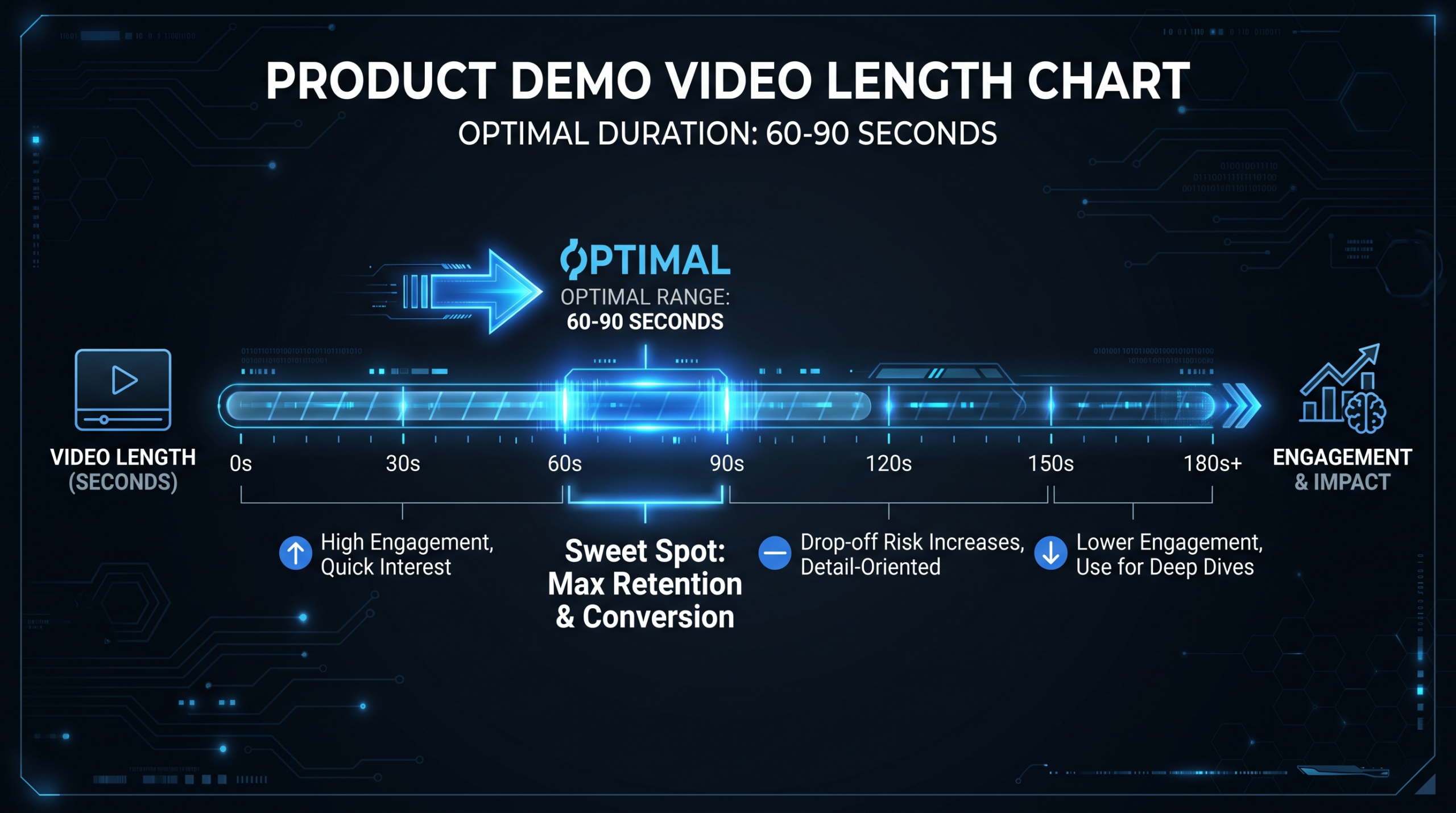
Most high-converting SaaS product demo videos run 60–90 seconds for homepage and paid ad placements. For sales demos sent to prospects or used during discovery calls, aim for 5–12 minutes — matched to deal complexity and buyer stage.
If that sounds like a wide range, it is — because the right product demo video length depends almost entirely on where the viewer is watching and what decision you want them to make afterward. A homepage demo and a sales follow-up demo serve different buyers at different moments. Treating them as the same is one of the most costly mistakes SaaS marketing teams make when planning their video production calendar.
TL;DR — Product Demo Video Length by Context
- Homepage / hero demo: 60–90 seconds. Long enough to show core value; short enough to hold attention through the CTA.
- Sales / prospect async demo: 5–12 minutes. Personalized to their pain point; role-matched for enterprise deals.
- Tutorial / onboarding demo: 2–5 minutes per topic. One concept per video beats one marathon walkthrough.
- Ad placements (LinkedIn, YouTube pre-roll): 15–30 seconds. Hook in the first five seconds or lose them permanently.
- The biggest mistake: Making demos that serve your internal review process, not the viewer’s decision. Cut everything that doesn’t accelerate their next step.
Table of Contents
- Demo Video Length at a Glance
- Why 60–90 Seconds Dominates Homepage Demos
- Sales Demo Videos: The 5–12 Minute Window
- Tutorial and Onboarding Demo Length
- Platform-Specific Length Guidelines
- Signs Your Demo Video Is Too Long
- Length vs. Depth: What Actually Converts
- Length Means Nothing Without Production Quality
- FAQ
Demo Video Length at a Glance
The complete framework across every product demo video type, organized by use case and viewer stage:
Product Demo Video Length by Use Case
| Demo Type | Ideal Length | Primary Goal | Buyer Stage |
|---|---|---|---|
| Homepage hero demo | 60–90 seconds | Generate sign-up or meeting request | Cold / awareness |
| Sales follow-up (async) | 5–10 minutes | Move prospect to next sales stage | Evaluation |
| Full product walkthrough | 10–20 minutes | Cover full feature set for complex deal | Deep evaluation / POC |
| Ad (LinkedIn, YouTube pre-roll) | 15–30 seconds | Drive click-through or retargeting | Cold / awareness |
| Email / outreach video clip | 60–90 seconds | Book a discovery call | Cold outreach |
| Tutorial / feature walkthrough | 2–5 minutes | Explain one workflow clearly | Trial / onboarding |
| Full onboarding video series | 3–7 min per video | Teach product systematically | Post-purchase |
| Product launch / announcement | 90 sec–3 min | Build excitement, drive feature adoption | Existing users |
These ranges aren’t arbitrary. They reflect what viewer engagement patterns, SaaS conversion research, and the practical limits of communicating value before someone clicks away actually support. The rest of this guide explains the reasoning behind each range so you can adapt them to your specific context.
Why 60–90 Seconds Dominates Homepage Demos
The homepage product demo is the most-watched and most-scrutinized video in a SaaS company’s library — and almost universally, the highest-converting ones run between 60 and 90 seconds. Here’s why that window works and what has to happen inside it.
What a Homepage Demo Must Accomplish
Your homepage demo needs to do four things, in this order, within its allotted time:
- Hook (0–8 seconds): State the problem your product solves. Not the product name. Not a logo animation. The viewer’s pain point, stated plainly.
- Core workflow demonstration (8–55 seconds): Show the product doing the one thing that matters most. One primary use case. Skip the feature tour entirely.
- Outcome / social proof (55–75 seconds): Brief proof: who uses it and what they get. A logo strip, a single result statement, a before/after metric. Hedged and honest — not fabricated precision.
- CTA (75–90 seconds): One call to action. Trial, demo request, or sign-up. Never multiple competing options.
Notice what isn’t there: a full product overview, a talking-head intro, a complete feature list, or anything that doesn’t directly answer “why should I care?” Homepage demos that run over 2 minutes almost always contain material that serves the internal review process — engineering wanted the API shown, sales wanted the dashboard included — rather than the viewer’s need to quickly understand value.
The Viewer Attention Reality
Video engagement research consistently shows that retention drops sharply after the first 30–60 seconds on marketing-context videos. Wistia’s video marketing research tracks engagement across millions of business videos and repeatedly shows that short-form content (under 2 minutes) retains significantly more viewers than longer-form content in cold-traffic contexts.
By the 90-second mark, viewers who were going to leave have largely already left. Everything after 90 seconds is watched primarily by viewers who were already engaged — and they’ll click the CTA regardless of what happens in the last 30 seconds. The viewers you lose between second 60 and second 120 are the ones you needed to convert.
When the 60–90 Second Rule Doesn’t Apply
A few scenarios where homepage demos can run longer without hurting conversion:
- Complex enterprise products where the buyer understands they’re entering a 10-minute evaluation. In this case the homepage demo functions as a pre-qualification filter, not a conversion driver — a different purpose that can justify more time.
- Niche vertical SaaS with a small, highly motivated audience — surgical workflow software, legal AI, financial compliance tools. These viewers will watch a 3-minute demo because the decision is high-stakes and they have no simpler alternative.
- Interactive or chapter-based demos that let viewers jump to their relevant use case. A video that “runs” 4 minutes may effectively deliver only 60–90 seconds of relevant content to each viewer segment — which is the right amount.
In all these cases the underlying principle is identical: every second of runtime earns its place by accelerating the viewer’s decision. If a second exists because someone in the review meeting wanted it included, cut it.
Sales Demo Videos: The 5–12 Minute Window
Sales demo videos should run 5–10 minutes for async prospect delivery, with full product walkthroughs extending to 12–15 minutes for enterprise evaluation contexts. The key difference from homepage demos: the viewer has already decided to learn more. They opted in. What they need now is depth and relevance — not a hook.
Async Sales Demos (Loom-Style, Email Follow-Up)
Async demos sent after a discovery call or cold outreach typically run best at 5–8 minutes. The structure that reliably works:
- 30–60 seconds: Personalized context. Reference the prospect’s specific situation from the discovery call. “You mentioned X challenge, so I’m focusing on Y capability.” This alone separates high-converting demos from generic ones.
- 3–6 minutes: Focused demonstration of the 2–3 features most relevant to their stated pain. Not a product tour. Not a feature list. The thing they said they needed, shown clearly.
- 60–90 seconds: Summary and clear next step. What should they do after watching? One ask, stated plainly.
Generic async demos — same video sent to every prospect regardless of what was discussed — reliably underperform. The total length matters far less than whether the content matches the conversation. A 7-minute personalized demo substantially outperforms a 4-minute generic one because it signals that you actually understood what they said.
Length by Deal Complexity
Sales Demo Length by Deal Size
| Deal Segment | Recommended Async Length | Content Priority |
|---|---|---|
| SMB / self-serve ($100–500/mo) | 3–5 minutes | Speed to value: show the aha moment fast, minimal setup |
| Mid-market ($1K–5K/mo) | 5–8 minutes | Core workflow depth plus one integration or admin view |
| Enterprise ($10K+/mo) | 10–15 minutes | Workflow depth, admin controls, security and compliance overview |
| Technical POC / IT evaluation | 15–20 minutes | API, data model, configurability, infrastructure requirements |
The Buying Committee Problem
For enterprise deals, a single demo video rarely covers what every stakeholder needs. A more effective approach: a 4–5 minute executive summary video for the economic buyer, plus separate role-based deep dives — 8 minutes for the end-user team, 10 minutes for the admin/ops team, 12 minutes for the IT or security team. Each stakeholder gets exactly the content that answers their questions. This structure also makes it easier for your champion to share internally without having to say “skip to the 7-minute mark.”
Tutorial and Onboarding Demo Length
Tutorial and onboarding demos should run 2–5 minutes per topic — one concept per video, not a marathon walkthrough. They operate outside the sales funnel and serve buyers who have already purchased. The attention context is different: users watching a tutorial have a specific problem they need solved, and they’ll exit the moment the video stops being relevant to that problem.
The One-Concept Rule
The single most useful principle for tutorial length: one video, one concept. A video titled “Getting Started with [Product]” that covers 11 things will lose viewers partway through — and they’ll abandon the feature they actually needed help with. A 12-video series, each covering one thing in 2–4 minutes, gets watched to completion because each episode has a clear beginning, middle, and end.
Teams building product demo video libraries for onboarding consistently find that modular content outperforms long-form walkthroughs on completion rates and on downstream metrics like support ticket volume and time-to-first-value.
Tutorial Length Ranges by Content Type
- Micro-tutorial / quick tip: 60–90 seconds. One setting, one action, one result. Ideal for contextual in-app triggers.
- Single-feature walkthrough: 2–4 minutes. Full workflow for one feature, including common edge cases and what to do if something doesn’t look right.
- Multi-step workflow: 5–8 minutes. Multiple features working together to accomplish a business outcome. Use chapter markers.
- Training module: 10–20 minutes. Only appropriate when the viewer has explicitly enrolled in a learning program (certification, admin training). Requires chapter markers; no exceptions.
Pacing Matters As Much As Length
A 4-minute tutorial that moves at the right pace feels short. A 3-minute tutorial with narration that’s too fast, no visual callouts, and no breath between steps feels exhausting — and viewers will replay it multiple times or give up. When evaluating tutorial quality, frame the question around density and pacing, not clock time alone. One useful check: can a new user follow along in real time while the video plays at 1x speed? If not, slow down or split the video.
Platform-Specific Length Guidelines
Where the demo video lives determines as much about its optimal length as what the demo is about — because platform context sets viewer expectations before they hit play. A viewer on your pricing page is in a completely different mental state than a viewer who encountered your ad while scrolling LinkedIn.
Demo Video Length by Platform and Placement
| Platform / Placement | Ideal Length | Key Format Notes |
|---|---|---|
| Website homepage | 60–90 seconds | Autoplay-ready. No audio dependency. Subtitled by default. |
| Website pricing or features page | 90 sec–3 min | Deeper evaluation stage; slightly more content is warranted. |
| LinkedIn (feed ad) | 15–30 seconds | Silent scroll context. First frame must read as a still image without captions. |
| LinkedIn (sponsored InMail) | 60–90 seconds | Warmer context. Personalized intro pays off here. |
| YouTube pre-roll (skippable) | 15–30 seconds | Skip button appears at 5 seconds. Hook must land in the first 4. |
| YouTube (SEO / content) | 5–12 minutes | Watch time is the metric. Chapter markers mandatory for search. |
| G2 or Capterra listing | 60–120 seconds | Buyer is comparing 5+ tools simultaneously. Punchy wins. |
| Sales email / Loom outreach | 60–90 seconds | Personalized hook in first 8 seconds; delete rate spikes without it. |
| Help center / customer portal | 2–5 minutes | High-intent viewer with a specific problem. Thorough beats brief here. |
Repurposing Across Platforms
You don’t always need separate shoots for each platform. A well-produced 90-second homepage demo often contains enough quality footage to cut a 20-second LinkedIn ad, a 30-second YouTube pre-roll, and a 60-second email clip — with minimal incremental editing work.
The SaaS video production process works best when you plan for this repurposing from the storyboard stage, not as an afterthought after the hero demo is locked. Shooting more coverage and flagging key scenes for short-form reuse takes an extra hour in production and saves two days of retakes later. VEC clients with Growth-tier plans typically get 3–5 platform-optimized cuts from a single hero demo session — producing one well and repurposing widely is almost always more efficient than producing each platform’s version from scratch.
Signs Your Demo Video Is Too Long
Analytics will eventually confirm a length problem — but you should be able to identify most warning signs in the edit before publishing. Here’s what to look for.
Warning Signs in the Edit
- You open with “Hi, I’m [Name] from [Company].” Cut it. The viewer knows what they clicked on. Use those 8 seconds on the problem instead.
- There’s a feature list anywhere. Feature lists belong in documentation, not demos. Every scene should show one feature solving one specific problem — not announce that the feature exists.
- You show the same workflow twice. Even when the second instance uses different sample data, it’s almost always redundant.
- Any scene starts with “And now let’s take a look at…” Cut the bridge narration. Cut straight to the next scene. The viewer knows what “next” means.
- The CTA follows a recap. Recaps are almost always unnecessary in short-form demos. End with the last moment of value, then the CTA immediately.
- Someone on the review team said “can we also include X?” This is the most reliable signal that the video is about to get too long. Every “can we also include” should be tested against “which viewer decision does this accelerate?”
Post-Publish Analytics Warning Signs
- Completion rate below 40%: More than half your viewers leave before the end. The drop-off timestamp tells you exactly where you lost them.
- Average view duration under 50% of video length: Even engaged viewers aren’t staying through the full runtime.
- High play rate, low conversion: People are watching but not acting. The content may be informative but is either not motivating action or the CTA is buried too late to catch most viewers.
Platforms like Wistia and Vidyard provide heatmap engagement analytics showing exactly where viewers skip, pause, or drop off. If you’re not reviewing this data per video, you’re managing product demo video length by gut rather than evidence.
Length vs. Depth: What Actually Converts
The relationship between demo video length and conversion rate is not linear — and it’s not the relationship most teams assume. Longer is not better. Shorter is not automatically better either. Matched is better.
The insight that matters: depth — meaning the specificity and relevance of what you show — converts. Length is just the container for that depth. A 65-second demo that shows the exact workflow the viewer struggles with will outperform a 3-minute demo covering the same territory in generic terms. This is why the most effective demo programs produce multiple targeted videos rather than one comprehensive video intended to work for all audiences.
The Context-Matching Framework
Before you lock any demo’s length, answer these three questions:
- What is the viewer’s current state of awareness? Cold traffic? 90 seconds maximum. Active evaluation? 5–10 minutes is justified. Deep technical POC? Up to 20 minutes if the content is genuinely necessary for the decision.
- What decision do you want them to make after watching? Book a call? Start a trial? Approve a purchase? Approve an IT review? The complexity of the target decision should directly inform the length.
- Where is this video being consumed? Work desktop with headphones and 15 focused minutes? Mobile scroll between meetings? Platform determines attention budget more than content intention does.
These three questions produce the right length constraint before you’ve planned a single scene.
Common Length Mistakes by Team
Demo Length Mistakes by Role
| Team | Typical Mistake | Why It Happens | The Fix |
|---|---|---|---|
| Marketing | Homepage demo runs 2–4 minutes | Every team’s priority feature had to be included | One use case per homepage demo, enforced before scripting |
| Sales | Same 10-minute generic Loom to every prospect | Efficiency prioritized over relevance | 60-second personalized open + 5-min focused deep-dive for that role |
| Product / CS | One tutorial video covers 5 features | Minimizing total video count | One concept per video; build a modular library |
| Leadership | Board / investor demo treated like a homepage demo | Confusion between audience types | Board demos can run 5–8 minutes with full context and competitive framing |
The pattern across all four: length errors almost always originate from internal stakeholder dynamics rather than viewer needs. The solution in every case is to define the viewer’s decision before the script is written, then ruthlessly remove anything that doesn’t serve that decision.
Length Means Nothing Without Production Quality
A 60-second demo with poor audio, jumpy cuts, and a cluttered UI will convert worse than a 90-second demo with clean narration, tight pacing, and motion callouts highlighting the right moments. This is a consistent pattern, not an edge case. Length optimizations are secondary to quality thresholds — you have to clear the quality baseline before length tuning makes a meaningful difference.
Why Production Quality Affects Perceived Product Quality
For high-stakes placements — homepage hero, G2 or Capterra listing, launch announcement — your demo video signals the quality of your product and your team’s attention to detail. Buyers at Series A–C SaaS companies make judgments about product maturity based partly on what the demo itself looks like. A video that feels unpolished creates doubt about whether the product is polished.
The product demo video production process at VEC is purpose-built for this: dedicated senior editors with SaaS UI presentation experience, motion designers who highlight the right moments with callout boxes and zoom cuts, and project managers who understand that a missed annotation or a too-fast screen transition costs conversions rather than just looking slightly off.
See our pricing page for plan structures suited to regular demo video production: Growth at $5K/month for early-stage teams building their first demo library, up to Scale at $16K/month for teams with weekly demo video output across multiple products and regions.
Production Quality Checklist for Demo Videos
- Audio: No background noise, no keyboard clicks, consistent level throughout. Viewers will accept a rougher visual before they’ll accept rough audio.
- Captions: Mandatory. A substantial portion of professional video content is consumed without sound — especially on LinkedIn and in shared Slack channels.
- Callouts and zoom cuts: Highlight the cursor or UI element being discussed. Don’t make viewers scan the screen to find what you’re pointing at.
- Screen resolution: 1080p minimum. 4K for hero demos displayed on high-resolution monitors and TV-connected screens in conference rooms.
- Music: Background track at 10–15% relative volume. Not distracting, not absent.
- End card: Static frame with your CTA, URL, and brand elements. 3–5 seconds. Gives viewers a moment to act rather than immediately transitioning to the next video in the queue.
For a deeper look at how video length recommendations intersect with platform engagement data, HubSpot’s video marketing blog regularly publishes platform-specific benchmarks and engagement research across B2B content formats.
For a more detailed look at the full production process behind high-performing SaaS demo videos, see our guide on product demo video production.
Frequently Asked Questions
What is the ideal product demo video length for a SaaS homepage?
60–90 seconds is the ideal length for a SaaS product demo on a homepage. This range is long enough to communicate core value and show the primary workflow, and short enough to hold most cold-traffic viewers through the call to action. Demos running over 2 minutes on homepage placements typically show significant completion rate drops before the CTA.
Can a product demo video be too short?
Yes. Demos under 45 seconds for anything more complex than a micro-feature often lack the time to establish the problem, show the solution, and deliver a CTA — leaving the viewer informed but not motivated to act. The practical floor for homepage demos is around 55 seconds. For sales demos, under 3 minutes rarely covers enough depth to move a deal forward regardless of how well-produced it is.
How long should a sales outreach video be in a cold email or LinkedIn message?
60–90 seconds for cold outreach. The personalized hook in the first 8 seconds matters more than total length — without immediate relevance, the video won’t be watched regardless of how short it is. Keep the actual product demonstration to 45–60 seconds and close with a low-friction, specific CTA (a proposed meeting time rather than “let me know if you’re interested”).
Should all tutorial videos be the same length?
No. Each tutorial should be as long as the concept requires — and no longer. A consistent structure (intro, demonstration, summary, CTA) matters more than a consistent runtime. The one-concept-per-video rule is more valuable than standardizing length. Forcing all tutorials into a 4-minute template will make some videos padded and others rushed; both outcomes hurt the viewer experience and completion rate.
Does a longer demo video hurt SEO on YouTube?
Not inherently. YouTube’s algorithm values total watch time and engagement signals, so longer videos can outperform shorter ones for SEO if they maintain viewer attention throughout. For demo-style content targeting search — feature comparisons, product walkthroughs, how-to content — 5–12 minutes with chapter markers tends to perform well. Short homepage-style demos (60–90 seconds) are better deployed as paid YouTube ads than as organic search content.
For deeper context on how demo video performance benchmarks compare across different formats and channels, see our full guide to product demo video statistics (2026) — including engagement benchmarks, CTA placement data, and platform performance by audience intent.
Need a Product Demo Video That Actually Converts?
Getting the length right is one decision. Executing it with the pacing, callouts, captions, and platform-specific cuts that drive action is where most teams need help. VEC’s dedicated editing teams produce SaaS product demo videos — from 60-second homepage heroes to full sales demo libraries — purpose-built for conversion.
Book a Free Strategy Call See How It Works