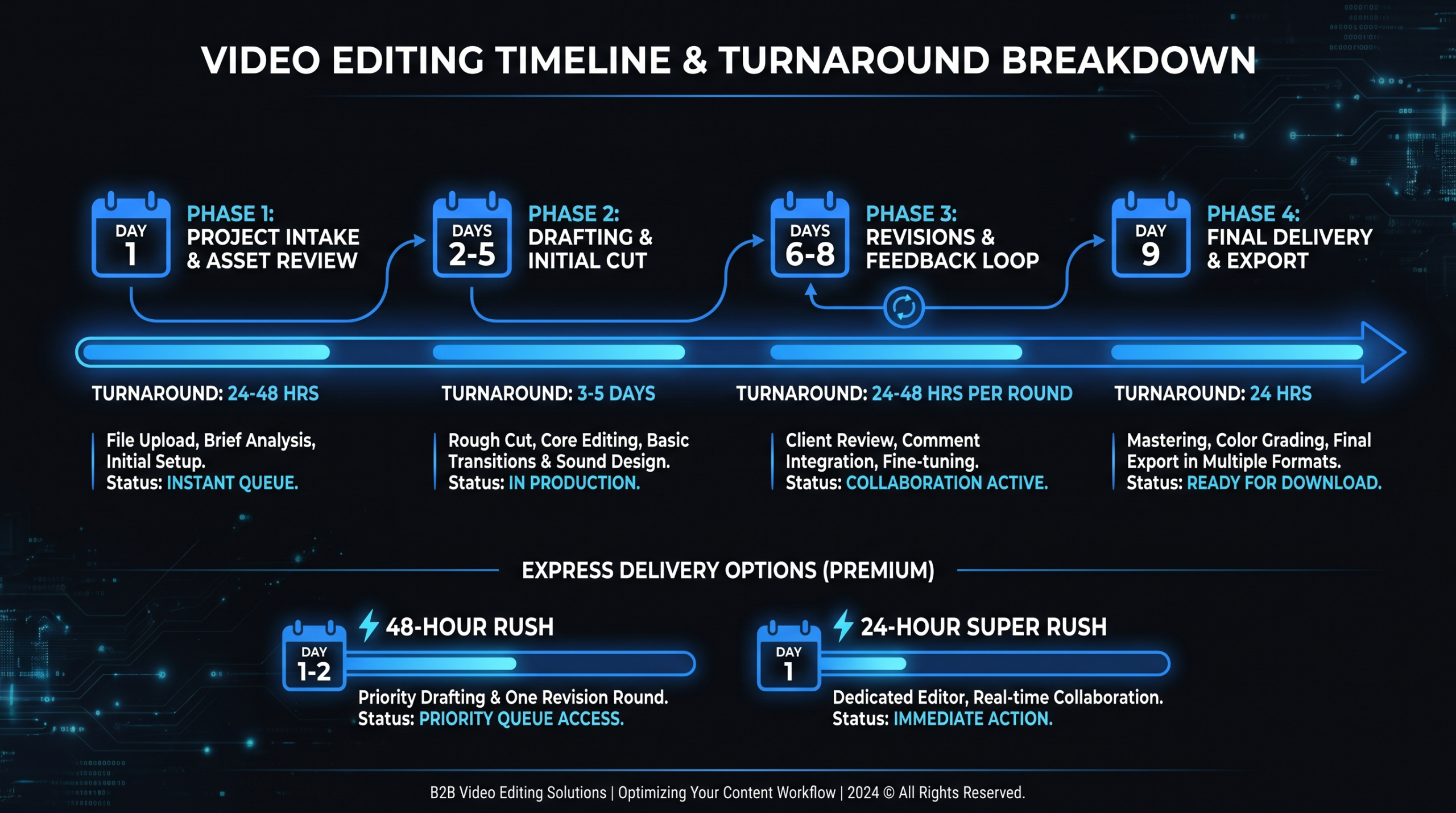
How Long Does Video Editing Take? Timelines for Every Video Type
TL;DR
Video editing takes 1–3 business days per finished minute of content under normal conditions. A 5-minute SaaS product demo typically takes 7–14 days from raw footage to final delivery; a 60-second social clip takes 1–3 days. Timelines vary most by footage organization, revision rounds, and whether you use a freelancer, subscription service, or dedicated team. Dedicated teams consistently deliver 30–50% faster than freelancers on comparable complexity because they eliminate the brand-learning and communication overhead that inflate most production timelines.
Table of Contents
- The Short Answer: How Long Does Video Editing Take?
- Video Editing Timeline by Content Type
- What Actually Slows Down Video Editing
- Freelancer vs Agency vs Dedicated Team: Turnaround Compared
- Revision Cycles and What They Cost in Time
- How to Cut Editing Time Without Cutting Quality
- Planning Your Content Calendar Around Editing Timelines
- FAQ
The Short Answer: How Long Does Video Editing Take?
Video editing typically takes 1–3 business days per minute of finished content, and the most common SaaS video types — product demos, explainer videos, and customer testimonials — usually require 7–14 business days from raw footage submission to final, approved delivery.
That range is wide for a reason. The actual timeline is driven by four variables that matter more than the video's length: footage organization, number of revision rounds, motion graphics complexity, and who's doing the editing. A well-organized 10-minute demo with clearly labeled takes, a clean brief, and consolidated feedback can be delivered in 5 days. A disorganized 3-minute testimonial with no selects marked, unclear brand guidelines, and three rounds of scattered stakeholder revisions can take three weeks — even though it's technically half the work.
Understanding this helps you plan your video content calendar realistically and avoid the bottleneck most content teams only notice after a launch date has already slipped. According to Wistia's video production research, companies that consistently publish video report that internal review and approval cycles — not editing itself — account for the majority of production delay. (Wistia, State of Video)
Video Editing Timeline by Content Type
Different video formats carry fundamentally different editing workloads. Here's a realistic breakdown based on typical B2B SaaS content, assuming reasonably organized footage and 2 revision rounds included:
Video Editing Timeline by Content Type
| Video Type | Finished Length | Typical Editing Hours | First Cut Delivery | Total End-to-End |
|---|---|---|---|---|
| Social clip (repurposed from long-form) | 15–60 sec | 2–6 hrs | 1–2 business days | 2–4 business days |
| Social clip (original footage) | 15–60 sec | 4–10 hrs | 2–3 business days | 3–6 business days |
| YouTube video (talking head + B-roll) | 8–15 min | 8–20 hrs | 3–6 business days | 7–12 business days |
| Product demo video (SaaS) | 2–5 min | 10–24 hrs | 4–8 business days | 8–16 business days |
| Customer testimonial | 2–4 min | 8–20 hrs | 3–6 business days | 6–12 business days |
| Animated explainer video | 60–90 sec | 20–60 hrs | 7–14 business days | 14–25 business days |
| Brand / company overview | 1–3 min | 15–40 hrs | 5–10 business days | 10–18 business days |
| Webinar highlight reel | 3–8 min | 10–28 hrs | 4–8 business days | 8–14 business days |
| Video podcast episode | 30–60 min | 4–12 hrs | 2–4 business days | 4–8 business days |
The editing hours column reflects the actual editor work time. The total end-to-end column is what appears on your calendar — it includes queue position, communication, first-cut review, revision incorporation, and final approval. These two numbers diverge most for complex deliverables where stakeholder review chains add days independent of how fast the editor works.
Why Animated Explainers Take So Much Longer
Animated explainer videos sit entirely outside the live-footage pattern. There's no raw footage to review or organize; instead, every second of content requires illustration, motion design, and audio sync — work that is inherently more labor-intensive per second than cutting live footage. A 90-second animated explainer commonly involves 60–80 unique assets before the animation even begins. For a full breakdown of what drives those numbers, see our explainer video cost breakdown.
The 4× Rule for Realistic Planning
A practical heuristic for calendar planning: expect 4× the editing hours to appear on your calendar. A 10-hour edit translates to roughly 4 business days of elapsed time when you account for queue position, async feedback, and revision turnaround. Dedicated teams typically run closer to 2–3× because they have reserved capacity and structured feedback loops rather than queues shared across multiple unrelated clients.
What Actually Slows Down Video Editing
The top reason video editing takes longer than expected is almost never the editor's skill — it's the inputs they receive and the feedback process they're working within. Here are the five most common timeline killers, in order of impact:
1. Disorganized or Unlabeled Footage
Editors routinely spend 15–25% of their total project time organizing footage before making a single cut. When raw files arrive with default camera names (e.g., "DSC_0047.mp4"), without selects marked, and with no indication of which takes are good, the editor must watch everything twice: once to understand what exists, once to edit. On a 12-hour project, that's 2–3 hours of invisible overhead that shows up in the timeline.
Fix: Mark your selects before sending. Even a simple "GOOD" or "BAD" label in the filename halves this time. Ask your production team to deliver a shot log or at minimum a list of recommended takes per scene.
2. Unclear Brand Guidelines on First Brief
First edits without clear brand guidelines produce first cuts that miss — and missed first cuts generate additional revision rounds. An editor who doesn't know your preferred color palette, lower-third style, music tone, or pacing rhythm will make reasonable guesses that still require correction. On a 3-round revision cycle, each round adds 3–5 calendar days. The brief you give at the start of a project determines how many revisions you'll need at the end.
This is one area where dedicated teams deliver compounding value: after 3–5 projects, the team has internalized your brand without needing a detailed brief every time. The time savings per project grow as the relationship matures. For how to structure an effective creative brief, see our outsourcing guide.
3. Stakeholder Review Chains
The editing phase often finishes faster than the approval phase. A first cut delivered Thursday afternoon may not receive consolidated feedback until Monday — not because reviewers are slow, but because async review across four time zones with no deadline yields no urgency. If video approval involves legal, compliance, or a VP who wasn't in the original brief, your timeline can stretch by weeks for what amounts to hours of editorial work.
Fix: Consolidate stakeholder feedback before sending to the editor. Run a synchronous review call for complex videos. Define who has final approval authority before work begins, and set a review deadline in the project brief.
4. Motion Graphics and Screen Recording Complexity
Lower thirds, animated transitions, custom product callouts, and screen recording enhancements can add 40–100% to editing time depending on complexity. A 5-minute SaaS demo with clean screen recordings, basic lower thirds, and standard transitions takes roughly half the time of the same video with custom animated product callouts, data visualization inserts, and a branded outro with kinetic text. When budgeting timelines, clarify upfront whether your video needs motion graphics — and at what complexity level.
5. Music Selection Changes After Assembly
Changing music after a cut is assembled requires re-timing every edit to the new track rhythm — it's structurally close to re-editing the video. Editors typically build pacing around the music; when that foundation changes, the structure changes with it. Music decisions made after a first cut is delivered add a full additional revision cycle, not a single tweak. Select music before editing begins and flag it as a foundation element that can't change without scope implications.
Freelancer vs Agency vs Dedicated Team: Turnaround Compared
Who you hire is the single biggest variable in how long video editing takes — larger than video type or raw footage complexity. The reason is structural: it's not just editor speed, but how queue depth is managed, how brand context is retained, and how feedback flows between stakeholder and editor.
Turnaround Time by Provider Type (Standard SaaS Content)
| Provider Type | First Cut Delivery | Revision Round Time | Typical End-to-End | Best For |
|---|---|---|---|---|
| Freelancer (Upwork / Fiverr) | 3–8 business days | 2–4 days each | 8–21 days | Simple, one-off edits with clear briefs |
| Project-based agency | 5–10 business days | 2–5 days each | 10–25 days | Polished single deliverables, occasional projects |
| Video editing subscription | 1–3 business days | 1–2 days each | 4–10 days | High-volume simple content in steady queue |
| Dedicated editing team (retainer) | 2–4 business days | 1–2 days each | 4–8 days | Consistent high-quality output at scale |
Freelancers often show the slowest first-cut delivery — not because they're less skilled, but because you share their capacity with other clients and there's no PM buffering the queue. If your freelancer is handling 4 projects simultaneously across multiple time zones, your 5-minute demo competes directly with everything else on their plate. For context on how this affects total cost, see our overview of video production pricing models and where each fits.
Subscription services can hit impressive first-cut speeds (some claim 24–48 hours) but with an important structural caveat: they process one request at a time. Submit 5 videos on Monday and video #5 likely won't receive a first cut until the following week. The services included in your plan also matter — motion graphics, color grading, and sound design often sit outside subscription base tiers as add-ons.
Dedicated teams operate at a different performance tier because of accumulated context. When the same senior editor has completed 20 videos for your brand, the first cut of video #21 arrives substantially closer to "done" than the first cut from a new provider who has never seen your visual language. This compounding brand familiarity drives the timeline difference more than raw editing speed.
For a direct comparison of these structural differences, see our guide on dedicated video teams vs project-based agencies — particularly useful if you're evaluating whether to consolidate from multiple project vendors into a single team arrangement.
VEC's Approach to Timeline Predictability
VEC builds all client relationships around a dedicated editing team — a senior editor, junior editor, and project manager assigned to your account. The PM role exists specifically to absorb the communication overhead that inflates timelines at most agencies and freelancer arrangements. First-cut delivery on standard SaaS demos and YouTube content typically runs 2–3 business days once organized footage is received. VEC's plans start at Growth ($5K/mo) with Scale ($16K/mo) and Core ($9.5K/mo) options above it. See the full breakdown on the VEC pricing page.
Revision Cycles and What They Cost in Time
Revisions are the most underestimated component of production timelines. Each round adds calendar time that is only partly driven by editing effort — most of it is waiting: for the first cut to land, for stakeholders to review, for feedback to be consolidated, for the revised cut to return.
What a Typical 2-Round Revision Cycle Looks Like
- First cut delivered → Stakeholder review period (1–3 days)
- Feedback consolidated and sent → Editor queue (0–2 days)
- Editor revises → Second cut delivered (1–2 days)
- Second round review → Final approval (1–3 days)
On a conservative 2-round cycle, you're looking at 4–10 days of elapsed feedback and review time alone — before counting actual editing. If the feedback direction shifts significantly between rounds ("we want to restructure the narrative") rather than narrowing toward final, a third round is common and can add another 5–8 calendar days to the timeline.
HubSpot's content team benchmarking has found that video content with defined approval workflows closes in significantly fewer revision rounds than video without them — a consistent pattern across B2B marketing teams. (HubSpot Marketing Blog)
How to Get to Final Cut Faster
- Provide a detailed brief before editing starts. Reference videos, pacing notes, specific lines to emphasize, music mood, and transition style — anything you'd normally say in revision round 1 belongs in the initial brief.
- Consolidate all feedback before sending. Three separate feedback emails across two days become three separate revision loops. Wait until all stakeholders have watched the same cut, then send one consolidated list.
- Separate structural from cosmetic feedback. "The messaging flow is wrong" and "the lower third font needs to match our brand" should be addressed in different rounds. Structural changes first; polish on the final pass.
- Define revision scope explicitly. "Adjustment within the existing cut" versus "new direction that changes the structure" are different scopes — budget and timeline for both upfront so neither catches you or the editor off guard.
How to Cut Editing Time Without Cutting Quality
The fastest way to shorten your video editing timeline isn't finding a faster editor — it's reducing the inputs that slow every editor down. These are operational improvements that compound across every video you produce.
Deliver Organized Footage
Send a folder with subfolders by scene or interview subject. Mark your hero takes in the filename or a notes doc. Include a shot log if your production team creates one. For screen recordings, export at maximum resolution and name each file by the feature or user flow it demonstrates. Organized footage is the single highest-leverage thing a content team can do to shorten editing timelines without changing vendors.
Record Audio Separately
Poor audio is the most time-consuming category of fix in post-production. A basic lavalier microphone and a quiet room eliminates an entire category of editorial work. Editors cannot fully fix a room echo or persistent HVAC hum in reasonable time; they can match audio levels across clean clips in minutes. Invest in audio quality before production, not in audio repair after.
Script Before Filming
Videos shot from a clear script generate less raw footage and fewer takes. Less raw footage means faster log, faster selects, faster editing. A 3-page, well-rehearsed script typically produces a cleaner 3-minute video than 45 minutes of improvised talking-head footage — and the editor's first cut of a scripted video often arrives 30–40% faster.
Batch Similar Content Requests
Editing 4 social clips from the same webinar recording is faster than editing 4 social clips from 4 different source recordings. The editor works within one familiar footage set, one audio environment, and one visual language — no ramp-up between requests. Batching content requests reduces per-project overhead and is one structural advantage of working on a retainer or dedicated team model rather than one-off projects. The cost-per-minute economics of batched content also tend to be materially lower than one-off rates.
Lock Music and Stock Assets Before Editing Begins
Music selection changes after a cut is assembled require re-timing every edit to the new track — it's structurally a re-edit. Select and approve music before footage goes to the editor and treat it as a locked element. Same logic applies to B-roll stock footage: if you know you'll need product close-ups, office environments, or UI animation assets, source and approve those files before handoff.
Planning Your Content Calendar Around Editing Timelines
Most content teams underplan for video editing time and cover the gap with expensive rush requests. A better approach is to build editing lead time into your content calendar as a fixed parameter — so video editing never sits on the critical path of a launch.
Content Calendar: Editing Lead Time Planning Guide
| Video Type | Footage → First Cut | Review + Revisions | Total Buffer to Build In | Rush Surcharge (typical) |
|---|---|---|---|---|
| Social clips (repurposed) | 1–2 days | 2–3 days | 3–5 days | 25–50% |
| YouTube talking head | 3–5 days | 4–6 days | 7–11 days | 25–50% |
| SaaS product demo | 5–8 days | 5–8 days | 10–16 days | 30–75% |
| Customer testimonial | 4–6 days | 4–6 days | 8–12 days | 25–50% |
| Animated explainer | 7–14 days | 7–10 days | 14–25 days | Often unavailable |
Build Backwards from Your Launch Date
Work backwards from your go-live date to set your filming deadline. Example for a 3-minute product demo launching September 15:
- Sep 15: Video live on site and distributed
- Sep 13: Final approved video delivered (2-day buffer for upload and QA)
- Sep 8: Revision cycle begins (5 days for 2 rounds)
- Sep 3: First cut delivered (5-day editing window)
- Sep 1: Footage submitted to editor
- Aug 28: Filming day
- Aug 25: Script and brief finalized
That's a 21-day runway from script to video live — which feels generous until you've missed a product launch because revision 2 feedback was still sitting in a VP's inbox on September 14.
When Timeline Compression Is Unavoidable
Rush editing is real and often necessary. Most agencies and freelancers can compress timelines for a 25–75% premium. The tradeoff is real: rush work often skips the standard QA pass, may involve fewer revision rounds, and can mean a different editor than your usual contact. For recurring video programs, routine rush requests signal a calendar planning issue — not a vendor speed issue. The structural fix is reserved capacity, not faster freelancers.
For more on what realistic production velocity looks like across different team types, see our companion post on video editing turnaround times and how teams benchmark their output against industry norms.
Frequently Asked Questions
How long does it take to edit a 1-minute video?
A 1-minute video typically takes 3–8 hours of editing time depending on complexity. A simple talking-head clip with basic cuts and titles might take 3 hours; a polished 60-second brand video with motion graphics, color grading, and multiple B-roll sources could take a full day. Add 1–3 business days for delivery and revision cycles, and plan for 2–5 days total from footage submission to final approved cut.
How long does it take to edit a 10-minute YouTube video?
A 10-minute YouTube video with talking-head footage, B-roll cutaways, basic lower thirds, and 2 revision rounds typically takes 7–12 business days from footage submission to final delivery. The editing itself runs 8–20 hours; the rest is review time and revision incorporation. If you have a dedicated editing team that already knows your channel style, expect to land toward the lower end of that range — often 5–8 days.
Why does video editing always take longer than expected?
The most common reason is the gap between editing hours and calendar days. A 12-hour edit doesn't mean 12 hours of wall-clock time — it maps to 2–3 business days of editor work, plus queue position, plus stakeholder review, plus revision turnaround. Most teams underestimate the approval phase, which often takes as long as the editing itself. Disorganized footage and unclear briefs also systematically inflate editing hours before the timeline problem even becomes visible on the calendar.
What's the fastest realistic turnaround for a product demo video?
For a 2–5 minute SaaS demo with organized screen recordings and a clear creative brief, a dedicated editing team can typically deliver a first cut in 2–4 business days. A subscription service may claim 24–48 hours, but first-cut quality at that speed often requires more revision rounds, effectively erasing the speed advantage. Genuine rush delivery under 48 hours is available from some providers but typically commands a significant premium and works best only on low-complexity content.
Does hiring a more expensive editor mean faster turnaround?
Not consistently. Senior editors are faster per editing hour, but calendar turnaround depends more on queue depth, communication process, and revision cycles than on individual editor speed. A highly skilled freelancer with a full queue is slower than a mid-level editor on a dedicated team who starts immediately. The real speed advantage comes from organizational structure — dedicated capacity, clear processes, and a PM who manages feedback flow — not from editor skill tier alone.
Tired of Waiting Weeks for Your Next Video?
VEC's dedicated editing teams deliver first cuts in 2–4 business days with a guaranteed commitment: double your video output in 90 days or month 4 is free. Plans start at $5K/month — book a call to see which fits your content velocity.
Book a Free Strategy Call View Pricing Plans