
10 AI Startup Video Examples That Convert
TL;DR
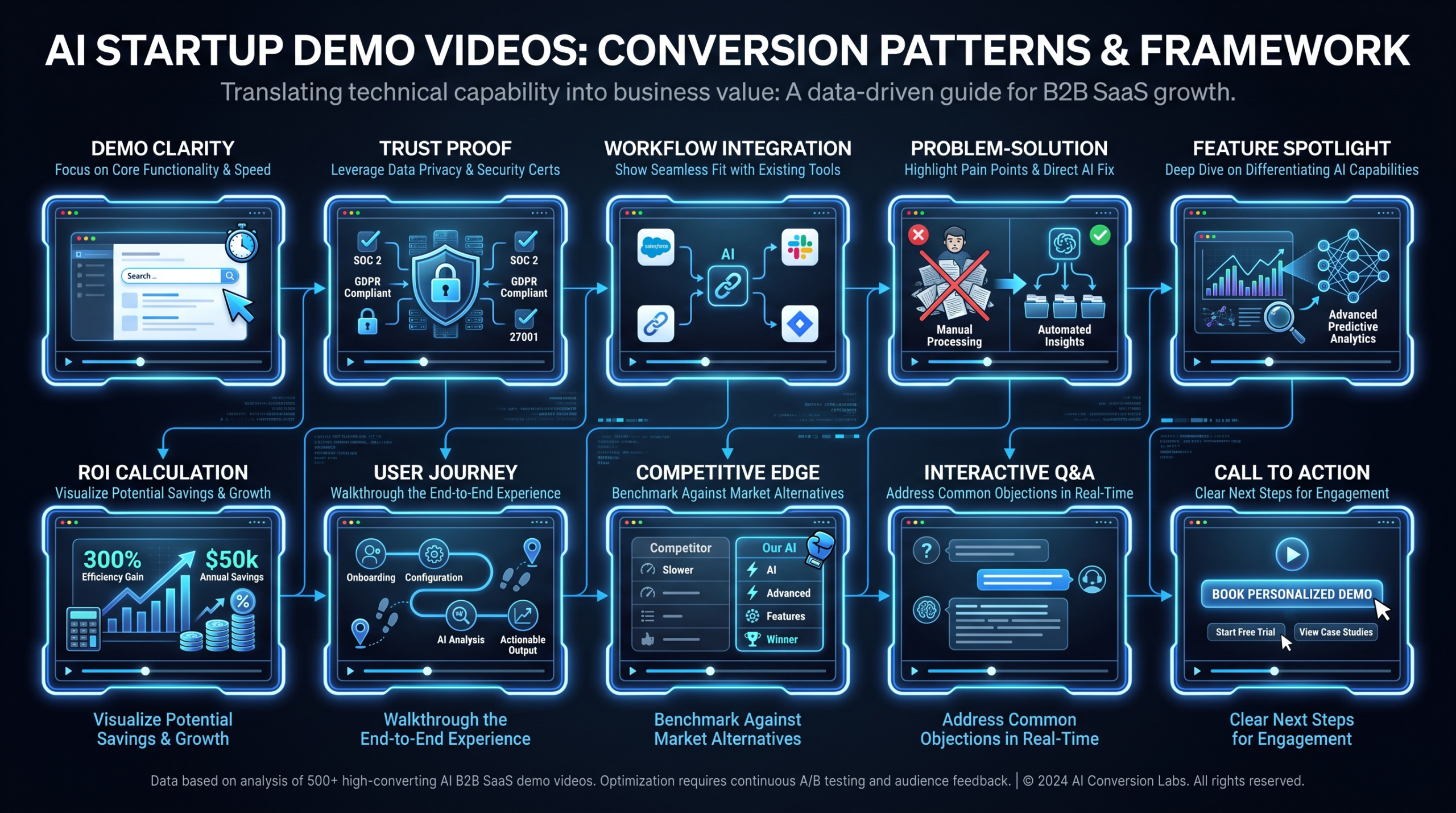
The best-converting AI startup videos share five patterns: demo clarity (show output before explaining inputs), trust architecture (prove before asking), workflow explanation (show before and after, not just features), claim discipline (precise where verifiable, hedged elsewhere), and CTA confidence (one clear action, no friction). The 10 examples below each execute at least three of these patterns — and each teaches something a VP Marketing or Head of Content can steal immediately.
Table of Contents
- Why AI Startup Videos Are a Different Beast
- Demo Clarity: Show the Output First (Notion AI, Loom AI)
- Trust Architecture: Proof Before the Pitch (Runway, Perplexity)
- Workflow Explanation: Before and After (HubSpot Breeze, Jasper AI)
- Claim Discipline: Earn Every Number (Monday.com AI, Otter.ai)
- CTA Architecture: Converting the Curious (Glean, Pitch)
- The 10 Examples: Side-by-Side Comparison
- The 5 Conversion Patterns: Summary and Implementation
- How to Apply These Patterns to Your Own Videos
- FAQ
Most AI startup demo videos make the same mistake: they explain the technology before proving it does anything useful. The result is a technically accurate video that converts no one.
The companies in this list figured out something different. They learned to speak to the skeptical VP Marketing who has seen a dozen AI demos this quarter and is waiting for the moment the product fails to do what it promises. Each video example below earns attention through demonstration, not declaration.
We analyzed publicly available product demo videos and marketing content from 10 real AI companies across different verticals. For each, we extracted the specific technique that makes it convert — and the concrete implication for your own video production strategy. If you're producing SaaS product videos, these are the benchmarks your team should be measuring against.
Why AI Startup Videos Are a Different Beast
AI startup videos face a credibility gap that standard SaaS demos don't. Your potential customer has been trained by years of overpromised AI to assume the demo was cherry-picked, the results don't generalize, and the "AI" is mostly rules-based logic with better branding. You are fighting that skepticism from the first second of your video.
This changes the conversion equation at every stage:
- The hook must be output, not pitch. Start with what the AI produces — a finished document, a generated video, a summarized meeting — before you explain how it works. The brain evaluates quality before it evaluates process.
- Trust signals must be earned, not asserted. Testimonials matter less here than on-screen proof. Show the input, show the processing, show the output. Transparency converts.
- Claims must be defensible. An AI startup that says "saves you 10 hours a week" without showing the workflow that produces those 10 hours gets dismissed. Name the specific task, show the before state, show the after state.
- The CTA must respect the skepticism. "Book a demo" asks a lot from someone who isn't yet convinced your demo is worth 30 minutes of their calendar. The best AI startup CTAs reduce friction: free trial, playground, or live product tour.
The 10 companies below each solved at least one of these problems in a way worth studying.
Demo Clarity: Show the Output First
Demo clarity is the practice of leading with the finished result before explaining the inputs or the process. It's the video equivalent of starting a case study with the outcome number rather than the client backstory. AI startup videos that nail this pattern convert because they answer the viewer's first question — "does this actually work?" — before asking them to invest attention in anything else.
Example 1: Notion AI
Pattern: Demo Clarity
What it is: Notion launched AI features integrated directly into its workspace product. Their product marketing videos show AI capabilities — summarization, writing assistance, database queries, action-item extraction — in the context of a workspace that looks already populated with real work. The AI appears mid-document, mid-task, not in an empty demo environment.
Why it converts: The strategic choice was to never show a blank slate. Every Notion AI demo begins with a realistic document or project — a quarterly review, a meeting note, a product spec — and shows the AI operating on that content. Viewers can immediately pattern-match to their own workflows. The "I could use this for that" recognition happens in the first 15 seconds.
What to steal: Pre-populate your demo environment with realistic content before you hit record. A blank text field or empty project is an abstraction. A half-written draft, a disorganized list, a transcript with key moments — these are contexts your viewer has lived in.
Example 2: Loom AI
Pattern: Demo Clarity + Workflow
What it is: Loom, the async video messaging tool (acquired by Atlassian), added AI features including automatic transcription, AI-generated summaries, and chapter creation. Their product videos show a three-panel experience: the video recording, the AI-generated summary below it, and the searchable transcript alongside. In roughly 60 seconds, a viewer understands exactly what changed in their async communication workflow.
Why it converts: Loom's AI demo works because it shows the before (a raw video recording with no notes) and the after (the same video with a structured summary, key moments, and searchable text) in a single screen. The value isn't described — it's visually obvious. You don't need to claim anything when the comparison does the persuasion.
What to steal: Design your video layout so the AI output is visible simultaneously with what it replaced. Side-by-side, before/after split, or annotation overlays all work. The viewer shouldn't have to remember the before state — keep it on screen.
Trust Architecture: Proof Before the Pitch
Trust architecture is the deliberate sequencing of evidence before the ask. AI startups that convert well delay their sales message until after they've demonstrated their product working on a real task. The effect is that the viewer arrives at the CTA already persuaded — the pitch becomes confirmation, not introduction.
Example 3: Runway
Pattern: Trust Architecture
What it is: Runway is an AI video generation and editing platform. Their product demos lead with the generated output — cinematic footage, stylized transformations, text-to-video results — before any mention of prompts, workflows, or pricing. The first 10 seconds of a Runway demo are purely "look at what this made." The product walkthrough only begins after the quality has been established.
Why it converts: Runway's target customer (creative director, video producer, marketing team lead) is highly visually literate and highly skeptical of AI-generated content quality. By leading with output quality, Runway earns the right to explain features. If the opening output doesn't impress, the rest of the video is irrelevant — so they bet everything on the quality of the result.
What to steal: Identify the single output your AI produces that, if seen without context, would make a target customer say "wait, how did that happen?" Lead with that. Don't explain it. Just show it. Make them curious enough to watch through to the how.
Example 4: Perplexity AI
Pattern: Trust Architecture
What it is: Perplexity AI is an AI-powered search engine that shows citations for every answer. Their product walkthroughs make a distinctive trust choice: they keep citations and sources visible throughout the demo. Every answer in the walkthrough shows numbered citations that the viewer can see link to real sources. The product demonstrates its own accountability in real time.
Why it converts: In an era of AI hallucination concerns, Perplexity's visible citation layer is a product-level trust signal that no testimonial or case study can replicate. The video doesn't claim the AI is accurate — it shows the mechanism by which accuracy is verifiable. Sophisticated buyers respond to that because it respects their intelligence.
What to steal: What does your AI do that demonstrates it's not making things up? Make that mechanism visible in your video. Log traces, source links, confidence scores, or human review steps — if your AI has guardrails, show them. Transparency converts at the enterprise buyer level especially.
Workflow Explanation: Before and After
Workflow explanation is the practice of showing the full job to be done — not just the AI's portion of it. It means showing the state before the AI was involved, the point at which the AI enters, and the state after. This pattern is essential when your AI solves a workflow problem (not just a content quality problem) and when your buyer needs to understand the time savings, not just the output quality.
Example 5: HubSpot Breeze AI
Pattern: Workflow Explanation
What it is: HubSpot Breeze is HubSpot's AI product suite embedded across their CRM platform. Their product overview videos walk through specific workflows: a rep preparing for a prospect call, a marketer drafting a follow-up sequence, a support agent resolving a ticket. In each case, the video shows the task in its unassisted state — the rep manually pulling contact history, the marketer writing from scratch — before the AI enters and compresses the work.
Why it converts: HubSpot's buyer is a revenue leader or marketing operations manager who already lives in HubSpot. The AI isn't positioned as a new product — it's positioned as an upgrade to workflows they already own. By grounding every demo in a recognizable workflow, HubSpot earns credibility without having to prove the product from scratch. The before state creates the pain; the AI creates the resolution.
What to steal: Map the three most time-consuming tasks your target user does before using your AI. Show one of them in the video in its unassisted state — even 5–10 seconds of "here's what this takes today" dramatically amplifies the impact of the AI solution that follows.
Example 6: Jasper AI
Pattern: Workflow Explanation + Claim Discipline
What it is: Jasper AI is an AI marketing content platform targeting content teams and brand marketers. Their product demos are built around the content creation workflow: brief → draft → edit → approve. Crucially, they show the brief going in (audience targeting, tone of voice, brand guidelines) before showing the content coming out. The workflow is visible — it's not a black box that produces polished content from nothing.
Why it converts: Content marketers are protective of brand voice. Showing the input parameters — that the AI is operating within guardrails defined by the user — addresses the "what if the AI sounds nothing like us?" objection before it's raised. The transparency about inputs builds trust in outputs.
What to steal: If your AI takes configurable inputs (brand guidelines, audience parameters, templates, constraints), show those inputs in your video before the output. Buyers trust outputs they can trace to inputs they control. The configuration screen is not a liability — it's a trust signal.
Claim Discipline: Earn Every Number
Claim discipline is the practice of making only the claims you can demonstrate in the video itself. This doesn't mean being conservative — it means earning specificity through demonstration rather than assertion. An AI startup that says "saves marketing teams 6 hours per week" and then shows a 6-minute workflow collapse earns that claim. One that asserts the same number without showing the workflow loses credibility with every skeptical viewer.
Example 7: Monday.com AI
Pattern: Claim Discipline
What it is: Monday.com integrated AI features into their work management platform — automation suggestions, task creation from natural language, status update drafting. Their product videos are notably careful with claims. Instead of efficiency percentages, they show specific task compression: a 5-step process reduced to 1 natural language input, a weekly status email drafted from a board state in seconds, an automation recipe suggested based on usage patterns.
Why it converts: Monday.com's target buyer — operations leads and team managers at mid-market companies — has been burned by automation promises before. By anchoring claims to specific, visible task outcomes rather than aggregate time savings, Monday.com speaks to a buyer who has learned to distrust the headline number. "Watch this automation set itself up" is more credible than "reduces manual work by 40%."
What to steal: Replace every percentage efficiency claim in your video script with a task-level demonstration. Instead of "save hours per week," show the specific task that takes those hours and collapse it. The specificity of the demonstration makes the implicit efficiency claim more believable than any number you could cite.
Example 8: Otter.ai
Pattern: Claim Discipline + Demo Clarity
What it is: Otter.ai provides AI-powered meeting transcription, real-time notes, and automated action item extraction. Their product demonstrations show a live meeting being transcribed in real time — the transcript appearing word by word as the speaker talks — and then show the AI identifying and extracting action items into a list at the meeting's end. The demo requires no narration; the product's value is entirely self-evident.
Why it converts: Otter.ai makes a claim that is empirically verifiable in the video: the AI accurately transcribes speech and surfaces action items. The video doesn't tell you it works — it shows you it working on a real conversation, in real time. Viewers self-qualify by recognizing meetings they attend where they wish this existed. The product demo is also the product proof.
What to steal: Identify the single feature of your AI that produces an observable output in real time — and build your demo video around showing that output appear. Real-time demonstration (even of a recorded screen) is the highest-trust format available because it's harder to fake than a polished before/after.
CTA Architecture: Converting the Curious
CTA architecture in AI startup video is about respecting the buyer's current relationship with AI skepticism. The buyer who just watched your best demo is still not certain. Your CTA must reduce the commitment required to take the next step to near zero. The best AI startup CTAs don't ask for 30 minutes of calendar time — they offer free access to the product itself, with the conversion tracked when the user experiences value, not when they click a button.
Example 9: Glean
Pattern: CTA Architecture + Trust
What it is: Glean is an enterprise AI search platform that indexes knowledge across workplace tools (Slack, Drive, Confluence, Salesforce, email) and surfaces it through a single search interface. Their product demo videos walk through a specific enterprise scenario — an engineer onboarding to a new codebase, a sales rep preparing for a call — and show Glean surfacing relevant information the person didn't know existed.
Why it converts: Glean sells to enterprise IT buyers who require extensive security and compliance evaluation. Their videos address this directly by showing the data access controls and permission inheritance alongside the search capabilities. The CTA isn't "try for free" (enterprise procurement doesn't work that way) — it's a structured demo request that emphasizes IT and security team participation. The CTA respects the buyer's actual procurement process.
What to steal: Match your CTA to your actual sales motion. A product-led growth company should offer a free trial or live product. An enterprise company should offer a structured demo with security documentation. A CTA that doesn't fit the buyer's process creates friction that destroys conversions even when the product demo was excellent.
Example 10: Pitch
Pattern: CTA Architecture + Demo Clarity
What it is: Pitch is a collaborative presentation platform with AI-powered features including slide generation from prompts, design suggestions, and content refinement. Their marketing videos show a presentation being created from a text brief — slide structure, copy, and design appearing together — and close with a free trial CTA that links directly to the AI creation flow, not to a sign-up landing page.
Why it converts: Pitch links the demo directly to the experience. The viewer just watched a deck get built from a brief in under 2 minutes. The CTA takes them immediately to the point in the product where they can replicate that experience with their own brief. The distance between "I believe this works" and "I experienced it myself" is reduced to one click. That is optimal CTA architecture for a PLG product.
What to steal: Map your video's demo moment to the exact product entry point that replicates it. If your video shows a feature, your CTA should deep-link to that feature — not to your homepage, not to a general sign-up page, but to the specific moment in your product that the viewer just watched and wants to try. See more on how to execute this in our guide on product demo video production.
The 10 Examples: Side-by-Side Comparison
Here is a complete overview of all 10 AI startup video examples, the primary conversion pattern each exemplifies, and the single most transferable technique from each.
10 AI Startup Video Examples: Conversion Pattern Analysis
| Company | Video Type | Primary Pattern | Transferable Technique |
|---|---|---|---|
| Notion AI | Product feature demo | Demo Clarity | Pre-populate demo with realistic content |
| Loom AI | Feature overview | Demo Clarity + Workflow | Show before/after simultaneously on screen |
| Runway | Output showcase | Trust Architecture | Lead with the most impressive output, explain after |
| Perplexity AI | Product walkthrough | Trust Architecture | Make the accuracy mechanism visible on screen |
| HubSpot Breeze | Workflow demo | Workflow Explanation | Show unassisted task first to establish pain |
| Jasper AI | Feature demo | Workflow + Claim Discipline | Show configuration inputs to build output trust |
| Monday.com AI | Feature overview | Claim Discipline | Replace % claims with specific task demonstrations |
| Otter.ai | Real-time demo | Claim Discipline + Demo Clarity | Real-time output appearance builds highest trust |
| Glean | Enterprise scenario demo | CTA Architecture + Trust | Match CTA format to actual buyer procurement process |
| Pitch | Product creation demo | CTA Architecture | Deep-link CTA to exact product moment shown in demo |
The 5 Conversion Patterns: Summary and Implementation
Across these 10 examples, five distinct patterns emerge. Understanding them separately lets you audit your existing videos and identify which pattern gap is costing you conversions.
The 5 AI Startup Video Conversion Patterns
| Pattern | What It Solves | How to Implement | When It Matters Most |
|---|---|---|---|
| Demo Clarity | Viewer doesn't know what the AI actually does | Open with finished output; explain how only after quality is established | New product category, unfamiliar AI capability |
| Trust Architecture | Viewer assumes AI demos are cherry-picked or unreliable | Show mechanism of accuracy; use real inputs, show processing, not just results | Enterprise buyers, compliance-sensitive verticals |
| Workflow Explanation | Viewer doesn't understand where AI fits in their existing process | Show unassisted task state (pain), AI entry point, improved output state | Process automation, workflow integration products |
| Claim Discipline | Viewer dismisses efficiency claims as marketing numbers | Replace aggregate stats with specific task demonstrations; earn every claim in-video | Mature market with cynical buyers, competitive positioning |
| CTA Architecture | Viewer is persuaded but the CTA asks too much | Match CTA to sales motion; PLG → free trial to feature; enterprise → structured demo | All stages, but especially mid-funnel demand gen |
How to Apply These Patterns to Your Own Videos
Knowing the patterns is the first step. Applying them to your own AI startup video production requires an honest audit of where your current videos break down. Here's a practical process:
Step 1: Watch Your Current Demo Video and Ask Four Questions
- Does the viewer see a compelling output within the first 15 seconds? (Demo Clarity)
- Does the video show the mechanism of accuracy — or just assert it? (Trust Architecture)
- Does the video show what the task looked like before the AI? (Workflow Explanation)
- Is the CTA one low-friction action that leads directly to the product moment shown? (CTA Architecture)
Most AI startup videos fail at least two of these. Prioritize the biggest failure first — fixing CTA architecture on a video that hasn't earned trust yet moves nothing.
Step 2: Redesign the Opening 30 Seconds
The opening 30 seconds of your AI demo video determines whether the rest gets watched. The 10 examples above all share one opening principle: the output appears before the explanation. Rewrite your opening to start with the product's most impressive single output — a generated report, a completed workflow, a finished creative asset — without context. Create the "how did that happen?" reaction before you explain anything.
Step 3: Add a Before State
Even 10–15 seconds of "here is what this looks like without the AI" dramatically amplifies your demonstration. Film or capture a screen recording of the unassisted workflow — the manual process, the blank page, the disorganized inbox — before showing the AI solution. The contrast does the persuasion work that narration alone cannot.
Step 4: Audit Your Claims Against Your Demonstrations
Go through your video script and identify every claim. For each claim, ask: is this claim demonstrated in the video itself? If not, either demonstrate it or remove it. Claims not backed by visible demonstration erode trust rather than build it — especially for AI, where skepticism is the default posture. Replace every unsourced efficiency percentage with a task-level demonstration.
Step 5: Outsource Production to Maintain Cadence
The companies in this list produce product demo content consistently — product updates, feature releases, customer-facing walkthroughs, social repurposing. That volume requires a dedicated production capacity most in-house marketing teams don't have. Working with a specialized video partner like VEC (dedicated editing teams for B2B SaaS, starting at $5K/month) lets your team focus on scripting and positioning while maintaining a consistent publishing cadence. Review the VEC pricing page to understand which plan matches your video volume. For the fundamentals of what a quality SaaS product video requires, see our full SaaS video production guide.
"The single change that moves the needle on AI startup video conversions is moving the proof earlier. If a viewer has to wait 90 seconds to see the product do anything impressive, most of them are gone." — VEC editorial team
Frequently Asked Questions
What makes a good AI startup video example to learn from?
A useful AI startup video example demonstrates at least one of the five conversion patterns — demo clarity, trust architecture, workflow explanation, claim discipline, or CTA architecture — in a way that is clearly intentional, not accidental. The best examples earn their claims through visible demonstration rather than assertion, and they match their CTA to the buyer's actual purchasing process. Use examples to audit your own videos against a specific pattern failure, not just for general inspiration.
How long should an AI startup product demo video be?
For top-of-funnel distribution (paid social, organic LinkedIn, YouTube pre-roll), 60–90 seconds is the effective ceiling. For mid-funnel product pages, pricing pages, and email nurture, 2–4 minutes is appropriate because the viewer has already self-qualified. For bottom-of-funnel demo request confirmations and sales enablement, 5–10 minute walkthroughs work well. The rule is not "shorter is always better" — it's "match length to the buyer's current level of commitment."
Do AI startup videos need professional production to convert?
For top-of-funnel distribution, professional production quality signals credibility that is especially important for AI startups where trust is already low. Viewers use visual quality as a proxy for product quality. For product walkthroughs embedded in the product itself (in-app tutorials, onboarding flows), high production value matters less than clarity and accuracy. Prioritize professional production for any video that a skeptical VP Marketing at a Series B company will encounter before they've spoken to your team.
What's the biggest mistake AI startup video teams make?
The most common conversion-killing mistake is leading with the feature set before showing the output. AI startup demo videos that open with "Introducing [Product] — the AI that does X, Y, and Z" have already lost the most skeptical viewers in the audience. The second most common mistake is asserting efficiency gains ("saves 10 hours per week") without demonstrating the workflow that produces those gains. Both mistakes can be fixed in post-production by restructuring the opening sequence.
How do AI startups like Runway and Notion handle video production at scale?
AI companies at Series A and beyond typically separate product marketing video (produced by an external partner or specialist team) from product walkthroughs (produced in-house). The product marketing videos — hero demos, brand films, paid campaign assets — require dedicated production resources for scripting, editing, motion graphics, and multi-format repurposing. Teams producing 8+ videos per month commonly use dedicated video editing partners rather than freelancers or subscription services, because brand consistency compounds over time in a way that pooled editorial resources cannot deliver. See our product demo video production guide for a full breakdown of what professional production covers for SaaS teams.
Ready to Produce AI Startup Videos That Actually Convert?
VEC provides dedicated video editing teams for B2B SaaS — senior editor, junior editor, PM, and creative direction assigned to your account. We guarantee double video output in 90 days or month 4 is free. If your AI startup needs consistent product demos, feature walkthroughs, and social repurposing at scale, let's talk.
Book a Free Strategy Call View Pricing
