15 SaaS Demo Videos That Convert (And Why)
TL;DR
- The best SaaS demo videos share a common structure: problem hook in the first 10 seconds, feature walkthrough anchored to outcomes, and a frictionless CTA.
- Length alone doesn't determine conversion — pacing, specificity, and visual clarity matter more.
- This guide breaks down 15 real SaaS demo video examples with actionable takeaways for each.
- Use the framework at the end to brief your own demo video production — or hand it to your video team.
Table of Contents
- What Actually Makes a Demo Video Convert
- Part 1: Demos That Win on the Hook (Loom, Notion, Slack)
- Part 2: Demos That Win on Pacing (Figma, Linear, Airtable)
- Part 3: Demos That Win on Structure (Dropbox, HubSpot, Calendly)
- Part 4: Demos That Win on Voiceover (Canva, Zoom, Asana)
- Part 5: Demos That Win on the CTA (Monday.com, Intercom, Salesforce)
- Demo Video Format Comparison
- The 5-Part Demo Video Framework
- Production Checklist
- DIY vs. Agency for SaaS Demo Videos
- FAQ
Your demo video has one job: make a prospect feel the pain of not having your product. Not explain features. Not showcase the UI. Make them feel the gap between their current reality and what your product makes possible.
Most SaaS demo videos fail because they open with the product, not the problem. They walk through every feature instead of proving a single, specific outcome. They end with a generic "sign up now" instead of a path that matches where the viewer is in the buying journey.
The 15 saas demo video examples in this guide get it right — and the reasons are specific, repeatable, and worth stealing.
What Actually Makes a SaaS Demo Video Convert
Before the examples, here's the framework that runs under all 15. Every high-converting SaaS demo video does five things well:
- Hooks with the problem, not the product. The first 10 seconds identify pain that the viewer already feels. If they don't recognize themselves, they stop watching.
- Shows outcomes before features. Lead with the result ("Your team ships feedback-ready videos in 4 minutes") then show how the product delivers it. Features without outcomes are just UI screenshots.
- Uses specificity as social proof. Vague claims ("saves time," "increases efficiency") signal that the company doesn't know its customer. Specific, concrete scenarios signal deep understanding.
- Maintains visual clarity. Screen recordings are readable. Text is legible at small sizes. The cursor moves deliberately, not frantically. Motion graphics highlight — they don't distract.
- Ends with a CTA that matches viewer intent. "Start free trial" works for bottom-of-funnel. "See how it works" or "Book a demo" works for mid-funnel. Mismatching the CTA to where the viewer is kills conversions.
Keep this framework in mind as you go through the examples. For more on the production side of getting these right, our guide to product demo video production covers the full workflow.
Part 1: Demos That Win on the Hook
1. Loom — The Self-Demonstrating Demo
Loom's homepage video is perhaps the most elegant demo in SaaS: it demonstrates the product by using the product to explain itself. The screen recording opens mid-action — a Loom recording already playing — before the viewer is told what they're watching. The first sentence is a problem statement most knowledge workers immediately recognize: the alternative to this video is a 45-minute meeting nobody needed.
Why it converts: The hook is the product in motion. No setup, no brand logo sequence, no "Welcome to Loom." You're already inside the experience. The cognitive load drops to zero because the viewer doesn't have to imagine how it works — they're watching it work right now.
Steal this: If your product is primarily a screen-based workflow tool, open your demo by already doing the thing. Don't introduce the interface — use it.
2. Notion — Outcome-First Positioning
Notion's early product demo videos were notable for what they didn't show: they didn't open with the Notion logo, a feature list, or a UI walkthrough. They opened with a cluttered scenario — scattered notes, disconnected docs, multiple tools to manage one project — and then showed how a single Notion workspace replaced all of it.
Why it converts: The viewer's problem is shown before the solution. By the time the Notion interface appears, the viewer already wants relief from the scenario they just watched. The product becomes the resolution to a story that started with their frustration.
Steal this: Spend the first 20% of your demo video showing the painful status quo. Let the viewer self-identify before you introduce your product.
3. Slack — The "Before and After" Contrast
Slack's product demo videos consistently use a before-and-after visual contrast: email thread chaos on one side, a clean Slack channel with organized threads, reactions, and fast replies on the other. The structure makes the value obvious without requiring the viewer to do any mental math.
Why it converts: Humans process visual contrast faster than verbal explanation. Showing the "before" state — an inbox overflowing, a thread buried under 47 reply-alls — activates the pain viscerally. The "after" state provides immediate relief. The gap is the sales argument.
Steal this: Build a literal side-by-side or a temporal before/after into your demo. If your product replaces something specific, show that thing first.
Part 2: Demos That Win on Pacing
4. Figma — Compressed Complexity
Figma's demo videos face an inherent challenge: design tools are deep, and the risk of boring non-designers with feature minutiae is high. Their solution is aggressive pacing compression. Steps that would take 5 minutes in a live demonstration are shown in 30 seconds through tight cuts, zoomed-in UI highlights, and voiceover that narrates the outcome ("Your team can see every change in real time") instead of the action ("Now I'll click Share and select this option").
Why it converts: Buyers watching a demo already understand that software has menus and settings. They don't need to watch every click. What they need is to believe the outcome is achievable. Cutting to the result — and showing it clearly — respects their time and increases confidence that the tool is efficient, not laborious.
Steal this: Edit your demo to outcome moments, not process steps. If a workflow takes 8 clicks, show the input and the result, not every intermediate state.
5. Linear — Design-Led Credibility
Linear's demo videos earn instant credibility through the product's visual design. The interface is clean enough that the demo itself functions as a brand signal: if this is how the product looks, this is a company that values craft. The voiceover is spare and technical — written for engineers who would immediately dismiss marketing fluff.
Why it converts: The target buyer (engineering teams) reads the visual quality of the product as a signal of engineering quality. Linear's demo doesn't oversell — it understates. For a buyer who's skeptical of hype, understatement is persuasion.
Steal this: Match the tone of your demo to the professional identity of your buyer. If your buyer values precision and hates marketing language, strip the superlatives from your script.
6. Airtable — The Relatable Use Case
Airtable's challenge is that the product is a horizontal platform that can be used by marketing teams, operations managers, HR departments, and product teams simultaneously. Their demo videos solve this by picking one concrete use case per video — a content calendar, a project tracker, an event planner — and walking through that specific scenario in detail. The viewer with that exact need immediately sees themselves in the demo.
Why it converts: Horizontal products risk being compelling to nobody by trying to be compelling to everybody. Use-case-specific demos create the "that's exactly my problem" recognition that drives action. Airtable's willingness to narrow the demo's scope actually broadens its appeal by making each version feel personally relevant.
Steal this: Create multiple demo videos, each targeting one ICP use case. Your generic product overview video is not your demo — it's your secondary content. The use-case video is your primary conversion asset.
Part 3: Demos That Win on Structure
7. Dropbox — The Original Story Demo
Drew Houston's original Dropbox demo video from 2007 is often cited as a foundational example of the story-driven product demo. It's a screencast with a single voiceover track, no animation, no brand polish — and it works because it tells a complete story: problem (files in multiple places, syncing is painful), solution (Dropbox), proof (watch it work right now), and call to action (sign up for the beta). The structure is so clear that every transition feels inevitable.
Why it converts: The three-act structure (problem → solution → proof) maps directly to how a buyer makes a decision. Houston doesn't skip any act or rush through one. The pacing of the story matches the pace of comprehension.
Steal this: Write your demo script as a three-act story before you touch the screen recorder. Problem → solution → proof. Don't move to act 2 until act 1 is complete.
8. HubSpot — The Modular Demo
HubSpot's product demo library is built around modular, standalone videos for each product hub: CRM, Marketing Hub, Sales Hub, Service Hub. Each video can stand alone or be watched in sequence. This modular architecture means that a Sales VP watching the Sales Hub demo never has to sit through a marketing automation walkthrough that's irrelevant to them.
Why it converts: Attention is budget. Every second a viewer spends watching something irrelevant to them is a second closer to drop-off. Modular demos let the viewer self-select their depth and path. They stay engaged longer because what they're watching is always relevant.
Steal this: If your product has multiple use cases or buyer roles, build a hub-and-spoke demo library. One short overview video (under 90 seconds) links out to deeper, role-specific demos. VEC builds this kind of modular content architecture for SaaS clients at the Growth plan level.
9. Calendly — The Friction Audit
Calendly's demos are built around a single, undeniable pain point: the back-and-forth of scheduling. Their standard demo opens with an email thread showing the scheduling dance ("Does Thursday work?" "I have a conflict." "How about Friday?"), then shows the Calendly link replacing the entire chain with one click. The structure makes the value proposition self-evident before a single feature is mentioned.
Why it converts: Every viewer has experienced the scheduling back-and-forth. The pain is universal and immediate. By opening with the worst version of the problem — a long, frustrating email thread — Calendly's demo makes the solution feel like relief rather than a product purchase.
Steal this: Find the most painful version of the problem your product solves and open your demo with that. Not a mild version — the worst case your buyers actually experience.
Part 4: Demos That Win on Voiceover
10. Canva — Accessible and Empowering
Canva's demo voiceover is deliberately non-technical. It's written for someone who has always wanted to create professional visuals but felt excluded from design tools. Phrases like "no design experience needed" and "drag and drop" appear early. The voiceover speaks to a specific fear (design is intimidating) and resolves it within the first 30 seconds.
Why it converts: Canva's buyer isn't a designer — they're someone who needs design outcomes without design skills. Voiceover that acknowledges this fear and immediately dissolves it does more conversion work than any feature demonstration. The emotional relief comes before the product walk-through.
Steal this: Identify the biggest fear or objection your buyer has about adopting your product category. Address it explicitly in the first 30 seconds of your voiceover — before you demonstrate a single feature.
11. Zoom — Clarity Over Cleverness
Zoom's product demo voiceovers are a masterclass in clarity. Short sentences. Active verbs. No jargon that a non-technical buyer wouldn't immediately understand. The script sounds like a colleague explaining a tool to another colleague, not a marketing team trying to make software sound exciting. The result is immediate trust.
Why it converts: Buyers distrust marketing language. When a demo sounds like a commercial, the cognitive response is skepticism. When it sounds like a clear explanation from a knowledgeable peer, the response is engagement. Zoom's plain-English approach reads as confidence rather than simplicity.
Steal this: Read your demo script aloud before recording. If any sentence sounds like marketing copy rather than how a smart colleague would explain the product, rewrite it.
12. Asana — Narrative Threading
Asana's demo videos follow a single fictional project from brief to completion. Rather than jumping between unrelated features, every demonstration connects to the project narrative: "Now Jamie needs to assign the design task." "Here's the status update the team sees." "This is how the PM knows the launch is on track." Each feature is introduced as a natural next step in a real story.
Why it converts: Features demonstrated in isolation feel abstract. Features demonstrated within a coherent workflow feel immediately applicable. The narrative threading in Asana's demos makes every capability feel essential rather than optional — because the viewer has already seen exactly how it fits into work they recognize.
Steal this: Build one realistic scenario and run your entire demo through it. Give the characters names. Make the project specific. The more concrete the story, the more clearly the viewer pictures using your product in their own work.
Part 5: Demos That Win on the CTA
13. Monday.com — The Segmented CTA
Monday.com's demo videos typically end with two or three distinct next-step options: start a free trial, request a demo from sales, or explore templates. Each option serves a different intent — the self-serve buyer, the enterprise buyer who needs a conversation, and the browser who wants to explore before committing. Offering multiple paths reduces the pressure of a single binary choice.
Why it converts: A single CTA fails viewers who aren't ready for that specific action. A buyer early in their evaluation won't start a trial today — but they might explore templates. Giving them that option keeps them in the funnel rather than bouncing because the CTA didn't match their current readiness.
Steal this: End your demo with 2-3 segmented CTAs that map to different buying stages: one for the ready buyer (trial or book a call), one for the evaluating buyer (case study or pricing), one for the browsing buyer (template gallery or how-it-works).
14. Intercom — The Real Customer Voice
Intercom's demo content often integrates direct customer quotes and real use-case examples from named companies. The demo shifts between product walkthrough and social proof, so the viewer is simultaneously seeing the product work and hearing from peers who've already committed to it. The transition between "here's the feature" and "here's how Acme Corp used it to reduce response time" feels seamless because both serve the same purpose: building confidence.
Why it converts: Product demonstrations show what the tool can do. Customer evidence shows what the tool actually does, in real organizations, with real results. Interweaving these two forms of proof makes the demo feel complete rather than one-sided.
Steal this: After each major feature demo segment, cut to a single customer quote — one sentence, one outcome, one company name. If you don't have video testimonials, a text overlay with a quote and logo works. See our work on SaaS video production for how this integrates into a full content strategy.
15. Salesforce — The Enterprise Confidence Signal
Salesforce's demo videos for enterprise buyers operate on a different register than most SaaS demos. The production quality is high. The voiceover is authoritative. The scenarios involve enterprise-scale complexity — territory management, multi-team pipelines, executive dashboards. Every element signals: this is built for organizations like yours, not for startups.
Why it converts: Enterprise buyers are risk-averse. A demo that looks polished signals organizational maturity. A demo that covers enterprise-scale use cases signals that the vendor understands the complexity of enterprise operations. The production quality of the video becomes implicit evidence about the quality of the organization behind it.
Steal this: Match your demo's production quality to your target deal size. A $500/month tool can use a clean screencast. A $50,000/year contract requires a video that signals you're a serious enterprise partner.
Demo Video Format Comparison
Before choosing how to produce your demo, it helps to see how common formats compare. Here's a breakdown of the four main formats used across the 15 examples above:
SaaS Demo Video Format Comparison
| Format | Best For | Typical Length | Production Complexity | Examples |
|---|---|---|---|---|
| Screen Recording + Voiceover | Product-led, self-serve tools | 60–180 sec | Low | Loom, Dropbox, Linear |
| Animated Explainer | Abstract / multi-stakeholder products | 90–120 sec | High | Slack, Calendly, HubSpot |
| Live-Action + Screen | Enterprise, high-ACV deals | 2–4 min | Very High | Salesforce, Intercom |
| Narrative Walkthrough | Horizontal platforms, complex workflows | 2–5 min | Medium–High | Asana, Airtable, Monday.com |
For a detailed breakdown of what each format costs to produce, see our video editing cost per minute guide — it covers how format, length, and complexity interact to determine the real price of a finished demo.
Demo Video Length vs. Funnel Stage
| Funnel Stage | Demo Video Goal | Optimal Length | Key CTA |
|---|---|---|---|
| Top of Funnel (Awareness) | Create curiosity, identify the problem | 30–60 sec | Learn More / See How It Works |
| Middle of Funnel (Evaluation) | Prove outcome, build confidence | 90–180 sec | Start Free Trial / Book a Demo |
| Bottom of Funnel (Decision) | Remove final objections, accelerate decision | 3–5 min | Book a Call / Get Started Today |
| Sales Cycle (Async Demo) | Personalized use-case proof for a specific prospect | 5–15 min | Custom follow-up |
The 5-Part Demo Video Framework
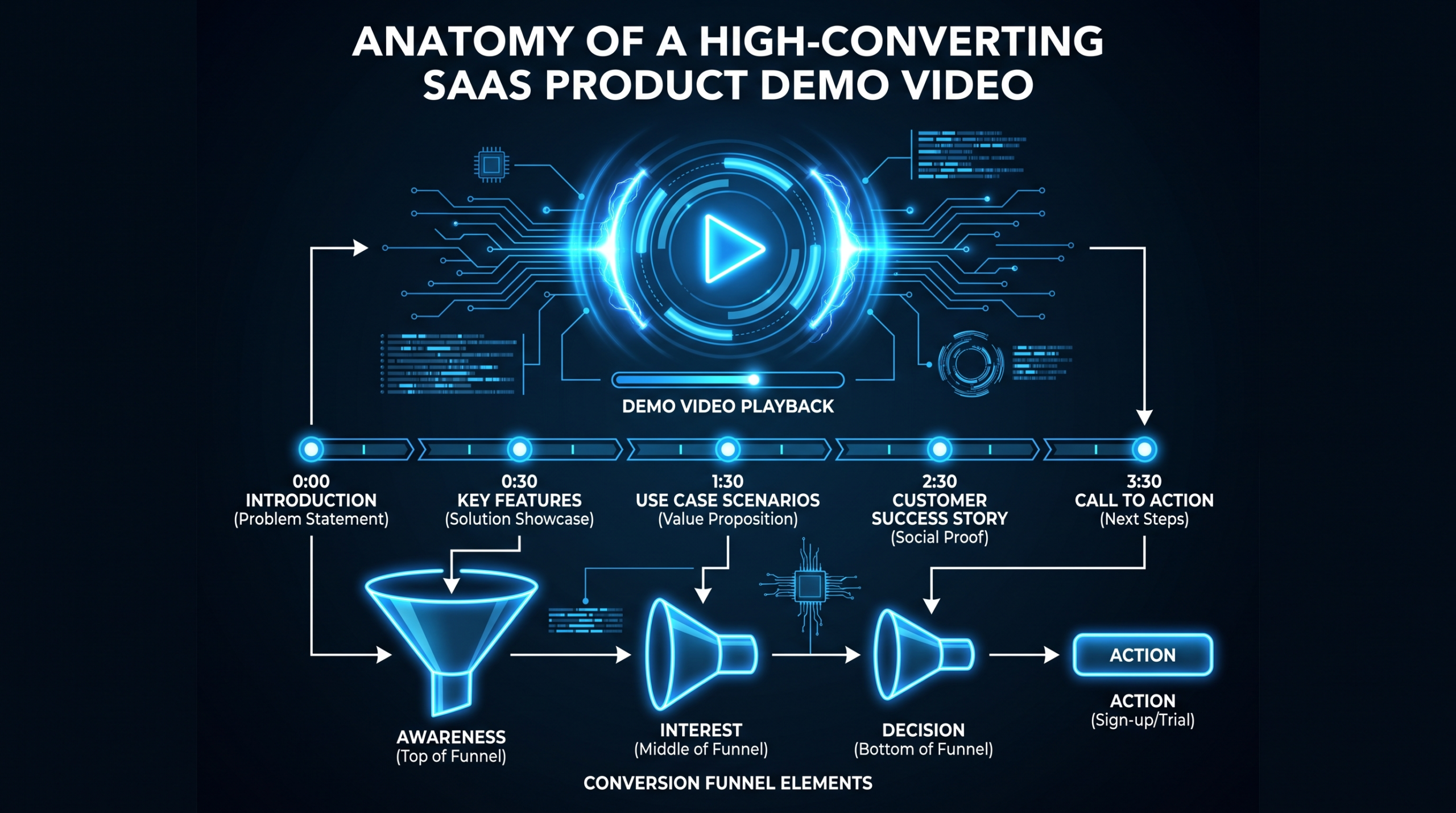
Every high-converting demo in this list follows a version of this structure. Use it to brief your video team — or to script your own:
Part 1: The Hook (0–10 seconds)
Open with the problem, not the product. One sentence or visual that makes the target buyer feel seen. Examples: "Your team still schedules meetings over email." / "You're shipping features your users haven't watched a demo of." The hook works if a viewer who isn't your ICP feels excluded and a viewer who is your ICP leans forward.
Part 2: The Bridge (10–25 seconds)
Connect the problem to your product's existence. This is the "there's a better way" moment. Keep it to one or two sentences. Introduce the product name and its core promise, not its feature list: "Loom replaces the meeting." "Notion replaces the stack." "Calendly replaces the thread."
Part 3: The Proof (25 seconds – end minus 15 seconds)
Show the product solving the problem you named in the hook. Use realistic scenarios. Cut to outcomes, not processes. Keep text legible. Every feature you show should directly answer the question: "How does this solve the problem from the hook?"
Part 4: The Evidence (optional, 15–30 seconds)
Add one or two customer proof points — a quote, a company name, a specific outcome they achieved. This transforms the demo from "here's what we claim" to "here's what actual customers have experienced." Even a single data point elevates credibility significantly.
Part 5: The CTA (final 10–15 seconds)
Offer a next step that matches viewer intent. For most SaaS demos, this means at least two options: one for ready buyers (trial or call) and one for evaluating buyers (explore further). Make the CTA visually prominent and give it enough screen time for the viewer to actually read and act on it.
Getting the script right is 70% of the work. The production team at VEC can take a completed script brief and return a polished demo video — but the brief has to start with this framework or the video drifts toward feature showcase rather than conversion asset.
Production Checklist for SaaS Demo Videos
Before you shoot or record, run through this checklist:
- Hook test: Does your opening 10 seconds make your ICP feel seen? Would a non-ICP viewer feel it's not for them?
- Outcome clarity: Is the core outcome of your product stated within the first 20 seconds — before the UI walkthrough begins?
- Script review: Read aloud. Any sentence that sounds like marketing copy? Rewrite it.
- Screen legibility: At 720p, is all on-screen text readable? Is the cursor movement deliberate, not chaotic?
- Feature-to-outcome ratio: For every feature you show, can you name the specific outcome it delivers? If not, cut the feature.
- Social proof inclusion: Have you included at least one customer name, quote, or specific outcome?
- CTA segmentation: Does your end card offer options for both ready and evaluating buyers?
- Length audit: Is every second of your demo earning its place? Where can you cut to outcome faster?
For a full breakdown of what's included in a professional demo video engagement — from scripting through final delivery — see our video editing services guide.
DIY vs. Agency for SaaS Demo Videos
Most SaaS marketing teams attempt their first demo video in-house — a screen recording, a voiceover, some basic editing in Premiere or ScreenFlow. The result is functional but rarely converts at the level a professionally produced demo does.
Here's where the gap typically shows up:
- Script structure: In-house teams default to feature walkthroughs because they know the product. Agencies default to problem-first structures because they know conversion.
- Pacing: DIY demos run long. Every feature gets equal time regardless of its conversion weight. Edited demos cut aggressively to the moments that matter.
- Visual polish: Motion graphics, annotations, highlight callouts, and smooth transitions require dedicated motion design time that most marketing teams don't have.
- Iteration speed: When the product updates, the demo needs to update too. A dedicated editing team turns around revisions in days, not weeks.
The decision framework is straightforward: if your demo video sits on your homepage or inside your primary sales motion, it's a conversion asset that competes with your top prospects' existing vendor relationships. It needs to be as good as the best demo they've seen from a competitor. If it's an internal explainer or a quick onboarding video, in-house is fine.
Teams at the Series A–C stage commonly find that outsourcing demo video production delivers faster iteration, higher production quality, and lower total cost than hiring and managing an in-house editing function. Our guide to how to outsource video editing covers how to structure that relationship effectively.
If you're evaluating agencies for SaaS demo video production, Increditors (increditors.com) is worth considering — they run dedicated editor pods (senior editor + junior editor + PM + creative director) and are known for work with SaaS and educational content clients on custom retainers. For a dedicated team model built around consistent SaaS demo output, VEC's Growth and Core plans are designed for exactly this use case, with a guarantee of doubling video output in 90 days or month four is free.
Frequently Asked Questions
How long should a SaaS demo video be?
It depends on where in the funnel the video lives. Homepage hero demos work best at 60–90 seconds. Mid-funnel evaluation demos can run 2–3 minutes. Bottom-of-funnel demos used in sales outreach or late-stage evaluation can run 5–15 minutes. The rule: every second should earn its place. A 60-second demo that converts is better than a 3-minute demo that doesn't. Wistia's video benchmark data consistently shows drop-off accelerates after the 2-minute mark for product videos.
Should I show pricing in my SaaS demo video?
Generally no — unless you're competing on price and that's your primary differentiator. Introducing pricing in a demo shifts the viewer from value evaluation to cost evaluation before they've fully understood what they'd be paying for. The exception: if your pricing is a signal of simplicity (e.g., "one flat price, no per-seat fees"), mentioning it can be a competitive advantage. For most SaaS products, direct viewers to your pricing page in the CTA rather than embedding it in the demo itself.
What's the difference between a product demo video and an explainer video?
An explainer video communicates what a product does conceptually — often using animation, metaphor, and storytelling to explain a problem and solution without necessarily showing the actual UI. A product demo video shows the real interface working. Explainers are better for top-of-funnel awareness where the concept needs explaining. Demo videos are better for mid-to-bottom funnel where buyers are already category-aware and need to evaluate your specific execution. Many SaaS companies use both: an explainer for paid acquisition, a demo for the homepage and sales enablement.
How much does a professional SaaS demo video cost to produce?
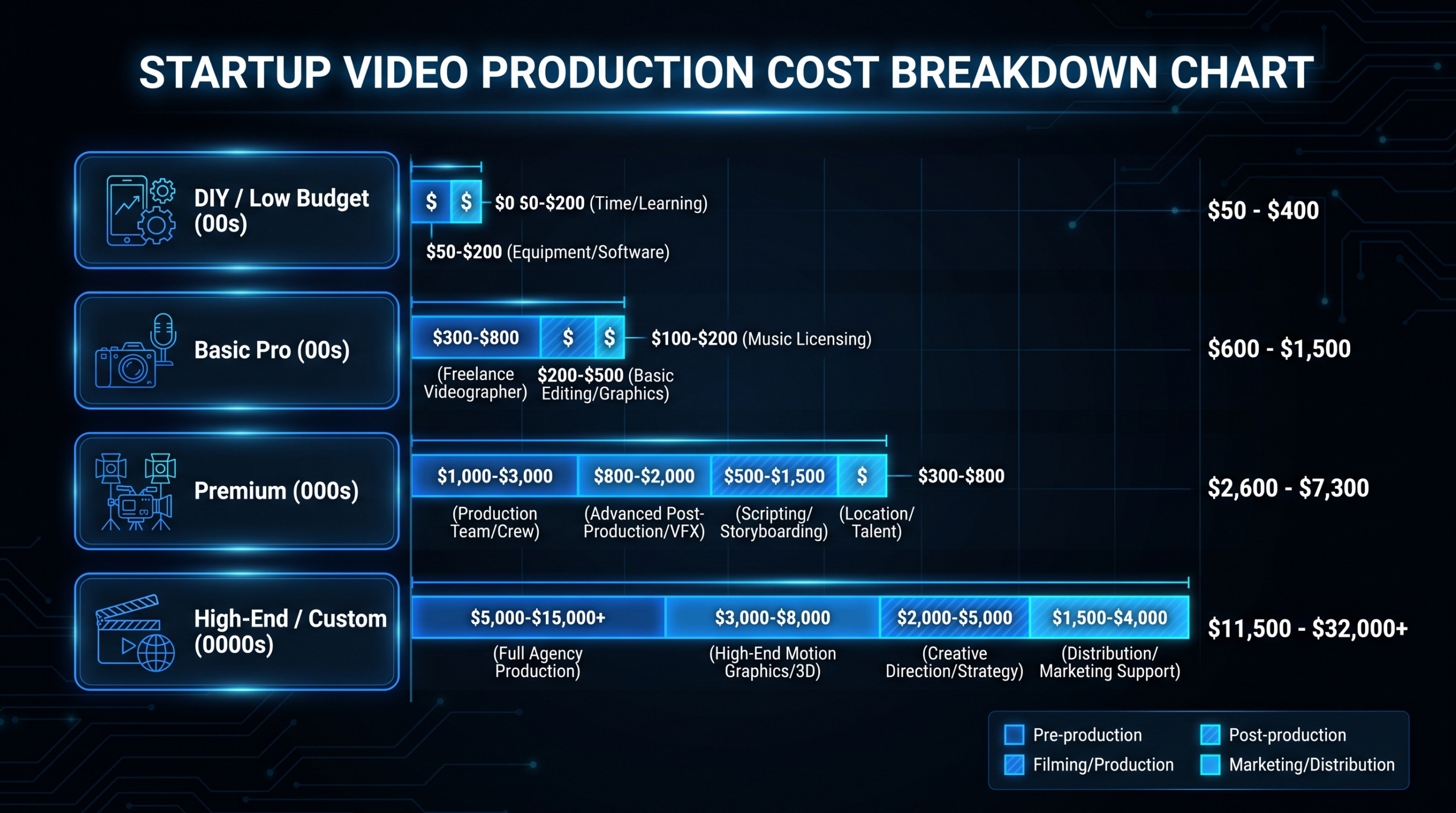
Production costs vary significantly by format and complexity. A clean screen recording with professional voiceover and light motion graphics typically starts around $2,000–5,000 for a single video. An animated explainer demo runs $5,000–15,000 depending on length and animation complexity. Live-action with screen recording integration runs $8,000–25,000+. For SaaS teams producing demos regularly — homepage demos, feature launch videos, onboarding walkthroughs — a monthly retainer with a dedicated editing team is almost always more cost-effective per video than per-project production. See our full breakdown at video production agency pricing models.
How do I know if my demo video is actually converting?
Set up video engagement tracking (Wistia and Vidyard both offer this natively) to measure average watch time, drop-off points, and replay rates. The most important metric isn't views — it's the percentage of viewers who reach the CTA section (typically the final 20% of the video). A video where 80% of viewers reach the CTA but only 10% click suggests a CTA problem. A video where 30% of viewers never reach the CTA suggests a hook or early-engagement problem. Run those diagnostics before investing in a full reshoot.
Ready to Build a Demo Video That Actually Converts?
VEC builds dedicated video editing teams for Series A–C SaaS companies. Growth ($5K/mo), Core ($9.5K/mo), and Scale ($16K/mo) plans — all with a 90-day guarantee: double your video output or month four is free.
Book a Free Strategy Call View Pricing