
How Often Should You Update Your Demo Video?
TL;DR
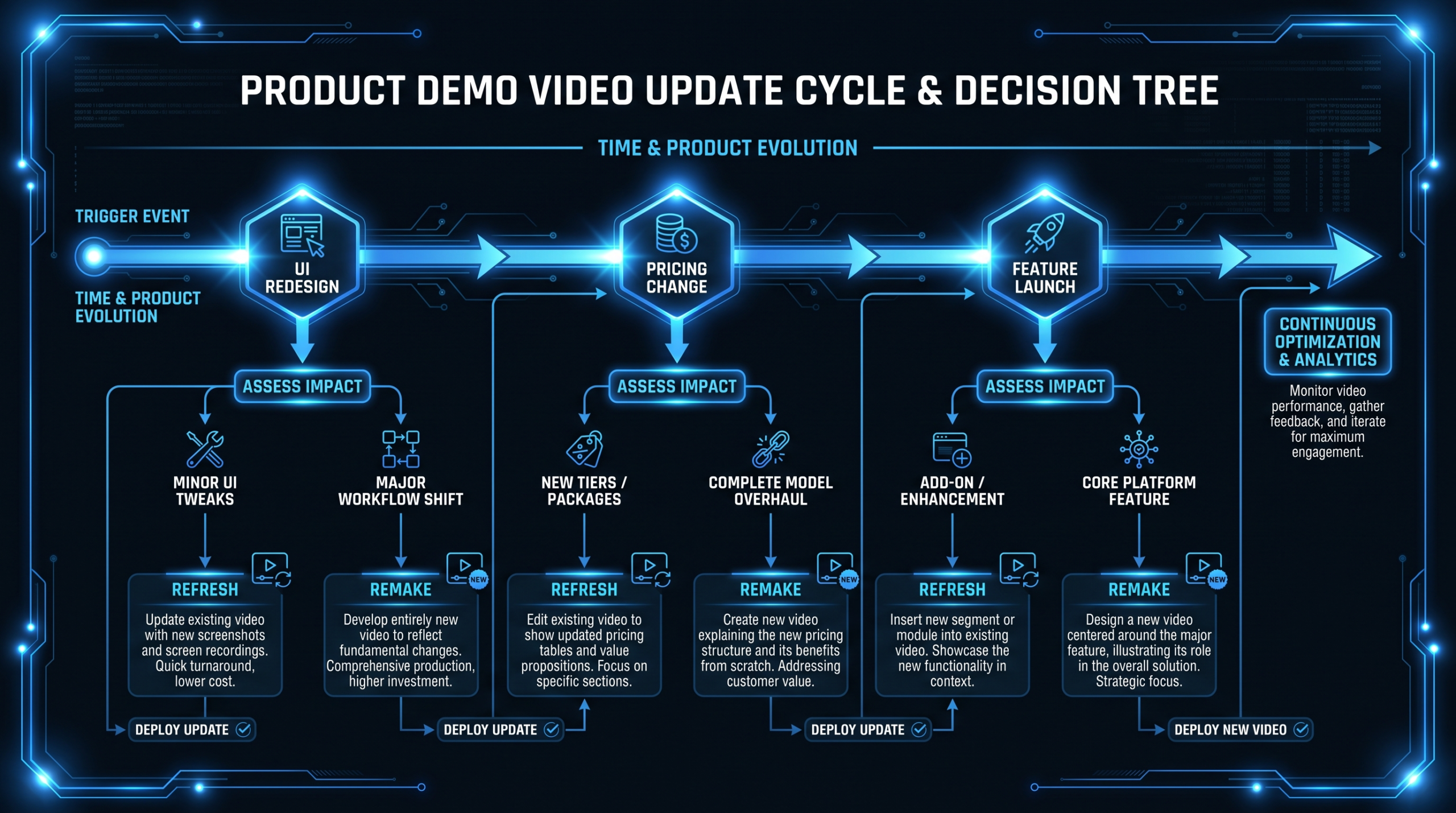
- Update immediately after any UI redesign, pricing change, brand repositioning, or major feature launch - each breaks demo-product alignment and erodes prospect trust in ways that compound quietly over months.
- Recommended cadence: Pre-Series A = every 3-4 months; Series A-B = quarterly plus event-triggered updates; Series C+ = continuous rolling refresh tied to product release cycles.
- Cheap refresh vs. full remake: Swapping out UI screen recordings, voiceover segments, or pricing callouts costs roughly 15-30% of a full rebuild. Use the decision matrix below to choose the right scope.
- The economics matter: Per-project quotes penalize frequent updates - every refresh triggers a new estimate, contract, and re-onboarding. Retainer models eliminate that friction entirely and make ongoing demo freshness sustainable.
Table of Contents
Your product ships every two weeks. Your demo video was recorded eight months ago. Those two facts are on a slow collision course - and in most SaaS marketing teams, nobody is actively managing the impact.
The product demo video is one of the highest-leverage assets in your content library. It plays on landing pages, gets embedded in outbound sequences, appears on your product tour page, and gets forwarded internally by champions during buying committee reviews. Unlike a blog post, it can't be quietly updated with an edit. Unlike a live sales call, it can't be adjusted in real time. What was produced is what plays - outdated UI, retired pricing tiers, discontinued feature flows and all.
Industry research consistently shows that video is among the most effective content types for influencing purchase decisions in B2B software - Wyzowl's annual State of Video Marketing report regularly finds that demo and product explainer videos are cited by buyers as among the most helpful content when evaluating software purchases. That effectiveness cuts both ways: a compelling, accurate demo accelerates deals; a stale, misaligned demo creates friction at exactly the wrong moment.
This guide answers the question most marketing teams never formally address: how often do you actually need to update your product demo video, what forces your hand, and how do you make the update process economically sustainable over time?
Your Demo Video Has an Expiration Date
The moment a demo video is published, it starts aging. That's not a flaw - it's physics. SaaS products change constantly, and the question isn't whether your demo will eventually go stale; it's how quickly the gap between "demo world" and "real product" becomes wide enough to hurt you.
The Demo-Product Gap
Demo-product misalignment happens in two flavors. The first is visual misalignment: the UI in the video shows a navigation structure, color palette, or dashboard layout that no longer exists. Prospects who watch the demo and then log into a trial see a fundamentally different interface. That visual dissonance registers immediately - "Did I sign up for the right product? Is this version outdated?" - and the doubt it plants is rarely explicit enough to surface in a sales call. It just reduces confidence quietly.
The second flavor is functional misalignment: the demo showcases a workflow that's been restructured, a pricing tier that was retired, or a feature that's been renamed or moved to a different location. In these cases, the demo actively misinforms prospects about what the product does. Sales teams discover this the hard way - when a prospect quotes a feature from the demo that no longer works the way the video depicts it, or when a buying committee has built budget assumptions around a pricing tier that doesn't exist anymore.
Why Sales Teams Work Around Stale Demos Rather Than Report the Problem
When demos go stale, sales teams develop workarounds rather than escalate the problem. Account executives learn which sections to skip in their own product tour calls. SDRs quietly stop embedding the video in cold outreach because too many prospects have mentioned the discrepancy. Customer success teams add disclaimers to demo links: "Note: Some UI has been updated since this was recorded." These workarounds accumulate over time - by the time someone formally flags the issue, the demo has often been quietly undermining conversion for months, and nobody has a clear line of attribution to point to.
5 Triggers That Force an Immediate Update
Certain product or business changes don't tolerate waiting for a quarterly review cycle. They require an update within two to four weeks of going live, not at the next planned demo refresh.
1. UI Redesign or Navigation Overhaul
A complete visual rethink of the product interface makes any existing screen-capture demo footage immediately wrong. This is the most obvious trigger and also the most disruptive, because it typically requires replacing the majority of recorded footage - not just swapping a few clips.
If your product is undergoing a major UI redesign, the smart move is to time the demo update with - or just after - the redesign's public launch, not months later. Many teams treat the redesign and the new demo as separate workstreams with different owners, which creates a window of weeks or months where the demo shows an interface that paying customers no longer recognize.
2. Pricing Changes
Pricing callouts in demo videos are trust landmines. If your demo shows a $49/month plan that you've since retired or repriced to $79/month, prospects who researched that price before a sales call will ask why the numbers changed. Worse, they may have already shared the video internally - a buying committee may now have incorrect budget assumptions based on your stale demo's pricing screen.
Pricing changes, especially increases, need to trigger an immediate demo update. At minimum, any screen recordings that show pricing dashboards, plan selection flows, or checkout screens need to be replaced or obscured. The product demo video production guide covers how to structure demos that handle pricing gracefully - including techniques that reduce pricing update costs when those changes inevitably come.
3. Brand Repositioning or Messaging Shift
When your ICP changes, your tagline evolves, or your messaging framework gets overhauled, the narrative spine of your demo becomes misaligned. The demo might still show the right features but frame them for the wrong audience. A B2B tool that pivoted from SMB to enterprise may have demos that emphasize ease-of-use and quick onboarding - exactly the wrong signals for enterprise buyers who need to see security, compliance, admin controls, and role-based permissions front and center.
Repositioning triggers don't always require reshooting screen footage, but they typically require a full voiceover rewrite, new text overlays, and re-edited pacing to serve the new narrative. This is a full remake for the story, often a partial refresh for the footage.
4. Major Feature Launch
A flagship feature launch - one that your marketing team is actively promoting as a differentiated capability - needs to appear in your demo. If you're running paid ads to a landing page that highlights a new AI-powered workflow but your demo video doesn't show that feature at all, you've created a discontinuous prospect experience. The ad promises one thing; the demo shows another.
Not every feature launch warrants a demo update. Minor improvements, small UX tweaks, and backend performance changes don't belong in the demo. But any feature that becomes a primary sales talking point, a homepage headline, or a paid acquisition angle earns a spot in the demo - and therefore triggers an update.
5. Fundamental Workflow Restructuring
Sometimes a core user flow gets restructured in a way that doesn't constitute a full UI redesign but does change how a key task is accomplished. The old three-step onboarding becomes a guided wizard. The reporting dashboard moves from a side panel to its own dedicated section. The data export flow gets redesigned entirely. If your demo narrates a workflow that now follows a completely different path, the gap registers with technically-savvy prospects who follow along carefully - and those are often your most valuable buyers.
The Real Cost of an Outdated Demo
The cost of keeping a stale demo in production is rarely calculated explicitly. It hides in conversion rate degradation, increased sales cycle length, and deal slippage that gets attributed to "market conditions" or "pricing objections" rather than the actual cause.
Demo Aging: Where the Damage Shows Up
| Symptom | Likely Cause | Business Impact |
|---|---|---|
| Prospects mention "outdated UI" on discovery calls | Visual misalignment between demo and current product | Objections to handle; reduced purchase confidence |
| Sales team stops sharing the demo link | Demo no longer accurately represents the product | Loss of async education; longer qualification cycles |
| Trial-to-close rate declining | Demo set wrong UX expectations for trial experience | Churn risk from day one; support overhead increases |
| Pricing questions increasing on sales calls | Stale pricing shown in demo creates budget confusion | Negotiation friction; delayed or lost deals |
| Demo link disappears from outbound sequences | SDRs avoiding the video after negative prospect feedback | Lost nurture touchpoint; fewer educated inbound leads |
| Champion confusion during live demo calls | Prospect pre-watched video, encounters different product | Trust erosion with the person most likely to close the deal |
The math is uncomfortable. If your demo plays 800 times per month and just 2-3% of viewers who would have converted don't - because the demo-product mismatch triggered doubt at a critical moment - that's 16-24 leads per month leaking silently. At an average deal size of $20,000 ARR, that's potentially $320K-$480K in annual pipeline impact from a single outdated video that cost $8,000 to produce and $2,000-$2,500 to update.
The cost of not updating your demo is almost always higher than the cost of the update itself. The challenge is that stale-demo damage is invisible in standard attribution models - it shows up as "no decision" or "went with competitor," not as "demo was misaligned."
Update Cadence by Company Stage
There is no single universal cadence for demo updates, because the right rhythm depends on your product release velocity, your sales motion complexity, and your content production infrastructure. But company stage is a reasonable proxy for all three - and it gives you a starting framework to customize from.
Recommended Demo Update Cadence by Stage
| Stage | Event-Triggered Updates | Baseline Cadence | Typical Demo Portfolio |
|---|---|---|---|
| Pre-Series A | UI redesign, ICP pivot, pricing change | Every 3-4 months | 1 core demo |
| Series A-B | Any of the 5 triggers listed above | Quarterly + event-driven | 1-3 use-case demos |
| Series C+ | Rolling updates tied to sprint cycles | Continuous / rolling refresh | 3-10 demos by persona or use case |
| Enterprise / Public | Per product tier, per vertical, compliance review | Continuous + approval workflows | 10+ variations |
Pre-Series A: Fix on Trigger, Review Every Quarter
At pre-Series A, your product is changing fastest and your budget is tightest - a particularly uncomfortable combination. The realistic approach is to treat the demo as a living asset rather than a permanent production, and build it modularly enough that updates remain affordable. A full production every four months is a reasonable target if you catch the major triggers and don't let the demo run two or more quarters behind the actual product.
The biggest mistake pre-Series A teams make is over-producing the first demo - spending $15,000-$20,000 on a polished animated explainer when the product will look materially different in six months. A professionally edited screen recording with a high-quality voiceover is cheaper, faster, and dramatically easier to update. See VEC's SaaS video production overview for how to structure an update-friendly demo foundation from day one.
Series A-B: Quarterly as a Baseline, Immediate for Major Triggers
By Series A, you have a more defined ICP, a more stable feature set, and a marketing team that actually owns the demo as a content channel. Quarterly updates align well with typical release rhythms - most Series A SaaS companies ship major features or improvements on a rough quarterly cadence, even if smaller updates ship more frequently.
The key shift at this stage is to explicitly separate planned updates from trigger-driven updates. Build Q1/Q2/Q3/Q4 demo refreshes into your content calendar as planned work. But also define, in writing, which product changes trigger an immediate update outside that planned cadence. If your team has a documented list of triggers, junior marketers can flag issues as they arise; without a list, everyone assumes someone else is tracking it, and nothing gets done until someone on a sales call notices a mismatch.
Series C+: Continuous Refresh as a System
At Series C and beyond, you're not managing one demo video - you're managing a portfolio. Demos segmented by persona, by use case, by vertical, by product tier. At this scale, the relevant question shifts from "when do we update" to "how do we build the infrastructure to update continuously without burning out the content team?"
The answer is almost always a combination of modular demo architecture (covered below) and a dedicated production partner on a retainer structure. Teams that try to manage a 6-10 video demo portfolio using per-project vendor quotes end up with half their demos perpetually stale - because the administrative overhead of re-quoting, re-briefing, and re-onboarding a production vendor for each individual update is too high to sustain.
Cheap Refresh vs. Full Remake: Decision Framework
One of the most important cost levers in demo management is knowing when a targeted refresh is sufficient and when only a full rebuild will solve the problem. Getting this wrong in either direction is expensive: treating a simple refresh as a full remake wastes budget; treating a full remake as a refresh produces a video that still underperforms.
When a Cheap Refresh Is Enough
A refresh replaces specific components of the existing video without rebuilding the narrative structure, pacing, or core screen-recording foundation. Typical refresh scope includes:
- Replacing individual screen recordings where the UI has changed but the workflow depicted is the same
- Re-recording or splicing the voiceover to update specific messaging, pricing callouts, or renamed feature terms
- Swapping text overlays that reference old plan names, discontinued stats, or outdated CTA language
- Updating intro and outro cards to reflect new brand guidelines, campaign messaging, or seasonal promotions
- Inserting a new 20-30 second feature module to show a recently launched capability without restructuring the rest of the video
Refreshes typically cost 15-30% of the original production budget. A demo that cost $8,000 to produce might cost $1,200-$2,400 to refresh, with a turnaround of 5-10 business days rather than the 4-8 weeks required for a full remake. For teams that update demos quarterly, a refresh model keeps annual video spend manageable.
When You Need a Full Remake
A full remake is warranted when the underlying narrative is broken - when the story the demo tells is wrong, not just visually outdated. Key indicators that a refresh won't be sufficient:
- Your ICP or positioning has fundamentally changed, and the demo's narrative arc is designed for the wrong audience
- More than 50-60% of the screen footage needs to be replaced
- The core product workflow the demo depicts has been removed or restructured entirely, not just visually updated
- A major UI redesign has changed the visual language so completely that patched-in new footage looks visually inconsistent with the retained segments
- The demo's pacing, length, or information architecture no longer matches your current sales methodology or the attention window of your target buyer
Refresh vs. Full Remake: Decision Matrix
| Change Type | Refresh | Full Remake | Estimated Cost vs. Original |
|---|---|---|---|
| UI color palette / branding update | ? | 10-20% | |
| Pricing callout or plan name update | ? | 5-15% | |
| New feature segment added (additive) | ? | 15-25% | |
| Voiceover messaging or positioning update | ? | 10-20% | |
| Individual workflow screen replacement | ? | 15-30% | |
| Full navigation or UX architecture restructure | ? | 80-100% | |
| ICP or core positioning pivot | ? | 80-100% | |
| 50%+ of screen footage needs replacement | ? | 60-90% | |
| New persona or use-case variant (net new) | ? | 100% (new video) |
The decision isn't always clear-cut. A production partner worth working with will audit your existing video against the required changes and give you an honest scope recommendation - sometimes a partial rebuild (rebuild the first half, refresh the second) is the right call. For an overview of how that audit and scoping process works in practice, see the VEC how it works page.
Building an Update-Ready Demo from the Start
The cheapest way to manage frequent demo updates isn't to find a cheaper vendor - it's to design your demo for updating from the start. Most demo videos are produced as monolithic assets: one seamless, fully composited video where every element is baked together in the final export. This makes initial production smooth but makes future updates expensive, because changing any component requires re-opening the entire project and re-rendering everything from scratch.
The Modular Demo Architecture
A modular demo is built from discrete, independently swappable segments with clean edit points between them:
- Core narrative segment (30-60 sec): Your problem statement, positioning hook, and product context. This changes rarely - only on repositioning or a significant brand shift.
- Feature modules (30-90 sec each): Individual feature demonstrations that can be reordered, replaced, or extended without touching adjacent segments. If a feature's UI changes, only that module needs a new screen recording.
- Pricing and CTA segment (15-30 sec): The "what it costs and what to do next" close. Structured as an independent segment so pricing changes don't require re-editing the entire video.
- Persona introduction (15-20 sec, optional): A swappable opening tailored to a specific role or use case, allowing you to produce one core demo and add persona-specific bookends without re-shooting the full video.
Modular architecture requires more upfront planning - segment boundaries need to be defined during scripting, screen recordings need to be captured and labeled by module, and voiceover needs to be recorded as discrete takes rather than one continuous read. The downstream payoff is significant: updates to a modular demo commonly run 40-60% cheaper than updates to a monolithic production, because you're only touching the component that changed.
Source Asset Discipline: The Silent Update Tax
One of the most common reasons demo updates become expensive is missing or disorganized source assets. When the original editor is no longer on the account, project files weren't delivered, or raw screen recordings were compressed and archived - the new editor has to work from the exported video file rather than the source project. Rebuilding motion graphics, re-isolating audio tracks, and reverse-engineering edit points from a compressed export is far more labor-intensive and produces lower-quality results than editing from the original project.
Require your production partner to deliver organized project files, labeled raw screen recordings, separate audio and music tracks, and all asset source files as part of every engagement. This is a fundamental part of what a professional video editing service should include. If your current partner doesn't deliver organized source assets as standard practice, that's worth addressing before you need your first update.
Wistia's research on video in B2B marketing consistently highlights that product demos and explainer videos drive the highest engagement and watch-through rates of any video type - which makes source asset continuity even more important, since these are the videos you'll be maintaining longest.
The Economics: Retainer vs. Per-Project for Demo Updates
Here's the structural problem with managing demo updates on a per-project basis: every update triggers a new sales cycle with your production vendor. You submit a change request, they scope it, they quote it, you negotiate, you approve, they onboard (again), they produce, you review, you request revisions, they deliver. For a targeted two-week refresh, you may spend two weeks in administrative overhead before a single frame is edited.
At a company that updates its demo four times per year, that overhead compounds into a serious operational drag. And because each update is treated as a discrete project, there's no continuity of editorial knowledge: different editors, no brand familiarity built over time, no ability to make a quick change outside the formal scope process, and no institutional memory of what worked or why the previous version was structured the way it was.
Teams managing ongoing video programs - including regular demo updates alongside social content, testimonials, and product tour videos - consistently find that retainer or dedicated-team models are substantially more economical once you factor in the full cost of per-project overhead.
Annual Demo Update Costs: Per-Project vs. Retainer Model
| Update Scenario | Per-Project Estimate | On a Retainer Model | Key Difference |
|---|---|---|---|
| 4 targeted refreshes/year (quarterly) | $8,000-$12,000 | Included in monthly retainer | Per-project adds scoping + vendor overhead each time |
| 1 full remake/year | $12,000-$25,000 | Included in monthly retainer | Retainer team knows your brand; faster production, fewer briefing rounds |
| 2 additional use-case variants | $10,000-$20,000 | Included in monthly retainer | Per-project requires full scope and brief for each new video |
| 1 emergency triggered update | $3,000-$5,000 + rush premium | Included in monthly retainer | Per-project typically adds 25-50% rush premium for short-notice requests |
| Estimated total demo spend/year | $33,000-$62,000 | Part of broader monthly program | Retainer covers all video output; demo updates are a subset, not the full spend |
The table above isolates demo-specific costs, but this understates the retainer advantage. A program like VEC's Growth plan at $5,000/month covers the full spectrum of SaaS video output - demo updates, social cuts, testimonial edits, product tour videos, and more - with a dedicated team that builds brand familiarity over time. When you amortize the monthly cost across all deliverables, the per-unit cost drops well below what per-project quotes can offer for comparable quality and turnaround speed.
The hidden cost of per-project demo management isn't the quote - it's the re-briefing, the re-onboarding, and the version inconsistency that accumulates when different editors touch the same asset over time with no shared context.
The counterargument for per-project pricing is flexibility - you're not locked into a monthly spend during slow periods. That's valid if your video production is genuinely sporadic. But for any Series A+ SaaS company with a content program that requires consistent output, including regular demo freshness, that flexibility is usually a false economy. The administrative overhead of managing per-project vendors across four to six demo updates per year, plus additional video deliverables, routinely consumes more team time than a structured retainer would cost.
For a detailed breakdown of when per-project versus retainer makes financial sense at different production volumes, the outsourcing video editing guide walks through the math including the breakeven point where retainer economics become clearly superior.
Frequently Asked Questions
How often should you update a product demo video?
As a baseline: quarterly for Series A-B companies, every 3-4 months for pre-Series A. But calendar-based cadence should always play second to trigger-based updates. If a UI redesign, pricing change, major feature launch, or repositioning event hits, update within 2-4 weeks - don't wait for the next planned cycle. Building a documented list of triggers that automatically queue an update is one of the highest-leverage operational improvements a content team can make.
How much does it cost to update a product demo video?
A targeted refresh - replacing specific screen recordings, updating voiceover segments, or swapping pricing callouts - typically costs 15-30% of the original production budget. For a demo that cost $8,000 to produce, a refresh commonly runs $1,200-$2,400. A full remake costs 80-100% of the original. If you're managing updates under a retainer model, individual refreshes are typically absorbed into the monthly engagement without a separate line item or scoping delay.
What's the difference between a demo video refresh and a full remake?
A refresh replaces specific components - screen recordings, voiceover segments, text overlays - without rebuilding the underlying narrative structure or re-scripting the video. A remake rebuilds from the brief: new script, new screen recordings throughout, new voiceover, and often a new visual style or pacing structure. Choose a refresh when the story the demo tells is still accurate and the audience is still correct, but specific elements are visually or factually outdated. Choose a remake when the positioning, ICP, or core workflow logic has fundamentally changed.
Should you update your demo video every time you launch a new feature?
No. Reserve demo updates for features that materially change your product's value proposition, become a primary sales talking point, or appear in paid acquisition campaigns. Minor improvements, performance updates, and small UX refinements don't belong in the demo. A useful filter: if the feature would appear in a sales deck, a homepage headline, or a paid ad, it earns a demo update. If it wouldn't make those cuts, it doesn't need one.
How long does it take to update a product demo video?
A targeted refresh with a production partner who already knows your brand: 5-10 business days. A full remake: 3-6 weeks depending on script development, screen recording sessions, voiceover recording, and review rounds. Emergency or trigger-driven updates can be compressed to 3-5 days with a retainer partner who has ongoing brand context, but expect a rush premium on per-project engagements. Modular demo architecture can reduce both timelines by 30-40% by limiting the scope of what needs to be re-recorded and re-edited for each update.
Time to Update Your Demo Video?
VEC's dedicated editing teams handle ongoing demo video refreshes and remakes as part of our monthly SaaS video programs. No new quotes, no re-briefing, no onboarding lag. Tell us what changed and we'll turn it around fast.
Book a Free Strategy Call View Our Plans
