What Does a Video Editor Need From You?
TL;DR
A video editor needs six core things from you: all raw footage files, synced audio, a clear creative brief, brand assets (logos, fonts, hex codes), licensed music or SFX, and an organised folder structure. Missing any one of these extends your turnaround time and multiplies revision rounds. The sections below cover each in detail — file naming conventions, format specs, delivery tools, a folder template you can use today, and what a disorganised handoff costs in calendar time and budget.
Table of Contents
- The Core Package Every Editor Needs
- Raw Footage: What to Send and How to Label It
- Audio Files: The Asset Editors Stress About Most
- Your Creative Brief: The One Thing Teams Skip
- Brand Assets, Graphics, and Style References
- File Formats and Technical Specs
- File Delivery: How You Send Matters Too
- The Hidden Cost of a Disorganised Handoff
- What Changes With a Dedicated Video Team
- FAQ
The Core Package Every Editor Needs
To start editing your video, a professional editor needs raw footage, clean audio, a creative brief, and your brand files — in that order of urgency. Without all four, editing either cannot begin or will produce a result that requires significant rework.
Think of the handoff like a construction handoff: your video editor is the builder. A perfect brief without materials means nothing gets built. Perfect materials without a brief means the wrong thing gets built. Experienced editors will pause work and request missing pieces rather than guess — which is the professionally correct call, but it delays your timeline.
Here is a complete checklist of what belongs in a ready-to-edit package:
- All raw video files — every take, including the ones you think didn't work
- Synced or separated audio files — especially if you recorded separately from camera
- A written creative brief — purpose, audience, tone, key messages, duration target, output specs
- Brand kit — logo (SVG or PNG with transparent background), colour hex codes, approved fonts as .OTF or .TTF files
- Music and SFX — licensed tracks with documentation, or direction on style and mood if you want the editor to source them
- Reference videos — examples of the look, pacing, or energy you are targeting
- Voiceover or interview transcript — if you have one, it saves the editor hours of scrubbing footage for selects
- Deadline and delivery specs — platform (YouTube, LinkedIn, Instagram), aspect ratio, subtitle requirements, output codec
The sections below break each of these down so you know exactly what format to use, how to label files, and which tools make delivery fast and friction-free.
Raw Footage: What to Send and How to Label It
Send your video editor every clip from your shoot — not a pre-selected subset. Editors need to find the best take themselves, and they regularly use clips the client dismissed as outtakes. Pre-filtering footage is one of the most common and expensive mistakes clients make: it forces reshoots or forces editors to work with suboptimal material.
What "All Footage" Actually Means
All footage means every recorded file from the session — multiple takes of the same line, b-roll you thought was too shaky, interview outtakes, camera tests. Even a botched take can yield a usable reaction shot, a single line delivered better than in the "good" take, or a cutaway the editor didn't know they would need until the edit was underway.
The reasonable exception: if you recorded six or more hours of a live conference or event, it is fair to flag segments that are clearly unusable (dead air, equipment failures). But within any defined shoot segment, send everything.
File Naming Convention
Inconsistent naming is one of the biggest sources of avoidable editing overhead. A consistent convention means your editor can orient in your folder within minutes instead of hours. The convention below works across most B2B video shoots:
Recommended File Naming Convention
| File Type | Naming Format | Example |
|---|---|---|
| Camera files | YYYYMMDD_CAMx_CLIPxxx.ext | 20260315_CAM1_CLIP001.mp4 |
| Interview takes | YYYYMMDD_SUBJECT-NAME_TAKExx.ext | 20260315_SARAH-JONES_TAKE03.mp4 |
| B-roll | YYYYMMDD_LOCATION-DESC_CLIPxxx.ext | 20260315_OFFICE-LOBBY_CLIP004.mp4 |
| Screen recordings | YYYYMMDD_SCREEN-DESC_TAKExx.ext | 20260315_DASHBOARD-DEMO_TAKE01.mp4 |
| Separate audio | YYYYMMDD_SUBJECT-NAME_AUDIOxx.ext | 20260315_SARAH-JONES_AUDIO01.wav |
Camera Originals vs. Proxy Files
If your camera shoots in a high-quality format like Apple ProRes, R3D (RED), or BRAW (Blackmagic RAW), ask your editor whether they want camera originals or a proxy set before you transfer. Working with 4K or higher originals requires significant storage and a capable editing workstation. Many professional editors prefer to cut on proxies and relink to originals for the final export.
If you shot on a smartphone or mirrorless camera and your files are H.264 or H.265 MP4, send the camera originals directly — no transcoding is needed and those formats are universally compatible with modern editing software.
Audio Files: The Asset Editors Stress About Most
Audio problems are the most common cause of reshoots and extended timelines. A video editor can work around shaky footage, imperfect lighting, or a slightly soft focus — they cannot fix fundamentally broken audio in post-production. Sending clean audio files is not optional.
When Audio Is Recorded on a Separate Device
If you used a lavalier microphone, a Zoom recorder, or a boom pole separate from the camera, you have what is called dual-system audio. You must send both the camera audio (embedded in the video file) AND the separate audio files. The editor will sync them and use the clean track. Sending only one or the other makes their job significantly harder.
Label audio files to match the corresponding video clip: if the interview file is 20260315_SARAH-JONES_TAKE03.mp4, the audio file should be 20260315_SARAH-JONES_AUDIO03.wav. Editors who receive a folder of files named audio_file_1.wav through audio_file_47.wav with no context spend significant time syncing manually — time you are paying for.
Audio File Formats: What to Use
- WAV (uncompressed) — preferred for voiceover, interviews, and sound design. Large files, but lossless quality.
- AIFF — Apple's uncompressed equivalent of WAV. Equally good, used interchangeably.
- MP3 at 320kbps — acceptable for music tracks and temp reference audio. Not suitable for voiceover or sync audio.
- AAC / M4A — use if WAV is impractical due to file size. Ensure 256kbps or higher.
For voiceover: always deliver WAV at 48kHz / 24-bit. This is the broadcast audio standard and what professional post-production workflows expect as a minimum.
If You Are Providing Licensed Music
Include the track file AND the license documentation. If you sourced music from Epidemic Sound, Artlist, Musicbed, or a similar service, export the license certificate as a PDF and include it in your audio folder. Even if your editor handles licensing on managed projects, the documentation for your specific track belongs with you and should travel with the project files.
Your Creative Brief: The One Thing Teams Skip
A creative brief is the single document that tells your video editor what you want, why it matters, and what "done" looks like. Without it, your editor is making directorial decisions that belong to you — and you will pay for this in revision rounds.
What Belongs in a Video Brief
A brief does not need to be long. A one-page document covering these six points is more useful than a ten-page deck that buries the actual direction:
- Purpose — what is this video supposed to do? (Drive sign-ups, explain a product feature, build trust with new prospects?)
- Target audience — who will watch this, and what do they already know?
- Key messages — the three things the viewer must remember after watching, stated as plain sentences
- Tone and pacing — fast-cut and energetic vs. methodical and authoritative? Reference a specific video if possible
- Target duration — not "make it as long as it needs to be." Pick a target: 60 seconds, 2 minutes, 4 minutes. The editor will flag if it is unrealistic given the material
- Output specifications — delivery platform, aspect ratio, whether you need open captions, subtitle files, or format variations
For a structured template, the VEC post on how to brief a video editor covers the format in detail and includes a template teams can adapt directly. That is the right starting point if you have never written a formal brief before.
For platform-specific considerations — particularly if your video is destined for your website rather than social channels — Wistia's video learning hub is a reliable resource covering embed options, viewer analytics, and web video best practices.
The Revision Multiplier Effect
Every piece of direction that lives in your head instead of a brief translates into a revision round. A team that receives a complete brief will typically deliver a first cut requiring only minor adjustments. A team that receives no brief will deliver a first cut reflecting their best interpretation — which may diverge significantly from your intent. This is not a failure of editing skill; it is a failure of communication. The brief is your responsibility, not theirs.
The practical outcome: teams that brief well consistently complete projects in two rounds of revisions or fewer. Teams that skip the brief commonly require three or more rounds. Each round costs calendar time — typically a full business day on a fast-turnaround team — even when no additional footage is required.
Brand Assets, Graphics, and Style References
Brand assets are the visual identity files your editor uses to build lower-thirds, intros, outros, and any motion graphics consistent with your company's design language. Send them once, store them with your editing team, and you will not need to send them again for subsequent projects.
What to Include in Your Brand Kit
- Logo — SVG preferred; PNG with transparent background as a fallback. Both horizontal and stacked versions if you have them. A white version on a transparent background for use on dark backgrounds.
- Colour palette — primary and secondary hex codes. Not "our brand is blue" — the exact hex value (e.g., #1A56DB). RGB and CMYK values if you have them.
- Typography — font names, and the actual font files (.OTF or .TTF) if they are licensed. Editors need the file itself to use a font in After Effects or Premiere Pro; a screenshot or font name alone is not usable.
- Brand guidelines PDF — if you have one, include it. Editors use it to understand spacing rules, logo clearance zones, and what not to do with your visual identity.
- Existing motion templates — if a previous editor created After Effects templates for your lower-thirds or outros, include the .aep file and all linked assets. This ensures consistency across projects without rebuilding from scratch every time.
Reference Videos
Three to five reference videos are worth more than ten paragraphs of style description. Link to YouTube or Vimeo videos that represent the look, pacing, and energy you want — and be specific. "Copy this style" is not actionable. "Same energy as the intro on this video, colour grade similar to the first 30 seconds of this one, pacing modelled on this cut" gives an editor something concrete to work from.
If your previous edited videos exist online, include links to those as well. Editors use existing content to maintain continuity across a content programme. This is one of the core reasons teams that work with a consistent outsourced video partner see quality and efficiency improve after the first few projects — the team builds institutional knowledge of your brand that no brief document fully captures.
File Formats and Technical Specs
Sending footage in the wrong format does not always cause problems, but it can force your editor to transcode before they start — adding setup time before a single cut is made. The table below covers the common scenarios.
File Format Guide by Asset Type
| Asset Type | Preferred Format | Acceptable Alternative | Avoid |
|---|---|---|---|
| Interview / talking head | ProRes 422 (.mov) or H.264 (.mp4) | H.265 (.mp4) from mirrorless/DSLR | Compressed exports from WhatsApp or social apps |
| Screen recording | Lossless QuickTime or OBS lossless | H.264 at highest available bitrate | Zoom / Teams screenshare recordings (low bitrate) |
| Drone / aerial | Camera original H.265 4K | H.264 4K | Pre-compressed social export from the drone app |
| Voiceover audio | WAV 48kHz / 24-bit | AIFF 48kHz / 24-bit | MP3 at any bitrate for VO or sync audio |
| Licensed music | WAV or MP3 320kbps | AIFF | Platform rips; YouTube audio library stream without downloaded file |
| Logo / graphics | SVG or PNG with transparent background | PSD with unlocked layers | JPEG (no transparency layer); screenshot of a logo |
| Fonts | .OTF or .TTF font file | Adobe Fonts name with a link to the specific font | A screenshot of the font in use; font name alone |
Resolution and Frame Rate
For most B2B video delivered via YouTube, LinkedIn, or embedded on a website, 1080p (1920×1080) at 24fps, 25fps, or 30fps is the standard. If you are shooting in 4K for future-proofing or to allow reframing in the edit, confirm with your editor that their workstation handles 4K editing natively or establish a proxy workflow upfront.
For social-first content — Instagram Reels, TikTok, LinkedIn short video — your editor will need either vertical (9:16) originals or the 16:9 footage plus clear direction on how to crop and reframe for each platform. Detailing the full scope of what is included in a professional video editing engagement is covered in our post on what video editing services include.
File Delivery: How You Send Matters Too
The best footage in the world will not help if it arrives via 18 separate email attachments, a Google Drive link that expires in seven days, or a WeTransfer that the editor cannot download before the link expires. The delivery method you choose affects how fast your editor can start and how reliably they can access your assets throughout the project.
File Delivery Method Comparison
| Method | Best For | File Size Limit | Main Drawback |
|---|---|---|---|
| Google Drive | Shared ongoing projects, small teams | 15 GB free; 100 GB+ on paid plans | Can be slow for large files; sharing permission issues common |
| Dropbox | Shared team storage, consistent long-term access | 2 TB+ on paid plans | Costs money at scale; sync issues during large uploads |
| WeTransfer Pro | One-time large sends, up to 200 GB | 200 GB per transfer | Links expire; no ongoing access; not collaborative |
| Frame.io | Professional video review and asset handoff | Depends on plan tier | Requires editor to have an account or guest link access |
| Shared NAS / cloud storage server | High-volume, ongoing production teams | Unlimited (your hardware / plan) | Requires IT setup and VPN access for remote editors |
| Physical hard drive | Very large projects (500 GB+), local or co-located teams | Physical drive capacity | Shipping time; risk of loss or damage in transit |
For ongoing video programmes — where you are delivering new footage weekly or bi-weekly — a shared Dropbox or Google Drive folder with a consistent structure is the most reliable option for most teams. Frame.io, now part of the Adobe ecosystem, adds timestamped review and approval layers on top of storage, which is valuable when multiple stakeholders need to leave specific feedback on cuts without a separate email chain.
Folder Structure That Editors Actually Use
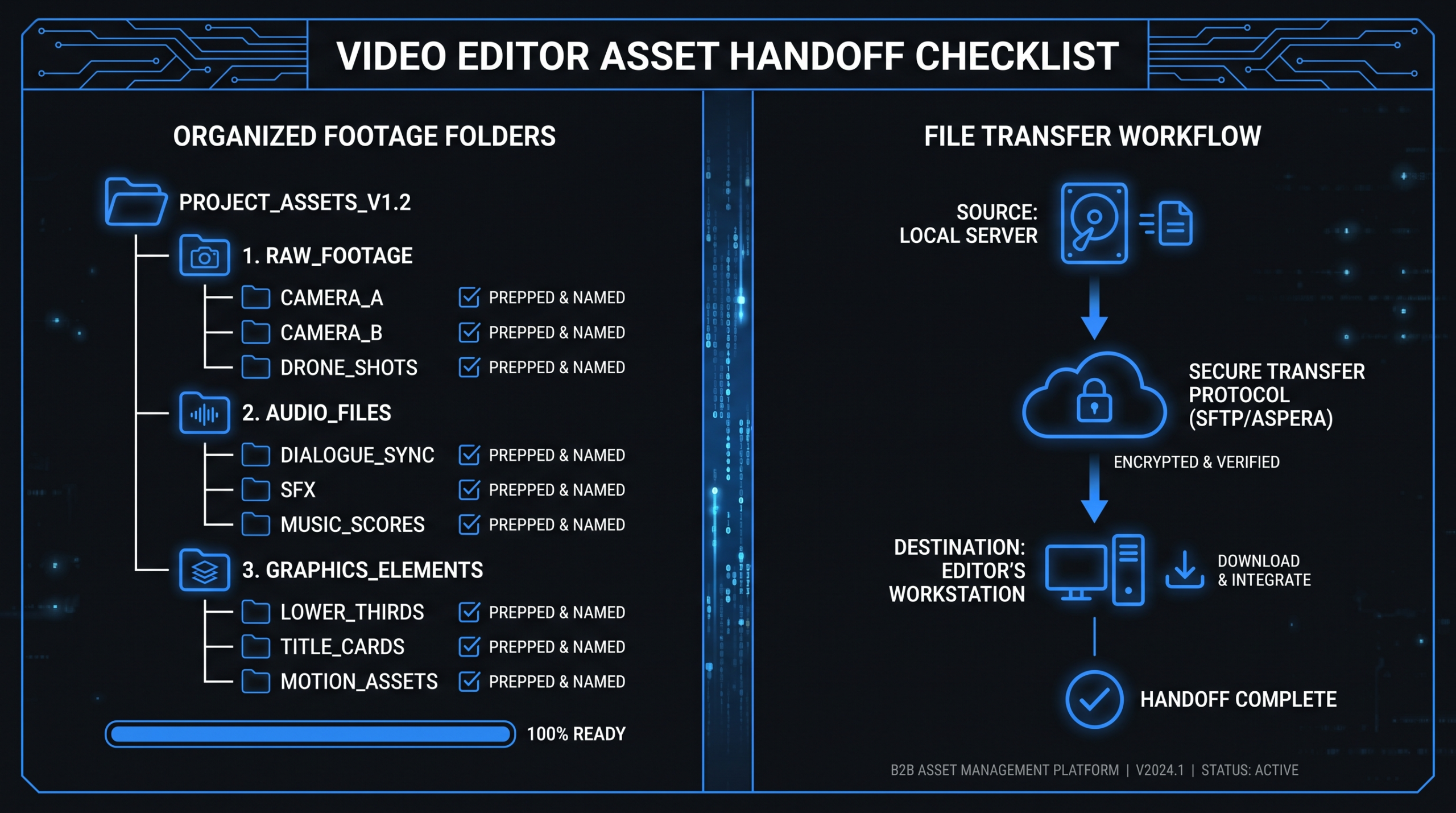
A consistent folder structure eliminates orientation overhead for every new project. The structure below works across Dropbox, Google Drive, and local drives, and scales from a single video to a monthly content programme:
PROJECT_NAME_YYYYMMDD/
├── 01_FOOTAGE/
│   ├── CAM_A/
│   └── CAM_B/
├── 02_AUDIO/
│   ├── VO/
│   ├── MUSIC/
│   └── SFX/
├── 03_GRAPHICS/
│   ├── LOGOS/
│   ├── FONTS/
│   └── TEMPLATES/
├── 04_BRIEF/
│   ├── creative_brief.pdf
│   └── references/
└── 05_DELIVERABLES/
Every new project uses the same root structure. The editor knows exactly where to look without asking. If you are working with VEC, your dedicated project manager establishes this structure at the start of your engagement so it is consistent across every delivery without you having to think about it.
The Hidden Cost of a Disorganised Handoff
A messy asset handoff does not just slow things down — it introduces errors. Editors who are forced to hunt for files, guess at the relationship between clips, or work with unnamed audio tracks routinely encounter sync problems they would not encounter with an organised package. These problems surface in first-cut deliverables and cost revision rounds to resolve.
What Happens When the Package Is Incomplete
When a professional editor receives an incomplete package, they have two options: start work on what they have and flag what is missing, or pause and request the full package before beginning. Most agencies take the second approach — because starting without complete assets typically means rebuilding work once the missing pieces arrive. Either path affects your timeline.
Beyond delays, consider the cost structure. If an agency charges for time spent on file management — and some do, either explicitly or embedded in their rates — you are paying editing rates for clerical work. Agencies with dedicated project managers handle asset intake and organisation before the editor ever touches the project. That layer absorbs the disorganisation overhead so the editor can focus on editing.
The Brief-to-Revision Ratio
The connection between brief quality and revision count is consistent across professional video production teams. A well-briefed project — covering all six points from the brief section above — commonly requires two rounds of revisions or fewer. A project with no brief or a vague half-page of notes regularly requires three or more rounds.
Each round costs calendar time. On a fast-turnaround team, a single revision round adds roughly one full business day to your delivery date. On a team managing multiple clients simultaneously, a round can add two to three days. Multiply that by the number of extra rounds a missing brief generates, and the time cost of skipping the brief is larger than the time it would have taken to write it.
For a full breakdown of what editing teams do with a well-organised project package — and where time goes on a typical engagement — see our overview of what professional video editing services include.
What Changes When You Have a Dedicated Video Team
When you work with a dedicated video editing team, the handoff process changes fundamentally after the first two to three projects. Your team already has your brand kit, your folder conventions, your style preferences, and your delivery specifications on file. You send footage — and that is largely it.
The Onboarding Investment Pays Off Quickly
The first project with any new editor — whether freelance, agency, or dedicated team — requires the most setup work. You are building the brief from scratch, establishing folder conventions, uploading your brand kit for the first time, and walking through your preferences. This is a one-time cost, not a recurring one.
With a dedicated team, this investment compounds over time. By month two, your team knows your brand's visual style without being told. By month three, they are anticipating production needs and flagging continuity issues before you notice them. By month four, they are often suggesting edit approaches that serve your content strategy without needing to be prompted.
This is the core value proposition of a dedicated model: the team improves at working with you over time. That dynamic is the opposite of what happens when you cycle through different freelancers or request quotes project by project from multiple agencies. VEC's Growth plan at $5K/month and Core plan at $9.5K/month both include a dedicated editing team and project manager, with a 90-day output guarantee for clients who complete the onboarding process.
What a Dedicated Team Still Needs From You
Even with an established team, certain inputs never change:
- New raw footage from each shoot — this never changes; the team cannot edit without source material
- Project-specific direction — even editors who know your brand need to know the purpose and key messages of each new video
- Updated brand assets when they change — a rebrand, a new logo version, or an updated colour palette needs to reach the team before it reaches the edit
- Clear, specific feedback on cuts — the editing process is collaborative; an editor cannot approve their own work on your behalf, and vague feedback generates extra rounds
The quality of your feedback delivery matters as much as the asset handoff. A revision note that says "make it feel more dynamic" wastes a full revision cycle. A note that says "the pacing in the first 20 seconds feels slow — tighten the cuts to every 2 seconds, hold the product screenshot at 0:45 for an extra beat, and cut the segment at 1:30 entirely" produces a result in one pass. Clear direction is the other half of a productive editor relationship.
The Model That Scales With Your Content Programme
Many B2B SaaS teams start with per-project editing, move to an agency retainer as their content volume grows, and graduate to a dedicated team when video becomes a central pillar of their marketing. At each stage, the handoff process becomes more refined and the overhead decreases. The foundation — clean footage, a clear brief, organised files — stays consistent throughout. What changes is how much of that infrastructure the team carries for you versus how much you manage yourself.
Frequently Asked Questions
What file format should I send my video footage in?
For most projects, H.264 or H.265 MP4 files from a DSLR, mirrorless camera, or smartphone are fine to send directly. If you shot with a cinema camera (RED, Blackmagic, or Sony FX series), ask your editor whether they want camera originals or a proxy set before you transfer, since those raw formats require significant processing power. For separately recorded voiceover or interview audio, send WAV files at 48kHz / 24-bit — this is the professional broadcast standard and what most post-production workflows expect.
Should I send all my footage or just the best takes?
Send all your footage — every take, including the ones you think did not work. Professional editors frequently find usable moments in clips clients considered outtakes: a better delivery of a single line, a reaction shot at the end of a take, or a cutaway that solves a continuity problem in the edit. Pre-filtering your footage before delivery is one of the most common causes of unnecessary reshoots, because the editor cannot use material they never received.
What happens if I do not provide a creative brief?
Without a brief, your editor will make directorial decisions on your behalf. Those decisions will reflect their professional judgment, not your actual intent. This typically adds revision rounds that a clear brief would have prevented. A brief does not need to be long: a one-page document covering purpose, target audience, key messages, tone, target duration, and output specifications is enough to reduce revision cycles significantly and get a first cut that matches what you had in mind.
How should I send large video files to my editor?
For ongoing projects, a shared Dropbox or Google Drive folder with a consistent structure is the most reliable approach. For one-time large sends over 20 GB, WeTransfer Pro or a physical hard drive may be more practical. Avoid sending footage via email or compressed through messaging apps — this degrades video quality and makes editing harder. Frame.io is worth exploring if you have multiple stakeholders who need to leave timestamped feedback on cuts, as it combines file storage with a professional review layer.
What brand assets does a video editor need?
At minimum: your logo in SVG or PNG format with a transparent background, your brand colour hex codes, and your font files in .OTF or .TTF format. If you have existing edited videos, include links to those as well — editors use them to maintain visual consistency across your content programme. If a previous editor built After Effects templates for your lower-thirds, title cards, or outros, include the .aep file with all linked assets so the new editor does not need to rebuild from scratch.
Stop Managing the Handoff. Get a Team That Handles It For You.
VEC's dedicated editing teams manage asset intake, organisation, and brief development as part of your onboarding. After the first month, sending your footage is all you need to do. Guaranteed to double your video output in 90 days — or month four is free.
Book a Free Strategy Call See Pricing Plans