
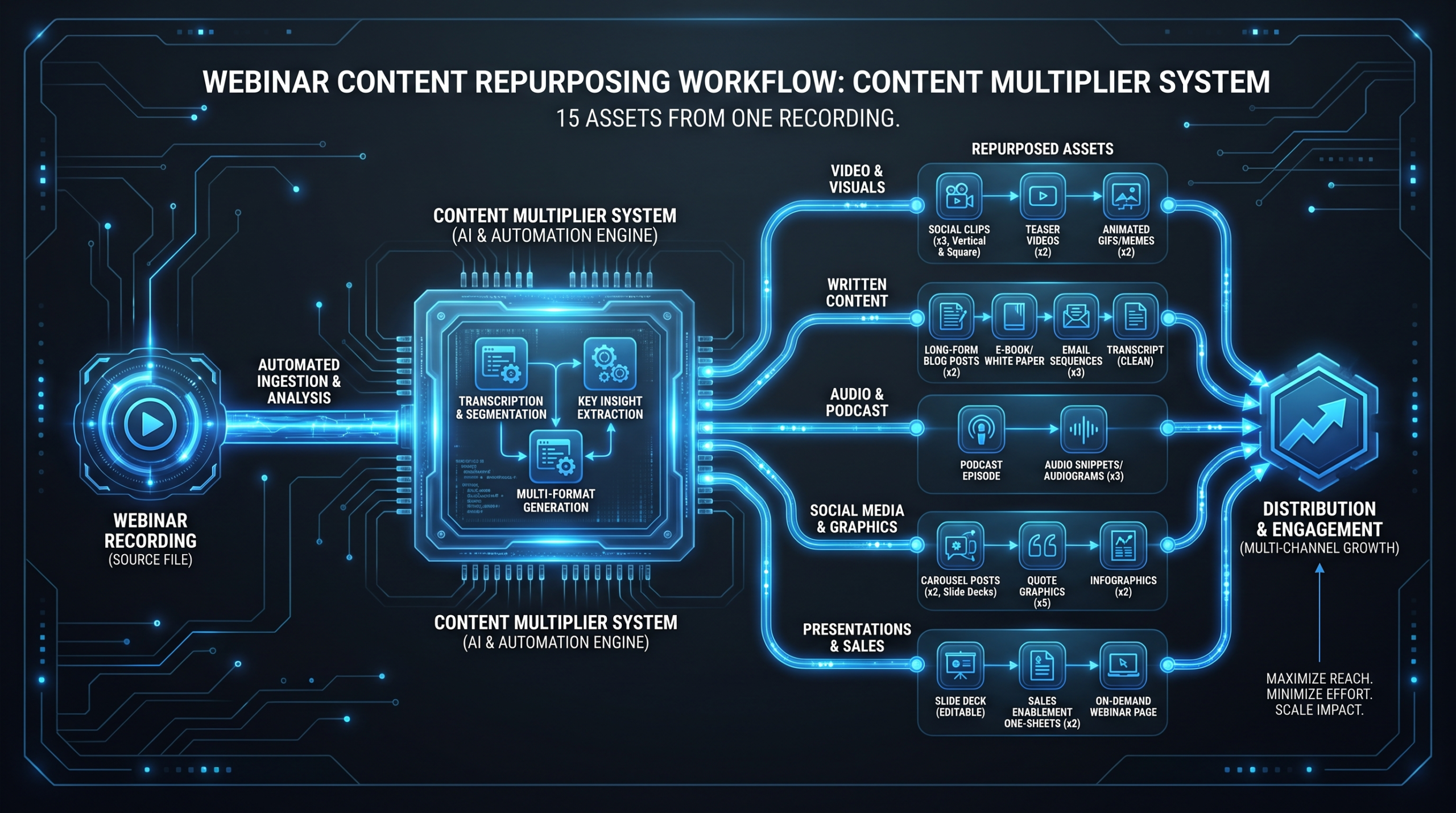
Webinar Repurposing: One Recording, 15 Assets
TL;DR
- A single 60-minute webinar recording can reliably generate 15+ distinct content assets across every funnel stage.
- Most SaaS marketing teams extract fewer than 3 pieces of content per webinar — the remaining value sits unused on a drive.
- The system requires a pre-brief to your editor before the webinar runs, not after, so the right moments are flagged at capture.
- Turnaround for the full 15-asset stack typically runs 5–10 business days with a dedicated editing team.
- Cost-per-asset for repurposed content is commonly 60–80% lower than producing equivalent assets from scratch.
Table of Contents
- Why Webinar Repurposing Is a Strategic Multiplier
- The 15-Asset Webinar Repurposing Checklist
- Asset Matrix: Platform, Format, and Complexity
- What to Brief Your Editor Before the Webinar
- Editing Turnaround Expectations
- Cost of Repurposing vs. Original Production
- Building a Repeatable Webinar Repurposing Workflow
- 30-Day Content Calendar for Your 15 Assets
- FAQ
Why Webinar Repurposing Is a Strategic Multiplier
Here is the standard fate of a B2B SaaS webinar: 200 people register, 80 attend live, the recording gets emailed to registrants the next morning, and then it sits in a Zoom folder for eight months until someone asks if it can be deleted.
That recording contains a subject-matter expert, real customer questions, quotable insight, and proof-of-expertise — all in one file. The live attendance is not the product. The recording is the raw material for a content program that compounds over the next 60 days.
The teams who understand this run webinars differently. They treat the recording as an input to a production system, not a deliverable. One 60-minute session becomes blog content, email sequences, LinkedIn clips, a podcast episode, sales leave-behinds, and internal training material — simultaneously. The same ideas reach your audience ten times, in different formats, across different channels, meeting buyers at every stage of their journey.
What makes webinar repurposing particularly valuable for Series A–C SaaS marketing teams is the leverage ratio. You already paid for the speaker, the promotion, the platform, and the production overhead. The marginal cost of extracting 15 assets from a recording you already own is a fraction of producing 15 standalone pieces of content. Teams commonly report cutting content production cost per asset by 60–80% when they systematize webinar repurposing versus briefing original content from scratch.
The bottleneck is almost never the idea. It is the edit. Most teams do not have the internal editing bandwidth to clip, caption, format, resize, and export a webinar into 15 distinct deliverables — so they skip it. The solution is to treat webinar repurposing as a production workflow, not an ad-hoc task, and pair it with editing capacity that can execute at speed.
Webinar Repurposing: The 15-Asset Checklist
Not every webinar warrants all 15. A 20-minute product deep-dive yields different assets than a 90-minute panel. Use this as a master list and select what fits your content program and audience distribution.
Video Assets
- Full replay (YouTube upload). Edited for standalone viewing — intro/outro added, B-roll cuts where needed, captions burned in. Upload to YouTube unlisted or public depending on your gating strategy. This asset has the longest shelf life and compounds via search.
- Gated replay (landing page). The same edited recording behind a form on your site. Drives pipeline from organic and paid traffic long after the live event. Pair with a dedicated landing page and chapter timestamps in the description.
- Highlight reel (3–5 min). The best 5–7 moments assembled into a standalone sizzle. Useful for promoting future webinars, sales follow-up, and partner distribution.
- Short LinkedIn video clips (5–8 clips, 60–90 sec each). The single highest-ROI asset type. These are punchy standalone moments — a bold claim, a framework reveal, a counterintuitive data point. Each clip gets square or vertical formatting for feed performance, open captions, and a hook text overlay on the first 3 seconds.
- Vertical short-form clips (3–5 clips, 15–30 sec). Formatted 9:16 for LinkedIn Stories, Instagram Reels, TikTok, and YouTube Shorts. Shorter hooks, faster cuts, larger caption text. These are distinct edits from the LinkedIn versions — not just a crop.
- Social audiograms (3–5 assets). Animated quote cards with waveform visualization. Most effective for sections where the speaker's words are particularly strong but the visual is unremarkable (slides, talking head). A 20-second audiogram of the best line in your webinar consistently outperforms static graphics on LinkedIn.
Written Assets
- Long-form blog post (1,500–2,000 words). A structured editorial article derived from the webinar's core argument. Not a transcript — a genuine editorial piece with an intro, sections, and conclusion. Optimized for the primary keyword. This is the anchor SEO asset from the session.
- Summary listicle post (600–800 words). A faster-reading companion piece: "7 things we learned from [Webinar Title]." Targets adjacent or lower-competition keywords. Can be published on the same date as the long-form or staggered by 1–2 weeks.
- LinkedIn carousel post. 8–12 slides telling the webinar's core framework as a visual slideshow. Carousels consistently drive high saves and shares on LinkedIn. Design the slides against your brand template; each slide is one idea, one sentence.
- Email nurture sequence (3–5 emails). A mini drip campaign triggered by registrant or replay-viewer behavior. Email 1: "Here's your replay + key timestamps." Email 2: The single most actionable insight from the session, with a relevant CTA. Email 3: A follow-up question + case study or related resource. Emails 4–5 (optional): A Q&A spotlight and a direct sales touchpoint.
- Email newsletter feature. A 200–300 word section for your regular newsletter — a "best moment" excerpt with a link to the replay and the blog. This is distinct from the nurture sequence: it goes to your full subscriber list, not just webinar registrants.
Sales and Enablement Assets
- Sales leave-behind deck or one-pager. Extract the 3–5 slides or talking points that directly address your buyer's objections or ICP pain points. Format as a branded PDF or a Notion page your AEs can share in follow-up emails. This is often the highest-conversion asset in the stack — buyers who missed the live session get the essential argument without sitting through a recording.
- FAQ document from the Q&A section. Transcribe and clean up the live Q&A. 8–15 questions with full answers. Upload to your knowledge base or resource library. Repurpose individual Q&As as social posts, help docs, or chatbot training content.
Audio and Long-Form Distribution
- Podcast episode (audio-only). Strip the audio, clean it (noise reduction, level normalization, breath editing), add your podcast intro/outro, and publish to Apple Podcasts, Spotify, and your RSS feed. If your webinar is a panel or interview format, this is straightforward. If it is a screen-share-heavy demo, add a brief audio intro that contextualizes what listeners cannot see.
- Internal training asset. Chapter-mark the full recording for easy navigation and upload to your internal LMS, Notion, or Google Drive training library. This is high-value for onboarding new hires, training SDRs on objection handling, or capturing a subject-matter expert's knowledge before they leave the company.
Asset Matrix: Platform, Format, and Editing Complexity
Webinar Repurposing Asset Matrix
| Asset | Primary Platform | Format | Edit Complexity | Approx. Edit Time |
|---|---|---|---|---|
| Full YouTube replay | YouTube | 16:9, 1080p | Medium | 2–4 hrs |
| Gated landing page replay | Website | 16:9, 1080p | Low | 1–2 hrs |
| Highlight reel | YouTube / Sales | 16:9, 3–5 min | Medium-High | 3–5 hrs |
| LinkedIn video clips (×6) | 1:1 or 4:5, 60–90 sec | Medium | 1–2 hrs each | |
| Vertical short clips (×4) | Reels / Shorts / TikTok | 9:16, 15–30 sec | Low-Medium | 45–60 min each |
| Audiograms (×4) | LinkedIn / Twitter | 1:1 or 4:5, 15–30 sec | Low | 30–45 min each |
| Long-form blog post | Website / SEO | Written | Medium (writing) | 3–5 hrs |
| Listicle post | Website / SEO | Written | Low | 1–2 hrs |
| LinkedIn carousel | PDF slides | Low-Medium | 2–3 hrs | |
| Email nurture sequence | Email (HubSpot/etc.) | Written | Medium | 3–4 hrs |
| Newsletter feature | Written | Low | 30–60 min | |
| Sales leave-behind | Email / Notion / PDF | Written + design | Medium | 2–4 hrs |
| FAQ document | Knowledge base | Written | Low | 1–2 hrs |
| Podcast episode | Apple / Spotify / RSS | Audio MP3 | Low-Medium | 1–3 hrs |
| Internal training asset | LMS / Notion / Drive | Video + timestamps | Low | 1–2 hrs |
Total editing hours across the stack: typically 30–50 hours for a complete 15-asset build, depending on webinar length and the number of video clips. With a dedicated editing team, this maps to 5–8 business days. With a solo freelancer, expect 2–4 weeks minimum — and likely significant quality inconsistency across assets.
What to Brief Your Editor Before the Webinar
The biggest mistake marketing teams make with webinar repurposing is treating it as a post-production task. Brief your editor before the session runs. This changes the economics and the quality of the final assets.
The Pre-Webinar Editor Brief
Send your editor (or editing team PM) this information before the session:
- Run of show / agenda with timestamps. Tell them when the main content starts, when Q&A begins, and any planned demonstrations. This allows them to find the sections quickly without scrubbing the entire recording.
- The 3–5 key arguments or frameworks. What are the most quotable moments likely to be? Where will the speaker make their boldest claims? These are the clip targets.
- Asset list and platform destinations. Confirm which of the 15 assets you are producing from this specific webinar. Not every session generates a podcast episode — agree on scope before editing begins.
- Aspect ratios and formatting specs. LinkedIn square, vertical Shorts, 16:9 replay — confirm the output formats so no rework happens after editing begins.
- Brand guidelines and template files. Motion graphics templates, caption style, color palette, font choices. If your editor does not have these, provide them in the brief.
- Speaker name and title. For lower-thirds and any title cards in the clips.
- Key visual moments to avoid. If a section has technical difficulties, if a speaker mentions a competitor, or if a Q&A answer goes off-script — flag it so the editor can omit it from clips.
During the Live Session
Assign someone on your team to timestamp noteworthy moments in real time. A shared Google Doc with the format [12:34] — Great line about pipeline velocity takes five minutes during the session and saves your editor two hours of scrubbing afterward. This single habit meaningfully compresses the time-to-first-asset.
The teams who produce the best clip content are not the ones with the best webinars. They are the ones who know exactly which 90 seconds they want before the editor opens the file.
Editing Turnaround Expectations
Turnaround depends heavily on editing capacity and how clearly the brief was written. Here is what marketing teams commonly experience across three capacity models:
Webinar Repurposing Turnaround by Capacity Model
| Capacity Model | First Clips (2–3 social videos) | Full 15-Asset Stack | Revision Cycle |
|---|---|---|---|
| In-house editor (1 person) | 3–5 business days | 3–5 weeks | 1–3 days/round |
| Freelancer (single hire) | 2–5 business days | 2–4 weeks | 2–5 days/round |
| Dedicated editing team | 24–48 hours | 5–8 business days | Same-day or next-day |
The 24–48 hour window for first clips matters for distribution timing. LinkedIn content performs best when published within 48–72 hours of a topic being discussed — if your webinar touches a trending subject, speed to publish is a real competitive factor.
For teams producing webinars monthly or quarterly, the freelancer model creates a consistent bottleneck: by the time the first session's assets are live, the next webinar is approaching and the editor is already behind. A dedicated team resolves this by maintaining a parallel work queue — clips from webinar two can start while the blog post from webinar one is still in review.
If you are evaluating your current video editing outsourcing setup, turnaround on social clips is a practical benchmark. If it regularly exceeds 5 business days for a 90-second clip, you have a capacity or process problem worth addressing.
Cost of Repurposing vs. Original Production
The financial case for webinar repurposing is straightforward, but most teams do not run the numbers explicitly. Here is a direct comparison.
Scenario: 15 Assets Produced Independently
Assume a SaaS marketing team wants to produce the equivalent 15 assets as standalone pieces of original content — no webinar recording, starting from scratch for each.
Cost of 15 Standalone Original Assets vs. Webinar Repurposing
| Asset | Standalone Production Cost | Repurposed Cost (from webinar) | Savings |
|---|---|---|---|
| Full edited video (YouTube) | $1,500–4,000 | $300–600 | ~75–80% |
| 6× LinkedIn clips | $300–600 each ($1,800–3,600) | $80–150 each ($480–900) | ~70–75% |
| 4× Vertical short clips | $150–350 each ($600–1,400) | $50–100 each ($200–400) | ~65–75% |
| 4× Audiograms | $100–250 each ($400–1,000) | $40–80 each ($160–320) | ~60–70% |
| Long-form blog post | $800–2,500 | $300–700 | ~65–75% |
| Listicle post | $300–800 | $100–250 | ~65–70% |
| LinkedIn carousel | $400–1,200 | $150–350 | ~60–70% |
| Email nurture sequence (3 emails) | $600–1,800 | $200–500 | ~65–75% |
| Sales leave-behind | $800–2,500 | $250–600 | ~68–76% |
| Podcast episode | $300–900 | $80–200 | ~70–78% |
The total standalone production cost for an equivalent 15-asset set commonly runs $8,000–22,000+ depending on quality tier and agency rates. Repurposing the same assets from a single webinar recording typically runs $2,500–6,000 — a saving in the range of 60–75% per asset across the board.
For a detailed breakdown of what video editing includes at each tier, see our guide to what video editing services include.
The comparison also understates the creative benefit: repurposed content is consistent. Every asset in the stack shares the same ideas, framing, and voice because they all originate from the same source material. Standalone production means 15 separate creative briefs, 15 different writer/editor interpretations, and no guarantee the LinkedIn clip reflects what the blog post argues.
How VEC Teams Approach Repurposing Economics
At Video Editing Company, clients on the Growth plan ($5K/mo) who include webinar repurposing in their workflow commonly allocate one webinar per month to the full 15-asset system. The result is a predictable content output that feeds organic, email, and social simultaneously — all derived from one 60-minute session that the marketing team was already running. The editing happens in parallel with the team's other deliverables, so the webinar repurposing does not crowd out other production. That is the compounding effect of having a dedicated team versus managing a queue of freelance requests.
Building a Repeatable Webinar Repurposing Workflow
A one-time webinar repurposing effort is a project. A repeatable workflow is a content machine. The difference is documentation and a standing process that runs without requiring you to re-brief the approach every time.
Step 1: Standardize Your Pre-Brief Template
Create a Google Doc template with the fields described in the briefing section above. Store it in a shared drive. Before every webinar, duplicate the template, fill it in, and share it with your editing team at least 48 hours before the session. This becomes the single source of truth for every repurposing workflow.
Step 2: Set Up Your Asset Queue
Use a project management tool (Asana, Linear, Notion, whatever you already run) to create a standard project template for webinar repurposing. Each asset type is a task. The template fires when the recording is uploaded. Your editing team picks up the queue immediately.
The queue should have three priority tiers:
- Priority 1 (publish within 48–72 hours): LinkedIn clips, newsletter feature, gated replay landing page.
- Priority 2 (publish within 5–7 days): YouTube upload, blog post, email nurture sequence, audiograms.
- Priority 3 (publish within 2–4 weeks): Podcast episode, sales leave-behind, LinkedIn carousel, FAQ document, internal training asset, vertical shorts, highlight reel.
Step 3: Define Your Distribution Stack
Before your first webinar repurposing run, map every asset to its distribution channel and the team member responsible for publishing it. Editing something and not publishing it is a common failure point. Assign ownership explicitly.
Distribution Ownership Map
| Asset Type | Channel | Owner | Publish Window |
|---|---|---|---|
| LinkedIn clips | LinkedIn (company + exec) | Social Manager | Days 1–3 |
| Gated replay landing page | Website | Demand Gen | Day 1 |
| Email nurture emails 1–2 | HubSpot / Marketo | Email Manager | Days 1 & 4 |
| Blog post (long-form) | Website / SEO | Content Manager | Days 5–7 |
| YouTube upload | YouTube | Social Manager | Day 5 |
| LinkedIn carousel | Social Manager | Day 8–10 | |
| Podcast episode | Apple / Spotify | Content Manager | Day 10–14 |
| Sales leave-behind | Sales team (AEs) | PMM / Sales Enablement | Day 7 |
| Vertical shorts | Reels / Shorts / TikTok | Social Manager | Days 14–21 |
| Internal training | LMS / Notion | Enablement | Day 14 |
Step 4: Build a Feedback Loop
After each webinar repurposing cycle, run a 15-minute retrospective: which assets performed best? Which were not worth producing? Which took too long in the edit queue? Use this data to adjust the asset list and the brief template for the next session. Over 3–4 webinar cycles, most teams find they can narrow to a 10–12 asset core that drives the majority of results, with optional assets for high-priority sessions.
The SaaS video production teams that get the most from webinar repurposing are not producing every possible asset from every session — they are producing the right assets consistently, with a process that keeps the quality bar high and the turnaround fast. Those two things, consistently achieved, compound into a meaningful content velocity advantage over time.
30-Day Content Calendar for Your 15 Assets
Here is a practical distribution schedule for a webinar hosted on Day 0 (any Monday). Adjust cadence based on your publishing frequency and channel strategy.
30-Day Webinar Repurposing Content Calendar
| Day | Action / Asset Published | Channel |
|---|---|---|
| Day 0 | Webinar runs live. Timestamp doc filled. | — |
| Day 1 | Gated replay landing page goes live. Email 1 sent to registrants (replay link + timestamps). | Website + Email |
| Day 2 | LinkedIn Clip #1 (boldest claim/takeaway). Editing team brief complete, full queue in progress. | |
| Day 3 | LinkedIn Clip #2 + Audiogram #1. Newsletter feature live. | LinkedIn + Email |
| Day 4 | Email 2 to nurture sequence (key insight + CTA). | |
| Day 5 | LinkedIn Clip #3. YouTube full replay uploaded (unlisted or public). | LinkedIn + YouTube |
| Day 6 | LinkedIn Clip #4 + Audiogram #2. | |
| Day 7 | Long-form blog post published. Sales leave-behind delivered to AEs. | Website + Sales |
| Day 8 | LinkedIn Clip #5. Email 3 (follow-up Q&A spotlight). | LinkedIn + Email |
| Day 10 | LinkedIn Carousel post. Audiogram #3 + #4. | |
| Day 12 | Summary listicle blog post published. LinkedIn Clip #6. | Website + LinkedIn |
| Day 14 | Podcast episode published. Internal training asset uploaded. | Apple/Spotify + LMS |
| Day 15 | Vertical Short #1 + #2 (Reels / YouTube Shorts). | Instagram + YouTube |
| Day 18 | Email 4 (optional: case study or related resource). | |
| Day 20 | Highlight reel published (YouTube / sales deck embed). | YouTube + Sales |
| Day 22 | Vertical Short #3 + #4. | Instagram / TikTok / Shorts |
| Day 25 | FAQ document published to knowledge base. | Website / Notion |
| Day 28 | Email 5 (optional: direct sales touchpoint for active nurture). | |
| Day 30 | Retrospective: measure performance, update brief template, plan next webinar repurposing cycle. | Internal |
This schedule keeps content flowing for an entire month from a single hour of recorded material. Each piece can be produced by the editing team in the background — no additional creative sessions, no new spokesperson bookings, no new content strategy meetings required.
For teams that want to understand the full scope of what a professional editing team can handle in a monthly engagement, the complete video editing services breakdown covers deliverable types, revision workflows, and what to expect at each capacity tier. If you are currently managing freelancers for this work and experiencing the bottlenecks described above, the guide to outsourcing video editing walks through how to evaluate and transition to a more scalable model.
Wistia's research on video engagement consistently shows that shorter, focused clips drive higher completion rates than full replays — which is the strategic argument for investing in the clip-cutting layer of this system. Similarly, HubSpot's content studies on email marketing indicate that video-centric email sequences drive meaningfully higher click-through rates than text-only nurture tracks. The 15-asset system is designed to exploit both of these patterns at once.
Video Editing Company clients who implement a monthly webinar repurposing system commonly find that webinar-derived content accounts for 30–50% of their total monthly content output — produced at a fraction of the per-asset cost of their other content programs. The compounding effect becomes visible at the 90-day mark: consistent distribution across channels, growing replay traffic, and an expanding library of sales assets that the team did not need to commission separately.
Frequently Asked Questions
How many assets can you realistically get from one webinar?
A 60-minute webinar with strong content typically yields 12–18 distinct assets. The 15-asset system described here is a realistic target for most sessions — not a theoretical maximum. The main limiting factor is content quality: a tightly-run webinar with clear frameworks and quotable moments generates more high-performing clips than a loosely-structured session where the speaker circles back repeatedly. Sessions under 30 minutes typically yield 8–10 assets; sessions over 90 minutes with panel discussions can yield 20+.
Should I repurpose every webinar this extensively?
Not necessarily. The full 15-asset system is best reserved for webinars with broad audience appeal and strong evergreen content — a webinar on "how to reduce churn" is worth the full treatment; a partner-specific product update may not be. A practical filter: if you would pay to produce an equivalent piece of long-form video content from scratch, repurpose the webinar. If the session is too niche or situational, extract only Priority 1 assets (clips and replay page) and move on.
How long does it take to produce all 15 assets?
With a dedicated video editing team, the full 15-asset stack typically completes in 5–8 business days after the recording is uploaded — assuming the pre-brief was submitted before the session and a timestamp doc was provided. Priority 1 assets (first LinkedIn clips, replay page, email 1) typically arrive within 24–48 hours. A freelancer working solo commonly takes 2–4 weeks for the full stack, and the quality is less consistent across asset types since one person rarely specializes in all formats.
Do I need a separate editor for video versus written assets like blog posts and emails?
For most teams, yes — video editing and content writing are distinct skills rarely found in one person at professional quality. The most efficient model is a video editing team handling the video and audio assets (clips, audiograms, podcast, replay) while a content writer handles the blog posts, emails, and carousel copy in parallel. The two workstreams run simultaneously, which is how the full stack can be completed in under 10 business days. Trying to run both through one generalist typically means longer turnaround and lower quality on both sides.
What is the best tool or software for webinar repurposing?
The recording tool itself matters less than the production workflow around it. Zoom, Riverside.fm, and StreamYard all export high-quality files suitable for professional editing. For clip discovery, tools like Descript or Opus Clip can accelerate the identification of highlight moments — but they produce rough cuts that typically need professional post-production before distribution. The real leverage is in the editing and formatting layer: getting a dedicated team that can take raw Zoom recordings and output properly formatted, branded, captioned assets across every channel, without you having to manage each export individually.
Ready to Build Your Webinar Repurposing System?
Video Editing Company's dedicated teams handle the full 15-asset stack — clips, blog content, podcast audio, carousels, and sales assets — from a single webinar recording. Growth plan clients commonly launch their first repurposing cycle within the first two weeks of onboarding.
Book a Free Strategy Call See How It Works See Pricing
