Video in Outbound Sales Sequences for SaaS
Table of Contents
Why Video in Outbound Sales Sequences
Cold email is broken for most SaaS companies. Average reply rates sit at 1-3%, and the inbox is more crowded than ever. SDRs send hundreds of templated messages that all sound the same - "I noticed your company is growing fast" or "congrats on the recent funding round." Decision-makers have learned to pattern-match and delete these in under 2 seconds.
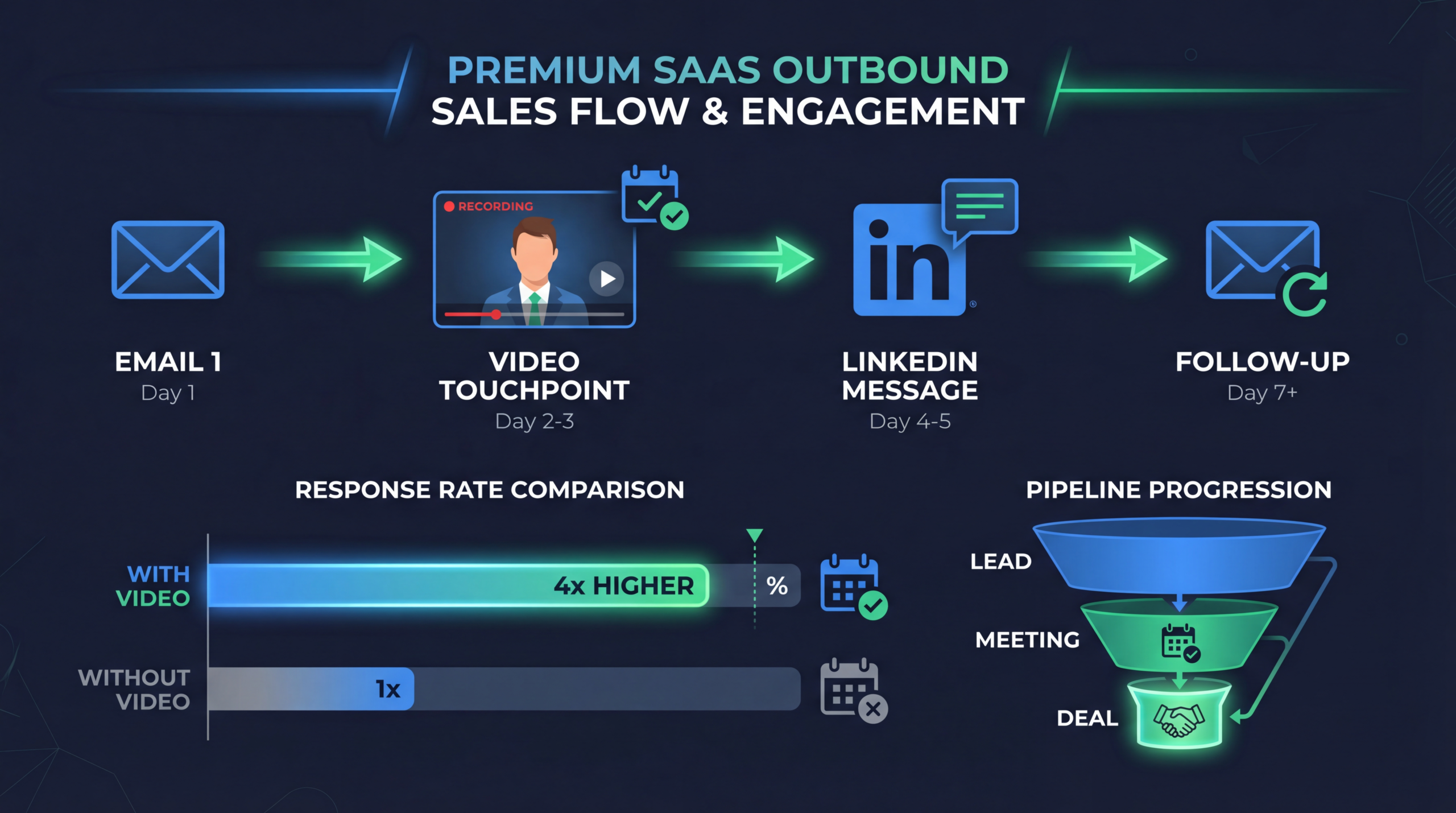
Video breaks the pattern. A video thumbnail in an email is visually distinct from every other message in the inbox. It signals effort, personality, and a willingness to go beyond the copy-paste approach. And the data backs it up: sales teams using personalized video in outbound sequences see 3x higher reply rates than text-only sequences, according to Vidyard's 2025 State of Video report.
But "video in outbound" doesn't mean recording yourself talking for 5 minutes and hoping the prospect watches. There's a science to it - the right video types, the right placement in the sequence, and the right level of personalization for the right accounts.
The psychology behind video outreach
Video works in outbound for three reasons:
- Pattern interrupt: A video thumbnail stops the scroll. In a sea of text emails, a human face is attention-grabbing. This alone can increase open rates by 40% or more when "video" appears in the subject line.
- Trust acceleration: Seeing and hearing a real person builds trust faster than text. The prospect can assess your energy, sincerity, and professionalism in seconds. It's harder to ignore someone who's looked into a camera and said your name.
- Effort signaling: Recording a video takes more effort than typing an email. Even a 60-second clip signals that you think this prospect is worth the extra work. In a world of automation, effort stands out.
Video Types for Sales Sequences
1. Personal intro video (Tier 1 accounts)
A 45-90 second video where the SDR introduces themselves, references something specific about the prospect's company, and connects it to a relevant problem your product solves. This is the highest-effort, highest-return format.
Structure:
- 0-10 sec: "Hi [Name], I'm [Your Name] from [Company]"
- 10-30 sec: Reference something specific - their recent blog post, funding announcement, job posting, or industry challenge
- 30-50 sec: Connect that observation to a problem you solve, with one specific data point or result
- 50-70 sec: Clear CTA - "Would it make sense to spend 15 minutes exploring whether this applies to [Company]?"
- 70-90 sec: Sign off with your name and a whiteboard/notepad showing their company name
2. Screen-share micro-demo (Tier 1-2 accounts)
A 60-120 second screen recording showing your product doing something specifically relevant to the prospect's situation. "I pulled up your website and noticed [X]. Here's how [three companies like yours] solved that with our platform."
This format works because it demonstrates capability without requiring the prospect to book a full demo. It's a preview that creates curiosity. Use our product demo script template to structure these efficiently.
3. Social proof video (Tier 2-3 accounts)
A 45-60 second video combining the SDR's face with a quick testimonial clip or case study data from a customer in the prospect's industry. "Hi [Name], I wanted to share a quick 30-second clip from [Customer], who's a [similar title] at [similar company]..."
4. Value-add video (All tiers)
Not a pitch - a genuinely useful insight relevant to the prospect's role. "Hi [Name], I was reviewing [industry trend/data point] and thought this would be relevant given [their company's situation]." Include your face for 15 seconds, then transition to a slide or data visualization for the remaining 45 seconds.
5. Follow-up recap video (Post-meeting)
After a discovery call or demo, send a 60-90 second video summarizing key takeaways, next steps, and one insight you had after reflecting on the conversation. This replaces the boring "per our conversation" follow-up email and shows continued investment.
| VIDEO TYPE | EFFORT | BEST FOR | EXPECTED REPLY RATE |
|---|---|---|---|
| Personal intro | High (5-10 min) | Tier 1 accounts | 15-25% |
| Micro-demo | Medium (3-5 min) | Tier 1-2 | 12-20% |
| Social proof | Low (2-3 min) | Tier 2-3 | 8-15% |
| Value-add | Low (2-3 min) | All tiers | 8-12% |
| Follow-up recap | Medium (3-5 min) | Post-meeting | 40-60% |
Scripts & Templates
The "I noticed" framework
This is the most versatile script for cold video outreach:
The "quick insight" framework
Less salesy, more value-first:
The "walk through" framework
Best for screen-share demos:
Tech Stack for Video Outbound
You need three categories of tools to run video in outbound at scale:
Recording tools
- Vidyard: Purpose-built for sales video. Chrome extension for quick recording, automatic hosting, viewer analytics, and CRM integration. The standard for B2B sales video.
- Loom: Simpler interface, good for teams new to video outreach. Lacks some sales-specific features but the viewer experience is clean.
- Sendspark: Specializes in personalized video at scale. Can merge prospect data into video templates for semi-personalized outreach.
Sequence tools with video support
- Outreach: Supports video embeds in email steps. Integrates with Vidyard for tracking.
- Salesloft: Native Vidyard integration for video in sequences.
- Apollo: Supports video thumbnails via HTML email customization.
- HubSpot Sequences: Integrates with Vidyard for video tracking within sequences.
Video production support
For companies that want polished video content in their sequences (beyond webcam recordings), professional editing can elevate quality significantly. Animated intros, branded overlays, and clean transitions differentiate enterprise outreach from scrappy startup prospecting. Talk to our team View Pricing about sales video production packages.
Sequence Design With Video
Video shouldn't appear in every touch. The most effective sequences use video as a pattern interrupt at strategic points:
Recommended 8-touch sequence
| TOUCH | DAY | FORMAT | PURPOSE |
|---|---|---|---|
| 1 | Day 1 | Email (text) | Initial outreach - establish relevance |
| 2 | Day 3 | LinkedIn connection + note | Multi-channel touchpoint |
| 3 | Day 5 | Email with VIDEO | Pattern interrupt - personal intro video |
| 4 | Day 8 | LinkedIn engage (like/comment) | Stay visible without being pushy |
| 5 | Day 11 | Email (text - value-add) | Share relevant insight or resource |
| 6 | Day 15 | Email with VIDEO | Micro-demo or social proof video |
| 7 | Day 20 | LinkedIn voice message | Additional channel + personal touch |
| 8 | Day 25 | Email (text - breakup) | Final touch with clear opt-out |
Video thumbnail best practices
- Always use a custom thumbnail - a still frame with a play button overlay. GIFs (3 seconds of you waving) increase play rates by 30%+ compared to static images.
- Show their company name or logo on a whiteboard, notepad, or your screen. This signals personalization before they even press play.
- Include the video length in the email text: "I recorded a quick 55-second video for you." Knowing the time commitment lowers the barrier to play.
- Don't embed - link. Most email clients can't play embedded video. Use a clickable thumbnail image that links to your Vidyard/Loom hosted video page.
Measuring Video Outbound Results
Track these metrics specifically for video-enhanced sequences:
| METRIC | BENCHMARK | HOW TO IMPROVE |
|---|---|---|
| Video play rate | 35-50% of email opens | Better thumbnails, shorter stated length |
| Average watch % | 60-80% | Tighter scripts, hook in first 5 sec |
| Reply rate (video emails) | 8-15% (cold), 20-40% (warm) | Better personalization, clearer CTA |
| Meeting booked rate | 3-8% of video viewers | Stronger value prop, easier scheduling |
| Video-to-opportunity | 1-3% of video viewers | Better prospect targeting, sequence timing |
A/B testing framework
Test one variable at a time across at least 50 prospects per variation:
- Video vs. no video (same sequence, same messaging)
- Video placement (touch 2 vs. touch 3 vs. touch 4)
- Video style (face-to-camera vs. screen share vs. both)
- Video length (30 sec vs. 60 sec vs. 90 sec)
- Personalization level (full custom vs. semi-custom vs. generic)
Common Mistakes
- Making it too long: The sweet spot is 45-90 seconds for cold outreach. Anything over 2 minutes loses most prospects. Respect their time.
- Poor audio quality: Bad video is forgivable. Bad audio is not. Use a decent microphone - even AirPods are better than a laptop mic in a noisy room.
- Reading a script: Viewers can tell when you're reading. Know your key points and speak naturally. Some imperfection is actually better - it feels more genuine.
- Generic "personalization": Saying "I see your company is in the SaaS space" is not personal. Reference something specific and recent. If you can't find something specific, don't pretend the video is personalized.
- No clear CTA: Every video should end with one specific ask. "Would a 15-minute call make sense?" is better than "let me know your thoughts."
- Sending video to everyone: Video outreach takes time. Sending personalized videos to low-fit prospects wastes your SDRs' most valuable resource. Reserve video for Tier 1-2 accounts.
Ready to Level Up Your Video Strategy?
Talk to our team about your video production needs. No commitment required.
Book a Free Strategy Call See PricingReady to get started? Book a free strategy call.
Frequently Asked Questions
How many personalized videos can an SDR record per day?
A well-practiced SDR can record 15-25 personalized videos per day (45-90 seconds each). This includes research time. If your SDR is spending more than 10 minutes per video, the process needs optimization - likely through better templates and research shortcuts.
Does video outreach work for enterprise deals?
Yes - arguably better than for SMB. Enterprise buyers are more inundated with generic outreach, so the pattern interrupt is more powerful. The key is quality over quantity: a VP of Engineering at a Fortune 500 will watch a thoughtful 60-second video that references their specific tech stack, but will delete a generic pitch instantly.
Should I use video for cold outreach or just warm leads?
Both, but with different approaches. Cold outreach videos need to be shorter (45-60 sec), highly personalized, and focused on a single relevant insight. Warm lead videos can be longer (60-120 sec), can reference prior interactions, and can go deeper on product capabilities.
What's the best time to send video emails?
Tuesday through Thursday, 8-10 AM in the prospect's timezone for B2B. Video emails have slightly higher engagement in morning sends because prospects are more likely to watch with sound (at their desk) versus evening sends (on mobile in noisy environments).
How do I handle prospects who don't have time to watch videos?
Keep videos under 60 seconds and state the length upfront. Include a text summary below the video thumbnail for those who prefer reading. Some prospects will never watch video - that's fine. The video is one tool in a multi-touch sequence, not the only tool.
B2B Video Brief Template
Structure your sales video production with our proven brief template used by 200+ SaaS teams.
Download Free