Unlimited Video Editing: How It Really Works
TL;DR
"Unlimited video editing" means unlimited requests in a queue — not unlimited simultaneous production. On a typical plan with one active request and a 48-hour turnaround, you can realistically expect 8–12 delivered videos per month. Higher-tier plans with multiple active slots push that to 16–24+. The model works well for high-volume, repeatable edits like social clips and podcast videos. It is not designed for complex branded content, parallel-priority deliveries, or animation-heavy work.
Table of Contents
Every week, a new "unlimited video editing" service launches promising bottomless creative output for a flat monthly fee. The marketing is compelling. The reality is more nuanced — and understanding it before you sign up will save you both money and frustration.
This guide explains the plain mechanics of how unlimited video editing subscriptions work: the queue model, the real throughput, turnaround realities, what types of work are covered, and the specific company profiles that get genuine value from this pricing structure. If you want to compare which services to choose from, the video editing subscription buyer's guide covers that. If you want to decode the fine-print clauses in a specific service's contract, see our breakdown of unlimited video editing fine print. This post is for understanding the model itself.
What "Unlimited" Actually Means
"Unlimited video editing" is a specific operational model, not a vague promise. Here is the precise definition: you can submit as many video editing requests as you want into a service's queue, and the team will work through them at their production capacity. The requests are unlimited. The production capacity is not.
This distinction is the foundation of everything that follows. Most confusion about the unlimited model comes from conflating the two.
The Queue Model Explained
Think of it like a restaurant that takes unlimited reservations. The number of tables doesn't change based on how many reservations you book — your party gets seated when a table opens up. Unlimited editing subscriptions work the same way: your requests enter a queue and the team processes them in sequence, one (or a few) at a time.
The service sets its own capacity — how many active projects it can run simultaneously — and that capacity is fixed regardless of how many requests you submit. Submitting 20 requests on Monday does not mean you get 20 videos by Friday. It means your queue has 20 items and the team will work through them at their normal pace.
Active Requests vs. Queued Requests
Most unlimited editing plans specify an "active requests" limit — the number of editing jobs the team is simultaneously working on for your account. This is the number that actually determines your throughput.
Active Request Limits by Plan Tier (Typical Industry Structure)
| Plan Tier | Active Requests | Monthly Cost Range | Realistic Monthly Output |
|---|---|---|---|
| Basic | 1 | Commonly $1,500–$2,500 | 8–12 videos |
| Standard | 2 | Commonly $3,000–$5,000 | 16–22 videos |
| Premium | 3–4 | Commonly $5,000–$8,000 | 24–36 videos |
These ranges reflect common market positioning as of 2026. Individual services price differently, and output depends heavily on what you're submitting — a simple podcast clip and a 10-minute YouTube edit with motion graphics are both "requests," but they are not remotely comparable in production time.
How the Queue Works Day-to-Day
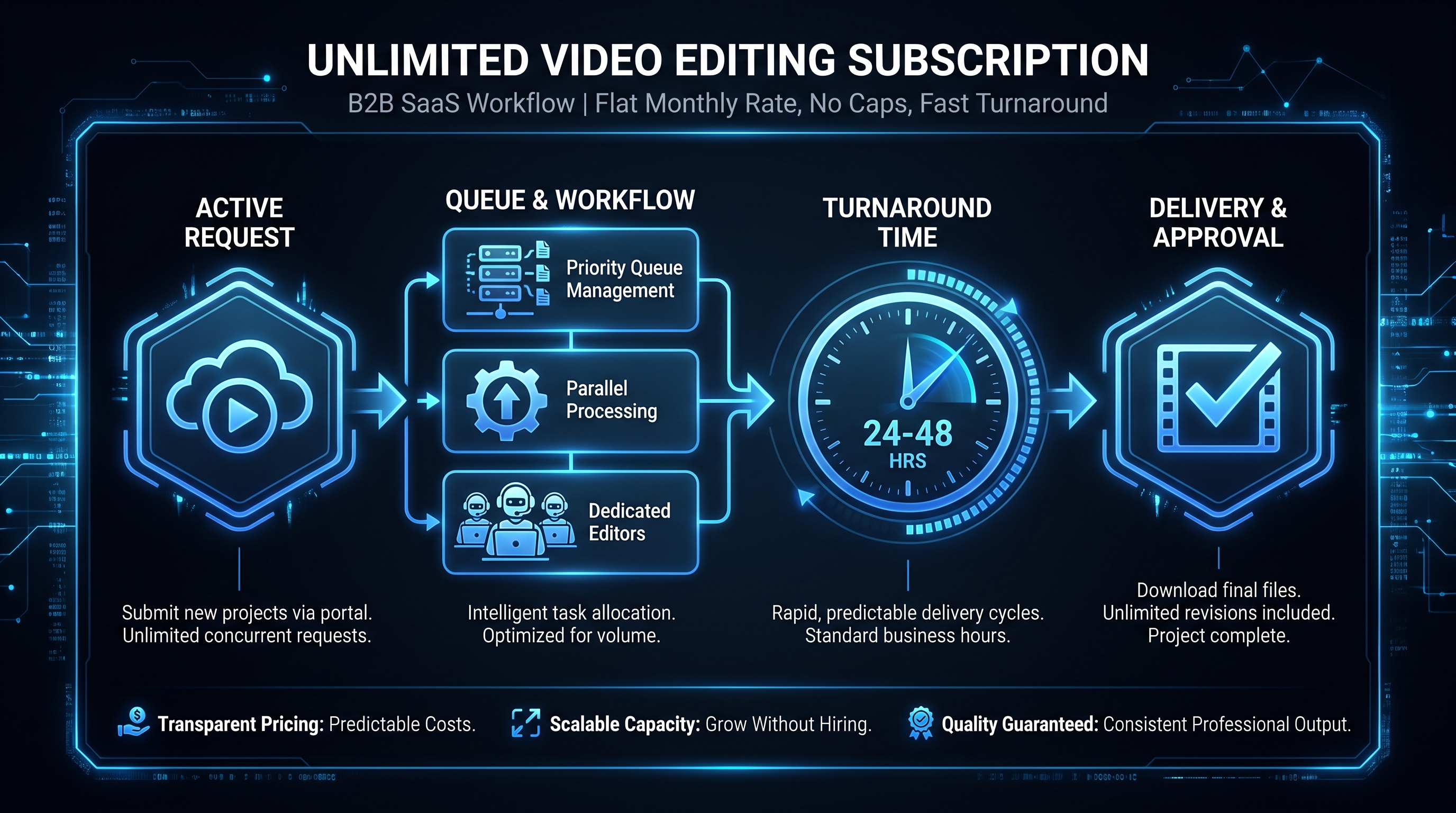
The operational workflow of unlimited editing subscriptions is more structured than most people expect. Here is the standard flow used by most queue-based services:
Step 1: Submit a Request
You submit a request through the service's portal — typically a project management tool (Asana, Monday, ClickUp, or a proprietary dashboard), a Slack channel, or an email intake form. A complete request includes: the raw footage or source files, the desired output format, a brief explaining style preferences and brand guidelines, and any reference examples.
Request quality directly affects delivery quality. A detailed brief with reference examples produces a better first draft than a vague one-liner. Services that accept vague requests will often come back with clarifying questions — which extends your effective turnaround.
Step 2: Queue Position
Once submitted, your request enters your account queue. If your plan allows one active request and the team is currently working on request A, request B sits in the queue until A is complete. Most services process queues in FIFO (first-in, first-out) order, though some allow clients to reorder queue items via the portal.
Queue management tip: Submit your highest-priority request first. If you need a product launch video and three social clips, submit the launch video immediately — don't batch-submit everything at once or the social clips may jump ahead in the queue.
Step 3: Active Production
When your request reaches the active slot, the editor begins work. They use your brand guidelines, reference materials, and brief to produce the first draft. This is where plan tier matters: a 1-active-request plan means one editor is working on one of your projects at any given time. A 3-active-request plan means three parallel editing tracks.
Step 4: Review and Revision
Delivery comes via a shared link — usually a frame.io or Vimeo review link, or a direct download. You review, leave timestamped comments, and submit revision notes. Most unlimited services include a defined number of revision rounds per request (typically 1–3 rounds; additional rounds may extend turnaround or incur extra fees — see the fine print breakdown for specifics).
Step 5: Final Delivery and Queue Advance
Once approved, the final file is delivered. The team automatically begins work on the next item in your queue. This cycle — submit, queue, produce, review, deliver — is the operational heartbeat of the unlimited model.
The Real Throughput Numbers
Monthly throughput is the number most buyers want to know and the number most services obscure. Here is how to calculate it yourself.
The Throughput Formula
The variables: active request slots × (business days ÷ turnaround days per request) = monthly throughput ceiling.
A plan with 1 active request and a 48-hour turnaround on typical edits: 1 × (20 business days ÷ 2 days) = 10 deliveries per month. Add revisions — assume 1 revision cycle adding 24 hours — and you're looking at 6–8 completed, approved deliveries per month. That's a realistic ceiling on a basic plan for mixed-complexity content.
Push that to a 2-active-request plan with the same math: 12–16 approved deliveries per month. A 4-active-request plan at the same turnaround: 24–32. These are still ceilings, not guarantees — if you submit complex work that takes 72+ hours per request, every number scales down proportionally.
Monthly Throughput by Content Type (Estimated Ranges)
| Content Type | Typical Edit Duration | Monthly Output (1 Active Slot) | Monthly Output (3 Active Slots) |
|---|---|---|---|
| Social media clips (15–60 sec) | 4–8 hours | 10–14 clips | 28–40 clips |
| Podcast video (30–60 min, video edit) | 8–16 hours | 6–10 episodes | 16–28 episodes |
| YouTube video (8–15 min) | 16–24 hours | 4–8 videos | 10–20 videos |
| Webinar/event recap (60–90 min raw) | 24–40 hours | 2–5 videos | 6–12 videos |
| Product demo (3–6 min, screen record + VO) | 20–32 hours | 3–6 demos | 8–16 demos |
These ranges assume the service works standard business hours (Mon–Fri) and no queue backlog delays. Turnaround promises are made on a per-request basis — if your queue has five items but the service only has one active slot, requests 2–5 wait while request 1 is in production.
The Complexity Ceiling
Most unlimited plans explicitly cap complexity. Services define "a request" as a single editing job up to a certain complexity level — commonly defined by raw footage duration (e.g., up to 90 minutes of source footage), output length (e.g., final video up to 15 minutes), and edit type (basic cuts, color, audio; not full animation or 3D work). Submitting a 4-hour conference recording and expecting a 20-minute highlight reel in 48 hours is outside the scope of most basic plans.
Understanding what your content is — and whether it fits the service's definition of a "request" — is the most important pre-purchase check you can do. For a full catalog of what typically falls in and out of scope, see what video editing services include.
Turnaround Times: What to Expect
Turnaround time is the period from when your request becomes active (not when you submit it) to when you receive the first draft. This distinction matters: a request submitted on a Friday with a queue of three items ahead of it won't become active until all three prior requests are completed — which could be mid-next-week.
Published vs. Effective Turnaround
Services publish their per-request turnaround (commonly 24–72 hours for basic edits). Your effective turnaround is published turnaround × number of items ahead of you in the queue + any revision cycles. A 48-hour service with 4 items in your queue means an effective 8-day wait before your fifth request is even started.
Turnaround by Plan and Content Type
Typical Turnaround Ranges (First Draft, Request Active)
| Plan Tier | Simple Clips (Under 60 sec) | Standard Edits (3–15 min) | Complex Work (15+ min, motion graphics) |
|---|---|---|---|
| Basic (1 active slot) | 24–36 hours | 48–72 hours | 72–120 hours (if in scope) |
| Standard (2 active slots) | 24–36 hours | 48–72 hours | 72–96 hours |
| Premium (3–4 active slots) | 12–24 hours | 24–48 hours | 48–72 hours |
Rush fees are a common add-on: many services offer same-day or 12-hour turnarounds for an additional charge. If your content calendar frequently requires expedited turnaround, factor this cost into your total plan comparison before committing.
Managing Queue Depth to Hit Your Deadlines
The best-performing unlimited editing clients actively manage their queue depth. Specifically: they maintain a buffer of 3–5 requests in the queue at all times so that the team is never idle waiting for new submissions, and they front-load the queue a week ahead of any significant content deadline. Submitting on Monday for a Thursday publication is risky on a 48-hour plan with any queue depth. Submitting the previous Wednesday gives the same request two full turnaround cycles of buffer.
What's Included — and What Isn't
The "unlimited" label applies to request volume, not to service scope. The scope of what the team will edit is defined by your plan and the service's capabilities. Here is how this typically breaks down:
Standard Inclusions (Most Plans)
- Basic cuts and assembly: Trimming, sequencing, pacing edits
- Color grading: Basic correction and grade matching to brand palette
- Audio cleanup: Background noise removal, level normalization, music sync
- Captions and subtitles: Auto-generated or manually typed, burned in or as SRT files
- Lower thirds and text overlays: Using a provided template or brand kit
- Transitions and basic motion: Simple zooms, cuts, standard transitions
- Format resizing: Recuts from 16:9 to 9:16 or 1:1 for social platforms
Common Exclusions or Add-Ons
- Custom motion graphics and animation: Animated logos, kinetic typography, custom UI animations typically require a higher tier or add-on
- 2D or 3D animation from scratch: Not covered under most standard plans
- Filming or production: These are editing-only services
- Scriptwriting and storyboarding: Creative pre-production is separate
- Stock footage and licensed music: Sometimes included from a stock library; branded tracks often require your license
- Thumbnail design and static graphics: Covered by some services, excluded by others
SaaS teams note: If you're producing product demo videos with screen recording, custom UI callouts, and animated transitions, verify explicitly whether these are within scope before purchasing. Demo video production has specific requirements that sit between "basic edit" and "full animation" — see our guide on how to outsource video editing for how to evaluate this fit.
Who Gets Real Value (and Who Doesn't)
The unlimited editing model is well-matched to a specific type of content operation. Outside of that profile, buyers consistently find the throughput or quality ceiling frustrating — not because the service is poor, but because the model doesn't fit the need.
It Works Best For
High-volume, repeatable content operations. Social media teams publishing 15–30 short-form clips per month, podcast teams that need weekly video edits, and YouTube channels repurposing long-form content into short-form clips are natural fits. The content is formulaic enough that briefs are easy to produce, revision cycles are short, and queue throughput delivers real volume.
Content teams that need predictable budgeting. A flat monthly fee with no per-project negotiation simplifies finance and eliminates the back-and-forth of scoping. Teams that produce variable-length content but at consistent volume benefit from the price stability.
Companies testing outsourced editing before a larger commitment. An unlimited subscription is often month-to-month, making it a lower-commitment way to evaluate whether outsourcing video editing fits your workflow before moving to a dedicated team arrangement.
It Fits Poorly For
Complex branded content with high production standards. A brand film, animated explainer, or cinematic case study video requires the kind of deep briefing, creative collaboration, and revision iteration that queue-based services aren't optimized for. The "submit and receive" model works for formulaic content; it struggles with creative briefs that evolve across multiple conversations.
Teams with parallel high-priority deadlines. If you regularly need three high-quality videos delivered simultaneously for a product launch, a 1-active-request plan will not deliver them concurrently. You'll need either a premium multi-slot plan or a dedicated team that can run parallel workflows.
SaaS companies with evolving brand standards. When your brand is actively developing — new product lines, new visual identities, new messaging frameworks — you need an editing team that participates in that evolution. Queue-based services execute against a static brief; they don't help you develop the brief. A dedicated team model, like what VEC structures around its Growth, Core, and Scale plans, is built for that kind of embedded partnership.
If you're already producing 15+ videos per month and need brand consistency across all of them, see how a dedicated editing team actually operates before committing to a subscription plan — the economics often shift at that volume level.
Unlimited Subscription vs. Dedicated Team: Key Differences
These two models are often compared side-by-side, and while they overlap in price range at the mid-tier, they serve fundamentally different operational needs.
Unlimited Subscription vs. Dedicated Team: Head-to-Head
| Factor | Unlimited Subscription | Dedicated Team (e.g., VEC) |
|---|---|---|
| Workflow model | Queue-based, sequential | Parallel, integrated with your calendar |
| Active output capacity | Defined by active request slots | Defined by team size (multiple editors) |
| Brand consistency | Relies on brief quality and templates | Team learns brand over time; retained knowledge |
| Editor continuity | May rotate across editors | Assigned editors; consistent voices |
| Turnaround | Fixed per-request (24–72 hrs active) | Negotiated; can be calendar-driven |
| Complex content | Often limited or extra cost | Full scope included by plan level |
| Contract commitment | Often month-to-month | Typically 3–6 month minimum |
| Monthly cost range | Commonly $1,500–$8,000 | Commonly $5,000–$16,000+ |
| Best volume range | 8–24 simple videos/month | 10–50+ videos/month, mixed complexity |
The unlimited subscription is not a downmarket version of a dedicated team — it is a different operating model entirely. The subscription optimizes for speed and flexibility on repeatable content. The dedicated team optimizes for depth, consistency, and scale. Many companies start with a subscription and graduate to a dedicated team as their content program matures and their throughput demands grow.
For a full comparison of these and other service models, the video editing subscription buyer's guide includes a decision framework based on content volume and complexity.
How to Submit Requests and Manage Your Queue Effectively
The teams that get the most from unlimited editing subscriptions treat the queue as a production system, not a help desk. These practices separate high-output clients from those who feel the model isn't delivering:
Write Complete Briefs
Every request should include: the raw file location or upload, the target output format and specs (1080p 16:9, 1080×1920 9:16, etc.), a reference video showing the style you want, a priority order if you're submitting multiple requests at once, and any explicit brand guidelines (color codes, font names, music tempo preferences). Incomplete briefs generate clarifying questions that can add 24 hours to your effective turnaround.
Batch Submit at the Start of Each Week
Front-loading your queue on Monday ensures the team is never idle waiting for new submissions. Submit the week's full workload — even rough briefs for lower-priority items — so the team can work through them in sequence without gaps.
Separate Simple from Complex Requests
If you need a 5-second logo animation alongside a 12-minute webinar edit, submit them as separate queue items. Complex requests that require back-and-forth hold up simpler items if they're bundled. Keeping each request scoped to a single deliverable keeps the queue moving.
Build a Brand Kit Your Editors Can Reference
Every unlimited editing service recommends having a brand kit: a shared folder or portal document containing your logo files, color palette, approved fonts, intro/outro templates, lower-third templates, and example videos. A well-maintained brand kit is the single biggest lever on consistency quality when you're working with a queue-based service where multiple editors may handle your account.
Track Your Queue Utilization
At the end of each month, count how many requests you submitted versus how many were delivered. If you're consistently submitting fewer requests than your plan's theoretical capacity, you may be overpaying for your tier. If the queue has a backlog at month's end — more items submitted than delivered — you may need a higher active-slot tier or a more efficient briefing process.
For more on structuring your outsourced editing workflow, see our full guide on how to outsource video editing — including how to evaluate whether a subscription or a managed team is the better fit for your current content volume.
Also, if you're exploring a hybrid approach — subscription for your high-volume social content and a retainer or dedicated team for complex brand assets — the monthly video editing service guide walks through how to structure that kind of split engagement.
Frequently Asked Questions
Is unlimited video editing actually unlimited?
The requests you can submit are unlimited. What's limited is production capacity — how many requests the team actively works on at once. On a 1-active-request plan with 48-hour turnaround, you'll realistically receive 8–12 completed videos per month, not hundreds. The "unlimited" refers to your queue depth, not the team's output speed.
How long will I wait from submission to delivery?
Turnaround time starts when your request becomes active — that is, when it reaches the front of the queue and an editor begins work. If you have five items ahead of your submission, add their combined turnaround time to the published figure. On a basic plan with a 48-hour per-request turnaround, a queue depth of three items means your newest submission won't be delivered for 6–8 business days from submission.
Can I rush a request in an unlimited plan?
Most services offer expedited options for an additional fee — either a "rush" surcharge (commonly 25–50% of the base equivalent project price) or a priority queue position add-on. If you regularly need same-day or next-business-day delivery, factor rush fees into your total monthly cost when comparing plans. Alternatively, a higher active-slot tier reduces effective turnaround without per-request fees.
What happens to unused capacity at the end of the month?
Unused queue capacity — months where you submit fewer requests than the plan could process — typically does not roll over. You pay for access to production capacity, not for a specific number of videos. If your content calendar is irregular, consider a lower tier or a month-to-month plan that you can pause during low-activity periods. Check the specific service's pause policy before signing; many allow 1–2 pauses per year.
When does a dedicated editing team make more sense than a subscription?
A dedicated team is typically the better fit when you're producing 15+ videos per month with mixed complexity, when brand consistency across all your content is non-negotiable, or when you need parallel high-priority deliveries that a single-slot subscription can't provide. The economics also shift at scale: at $5,000–$9,500/month, dedicated teams like those at VEC's Growth and Core plans deliver more complex output, assigned senior editors, and a project manager — compared to a premium subscription at similar pricing that offers faster queue throughput but less brand depth. The right trigger is usually when the subscription's sequential model starts creating launch-deadline pressure.
Not Sure Which Model Fits Your Team?
We work with B2B SaaS companies producing anywhere from 8 to 50+ videos per month. Tell us about your current output and content mix — we'll give you an honest recommendation on whether a subscription or a dedicated team makes more financial sense for your situation.
Book a Free Strategy Call See How Our Teams Work