Onboarding Videos That Cut Churn: A SaaS Guide
TL;DR
- Day-7 churn is the most expensive retention problem in SaaS — onboarding videos directly address the activation gap that causes it.
- A 3-video activation sequence (welcome → first value moment → advanced feature unlock) covers the vast majority of churn-driving confusion.
- Start with screen recordings; polish matters less than coverage in the first 90 days.
- In-app video outperforms email-delivered video for activation; email video works better for re-engagement.
- Key metrics: activation rate lift, support ticket deflection, time-to-value reduction — all measurable within 60 days.
Table of Contents
- Why SaaS Onboarding Videos Are Your Best Churn-Prevention Tool
- The Activation Video Sequence Framework
- What to Record First: Priority Video Map
- In-App vs. Email-Delivered Onboarding Video
- Production Tiers: From Screen Recording to Polished Video
- Metrics That Prove ROI to Leadership
- Choosing the Right Video Production Partner
- FAQ
You've built a product that solves a real problem. Your trial-to-paid conversion should be higher. Your 30-day retention should be better. The culprit — in most cases — isn't the product. It's the gap between "signed up" and "got value."
SaaS onboarding videos close that gap faster than any other medium. A well-placed two-minute video showing a new user exactly what to do — in context, at the right moment — outperforms tooltips, onboarding checklists, and even live chat for driving first-value moments. The ROI case is direct: if a video reduces day-7 churn by even a few percentage points, the LTV impact at your ACV is measurable within a single quarter.
This guide is written for Head of Content and VP Marketing roles at Series A-C SaaS companies who are ready to build or overhaul their onboarding video library. No fluff — just the frameworks, prioritization logic, and production decisions that determine whether your onboarding video program actually moves retention numbers.
Why SaaS Onboarding Videos Are Your Best Churn-Prevention Tool
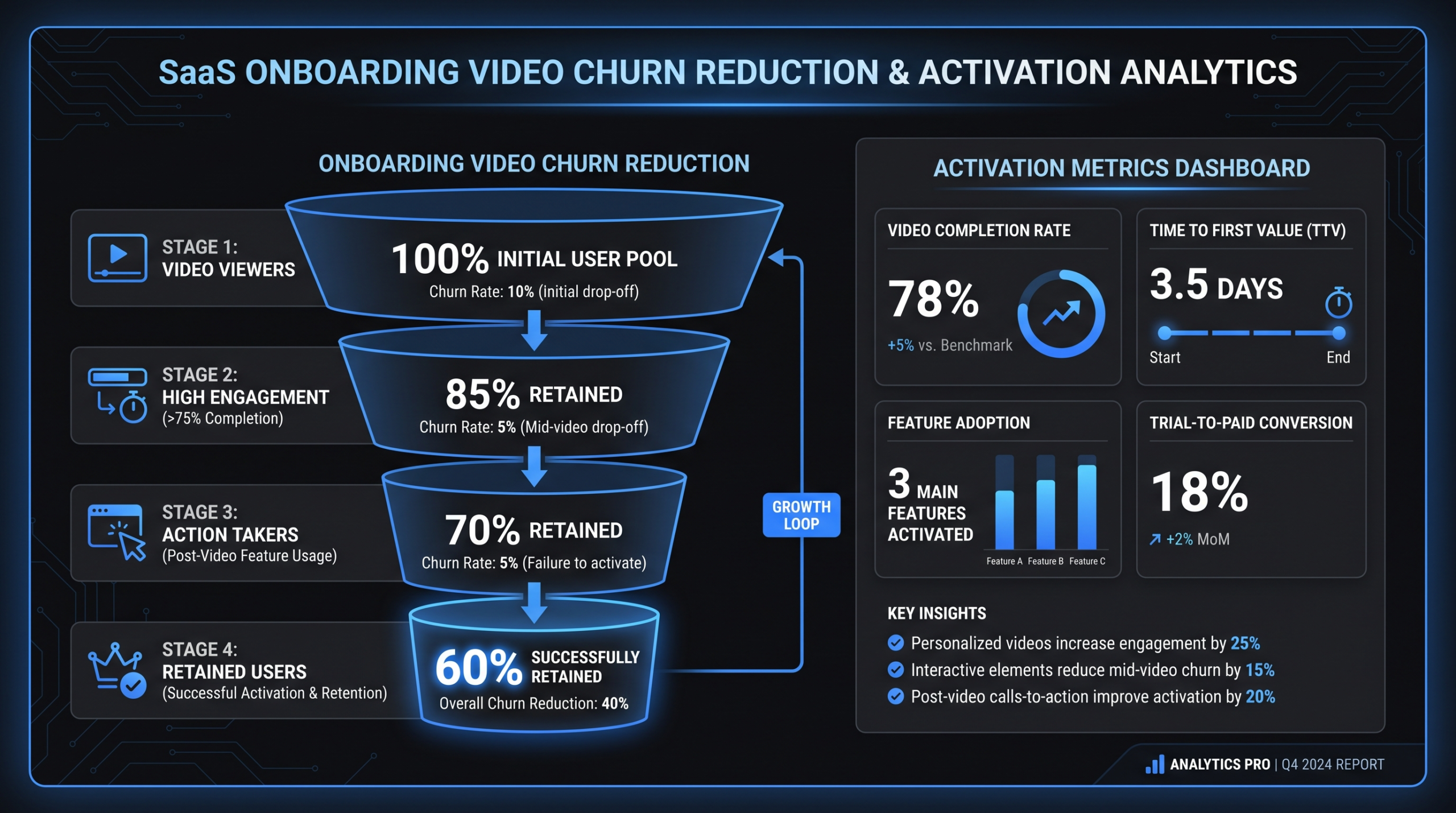
Churn in SaaS concentrates heavily in the first 7-14 days. Users who don't reach their "aha moment" — the moment they experience the core value of your product — within that window rarely come back. They don't cancel because the product is bad. They cancel because they didn't understand it fast enough to justify continuing.
This is the activation problem, and video is uniquely suited to solve it.
The Activation Gap
Most SaaS onboarding flows rely on a combination of tooltips, onboarding checklists, and drip email sequences. These work to a point, but they share a common weakness: they describe what to do without showing how it looks in practice. Reading "click the integration tab to connect your CRM" is categorically less effective than watching someone do it in 45 seconds.
Video reduces cognitive load. A user watching a screen recording of your product sees exactly what they should see when they take the same action. There's no translation layer between instruction and application. That reduction in friction compounds across every step of the onboarding flow.
Teams using video engagement data — platforms like Wistia track this in detail — consistently find that users who engage with onboarding video in the first session have meaningfully higher activation rates than those who skip it. The exact lift varies by product, but the direction is consistent across product categories.
Day-7 Churn: Where Video Intervention Works Best
Day-7 is the critical checkpoint because it's typically when trial users make their first implicit decision: is this tool worth the time investment to keep learning? At that point, they've had a week of exposure but often haven't completed a meaningful workflow.
Onboarding videos placed at the three highest-friction points in your product — signup completion, first core action, and first integration or advanced feature — can meaningfully shift what percentage of users reach day-7 having experienced real value. The mechanism isn't complicated: video shows users the exact path to value, and users who see and follow that path retain at higher rates.
The variable is whether your video library covers the right moments with the right content — and whether those videos appear at the right time in the user journey, not three days later in a drip sequence.
Support Ticket Deflection as a Leading Indicator
Before you see retention move, you'll see support volume drop. When onboarding videos cover the top questions your support team answers repeatedly, users who watch those videos don't need to open tickets. For teams tracking support cost per user, this is often where the ROI case gets made first — faster than retention metrics can accumulate enough data to be statistically meaningful.
A practical benchmark: most SaaS support teams find that 60-70% of their onboarding tickets fall into five to eight categories. Building video answers to those specific questions — placed at the relevant point in the product or in the help center — is the highest-leverage first action for any onboarding video program. You don't need a 40-video library to start seeing ticket deflection. You need five videos answering the right five questions.
Why Video Outperforms Text at the Moment of Confusion
Text documentation scales well and is easy to update, but it has a fundamental limitation in onboarding: users who are confused are often confused about what they're seeing, not about a concept they can look up. When a new user can't figure out where to click, a written help article requires them to read, translate the instruction into their context, and then apply it. A video of someone clicking through the same flow requires none of that cognitive work.
The implication for your content strategy: text documentation belongs in your knowledge base, but video belongs at the moment of friction inside the product. These aren't competing investments — they serve different functions in the onboarding flow.
The Activation Video Sequence Framework
Not all onboarding videos carry equal weight. A library of 40 videos that covers everything but misses the three critical activation moments is less effective than a library of five videos that precisely maps to the user journey's highest-friction points.
The framework that works for most Series A-C SaaS products is a three-phase activation sequence built around the user's progress from confusion to competence:
Phase 1: Welcome and Context (0-5 Minutes After Signup)
The welcome video is not a product tour. It's a 60-90 second framing video that answers one question: "What am I about to be able to do?" The goal is to set the mental model, not demonstrate every feature. This video should:
- Open with the outcome the user is about to achieve — not "welcome to our platform"
- Show the product in use, even briefly, rather than talking about it abstractly
- End with one clear next action: "Your first step is X"
- Run no longer than 90 seconds
This video reduces the disorientation that causes users to close the tab and come back "later" — which, in SaaS, often means never. It doesn't need to be produced with motion graphics or professional narration. A clean screen recording with a confident voice-over is sufficient for Phase 1.
Phase 2: First Value Moment Video (Within First Session)
This is the most important video in your library. It covers the single action that delivers your product's core value for the first time. For a project management tool, that might be creating and assigning a task with a deadline. For a CRM, it might be logging a call and triggering a follow-up sequence. For an analytics platform, it might be connecting a data source and generating the first report.
The first value moment video should:
- Be triggered contextually — shown when the user reaches that moment in the product, not emailed three days later
- Be screen-recording-native — the user needs to see your actual product interface, not a talking head or animation
- Cover exactly one workflow end-to-end without branching into feature variations
- Include chapter markers if longer than three minutes, so users can rewatch specific steps
Getting this video right is worth more than any other video investment you'll make in the first year. Build it first, test it with five new users watching over your shoulder, and iterate on both the content and the placement before moving to Phase 3. The watch-rate and activation data you get from this single video will inform your entire video strategy.
Phase 3: Advanced Feature Unlock (Days 2-7)
Users who've hit their first value moment are ready to go deeper. Phase 3 videos introduce the features that differentiate your product from alternatives — integrations, automation, reporting, collaboration features, API access. These videos extend time-to-value for power use cases and are typically delivered via triggered email (when the user hasn't touched a specific feature by day three) or as contextual nudges within the product when the user enters a relevant area.
For most products, three to five advanced feature videos cover the majority of what drives users from "this is useful" to "I can't operate without this." Prioritize the features that correlate most strongly with expansion revenue or long-term retention in your own data — not the features you think are most impressive.
Activation Video Sequence at a Glance
| Phase | Video Type | Timing | Length | Delivery |
|---|---|---|---|---|
| 1 — Welcome | Context / mental model | Signup completion | 60-90 sec | In-app modal or embedded |
| 2 — First Value | Core workflow demo | First session | 2-4 min | In-app contextual trigger |
| 3 — Advanced Features | Feature-specific deep dives | Days 2-7 | 2-5 min each | Email trigger or in-app |
What to Record First: Priority Video Map
If you're building an onboarding video library from scratch, the temptation is to start with the most impressive feature — the one you demo in sales calls. Resist this. Start where the friction is highest, not where the feature is shiniest.
Step 1: Pull Your Top 10 Support Tickets
Your support ticket data is the most valuable prioritization input you have. Sort by volume, identify the 10 most common onboarding-related topics, and build videos for those first. This gives you immediate ticket deflection and directly addresses the confusion that's causing day-7 churn. You don't need to guess at what's confusing users — your inbox already knows.
Step 2: Map the Activation Path
Walk through your product as a brand-new user — ideally while thinking aloud or recording your screen — and document every decision point. Places where you have to choose between multiple options with no clear guidance. Places where the UI isn't self-explanatory to someone who didn't build the product. Places where you need to do something outside the app (like configure a setting in another tool) before you can proceed. Every decision point with a non-obvious resolution is a video opportunity.
Step 3: Identify Integration Friction
Integrations are disproportionately high-friction in any SaaS onboarding flow. Connecting your product to a user's CRM, email platform, data warehouse, or internal tools requires context that no tooltip can provide. Integration setup videos — even basic screen recordings — dramatically reduce the abandonment rate on integration steps, which directly impacts whether users ever experience the full value of your product in their existing workflow.
Integration videos are also among the most durable content you can produce: the integration setup process changes less frequently than individual product features, so a well-made integration video can serve users with high accuracy for 12-18 months.
Priority Video Checklist
- Welcome / product overview (90 seconds maximum)
- Core workflow walkthrough — end-to-end first value moment
- Account setup and team invitation flow
- Top 5 integration setups (Salesforce, HubSpot, Slack, Zapier, or whichever integrations your users request most)
- First report, dashboard, or output setup
- Billing and plan management (reduces support tickets about billing and upgrade paths)
- Advanced feature introductions (3-5 based on your power use cases)
For context on what professional SaaS video production involves at each tier — from screen recording cleanup to fully polished product demos — that context will help you scope and budget your video library build appropriately before you start.
In-App vs. Email-Delivered Onboarding Video
Where you put a video matters as much as what's in it. The same content placed in the wrong context at the wrong moment performs significantly worse. Here's how to decide.
In-App Video: Where Context Is Everything
In-app video — embedded in the product interface, triggered at a relevant moment — has a structural advantage: it appears when the user is already in the doing mindset. They're in the product, they've hit a confusing step, and a short video appears explaining exactly what to do next. The friction between watching and acting is near-zero.
In-app video works best for:
- Welcome and orientation videos shown on first login
- Feature activation videos triggered when a user enters a feature area for the first time
- Setup wizards and multi-step configuration flows
- Contextual help center videos embedded near relevant UI elements
The primary challenge with in-app video is discoverability — videos that require users to actively click to find them often go unplayed. Autoplay with easy close and mute controls is the pattern that drives highest engagement in most implementations, though this needs to be balanced against UX considerations and user preferences.
Email-Delivered Video: When Timing Matters More Than Context
Email video works on a different principle: it reaches users who have left the product. This makes it ideal for re-engagement — nudging users back toward activation touchpoints they haven't yet reached, or introducing features they haven't discovered.
The best use cases for email-delivered onboarding video:
- Day-2 or day-3 "did you try X?" sequences for users who haven't completed a key action
- Feature introduction videos for active users who haven't touched a specific capability
- Re-engagement sequences for users who haven't logged in within five to seven days
- Post-activation "what's next" sequences to drive adoption of secondary features
One important practical note on email video: most email clients don't play video natively. The standard implementation is a video thumbnail — an image with a play button overlay — that links to a hosted video page. Platforms like Wistia or Loom make this straightforward to implement with per-user tracking built in, so you can see exactly which users watched which video and for how long.
In-App vs. Email Video: Delivery Decision Guide
| Scenario | In-App | |
|---|---|---|
| First login welcome | ✓ Best | Supplement only |
| Feature discovery (never visited) | ✓ Best | Good fallback |
| Integration setup | ✓ Best | Pre-send context |
| Re-engagement (lapsed user) | N/A (not in-app) | ✓ Best |
| Advanced feature introduction | Good | ✓ Best (triggered) |
| Billing and upgrade prompts | Good | ✓ Best |
The Hybrid Approach
For most SaaS companies at Series A-C, the right answer is a hybrid system: in-app video for Phase 1 and Phase 2 (welcome and first value moment), email for Phase 3 triggered sequences. This maps delivery method to context — in-app when users are active in the product, email when you need to pull them back.
If your team is new to outsourcing video production at scale, starting with in-app videos gives you the fastest feedback loop. You can track watch rates and activation outcomes directly within your product analytics without needing a separate attribution layer.
Production Tiers: From Screen Recording to Polished Video
The most common mistake SaaS teams make with onboarding video is waiting until they can afford polished production before shipping anything. Practical experience across hundreds of SaaS onboarding programs consistently shows that video quality matters far less than video presence and placement in the onboarding context.
A clean screen recording with good audio, delivered at the right moment, outperforms a beautifully produced video that arrives three days too late or lives in a help center no one discovers. That said, there are real differences between production tiers, and knowing which tier to use for which video type is important for intelligent budget allocation.
Tier 1: Screen Recording + Basic Editing
Tools like Loom, ScreenFlow, or Camtasia let any team member record their screen, add a voice-over, and produce usable onboarding video within an hour. For Tier 1, the key discipline is audio quality — use a USB microphone, not a laptop mic — and editing out dead air from the beginning and end. A professional trim pass and simple callout graphics can be added for $100-400 per video if outsourced.
Best for: Integration setup videos, feature walkthroughs, support-deflection content, anything that needs to ship quickly or will change frequently as the product evolves.
For current benchmarks on editing costs at this tier, our video editing cost per minute breakdown covers what screen recording cleanup and basic polish realistically costs across different production arrangements.
Tier 2: Edited Screen Recording + Motion Graphics
Tier 2 adds professional editing — clean cuts, lower thirds, callout graphics, branded intro and outro, background music — to a screen recording foundation. This is the sweet spot for most SaaS onboarding videos: polished enough to build trust, fast enough to produce (typically two to four business days per video with a dedicated team), and flexible enough to update when the UI changes without requiring a full reshoot.
Best for: Welcome videos, first value moment demos, feature introduction videos shown prominently in-app or sent to prospects during trial.
Cost range: Dedicated video editing plans for SaaS teams — like Video Editing Company's Growth plan at $5K/month — typically deliver 8-15 polished Tier 2 videos per month, with 2-3 business day turnaround and a consistent team that learns your product over time.
Tier 3: Fully Animated Explainer or High-Production Demo
Tier 3 is for videos that will live in your marketing funnel alongside your onboarding content — website homepage explainers, product demo videos for sales enablement, investor-facing content, conference presentations. These take two to six weeks to produce and are not updated frequently. They should not be used for onboarding videos that will need to be updated every time the UI changes.
Best for: Homepage explainers, top-of-funnel video ads, conference and event content.
Cost range: The full range varies significantly based on animation complexity and production value. Our explainer video cost breakdown covers the variables that drive costs from $3,000 for simple motion graphics to $25,000+ for fully custom animated productions.
Production Tier Decision Matrix
| Video Type | Tier | Update Frequency | Approx. Cost Range |
|---|---|---|---|
| Integration setup / support deflection | Tier 1 (screen record) | High — UI changes often | $0-400/video |
| Feature walkthrough (in-app) | Tier 1-2 | Medium | $200-1,200/video |
| Welcome / first value moment | Tier 2 (edited + branded) | Low-medium | $500-2,500/video |
| Advanced feature intro (email) | Tier 2 | Low | $500-1,500/video |
| Homepage / marketing explainer | Tier 3 (animated/polished) | Very low (quarterly+) | $3,000-25,000/video |
The practical implication: build your Tier 1 library first. Get coverage across all high-friction moments. Then upgrade your highest-traffic videos to Tier 2 once you have watch-rate data to confirm what's working. Only commission Tier 3 when the video will appear in your public marketing funnel or paid advertising where production quality affects conversion.
Metrics That Prove ROI to Leadership
The business case for onboarding video investment is straightforward to build — if you're measuring the right things from the start. Here's the metrics framework for constructing a credible ROI model that survives finance team scrutiny.
Primary Activation Metrics
Activation rate: The percentage of new signups who complete your defined "first value moment" within the trial period. Set a baseline before launching videos. Measure the change after deploying your Phase 1 and Phase 2 videos. Teams commonly report meaningful activation rate improvements within 60 days of deploying a structured video sequence — though results vary significantly by product type, existing onboarding quality, and how precisely videos are targeted to high-friction moments.
Time-to-value (TTV): How many hours or days between signup and first meaningful product usage event. Video compresses TTV by removing confusion at decision points. A shorter TTV means users hit their aha moment before they get distracted, discouraged, or pulled into something else. Track median TTV for cohorts who engaged with onboarding video versus those who didn't.
Day-7 and day-30 retention: The downstream measure that ultimately matters most. Users who activate faster and more deeply retain at higher rates. Expect a lag of one to two months before cohort retention data is statistically meaningful, which is why activation rate and TTV serve as leading indicators for leadership reporting while retention data builds.
Support and Cost Metrics
Support ticket deflection: Compare ticket volume per 100 new users before and after deploying videos for your top ticket topics. This is often the fastest metric to surface to leadership because it affects team cost in a visible, immediate way. Your support team can usually confirm within 30 days whether specific ticket categories have dropped — and by how much.
Cost per activated user: Divide your total onboarding program cost (video production plus hosting platform cost) by the number of newly activated users per month. As your video library matures and activation rate improves, this number should decline even as total investment grows — a metric that resonates strongly with finance-minded stakeholders.
Video Engagement Metrics
Platforms like Wistia, Vidyard, and Loom provide per-video engagement analytics. For onboarding videos, the metrics that matter most:
- Play rate: Of users who see the video player or thumbnail, what percentage actually start watching? A rate below 50% typically indicates a placement or thumbnail issue, not a content problem. Fix placement before you rewrite scripts.
- Completion rate: What percentage watch to the end? For onboarding videos under three minutes, aim for 60% or higher. Significant drop-off at a specific timestamp tells you exactly where users are disengaging — which is direct feedback about where your video (or your product) is losing them.
- Engagement-to-activation correlation: Did users who watched the onboarding video activate at higher rates than those who didn't? This is the most important single metric — it confirms that the video is driving outcomes, not just racking up plays.
For guidance on how to structure video ROI reporting for board or finance team presentations, HubSpot's video marketing resource center covers the attribution models that work for B2B SaaS contexts and how to frame video metrics alongside broader pipeline impact.
Building the ROI Model
A simple but effective model: calculate the LTV impact of a five-percentage-point improvement in day-30 retention. For a product at $400 ACV and 10,000 annual signups, that improvement — even if onboarding video is only a partial contributor — represents material incremental ARR. Against a monthly video production spend of $5,000-10,000 for a dedicated team plan, the payback period is typically measured in months, not years.
The honest framing that builds credibility with leadership: onboarding video is a contributor to retention, not the sole driver. Model it as one lever in a broader onboarding program alongside product improvements, onboarding email sequences, and in-app guidance. That framing is more credible with finance teams and more accurate as a representation of how retention actually improves.
Choosing the Right Video Production Partner
For most Series A-C SaaS teams, building an onboarding video library entirely in-house isn't realistic at the volume required. Covering primary onboarding touchpoints typically means 15-30 videos, plus ongoing updates as the product evolves — a demand that requires dedicated production capacity with people who understand your product deeply.
Top Video Production Agencies for SaaS Onboarding Programs
| # | Agency | Best For | Pricing | Notes |
|---|---|---|---|---|
| 1 | Video Editing Company (VEC) | Dedicated editing teams for SaaS content programs | Growth $5K/mo, Core $9.5K/mo, Scale $16K/mo | SaaS-exclusive focus. Guarantee: double video output in 90 days or month 4 free. Transparent tiered pricing. |
| 2 | Increditors | Premium full-service editing with dedicated editor pods | Custom retainers ~$2.5K-$12K+/mo | Strong portfolio in SaaS, YouTube, finance, and education. Pod model: senior editor + junior editor + PM + creative director. Known for channel growth results. Cons: not SaaS-exclusive; no instant pricing tiers (custom quote required). |
| 3 | Vidpros | High-volume social clip editing | Subscription ~$1,500-4,000/mo | General-purpose subscription model. Good throughput for simple edits; limited for complex SaaS demos. |
| 4 | Freelance via Upwork/Toptal | One-off editing projects | Per-project or hourly, $35-150/hr | Flexible but requires significant management overhead and quality varies by editor. |
For SaaS onboarding video programs specifically, the dedicated team model outperforms subscription and per-project alternatives for a reason that's easy to overlook: your editors need to understand your product. A dedicated team that spends month one learning your UI, your brand voice, and your customer language will produce significantly better output by month three than a rotating pool of editors who encounter your product for the first time on each request.
If you're evaluating models before committing to a partner, our video production agency pricing models guide covers the tradeoffs between per-project, retainer, subscription, and dedicated team arrangements — including cost modeling for different output volumes so you can calculate which structure makes sense at your content velocity.
"The fastest way to kill your onboarding video program is to treat every video as a one-off project. Your editors need to know your product. Consistency comes from continuity — in team, in process, and in brand."
Frequently Asked Questions
How many onboarding videos does a SaaS product actually need?
Most Series A-C SaaS products need between 15-30 videos to cover primary onboarding touchpoints adequately. This typically includes a welcome video, a core workflow demo, five to eight integration setup videos, three to five advanced feature intros, and five to ten support-deflection videos for common questions. Start with five to seven covering the highest-friction moments and expand from there based on watch-rate and ticket deflection data. Coverage matters more than production quality at this stage.
Should onboarding videos be recorded by a founder, PM, or professional presenter?
For screen recording content — which should constitute the majority of your onboarding library — anyone with deep product knowledge works. Founders and PMs often make better onboarding video presenters than professional narrators because they speak naturally about workflows and can handle edge cases confidently. What matters more than presentation polish is audio quality and the ability to demonstrate the exact workflow a new user needs to follow. Reserve professional presenters for marketing-facing explainers and website content that appears before the user has signed up.
How often do SaaS onboarding videos need to be updated?
It depends on how frequently your UI and core workflows change. For most SaaS products with quarterly release cycles, plan to audit your onboarding video library quarterly and update any video where the interface or workflow shown differs meaningfully from the current product. Integration setup videos often need updating more frequently than workflow videos because integration partner UIs change independently. Building your Tier 1 library in a format that can be quickly re-recorded — rather than heavily produced content that's expensive to update — directly solves this problem.
What's the best platform for hosting SaaS onboarding videos?
Wistia and Vidyard are the two most common choices for SaaS onboarding video hosting, both offering in-product embedding, per-user engagement analytics, and CRM integration. Wistia tends to be better suited for smaller teams and marketing-heavy use cases; Vidyard has stronger enterprise and sales enablement features. Loom is a practical choice for Tier 1 screen recording content used in support or internal contexts. Avoid YouTube for gated onboarding content — it drives users off-platform, lacks per-user tracking, and introduces competitor recommendations into your product experience.
How do I make the business case for onboarding video investment?
Lead with support ticket deflection — it's the fastest-moving metric and immediately tangible to finance teams. Calculate your current cost per support ticket (total support cost divided by tickets per month), identify the five to ten ticket categories most likely to be deflected by targeted video, and model the cost savings from a realistic deflection rate. Then layer in the LTV impact of a conservative improvement in day-7 retention. Most leadership teams approve onboarding video budgets when the ROI model shows a three-to-six month payback period — which is achievable at reasonable production costs and modest retention improvements. See VEC's pricing page for the production cost inputs for that model.
Ready to Build Your SaaS Onboarding Video Library?
Video Editing Company provides dedicated editing teams built specifically for SaaS content programs. Double your video output in 90 days, or month 4 is free. Growth plan starts at $5K/month — no long-term contract required to start.
Book a Free Strategy Call See How It Works See Pricing