
Your SaaS demo video should be your hardest-working sales asset. It runs 24/7, never calls in sick, and can reach thousands of prospects simultaneously. But if your SaaS demo video conversion rate is underwhelming — and for most companies, it is — the video isn't working. It's just— playing. There's a critical difference between a demo video that exists on your website and a demo video that actually moves prospects from "interested" to "let me talk to sales."
We've analyzed hundreds of SaaS demo videos across every category — from project management tools to cybersecurity platforms — and the patterns of failure are remarkably consistent. The good news? The fixes are equally consistent. In this comprehensive guide, we'll diagnose the most common reasons SaaS demo videos fail to convert, show you before-and-after script comparisons, and give you a proven optimization checklist you can apply to your own demo video today.
Let's start with some context. According to industry benchmarks, a well-optimized SaaS demo video should achieve:
If your numbers are below these benchmarks, you have a conversion problem. But don't worry — you're not alone. The vast majority of SaaS companies ship demo videos that underperform because they make one or more of the following mistakes.
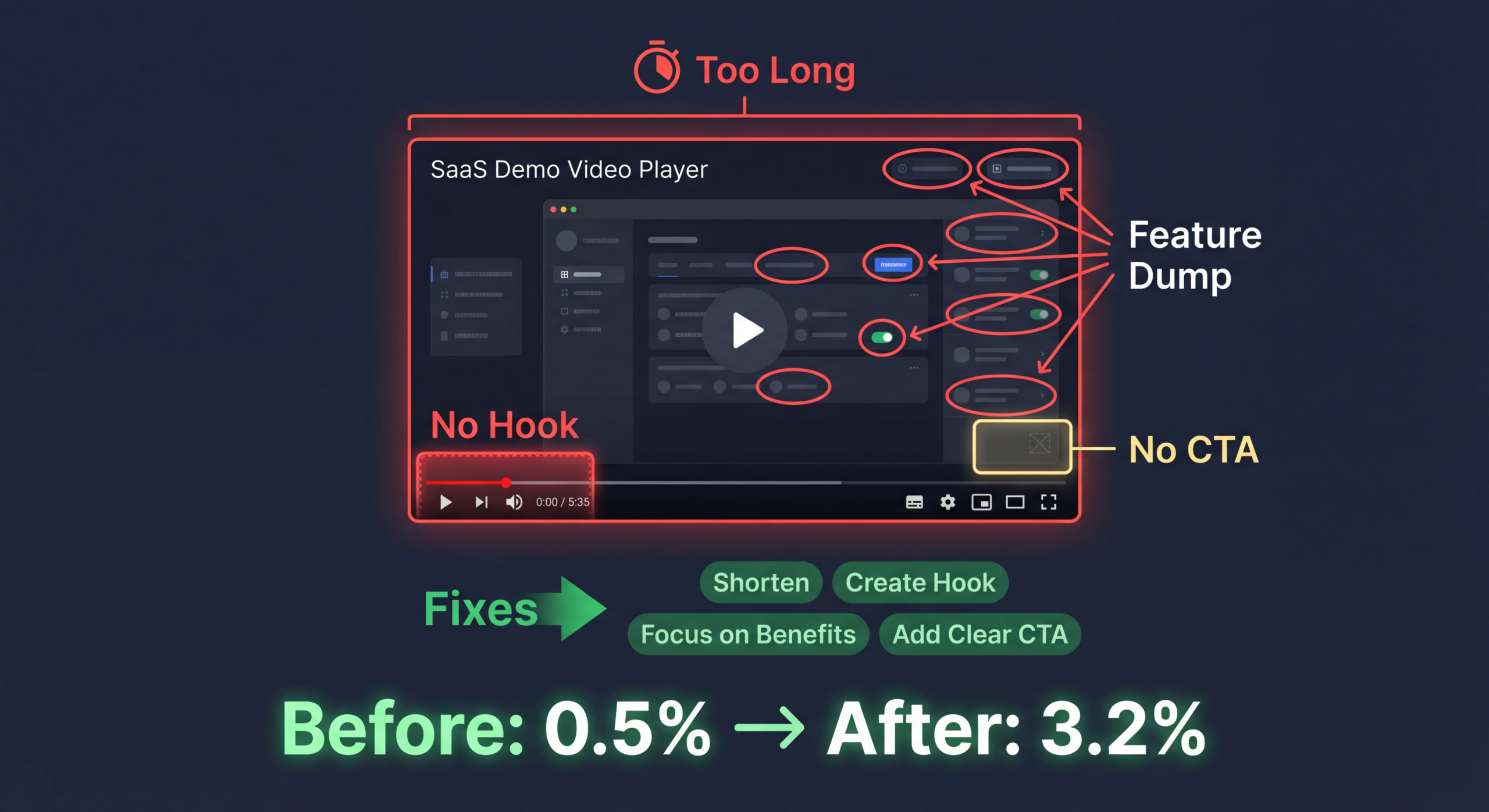
This is the single most common reason SaaS demo videos fail to convert. Product teams and marketers naturally gravitate toward feature tours: "Here's the dashboard. Here's the reporting module. Here's how you create a new project." The problem? Prospects don't care about features. They care about outcomes.
A feature tour is like someone describing every ingredient in a meal instead of letting you taste it. Your prospect's brain is constantly asking one question: "How does this help ME?" If your demo video doesn't answer that question within the first 15 seconds, you've lost them.
Every great demo video follows a problem-solution-result arc:
We've seen SaaS demo videos that run 15, 20, even 30 minutes. Unless you're selling enterprise software with a six-figure deal size and a highly committed audience, nobody is watching a 20-minute demo video from start to finish. The data is clear: engagement drops dramatically after the 2-minute mark for most web-based video content.
Your primary demo video — the one on your homepage or product page — should be 90 seconds to 3 minutes. That's it. If you need to go deeper, create supplementary videos for specific features or use cases. The primary demo video is a trailer, not the full movie. It should create enough interest to drive the next action (free trial, live demo, or contact sales).
You'd be amazed how many SaaS demo videos simply— end. No clear next step. No CTA. No reason for the viewer to do anything other than close the tab. This is conversion suicide. Your demo video exists to drive a specific action — and if you don't tell viewers what that action is, they won't take it.
Choose ONE primary CTA and reinforce it:
Don't give viewers three different CTAs. One action. Make it obvious. Make it easy.
Let's look at a concrete example of how rewriting a demo video script dramatically improves conversion potential. This is based on a real project (details anonymized).
Duration: 4 min 20 sec — Feature-focused — Passive CTA — Low conversion
Duration: 1 min 52 sec — Problem-focused — Direct CTA — High conversion
In 2026, production quality expectations are higher than ever. Prospects subconsciously associate video quality with product quality. If your demo video looks cheap — bad audio, pixelated screen recordings, inconsistent branding — prospects will assume your product is equally unpolished.
This doesn't mean you need a $50,000 Hollywood production. But you do need:
If you're producing demo videos in-house with screen recording software and no editing, you're leaving conversion on the table. Consider working with a professional demo video production team to elevate your output.
SaaS companies serve multiple personas — and each persona has different pain points, priorities, and decision criteria. A single demo video trying to speak to everyone ends up resonating with no one. The CMO cares about different things than the end-user. The IT administrator has different concerns than the sales leader.
You don't need to produce entirely different videos for each persona. Instead:
If your demo video is hidden three clicks deep on a subpage that nobody visits, it doesn't matter how good it is. Placement drives views, and views drive conversions.
Many SaaS companies produce a demo video, publish it, and never look at the data. They don't know where viewers drop off, which sections generate the most engagement, or whether the video is actually influencing conversions. Flying blind guarantees mediocre results.
Here are the metrics you should be tracking for every demo video:
Set up heatmap tracking in your video platform (Wistia, Vidyard, and Vimeo all offer this). Review the data monthly and make iterative improvements. Even small changes — adjusting the hook, tightening a section that sees high drop-off, or testing a different CTA — can compound into significant conversion gains over time.
Use this checklist to audit and optimize your existing demo video. Every "no" is an opportunity to improve conversion rates.
Understanding why certain demo videos convert and others don't requires understanding basic buyer psychology. Here are the psychological principles that drive SaaS demo video conversion:
People are more motivated by the fear of losing something than the prospect of gaining something. Your demo video should emphasize what prospects are losing by not using your product: wasted time, lost revenue, missed opportunities. "Your competitors are already using automated reporting to close deals 30% faster" is more powerful than "Our reporting tool is fast."
When you overwhelm viewers with information, they shut down. Every feature you show, every screen you display, every piece of text on screen adds cognitive load. The most effective demo videos are ruthlessly simple — they show the minimum necessary to communicate value and drive action.
Including customer logos, user counts, or brief testimonial clips within your demo video significantly boosts conversion. "Trusted by 3,000+ marketing teams" or a quick 5-second clip of a customer saying "This tool saved us 20 hours a week" provides powerful validation.
People remember the most intense moment (peak) and the final moment (end) of an experience. Your demo video should have one "wow moment" — the feature or result that makes jaws drop — and a strong, memorable ending with a clear CTA. A weak ending kills conversion even if the middle was great.
Set expectations early. If your product saves time, quantify it immediately: "What if you could reclaim 10 hours every week?" This anchor makes everything that follows feel valuable in relation to that initial promise.
If your current demo video isn't performing, here's a proven process for improving it:
Pull your current metrics: play rate, average watch time, drop-off points, and CTA click rate. If you don't have analytics, install Wistia or Vidyard and collect at least two weeks of baseline data before making changes. Run a video content audit if you haven't already.
Ask your sales reps three questions:
These answers should drive your script rewrite. The best demo videos address the most common objections and lead with the "aha moment."
Using the problem-solution-result framework, write a new script that:
Invest in professional production. This means:
Launch the new video and compare performance against your baseline. Run A/B tests if possible — test different thumbnails, different opening lines, or different CTAs. Video optimization is an ongoing process, not a one-time project.
Here's a real-world example (company details anonymized) of how optimizing a demo video transformed conversion rates:
A Series B SaaS company in the project management space had a 4-minute demo video on their homepage. It had been produced in-house two years earlier using screen recording software and a team member's narration. The video averaged 35% watch time, 0.8% CTA click rate, and was not demonstrably influencing conversions.
Not all demo videos are created equal. Here are the formats that consistently drive the highest conversion rates:
A story-driven demo that follows a fictional (or real) user through a workflow. "Meet Sarah, a marketing manager who was drowning in spreadsheets—" This format is emotionally engaging and helps prospects see themselves in the story.
Shows the "old way" vs. "the new way with our product." Extremely effective for products that replace manual processes. The visual contrast between complexity (old) and simplicity (new) is powerful.
Starts with the end result — the beautiful dashboard, the time saved, the revenue generated — then works backward to show how the product achieves it. This hooks viewers immediately with the outcome they want.
Follows a user through a typical day, showing how the product integrates into their workflow at multiple touchpoints. Effective for products with broad use cases across a user's daily routine.
Where you host your demo video matters for conversion. Here's a quick comparison:
For maximum conversion, we recommend using Wistia or Vidyard for on-site demo videos (where conversion tools are native) and YouTube for discoverability and SEO. You can embed the same video on both platforms to get the best of both worlds.
For your primary homepage or product page demo video, aim for 90 seconds to 2.5 minutes. This is the sweet spot where you can communicate core value and drive a CTA without losing attention. Supplementary feature demos can run 3–5 minutes for viewers who are already engaged and seeking deeper information.
Generally, no — at least not your primary demo video. Gating adds friction that dramatically reduces views. Your main demo should be freely accessible to maximize its impact on conversion. However, you can gate deeper content like full product walkthroughs or webinar recordings where the viewer has already shown strong intent.
Plan to refresh your primary demo video every 6–12 months, or whenever you have a major product update, rebrand, or shift in target market. UI-heavy demo videos become outdated faster as your product evolves. If your video shows an old interface, viewers will question whether the product itself is current.
The best CTA depends on your sales motion. For product-led growth (PLG) companies, "Start Your Free Trial" is typically the highest-converting CTA. For sales-led companies, "Book a Personalized Demo" or "Talk to Our Team" works better. The key is to match the CTA to your buyer's expected next step in your funnel.
Human narration almost always outperforms text-only or music-only demos. A warm, confident human voice creates trust and guides the viewer's attention. If budget allows, hire a professional voiceover artist. If not, choose someone on your team with a clear, engaging speaking voice and invest in a quality microphone.
Track three metrics before and after the video update: (1) page conversion rate (the % of visitors who take your desired action), (2) video-influenced pipeline (use your video platform's CRM integration to track which leads watched the video before converting), and (3) sales cycle length for video-influenced vs. non-video-influenced deals. Most companies see ROI within 60–90 days of launching an optimized demo video.
AI voiceover technology has improved dramatically in 2025—2026, and it's a viable option for internal or lower-stakes videos. However, for your primary demo video — your most important conversion asset — we still recommend human narration. The subtle emotional nuances, natural pacing, and authenticity of a human voice create a stronger connection with prospects. Use AI for rapid prototyping or supplementary content where volume matters more than polish.
Use our proven demo script framework to write a SaaS demo video that actually converts. Includes the problem-solution-result structure, CTA formulas, and real examples.
Download the Template Book a Free Strategy Call See Pricing