Real Estate SaaS Demo Videos: 2026 Guide
TL;DR
Real estate SaaS demo videos fail when they treat non-technical buyers like developers. This guide covers how to structure proptech demos that show CRM workflows, transaction pipelines, analytics dashboards, and AI features in language real estate professionals actually use - including a section-by-section script framework, production standards, and the specific editing decisions that make the difference between a demo that converts and one that gets skipped.
Table of Contents
- Why Real Estate SaaS Demos Are Different
- The Non-Technical Buyer Problem in PropTech
- Core Content Blocks Every PropTech Demo Needs
- Demo Script Framework: Section-by-Section
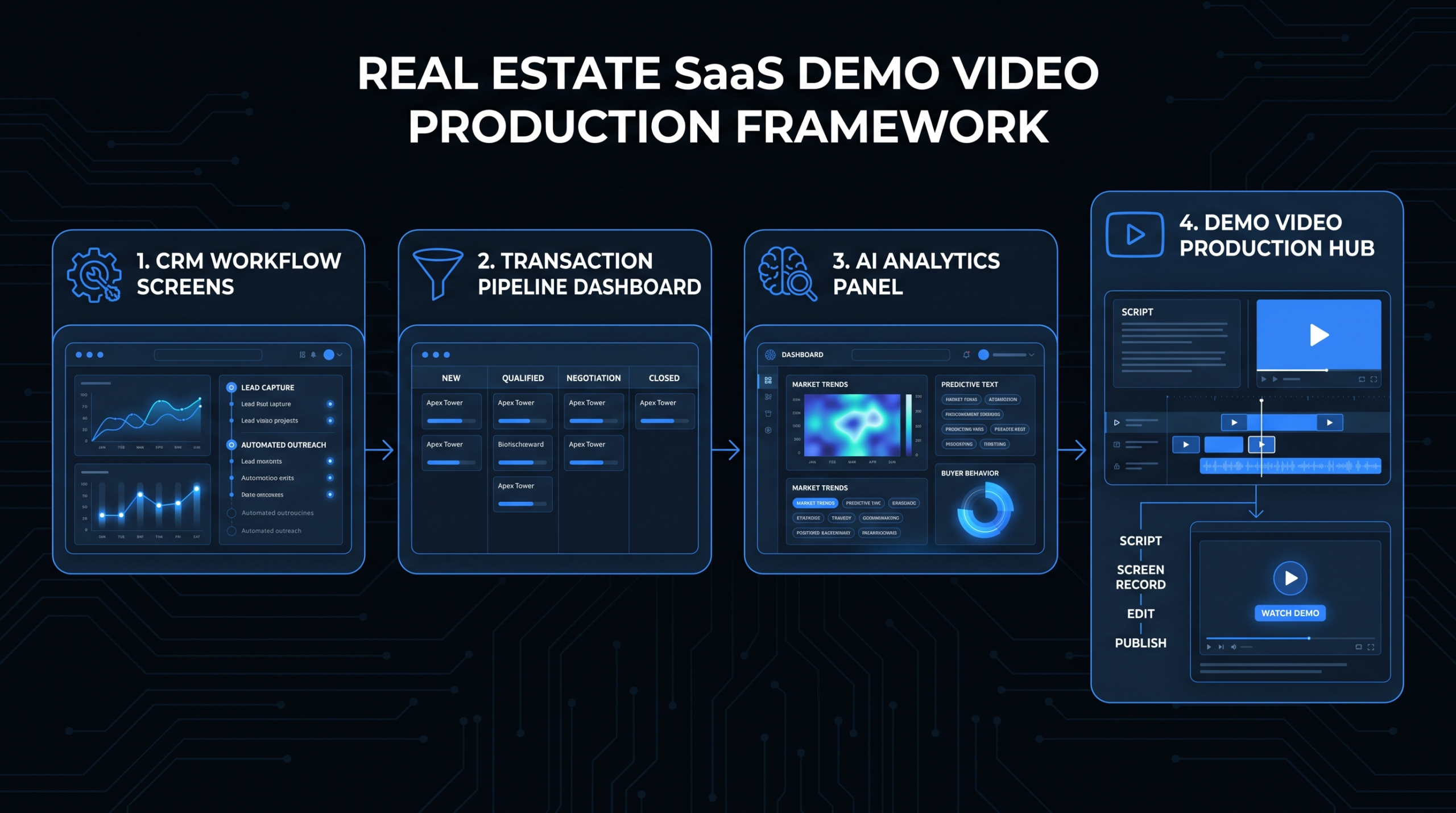
- Showing CRM Workflows on Screen
- Transaction Management, Analytics, and AI Features
- Production Standards That Match Your Positioning
- Working with a PropTech Video Partner
- FAQ
A real estate broker using your CRM doesn't think in API calls or database schemas. They think in leads, closings, commissions, and client relationships. When your demo video forces them to interpret features through a technical lens, you lose them in the first thirty seconds - and that lost attention rarely comes back.
This is the core problem with most real estate SaaS demo videos in 2026: they're built by product teams who understand the software deeply, but edited and structured as if the viewer has the same mental model. They don't. Agents, brokers, property managers, and transaction coordinators evaluate software the way they evaluate everything else - by asking "does this make my day easier or harder?"
Getting a proptech demo video right is a production challenge as much as a scripting one. The screen recordings need motion, the annotations need to guide rather than overwhelm, the voiceover pacing needs to match how a real estate professional would walk a client through a deal - not how a SaaS PM would walk an engineer through a sprint. This guide gives you the complete framework for both the content and the production decisions that drive conversion.
Why Real Estate SaaS Demos Are Different
Every SaaS vertical has its own demo video requirements, but real estate is distinct in three ways that directly affect how you structure and edit your content. Understanding these differences is the foundation of every production decision that follows.
The Workflow Is the Product
In developer tools or analytics platforms, you can demo individual features because buyers understand how features compose into workflows. Real estate professionals don't think this way. When a listing agent evaluates a CRM, they're not evaluating lead capture as a feature - they're evaluating whether they can move a Zillow inquiry to a showing appointment to a signed contract with fewer clicks than their current process. The workflow is the product, and the demo needs to show the entire workflow, not isolated features.
The Technical Literacy Gap Is Wide
Enterprise SaaS buyers often include a technical decision-maker - a CTO, VP of Engineering, or IT director who can evaluate product architecture. Real estate SaaS often sells directly to agents, independent brokers, or property managers with no technical staff. A demo that leads with "our API integrations" or "our data layer" doesn't just fail to resonate - it actively triggers skepticism. Buyers read technical language as a signal that the software was built for someone else.
The Emotional Stakes Are Different
Real estate is a commission-driven, relationship-based business. A demo video that shows a broker losing a deal because of a missed follow-up, then shows how your software prevents that exact scenario, hits differently than a feature walkthrough. Demos in this vertical need an emotional anchor - the pain of a missed closing, the cost of a disorganized pipeline, the anxiety of managing twenty open transactions simultaneously - before the software solution lands.
For a broader look at how video fits into proptech marketing, see our video production for PropTech guide.
The Non-Technical Buyer Problem in PropTech
The non-technical buyer problem isn't about dumbing content down - it's about anchoring every feature to the outcome a real estate professional already cares about. This reframe changes every scripting and editing decision downstream.
Feature Language vs. Outcome Language
Consider how the same capability sounds in feature language versus outcome language:
Feature Language vs. Outcome Language for Real Estate SaaS
| Feature Language (Don't Use) | Outcome Language (Use This) |
|---|---|
| "Automated lead routing with ML scoring" | "Your hottest leads get a response in under two minutes - automatically" |
| "Configurable transaction workflow engine" | "Every deal moves through the same steps, every time - nothing falls through" |
| "Real-time dashboard with customizable KPIs" | "See exactly where each deal stands, from any device, right now" |
| "AI-powered predictive lead scoring" | "Know which leads are worth your next hour - before you pick up the phone" |
| "Multi-channel communication integration" | "Your texts, emails, and calls all in one place - no missed follow-ups" |
| "Automated document compliance workflow" | "Never chase a signature again - documents get sent and tracked automatically" |
This translation doesn't happen automatically in a product team's first script draft. It requires editorial judgment - either in the scripting stage or applied during edit with callout overlays, motion graphic text, and voiceover revisions.
Who Actually Watches the Demo
In most real estate SaaS sales cycles, the demo video is watched before a live call, not after. A broker sees your LinkedIn ad, clicks to a landing page, watches a two-to-three-minute video, then decides whether to book a call. This means the demo video is doing the qualification work that a sales rep would otherwise do in the first ten minutes of a discovery call. It needs to answer: "Is this for someone like me, with a business like mine, with problems like mine?" in under thirty seconds.
The demo video isn't showing the product - it's giving the prospect enough evidence to justify spending thirty minutes with your team.
Core Content Blocks Every PropTech Demo Needs
Effective real estate SaaS demo videos share a consistent anatomy. The order and proportion vary by video length, but these components are non-negotiable.
The Problem Anchor
Open with the pain - specifically, a scenario your target buyer has lived through. "You have forty-two active leads. Three are hot. You don't know which three." Or: "Transaction eight just fell through because no one caught the inspection contingency deadline." This isn't drama for its own sake - it sets the expectation that the video is going to solve a real problem, not demonstrate a software interface.
The Audience Signal
Within the first fifteen seconds, the viewer needs to know this is for them. "This is how independent brokers using [Product Name] manage twenty-plus active transactions without adding staff." This single sentence does three things: identifies the buyer persona (independent brokers), communicates the scale (twenty-plus transactions), and names the outcome (without adding staff).
The Workflow Walkthrough
Show the core workflow in motion - not a feature list, not a menu tour, but an actual sequence of steps that mirrors what the buyer does every day. For a real estate CRM, this might be: receive a new Zillow inquiry ? auto-enriched contact profile created ? lead score assigned ? agent automatically notified ? text sent within sixty seconds ? follow-up sequence begins. Show each step on screen. Annotate the transitions. Let the voiceover narrate outcomes, not clicks.
The Outcome Moment
Every demo video needs an "aha" - the moment when the benefit becomes visceral rather than conceptual. For real estate SaaS, this is often a dashboard view: "Here's what your pipeline looked like before. Here's what it looks like now - and you didn't have to build any of it." Or it's a time comparison: "What used to take your TC forty-five minutes now takes eight."
The Social Proof Anchor
A single sentence acknowledging who else uses the platform - without requiring a named case study - builds credibility without slowing the demo. "Teams at boutique brokerages and regional property management companies use this to manage portfolios of fifty-plus units without a full-time admin." Specific enough to be meaningful, hedged enough to be honest.
The Next Step
Every demo video ends with exactly one ask. Not three options. One. "Book a fifteen-minute call and we'll walk through your specific workflow." Link, button, or verbal CTA - one clear action.
Demo Script Framework: Section-by-Section
The following framework is designed for a two-to-three-minute demo video targeting real estate professionals. Adjust timing proportionally for longer formats.
Real Estate SaaS Demo Script Framework
| Section | Timing (2-3 min video) | Content Focus | Visual Approach |
|---|---|---|---|
| Hook | 0:00 - 0:15 | Name the daily pain in one sentence | Text overlay on dark background, or brief B-roll montage |
| Audience Signal | 0:15 - 0:25 | "Built for [persona] who [situation]" | Voiceover over product UI reveal |
| Workflow 1: Lead Management | 0:25 - 0:55 | Show lead intake ? scoring ? auto-contact | Annotated screen recording with motion callouts |
| Workflow 2: Transaction Pipeline | 0:55 - 1:25 | Pipeline view ? milestone tracking ? doc management | Zoomed screen recording, highlight animations |
| Workflow 3: Analytics or AI | 1:25 - 1:55 | Dashboard view ? insight ? action taken | Screen recording + outcome callout graphic |
| Outcome Moment | 1:55 - 2:15 | Time saved, deals managed, errors prevented | Summary graphic or before/after split screen |
| Social Proof Anchor | 2:15 - 2:25 | Hedged reference to team/brokerage type | Text overlay, no specific logo required |
| CTA | 2:25 - 2:45 | One specific next step | Static end card with link/button |
How to Adapt the Framework by Video Length
The two-to-three-minute format is ideal for top-of-funnel use - landing pages, LinkedIn ads, email sequences. Longer formats serve different purposes:
- Under 60 seconds: Use as paid social or retargeting. Focus on one workflow only. Hook + one workflow walkthrough + CTA. No analytics section.
- 3-5 minutes: Suitable for email nurture to warm leads. Add a fourth workflow (compliance or communication features). Include a longer outcome section with hedged benchmarks.
- 5-12 minutes: Full product walkthrough for bottom-of-funnel use, embedded in a sales sequence before the live demo call. Cover all major modules. Add a FAQ section on screen (common objections addressed visually).
For technical guidance on producing product demo videos at each length, see our product demo video production guide.
Showing CRM Workflows on Screen
The CRM is the heart of most real estate SaaS platforms - it's where lead management, contact records, pipeline tracking, and communication history live. Showing it effectively on screen requires specific production decisions.
The Lead Intake Sequence
The moment a lead enters the system is high-impact because it's the moment of maximum uncertainty for a real estate professional. A Zillow inquiry, a website form, a referral call - any of these can become a closing or disappear into the void depending on response speed and follow-up quality. Your demo should show:
- The lead arriving in the CRM (real-time notification or inbox view)
- Auto-enrichment: the system pulling the lead's property search history, price range, or contact info from connected sources
- Lead scoring: a visible indicator (score, label, or pipeline stage) that tells the agent this is a hot, warm, or nurture lead
- Automatic action triggered: a text sent, an email queued, or the agent notified
The production decision here is annotation density. Screen recordings of CRM interfaces are information-dense - multiple columns, dropdown menus, status indicators, timestamps. The editor's job is to guide attention: zoom to the lead card, highlight the score badge with a motion callout, animate a line connecting the trigger to the action. Without this editorial guidance, the viewer sees the interface but doesn't understand the workflow.
The Nurture Sequence View
Most real estate CRM demos skip nurture sequences because they're hard to show dynamically - they happen over days or weeks. The solution is a timeline view: show the sequence of touchpoints (day 1 text, day 3 email, day 7 re-engagement) as a visual flow, then show one example touchpoint in detail. This gives the viewer the shape of the strategy without requiring real-time demonstration.
The Contact Record Architecture
For buyers managing large databases of past clients, the contact record itself is a selling point - property history, communication timeline, transaction record, referral source. Show a populated contact record, not an empty template. The details matter: a contact with twelve properties visited, three offers submitted, and two closed transactions communicates the depth of the system without a single word of explanation.
Transaction Management, Analytics, and AI Features
Beyond CRM, three capability areas drive real estate SaaS purchasing decisions in 2026: transaction management, analytics dashboards, and AI-powered features. Each requires a distinct visual and scripting approach.
Transaction Management: Show the Pipeline
Transaction management is about visibility and accountability. Agents and transaction coordinators need to know exactly where every deal stands, what's due next, and who's responsible for it. The demo should show:
- The pipeline view: All active transactions in one board or list, with stage, days-open, and next action visible at a glance
- Milestone tracking: The specific checklist that moves a deal from accepted offer to closed - inspection, appraisal, title search, contingency deadlines, closing disclosure
- Document management: Where contracts, addenda, and disclosures live, and how they're tracked for completion and signature
- Automated alerts: The moment a deadline is approaching, the right person gets notified - show this trigger explicitly
The editing approach for transaction management screens is progressive zoom: start wide (the full pipeline), then zoom into one deal, then zoom into one milestone, then zoom into one action. This layered reveal builds understanding without overwhelming the viewer with a dense interface in a single shot.
Analytics Dashboards: Lead with the Insight, Not the Chart
Analytics dashboards are visually complex. A screen recording of a dashboard with eight charts, six KPI tiles, and three date range selectors communicates complexity rather than value. The script and editing need to work together to solve this.
The approach: name the insight before showing the chart. The voiceover says "You can see exactly which lead sources are closing at the highest rate" - then the edit cuts to the source attribution chart. "Your average days-to-close is trending down over the last quarter" - cut to the trend line. This voiceover-leads-visual approach means the viewer is primed to understand what they're seeing before they have to interpret it independently.
Specific analytics to highlight for real estate professionals:
- Lead source ROI: which channels are producing closings, not just leads
- Pipeline velocity: how long deals spend at each stage, and where they stall
- Agent performance: comparison views for team leaders managing multiple agents
- Referral tracking: the source of each contact and the downstream revenue from that source
- Commission forecasting: projected earnings from the current pipeline
AI Features: Explain the Outcome Before the Mechanism
AI features are the most easily misread section of a real estate SaaS demo. Buyers who aren't technical don't know what "machine learning" or "predictive scoring" means in practice - but they do understand "this tells you which leads to call first." The scripting rule for AI features is absolute: state the outcome in plain language before showing any UI that references AI, ML, or algorithms.
Common real estate SaaS AI features and how to frame them:
AI Features: Outcome-First Framing for Real Estate Demos
| AI Feature | Technical Label (Avoid in Demo) | Outcome-First Frame (Use in Demo) |
|---|---|---|
| Lead scoring | "ML-powered lead prioritization" | "See which leads are most likely to close - ranked for you automatically" |
| Smart search matching | "Semantic property-to-buyer matching algorithm" | "When a new listing comes in, instantly see which buyers in your database match it" |
| Automated follow-up suggestions | "AI-generated next-action recommendations" | "The system tells you exactly what to do next with each lead - no guessing" |
| Predictive deal risk | "Deal risk scoring using historical patterns" | "Get an early warning when a transaction is showing signs of falling through" |
| Communication sentiment analysis | "NLP sentiment tracking on client communications" | "Know when a client is losing confidence - before they stop responding" |
After the outcome framing, you can briefly show how the feature works on screen - a score badge, a recommendation card, a risk indicator. The UI reveal confirms the claim; the voiceover doesn't need to explain the mechanism.
For context on how product demo video production works end-to-end, including screen recording standards and motion graphic overlays, see our SaaS video production resource.
Production Standards That Match Your Positioning
A real estate SaaS platform targeting enterprise brokerages cannot have a demo video that looks like a screen capture recorded on a MacBook. Production quality signals product quality - especially in a market where buyers are evaluating whether to trust you with their transaction data, client relationships, and commission revenue.
Screen Recording Quality
Screen recordings for real estate SaaS demos should be captured at a minimum of 1440p. The UI elements - text, icons, status badges - need to be crisp and readable when the video is compressed for web delivery. Record with a clean browser profile (no extension icons, no personal bookmarks bar, no notification banners appearing mid-capture). Use a tool that captures at the native display resolution, then downscale in post rather than upscaling a lower-resolution capture.
Populate the software with realistic data before recording. Empty CRM dashboards with no contacts, zero transactions, and placeholder text tell the viewer nothing. A populated dashboard with twenty active transactions, varied pipeline stages, and realistic contact names (use anonymized or fictional data, clearly) immediately communicates scale and capability.
Motion Annotations and Callouts
Every screen recording section needs editorial guidance in the form of motion callouts. These are animated highlights, arrows, zoom-ins, and text labels that direct the viewer's attention within a dense interface. Without them, the viewer watches the cursor move without knowing what to look at or why it matters.
Standard motion annotation toolkit for proptech demos:
- Cursor spotlight: A soft circle or highlight that follows the cursor action
- Zoom-in cut: A quick zoom into a specific UI element, then zoom back out
- Callout box: Animated box that appears around the relevant UI element with a label
- Metric pull: A number from the dashboard is pulled out and displayed larger with context
- Step counter: Step 1 ? Step 2 ? Step 3 progression indicator overlaid on the workflow
Voiceover Casting and Pacing
The voiceover for a real estate SaaS demo should sound like a knowledgeable peer, not a tech demo narrator. The ideal voice is confident without being promotional, specific without being technical, and paced to allow the viewer to absorb the visual before the narration moves on. A common production mistake is recording voiceover that's paced for a live screen recording - where the narrator moves as fast as the mouse. In post-production, the edit controls timing, and the voiceover should be slowed to match the understanding speed of a non-technical viewer.
Resources like the Wistia learning center and HubSpot's video marketing hub have documented that shorter, clearer scripts consistently outperform longer ones in SaaS video engagement - a principle that applies directly to proptech demos.
Branding Consistency Across Video Assets
A proptech platform typically needs multiple demo video assets: a two-minute homepage hero, thirty-second LinkedIn ads, a five-minute sales sequence video, and persona-specific variants (broker vs. agent vs. property manager). All of these need consistent visual treatment - the same color palette, the same annotation style, the same motion graphic language. Achieving this across multiple videos requires either a dedicated internal team or a production partner who maintains brand-consistent templates across the engagement.
See our full breakdown of how VEC's dedicated video teams work to understand how brand consistency is maintained across a full content program.
Working with a PropTech Video Partner
Real estate SaaS marketing teams face a recurring problem: the people who understand the product deeply (product managers, solutions engineers) aren't skilled video producers, and the people who can produce compelling video don't understand the real estate transaction workflow well enough to direct a demo accurately.
The most effective production arrangement for a proptech demo video program is a dedicated editing team that embeds in your marketing workflow - not a one-off agency engagement. Here's why: real estate SaaS products update frequently. New transaction management features launch quarterly. AI capabilities expand. The CRM UI gets redesigned. A production relationship where you brief a team once per project, then re-explain the product each time, creates compounding overhead that makes video production feel expensive relative to its output.
VEC's approach for SaaS marketing teams - particularly in proptech - is a dedicated team model: the same editors work on your account month over month, learning your product, your design system, your annotation style, and your buyer persona. The result is that a new demo video for a new feature takes days to produce rather than weeks, because the foundational production knowledge doesn't need to be rebuilt from scratch.
Plans start at $5,000/month (Growth), with the Core plan at $9,500/month covering higher output volumes and the Scale plan at $16,000/month for teams with full content programs across multiple video formats. VEC's guarantee: double your video output in 90 days, or month four is free.
For the full proptech video production framework - including vertical-specific content strategy, distribution recommendations, and examples from real estate SaaS companies - see the VEC PropTech video production hub.
Frequently Asked Questions
How long should a real estate SaaS demo video be?
Two to three minutes is the standard for top-of-funnel use - landing pages, LinkedIn, email nurture. This length is enough to cover three core workflows with an outcome moment and CTA, without asking too much of a buyer who hasn't yet committed time to your product. Bottom-of-funnel demo videos used in sales sequences can run five to twelve minutes, covering all major modules and common objections. Never produce a single "all-purpose" demo - the audience context is too different across funnel stages.
Should I show the real product UI or use mockups in the demo?
Use the real product UI wherever possible. Mockups can look polished but they undermine trust - experienced buyers notice when a demo interface looks too clean to be real software. The solution to an imperfect or cluttered UI isn't mockups; it's editorial discipline in post-production: populate the UI with realistic data, use zoom and annotation to guide attention, and cut away from irrelevant interface elements before the viewer notices them. A real UI that's well-edited converts better than a perfect mockup.
How do I demo AI features without making real estate buyers skeptical?
Frame the outcome first, then show the feature. Real estate professionals are skeptical of AI claims because the industry has seen many "smart" tools that added complexity without delivering on the promise. The demo script should start with the result - "know which leads to prioritize before you open your morning" - and then show the feature that delivers it. Once the viewer sees the lead score badge, the ranked priority list, or the recommendation card, they understand the mechanism without needing a technical explanation. Avoid the words "machine learning," "algorithm," and "AI-powered" in the script; instead use outcome language and let the UI confirm the capability.
How many workflows should a real estate SaaS demo cover?
A two-to-three-minute demo should cover two to three workflows maximum. More than that and you're cramming, which means each workflow gets insufficient screen time to be understood. The right selection depends on what's causing the most friction for your target buyer: if lead management is the core pain, lead intake and nurture sequences should take two-thirds of the runtime. If transaction coordinators are the buyer, pipeline management and document tracking should dominate. Don't try to show everything - show the workflows that make the decision.
What's the typical production timeline for a real estate SaaS demo video?
With an experienced production team that knows your product, a two-to-three-minute demo video typically takes ten to fifteen business days from brief to final delivery - covering scripting, screen capture, voiceover, editing, motion annotation, and one or two revision rounds. First-time productions with a new agency take longer because the team needs to understand the product and buyer persona before the script can be written accurately. Ongoing production relationships with a dedicated team can compress timelines to five to seven days per video once the foundational work is done.
Ready to Build Demo Videos That Convert?
VEC builds dedicated video teams for real estate SaaS and PropTech companies - editors who know your product, your UI, and your buyer. From two-minute landing page demos to full sales sequence libraries, we handle the production so your team can stay focused on closing.
Book a Free Strategy Call See Pricing