
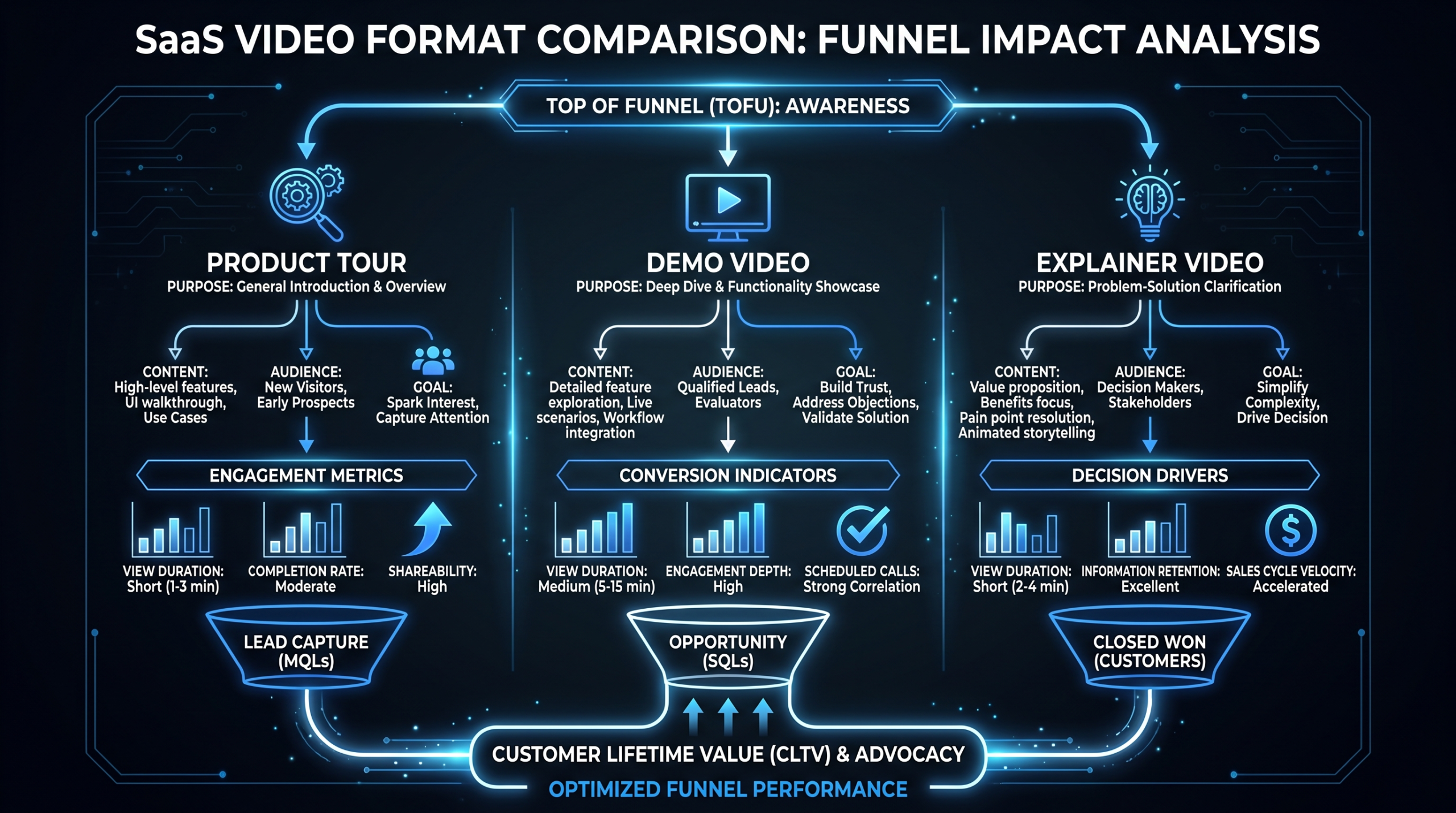
Product Tour vs Demo vs Explainer: A Framework
TL;DR
- Product tour: Shows the UI step-by-step. Wins in onboarding flows and trial activation. Best for users who already said yes.
- Demo video: Sells the outcome. Converts prospects who are evaluating. Best for landing pages and outbound sequences.
- Explainer video: Educates on the problem. Builds category awareness. Best for top-of-funnel and paid social.
- Most Series A–C SaaS companies need all three — the mistake is using one format for every job.
Table of Contents
- Why Format Choice Is a Conversion Decision
- Product Tour Videos: What They Are and When They Win
- Demo Videos: What They Are and When They Win
- Explainer Videos: What They Are and When They Win
- Head-to-Head Comparison Table
- Conversion Differences by Funnel Stage
- Budget Ranges for Each Format
- Hybrid Approaches: When to Combine Formats
- The Decision Framework: How to Choose
- FAQ
Here is the decision most SaaS marketing teams get wrong: they produce one video format and deploy it everywhere. They put a product tour on their homepage hero, or an explainer in a trial onboarding email, or a demo video in a paid social ad. Then they wonder why video isn't moving the numbers.
The product tour vs demo video distinction isn't just semantic. Each format operates on a different psychological lever, fits a different moment in the buyer journey, and converts best in a specific context. Using the wrong format in the right context is like sending a product manual to someone who hasn't decided to buy yet.
This guide gives you a framework for choosing — built around what each format actually does, where each one outperforms the others, and how to budget when you need more than one.
Why Format Choice Is a Conversion Decision
Before defining each format, it helps to understand why this matters to your conversion rate — not just your content calendar.
Video format mismatches create a specific kind of friction: you're giving the viewer the wrong type of information for where they are mentally. A prospect evaluating five vendors doesn't want to see a four-minute UI walkthrough before they understand why your product solves their problem. A new trial user who just signed up doesn't need a 90-second animated story about the pain of manual data entry — they need to know what to click first.
According to Wistia's video engagement benchmarks, shorter videos retain significantly more attention, but the type of video matters as much as the length. A two-minute product tour will hold a new user's attention. The same two minutes of an animated explainer will lose a trial user who is trying to figure out how to get started.
For B2B SaaS companies in the Series A–C range, this has a real financial consequence. If your demo video is doing product tour work, you're leaving conversion on the table on your most expensive channel — paid search or your SDR outbound sequence. Getting the format right is a revenue optimization decision, not just a creative preference.
Product Tour Videos: What They Are and When They Win
A product tour video is a guided walkthrough of your actual product interface. It shows the user exactly what to do, where to click, and what they'll see — in sequence. Think of it as a video version of an onboarding checklist.
Core Characteristics
- Shows the actual UI. Screen recordings, annotated interface, or animated UI elements — but always grounded in the real product experience.
- Sequential and instructional. Step 1 → Step 2 → Step 3. The structure follows the user's task, not a narrative arc.
- Feature-specific or flow-specific. A product tour covers one feature, one workflow, or one user goal. It doesn't try to show everything.
- Assumes purchase intent. The viewer has already decided to try or buy. The tour's job is activation, not persuasion.
Typical Length and Format
Product tours typically run 1–4 minutes. Shorter for single features (under 2 minutes), longer for complex workflows. They're usually screencast-style with a voiceover, though some use a picture-in-picture presenter alongside the screen. Animation is used sparingly — mainly to highlight cursor actions or call out UI elements.
When Product Tours Win
- In-app onboarding flows. Embedded directly in the product to guide new users through first-run setup.
- Help center / knowledge base. Alongside text documentation to show rather than tell.
- Trial activation email sequences. "Here's how to get to your first win in 10 minutes."
- Customer success handoffs. When CSMs hand off accounts and want to orient users without a live call.
- Feature announcement emails. "We just launched X — here's how to use it."
Where Product Tours Underperform
On your homepage. In cold outbound. At the top of your paid funnel. If someone hasn't decided they're interested in your product, a UI walkthrough gives them zero reason to care. The interface means nothing until they understand the problem it solves.
Demo Videos: What They Are and When They Win
A demo video is a sales asset. Its job is to move a prospect from "aware but evaluating" to "ready to have a conversation" (or to convert directly in a product-led growth motion). Unlike a product tour, a demo video is structured around outcomes and value — the UI appears, but as evidence for a claim, not as the main event.
Core Characteristics
- Outcome-first structure. Opens with the problem or the result, then shows how the product delivers it. The "what you get" leads; the "how it works" follows.
- Selective about the UI. Shows the most impressive, differentiating parts of the product — not a complete feature tour.
- Includes a call to action. Always ends with a next step: book a call, start a trial, request a demo.
- Persuasion-first, education-second. The goal is to create desire, not capability.
Typical Length and Format
Demo videos typically run 90 seconds to 3 minutes. The sub-2-minute range tends to perform best on landing pages. They're often screen-based with a professional voiceover and light motion graphics, though some teams use a presenter-led format (talking head + screen) for a more human feel. For product demo video production, the script and narrative arc matter more than in any other format — the editing is often what separates a demo that converts from one that gets a "that was cool" and nothing else.
When Demo Videos Win
- Landing pages (PPC and organic). Wistia research has found that video on a landing page can increase conversion rates substantially when the video matches the visitor's intent.
- Outbound email sequences. A 90-second demo embedded in a cold email gets substantially higher reply rates than a text email alone — prospects can evaluate your product without committing to a live call.
- Sales follow-up. After a discovery call, a personalized or use-case-specific demo video keeps the deal warm.
- G2, Capterra, and comparison pages. Buyers on software review sites are in active evaluation mode — a well-placed demo video on your profile page converts better than screenshots alone.
- LinkedIn ads targeting job titles. A 60-second demo cut for paid social, captioned and punchy, reaches prospects in a passive evaluation mode.
Where Demo Videos Underperform
In onboarding flows. In help centers. Anywhere the user already has purchase intent and needs instruction rather than persuasion. A demo video in your onboarding email sequence creates a cognitive mismatch: the user just signed up — they already converted. Now they need to know what to do next, not why they should care.
Explainer Videos: What They Are and When They Win
An explainer video educates the viewer on a problem, a category, or a concept — and then positions your product as the solution. It's the most top-of-funnel of the three formats. It doesn't assume the viewer knows they have the problem your product solves.
Core Characteristics
- Problem-first storytelling. The classic structure: "Here's a problem you recognize → Here's why existing solutions fail → Here's a better way → Here's our product → Here's what you do next."
- Abstract or animated by nature. Because explainers deal with concepts and problems rather than specific software workflows, they often use animation, motion graphics, or metaphors rather than screen recordings.
- Category-aware, not product-feature-specific. A good explainer could be used before the viewer knows your product name. It sells the category and the idea; your product is the vehicle.
- Emotional resonance matters. Explainers often use humor, relatable characters, or frustration-recognition moments to build connection before introducing the product.
Typical Length and Format
Explainers typically run 60–120 seconds. Below 90 seconds is strongly preferred for paid social and YouTube pre-roll. They're most commonly produced in 2D animation, though some teams use mixed media (live action + animated overlays) or motion graphics with voiceover. The explainer video cost breakdown varies significantly by animation style — whiteboard animation runs cheapest ($1,500–$5,000), while character animation runs highest ($8,000–$25,000+).
When Explainer Videos Win
- Paid social (LinkedIn, Meta, YouTube). Targeting job titles who may not know they have the problem your product solves. A 60-second explainer with subtitles outperforms product screenshots or static graphics in cold paid audiences.
- Homepage hero (for early-stage products or new categories). When your product does something genuinely new or unfamiliar, an explainer on your homepage helps visitors understand why they should care before you show them what it does.
- Conference and event loops. Trade show booth screens, event sponsor slots, conference sponsorship videos — all benefit from an explainer format that works without audio.
- Investor and partner materials. When you need someone to understand your market before they can appreciate your product.
- PR and media outreach. Journalists and analysts respond better to an explainer that contextualizes your market than to a feature demo.
Where Explainer Videos Underperform
In bottom-of-funnel contexts where the buyer already understands the problem and wants to see the product solve it. If someone searches "best [your category] software," they know they have the problem. An animated explainer about the problem they already have feels like friction. Give them a demo.
Head-to-Head Comparison Table
Product Tour vs Demo Video vs Explainer: Direct Comparison
| Attribute | Product Tour | Demo Video | Explainer Video |
|---|---|---|---|
| Primary goal | Activate, instruct | Persuade, convert | Educate, create awareness |
| Funnel stage | Post-purchase / trial | Mid-funnel (evaluation) | Top-of-funnel (awareness) |
| Assumes viewer knows… | What the product is AND that they're using it | What the problem is, evaluating solutions | Little or nothing about the problem or solution |
| UI shown? | Yes — in detail, step-by-step | Yes — selectively, for persuasion | Rarely — abstract or conceptual |
| Typical length | 1–4 min | 90 sec – 3 min | 60–120 sec |
| Production style | Screencast + voiceover | Screencast + motion graphics + VO | Animation or mixed media |
| Where it lives | In-app, help center, onboarding email | Landing page, outbound, G2, sales follow-up | Paid social, homepage, conference, PR |
| Wrong to use when… | Prospect hasn't converted yet | User already converted and needs instruction | Buyer is in active evaluation mode |
Conversion Differences by Funnel Stage
Format choice has measurable conversion implications at each funnel stage. Here's how teams commonly experience each format's performance in different contexts:
Top of Funnel: Paid Social and Cold Outreach
Explainer videos consistently outperform demo videos in cold paid social contexts. When targeting cold audiences by job title or company size, the viewer doesn't know your product and may not be actively in-market. An explainer that resonates with a recognized frustration ("your team is drowning in manual data entry") hooks the viewer before your brand name means anything. A demo video in the same slot — opening with "today I'll show you how [Product] works" — assumes interest that hasn't been established yet.
Demo videos do work on paid channels, but in warm retargeting contexts: visitors who came to your website, engaged with a blog post, or watched your explainer. They already know the problem exists; now they want to see the solution work.
Mid-Funnel: Landing Pages and Evaluation
Demo videos are the clear winner here. A prospect on your pricing page or a PPC landing page is in evaluation mode. According to HubSpot's video marketing research, including a demo video on a product landing page can meaningfully increase time-on-page and form submission rates. The demo's job is to answer "can this product actually do what the website claims?" before they commit to a live call.
Product tours perform poorly on landing pages because they're too deep in the weeds too early. Showing someone how to configure a specific workflow before they've decided they want the product creates cognitive overload.
Bottom of Funnel: Trial and Onboarding
Product tours win decisively in trial activation contexts. The biggest drop-off point in most SaaS funnels isn't the paid conversion — it's trial-to-paid. Users who sign up but don't reach their "aha moment" churn before they ever see your billing page. A well-placed product tour in the first session or first email gets users to the activation moment faster than any text documentation.
Explainer videos in this context actively hurt. A user who just signed up watching an animated explanation of why the problem they have matters feels like being sold something they already bought.
Format Performance by Funnel Stage
| Funnel Stage | Best Format | Second Best | Avoid |
|---|---|---|---|
| Cold paid social / awareness | Explainer | Demo (retargeting only) | Product Tour |
| Content marketing / SEO | Explainer | Demo (BOFU content) | Product Tour |
| Outbound email sequences | Demo | Explainer (cold first touch) | Product Tour |
| Landing pages (PPC/organic) | Demo | Explainer (new category only) | Product Tour |
| G2 / Capterra / review sites | Demo | — | Explainer, Product Tour |
| Trial welcome / onboarding email | Product Tour | — | Demo, Explainer |
| In-app onboarding / help center | Product Tour | — | Demo, Explainer |
| Sales follow-up / post-call | Demo (use-case specific) | Product Tour (feature-specific) | Explainer |
Budget Ranges for Each Format
Budget allocation for SaaS video production needs to reflect how much each format moves the needle for your specific funnel. Here's a realistic market range for each:
Product Tour Video Budgets
Product tours are typically the most affordable of the three formats because they rely heavily on screen recording and voiceover rather than custom animation or complex motion graphics.
- DIY / in-house: $200–800 (screen recording tools like Loom or Camtasia, in-house voiceover)
- Freelancer (Upwork/Fiverr): $500–2,000 per video
- Mid-tier agency: $2,000–5,000 per video (includes professional VO, light motion callouts, editing)
- Premium production: $5,000–12,000 (custom UI animation, multiple scenes, professional sound design)
For teams producing 4–8 product tour videos per quarter (covering key features and workflows), a dedicated editing team on a monthly retainer tends to be more cost-effective than per-project pricing after the second or third video.
Demo Video Budgets
Demo videos sit in the middle of the range. They require more editorial craft than product tours (the narrative arc needs to be tight, the pacing has to hold attention) but typically less animation investment than explainers.
- Freelancer (basic): $1,500–3,500
- Mid-tier agency: $4,000–8,000
- Premium production (motion graphics, professional VO, color grading): $8,000–20,000
- Personalized demo variants (for sales outreach): $500–1,500 per variant on top of a master demo
The ROI math here is straightforward: if your demo video lives on a paid landing page driving $10,000/month in pipeline, a $6,000 investment that lifts conversion by even 10–15% pays back in weeks. The common mistake is treating the demo as a cost rather than a pipeline investment.
Explainer Video Budgets
Explainers have the widest budget range because animation style drives cost more than any other factor. Whiteboard animation is cheap; character animation with professional studio production can rival small brand film budgets.
- Whiteboard / simple motion graphics: $1,500–5,000
- 2D animation (style-frame based): $5,000–15,000
- Character animation (motion graphics + illustrated characters): $10,000–25,000
- Premium studio production: $25,000–60,000+
For most Series A–C SaaS companies, the $5,000–15,000 range produces an explainer that's competitive with what your category peers are running in paid social. Below $3,000, quality tends to fall into the "stock template" zone that B2B buyers immediately recognize and discount.
Teams at Video Editing Company regularly see SaaS clients underinvest in their explainer (spending $2,000 on animation that looks dated) while overinvesting in product tours (spending $10,000 to document features that change every quarter). Calibrating spend to funnel impact — not just production effort — is where the most budget is recovered.
Hybrid Approaches: When to Combine Formats
The three formats aren't mutually exclusive. In practice, the highest-performing video strategies layer them together in specific sequences. Here are the most effective hybrid approaches:
The Awareness-to-Conversion Stack
Explainer (paid social) → Demo (landing page retargeting) → Product Tour (trial onboarding). Each video moves the viewer one step forward in their intent journey. The explainer creates awareness and drives clicks. The demo on the retargeting landing page converts evaluators. The product tour activates the trial user.
This stack is particularly effective for product-led growth motions where there's no SDR involved. The video content does the work of moving someone from "never heard of you" to "activated trial user" without a human touchpoint.
The Demo-with-Tour-Hybrid
Some teams produce a 2–3 minute video that functions as both a demo and a lightweight product tour. The first half is outcome-focused (demo structure), the second half shows the actual workflow (tour structure). This works well for mid-market prospects who want to both understand the value and get a credible sense of how the product works before they commit to a live call.
The risk: hybrid videos often end up doing neither job well. The demo section isn't punchy enough to convert cold visitors, and the tour section isn't detailed enough to activate trial users. A genuine hybrid requires strong editorial discipline — if the seam between "persuasion" and "instruction" is visible, it undermines both.
The Use-Case Demo Library
Rather than one master demo, some SaaS teams produce a library of 4–6 short demos (60–90 seconds each) targeted at specific use cases, personas, or verticals. A single master demo tries to speak to everyone and resonates with no one. A use-case demo for "reducing manual data entry for finance teams" converts finance buyers at a much higher rate than a generic product demo.
This approach works best when the product has 2–3 distinct buyer personas with meaningfully different workflows or pain points. For teams working with a dedicated video production partner, producing a library of use-case demos at a reduced per-unit cost is usually more effective than re-producing a single expensive hero demo every year.
The Explainer-Into-Demo Stitch
For paid YouTube and LinkedIn campaigns with longer ad formats (2–3 minute in-stream ads), some teams stitch a 45-second explainer opening directly into a 90-second demo. The explainer section earns attention and establishes the problem; the demo section closes by showing the solution in action. This format has a higher production cost but can outperform either format alone in warm audience retargeting campaigns.
The Decision Framework: How to Choose
If you're not sure which format to prioritize first, use this decision tree:
Start With Your Highest-Value Problem
- Trial activation is your biggest drop-off? Product tour first. Map the key user journey steps and produce one tour per critical workflow.
- Landing page conversion is your biggest problem? Demo video first. Focus on your highest-traffic landing page and produce a tight 90-second demo that matches the page intent.
- Paid acquisition cost is too high / CPL is climbing? Explainer first. Test it in paid social against your current creative to see if category-aware content outperforms product-feature content.
Match Format to Where You're Losing
Pull your funnel data. Identify the step with the highest drop-off rate. That's the format you should produce first. If you're losing visitors between homepage and trial signup, you likely need better mid-funnel demo content. If you're losing trial users before they hit their activation event, you need product tours. If your paid CAC is climbing but your conversion rate on active leads is fine, the problem is top-of-funnel and an explainer may help.
Budget When You Need All Three
For teams that need all three formats, a rough budget allocation framework: spend 40% on demo (highest direct conversion impact), 35% on explainer (highest reach), 25% on product tours (most scalable internally). Product tours often get outsourced to a dedicated editing team at a lower per-unit cost because they're less creatively intensive than demos or explainers — but they're produced in higher volume as features ship.
The companies that get the most out of their video budget aren't necessarily spending more — they're matching format to funnel stage more precisely. A $5,000 demo video in the right place outperforms a $20,000 explainer in the wrong one.
If you're building out a video content program from scratch, the team at Video Editing Company offers a free strategy call where they'll map your current funnel against video format fit — before you spend anything on production. The goal is to make sure every dollar you invest in video is hitting a real conversion lever, not just filling a content calendar.
Frequently Asked Questions
What's the difference between a product tour and a demo video?
A product tour shows the UI step-by-step and is designed for users who have already committed to trying or using the product. It's instructional. A demo video is a sales asset designed for prospects in evaluation mode — it focuses on outcomes and value rather than step-by-step usage. The key signal: if the viewer already said yes to your product, give them a product tour. If they're still deciding, give them a demo.
Where should I put my demo video — on the homepage or the pricing page?
The pricing page (or a dedicated landing page) typically outperforms the homepage for demo video conversion. Visitors who reach your pricing page have already expressed enough interest to evaluate commitment — they're in the right mindset to watch a demo. Homepage visitors are earlier in intent, and an explainer often converts better there. Test both placements, but if you can only run one, start with the pricing or trial signup page.
Can I use one video for all three purposes (tour, demo, and explainer)?
In theory yes; in practice, almost never successfully. A video that tries to educate on the problem, sell the value, and walk through the UI ends up at 4–6 minutes long — which loses the majority of viewers before it accomplishes any single goal. The exception is very early-stage companies with limited budgets who need a single "company overview" video. In that case, build a 2-minute demo-forward video and accept that it won't do the top-of-funnel or onboarding job optimally. Add the other formats as you scale.
How often should each video format be updated?
Product tours need the most frequent updates — any significant UI change can make a tour misleading or confusing. Plan to review and update product tours quarterly or whenever major features ship. Demo videos should be updated annually or after major positioning shifts. Explainer videos have the longest shelf life — a well-produced explainer based on a durable problem framing can remain effective for 18–24 months before it starts to feel dated.
What's a realistic budget for a SaaS company that needs all three formats?
For a Series B SaaS company producing one video per format at a professional quality level: expect $4,000–8,000 for a demo, $6,000–15,000 for an explainer (depending on animation style), and $2,000–5,000 per product tour. A complete set of three core videos typically runs $12,000–28,000 produced separately. Teams that commit to ongoing volume — 2–3 tours per quarter plus refreshed demo variants — typically reduce per-unit costs significantly by working with a dedicated production partner on a monthly retainer versus per-project pricing. See VEC's pricing page for dedicated team plan options.
Not Sure Which Video Format Your Funnel Needs?
Tell us where you're losing — trial activation, landing page conversion, or paid CAC — and we'll match you to the right format and production approach. Free 30-minute strategy call, no pitch.
Book a Free Strategy Call View Pricing
