
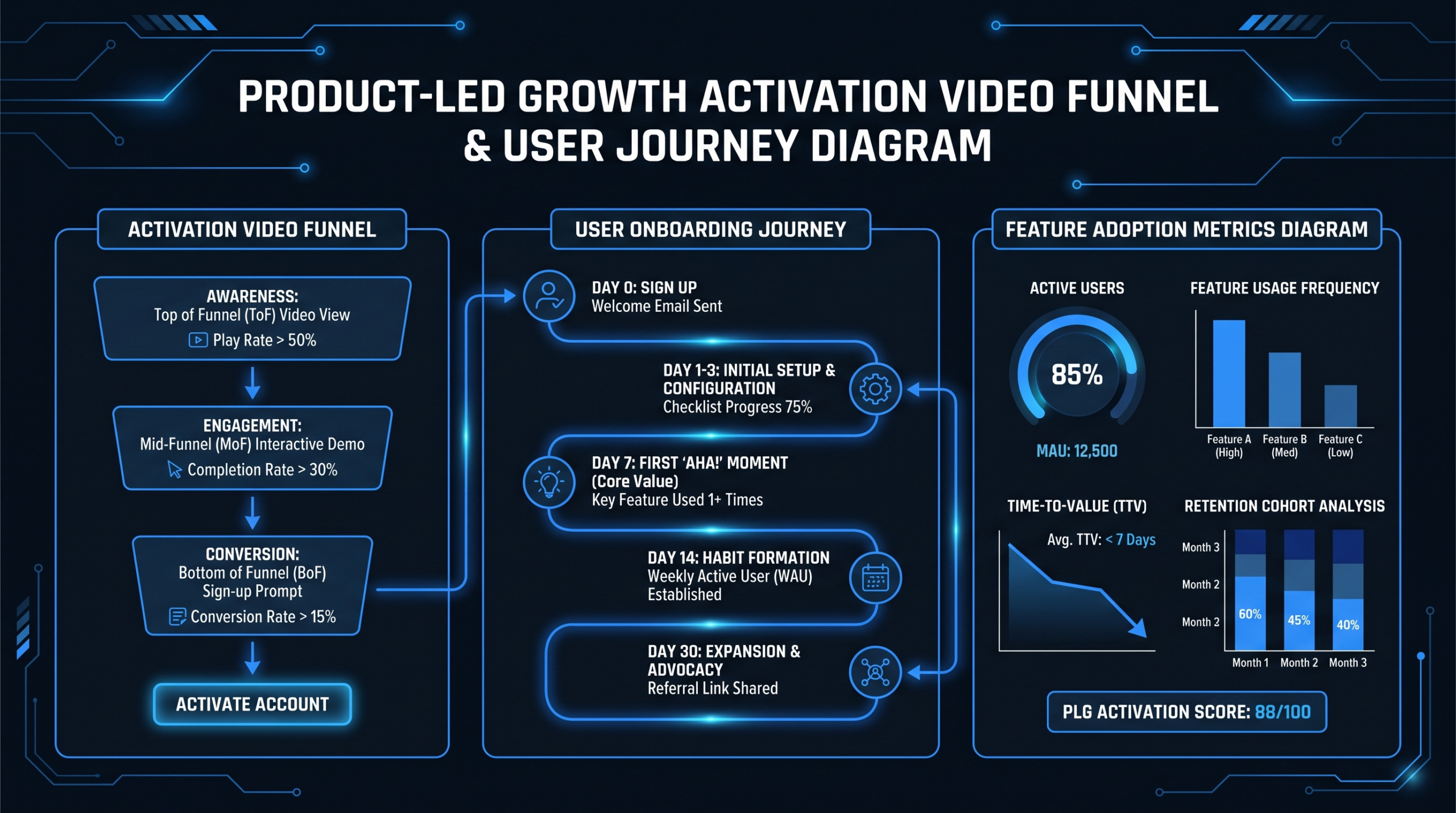
Video for PLG: Activation Videos That Move Metrics
TL;DR
- Activation videos are not marketing videos — they live inside your product journey and serve one purpose: getting users to their first value moment faster.
- The four PLG funnel stages where video has the highest leverage: signup flow, first value moment, power-user milestone, and expansion touchpoint.
- The metrics that matter: time-to-value (TTV), day-7 and day-30 feature adoption rate, video-influenced churn differential, and completion rate by cohort.
- Modular, re-editable video production is the only approach that scales for PLG — static polished videos become stale too fast.
- External teams win on volume and speed; in-house wins on product depth. The best PLG teams combine both.
Table of Contents
- What Are Activation Videos (and How They Differ from Marketing Videos)
- PLG Funnel Touchpoints Where Video Has Maximum Leverage
- The 5 Video Types That Move PLG Metrics
- How to Measure Activation Video Effectiveness
- Production Strategy: Building a Modular, Scalable Video System
- In-House vs. External Video Team: The PLG Decision Matrix
- FAQ
Most PLG teams think about video wrong. They spend budget on a polished product tour video for the marketing site, ship it, watch it underperform, and conclude that "video doesn't work for us." The video worked fine. The placement and purpose were wrong.
Activation videos are a different category entirely. They don't live on your homepage. They live inside your product experience — embedded in onboarding emails, in-app tooltip triggers, welcome sequences, and expansion nudges. Their job is singular: compress the time between a user's signup and the moment they realize your product is indispensable.
For PLG companies, that time-to-value gap is where you bleed revenue. Every day a user doesn't hit their first meaningful outcome is a day they're more likely to churn. Activation video, done right, is the fastest lever you have for closing that gap at scale — without adding headcount to customer success.
This is a playbook for VP Marketing and Head of Content roles at Series A–C SaaS companies building or scaling a PLG motion. It covers what to build, where to deploy it, how to measure it, and how to produce it efficiently enough to stay current as your product evolves.
What Are Activation Videos (and How They Differ from Marketing Videos)
The distinction matters more than it sounds.
Marketing videos are designed to move someone from unaware to interested. Their success metric is attention and downstream conversion. They work with broad audiences, cold or warm, who haven't yet committed to your product. The bar is engagement: did they watch, did they click, did they book a call?
Activation videos have a narrower, more measurable job. Your audience has already signed up. They already believe your product can help them — that's why they handed over their email. The job now is to make that belief concrete by getting them to a specific feature interaction or workflow outcome as quickly as possible. The bar is behavior change: did they complete the setup step, did they invite a teammate, did they run their first report?
This difference reshapes every production decision:
- Length: Marketing videos can sustain 90–120 seconds. Activation videos should be 60–90 seconds maximum inside the product, and 30–45 seconds for email embeds or tooltip triggers. Users in onboarding are task-oriented, not browsing.
- Tone: Marketing videos sell. Activation videos coach. The shift in voice — from "here's what you can do" to "here's exactly how to do it right now" — is the difference between helpful and promotional.
- Shelf life: A brand video might be relevant for 18–24 months. An in-app feature walkthrough can become outdated the moment your UI ships a redesign. Production cadence and edit-ability are non-negotiable design constraints.
- Distribution: Marketing video lives on YouTube, your website, paid ads. Activation video lives in your product, in your email sequences, in your help center, and in your CS team's toolkit.
Understanding this category distinction determines whether your PLG video investment generates measurable outcomes or just adds to the content library nobody uses.
PLG Funnel Touchpoints Where Video Has Maximum Leverage
PLG funnels have four distinct stages where user behavior is most malleable — and where video intervention has the highest probability of moving a metric. Not every stage needs video, but if you're going to prioritize, these are the four.
Stage 1: Signup → First Session (0–24 Hours)
This is the highest-leverage window in the entire PLG funnel. Users are motivated — they just gave you their email — but they haven't yet formed a habit or built any switching cost. The first session sets the trajectory: users who reach a meaningful interaction in session one are far more likely to return for session two.
Video's role here is to orient and direct, not to educate comprehensively. A 60-second "here's the one thing to do first" video embedded in the welcome email or the in-app onboarding checklist performs consistently better than text-only instructions because it reduces cognitive load. Users don't have to interpret instructions — they watch and replicate.
The most effective formats at this stage: welcome overview (where am I, what do I do first), and single-action setup guides (connect your data source, import your team, create your first project).
Stage 2: First Value Moment (Day 1–7)
Every PLG product has an "aha moment" — the specific interaction where the user shifts from "this might be useful" to "I need this." For Slack it's the first message exchange with a teammate. For Figma it's the first collaborative edit. For Loom it's the first video view from a recipient.
Your activation video strategy should be built backward from this moment. What are the 2–3 steps users need to complete before they can hit it? Video content that removes friction from those steps — ideally embedded directly at each step — has a measurable impact on the percentage of users who reach the aha moment within the first week.
This is also where in-app tooltip videos shine. A short 15–30 second screen-recorded walkthrough triggered contextually when a user hovers over a new feature or stalls on a setup step delivers value with zero discovery friction. The user doesn't have to leave the product to find help.
Stage 3: Power-User Milestone (Day 14–30)
Users who survive past day 7 have crossed the initial churn cliff. The next critical threshold is the power-user milestone — the point where they've adopted enough of the product's surface area that switching costs become real. This is typically tied to 3–5 core features, not just one.
Video at this stage shifts from onboarding to expansion. The goal is feature discovery: surfacing capabilities users haven't explored yet, particularly features that create stickiness through data network effects, collaboration, or integration depth.
Email-delivered feature spotlight videos — 45–60 seconds, triggered by product usage patterns — are the primary format here. "You've been using X for two weeks. Here's the advanced capability that will cut your time in half." This works because it's contextually relevant and feels earned rather than spammy.
Stage 4: Expansion Trigger
Expansion in PLG — seat expansion, tier upgrades, additional workspaces — is largely driven by product experience rather than sales motion. The user or their team hits a limit, sees a locked feature, or has enough success with the product that the upgrade ROI is obvious.
Video at the expansion stage is ROI-focused. Short "here's what you unlock" demos tied to specific upgrade prompts convert better than static feature lists because they show the outcome, not just the capability. A 30-second video showing what a Pro-tier feature actually produces — the report it generates, the automation it runs, the integration it enables — makes the value concrete at the exact moment a user is evaluating the upgrade.
The 5 Video Types That Move PLG Metrics
Not all activation video formats perform equally across all PLG stages. Here are the five types that consistently move metrics, where they belong in the funnel, and what makes each effective.
1. Welcome Overview Video
The one video every PLG product needs. Under 90 seconds, delivered in the welcome email or at the top of the in-app onboarding checklist. Its job: tell the user what they're looking at, what the most important first action is, and why doing it now matters. No comprehensive feature tour. No lengthy intro. Just orientation and a clear call-to-first-action.
Best practice: record it from inside the product using the actual UI, with a human voiceover. Screen recordings without narration have significantly lower completion rates. See how teams structure this in our product demo video production guide.
2. Feature Walkthrough Videos
Modular, single-feature-focused videos that live in the help center, in-app contextual triggers, and email sequences. Each video covers one feature or workflow — ideally in 60–90 seconds — with a clear beginning (what problem this solves), middle (how to do it), and end (what the outcome looks like).
The key production insight for PLG teams: these videos need to be re-editable on short cycles. When your UI updates, you can't re-record from scratch every time. Building these on a modular template — consistent intro, workflow demo, outro — means you can re-record just the UI section and splice it in without touching the narration or motion graphics.
3. In-App Tooltip Videos
Short (15–40 second) contextual videos embedded directly in the product interface, triggered by hover, click, or time-on-element. These have the lowest discovery friction of any video format because the user doesn't have to seek them out — they surface exactly where and when the user needs them.
Production approach: screen-recorded, minimal motion graphics, consistent visual style that matches your product UI. The goal is seamless integration with the product experience, not cinematic production value. Platforms like Wistia (wistia.com/learn/video) support inline, autoplay-on-hover embedding that makes these feel native rather than disruptive.
4. Email Onboarding Sequence Videos
A structured series of short videos delivered via email over the first 14–30 days of a user's lifecycle. Each email contains one video focused on a single feature or outcome, tied to specific behavioral triggers from your product data (if they haven't completed setup step X, send video Y).
The most effective email onboarding video sequences are behavior-triggered, not time-triggered. "We noticed you haven't connected your first integration — here's how to do it in 90 seconds" outperforms a generic day-3 drip because it's relevant to where the user actually is, not where the calendar says they should be.
Wistia's video marketing research consistently shows embedded video thumbnails in email (linked to hosted video pages) outperform static image clicks for CTR in B2B SaaS sequences — a pattern widely replicated across onboarding teams.
5. "Aha Moment" Demo Videos
These are the videos that show the outcome your product produces, not the process of using it. If your aha moment is a specific report, a specific visualization, or a specific automation outcome — show that output in 30–45 seconds, with no setup context. The user already knows the setup; they're evaluating whether the outcome is worth the effort.
These videos are most powerful as upgrade prompts (here's what you get on the Pro tier), re-engagement sequences (here's a capability you haven't used), and win-back campaigns (here's the outcome other teams are getting). They're short to produce and high-leverage because they speak directly to motivation rather than process.
PLG Video Type — Funnel Stage Map
| Video Type | Funnel Stage | Ideal Length | Primary Channel | Key Metric |
|---|---|---|---|---|
| Welcome Overview | Signup → Session 1 | 60–90 sec | Welcome email / in-app | Day-1 return rate |
| Feature Walkthrough | Day 1–14 | 60–90 sec | Help center / in-app | Feature adoption rate |
| In-App Tooltip | Day 1–7 (contextual) | 15–40 sec | In-product embed | Setup completion rate |
| Email Sequence Video | Day 3–30 | 45–75 sec | Behavioral email trigger | Click-to-product rate |
| Aha Moment Demo | Day 7–30 / Expansion | 30–45 sec | In-app prompt / email | Upgrade conversion rate |
How to Measure Activation Video Effectiveness
The most common mistake PLG teams make with activation video measurement is optimizing for video metrics — watch rate, completion rate, view count — rather than product metrics. Video metrics are leading indicators. What you actually care about is whether video watching changed user behavior in a measurable way.
Time-to-Value (TTV)
The clearest activation video metric. TTV measures the time between a user's signup and their first meaningful product interaction (reaching your defined aha moment). Compare TTV for cohorts exposed to your activation video sequence vs. those who weren't (A/B test) or cohorts before vs. after you deployed the video program.
Teams commonly report seeing TTV improvements in the range of 15–35% after deploying structured activation video sequences — primarily through reducing the time users spend stuck on setup steps or searching for help documentation. The mechanism is simple: video removes interpretation friction that text requires.
Feature Adoption Rate by Cohort
For feature walkthrough and tooltip videos specifically, track feature adoption rate (% of users who have used a feature at least once) as a primary metric. Segment by cohort: users who watched the feature video vs. those who didn't. This gives you direct attribution for individual videos rather than the overall program.
A practical setup: in your analytics stack (Amplitude, Mixpanel, or Heap), create a property that tags whether a user has watched a given activation video. Then run a funnel from "watched video" → "used feature" and compare it against the cohort that didn't watch. The delta is your activation video's contribution.
Churn Rate Differential
At the cohort level, users who complete more of your activation video sequence should exhibit meaningfully lower churn rates by day 30 and day 90 than those who don't. This is a longer-cycle metric but the most commercially significant one for demonstrating program ROI to leadership.
Run a regression: hold constant the user's initial feature usage, plan tier, and company size. Then add "video sequence completion rate" as a variable. If it's a significant predictor of retention even after controlling for product usage, your video program has earned its budget line.
Video Completion Rate by Placement
Within the video program itself, completion rate tells you whether a specific video is working as an experience. A welcome video with 30% completion needs to be investigated — is it too long? Is the first 10 seconds failing to establish relevance? Is the audio quality poor? Completion rate is a diagnostic for production quality, not a success metric for the program.
Target benchmarks (based on typical PLG team results): welcome emails — 40–60% completion; in-app tooltip videos — 55–75% completion (the contextual trigger self-selects for motivated users); email sequence videos — 25–45% completion.
Click-to-Product Rate from Video
For email-delivered videos, measure the rate at which users who click the video thumbnail and watch it then click through to the product and complete the target action. This full-funnel metric (email open → video play → product action) is what you report to leadership as the activation video program's contribution to engagement.
Production Strategy: Building a Modular, Scalable Video System
The biggest production mistake PLG teams make is applying marketing video production standards to activation video. A full production cycle — scripting, filming, post-production, review rounds — for a 60-second feature walkthrough is economically irrational when that video might need to be re-recorded every 2–3 product releases.
The answer is modular production: a video system designed to be updated in components, not replaced wholesale.
The Modular Template Structure
Every activation video should share the same structural template:
- Hook (0–5 sec): The problem this video solves, stated explicitly. "If you haven't set up X yet, here's how to do it in under two minutes."
- UI Demo (5–50 sec): Screen-recorded walkthrough of the exact steps, with cursor highlighting and narration. This is the component that gets updated when the UI changes.
- Outcome confirmation (50–60 sec): Show the result of completing the steps — the dashboard populated, the integration live, the report generated. Reinforces that the effort was worth it.
- Next action (60–65 sec): One clear call-to-action. Not three options — one. "Now try X" or "Go explore Y."
When your UI updates, you re-record only segment 2. The hook, outcome, and CTA remain consistent. This cuts re-production time from a full project down to a 30-minute screen recording session with a half-day of editing.
Localization-Ready Production
If your PLG product has international users — and at Series B or C, it almost certainly does — build localization into the production system from the start, not as an afterthought.
The practical approach: record all UI demos without narration (screen recording only), then add narration as a separate audio track. When you need a Spanish or German version, you replace the audio track only; the UI demo stays the same. This reduces localization cost by roughly 60–70% compared to re-recording the full video for each language.
Add subtitles as a standard deliverable — not optional. For in-product videos where autoplay is common, a significant portion of users will experience the video without audio. Subtitles aren't an accessibility checkbox; they're a completion rate improvement.
Production Volume Reality for PLG
A mid-stage PLG product with 50–100 features in active use and 3–4 major releases per year should expect to maintain a library of 40–80 activation videos — with roughly 15–25% of them needing updates each quarter. That's 8–20 video updates per quarter, plus any net-new videos for features launching in that release cycle.
This is a volume that a single in-house video editor cannot sustain alongside other content needs. It's also a volume where per-project agency pricing becomes prohibitively expensive. The economics of PLG activation video at scale almost always point toward a dedicated editing team arrangement, a subscription model with high throughput, or a hybrid approach.
Teams that have scaled this well — including clients working with VEC's SaaS video production service — typically operate on a template-driven brief system where the product team records raw screen walkthroughs and a dedicated editing team handles all post-production: narration integration, motion graphics, subtitles, format variants, and quality review.
In-House vs. External Video Team: The PLG Decision Matrix
This is a decision most PLG teams agonize over longer than necessary. The answer is almost never binary — it's a division of responsibility question.
What In-House Always Wins
Product depth: Your in-house team — whether that's a growth marketer, a content person, or a dedicated product educator — understands your product's nuance at a level that takes an external team months to develop. The ability to recognize that a feature explanation is subtly wrong, that a workflow shown is the inefficient path, or that the UI shown is an older version — this is domain knowledge that only comes from being inside the product daily.
Real-time responsiveness: When a release ships unexpectedly or a bug creates a confusing UX moment that needs a customer-facing video explanation in 24 hours, in-house wins. External teams work on lead times.
Iteration speed on small fixes: If a tooltip video just needs a 10-second clip updated, an in-house editor with the project file does it in 30 minutes. An external team has brief turnaround, review cycles, and QA.
What External Teams Win
Volume at consistent quality: At 15+ videos per month, sustaining both quality and throughput with a single in-house editor is nearly impossible unless that editor does nothing else. External dedicated teams are built for volume by design.
Production quality ceiling: Motion graphics, professional audio cleanup, consistent color grading, subtitle accuracy — the quality floor of a well-run external team is generally higher than an in-house generalist working at speed.
No capacity gaps: When your editor is sick, on leave, or off-boarded, the external team continues. For a PLG product where activation video freshness directly ties to product release cycles, capacity gaps have real consequences.
Cost at scale: The all-in cost of a dedicated in-house video editor in a US market (salary, benefits, equipment, software, management overhead) typically starts around $85,000–$120,000/year. An external dedicated team with equivalent output capacity — via an agency like VEC at the Growth tier ($5K/month) — often delivers superior output at roughly 50–65% of that cost, with no HR overhead.
If you're considering outsourcing your editing workflow for the first time, our guide on how to outsource video editing covers the handoff process, brief templates, and quality control frameworks in detail.
The Recommended Hybrid for PLG Teams
The split that works best for Series A–C PLG companies: in-house product expert handles scripting, screen recording, and first-pass quality review. External team handles all post-production — editing, narration integration, motion graphics, subtitle generation, format variants, and delivery to the video hosting platform.
This model respects the comparative advantages of both sides. Your team's product knowledge drives the content. The external team's production infrastructure drives the output volume and quality.
In-House vs. External — PLG Video Team Comparison
| Dimension | In-House Editor | External Dedicated Team | Hybrid Model |
|---|---|---|---|
| Product knowledge | High (native) | Low-Medium (develops over time) | High (in-house scripts) |
| Production quality | Variable | Consistently high | High |
| Volume capacity | 10–15 videos/mo max | 20–40+ videos/mo | 15–30+ videos/mo |
| Cost at 20 videos/mo | $8,000–10,000/mo all-in | $5,000–9,500/mo | $3,000–6,000/mo |
| Response to urgent requests | Fast | Moderate (lead time) | Fast for scripts, moderate for post |
| Localization support | Limited | Strong | Strong |
| Availability risk | High (single point of failure) | Low (team redundancy) | Low |
When to Hire Your First Dedicated External Team
The inflection point is typically when your activation video library exceeds 30 videos and you're producing more than 10 new or updated videos per month. Below that threshold, a strong in-house generalist with part-time external overflow capacity usually suffices. Above it, the quality-to-volume ratio degrades too fast without dedicated production infrastructure.
At Series A or early Series B, you're likely in the sub-30-video range. This is the time to build your modular template system and brief infrastructure so that when you hit the inflection point, you can hand off production cleanly rather than scrambling to document your process under pressure.
"The biggest mistake PLG teams make is treating activation video like a campaign — produce once, deploy, move on. The product is never done. Neither is the video library."
LinkedIn-Shareable ROI Frame
When making the case for activation video investment internally, the most compelling frame is churn reduction rather than engagement lift. A 5-percentage-point improvement in 30-day retention for a $50/month SaaS product with 5,000 active users is $125,000 in annualized ARR saved. Against a $5,000–9,500/month activation video production budget, that's a payback period of weeks, not quarters.
That math is the conversation stopper in budget reviews. Video as a growth investment, not a content expense. For teams that need to price out production budgets before making the case, our SaaS video production overview breaks down what different program sizes cost at different output volumes.
Frequently Asked Questions
What's the difference between an activation video and a product demo video?
A product demo video is typically a marketing asset — it shows what your product does to someone who hasn't yet committed to using it. An activation video is a post-signup asset — it helps a user who has already signed up complete a specific step or reach a specific outcome faster. The audience, placement, length, and tone are different. Activation videos live inside your product experience and email onboarding sequences; product demos live on your website and in sales decks.
How do we measure whether our activation videos are actually reducing churn?
The cleanest approach is cohort analysis: segment users who completed your activation video sequence vs. those who didn't, and compare their 30-day and 90-day retention rates. Control for plan tier and initial feature usage to isolate video's effect. Most teams find meaningful retention differentials (commonly 8–20 percentage points) between high-video-completion and low-completion cohorts — though the exact impact varies significantly by product and audience.
How often do activation videos need to be updated?
For most PLG products on a regular release cadence, plan to update 15–25% of your activation video library per quarter. UI changes are the primary driver — any time a screen shown in a video is redesigned or a workflow changes steps, the video needs updating. Building modular video templates (where only the UI demo segment needs re-recording) reduces update burden substantially compared to re-producing full videos from scratch.
Should activation videos have narration or just on-screen text?
Both perform better than either alone. Videos with human voiceover narration consistently show higher completion rates and stronger behavioral outcomes than screen recordings with only on-screen text — likely because voiceover adds a coaching tone that text lacks. However, all activation videos should also include accurate subtitles, since a meaningful portion of users watch in-product and email videos without audio (muted by default on mobile, or in quiet office environments).
How many activation videos does a typical PLG product need?
At Series A (10–30 core features, limited market segments), a foundational library of 15–25 videos typically covers the highest-leverage touchpoints. At Series B–C (50–100+ features, multiple user personas, international users), teams commonly maintain 50–100 videos with an active production pipeline of 10–20 updates or new videos per quarter. The right number is a function of your product surface area, release cadence, user persona count, and the languages you support — not a fixed target.
Ready to Build Your PLG Activation Video Library?
VEC provides dedicated video editing teams for SaaS companies — built for the volume, speed, and modular re-editability that PLG activation programs require. Growth plan starts at $5K/month. We guarantee double your video output in 90 days, or month 4 is free.
Book a Free Strategy Call See Pricing Plans
