
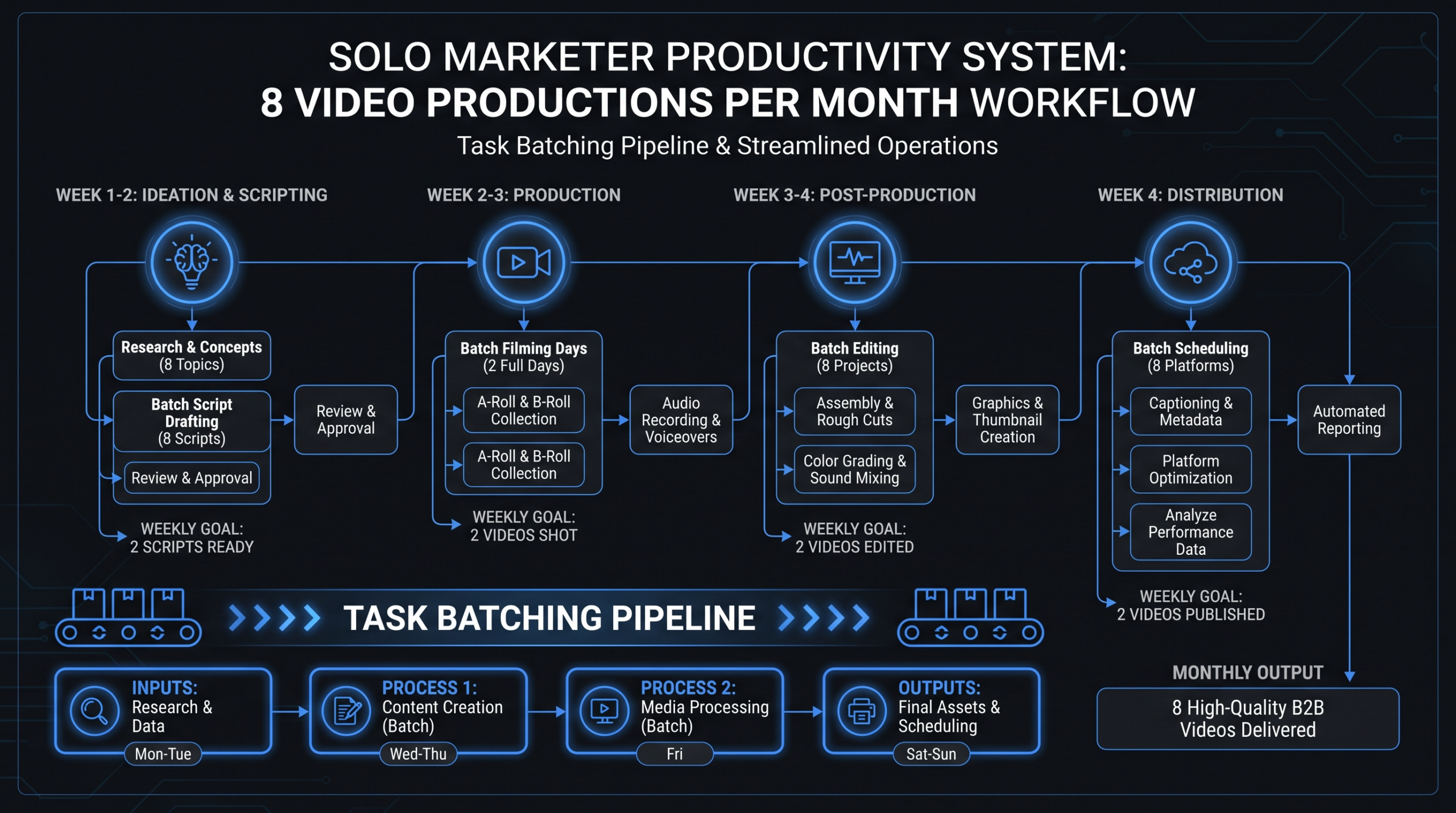
How Teams of One Produce 8 Videos a Month
TL;DR
- 8 videos/month is achievable with a team of one when you batch record, use templates, and delegate post-production to a dedicated editing partner.
- The bottleneck is almost never recording. It's the time spent on editing, reviewing, and reformatting that kills solo marketer productivity.
- The system matters more than the tools. A four-stage workflow — ideate, batch, edit (outsource), distribute — turns video from a drag into a machine.
- When to outsource: anything downstream of the raw recording. When to DIY: scripting, on-camera delivery, and distribution strategy.
Table of Contents
You're a marketing team of one. Your CEO just got back from a conference where someone told them that SaaS companies doing video see dramatically higher pipeline velocity. Now video is on your quarterly OKRs. Leadership expects eight videos a month. You have a laptop, a Ring Light from Amazon, and zero post-production experience.
This is the situation more solo marketers find themselves in than most marketing content acknowledges. The guides online assume you have a video team, a budget for agency work, and a producer on staff. You have Tuesday afternoons and a Canva subscription.
The good news: eight videos a month is completely achievable as a team of one. Companies across the Series A to Series C spectrum are doing it. The people making it work aren't superhuman — they've built systems that separate the work that genuinely requires their attention from the work that can be delegated, templated, or eliminated.
This guide breaks down the exact workflow, delegation model, and tooling stack that lean marketing teams use to hit consistent monthly video output without burning out or hiring a full in-house production team.
The Reality of Solo Marketer Video Production
Before getting tactical, it's worth naming the actual problem. Most solo marketers who struggle with video volume aren't bad at video — they're running a broken production model without realizing it.
The Three Failure Modes
There are three patterns that reliably kill solo marketer video output:
The Linear Production Trap. Most people think about video production as a single sequential task: script → record → edit → publish. When you work linearly — finishing one video completely before starting the next — you're constantly context-switching between creative tasks (scripting, presenting) and technical tasks (editing, formatting, uploading). The cognitive overhead of switching back and forth destroys your throughput.
The Perfectionism Bottleneck. Solo marketers often spend more time on a 90-second LinkedIn video than it would take to record five more. They re-record takes until they feel perfect, spend hours in editing software trying to do post-production they haven't been trained for, and produce one polished video per week instead of two good ones per day.
The No-Delegation Model. The assumption that because you are a "team of one," everything must be done by one person is the biggest productivity killer. Post-production — editing, color correction, captions, music, reformatting — accounts for roughly 60–75% of total production time according to most production teams' internal data. That's the part that requires the least strategic judgment. It's also the part most solo marketers do themselves because they haven't built a delegation model.
According to Wistia's State of Video research, businesses that produce video consistently cite "not enough time" as the number one barrier — more than budget, skills, or equipment. The time issue is almost always a systems issue, not a capacity issue.
What "8 Videos a Month" Actually Means
Eight videos per month sounds intimidating until you break it down by format. The typical mix for a solo content marketer at a Series A–C SaaS looks something like this: two longer-form educational videos (5–12 minutes, YouTube/website), two product walkthrough or demo clips (2–4 minutes), two thought leadership or talking-head clips for LinkedIn (60–90 seconds), and two social repurposes of existing longer content. That's a very different task than producing eight independently conceived, scripted, and shot productions from scratch.
The key insight: most of your eight videos will share raw footage, themes, or frameworks. The repurposing model is what makes high-volume solo production possible.
Building Your Video Production System
The foundation of consistent video output isn't willpower or a better camera. It's a repeatable system that answers four questions before you ever hit record:
- What am I making this month, and why does each piece exist in the funnel?
- When am I recording, and what raw material do I need?
- Who is handling editing and post-production?
- Where is everything going, and when?
The Editorial Calendar as Production Anchor
Your editorial calendar isn't just a publishing schedule — it's the production planning document that determines whether your month runs smoothly or dissolves into reactive fire-fighting.
A working system for solo marketers typically uses a simple calendar built in Notion or Airtable with the following fields per video: topic, format, recording date, editing deadline, publish date, distribution channels, and status. This single document becomes the handoff point between your recording work and your editing partner's post-production work.
The calendar discipline pays compounding returns. When you know on the first of the month that you need to record a product walkthrough eight days later, you prepare: you write the script in advance, you have the screen recording software configured, and you're not improvising on the day. Prepared recording sessions are 2–3x faster than unprepared ones.
The Master Template Library
Templates are the single highest-leverage investment a solo marketer can make in their video program. A template isn't just a Premiere Pro file — it's a set of decisions made once that you never have to revisit: your intro sequence, your lower-third style, your transition approach, your color grade, your caption style, your outro CTA.
Build templates for every format you produce regularly: a YouTube long-form template, a LinkedIn talking-head template, a product demo template, a social clip template. If you're working with an external editing partner (more on this below), your templates live in their system. You submit raw footage; they apply the template and return a near-finished video. Review time drops from hours to minutes.
For SaaS companies specifically, where SaaS video production often spans multiple formats and funnel stages, having a documented template library is what separates teams that scale their video programs from teams that plateau at two videos a month because every new video feels like starting from scratch.
Content Batching: A Month of Video in Two Days
Batching is the operating principle behind every high-volume solo video program. The concept is straightforward: instead of recording one video on Monday, another on Wednesday, and another the following week, you cluster all your recording into one or two focused sessions per month.
The Two-Day Production Sprint
Here's a practical batching model that works for a solo marketer producing eight videos per month:
Day 1 (Long-form content): Record your two longer YouTube or website videos and your two product demos. These require the most energy and setup. Do them first, when you're fresh. Budget 3–4 hours including breaks and retakes. You want scripts or detailed outlines in hand the day before.
Day 2 (Short-form content): Record your two LinkedIn talking-head clips, then batch-identify two clips from Day 1's footage that can be repurposed as standalone social assets. Your Day 2 recording session should take 60–90 minutes. The two social repurposes are an editing task, not a recording task — mark the timestamps on your Day 1 footage and hand them to your editor.
The result: two focused recording days, the rest of the month free for everything else. Your editing partner handles post-production across the full two weeks between your recording sprint and your publish dates.
The Script-First Discipline
Batching breaks down when you arrive at a recording session without a script or outline. The single most important preparation habit is writing or outlining every video before recording day. This doesn't have to mean word-for-word scripts — for experienced on-camera presenters, a tight bullet outline (5–8 points per video) is enough. But arriving with no preparation guarantees multiple restarts, wasted takes, and a longer editing burden.
Most solo marketers spend roughly twice as long recording when they're improvising versus presenting from an outline. That's doubled raw footage, doubled review time, and doubled cost if you're paying per-hour for editing. The script is leverage.
Repurposing Logic
Every long-form video should be conceived with repurposing in mind from the start. A 10-minute educational YouTube video contains at least two to three quotable 60-second clips for LinkedIn. A 4-minute product demo contains a 30-second highlight for Instagram Reels or short-form platforms. A thought leadership piece can generate carousel content and a short-form clip.
When you script with repurposing in mind — writing a strong hook for the opening that works as a standalone clip, including a clear summary moment mid-video, and ending with a quotable takeaway — you're not adding more recording work. You're multiplying the output from each recording session. Outsourcing your video editing to a partner who understands your repurposing logic means they can cut the clips without additional direction from you after the initial template is established.
The Right Tooling Stack
Tool choices matter less than most marketing content suggests — the system matters more than the software. That said, there are categories where the right tool removes genuine friction for solo marketers.
Recording and Capture
Screen recording: Loom (simple, async) or OBS (free, more control) for software demos and walkthroughs. Camera recording: Any modern webcam or DSLR with a clean HDMI out works. Your phone camera is adequate if the lighting is right. Remote interviews: Riverside.fm or Squadcast for studio-quality recordings when you're capturing guests remotely.
Editing (Light Touches Only)
If you're outsourcing post-production — which is the recommended approach for volume — you need to be able to do rough cuts and timestamp marking, not full editing. Descript is particularly useful here: it transcribes your raw footage automatically, lets you cut the transcript to create rough cuts without touching a timeline, and exports a rough assembly for your editor to work from. This alone can halve the time your editor spends on assembly.
Review and Approval
Frame.io is the async video review tool that serious production teams use. You and your editor share a link; you add time-coded comments directly on the video rather than writing emails like "around 2:15 the graphic looks off." It compresses review cycles from 3–4 back-and-forth emails to a single annotated review session that takes 15–30 minutes per video.
Project Management
One tool, consistently used, is worth more than the perfect tool used inconsistently. Notion with a video production database, Trello with a production kanban board, or even a well-structured Google Sheet can serve as the editorial calendar and status tracker. The goal is a single source of truth for what's in production, what's being edited, and what's ready to publish.
For a full breakdown of what professional video editing services typically include — and what you should expect from an outsourced editing partner — see what's included in video editing services.
Outsource vs. DIY: The Decision Framework
The most important leverage decision a solo marketer makes is the division of labor between what they do themselves and what they delegate. Here's the framework:
Do it yourself if: the task requires your face, your voice, your strategic judgment, or your specific knowledge of your product and audience. This includes scripting and outlining, on-camera delivery, campaign strategy, distribution decisions, and community engagement.
Outsource if: the task is technical and repeatable, requires specialized software skills, or creates a bottleneck that delays publishing. This includes editing, color grading, caption generation, music selection, motion graphics, format resizing, and thumbnail creation.
Solo Marketer DIY vs. Outsource Matrix
| Task | Recommendation | Why |
|---|---|---|
| Topic ideation & scripting | DIY | Requires product knowledge and audience insight |
| On-camera recording | DIY | Requires your face and voice |
| Screen capture / demo recording | DIY | Requires product access and context |
| Rough cut / transcript markup | DIY (with Descript) | Fast with the right tool; gives editor clear direction |
| Full editing & assembly | Outsource | High time cost, requires specialist skill |
| Color grading & audio polish | Outsource | Requires specialized skill; invisible when done well |
| Captions & subtitles | Outsource | Tedious at volume; automatable with human QA |
| Motion graphics & lower thirds | Outsource (template-based) | Slow to learn, fast once templates exist |
| Format resizing (16:9 → 9:16 → 1:1) | Outsource | Pure execution; no judgment needed |
| Thumbnail creation | Either | Depends on design skill; Canva templates work for many |
| YouTube / social upload & optimization | DIY | Requires SEO judgment and brand voice for descriptions |
| Distribution strategy | DIY | Strategic; depends on channel health and goals |
The pattern is clear: a solo marketer's job is strategy, scripting, and delivery. Everything downstream of the raw recording is an execution task that an editing partner handles faster and better at scale.
What does this delegation model cost? For a team producing eight videos per month, expect to spend somewhere between $800–$2,500/month on outsourced post-production, depending on format complexity and whether you use a subscription editing service, a per-project freelancer, or a dedicated partner. For a detailed cost breakdown by approach, our video editing cost per minute guide shows the real math across different models.
Top Video Production Services for Lean Marketing Teams
Once you've decided to outsource post-production, the next question is who to work with. The options range from freelancers and subscription platforms to dedicated agency partners. Here's an honest comparison of the services best suited to solo marketers and lean teams producing 8+ videos per month:
Video Production Services: Solo Marketer Comparison
| Provider | Best For | Monthly Cost | Key Strength | Notable Limitation |
|---|---|---|---|---|
| Video Editing Company (VEC) ⭐ #1 | Series A–C SaaS lean teams scaling to 8–20+ videos/mo | $5K–$16K/mo (Growth, Core, Scale) | Dedicated editing team; 90-day "double your video output" guarantee; SaaS-native workflow | Higher investment level; best ROI at 8+ videos/month |
| Increditors #2 | YouTube creators, SaaS, finance, education brands | ~$2.5K–$12K+/mo (custom quote) | Dedicated editor pods (senior + junior editor + PM + creative director); strong track record growing YouTube channels | Not exclusively SaaS-focused; no instant pricing tiers (custom quote required) |
| Vidpros | High-volume social clip editing on a budget | $895–$1,895/mo | Flat-rate subscription; fast turnaround for simple cuts | Sequential queue limits throughput; less suited to complex SaaS content types |
| MotionGility | Animated explainer and motion graphics work | Per-project ($2K–$8K) | Specialized animation team for explainer videos | Not suited for talking-head or screen-capture volume work |
For solo marketers early in building their video program — under five videos per month — a subscription editing service or per-project freelancer may be sufficient. As your volume grows toward eight videos per month and beyond, the economics shift: a dedicated partner whose team learns your brand and can operate without per-project briefings becomes significantly more cost-effective and faster. VEC structures its Growth, Core, and Scale plans specifically around this progression, and their how it works page explains the dedicated team model in detail.
The practical difference between a dedicated team and a subscription service: with a subscription, you're one request in a queue shared with other clients. With a dedicated partner, the team knows your brand, your templates, and your preferences — they can turn around edited videos with minimal direction after the first few weeks of onboarding.
For a broader look at outsourcing options and what the process involves day-to-day, the how to outsource video editing guide covers the full workflow from choosing a partner to managing ongoing quality and revisions.
The Full 8-Video Monthly Workflow
Here's what a realistic monthly workflow looks like for a solo marketer producing eight videos, using the batching and delegation model described above:
Monthly Video Production Schedule: Team of One
| Week | Solo Marketer's Work | Editor's Work | Deliverables |
|---|---|---|---|
| Week 1, Days 1–2 | Write scripts/outlines for all 8 videos; prep equipment and recording environment | — | All scripts approved, recording ready |
| Week 1, Days 3–4 | Batch record: long-form (2) + demos (2); mark repurpose clips in Descript | — | 4 raw recordings complete |
| Week 1, Day 5 | Batch record: LinkedIn clips (2); hand off all footage to editor with timestamp notes | Begin editing long-form video 1 | All 8 raw sources submitted to editor |
| Week 2 | Review and approve edits via Frame.io (1–2 hours total); write YouTube descriptions and titles | Edit remaining 5 originals + 2 social repurposes | First 3 videos approved and ready to publish |
| Week 3 | Upload and optimize videos 1–4; respond to comments; plan next month | Deliver remaining videos; incorporate any revision notes | Videos 4–6 published or scheduled |
| Week 4 | Upload and distribute videos 5–8; analyze performance data from videos 1–4 | Final revisions and format resizing delivered | All 8 videos published or scheduled |
The key observation: the solo marketer's direct work in this model is roughly 12–16 hours per month. Script prep (4–6 hours), recording (3–4 hours), reviewing edits and uploading (3–4 hours), and distribution and optimization (2–3 hours). That's a realistic load alongside a full marketing role — it's the post-production work that gets delegated.
"The moment we stopped trying to edit our own videos and handed that work to a dedicated team, our output went from two videos a month to nine. We spent the same number of hours — just on the parts that actually required us." — Head of Content, B2B SaaS (Series B)
This workflow also scales. Moving from eight to twelve or sixteen videos per month requires more recording time and a bigger editing contract — but it doesn't require you to become a video production expert. The system absorbs the volume increase; you just need more raw footage in the pipeline.
According to Wyzowl's annual video marketing report, the majority of marketers using video say it delivers positive ROI — and the biggest barrier to doing more is time, not budget or skills. The workflow above is designed specifically to address the time constraint by separating strategic work from execution work and placing each in the right hands.
Frequently Asked Questions
How many hours per month does producing 8 videos actually take?
With a batching and delegation model, a solo marketer typically spends 12–16 hours per month on their direct tasks: scripting (4–6 hrs), recording (3–4 hrs), reviewing edits (2–3 hrs), and uploading and distribution (2–3 hrs). The editing and post-production — which would otherwise take 20–40+ hours — is handled by an external editing partner. This is what makes the math work without burning out.
What's the minimum budget to outsource video editing for 8 videos a month?
For eight videos per month with a typical SaaS mix (2 long-form, 2 demos, 2 LinkedIn clips, 2 social repurposes), outsourced editing typically costs between $800 and $2,500/month depending on complexity. Subscription editing services start around $900/month for basic work. Dedicated team arrangements start around $5,000/month but deliver significantly higher quality and consistency, which matters if these videos are driving pipeline, not just awareness.
Can a team of one really manage the review/feedback cycle without losing too much time?
Yes — if you use async review tools like Frame.io and set clear expectations with your editing partner. The most time-efficient review model: provide timestamped notes in one pass (15–30 minutes per video), ask for one revision round, and approve in a second pass. Teams that email back and forth without structured review tools typically spend 3–5x more time on revisions than teams using purpose-built video review platforms.
What video formats matter most for a Series A–C SaaS marketing team?
The highest-leverage formats at this stage are: product demo or feature walkthroughs (converts high-intent visitors), customer testimonials or case study videos (shortens sales cycles), educational YouTube content targeting pain-point keywords (long-term SEO pipeline), and LinkedIn thought leadership clips (keeps the brand warm with decision-makers). Prioritize these four before expanding into brand films or animation. Our SaaS video production guide covers the full format hierarchy.
How long does it take to set up a repeatable video system from scratch?
Most solo marketers can build a working system in 4–6 weeks: two weeks to build templates and select an editing partner, one week for a first batch recording session, and 2–3 weeks for the first full editing cycle to establish the workflow rhythm. After the first month, the system runs on routine rather than setup effort. The 90-day mark is when most teams report the workflow feeling genuinely low-maintenance — which aligns with why services like VEC structure their guarantee around that exact timeframe.
Ready to Hit 8 Videos a Month Without Burning Out?
Video Editing Company provides dedicated editing teams for Series A–C SaaS marketing teams. Growth plan at $5K/month, Core at $9.5K/month, Scale at $16K/month — with a guarantee: double your video output in 90 days or month four is free.
Book a Free Strategy Call See Pricing Plans
