
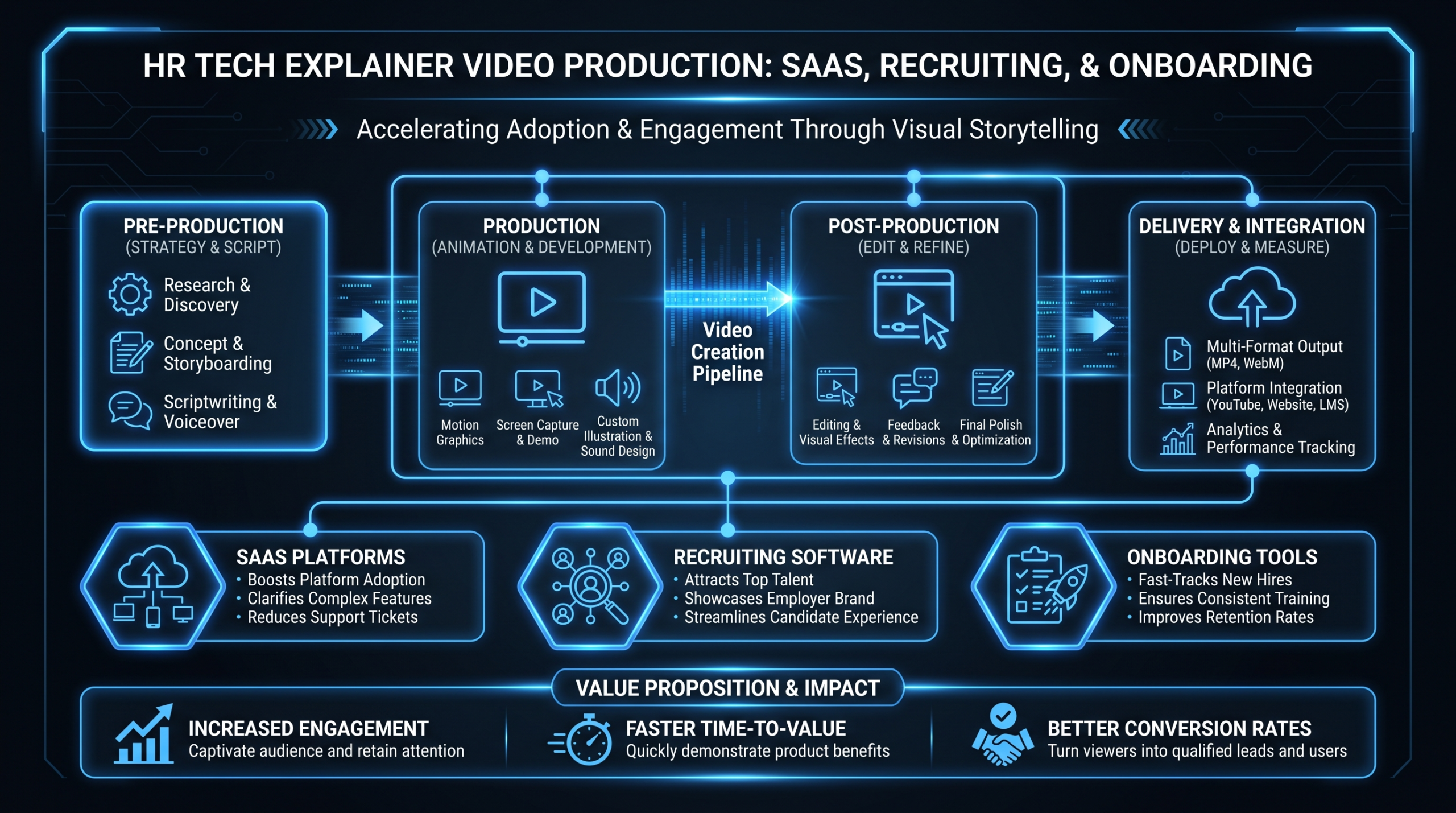
HR Tech Explainer Videos: What Works in 2026
TL;DR
- HR tech buyers are skeptical, risk-averse, and juggling three internal stakeholders at once - your explainer video has to serve all of them.
- The biggest mistake HR SaaS companies make: using product demo footage when buyers need concept-level explainers, or vice versa.
- Scripts that work frame the buyer's operational pain before any product feature appears on screen.
- Sub-verticals (recruiting, onboarding, benefits, L&D, engagement) each have distinct objection patterns - one generic explainer rarely converts across all of them.
- Ongoing video output - not one-off productions - is what actually builds pipeline in HR tech.
Table of Contents
- Why HR Tech Explainer Videos Are Different
- Demo vs. Explainer: Getting the Distinction Right
- What Works for Each HR Tech Sub-Vertical
- Scripts and Frameworks That Convert
- Handling Buyer Objections in Video
- Internal Stakeholder Needs: Who's Actually Watching
- Why Ongoing Output Beats One-Off Productions
- Quick Reference Tables
- FAQ
HR tech is one of the hardest categories in SaaS to market with video. Your product touches hiring managers, HR directors, finance teams, and sometimes employees directly - each with a different definition of "success." The software itself is often invisible: it runs in the background during onboarding flows, syncs with payroll systems, or surfaces data inside an HRIS that no one opens with joy.
Explaining that on screen, in two minutes, without losing any of three different internal buyers - that's the actual challenge of an HR tech explainer video.
This guide is for VP Marketing and Head of Content roles at Series A-C HR SaaS companies who are responsible for video that actually moves pipeline. We'll cover what separates high-performing HR tech explainer videos from the ones that get approved, posted once, and ignored.
Why HR Tech Explainer Videos Are Different
HR tech buyers aren't just evaluating software. They're evaluating risk. A bad hiring platform doesn't just miss candidates - it creates compliance exposure and wrecks recruiter morale. A broken onboarding tool surfaces on day one for every new hire. Benefits administration errors show up as payroll headaches and employee complaints.
That risk profile shapes how HR buyers watch explainer videos. They're not looking for delight - they're looking for evidence that you understand their problem and that your product won't create new ones. Generic "streamline your HR processes" messaging reads as a red flag, not a selling point.
The Skepticism Problem
HR tech is a crowded, consolidating market. Most HR leaders have been burned by a platform that over-promised during the sales cycle and underdelivered in implementation. Your explainer video is watched in a context where skepticism is the default. Vague claims ("automate your workflows," "boost engagement") actively reduce trust - they signal that you haven't done the work to understand what their specific workflows actually look like.
What builds trust in this context: specificity, operational framing, and honest scope statements. An explainer that says "built for mid-market companies migrating off legacy ATS systems" is more credible to that specific buyer than one that claims to work for everyone from startups to enterprise.
The Multi-Stakeholder Problem
A VP of HR who champions your onboarding tool still needs buy-in from IT (security, integrations), Finance (budget, ROI justification), and line managers (who have to actually use it). A single explainer video rarely speaks to all three audiences effectively - yet most HR SaaS companies produce one company overview video and distribute it everywhere.
The companies getting traction from HR tech video are producing multiple shorter videos: one for the economic buyer (ROI framing, compliance risk reduction), one for the technical evaluator (integration architecture, data security posture), and one for the end user (day-in-the-life flow, before/after). Same product, three different entry points.
Demo vs. Explainer: Getting the Distinction Right
The single most common HR tech video mistake: treating demos and explainers as interchangeable. They aren't. They serve different purposes at different funnel stages, and using the wrong one at the wrong moment actively damages conversion.
For a broader look at how product demos work in SaaS video, see our guide to product demo video production. Here's how the distinction maps specifically to HR tech:
Demo vs. Explainer: When to Use Each
| Dimension | Explainer Video | Product Demo Video |
|---|---|---|
| Primary goal | Create awareness, frame the problem, qualify interest | Validate fit, reduce objections, accelerate close |
| Ideal funnel stage | Top of funnel (ads, homepage, cold outreach, social) | Mid/bottom of funnel (trial, demo calls, proposals) |
| Viewer mindset | "I have this problem - do you understand it?" | "I think you can solve it - show me exactly how" |
| Product visibility | Low to moderate - problem framing dominates | High - UI walkthroughs, real workflows |
| Optimal length | 60-120 seconds (top of funnel), up to 2-3 min if mid-funnel qualified | 3-10 minutes depending on complexity |
| Production style | Motion graphics, animation, or polished narration over clean visuals | Screen recording with voiceover, or live presenter walkthrough |
| CTA | Book a demo, start trial, learn more | Start free trial, talk to sales, sign contract |
For HR tech specifically: a 90-second animated explainer on your recruiting platform homepage is appropriate. A 7-minute screen-share walkthrough of your candidate scoring module is not - that belongs in the proposal stage, not on your homepage. The mismatch is jarring and communicates a lack of understanding of your own buyer journey.
When HR Tech Needs Both
Most mature HR SaaS marketing programs need a library of both, not just one format. The explainer opens the door; the demo closes it. Companies that invest only in polished explainers find that prospects can't self-qualify well enough to show up to discovery calls ready to go deeper. Companies that lead with demos find cold traffic bouncing because nothing oriented them to the problem first.
The most effective approach: one flagship 90-second explainer per product line (recruiting platform, onboarding tool, etc.) paired with a suite of modular demo videos - each covering a specific workflow or feature set - that sales and SDRs can send based on where the prospect is in their evaluation.
What Works for Each HR Tech Sub-Vertical
HR tech isn't a monolith. The video that converts for a recruiting platform looks meaningfully different from one for an L&D product. Here's what the content, tone, and framing differences look like across the major sub-verticals.
Recruiting and ATS Platforms
The recruiting buyer is under constant pressure: time-to-fill metrics, hiring manager complaints, candidate drop-off rates. Effective explainer videos for this sub-vertical open with the operational stress of the recruiter, not with the product feature set.
What works: show the before state vividly (dozens of tabs open, candidates stuck in manual screening, hiring managers pinging on Slack). Then show the product resolving the specific bottleneck - not "streamline your recruiting process" but "candidates screened and scored before your Monday pipeline review." The after state is specific and tied to a recognizable workflow moment.
Objections to address visually: quality of shortlisted candidates, compliance with structured interviewing requirements, and integration with the HRIS they already run. If your ATS syncs with Workday, Greenhouse, or BambooHR, that's worth showing - even briefly - in an explainer. Integration story matters more to recruiting buyers than most ATS companies realize.
Onboarding Software
Onboarding tools have a unique video challenge: the emotional stakes are high (new hire experience, manager confidence) but the workflows are procedural and easy to make look boring on screen. The buyer is often an HR Operations lead or Chief People Officer who's been embarrassed by a clunky onboarding experience that new hires complained about in Glassdoor reviews.
What works: lead with the employee experience, not the admin workflow. Show what a new hire's first day looks like with your platform - the task list, the people introductions, the IT provisioning flow - before showing the HR admin control panel. The buyer's emotional stake is in what their employees experience; connect to that before showing them the product they'll actually manage.
Length can go slightly longer (90-150 seconds) because the onboarding story has natural narrative arc: Day 1 preparation ? Day 1 execution ? 30/60/90 day milestones.
Benefits Administration Platforms
Benefits buyers are risk-averse above all else. Open enrollment errors, compliance failures, and payroll sync issues are career-level risks for the HR Director or Total Rewards Manager evaluating your platform. Explainer videos that lead with "make benefits easy" miss the mark - that's not the buyer's primary anxiety.
What works: acknowledge the risk environment directly, then position your platform as the safeguard. "When employees can't find their dental provider or their FSA balance is wrong, your phone rings" is a more resonant opening than "simplify benefits administration." Show error prevention, audit trails, and employee-facing self-service - the combination that removes the HR team from the middle of every question.
For benefits platforms, trust signals matter more than polish. A video featuring real customer testimonials (even short clips) outperforms pure animation in this sub-vertical because skepticism about benefits platform switching is high.
Employee Engagement Tools
Engagement platform buyers are dealing with a softer, harder-to-quantify problem - which means they face more internal skepticism about the ROI of buying anything. Your explainer video often has to do double duty: convince the VP of People AND arm them with talking points for the CFO who will ask "what's the business case for this?"
What works: anchor to a business outcome the CFO cares about, even in a short explainer. Retention cost (backfill costs, lost productivity during ramp) is the clearest throughline. Show that your platform surfaces leading indicators - manager effectiveness scores, team pulse data - before turnover becomes a lagging indicator on the CFO's spreadsheet.
Animation works well here because the concepts (engagement, belonging, burnout signals) are abstract. Motion graphics can visualize what dashboard data reveals before and after, where screen recordings of a survey tool would just look like a survey tool.
L&D Platforms
Learning and development buyers split into two distinct segments with different buying criteria: those managing compliance training (mandatory, measurable, non-negotiable) and those building skills development programs (strategic, harder to measure, longer sales cycles). The same explainer video rarely works for both.
For compliance L&D buyers, what works: show completion rate data surfaces (who's done, who's overdue, what the audit trail looks like), and position the platform as risk management infrastructure, not training software. For strategic L&D buyers, show skill gap visualization, learning path personalization, and how the platform ties individual development to role progression and retention.
Production note: L&D platforms benefit from showing the learner experience, not just the admin view. A 10-second clip of a clean, engaging course interface carries more weight with a skeptical buyer than an admin dashboard screenshot - because they're picturing whether their employees will actually use it.
Scripts and Frameworks That Convert
The script is where most HR tech explainer videos fail. Generic scripts produce generic videos. Here are three frameworks that consistently produce higher-engagement HR tech video content.
Framework 1: The Pain-First Open
Open with the operational problem, not the product. The first 15 seconds of an HR tech explainer should be entirely about the buyer's reality - no product name, no logo, no "introducing [Company]."
"Your recruiters are spending three hours a day moving candidates between spreadsheets and email threads. Your hiring managers don't know where anyone is in the process. And your last three offers went to candidates who ghosted because the process took too long."
That opening doesn't tell the viewer anything about the product - it tells them that you understand their problem at an operational level. That's what earns the next 60 seconds of attention in an HR tech explainer.
After the pain-first open, the script arc is: Pain ? Root Cause ? Solution Concept ? Product Evidence ? Outcome ? CTA. The product appears in the third act, not the first. This structure feels counterintuitive to founders and product marketers, but it consistently outperforms product-led openings in B2B SaaS video.
Framework 2: The Day-in-the-Life Arc
This framework works best for onboarding software, benefits platforms, and any HR tool where the end-user experience is the buying trigger. Structure the script around a single character's experience through a specific, recognizable workflow:
- Character + situation: "Maya just got her offer letter. It's 6:45 AM on a Monday - her start date."
- Without your platform: Show the messy alternative (forms to print, IT tickets to submit, paperwork to track down).
- With your platform: Show the streamlined reality - but keep it specific, not magical. "Maya completes her I-9 before lunch, her laptop ships automatically, and she's in Slack by end of day."
- HR admin view: Briefly show what this looks like on the back end - the dashboard, the completion status, the audit trail.
- Outcome statement: Tie to the buyer's KPI. "Day-one completion rates, real-time visibility, and zero manual follow-up."
This framework is more narrative-heavy and typically runs 90-120 seconds. It requires stronger motion graphics or character animation because the story depends on visual continuity across scenes.
Framework 3: The ROI Proof Structure
This framework is purpose-built for multi-stakeholder situations where the economic buyer needs ammunition for a budget conversation. It's best used in mid-funnel video (proposal stage, follow-up assets) rather than top-of-funnel explainers.
Structure: Baseline Metric ? Current Cost ? Platform Impact ? Conservative Estimate ? Payback Frame. Every claim is hedged and sourced to customer evidence or your own product data - never to invented industry statistics.
"The average mid-market company takes 35-50 days to onboard a new hire to full productivity - mostly due to fragmented paperwork, manual IT provisioning, and manager uncertainty about what to do. Companies using [Platform] typically report cutting that ramp time by several weeks, driven by automated task flows and real-time manager visibility."
Notice the hedging: "typically report" and "several weeks" rather than fabricated percentages. Sophisticated HR buyers will fact-check precise claims. Honest, hedged ranges paired with customer quotes are more credible than polished statistics that can't be verified.
Handling Buyer Objections in Video
Every HR tech category has predictable buyer objections. High-performing explainer videos address at least one or two of them preemptively - without being defensive about it.
Common HR Tech Objections and Video Responses
| Objection | What Not to Do | What Works in Video |
|---|---|---|
| "This will be hard to implement" | Ignore it; claim "easy setup" | Show a realistic implementation timeline; feature a customer soundbite on time-to-value |
| "We're already using [Workday/BambooHR/ADP]" | Trash the competitor | Show the integration logo wall; explain your layer in the stack specifically |
| "HR doesn't have the budget right now" | Push features harder | Tie to a budget the CFO already owns (recruiting cost, turnover cost, compliance risk) |
| "Our employees won't adopt it" | Promise "intuitive design" | Show employee NPS scores or adoption data from customers; show the employee-facing UI briefly |
| "We tried something similar and it failed" | Minimize past failure | Acknowledge migration risk directly; show the onboarding support structure |
| "IT will never approve the security review" | Skip security entirely | One slide or scene on SOC 2 / GDPR compliance; link to security page in video CTA |
The goal isn't to turn your explainer video into an objection-handling FAQ - that makes it too long and kills the narrative. Pick the one or two objections that most commonly stall your deals and address them in a single scene or visual element. The rest belongs in your demo video library and sales enablement assets.
The Credibility Signal Hierarchy
HR buyers weight evidence in a specific order. Understanding this hierarchy helps you decide which proof elements to include in a short explainer vs. where to send deeper evidence.
- Customer company logos - highest credibility, lowest information. Show them early to establish "companies like you trust us."
- Customer quotes or soundbites - specific, operational quotes from recognizable roles ("we cut our time-to-fill by about three weeks" from a TA Director at a named company) beat product-generated statistics.
- Product UI evidence - real screenshots or screen recordings. Never mocked-up or beautified to the point of being unrecognizable from the actual product.
- Certifications and compliance marks - SOC 2, ISO 27001, GDPR compliance badges. Not persuasive on their own, but necessary to prevent disqualification.
- Vendor-generated statistics - lowest credibility with sophisticated buyers. Use sparingly and always attribute clearly.
Internal Stakeholder Needs: Who's Actually Watching
Most HR tech explainer videos are built for one person: the champion who's already sold on the category. That's the wrong assumption at the top of funnel - and it explains why so many well-produced HR tech videos generate views but not pipeline.
Here's who's actually watching your video, depending on where it's distributed, and what each stakeholder needs to see:
The HR Leader (Economic Buyer)
This is typically a VP of People, Chief People Officer, or HR Director. They're evaluating whether this platform fits their people strategy and whether they can defend the spend to the CFO. What they need from video: problem framing that resonates with their world, evidence that similar companies have succeeded, and a clear signal that your product is enterprise-grade (not a point solution that creates new fragmentation).
Best format for this stakeholder: 90-second top-of-funnel explainer (homepage, LinkedIn ads) + a 3-minute customer story video (mid-funnel, email, proposal).
The Technical Evaluator (IT / Systems Owner)
Security, integrations, data residency, SSO support, and implementation timeline. This person is not watching your homepage explainer - they're watching whatever you send them directly during the evaluation. What they need: a technical architecture overview, integration demo clips, and evidence that your support structure is real.
Best format: short integration walkthrough videos (2-4 minutes, screen-recorded, lightweight production) hosted on a dedicated technical resources page. These don't need to be polished - they need to be accurate and complete.
The Line Manager (End User Proxy)
Managers care about whether your platform makes their job easier or adds to their to-do list. They're often the buyer's internal critics - if managers push back during a pilot, the deal dies. What they need from video: a day-in-the-life clip that shows the 3-5 manager-facing interactions with the platform, not the HR admin control panel.
Best format: 60-90 second use-case clips, often most effective when embedded in manager-facing internal communications rather than on the marketing site.
The Finance Stakeholder (Budget Approver)
Involved late in the process but capable of killing deals. What they need: the ROI frame from the economic buyer's champion, translated into a cost structure they can evaluate. Video isn't usually the primary format here - but a 2-minute ROI summary video can be powerful when the champion needs to present to finance without being in the room.
This is the use case for the ROI Proof Structure framework from the previous section. A clean, data-backed video the HR leader can forward to finance - without having to craft the business case from scratch themselves - removes a significant friction point in the close.
Why Ongoing Output Beats One-Off Productions
The typical HR tech video marketing posture: spend $15,000-$40,000 on a company overview video. Publish it. Update it 18 months later when the product UI changes. Repeat.
This approach consistently underperforms companies that invest in ongoing video output at lower per-unit cost. Here's why the one-off model fails in HR tech specifically:
Product Evolution Outpaces One-Off Video
HR tech products update continuously - new integrations, regulatory changes (particularly around compliance modules), pricing model updates, and UI improvements. A beautifully produced explainer video from 18 months ago may show features that have been deprecated or fail to mention integrations that are now core to the pitch. The longer you go between video updates, the more your video library creates friction rather than reducing it.
Different Buyers Need Different Entry Points
As covered in the sub-vertical section: a recruiting platform video doesn't convert an onboarding buyer, even if you sell both. Companies that build per-vertical content libraries convert significantly better in each vertical because the video speaks to a problem the buyer actually recognizes. Building that library requires ongoing output, not single production events.
Algorithm Rewards Consistency
LinkedIn's algorithm, YouTube's recommendation system, and organic search all favor recency and consistency. A single video generates a burst of views and decays. A content program - case study videos, product update explainers, vertical-specific content, short-form clips for social - compounds over time. For a practical overview of how to structure ongoing SaaS video output, see our SaaS video production guide.
What Ongoing Output Looks Like in Practice
For a Series B HR tech company with a $50K-$100K annual video budget, here's a realistic ongoing output structure:
- Monthly: 1-2 customer story or use-case videos (short-form, 60-90 seconds), 4-8 social repurpose clips from existing content, 1 product update explainer when relevant
- Quarterly: 1 vertical-specific explainer video, 1 mid-funnel demo walkthrough per product line, refresh of top-performing existing videos
- Annually: Full rebrand or redesign of flagship company overview video, audit of entire video library for accuracy
This output level typically requires a dedicated editing team rather than per-project agency engagements - the brief-and-wait cycle of project-based production doesn't support the iteration speed modern HR tech content demands. See our guide to outsourcing video editing for how to structure this operationally.
Video Editing Company works with HR tech and B2B SaaS companies on exactly this model - a dedicated team assigned to your account, learning your product and brand, producing a sustained content library rather than one-off deliverables. Our Growth plan ($5K/mo) suits most Series A-B programs; Core ($9.5K/mo) handles higher-output Series B-C teams. See our plans if you're evaluating how to structure ongoing video production.
Measuring What You're Getting
Ongoing video output is only valuable if you're tracking what's working. HR tech marketing teams commonly track:
- Video completion rate - the percentage of viewers who watch through to the CTA. Drop-off points tell you where your script or pacing loses the audience.
- Post-video conversion - did the viewer take the CTA action (demo request, trial signup, content download)? Video views without conversion downstream are a vanity metric.
- Per-channel performance - the same video often performs very differently on LinkedIn vs. YouTube vs. embedded on a landing page. Understanding where your video converts allows you to invest in distribution, not just production.
- Deal influence - CRM attribution to track whether prospects who watched a specific video closed at a higher rate or faster. This is the metric the CFO cares about.
Platforms like Wistia document detailed B2B video engagement benchmarks that give you a baseline for what healthy completion rates look like at different video lengths. For a full cost breakdown of building out a video content program, our explainer video cost breakdown covers production tiers and what drives the price range.
Quick Reference Tables
Video Type by HR Tech Sub-Vertical
| Sub-Vertical | Top-of-Funnel Format | Mid-Funnel Format | Key Objection to Address |
|---|---|---|---|
| Recruiting / ATS | 90-sec animated explainer, pain-first open | Candidate workflow demo, integration walkthrough | Integration with existing HRIS / ATS |
| Onboarding Software | Day-in-the-life arc, employee perspective first | Admin dashboard demo, IT provisioning walkthrough | Implementation complexity, IT approval |
| Benefits Administration | Risk-framing open, compliance and error-prevention focus | Enrollment flow demo, payroll sync walkthrough | Switching risk, data migration accuracy |
| Employee Engagement | Business outcome anchor (retention cost), animation-heavy | Manager dashboard demo, survey analytics walkthrough | ROI proof, CFO buy-in |
| L&D Platforms | Split by segment: compliance (risk frame) vs. skills (growth frame) | Course authoring demo, completion reporting walkthrough | Employee adoption, manager engagement |
Script Framework Selector
| Framework | Best For | Optimal Length | Primary Audience |
|---|---|---|---|
| Pain-First Open | Top-of-funnel explainers across all HR tech verticals | 60-90 seconds | HR Leader / Champion |
| Day-in-the-Life Arc | Onboarding tools, benefits platforms, any end-user-dependent product | 90-150 seconds | HR Leader + Line Manager |
| ROI Proof Structure | Mid-funnel budget justification, multi-stakeholder deals | 90-120 seconds | Economic Buyer + Finance |
| Integration-Led Demo | ATS, HRIS-adjacent tools where the stack story matters | 3-5 minutes | Technical Evaluator (IT) |
| Customer Story | Mid-funnel proof point, proposal-stage follow-up | 2-3 minutes | All stakeholders |
For more on how explainer video production costs break down by format and production tier, see our explainer video cost breakdown. And for the broader context of how video fits into an HR tech product demo strategy, our product demo video production guide covers the full workflow. Wyzowl also publishes annual video marketing research that tracks how B2B buyers use video during purchase decisions - useful context for building your case internally.
Frequently Asked Questions
How long should an HR tech explainer video be?
For top-of-funnel use (homepage, LinkedIn ads, cold outreach), 60-90 seconds is the reliable range. This is long enough to frame the problem and show the solution concept, short enough to hold attention in a scroll-heavy feed. Mid-funnel explainers (proposal stage, trial emails) can run 2-3 minutes when you have a qualified audience that's ready to go deeper. Product demo videos for technical evaluators can run 5-10 minutes, but those aren't explainers - they're a different format for a different stage.
Should HR tech explainer videos use animation or live-action?
Animation is typically the better choice for top-of-funnel HR tech explainers because it lets you visualize abstract concepts (engagement signals, workflow bottlenecks, data flows between systems) that are difficult to capture on camera. Live-action works well for customer testimonial videos and leadership credibility content. Screen recording with polished voiceover works for product walkthroughs. Many high-performing HR tech video libraries use all three formats at different stages - animation for top-of-funnel, screen recording for mid-funnel demos, live-action for social proof.
How many explainer videos does an HR tech company actually need?
More than one, fewer than you might think. A realistic starting library for a mid-market HR SaaS company: one flagship company overview explainer, one per product line or major use case, one per primary stakeholder audience (HR leader, IT evaluator, line manager), and one customer story per key vertical you sell into. That's typically 8-15 videos to start, with ongoing additions as you expand verticals or launch new features. The mistake is treating video as a "launch once, maintain forever" asset category rather than a content program.
What's the biggest mistake HR tech companies make with explainer videos?
Leading with features instead of the buyer's problem. The instinct - especially from product-led teams - is to show the product immediately. But HR tech buyers are evaluating dozens of platforms, and they tune out feature lists fast. The explainer videos that break through open with the operational reality the buyer is living: the recruiter who loses three candidates a week to slow processes, the HR director who gets 20 benefits questions a day during open enrollment. Make the buyer feel understood before you show them anything about the product.
How do we produce enough HR tech video content without a huge in-house team?
The most scalable model for B2B SaaS video programs at the Series A-C stage is a dedicated external editing team - assigned to your account, familiar with your product and brand, available for day-to-day collaboration without the overhead of full-time headcount. This gives you the brand consistency of an in-house team with the flexibility of an agency. It's the same model outlined in our guide to outsourcing video editing - the key is finding a partner who understands B2B SaaS video norms, not just post-production mechanics.
Ready to Build Your HR Tech Video Library?
Video Editing Company works with HR SaaS and B2B software teams on dedicated video programs - a senior editing team that learns your product, produces on cadence, and scales with your content needs. Whether you're starting your first explainer series or need to rebuild a stale video library, let's talk through what your program should look like.
Book a Free Strategy Call See Our Plans
