
Demo Video Production: Brief to Publish in 14 Days
TL;DR
- Most SaaS demo videos fail because of 7 fixable mistakes — not budget or production quality.
- A structured 14-day demo video production process eliminates 80% of the revision cycles that kill timelines.
- The first 10 seconds of your demo video determine whether a VP stays or bounces — and most teams get them wrong.
- Funnel placement, CTA copy, and post-launch metrics matter more than production polish for conversion.
- The right team structure (in-house, agency, or dedicated pod) changes your per-video cost by 3–5x.
Table of Contents
- Why Most SaaS Demo Videos Fail
- Mistake 1: Burying the Product Behind a Story Arc
- Mistake 2: Feature-Dump Scripts
- Mistake 3: Wrong Length for the Funnel Stage
- Mistake 4: Weak First 10 Seconds
- Mistake 5: No CTA or the Wrong CTA
- Mistake 6: Misaligned Funnel Placement
- Mistake 7: Publishing Without a Metrics Plan
- The 14-Day Demo Video Production Process
- Demo Video Production Checklist
- In-House vs Agency vs Dedicated Team
- How to Brief Your Video Team
- FAQ
Most SaaS demo videos don't have a production problem. They have a strategy problem.
The footage looks polished. The motion graphics are clean. The voiceover is professional. And the video still doesn't convert — because it was built on a brief that misunderstood who was watching, what they needed to see, and what action the video was supposed to drive.
This guide is for VP Marketing and Head of Content teams at Series A–C SaaS companies who want a demo video that moves pipeline — not just one that checks the "we have a demo video" box. We'll cover the seven mistakes that kill conversion, then walk through the exact 14-day demo video production process that gets you from brief to published without the usual chaos.
Why Most SaaS Demo Videos Fail Before Anyone Watches Them
The problem usually starts before the camera rolls — or the screen recorder starts. The brief is vague, the script is written by a product manager who wants to showcase every feature, and the "video strategy" is "post it on the homepage and see what happens."
Research from Wistia's video engagement studies consistently shows that drop-off accelerates sharply past the 2-minute mark for marketing videos. The average B2B buyer will watch your demo for less than 90 seconds before deciding whether to book a call or leave. If you haven't earned their continued attention in that window, production quality is irrelevant.
The seven mistakes below are the recurring patterns we see across hundreds of SaaS demo video projects. Each one is fixable — once you know where to look.
Mistake 1: Burying the Product Behind a Story Arc
What It Looks Like
The video opens with 45 seconds of "imagine a world where your team doesn't waste time on X" before the product appears. By the time the actual interface shows up, a third of your audience has already left. Story-driven intros work in brand films. They don't work in demo videos. Your buyer arrived at this video because they want to evaluate your product — not be sold on a problem they already know they have.
The Fix
Lead with the product, not the problem. Show the UI within the first 15 seconds. You can establish context quickly — "This is how [Company] reduced customer onboarding time by 40%" — but get to the product itself immediately after. Your narrative context should take no more than one sentence.
Checklist item: Does your demo video show the product interface within the first 20 seconds? If not, restructure the opening before you touch anything else.
Mistake 2: Feature-Dump Scripts
What It Looks Like
The script covers 12 features in 3 minutes. The viewer finishes the video knowing that your product does a lot of things — but having no idea which of those things solves their specific problem. It reads like a product changelog, not a sales conversation.
Feature-dump scripts usually come from involving too many stakeholders in the scripting process. Product wants to showcase the roadmap. Sales wants to address every objection. Marketing wants to hit every use case. The result is a video that speaks to everyone and compels no one.
The Fix
Pick one ICP, one job-to-be-done, and one outcome. Build the entire script around: "Here is the specific problem [your ICP] has, here is exactly how [your product] solves it, and here is the result they can expect." Three features shown in depth convert better than twelve shown in passing.
If you serve multiple ICPs, build multiple demo videos — one for each segment. This is one of the consistent findings in VEC's SaaS video production work: focused demo scripts outperform comprehensive ones by a significant margin, particularly in mid-funnel sequences where buyers are actively comparing vendors.
Checklist item: Can you state your demo video's single ICP, single JTBD, and single outcome in one sentence? If not, the script needs a rewrite before production starts.
Mistake 3: Wrong Length for the Funnel Stage
What It Looks Like
A 4-minute deep-dive demo video is placed on the homepage above the fold. A 60-second overview is sent to a prospect who just finished a discovery call and needs to understand implementation. Both are wrong for their context. Video length isn't a one-size-fits-all decision — it's a funnel-stage decision.
The Fix
Match your video length to where in the buyer journey your viewer is:
Demo Video Length by Funnel Stage
| Funnel Stage | Video Type | Target Length | Goal |
|---|---|---|---|
| Awareness (TOFU) | Hero / Overview demo | 60–90 seconds | Generate curiosity, drive sign-up or call booking |
| Consideration (MOFU) | Feature spotlight / Use case demo | 2–4 minutes | Demonstrate value for a specific job-to-be-done |
| Decision (BOFU) | Deep-dive / Implementation demo | 5–10 minutes | Address objections, confirm fit, accelerate close |
| Post-sale / Onboarding | Walkthrough / Tutorial | 3–8 minutes | Drive activation, reduce support tickets |
If your organization only has one demo video, it's almost certainly the wrong length for at least two of these four stages. The goal of a proper demo video production process is to define funnel placement before scripting — not after.
Mistake 4: Weak First 10 Seconds
What It Looks Like
The video opens with your logo animation. Then brand music fades in. Then a title card. Then the narrator says "Welcome to [Company]." By second 10, you've communicated nothing of value. The viewer hasn't committed to watching — they're still deciding whether this video is worth their time. If you spend that window on branding formalities, you lose them.
According to HubSpot's video marketing research, the highest viewer drop-off point for marketing videos consistently occurs within the first 10 seconds. Your opening line is your most expensive real estate.
The Fix
Open with the outcome or the problem, not your logo. The first line of your script should be the reason the viewer should keep watching. Examples:
- "If your sales team is still manually logging calls in your CRM, here's what you're missing."
- "This is how [Company] cut customer onboarding from 14 days to 3 — without changing their product."
- "Most onboarding tools require 6 weeks to go live. Ours is live in 48 hours."
Your logo can appear at the end. Your brand color system carries the visual identity throughout. The first 10 seconds belong entirely to your viewer's attention.
Checklist item: Read the first two sentences of your script aloud. Does it immediately answer "why should I keep watching?" If not, rewrite the opening before anything else is produced.
Mistake 5: No CTA or the Wrong CTA
What It Looks Like
The video ends. The narrator says "Learn more at our website." The screen fades to the logo. No specific next step, no urgency, no clear path forward. Or the opposite: the CTA is "Start Your Free Trial" at the end of a 5-minute deep-dive demo targeted at enterprise prospects who need a procurement cycle to buy anything.
The Fix
Your CTA should match your funnel stage, your ICP, and your sales motion. For a TOFU overview video, "Book a 20-minute demo" is appropriate. For a BOFU implementation walkthrough, "Talk to our onboarding team" or "See it live with your data" fits better. For a product-led growth motion, "Start free — no credit card required" is the obvious call.
Specificity converts. "Book a call" outperforms "Learn more." "See it live with your data" outperforms "Request a demo." Operationally: build the CTA into the video edit itself — not just as an end-card overlay. Voice the CTA on camera or in voiceover. Make the graphic prominent. Test CTA copy with the same rigor you'd apply to a paid ad headline.
Mistake 6: Misaligned Funnel Placement
What It Looks Like
Your 8-minute comprehensive demo video is the primary hero element on the homepage. Cold visitors who've never heard of your company are being asked to invest 8 minutes before they have any reason to trust you. Or your 60-second teaser video is in the nurture sequence going to warm prospects who've already attended your webinar — they need detail, and you're showing them a trailer.
The Fix
Map every existing video asset to the correct funnel stage using the length table above. For the homepage, shorter is almost always correct — 90 seconds to 2 minutes maximum. Save detailed implementation walkthroughs for dedicated demo pages, sales sequences, and post-call follow-up emails.
A detailed breakdown of how VEC structures demo video assets across the customer journey is available in our product demo video production guide.
Checklist item: For every demo video you have, can you name exactly where it lives, who sees it, and what action it's supposed to drive? If not, audit placement before producing new content.
Mistake 7: Publishing Without a Metrics Plan
What It Looks Like
The video goes live. Three months later, the question "is the demo video working?" is answered with "the views look okay." Nobody knows the conversion rate, average watch time, or whether the video is actually influencing pipeline. Video without measurement is content creation. Video with measurement is a revenue asset.
The Fix
Before the video launches, define three things:
- Primary metric: What does success look like? (CTA click-through rate, demo bookings from video-influenced sessions, MQL-to-SQL conversion rate for video touchpoints)
- Engagement metric: Average view duration and per-second drop-off points — if viewers consistently leave at the 1:30 mark, that's a fixable script or pacing problem
- Attribution window: How long after viewing do you track downstream conversions?
Wistia, Vidyard, and native YouTube Analytics all give you per-second engagement curves. A drop-off spike at a specific timestamp is a diagnostic, not a judgment. Often a simple re-edit of pacing or a restructured feature sequence solves it — no reshoot required. Understanding what video editing services typically include helps you scope these post-launch optimizations and budget for them correctly.
The 14-Day Demo Video Production Process
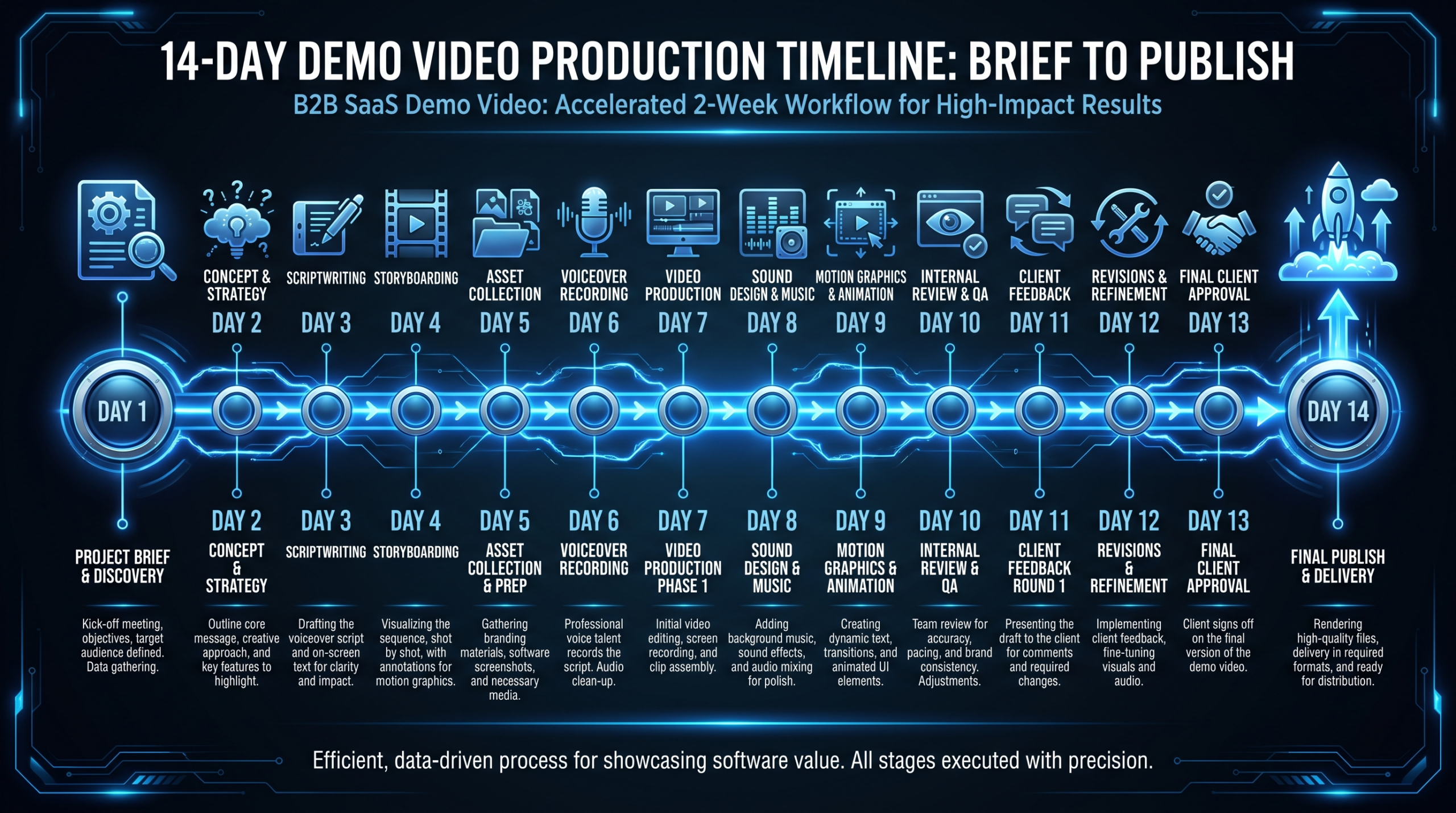
The header image shows the full sprint at a glance. Here's what each phase actually involves — and where most projects lose time.
14-Day Demo Video Production Sprint
Creative Brief & Discovery
Lock the ICP, JTBD, funnel stage, single outcome, CTA, and distribution channel before writing a single word of script. This is the phase most teams skip — which is why they end up doing six rounds of revisions instead of two.
Scriptwriting & Narrative Structure
Write for the ear, not the eye. A 90-second script is roughly 225 words at natural speaking pace. Read it aloud and time it. Define voiceover tone (conversational vs. authoritative), pacing markers, and the exact moments when the product UI appears on screen.
Storyboarding & Visual Concepts
Map the visual sequence: which screens, in what order, with what motion graphics overlays. Identify any assets that don't exist yet — UI screens you need to record, graphics you need designed. Flag these in days 3–4, not days 8–9. Late asset discovery is the most common timeline killer.
Script Review & Asset Collection
Script and storyboard go to stakeholders for one consolidated round of feedback. Simultaneously: screen recordings and UI captures happen with real data, clean state, and populated with plausible demo scenarios rather than "lorem ipsum" placeholder content. Never ship a demo with [email protected] in the UI.
Voiceover Recording & Screen Recording
Professional VO session with the approved, timed script. Screen recordings captured at 4K. Audio levels set, room tone captured for background fill, plosives edited. A professional VO takes 2–4 hours including direction, selects, and room noise passes.
Editing, Motion Graphics & Animation
Assembly cut first (pure sequence), then creative edit (pacing, cutaways, callout text), then motion graphics pass (zoom animations, UI highlights, text overlays, data callouts). Color correction for screen recordings. For SaaS demos, UI zoom and highlight animations are the difference between "clear" and "impressive."
First Draft Review & Revisions
Internal first draft delivered. Stakeholder feedback collected in a single consolidated document — not in email chains, not in separate Slack threads. Two revision rounds is standard. More than that is a brief problem, not an execution problem. Log all feedback with timestamps to prevent "I thought we already fixed that" cycles.
Polish, QA & Final Rendering
Audio mastering, final color pass, subtitle and caption generation, format exports: 16:9 for web, 9:16 for social, 1:1 for LinkedIn. QA checklist: CTA visible and correctly linked, no test UI data exposed in screen recordings, brand colors accurate, audio levels consistent throughout.
Client Sign-off & Distribution
Final sign-off, asset delivery in all required formats, upload to hosting platform (Wistia, Vidyard, or YouTube), embed code generated, analytics tracking configured, landing page updated, metrics baseline established. Published and live.
The two phases that most commonly break the 14-day timeline: Days 1–2 (brief and discovery) because teams rush past them, and Days 9–10 (revision cycles) because feedback arrives from five people in five separate channels instead of one consolidated document.
If you're working with an external video production team, see how VEC structures client engagements on our how it works page — the brief-to-deliver workflow is built to eliminate exactly these bottlenecks.
Demo Video Production Checklist
Use this before briefing anyone — internal team or external agency. Every unchecked item is a potential revision round later.
Pre-Production Checklist
| Item | Why It Matters | Done? |
|---|---|---|
| ICP defined (role, company size, industry) | Determines script tone, pain points, and CTA | ☐ |
| Funnel stage confirmed | Determines length, depth, and CTA type | ☐ |
| Single outcome statement written | "This video shows [ICP] how to [achieve X]" | ☐ |
| Distribution channel confirmed | Affects format, captioning, and thumbnail requirements | ☐ |
| Screen recording environment prepared | Clean UI, realistic demo data, no test accounts visible | ☐ |
| Brand assets compiled | Logo, color codes, font files, motion template | ☐ |
| Stakeholder review process defined | Who reviews, by when, how many rounds maximum | ☐ |
| Metrics plan defined | Primary KPI, engagement metric, attribution window | ☐ |
In-House vs Agency vs Dedicated Team: What the Numbers Actually Look Like
The build-vs-buy decision for demo video production is more nuanced than it first appears. Here's the honest cost comparison for a Series B SaaS team producing 4–8 demo videos per quarter:
Team Structure Comparison: 4–8 Demo Videos Per Quarter
| Model | Est. Monthly Cost | Turnaround | Brand Consistency | Scalability |
|---|---|---|---|---|
| In-house editor (1 FTE, US) | $7,000–10,000 (salary + benefits) | 3–5 business days | High | Low — single point of failure |
| Freelancer (per project) | $2,000–6,000 (variable) | 5–10 business days | Low | Medium |
| Project-based agency | $4,000–12,000 (variable) | 10–20 business days | Medium | Medium |
| Dedicated team (VEC Growth plan) | From $5,000/mo | 5–8 business days | High | High — built-in redundancy |
The in-house model looks attractive until you account for benefits, software licenses, equipment, and the fragility of a one-person editing operation. When your editor takes PTO or resigns, your entire video program stops.
A dedicated team from a specialist provider like VEC gives you a senior editor, junior editor, project manager, and creative director for roughly the same loaded cost as one mid-level in-house hire — with built-in redundancy and zero recruitment overhead. VEC's Growth plan, for example, guarantees doubled video output within 90 days or month four is free.
For a deeper look at what drives cost across production models, see our analysis of video editing cost per minute — including how per-minute cost drops significantly as volume and team continuity increase.
The question isn't "can we afford a dedicated video team?" — it's "what does each demo video cost us in lost pipeline when it's delayed, underwhelming, or placed at the wrong stage of the funnel?"
How to Brief Your Video Team in 30 Minutes
A complete brief prevents 80% of revision rounds. Here's the eight-field format that covers everything a production team needs to make every creative decision correctly — without requiring constant check-ins.
The 8-Field Demo Video Brief
- Video objective: What specific action should a viewer take after watching? Not "understand our product" — "book a demo call" or "start a free trial."
- Primary viewer: Job title, company size, industry, current pain state. One person, not a persona committee built by consensus.
- Funnel stage: TOFU / MOFU / BOFU / Post-sale. This determines length, depth, and CTA.
- Single outcome: One sentence. "This video shows [VP of Sales at Series B SaaS] how to reduce CRM data entry by 70% using our auto-capture feature."
- Key scenes: Three to five specific UI flows or product moments that must appear. Not a feature list — specific user journeys the ICP actually cares about.
- CTA and next step: Exact copy for the end-card CTA. Exact URL. Exact next step in the buyer journey.
- Brand constraints: Logo placement, color usage, music style, VO tone, any competitor names or claims to avoid.
- Distribution and format: Where will this live? What aspect ratios are needed? (Homepage = 16:9. LinkedIn organic = 1:1. Stories/Reels = 9:16.)
Fill this out before your first call with a production team. It cuts briefing time in half, eliminates scope creep, and gives your editor a clear north star for every creative decision. If you're exploring outsourcing your video production for the first time, our guide to outsourcing video editing walks through how to structure the handoff so the external team can operate as a true extension of your marketing function.
Weak Brief vs Strong Brief: Side by Side
Brief Quality Comparison
| Field | Weak Brief | Strong Brief |
|---|---|---|
| Objective | "Show how our platform works" | "Drive demo bookings from homepage visitors" |
| Viewer | "Marketing teams at SaaS companies" | "VP Marketing, 50–200 person Series B SaaS, evaluating video production vendors" |
| Outcome | "Highlight key features" | "Show how our platform cuts video production time from 3 weeks to 5 days" |
| CTA | "Visit our website" | "Book a free 20-minute strategy call — button links to /book-call/" |
| Key scenes | "Show the dashboard" | "1) Upload raw footage, 2) Auto-transcription review, 3) One-click export to client portal" |
The strong brief takes 20 extra minutes to write and saves 2–3 rounds of revisions. For a team producing four or more demo videos per quarter, that's a meaningful time saving — and a significant cost reduction if you're working with an agency where additional revision rounds are billed separately.
Frequently Asked Questions
How long should a SaaS demo video be in 2026?
It depends entirely on funnel stage. Homepage hero demos should be 60–90 seconds maximum — engagement drop-off accelerates sharply beyond that for cold visitors. MOFU feature demos can run 2–4 minutes for a qualified prospect who has expressed intent. BOFU walkthroughs used in sales conversations can run 5–10 minutes, because the viewer has high intent and is actively evaluating. The rule: match length to the viewer's current commitment level. A cold visitor hasn't committed to anything; a warm prospect in active evaluation has committed to the evaluation process.
What does a quality SaaS demo video realistically cost?
A professional 90-second SaaS demo video — scripted, with motion graphics, professional VO, and proper screen recordings — typically runs $3,000–8,000 as a standalone project with a quality agency. Under a retainer or dedicated team arrangement producing multiple demo videos per month, the effective per-video cost commonly drops to $1,500–3,500 depending on complexity. VEC's Growth plan at $5,000/month is structured to cover 2–4 polished demo videos per month plus supporting social cut-downs. See the pricing page for current tier details.
Can we produce a quality demo video in under 14 days?
Yes, with defined tradeoffs. An accelerated 7-day sprint is achievable if the creative brief is fully locked before day 1, the script is approved in one consolidated round, screen recordings are captured by day 2, and revisions are limited to a single pass. Teams commonly report that rushing the brief phase — not the production phase — is what creates the most expensive delays and re-work. If your timeline is under 7 days, expect a rush premium of 25–40% from most agencies and accept limited revision cycles as part of the compressed scope.
What makes a SaaS demo video convert versus just getting views?
Four factors matter most: 1) The first 10 seconds earn continued attention — lead with the outcome, not your logo. 2) The video is built around one ICP, one problem, one outcome — not a feature catalogue. 3) The CTA matches the buyer's funnel stage and asks for a proportionate commitment. 4) The video is placed at the right stage — a 5-minute deep-dive on a cold homepage typically kills conversion, while a 90-second teaser in a warm nurture sequence leaves qualified prospects wanting more context. All four need to be true simultaneously.
Should we use a dedicated video team or hire in-house for ongoing demo video production?
For most Series A–C SaaS companies producing 4–12 videos per quarter, a dedicated external team delivers better economics and resilience than a single in-house hire. One US-based in-house editor runs $7,000–10,000/month fully loaded, covers 1–2 videos per week at most, and creates a single point of failure — when they leave or take leave, the program stops. A dedicated team from a specialist provider includes a senior editor, junior editor, and project manager for a comparable investment, with built-in redundancy and no recruitment cost. The in-house model makes more financial sense when you consistently exceed 20+ videos per month and need someone fully embedded in your product team's daily workflow.
Ready to Run Your 14-Day Demo Video Sprint?
VEC's dedicated team model is built specifically for SaaS companies that need consistent, high-converting demo videos without the overhead of hiring in-house. Growth plan starts at $5,000/month. Double your video output in 90 days — or month four is free.
Book a Free Strategy Call See How It Works See Pricing
