
Demo Video Metrics That Matter Beyond Views
TLDR
- Views and impressions measure distribution, not persuasion — use them as context, not as goals.
- The metrics that predict revenue: watch-through rate, hook retention, click-through to trial or demo, influenced pipeline, and sales usage rate.
- Platform instrumentation (Wistia, Vidyard) + UTM discipline + CRM fields = a closed-loop attribution system you can defend in a board meeting.
- Most B2B SaaS teams under-report demo video impact because they skip the CRM integration step — that is where the pipeline credit lives.
Table of Contents
- Why View Count Is the Wrong North Star
- Engagement Metrics That Predict Conversion
- Pipeline and Revenue Metrics
- Metrics by Funnel Stage: The Full Table
- How to Instrument Your Demo Video Stack
- What "Good" Looks Like: Benchmarks by Category
- Vanity-Metric Traps to Avoid
- Monthly Reporting Template You Can Copy
- FAQ
Your demo video got 4,200 views last quarter. Marketing is calling it a win. Sales is shrugging. And your pipeline number has not moved.
Here is the uncomfortable truth: views are a distribution metric. They tell you how many times the video loaded — nothing about whether it convinced anyone to book a call, start a trial, or raise their hand for a live demo. Optimizing for views is like judging a sales deck by how many people opened the email attachment.
This guide covers the demo video metrics that actually predict revenue impact, how to instrument your stack to capture them, what good benchmarks look like, and a simple monthly reporting template you can hand to your VP or your board. Everything here is actionable without a data science team — just a video platform, disciplined UTM hygiene, and one CRM field.
Why View Count Is the Wrong North Star
Views are easy to count. Every platform reports them. That is precisely why they dominate dashboards even when they are the least useful signal in the stack.
A view on YouTube counts after 30 seconds. A view on LinkedIn counts after 3 seconds. A view in a Wistia embed counts the moment the player loads — regardless of whether anyone pressed play. These definitions are not standardized, not comparable, and not tied to whether your video delivered its persuasion goal.
More importantly, views do not discriminate. A competitor researching you, a job candidate evaluating the company, and a champion building internal consensus to buy your product all show up as "views." They are not equivalent audiences, and treating them as equivalent inflates your sense of impact while obscuring who is actually being moved through the funnel.
The teams running the best demo video programs at Series A–C SaaS companies have largely deprioritized views as a primary success metric. They still track it — as a distribution benchmark, a reach indicator, and an input for algorithmic ranking. But they do not optimize for it. They optimize for what happens after the view.
"The question is never how many people saw the video. It is how many of the right people watched enough of it to want a conversation."
Engagement Metrics That Predict Conversion
These metrics require a proper video platform (more on instrumentation below) rather than native embeds. They measure what the viewer actually did — not just that the video loaded.
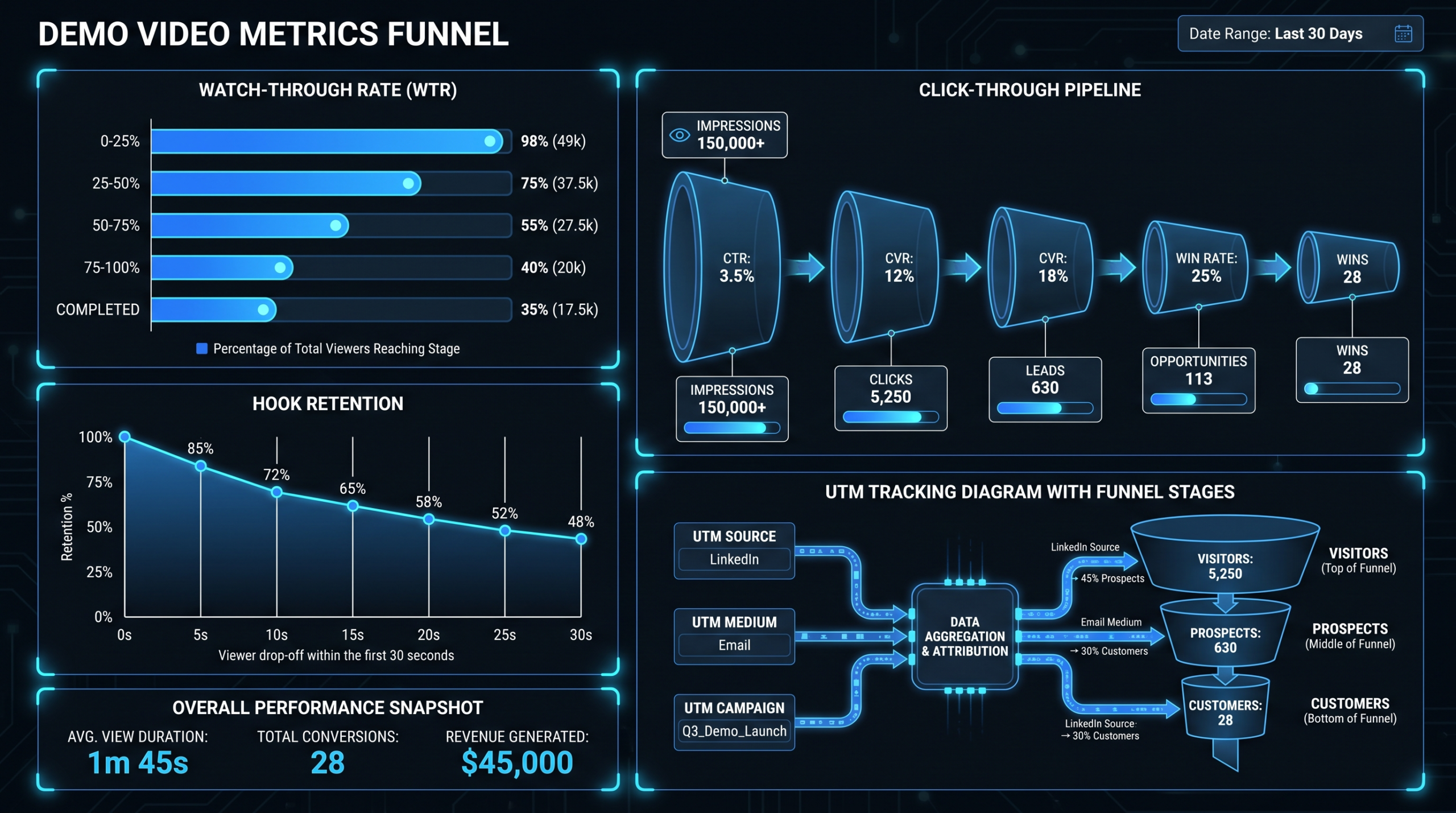
Watch-Through Rate
Definition: The percentage of the video each viewer watched, averaged across all viewers. Also called "average watch percentage" or "video retention rate" depending on the platform.
Why it matters: A high watch-through rate on a demo video means your narrative held attention across the full runtime. For a product demo, this correlates strongly with intent — someone who watched 80% of your pricing and packaging section is a fundamentally different prospect than someone who dropped off at 15%.
How to use it: Segment watch-through by traffic source. Organic search visitors, newsletter subscribers, and paid social audiences typically show different drop-off patterns. A 60% watch-through from your ICP via email and a 20% watch-through from cold paid traffic is a healthy distribution — not a problem. But if your ICP drops at the same moment as cold audiences, that is a structural issue in the video's narrative or pacing worth fixing.
Watch-through rate is also your key diagnostic for revision decisions. Consistent drop-offs at specific timestamps tell you exactly which sections are losing people — feature by feature, pricing slide by pricing slide. Without this data, a demo video refresh is guesswork. With it, you can do a targeted re-edit of the 45-second section that is causing 30% of viewers to bail, without touching anything else.
Hook Retention (0–30 Seconds)
Definition: The percentage of viewers who continue watching past the 30-second mark, expressed as a share of everyone who pressed play.
Why it matters: The first 30 seconds of a demo video are everything. If you open with a company history slide, a talking-head introduction, or a loading screen with your brand music — you are burning the one moment of maximum attention you will ever get with a new visitor. Hook retention measures whether your opening actually works.
It is a separate metric from overall watch-through because hook failures are categorically different from mid-video drop-offs. A viewer who drops at 0:22 never received your value proposition. A viewer who drops at 3:40 probably got it but hit a section that did not apply to their situation.
What to do with it: If hook retention is below 50%, the problem is almost always the first line — the opening sentence, the first visual, or the first five seconds of the voiceover. You do not need to reshoot the entire demo. Fix the hook. In the product demo video production work that dedicated editing teams handle for SaaS clients, a hook re-edit alone commonly improves 30-second retention significantly without touching the rest of the video. It is one of the highest-leverage, lowest-cost interventions available on an existing demo asset.
Click-Through to Trial or Demo
Definition: The percentage of viewers who click a CTA embedded in or adjacent to the video — start trial, book demo, learn more — during or immediately after watching.
Why it matters: This is the first metric that directly touches revenue. Click-through to trial or demo is the video's conversion rate. Every other engagement metric leads here.
Tracking requirements: This requires either an in-video CTA (available in Wistia Turnstile, Vidyard CTAs, and similar platforms) or a click event tracked on the surrounding page. The key is ensuring the CTA destination has UTM parameters that identify the source as the demo video — otherwise you are giving credit to the landing page, not the video that did the convincing.
Click-through rates for demo videos on high-intent pages (pricing, demo request) commonly run in the single-digit to low-double-digit percentage range. On lower-intent pages (blog posts, social embeds), expect lower rates. If you are seeing near-zero click-through on a page where the audience should have purchase intent, the video, the placement, or the CTA offer has a problem worth diagnosing.
Pipeline and Revenue Metrics
Engagement metrics tell you the video is working. Pipeline metrics tell you it is making money. The gap between the two is where most SaaS content teams under-report demo video impact.
Influenced Pipeline
Definition: The total value of deals where the prospect watched the demo video at some point in their journey, regardless of whether the video was the first touch or the deciding factor.
Why it is different from attributed pipeline: Attribution models — especially last-touch — are notoriously bad at crediting mid-funnel content. A prospect might watch your demo video on week two of a 10-week deal cycle, then convert via a direct outreach email on week nine. Last-touch attribution gives the email all the credit. Influenced pipeline models give the demo video credit as a touchpoint in that deal's history.
Why it matters: Influenced pipeline is the metric that justifies reinvestment in demo video quality. If your demo video appears in the journey of 40% of won deals, that is a data point your CFO will act on. It is also the metric that should anchor your quarterly video ROI report — not view counts.
How to capture it: Your CRM needs a "demo video viewed" field or activity log entry on each contact record. This requires the video platform to fire a webhook or API call to your CRM when a known contact watches the video. The technical setup is covered in the instrumentation section below, but the key point is that this connection must be built deliberately — it does not happen automatically from a YouTube embed.
Sales Usage Rate
Definition: The percentage of your sales team's active deals where the demo video was sent or shared with the prospect.
Why it matters: A demo video is only as powerful as its deployment. If your sales reps have a professionally produced demo video and are not using it in the majority of deal cycles, the problem may not be the video — it may be adoption. Sales usage rate surfaces this gap and turns it into a coachable metric.
Platforms like Vidyard track share events and view events per recipient, which means you can build a dashboard showing: which reps are sending demo videos, whether prospects are watching them, and whether deals where the video was watched advance faster than those where it was not. That last comparison — video-touched deals vs. non-video-touched deals — is often the most compelling data point for justifying a demo video refresh investment.
Low sales usage rate is also a feedback signal on the video itself. If reps are not sharing it, ask them why. Common answers: the demo feels outdated, it does not match the objections their specific prospects raise, or the runtime is too long for email sharing. All of these are fixable production decisions.
Assisted Conversions and Deal Velocity
Assisted conversions: Completed deals where the demo video was a touchpoint — not necessarily the last one. Platforms like HubSpot and Salesforce support multi-touch attribution reporting that can surface this. The setup requires that video views are logged as contact activities in your CRM.
Deal velocity: The average number of days from first touch to close in deals where the demo video was watched, compared to deals where it was not. If demo-video-touched deals close 12 days faster on average, that is a pipeline acceleration argument with a real dollar value attached — multiply by your average deal size and your deal volume to get a revenue impact estimate.
Metrics by Funnel Stage: The Full Table
Different metrics matter at different funnel positions. Here is how to map them across the full buyer journey for a B2B SaaS demo video program:
Demo Video Metrics by Funnel Stage
| Funnel Stage | Key Metric | What You Are Measuring | Target Range (Hedged) |
|---|---|---|---|
| Awareness | Unique viewers (ICP-qualified) | Distribution breadth among target audience | Benchmark vs. prior period; no universal target |
| Awareness | Hook retention (0–30s) | Opening effectiveness | Typically 50–70% of play-starts |
| Consideration | Watch-through rate | Narrative holding power across runtime | Commonly 40–65% for 2–7 min demos |
| Consideration | Heatmap re-watch segments | High-interest content sections | Re-watch on pricing/integrations = positive signal |
| Decision | CTA click-through rate | Video conversion rate | Often 5–15% on high-intent pages |
| Decision | Trial or demo request rate (video traffic) | Downstream conversion after video view | Varies by ICP fit; compare vs. non-video traffic |
| Sales | Sales usage rate | Rep adoption in active deals | Aim for 70–90% of reps sharing in deals above a defined ACV threshold |
| Revenue | Influenced pipeline ($) | Total pipeline value touched by demo video | Patterns vary widely; track trend over time |
| Revenue | Deal velocity delta (video vs. no video) | Pipeline acceleration effect | Any positive delta is worth quantifying in dollars |
The ranges above are drawn from patterns commonly reported by B2B SaaS video teams and platforms like Wistia and Vidyard. Your product category, deal complexity, and video format will shift these numbers significantly. Treat them as starting benchmarks, not performance contracts — and always compare your numbers against your own prior periods before comparing to industry figures.
How to Instrument Your Demo Video Stack
Good metrics do not happen automatically. They require a deliberate instrumentation layer connecting your video platform, your website analytics, and your CRM. Here is how to build it without a data engineering team.
Wistia and Vidyard-Style Platforms
Native embeds — YouTube, free Vimeo, Loom public links — do not provide the viewer-level data you need for B2B attribution. You need a platform built for pipeline tracking.
Wistia is the most commonly used choice for website embeds and landing pages. It provides per-viewer heatmaps (available when viewers are identified via email capture), watch-through graphs, CTA click tracking, and Turnstile email gating. Its integration with HubSpot and Marketo means identified viewer events can fire directly to contact records. Wistia's documentation on video engagement metrics is a solid reference for understanding how their tracking layer works in practice.
Vidyard is the stronger choice for sales enablement — where reps share individual video links with specific prospects. Vidyard's per-recipient tracking shows exactly which prospect watched which video, for how long, on what date. This is what makes sales usage rate and per-deal video engagement measurable at the individual deal level. Vidyard's video marketing metrics guide covers their analytics capabilities in detail.
For most mid-market SaaS teams: Wistia on website and landing pages combined with Vidyard for sales outreach covers the full funnel. The key is choosing one platform for each context and staying consistent — mixing platforms within the same funnel stage creates data silos that undermine attribution accuracy.
UTM Discipline
UTM parameters are the connective tissue between your video platform and your web analytics or CRM attribution model. Without disciplined UTM hygiene, you cannot prove which traffic source drove which conversions — and your demo video's contribution disappears into "direct" or "other."
The standard UTM structure for demo video traffic:
utm_source: where the video lives (wistia, vidyard, youtube, linkedin)utm_medium: how it is being distributed (email, social, embed, cpc)utm_campaign: the campaign or content program (demo-video-q3-2026)utm_content: which specific video if you have multiple (product-overview-v2)
Critical rule: every CTA link in or around the demo video gets UTM parameters. The video watch-through data lives in Wistia or Vidyard. The conversion event lives in your CRM or website analytics. UTMs are what stitch them together. Without them, even a perfectly instrumented video platform cannot tell you what happened after the click.
Build a UTM naming convention document, share it with your demand gen team and your video production partner, and enforce it on every new video release. The tracking layer should be set up before the video goes live, not retrofitted after the fact. When briefing a new demo video, include UTM-tagged CTA destinations as a required deliverable alongside the edit itself. See our guide on SaaS video production for how leading teams structure the handoff between production and distribution.
CRM Fields
The final piece is getting video engagement data into your CRM so deal teams can see it and so influenced pipeline reports can be generated. There are three approaches, from most to least automated:
- Native integration: Wistia to HubSpot and Vidyard to Salesforce both have native integrations that can log video view events as contact activities. Setup typically takes 30–60 minutes per platform. This is the cleanest option and requires no ongoing maintenance once configured.
- Webhook routing via Zapier or Make: If your CRM is not natively supported, most video platforms fire webhooks on view events. Use Zapier or Make to route those events to a custom CRM field — for example, "Demo Video: Last Viewed Date" or "Demo Video: Percent Watched." This covers most major CRMs not in the native integration list.
- Manual tagging (minimum viable): If you are early-stage and lack the integration bandwidth, have your SDR or AE team manually tag contacts in the CRM when they confirm a prospect watched the demo. It is not scalable, but it gets you influenced pipeline data now — and 90 days of tagged data showing pipeline correlation is usually enough to justify the platform investment.
Once the data is in your CRM, build two saved reports: "Demo Video Watchers in Active Pipeline" and "Won Deals — Demo Video Touchpoint Yes/No." These two views give you everything you need for a monthly video metrics review and a compelling reinvestment argument. To understand what a full video production workflow looks like end to end — from brief to distribution to measurement — our how-it-works page walks through VEC's process with SaaS clients.
What "Good" Looks Like: Benchmarks by Category
Benchmark ranges in this space are contentious because they vary significantly by product category, deal size, and funnel position. The ranges below reflect patterns commonly observed across B2B SaaS video programs — treat them as starting points, not performance contracts.
Demo Video Benchmarks (B2B SaaS, 2–10 Min Runtime)
| Metric | Needs Attention | Typical Range | Strong Performance |
|---|---|---|---|
| Hook retention (0–30s) | Below 40% | 50–65% | Above 70% |
| Watch-through rate (full video) | Below 30% | 40–60% | Above 65% |
| In-video CTA click rate | Below 2% | 4–12% | Above 15% |
| Page CTA click rate (video landing page) | Below 3% | 6–15% | Above 18% |
| Trial or demo start rate (video-sourced) | Below 5% | 8–18% | Above 22% |
| Sales usage rate | Below 40% | 60–80% | Above 85% |
| Influenced pipeline coverage | Below 15% | 25–45% | Above 50% |
A few important caveats on interpreting these ranges:
- Length affects retention non-linearly. A 90-second highlight reel and a 7-minute full product walkthrough will have very different watch-through rates even if both are high-quality. Compare videos of similar length and intent against each other, not against an industry-wide average that mixes all formats.
- Audience quality matters more than benchmark proximity. A 45% watch-through rate from your ICP-matched email list is more valuable than a 65% watch-through rate from broad paid traffic. Benchmark in context of your audience source, not in isolation.
- Influenced pipeline percentages are highly model-dependent. Companies with longer consultative sales cycles typically see higher video touchpoint rates than product-led growth businesses. Do not compare your 30% against a PLG company's 12% — they are measuring different buyer journeys.
- Trend matters more than absolute position. A watch-through rate that improves from 38% to 52% over three months after a hook re-edit is more meaningful than a static 60% rate with no context. Build month-over-month tracking as your primary evaluation lens.
Vanity-Metric Traps to Avoid
Beyond raw view counts, there are several metrics that look compelling in a slide deck but have limited predictive value for B2B demo video programs. Knowing what to ignore is as important as knowing what to track.
Total Impressions
Impressions measure how often your video thumbnail appeared in a feed — not whether anyone saw it, and certainly not whether anyone cared. On LinkedIn and YouTube, impressions are inflated by algorithmic distribution to non-ICP audiences. They are useful for understanding potential reach; they become misleading when treated as evidence of impact. Keep them in the distribution section of your report and never let them appear in your pipeline narrative.
Likes, Shares, and Comments (Social Platforms)
Social engagement metrics on demo videos are almost entirely driven by content style and emotional tone, not by persuasion effectiveness. A polished, energetic demo video will generate more likes than a dry technical walkthrough — but the dry technical walkthrough might convert enterprise buyers at a significantly higher rate. Do not optimize demo video production for social engagement metrics. Optimize for conversion of the audience who matters. These are often in direct tension with each other.
Average View Duration (Absolute Number)
An average view duration of "2 minutes 14 seconds" sounds meaningful until you realize it does not account for video length. That same duration on a three-minute video means most people watched nearly the whole thing. On a ten-minute video, it means most people bailed in the first quarter. Always report watch-through rate as a percentage of video length, not as an absolute duration. The absolute number is only useful when you are comparing videos of identical length.
Play Rate in Isolation
Play rate — the percentage of page visitors who pressed play — measures your thumbnail, your above-the-fold placement, and your surrounding page copy as much as it measures the video itself. A low play rate on a high-converting demo page might just mean fewer but more qualified visitors are pressing play and then converting. A high play rate can mean your thumbnail is doing clickbait-y things that attract the wrong audience. Always pair play rate with watch-through and CTA data before drawing conclusions about what is working.
Subscriber Gains and Follower Growth
For B2B SaaS, subscriber and follower gains from demo video distribution correlate poorly with pipeline impact. A large YouTube subscriber base is a distribution asset. It is not a revenue asset. Track follower growth separately from your demo video effectiveness metrics, and do not allow it to inflate your reported video ROI. The question for a demo video program is always "how many qualified buyers did this influence," not "how many people clicked Subscribe."
Monthly Reporting Template You Can Copy
Below is a reporting structure used by content and demand gen teams at SaaS companies with mature demo video programs. It covers all the metrics that matter, fits on one slide or one Notion page, and gives leadership the context to make investment decisions. Copy it, fill in your numbers, and share it with sales and marketing leadership every month.
Monthly Demo Video Metrics Report — Copyable Template
| Section | Metric | This Month | Last Month | Notes / Action Trigger |
|---|---|---|---|---|
| Distribution | Unique viewers (ICP-qualified) | — | — | Filter by company size or industry if CRM-linked |
| Engagement | Hook retention (0–30s) | — | — | Flag for revision if below 50% |
| Engagement | Watch-through rate (avg %) | — | — | Note major drop-off timestamps |
| Conversion | CTA click-through rate | — | — | Breakdown by placement: page vs. in-video |
| Conversion | Trial or demo starts from video traffic | — | — | UTM-sourced; compare to non-video traffic rate |
| Sales | Sales usage rate | — | — | Percentage of active deals where video was shared |
| Pipeline | Influenced pipeline ($) | — | — | Deals with demo video touchpoint in buyer journey |
| Pipeline | Deal velocity — video vs. no video (days) | — | — | Positive delta = pipeline acceleration argument |
| Actions | Top drop-off section to address | — | — | Specific timestamp + proposed edit |
| Actions | A/B test or revision planned this month | — | — | Hook re-edit, new CTA, thumbnail version B |
A few notes on making this template genuinely useful rather than performative:
Fill in last month first. Trends matter more than absolutes. A 52% watch-through rate in isolation tells you nothing. A 52% rate that was 61% last month tells you something changed and you need to find out what. If you do not have last month's numbers, this is month one of a new baseline — accept that the first report is context-free and make sure the next one is not.
Make the action items section non-negotiable. The point of this report is not to celebrate numbers — it is to generate improvement tasks. If your watch-through rate is declining, that is a trigger to pull the heatmaps, identify the drop-off section, and schedule a re-edit. If sales usage rate is below target, that is a trigger for a conversation with your sales lead about what is blocking adoption. Teams that improve month-over-month treat this report as a production input, not a retrospective. See our overview of what video editing services include to understand what a revision scope typically covers.
Share it with sales leadership, not just marketing. Sales usage rate and deal velocity data are as much sales metrics as marketing metrics. A shared report prevents the accountability gap that forms when video performance lives exclusively in a marketing dashboard that sales never sees. The best-performing demo video programs are joint marketing-sales assets — measured, owned, and iterated on by both teams.
Add a "most-rewatched 30 seconds" row if your platform supports it. Knowing which segment of your demo is most rewatched tells you what your prospects find most valuable — which is also what your sales reps should lead with in discovery calls. That kind of content intelligence is one of the underused benefits of a properly instrumented video stack, and it is the kind of feedback loop that makes demo video programs compound in effectiveness over time.
For SaaS teams producing a high volume of demo videos and format cuts who need both consistent output and fast revision turnarounds, VEC's dedicated team model is built specifically for this use case. Plans start at $5K/month with a guarantee to double your video output within 90 days. See current pricing for details on what each plan covers.
Frequently Asked Questions
What is a good watch-through rate for a product demo video?
For B2B SaaS product demos in the 2–7 minute range, a watch-through rate in the 40–60% range is commonly observed. Above 65% is strong, especially on longer demos where maintaining attention is harder. Below 30% suggests a structural issue — either the audience is not qualified for the content, or there is a specific section causing viewers to exit. Pull the heatmap data to identify where drop-offs are concentrated before concluding the video needs a full rebuild. Often a targeted re-edit of one or two problem sections moves the number significantly.
How do I measure demo video impact on pipeline without a CRM integration?
Start manually. Create a custom CRM field called "Demo Video Viewed" and have your SDR or AE team tag contacts when they confirm a prospect watched the demo — via a reply to a sharing email, a mention in a discovery call, or a video platform view notification. It is not automated, but 90 days of tagged data typically shows enough pipeline correlation to justify the platform integration investment. The manual approach also forces your sales team to think about demo video as a trackable deal asset rather than a nice-to-have attachment.
Should I use Wistia or Vidyard for demo video tracking?
They serve different parts of the funnel. Wistia is stronger for website embeds, landing pages, and content-led distribution — it is built around the viewer experience and marketing attribution. Vidyard is better for sales-led motion where reps share specific video links with specific prospects and need per-recipient engagement data. Most mid-market SaaS companies benefit from both: Wistia on the marketing side, Vidyard for sales outreach. If budget is a constraint, start with the platform that aligns with your primary go-to-market motion — and add the second when your sales cycle or content program expands.
What is the difference between attributed and influenced pipeline for video?
Attributed pipeline — especially under last-touch models — credits the most recent touchpoint before conversion. Influenced pipeline credits any touchpoint in the buyer's journey, including a demo video watched on week two of a 10-week deal cycle. For demo videos, which tend to be mid-funnel consideration assets rather than final converting actions, influenced pipeline almost always gives a more accurate picture of impact. Most major CRMs support multi-touch or influence reporting natively — the prerequisite is that video view events are logged as contact activities in the CRM, which requires the integration setup described above.
How often should we refresh or update our demo video?
The monthly metrics report should answer this objectively. Declining watch-through rate, hook retention below 50%, and sales reps citing "it feels outdated" are all triggers for a refresh review. As a general guideline, SaaS products change enough that a demo video over 12–18 months old will likely have accuracy issues on top of any performance issues. Minor product UI changes or feature additions can often be addressed with a targeted re-edit of specific sections rather than a full reshoot — which is where a dedicated editing partner adds significant speed advantage over a per-project agency relationship. Targeted section re-edits are substantially faster and cheaper than full rebuilds and often move the metrics as much as a complete redo.
Ready to Make Your Demo Video Work Harder?
VEC builds and maintains demo videos for Series A–C SaaS companies — with dedicated editing teams who understand your product, your metrics, and your iteration cycle. Plans from $5K/month. Book a call to see if we are the right fit.
Book a Free Strategy Call See Pricing Plans
