AI Video Editing in 2026: What It Can (and Can't) Replace for B2B Teams
AI video editing for B2B teams has gone from a novelty to a genuine workflow component in the span of two years. In 2024, AI editing tools were mostly parlor tricks — auto-generated captions with questionable accuracy, basic jump-cut removal, and clunky text-to-video generators that produced uncanny results. In 2026, the landscape is dramatically different. Adobe Premiere's AI tools can intelligently extend clips, generate B-roll, and automate color matching. Platforms like Descript have made text-based editing genuinely practical. And dozens of specialized tools handle everything from auto-captioning to clip selection to batch reformatting.
But here's what the hype cycle won't tell you: AI video editing in 2026 is extraordinarily good at some things and completely incapable of others. For B2B marketing teams — who need video content that builds trust, communicates complex value propositions, and drives pipeline — understanding this distinction isn't academic. It's the difference between building a scalable content engine and producing a flood of mediocre content that damages your brand.
This guide gives you the complete, honest picture of AI video editing B2B capabilities in 2026. We'll cover what AI can do well, what it can't do yet, which tools matter, how to build a hybrid workflow, and how to future-proof your video operations as the technology continues to evolve.
The Current State of AI Video Editing Tools in 2026
Before we get into strategic recommendations, let's establish what AI video tools can actually do today — not what they promise in marketing copy, but what works reliably in production environments.
What AI Does Well (Right Now)
These are the capabilities where AI editing tools have reached production quality — meaning you can rely on them consistently without heavy human oversight:
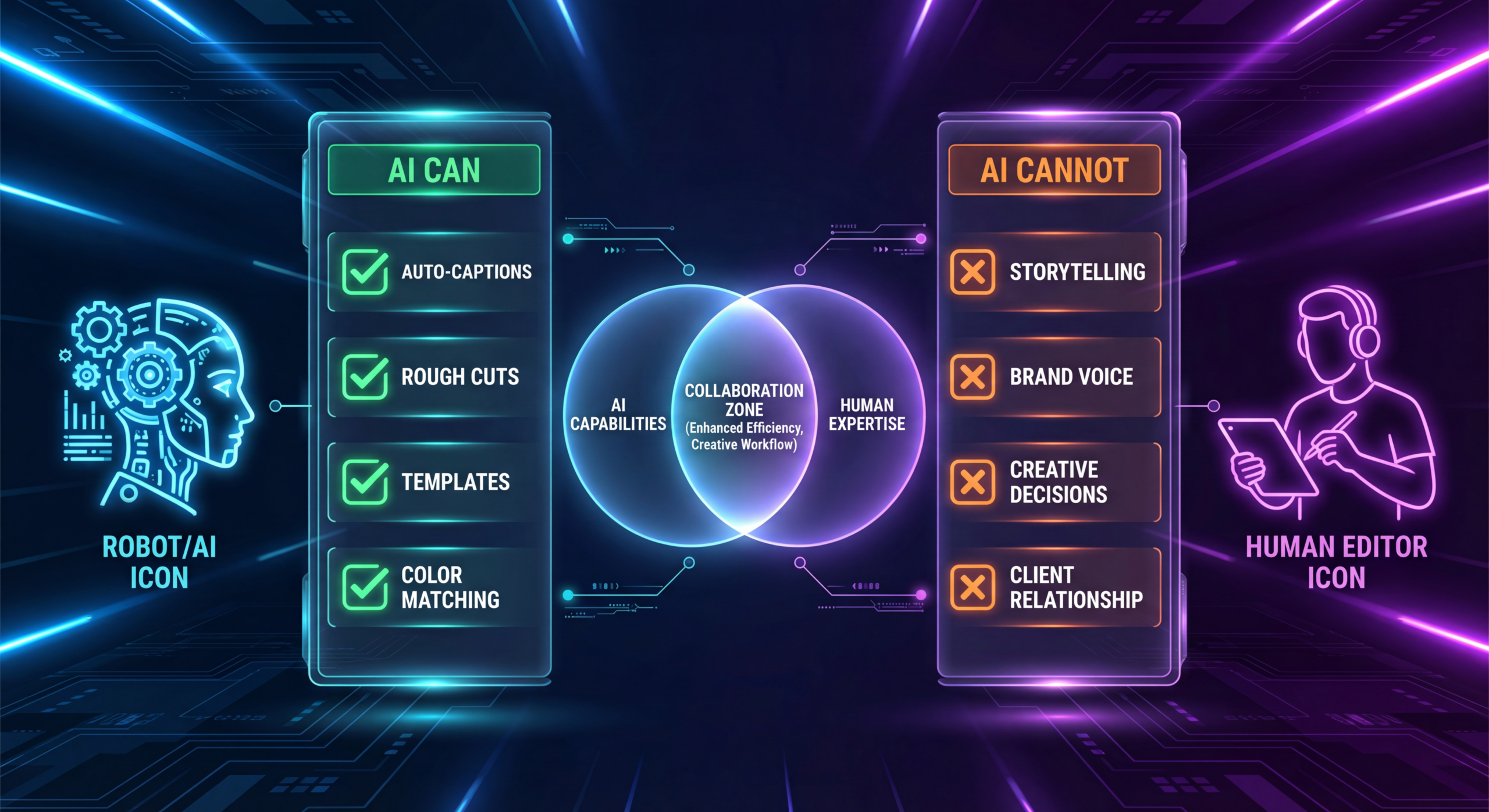
1. Auto-captioning and subtitle generation
This is the most mature AI editing capability. Tools like Descript, Kapwing, and even LinkedIn's native captioning produce accurate captions in seconds. Accuracy rates for English content are consistently above 95%, and most tools handle technical jargon reasonably well (though B2B-specific terminology still needs review). For teams producing LinkedIn video content, AI captioning alone saves hours per week.
2. Silence and filler word removal
AI can identify and remove "um," "uh," long pauses, and false starts from talking-head footage with high accuracy. Descript pioneered this with "filler word removal," and it's now available in multiple tools. For B2B companies producing thought leadership content, this feature tightens deliveries dramatically and reduces editing time by 30–40% on raw talking-head footage.
3. Auto-formatting and aspect ratio adaptation
Tools like Opus Clip and Kapwing can automatically reframe video for different platforms — converting 16:9 footage to 9:16 or 1:1 while intelligently tracking the speaker or focal point. This is genuinely useful for B2B teams that need to repurpose content across LinkedIn, YouTube Shorts, and Instagram.
4. Clip selection from long-form content
AI can analyze a 60-minute webinar or podcast recording and identify the 5–10 most "engaging" segments for social clips. Tools like Opus Clip and Clippie use engagement prediction models to surface moments with high potential. The selections are surprisingly good for a first pass, though they need human curation for B2B context (the "most engaging" clip isn't always the most brand-appropriate one).
5. Basic color correction and audio normalization
AI handles routine technical corrections well — normalizing audio levels, basic color grading, noise reduction, and background removal. These are the "chore" tasks of editing that don't require creative judgment, and AI handles them efficiently.
6. Transcription-based editing
Editing video by editing text is now genuinely practical. You read the transcript, delete the sentences you don't want, rearrange sections, and the video follows. For rough-cut assembly of interview and talking-head content, this is transformative.
What AI Can't Do (Yet)
These are the capabilities where AI editing tools fall short — not because the technology is broken, but because the tasks require judgment, context, and creative intuition that AI fundamentally lacks in 2026.
1. Strategic storytelling and narrative structure
AI can identify "engaging" moments, but it cannot construct a narrative arc. It doesn't understand that your customer testimonial needs to follow a problem → solution → result structure. It can't judge whether a particular edit serves your marketing objective or undermines it. Storytelling requires understanding the audience's emotional journey — something that remains entirely human.
2. Brand-consistent creative decisions
AI tools can apply templates, but they can't make the nuanced creative decisions that maintain brand consistency. The difference between "professional and authoritative" and "corporate and sterile" is subtle, and it's the kind of judgment that requires understanding brand identity at a deep level. An AI tool doesn't know that your brand uses humor sparingly and strategically, or that your CEO prefers a warm, conversational edit over a slick corporate one.
3. Emotional pacing and timing
The best video editors understand rhythm — when to linger on a moment, when to cut quickly, when to let silence speak. This is the craft of editing, and it's what separates a "fine" video from a compelling one. AI can remove dead space, but it can't judge the emotional weight of a pause or the comedic timing of a cut.
4. Complex B-roll integration
While AI can generate simple B-roll and suggest stock footage, integrating B-roll purposefully — in a way that reinforces the message without distracting from it — remains a human skill. A skilled editor uses B-roll to emphasize key points, create visual metaphors, and maintain viewer engagement. AI uses B-roll to fill space.
5. Multi-stakeholder feedback interpretation
Real-world B2B video editing involves interpreting ambiguous feedback from multiple stakeholders. "Make it more punchy" means something different to the CMO than to the product manager. A human editor navigates these dynamics — asking clarifying questions, making judgment calls, and finding creative solutions that satisfy competing requirements. AI tools have no capacity for this.
6. Quality control and final polish
AI-generated edits consistently miss the "last 10%" of quality that makes B2B content feel professional. Misaligned captions, awkward transitions, audio artifacts at cut points, subtitle timing that doesn't match speech rhythm — these small issues accumulate and create a "something feels off" reaction in viewers. A professional editor catches and fixes these details. AI doesn't.
The Real-World Impact: AI Video Editing B2B Case Studies
Let's move from theory to practice. Here's what we're seeing across B2B teams that have integrated AI editing tools into their workflows.
What's Working: The Hybrid Approach
The B2B marketing teams seeing the best results aren't choosing between AI and human editing — they're using both strategically. Here's the model that's working:
- AI handles the first 60%: Transcription, filler word removal, rough-cut assembly, auto-captioning, and aspect ratio reformatting. These tasks are repetitive, time-intensive, and don't require creative judgment.
- Humans handle the final 40%: Narrative structure, pacing refinement, brand consistency, B-roll integration, graphics, final polish, and quality control. These tasks require expertise and strategic thinking.
The result? Teams using this hybrid approach are producing 2–3× more video content without increasing headcount, while maintaining (or improving) quality standards.
What's Not Working: Full Automation
We've seen several B2B teams try to fully automate their video production using AI tools. The pattern is consistent:
- Month 1: Excitement. The team produces 4× more videos than before using AI-only editing.
- Month 2: Quality concerns surface. Engagement rates drop. The content feels "off." Stakeholders start flagging issues.
- Month 3: The team realizes they're spending more time reviewing and fixing AI output than they would have spent on a hybrid workflow. They either revert or restructure.
The lesson: automated video editing tools are accelerators, not replacements. They're incredibly valuable when used as part of a system that includes human editorial oversight. Used alone, they produce volume without quality — which is worse than producing nothing, because bad video actively damages your brand.
"AI is like having a very fast, very capable intern. They can do a lot of the grunt work, but you wouldn't hand them your brand and say 'figure it out.' You give them clear parameters, review their work, and make the strategic decisions yourself."
AI Video Tools for B2B Teams: The 2026 Landscape
Here's our assessment of the major AI video tools available in 2026, specifically evaluated for B2B marketing use cases.
Descript
Best for: Text-based editing, filler word removal, rough-cut assembly
B2B strength: Excellent for processing talking-head content, podcasts, and interviews. The text-based editing paradigm is genuinely useful for marketers who think in words, not timelines.
Limitations: The "AI-refined" cuts still need human polish. Transitions can feel mechanical. Not suitable for complex multi-camera edits.
Opus Clip / Clippie
Best for: Extracting short clips from long-form content
B2B strength: Can process a 60-minute webinar and surface 10–15 potential social clips in minutes. Saves enormous time on content repurposing.
Limitations: Clip selection prioritizes "engagement potential" which doesn't always align with B2B brand standards. You'll use 40–60% of the suggestions; the rest need to be discarded or heavily reworked.
Adobe Premiere Pro (AI features)
Best for: Professional-grade editing with AI acceleration
B2B strength: The 2026 Premiere update added AI-powered clip extension, scene detection, and intelligent color matching. These features accelerate professional editing workflows without replacing the editor.
Limitations: Requires a skilled editor to operate. The AI features are tools within a professional suite, not standalone solutions. This is the right approach for quality-focused teams.
Kapwing
Best for: Quick social media video creation and formatting
B2B strength: Good for rapidly creating simple social clips, adding captions, and reformatting content. Accessible for non-editors on the marketing team.
Limitations: Output quality ceiling is relatively low. Fine for quick social content; not suitable for brand videos, customer stories, or any content where quality significantly matters.
Runway
Best for: AI-generated visual effects and creative experimentation
B2B strength: Limited for most B2B use cases. Potentially useful for generating creative B-roll or visual effects for brand content.
Limitations: The generated content still looks noticeably AI-generated, which can undermine trust in B2B contexts where authenticity matters.
Building a Hybrid AI + Human Video Workflow
Here's the practical workflow we recommend for B2B marketing teams that want to leverage AI video editing without sacrificing quality.
Phase 1: Capture & Organize (Human + AI)
- Human: Plan, brief, and record raw content (see our video editing brief template guide)
- AI: Auto-transcribe all recordings, organize footage by topic/speaker, identify key moments
Phase 2: Rough Assembly (AI-Led)
- AI: Remove filler words and silence, create text-based rough cut, generate initial captions
- AI: For long-form content, identify candidate clips for social repurposing
- Human: Review AI clip selections, choose the best candidates, add context notes for the editor
Phase 3: Creative Editing (Human-Led)
- Human editor: Refine the rough cut into a narrative, adjust pacing, integrate B-roll, add graphics and animations, apply brand styling
- AI: Assist with color correction, audio normalization, and technical cleanup
- Human editor: Final polish, transitions, caption styling, export for all required formats
Phase 4: Format & Distribute (AI + Human)
- AI: Auto-reformat the hero video for additional platforms (square, vertical, etc.)
- Human: QC each reformatted version, adjust framing or captions as needed
- Human: Final approval and distribution
Human QC pass only
AI draft → Human refine
Full editorial control
AI accelerate → Human direct
The Economics of AI vs. Human Video Editing for B2B
Let's talk dollars. One of the biggest selling points of AI video tools is cost reduction. But the economic picture is more nuanced than the tool vendors suggest.
The True Cost of AI-Only Editing
On the surface, AI editing tools cost $30–200/month per seat. Compared to a professional editor ($60–150/hour or $4,000–10,000/month for dedicated service), the math seems obvious. But the true cost calculation must include:
- Internal review time: AI output requires significant review. Your marketing team spends 2–4 hours per video reviewing, fixing, and re-exporting AI-edited content. At a loaded cost of $75–100/hour for a senior marketer, that's $150–400 per video in hidden costs.
- Quality cost: Lower-quality video reduces engagement, hurts brand perception, and ultimately impacts pipeline. This is hard to quantify but very real. If AI-edited content gets 30% lower engagement than human-edited content, you need to produce 43% more content to achieve the same reach — eroding the cost advantage.
- Opportunity cost: The hours your marketing team spends reviewing and fixing AI output could be spent on strategy, campaign planning, and other high-value activities.
- Tool sprawl: Most teams end up using 3–5 different AI tools for different tasks. The cumulative subscription cost, plus the time to manage and learn multiple tools, adds up.
The True Cost of Human-Only Editing
On the flip side, relying entirely on human editors without leveraging AI has its own inefficiencies:
- Slower throughput: A human editor can produce 8–12 polished videos per month. With AI acceleration, the same editor can produce 15–20.
- Higher cost per video: Without AI handling the repetitive tasks, more of the editor's time goes to technical work rather than creative work.
- Scaling challenges: Scaling from 10 to 30 videos per month requires hiring additional editors, which takes time and increases fixed costs.
The Sweet Spot: Hybrid Economics
The most cost-effective model combines AI tools for acceleration with human editors for quality and creative direction. Here's what the economics look like:
- AI tools: $100–300/month
- Dedicated editing service: $3,000–8,000/month
- Output: 15–25 polished videos/month
- Cost per video: $130–330
- Quality: Production-grade, brand-consistent, strategically edited
Compare this to AI-only ($50–100/video but lower quality and higher internal review cost) or human-only ($300–600/video but lower throughput). The hybrid model delivers the best cost-per-quality-video ratio.
AI vs. Human Editing: What B2B Buyers Actually Respond To
Here's something the AI editing tool companies don't talk about: AI vs human editing matters to your audience, even if they don't consciously recognize it.
B2B buyers are sophisticated. They consume a lot of content, and they've developed an intuitive sense for quality. Research from LinkedIn's B2B marketing team shows that content perceived as "authentic" and "thoughtful" generates significantly higher trust signals than content perceived as "mass-produced" or "automated."
What does this mean practically?
- AI-edited content tends to feel uniform. Same pacing, same caption style, same transitions. After 3–4 videos, it starts to feel like content, not communication.
- Human-edited content has personality. A skilled editor makes choices that reflect the brand's voice — a slightly lingering pause on an important point, a well-timed cut to B-roll, a caption emphasis that highlights the right word. These micro-decisions create a feeling of intentionality.
- Trust is built through craft. When a prospect watches a well-edited video, they unconsciously associate the quality of the content with the quality of the company. A polished video says "we take what we do seriously." A generic, AI-assembly video says nothing.
For brand videos, customer stories, key thought leadership pieces, and any content that directly influences buying decisions, human editorial quality isn't a luxury — it's a strategic necessity.
Future-Proofing Your B2B Video Workflow
AI editing capabilities will continue to improve. By 2027–2028, we expect AI tools to handle more of the rough editing workflow with higher quality. Here's how to position your team for that evolution.
Invest in Systems, Not Tools
Specific AI tools will come and go. What matters is building a workflow that can incorporate new tools as they emerge. Document your video production process with clear handoff points between AI and human tasks. When a new tool comes along that handles a specific task better, you can swap it in without disrupting the entire workflow.
Develop Your Team's AI Literacy
Your marketing team and your editing partners should understand what AI tools can and can't do. The most effective operators are people who know how to prompt AI tools effectively, recognize when AI output needs human intervention, and can quickly iterate between AI and manual workflows.
Keep Humans in the Loop
As AI capabilities improve, the temptation will be to remove more human touchpoints. Resist this. The competitive advantage in B2B content isn't speed or volume — it's quality and relevance. The companies that maintain human editorial oversight will produce better content than those that fully automate, and that quality gap translates directly into brand trust and pipeline.
Expect AI to Handle More Technical Tasks
Over the next 2–3 years, AI will likely become reliable enough to handle:
- Multi-camera switching and angle selection
- Advanced color grading (beyond basic correction)
- Motion graphics generation from templates
- More accurate B-roll suggestion and integration
- Real-time collaborative editing assistance
Don't Expect AI to Handle Creative Strategy
What AI won't handle in the foreseeable future:
- Understanding your brand voice at a nuanced level
- Making editorial decisions based on marketing strategy
- Navigating stakeholder dynamics
- Creating genuinely original creative concepts
- Understanding the competitive context of your content
The human editor's role is evolving from "person who cuts footage" to "creative director who orchestrates AI tools and human craft." This is a more valuable role, not a less valuable one.
How to Evaluate AI Video Tools for Your B2B Team
If you're considering adding AI video tools to your workflow, here's a practical evaluation framework:
Question 1: What specific task does this tool solve?
Be precise. "AI video editing" is too broad. Is it captioning? Clip selection? Reformatting? Rough-cut assembly? Each task has different quality requirements and different impact on your workflow.
Question 2: What's the quality ceiling?
Run your actual content through the tool. Don't evaluate based on the demo reel — test with your raw footage, your audio quality, your content type. The gap between demo and reality is often significant.
Question 3: How much human review does the output require?
Time the full workflow: AI processing + human review + manual fixes. If the total time isn't significantly less than doing it manually, the tool isn't adding value — it's just adding complexity.
Question 4: Does it integrate with your existing workflow?
A tool that requires exporting to a proprietary format, using a separate platform, and then re-importing creates friction. The best AI tools integrate into workflows your team already uses.
Question 5: What's the real cost?
Include subscription cost + internal review time + learning curve + quality differential. Some "free" AI tools cost more in total workflow time than paid alternatives that produce better output.
Frequently Asked Questions
Will AI replace video editors for B2B content?
Not in 2026, and likely not in the foreseeable future. AI will replace specific tasks within the editing workflow — particularly repetitive, technical tasks like captioning, reformatting, and rough-cut assembly. But the creative, strategic, and quality-assurance aspects of B2B video editing require human judgment that AI fundamentally lacks. The editor role is evolving, not disappearing.
What's the best AI video editing tool for B2B marketing teams?
There's no single best tool — the right choice depends on your specific workflow. For text-based editing and filler removal, Descript leads. For clip selection from long-form content, Opus Clip is strong. For professional editing with AI acceleration, Adobe Premiere's AI features are the most robust. Most B2B teams end up using 2–3 tools for different tasks.
How much time can AI save on video editing?
For the tasks AI handles well (captioning, filler removal, reformatting, rough assembly), time savings are typically 40–60%. For the overall video production workflow including creative editing, the realistic time savings with a hybrid approach are 25–35%. The key insight: AI saves the most time on tasks that were already the most tedious and least creative.
Is AI-edited video good enough for LinkedIn and social media?
For quick, high-volume social clips (internal team shares, event highlights, simple reposts), AI-only editing can be acceptable. For your primary brand content — thought leadership, customer stories, campaign videos — the quality gap between AI-only and human-refined editing is significant and noticeable. Your audience may not articulate why one video "feels better," but they respond to quality with higher engagement and trust.
Should we hire an AI-savvy editor or use AI tools ourselves?
Both, but prioritize the AI-savvy editor. Your marketing team should be familiar with basic AI tools for quick tasks, but the strategic value comes from an editor (in-house or service partner) who uses AI tools as part of a professional workflow. An AI-fluent editor produces better output faster than a marketer using AI tools alone.
How do we maintain brand consistency when using AI editing tools?
Three strategies: (1) Create comprehensive brand templates that AI tools can apply, (2) Always include a human review step specifically focused on brand consistency, and (3) Work with an editing partner who has internalized your brand standards and can catch inconsistencies that AI and templates miss. The template handles 70%; the human catches the other 30%.
What budget should B2B teams allocate for AI video tools?
For a mid-market B2B team producing 10–20 videos/month, budget $200–500/month for AI tools (2–3 subscriptions covering your core use cases). This is supplemental to your editing costs, not a replacement. The ROI comes from increased throughput and time savings on technical tasks, not from eliminating human editing costs.
📋 Get the AI + Human Video Workflow Template
Download our step-by-step workflow template that shows exactly how to combine AI tools with human editing for maximum efficiency and quality. Includes tool recommendations, handoff points, and quality checkpoints.
Download Workflow Template See PricingThe Bottom Line: AI Is a Tool, Not a Strategy
AI video editing for B2B teams in 2026 is genuinely useful — more useful than it was a year ago, and less useful than it will be a year from now. The companies getting the most value from it are the ones who see it clearly: AI is a powerful accelerator for specific editing tasks, not a replacement for the strategic, creative, and quality-driven work that makes B2B video content effective.
The winning formula is simple: use AI to eliminate the tedious work, and invest the saved time into higher creative quality. Let AI handle the transcription, the filler words, the reformatting, and the rough assembly. Let humans handle the storytelling, the brand consistency, the emotional pacing, and the final polish.
That's not a compromise — it's the optimal workflow. And the B2B teams that build it now will have a significant content advantage over those still trying to figure it out in 2027.
If you're looking for an editing partner that combines AI-accelerated workflows with human creative expertise, we'd love to show you how we work.
Ready to Build Your Hybrid Video Workflow?
Our team uses AI tools strategically to accelerate production while maintaining the human editorial quality your brand needs. Let's design your ideal workflow together.
Book a Free Strategy Call Get the Workflow Template