9 Video Editing Outsourcing Mistakes to Avoid
TL;DR
The biggest video editing outsourcing mistakes aren't about choosing the wrong vendor — they're about skipping setup steps that cause every subsequent project to underperform. This guide covers the 9 most common errors, what each costs you in time and quality, and the specific fixes that prevent them. If you're planning to outsource video editing, read this before you brief a single editor.
Table of Contents
- Mistake 1: Choosing the Cheapest Option Without Vetting Quality
- Mistake 2: Handing Off Without Brand Guidelines
- Mistake 3: Skipping the Trial Project
- Mistake 4: No Revision Policy in Writing
- Mistake 5: Outsourcing Volume Before Trust Is Established
- Mistake 6: Poor File Handoff and Asset Management
- Mistake 7: Ignoring Real Turnaround Constraints
- Mistake 8: No Structured Feedback Loop
- Mistake 9: Treating It as Transactional Rather Than Ongoing
- Mistake vs. Fix: Side-by-Side Reference
- Outsourcing Model Comparison
- FAQ
Video editing outsourcing looks straightforward on paper: find a team, send footage, get polished videos back. In practice, content operations leaders at Series A–C SaaS companies routinely discover that the outsourcing relationship breaks down long before the first video ships — and almost always for predictable, preventable reasons.
These aren't failures of talent or vendor selection. They're failures of process, expectation-setting, and structure on the buyer's side. The nine mistakes below are the ones that consistently stall outsourcing programs, inflate revision cycles, and produce videos that never quite feel on-brand.
Each section names the mistake, explains why it's damaging, and gives you a concrete fix you can implement before your next brief.
Mistake 1: Choosing the Cheapest Option Without Vetting Quality
The cheapest outsourced editing rate is rarely the cheapest total cost of video production. When quality misses the mark, the true cost is the time your team spends in revision cycles, the reputational cost of publishing a video that looks off-brand, and the opportunity cost of the launch delay.
Why Teams Fall Into This Trap
Budget pressure is real. When leadership asks why you're spending $X on video editing, "we vetted the quality" isn't as tangible an answer as "we got the rate down." So teams anchor on line-item rate rather than output quality per dollar.
What It Actually Costs
A lower rate paired with two or three additional revision rounds typically costs more in total editor hours than a higher rate with a clear brief and fewer revisions. Beyond hours, there's the less-visible cost: team members spending time on feedback that should be spent on content strategy.
Warning sign: If you're spending more than 90 minutes per video on feedback and revision coordination, your effective cost-per-video is likely higher than you think — regardless of the quoted rate.
The fix: Evaluate vendors on cost-per-approved-minute of finished video, not hourly or per-project rate. Ask any prospective vendor for 3 recent samples from clients in your content category. Run a paid trial (see Mistake 3) before committing to volume. Our guide to video editing cost per minute gives you the benchmarks to evaluate quotes properly.
Mistake 2: Handing Off Without Brand Guidelines
Outsourced editors are skilled at editing — they are not skilled at reading your mind. Without a documented brand guide, every video requires your team to manually correct the same style decisions across every project: the wrong font, a slightly-off color, transitions that don't match your aesthetic, music that clashes with your tone.
What "Brand Guidelines" Means for Video
For video editing outsourcing, brand guidelines go beyond your visual identity PDF. A useful editing-specific guide covers:
- Typography: Fonts, sizes, and hierarchies for lower thirds, title cards, and captions
- Color palette: Exact hex or RGB values for overlays, backgrounds, and text
- Pacing preferences: Fast-cut vs. deliberate, average cut frequency by content type
- Music direction: Genre, BPM range, and emotional tone; approved libraries or tracks
- B-roll sourcing rules: Approved stock libraries, which types to avoid (overly staged, cheesy)
- Caption style: Auto-cap or sentence case, position, color, animation
- Intro/outro templates: Editable project files, not just references
The fix: Before the first brief, create a video brand guide as a shared document and a starter project file (Premiere, Resolve, or DaVinci depending on your vendor's stack). Include annotated reference videos — actual examples with timestamps calling out what's right. One well-built guide eliminates the same feedback across dozens of future projects.
Mistake 3: Skipping the Trial Project
Committing to a volume retainer or ongoing engagement before running a real paid trial is one of the most common and expensive outsourcing mistakes. Portfolios and demos show best-case output — they don't show how a vendor handles your specific content type, your brief style, or your feedback process.
What a Proper Trial Looks Like
A meaningful trial isn't "can you edit this one clip" — it's a real, production-weight project that tests the full workflow: receiving a brief, sourcing assets, producing a first cut, handling a round of feedback, and delivering a final file on schedule. You need to see the vendor under real working conditions, not demo conditions.
Trial Scope Recommendations
- Choose a video type that represents your typical content (not your simplest one)
- Pay fairly for the trial — a vendor investing serious effort will treat it as a real project
- Brief it the same way you'd brief your ongoing work
- Evaluate: output quality, time to first cut, quality of questions asked during the brief, revision turnaround, and final delivery format
The fix: Budget one to two paid trial projects per vendor finalist. Score each trial on a consistent rubric so comparisons are apples-to-apples. Make the winner earn the retainer through performance, not through a polished sales deck.
Mistake 4: No Revision Policy in Writing
Revision scope is the most common source of conflict in outsourcing relationships. Without a written policy, both sides bring different assumptions to every project — the vendor assumes "minor revisions," the client assumes "whatever it takes to get it right." That gap compounds over time into resentment, delayed projects, and scope disputes.
Common Revision Conflicts
- "Can you just swap that music?" — a request that seems minor but requires full re-export
- New stakeholder feedback arriving in round 3 that contradicts round 1 approval
- Direction changes mid-project that reset the edit entirely
- Unclear who on the client side has final approval authority
Warning sign: If your projects regularly exceed 2 revision rounds, the problem is almost always an undefined approval chain or feedback arriving from multiple stakeholders without consolidation before it's sent to the editor.
The fix: Define revision rounds (typically 2–3) in your agreement, specify what constitutes a revision vs. a new brief, and name a single point of contact on your side responsible for consolidating feedback before it goes to the vendor. Anything outside the agreed revision scope is scoped and quoted separately — agree on this before any project begins.
Mistake 5: Outsourcing Volume Before Trust Is Established
Some teams, eager to clear a content backlog, push 10 or 15 videos to a new vendor in month one. If the vendor's output quality or communication style doesn't match expectations, you're now managing 10 underperforming projects simultaneously instead of catching misalignment on one.
The Ramp Logic
Effective outsourcing relationships build confidence incrementally. A phased ramp — 2 to 3 videos in month one, 5 to 7 in month two, full cadence from month three — gives both sides time to calibrate the brief format, feedback style, and file handoff workflow before volume amplifies any friction.
Teams that ramp properly tend to reach steady-state quality faster than teams that flood a new vendor with work immediately, because the feedback loop tightens faster at lower volume.
The fix: Define a 90-day ramp plan before signing. Months 1–2 are calibration; month 3 is full cadence. Gate each phase on quality KPIs: first-cut approval rate, revision round count, on-time delivery rate. If the vendor passes calibration, you scale confidently. If they don't, you've contained the risk. VEC structures every new client relationship this way — it's part of why the team guarantees double video output within 90 days. See how the onboarding model works for detail on that ramp structure.
Mistake 6: Poor File Handoff and Asset Management
Disorganized asset delivery is a silent productivity killer. When raw footage arrives in randomly named folders, with footage from multiple shoots mixed together, with no indication of which takes are selects or which B-roll is approved — editors spend billable hours organizing before they start editing. That time comes out of your budget.
What Disorganized Handoff Looks Like in Practice
- Footage named
MOV_20260831_1.mp4throughMOV_20260831_47.mp4with no cue to which is usable - Brand assets sent in an email thread instead of a shared asset library
- Script and footage living in different locations with no timestamp alignment notes
- No indication of which takes are selects vs. safety shots
- Feedback delivered as a voice note or a screen recording instead of timestamped written notes
The fix: Build a standard intake folder structure before your first project and use it every time. A practical structure: /Project-Name/01-Footage/Selects, /Selects/B-Roll, /02-Assets (logo, fonts, templates), /03-Script, /04-Reference. Name footage files with scene and take numbers. Send timestamped written feedback — not audio, not screen recordings unless you timestamp them in the body. Your editors will deliver faster, and your revision cycles will shrink.
Mistake 7: Ignoring Real Turnaround Constraints
Teams often underestimate how much lead time video editing actually requires — and build production calendars that assume best-case turnaround at every step. When a single project slips, the whole calendar compresses, and editors get rushed briefs with impossible deadlines.
Realistic Turnaround Benchmarks
Turnaround varies significantly by video type, complexity, and vendor model. As a general reference for planning purposes:
Typical First-Cut Turnaround by Video Type
| Video Type | Length | Typical First-Cut Turnaround | Rush Premium (Est.) |
|---|---|---|---|
| Social clip / repost | 15–60 sec | 1–2 business days | Same-day possible, +30–50% |
| Long-form YouTube edit | 8–20 min | 3–5 business days | +25–40% for 1–2 day turnaround |
| Product demo / explainer | 2–5 min | 4–7 business days | +40–60% for sub-3-day |
| Full campaign batch (5+) | Various | 10–18 business days | Rush adds per-video overhead |
| Testimonial / interview edit | 2–4 min | 3–5 business days | +20–35% |
These are planning benchmarks — not guarantees from any specific vendor. Confirm actual turnaround commitments in writing before starting any time-sensitive project.
The fix: Build your content calendar backward from publish date, adding buffer at each production stage. Plan for two revision rounds minimum. Identify which videos are time-critical (product launches, events) vs. evergreen, and brief time-critical pieces first. If your cadence requires reliably fast turnaround, that's a selection criterion for your outsourcing partner — not an assumption to make after signing.
Mistake 8: No Structured Feedback Loop
Feedback delivered inconsistently — sometimes a document, sometimes a Loom, sometimes a string of Slack messages — forces editors to piece together direction from multiple formats. The more disjointed the feedback, the higher the chance that something gets missed or misinterpreted.
The Hidden Cost of Informal Feedback
When feedback arrives as a voice note saying "the middle section feels slow, and also maybe try a different music vibe," the editor must interpret two subjective notes without anchoring context. "Slow" at what timestamp? "Different music vibe" in what direction? Each interpretation attempt is a revision round spent guessing rather than refining.
Wistia's video production team notes that structured creative briefs and timestamped feedback consistently reduce revision cycles in collaborative editing workflows — a principle that translates directly to outsourcing relationships. See Wistia's video review process guide for a framework many content teams adapt for their own use.
The fix: Standardize your feedback format. At minimum: timestamp + description of the issue + your preferred direction. Consolidate all stakeholder feedback into one document before sending — never relay feedback from multiple people in separate messages. Tools like Frame.io, Wipster, or even a shared doc with timestamps work well. The format matters less than the consistency.
Mistake 9: Treating It as Transactional Rather Than Ongoing
Teams that treat video editing outsourcing as a vendor relationship — transactional, interchangeable, always replaceable — consistently get lower quality than teams that treat it as a working partnership. The difference isn't price. It's how much context the editing team carries about your brand, audience, and content strategy.
What Context Does for Output Quality
An editor who has worked on 50 of your videos understands which talking points your audience cares about, which B-roll feels authentic vs. forced, how your audience responds to pace changes, and where your current content strategy is trying to go. None of that context exists on project one. It compounds over time — but only if the relationship is maintained rather than restarted every few months.
HubSpot's research on content team structure consistently points to consistency and institutional knowledge as the primary drivers of quality at scale — the same dynamic applies to outsourced creative teams. Reference: HubSpot's content strategy resources.
The fix: Invest in knowledge transfer early. Share your content strategy, your audience personas, your best-performing and worst-performing videos. Give feedback that explains the "why" behind every note. Treat the outsourcing team as an extension of your in-house team, and you'll see quality compound over time rather than plateau. For the best results, look at how dedicated team models are structured — where the same editors work on your account month after month — in our full guide to outsourcing video editing.
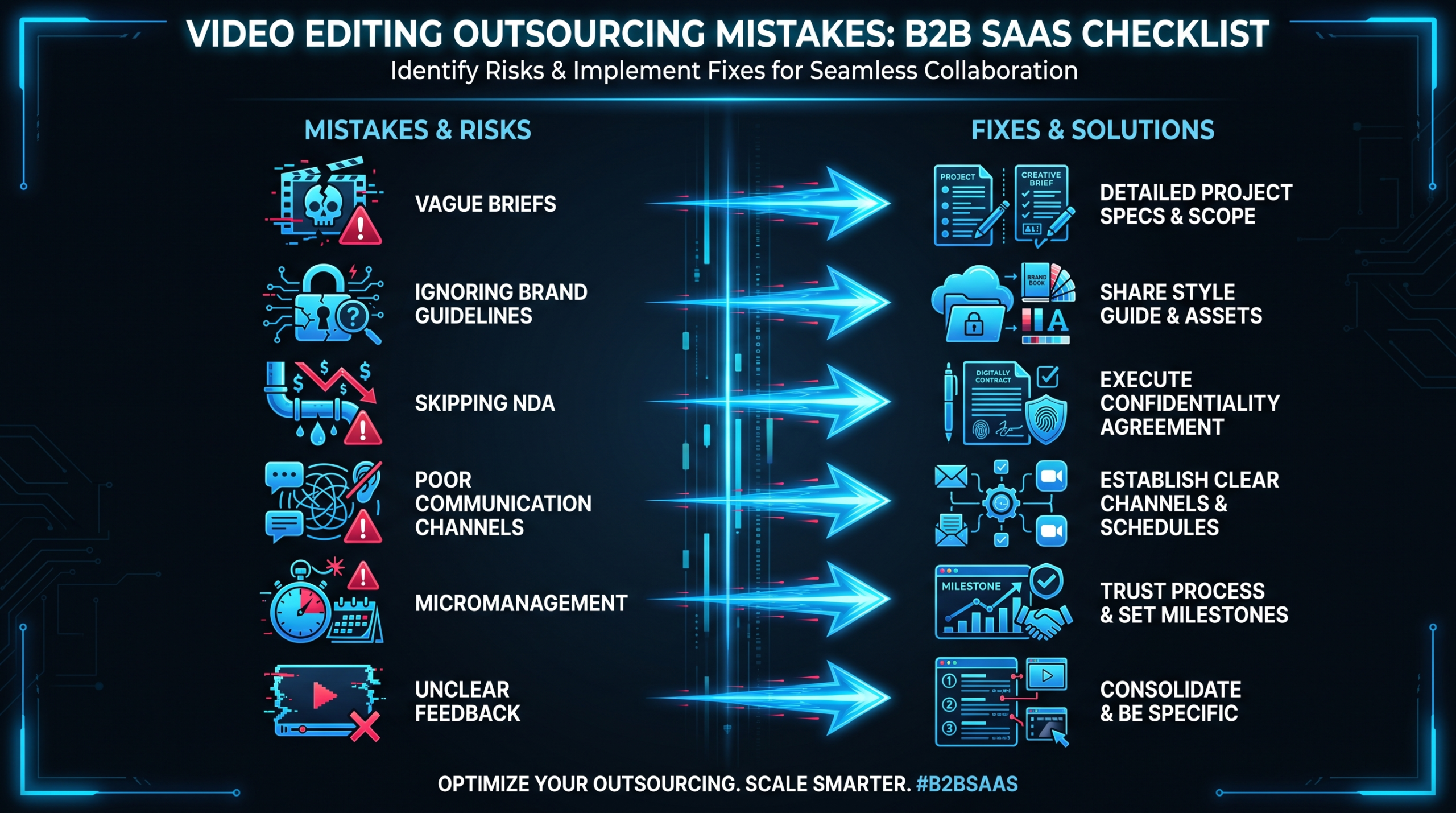
Mistake vs. Fix: Side-by-Side Reference
Here's a quick reference for the nine mistakes and their targeted fixes:
The 9 Mistakes at a Glance
| # | Mistake | Root Cause | Fix |
|---|---|---|---|
| 1 | Choosing on price alone | Anchoring on rate vs. output quality | Evaluate cost-per-approved-minute; run trials |
| 2 | No brand guidelines | Assuming editors infer brand style | Build video-specific brand guide + project file templates |
| 3 | Skipping the trial | Trusting portfolios over live performance | Paid trial on real production-weight project |
| 4 | No revision policy | Differing expectations on both sides | Define rounds, scope, and approval chain in writing upfront |
| 5 | Too much volume too soon | Eagerness to clear backlog immediately | Phased 90-day ramp; gate on quality KPIs |
| 6 | Disorganized file handoff | No standard intake process | Standardized folder structure + named footage + written timestamped feedback |
| 7 | Unrealistic turnaround expectations | Best-case planning with no buffer | Build calendars backward; confirm turnarounds in writing |
| 8 | No feedback structure | Informal feedback via multiple channels | Standardized timestamped feedback; single consolidated send |
| 9 | Transactional mindset | Treating vendors as interchangeable | Invest in context transfer; use dedicated team model |
Which Outsourcing Model Avoids Most of These Mistakes by Default
Not all outsourcing models expose you to the same risks. The table below maps common model types to their inherent risk profile for the nine mistakes covered above. For a deeper analysis of countries and regions to consider when building your outsourcing team, see the best countries for outsourcing video editing.
Outsourcing Model Risk Profile
| Model | Brand Consistency | Revision Risk | Context Retention | Turnaround Reliability | Best For |
|---|---|---|---|---|---|
| Per-project freelancer | Low | High | None (restarts each time) | Variable | One-off needs, tight budgets |
| Freelance marketplace (Upwork/Fiverr) | Low–Medium | High | Low (inconsistent team) | Variable | Simple, templated content |
| Subscription service | Medium | Medium | Low–Medium | Defined SLA | High-volume social content |
| Agency retainer (rotating team) | Medium | Medium | Medium | Good | Steady content with some brand depth |
| Dedicated team (same editors each month) | High | Low | High (compounds over time) | Excellent | Scale + brand consistency at volume |
VEC operates on the dedicated team model — Growth ($5K/mo), Core ($9.5K/mo), and Scale ($16K/mo) plans all assign the same senior editor and PM to your account month after month. That structure directly prevents Mistakes 2, 5, and 9 by default. See VEC's pricing and plan details for the specifics of what's included at each tier.
If you're at the earlier stage of evaluating the outsourcing model options and cost structures, the how to outsource video editing guide covers the full vendor selection process.
Frequently Asked Questions
What is the most common video editing outsourcing mistake?
Handing off without brand guidelines is the most frequently cited friction point, because it creates recurring correction work on every project. Once a brand guide and editable project templates are in place, this mistake is entirely preventable — and the quality lift across subsequent videos is immediate.
How many revision rounds should I include in an outsourcing agreement?
Two rounds is standard for most production types; three rounds is common for complex or brand-sensitive videos. Beyond three rounds, the root cause is almost always an unclear initial brief, missing brand guidelines, or an approval process with too many stakeholders. Fix the process, not just the round count.
How long should a video editing outsourcing trial project take?
A meaningful trial typically runs one to three weeks, depending on the video type. It should include a full brief, at least one round of feedback, and final delivery. The goal is to see the vendor's real working rhythm — not a rush job under demo conditions. Pay for the trial at your standard rate to ensure you're seeing realistic effort.
Is video editing outsourcing worth it for SaaS companies publishing 4–8 videos per month?
At 4–8 videos per month, in-house editing typically costs more in salary, benefits, software licenses, and management overhead than a mid-tier outsourcing retainer — especially when you factor in the consistency and scalability benefits. The break-even point varies by market and content complexity, but teams in that range commonly find outsourcing delivers better output per dollar than a single in-house hire. See the full analysis in the outsource video editing guide.
How do I choose between a freelancer and an agency for video editing outsourcing?
For one-off or infrequent needs, a vetted freelancer can be cost-effective. For consistent volume (3+ videos per month) with brand consistency requirements, an agency or dedicated team model will typically outperform a freelancer arrangement over time — because context and brand knowledge compound in a stable team relationship. The more consistent your publishing cadence, the stronger the case for a structured agency relationship.
Ready to Outsource Video Editing the Right Way?
VEC provides dedicated video editing teams for B2B SaaS companies — same editors, same PM, month after month. Growth, Core, and Scale plans starting at $5K/mo. We guarantee double your video output in 90 days, or month 4 is free.
Book a Free Strategy Call See Plans & Pricing