
Turning Sales Calls into Marketing Video Gold
TL;DR
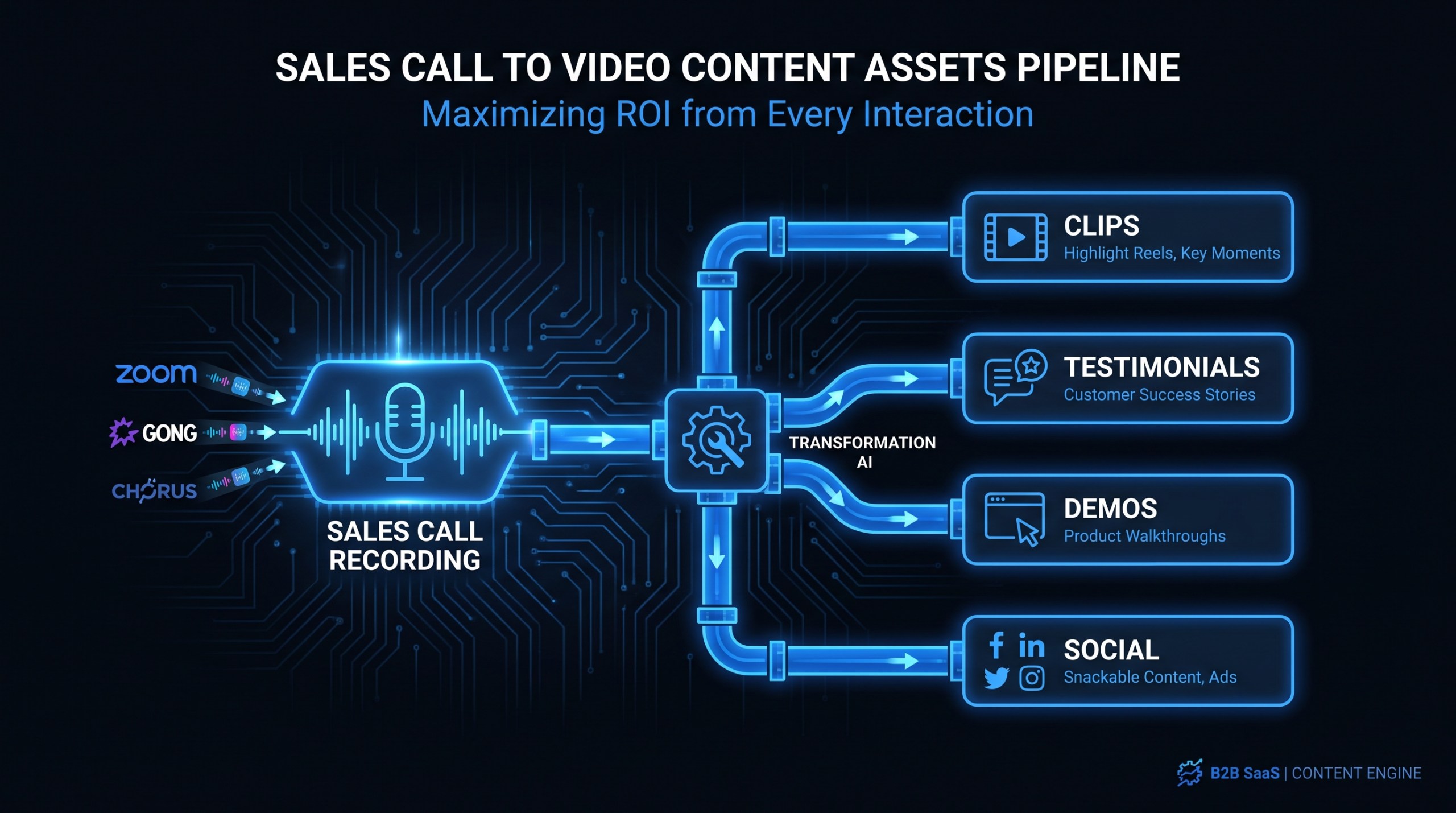
Sales call recordings on Gong, Chorus, and Zoom are your most underused marketing asset. This playbook shows VP Marketing and Head of Content teams at Series A–C SaaS companies how to build a repeatable system for extracting objection-handling clips, FAQ videos, testimonial edits, product demo highlights, and social snippets from recorded calls — then distributing them across the funnel. The result: a high-volume sales call content program that runs without a single additional shooting day.
Table of Contents
- Why Your Sales Calls Are Your Best Untapped Content Asset
- The 5 Types of Video You Can Extract
- Getting Consent: The Legal Framework
- Finding High-Value Moments in Your Recordings
- Editing for Funnel Stage: A Distribution Framework
- Building the Production Workflow
- Choosing the Right Video Editing Partner
- Measuring What Works
- FAQ
Your sales team is recording dozens of calls every week. Discovery calls, demo walkthroughs, objection-handling conversations, QBRs, renewal calls. Every recording is sitting in Gong, Chorus, or your Zoom archive — and most marketing teams never touch them.
That is a significant missed opportunity. Inside those recordings, your prospects are telling you — in their own language — exactly what problems they're trying to solve, what concerns are blocking them from buying, and what results they've achieved since signing. That's more authentic, more specific, and often more persuasive than anything a copywriter will produce from scratch.
This guide is for the VP Marketing or Head of Content who wants to build a real system around this asset — not just clip a call occasionally, but run a repeatable sales call content program that consistently feeds the funnel with video that converts.
Why Your Sales Calls Are Your Best Untapped Content Asset
The average B2B SaaS company invests heavily in content: blog posts, whitepapers, webinars, social campaigns. Yet the richest source of customer language, real objections, and authentic proof goes mostly untouched: the recorded sales call library.
There are three reasons this library is exceptional as a content source:
1. It Contains Your Customers' Exact Language
Marketers spend enormous effort trying to write copy that sounds like their customers. Sales recordings contain the actual words your buyers use to describe their problems. "We're still doing this in spreadsheets" is a prospect articulating a pain point on a call — and it's a better headline than anything your team will workshop in a brainstorm session. The voice-of-customer data is already there; you just need to extract it.
2. It Surfaces Your Real Objections — Not the Ones You Assume
Every marketing team has assumptions about why prospects don't buy. Sales call recordings tell you what is actually happening. The pricing concern you thought was the main barrier might be coming up on fewer than 20% of calls. The integration question you haven't addressed on your website might appear on nearly every demo. Mining call recordings with a tool like Gong's Smart Trackers or Chorus's Topics gives you a data-driven view of which objections need content — not a hypothetical one.
3. It Already Exists — You're Not Creating New Work
Every other content format requires origination: a writer to draft it, a designer to style it, a spokesperson to record it. Your sales call recordings already exist. The marginal cost of turning them into marketing content is the workflow (consent, identification, editing, distribution) — not the creation of new raw material. For a Head of Content trying to increase output without expanding headcount, that's a significant structural advantage.
The Intelligence Platform Advantage
Tools like Gong and Chorus (now ZoomInfo Revenue) make large-scale mining practical. Both platforms automatically transcribe recordings, apply AI-generated topic tags, and allow keyword search across your entire call library. You can query "we're already using [competitor]" and surface every competitive displacement conversation in the last six months. You can search for "this has saved us" and find every unprompted customer success statement. What was once an unworkable archive becomes a searchable content database.
The 5 Types of Video Content You Can Extract From Sales Call Recordings
Not every moment in a sales recording is content-ready, but five content types emerge consistently from any reasonably active call library:
1. Objection-Handling Clips (1–3 minutes)
Find the moments where your AE addresses a specific concern — pricing, migration complexity, competing vendor relationships, security questions — and edit the response into a standalone clip. These serve two functions simultaneously: they become FAQ video content for marketing and coaching material for sales.
Search queries in Gong that surface these: "concerned about," "worried that," "how does that compare to," "the problem I have with," "vs. [competitor name]."
2. Customer Problem Statement Clips (30–90 seconds)
Before your AE says anything, the prospect is articulating their pain. Listen for segments where a customer describes the problem your product solves — unprompted and in their own words. "We were spending twelve hours a week consolidating reports from three different systems" is more persuasive than any copywritten pain point. These clips become the authentic intro to product explainers, the hook for LinkedIn videos, and the problem-framing opening of bottom-funnel testimonials.
3. Product Demo Highlights (2–5 minutes)
A full 45-minute demo call is not distributable content. But within that call, there is often a 90-second sequence where the AE demonstrates three or four features and the prospect reacts with visible enthusiasm — "can we do that?" or "wait, so this would replace our current process entirely?" That segment, extracted and lightly edited, is a compelling product demo video that carries authentic social proof built in. For SaaS teams investing seriously in this format, professional product demo video production can significantly improve the output quality of these call-extracted clips.
4. Customer Testimonials From QBRs and Renewal Calls (30–90 seconds)
Quarterly business reviews and renewal conversations are where customers reflect on the value they've received. These calls regularly contain unsolicited praise — results, ROI statements, specific process improvements. When properly consented (more on that below), these segments are among the most valuable testimonial content a SaaS marketing team can produce, because they're entirely unscripted and attributed to a real customer on a real call.
5. Social Hooks and Short-Form Snippets (15–30 seconds)
The single most impactful sentence from any given call — a counterintuitive customer insight, a striking metric, a question that reframes the category — is a LinkedIn video hook. These 15–30 second clips require the least editing and can be produced in volume. They drive top-of-funnel awareness and often outperform polished brand content because they feel unscripted — because they are.
Getting Consent: The Legal Framework
Using recorded conversations for marketing content requires explicit consent. This is the step most teams either skip (risky) or overcomplicate (paralyzing). The right approach is simple and systematic.
Recording Notifications: The First Layer
Both Gong and Chorus allow you to configure the notification that plays at the start of every recorded call. Most companies use generic language ("this call may be recorded"). Upgrade this to explicit language: "This call is being recorded for training, quality assurance, and marketing purposes." This single change puts all call participants on notice about potential marketing use from the first interaction.
Note: Two-party consent laws vary by U.S. state and across international jurisdictions. Consult your legal team on the specific language requirements for your customer base.
Written Release for Any Published Content
For any clip you intend to publish externally — on your website, in ads, on social — get a written release from every identifiable participant. A one-page video release form is the standard tool. Many SaaS companies add a standard video release clause to their enterprise contract amendments for key accounts, which streamlines the process at renewal time.
The Consent Tracker
Maintain a shared spreadsheet (or a column in your content management system) as a consent tracker. Columns: call ID, call date, participant names, recording platform link, consent notification confirmed (Y/N), written release received (Y/N), approved clip timestamps, approved distribution channels. No clip enters production without a complete row in this tracker. This isn't administrative overhead — it's the legal protection layer for the entire program.
For Internal Participants (Your AEs)
Your sales team members are employees, so the consent bar is lower. Best practice is still to include a clause in their employment agreement or handbook acknowledging that recorded calls may be used for marketing purposes. Brief your AEs proactively: they should know when a clip is being considered for external use, and their awareness often improves the quality of how they handle calls when they know recordings may become content.
Finding High-Value Moments in Your Recordings
With consent protocols established, the operational challenge is efficiency: how do you process a library of hundreds of recordings without manually reviewing every one? The answer is a combination of platform intelligence and a structured identification workflow.
Configure Smart Trackers in Your Recording Platform
Gong's Smart Trackers and Chorus's Topics allow you to define content categories and automatically tag calls at the moment level. Set up the following trackers as a starting point:
- Competitor mentions: Track every competitor name mentioned. Surface calls where AEs handle competitive comparisons.
- ROI language: Keywords like "saved us," "reduced," "hours per week," "we went from X to Y." These surface testimonial-quality moments.
- Pain point language: "The problem is," "we struggle with," "our biggest challenge," "we've been trying to solve."
- Enthusiasm signals: "Love it," "exactly what we need," "this changes things," "can we actually do that."
- Pricing and objection language: "Too expensive," "how does that compare," "what's the ROI," "I need to justify this to my CFO."
These trackers automatically surface the relevant call segments for each category without any manual review. You're running a search against the entire library rather than listening to recordings one by one.
Work Backwards From the Content Calendar
Before mining the library, know what content gaps you're filling. If next quarter's campaign focuses on competitive displacement, start your Gong search with competitor-mention calls. If you're launching a new integration, search for calls where prospects asked about that integration's absence. Mining calls without a distribution plan produces content orphans — clips produced with no home and therefore never published.
The Content Moment Log
Designate someone (content specialist, sales enablement manager, or a dedicated editor) to maintain a running "content moment log" — a simple document listing clip candidates with: call URL, timestamp, video type (objection, testimonial, demo highlight, hook), proposed funnel stage, consent status, and priority. Review this log weekly. The goal is to maintain a pipeline of 10–15 clip candidates in various stages of consent and production, so the editing team is never waiting on sourcing.
Editing for Funnel Stage: A Distribution Framework
The most common mistake in sales call content programs is producing clips without a distribution plan. Each content type belongs in a specific part of the funnel, and editing choices should reflect where the clip will live.
Sales Call Content: Funnel Stage Mapping
| Content Type | Funnel Stage | Primary Channels | Key Editing Priorities |
|---|---|---|---|
| Social hooks (15–30 sec) | Top of funnel | LinkedIn, YouTube Shorts, X | Strong open, captions, minimal branding |
| Problem statement clips | Top of funnel | LinkedIn Organic, Meta paid | Authentic feel, voice-of-customer framing |
| Objection-handling clips | Middle of funnel | Email nurture, retargeting ads | Branded intro/outro, clear resolution |
| Product demo highlights | Middle of funnel | Landing pages, sales deck embeds | Feature callouts, screen-share cleanup |
| Customer testimonials | Bottom of funnel | Proposals, pricing pages, sales sequences | Name/title overlay, color grade, clean audio |
| Full call segments (5–15 min) | Bottom of funnel | Deep-link in sales sequences | Chapter markers, transcript sync |
Top-of-Funnel: The Authenticity Play
Problem statement clips and social hooks work because they don't look like marketing. A 20-second clip of a customer describing a pain point — with clean captions and minimal branding — makes a cold audience feel seen before they've heard your product pitch. The editing priority here is preserving authenticity: don't over-polish, don't add heavy motion graphics, start with the hook in the first two seconds. Platform algorithms reward completion rates; a conversational, unfiltered clip often outperforms a slick brand video at the top of funnel.
Middle-of-Funnel: The Consideration Bridge
Prospects evaluating your product against alternatives need to see two things: that you handle their specific concerns, and that the product actually does what you claim. Objection-handling clips and demo highlights deliver both. At this stage, add branded intros and outros so the content is clearly attributed to your company. For screen-share segments from demo calls, clean up any Zoom compression artifacts, add feature callout text overlays, and ensure captions are available for viewers watching without sound (standard in email and LinkedIn environments).
Bottom-of-Funnel: The Decision Proof
Customer testimonials from QBRs and renewal calls are the most persuasive bottom-funnel content you can produce. At this stage, invest in production quality: audio cleanup (call recordings have variable mic quality), color correction for any on-camera moments, clean lower-thirds with the customer's name and title. A 60-second clip of a customer describing a specific before-and-after result — used in a proposal or embedded in a pricing page — can meaningfully improve close rates. For SaaS teams running high-volume programs, see how leading companies structure their SaaS video production programs around this exact use case.
Building the Production Workflow — Who Does What
The system only works at scale if roles and handoffs are clear. Here is the workflow structure that applies to most Series A–C SaaS marketing teams:
The Four Roles
- Head of Content / Content Strategist: Owns the content calendar, determines which clip types are needed each week, runs the weekly content moment log review, defines the brief for each clip entering production.
- Sales Intelligence Analyst / Revenue Enablement: Manages Gong/Chorus search, maintains the consent tracker, exports approved clip segments and delivers raw files to the editor with timestamp notes.
- Video Editor (external partner): Takes raw exports, edits to spec, adds captions and branding overlays, delivers finished clips with format variations for each distribution channel.
- Legal / Compliance: Reviews the consent protocol quarterly, spot-checks written releases for any customer-facing content before it goes live.
At most Series A–C companies, the content strategist and the sales intelligence role are covered by one or two people. The video editor is where external support becomes essential — particularly for maintaining the volume and consistency that makes the program worthwhile.
The Weekly Production Cadence
A sustainable rhythm for a team of two (one content lead, one editor):
- Monday: Content lead reviews the moment log, selects 4–6 clips for the week, confirms consent status on each.
- Tuesday: Sales intelligence exports approved raw segments from Gong/Chorus; content lead writes briefs (clip type, in/out timestamps, funnel stage, channel, text overlays needed).
- Wednesday–Thursday: Editor produces clips, delivers for review via shared folder or project management tool.
- Friday: Content lead reviews, requests any revisions, approves final clips for distribution schedule.
This cadence produces 16–24 finished clips per month — a meaningful volume for any SaaS content program — without any shooting days, script writing, or external talent coordination.
What to Brief Your Editor — And Why It Matters
The quality of your editor brief determines revision cycles. A complete brief includes: raw file link, in/out timestamps (exact, not approximate), video type, funnel stage, distribution channel, required format variations (16:9 for LinkedIn, 9:16 for Stories/Shorts), brand guidelines reference, and any specific caption text or overlay copy needed.
Ambiguous briefs cost time. If you want to learn how to outsource video editing effectively, the single highest-leverage skill is writing a brief specific enough that the editor needs to ask zero clarifying questions.
Choosing the Right Video Editing Partner for Sales Call Content
Editing sales call footage requires a skill set that not all video editors or agencies have developed. Call recordings are raw material: variable audio levels from different microphones and connection qualities, Zoom compression artifacts on screen-share segments, awkward silences that need to be removed without creating jump cuts. Your editor needs competence in audio cleanup, caption generation at speed, and rapid turnaround — because this content type has a short shelf life relative to the events referenced in the calls.
When evaluating editing partners for an ongoing sales call content program, here are the factors that matter most:
Video Editing Partners for SaaS Sales Call Content Programs
| Provider | Model | Best For | Pricing | SaaS Focus |
|---|---|---|---|---|
| Video Editing Company (VEC) ⭐ #1 | Dedicated team | Series A–C SaaS, ongoing call-to-content programs | $5K–$16K/mo | SaaS-native; "double video output in 90 days" guarantee; Growth, Core, Scale plans |
| Increditors #2 | Full-service agency (dedicated editor pods) | SaaS, YouTube, finance, education; premium output | ~$2.5K–$12K+/mo (custom quote) | Strong SaaS track record; Sr. editor + Jr. editor + PM + CD per pod; [email protected] |
| Vidchops / Motion Array Edits | Subscription | High-volume simple social clips | $1.5K–$4K/mo | General market; not SaaS-specific |
| Freelancer (Upwork/Toptal) | Per-project / hourly | One-off clips, tight budgets | $30–$100/hr | Varies widely; no program continuity |
For teams building a systematic sales call content program, the dedicated team model consistently outperforms other arrangements. You need editors who learn your brand, your AEs' communication styles, and your content format preferences over time — without requiring a new brief every time you change AE or add a content format. Video Editing Company's dedicated team plans are structured specifically for this: consistent editors, fast turnaround, and a production volume guarantee.
Increditors (increditors.com) is the other premium option worth evaluating. Their dedicated pod structure — senior editor, junior editor, project manager, and creative director — is well-suited for high-quality testimonial production and polished demo highlight reels. They're not SaaS-exclusive, and pricing requires a custom quote, but their output quality is consistently high for the B2B content formats that sales call programs produce most often.
For a broader look at the economics of different editing arrangements, the full breakdown of what video editing services include is a useful reference for setting expectations with any provider.
Measuring What Works
A sales call content program generates volume quickly. Without measurement discipline, you'll produce a lot of clips and have little visibility into which ones actually move the business. Define your metrics before you start producing.
Content Performance Metrics (by Channel)
For organic social (LinkedIn, YouTube Shorts): view completion rate, engagement rate (reactions + comments + shares), and follower-attributed pipeline (trackable through UTM parameters on linked content).
For paid social: cost per click, click-through rate, and conversion rate on the destination page. Sales call content tends to perform well in retargeting because it's more specific and authentic than standard brand creative.
For email nurture: open rate, click-to-play rate on embedded video thumbnails, and downstream conversion to demo request. Wistia's research on video in email provides benchmark data worth tracking against.
Sales Velocity Metrics
The harder (and more important) measurement: does this content improve sales outcomes? For clips used in sales sequences, track reply rate and meeting-book rate against baseline sequences without video. For bottom-funnel testimonials shared in proposals, track close rate on deals that included video vs. those that didn't.
Video's influence on sales velocity is well-documented at the industry level — HubSpot's sales video research provides benchmarks for reply rate improvements — but your own data from your own program will be more persuasive to your leadership than third-party statistics.
Program Health Metrics
Weekly leading indicators that tell you whether the system is working:
- Clips logged vs. clips produced: Is your identification pipeline staying ahead of production?
- Consent approval rate: What percentage of customers you ask for permission actually say yes? (Typically 50–75% for well-framed requests to happy customers.)
- Brief turnaround time: How long from clip identification to brief delivered to editor?
- Funnel stage coverage: Are you producing content for all three funnel stages, or defaulting to top-of-funnel social content only?
Monthly lagging indicators: total clips in active distribution, pipeline attribution from video-influenced deals, and cost per clip (total program cost divided by finished clips produced).
The Quarterly Content Audit
Every quarter, pull performance data across all published clips and identify patterns: which video types drive the most engagement? Which funnel stages are producing the best conversion rates? Which AEs' calls surface the most content-worthy moments? Use these findings to refine your Gong search priorities and your brief formats for the next quarter. The program improves with each cycle — provided you're collecting the data needed to improve it.
"The best sales call content programs aren't built in a sprint — they're built as a system. The teams that win are the ones that treat call recordings as a permanent content source, not a one-time project."
Frequently Asked Questions
Do I need Gong or Chorus to run a sales call content program?
No — you can run a simpler version with Zoom recordings and manual review, though it's significantly more labor-intensive. Gong and Chorus add value through searchable transcripts, topic tagging, and clip export workflows that make large-scale mining practical. If you're conducting fewer than 50 calls per month, Zoom recordings with a dedicated reviewer is workable. Beyond that, the intelligence platforms pay for themselves quickly in time saved on content identification.
What percentage of sales calls typically yield usable marketing content?
In active call libraries, roughly 10–20% of calls contain at least one moment worth extracting for marketing use. Of those moments, not all will have consent clearance or sufficient audio quality. In practice, a team running 150 calls per month might identify 25–35 content-worthy moments, of which 15–20 clear consent review and enter production. That's still a meaningful content volume with zero additional shooting days.
What should I pay for video editing of sales call content specifically?
Sales call content editing is less complex than production editing (no color grading for cinematic footage, no multi-camera syncing) but requires specific skills: audio cleanup, caption generation, and speed. On a per-clip basis, expect $75–$250 per finished clip for standalone work. On a dedicated team model, the effective per-clip cost typically falls to $40–$120 depending on volume and plan tier. A dedicated program at scale is almost always more cost-effective than per-project pricing once you're producing 15+ clips per month.
How do I get my sales team to cooperate with the content program?
Frame it as mutual benefit. AEs who have their calls turned into marketing content get higher profile internally; the clips also function as personal brand content they can share on LinkedIn. Create a simple nomination process: AEs can flag their own calls as content candidates, which gives them agency and dramatically improves the quality of what surfaces. The teams that run the most successful programs treat sales as a content partner, not a content source — involving them in reviewing final cuts before anything with their face or voice goes live.
How long does it take to build a repeatable sales call content system?
Most teams reach a functional weekly cadence within 6–8 weeks of starting. The first two weeks are usually spent on consent protocol setup and Gong/Chorus tracker configuration. Weeks 3–4 are the first production runs, usually producing 3–5 clips with a longer feedback cycle. By week 6–8, the brief format is standardized, the editor knows the brand, and the workflow runs largely on autopilot with 4–6 clips produced per week. The investment is front-loaded; the ongoing operational cost is low.
Ready to Turn Your Call Library Into a Content Engine?
Video Editing Company provides dedicated editing teams for Series A–C SaaS companies. Our editors specialize in SaaS content formats — including sales call extraction, demo highlight reels, and testimonial production — with a guarantee to double your video output in 90 days or month four is free.
Book a Free Strategy Call See Pricing
