Product Launch Videos: Teaser to Demo Day
TL;DR
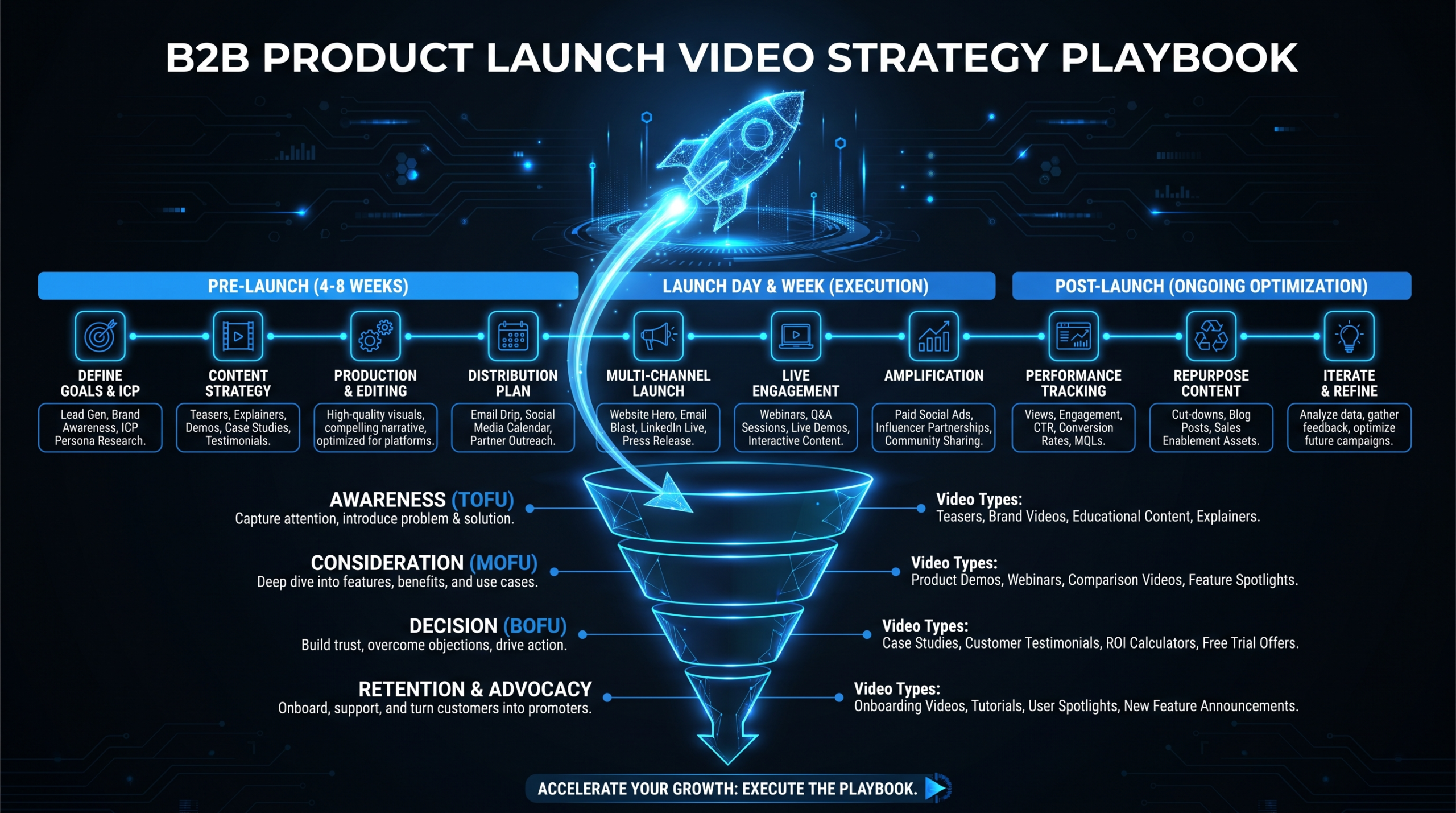
A complete B2B SaaS product launch needs at least six video assets: teaser, announcement, full demo, feature explainers, social proof clips, and social media cuts. Start production eight weeks before launch. Distribute across email, LinkedIn, YouTube, and in-app channels. Repurpose everything systematically for 6–8 weeks of post-launch content. Without a structured video playbook, most launch video budgets produce one mediocre asset instead of six great ones.
Table of Contents
- The Complete Video Asset Stack for a Product Launch
- The 8-Week Launch Video Production Timeline
- How to Script Each Launch Video Type
- Capturing Launch Footage Remotely
- Coordinating With Product and Sales Teams
- Distribution Strategy: Where and When to Deploy Each Video
- Post-Launch Repurposing: Extend the Shelf Life
- FAQ
Your product team ships the feature. Sales wants proof points. Marketing has three weeks to "make a video." Sound familiar?
A product launch without a video strategy is just an announcement. The difference between companies that generate genuine pipeline from launches and those that see a spike-and-drop in signups often comes down to one thing: systematic video execution across the full launch arc.
This playbook covers everything a Head of Content or VP Marketing at a Series A–C B2B SaaS company needs: which video assets to build, when to build them, how to script and capture them with a remote team, and how to distribute and repurpose them for maximum shelf life. No creative theory — just the operational framework that drives results.
The Complete Video Asset Stack for a Product Launch
Most launch teams default to one video. One announcement, one demo recording, one "overview" piece. That approach leaves most of the value on the table. A well-executed product launch requires at least six distinct video types — each serving a different audience state, channel, and moment in the buyer journey.
The Six Launch Video Types
1. Teaser Video (15–30 seconds)
The teaser is pure anticipation. No product features, no pricing, no demos. Just enough to signal something is coming. Think of it as the movie trailer for your launch — it builds curiosity and pre-conditions your audience to pay attention on launch day. The best teasers are visually distinctive, use sound design aggressively, and end on a date reveal or "coming soon" card. Copy-light by design: two to four words of on-screen text, maximum.
2. Announcement Video (60–90 seconds)
This is your launch-day hero asset. It runs the classic problem → solution → transformation arc and delivers the emotional hook: "We built this because [specific pain]." It doesn't need to show every feature — it needs to create genuine demand for the product. Product marketing should own the script; creative direction sits with your content or brand team.
3. Full Product Demo (3–5 minutes)
The demo video is where intent becomes decision. It's a structured walkthrough of the product's core workflows — real UI, representative data, paced for a viewer who is actively evaluating. This is not a screen-share recording of someone clicking around. It's a narrative. For a deep dive on what separates weak demos from high-converting ones, see our guide to product demo video production.
4. Feature Explainer Videos (60–90 seconds each)
One video per major feature or use case. These are the workhorse assets that live in help docs, onboarding sequences, and sales follow-ups long after launch day excitement fades. They're the depth layer that supports the announcement video's claims. Write these after the announcement is locked — they should extend, not repeat.
5. Social Proof / Customer Reaction Clips (30–60 seconds each)
If you have beta users, capture them on video — even asynchronously via Loom. Two or three 30-second clips of customers describing how they use the feature carry more persuasive weight than any polished marketing copy. These clips work especially well in email follow-ups and sales outreach sent in the week after launch.
6. Social Media Cuts (15–30 seconds each, platform-optimized)
Every major video in your launch stack should produce social cuts. A 90-second announcement becomes three 30-second LinkedIn clips. A 4-minute demo produces a "one-minute magic moment" cut for LinkedIn and a 15-second hook clip for other short-form channels. These cuts extend distribution reach without requiring new content — they're a production efficiency play, not a separate creative effort.
Launch Video Asset Comparison
| Asset Type | Length | Primary Purpose | When to Release | Primary Channel |
|---|---|---|---|---|
| Teaser | 15–30 sec | Build anticipation | T-14 to T-7 days | LinkedIn, email |
| Announcement video | 60–90 sec | Drive signups / demos | Launch day | LinkedIn, email, homepage |
| Full product demo | 3–5 min | Accelerate evaluation | Launch day + T+1 | YouTube, landing page, sales |
| Feature explainers | 60–90 sec each | Deepen understanding | T+1 through T+14 | In-app, help docs, email |
| Social proof clips | 30–60 sec each | Build trust, remove objections | T+3 through T+10 | Email, LinkedIn, sales 1:1 |
| Social media cuts | 15–30 sec each | Expand reach, drive traffic | T-7 through T+30 | LinkedIn, Instagram, TikTok |
Most launch teams produce one video and distribute it everywhere. The highest-performing launches treat each channel as a distinct placement requiring a purpose-built asset — the same content in the same format across all channels consistently underperforms.
The 8-Week Launch Video Production Timeline
Launch video production is a dependencies problem. The announcement video needs approved messaging. The demo needs a stable product build. Social cuts need the announcement to be locked first. If you start eight days before launch, you'll either ship mediocre assets or nothing at all.
Eight weeks is the sustainable runway for a complete launch video package. Teams that consistently compress below six weeks report making significant quality trade-offs — typically cutting feature explainers entirely and shipping social cuts that weren't planned in advance.
8-Week Launch Video Production Schedule
| Week | Countdown | Key Deliverables | Who Owns It |
|---|---|---|---|
| Week 1–2 | T-56 to T-43 | Messaging hierarchy locked; asset list defined; scripts for teaser + announcement drafted; production team briefed | Product Marketing + Content Lead |
| Week 3 | T-42 to T-36 | Teaser video produced, reviewed, and approved; scheduled for T-14 deployment | Video Production + Marketing |
| Week 4–5 | T-35 to T-22 | Announcement video recorded and edited (2 review rounds); demo recording session in staging environment | Video Production + PM |
| Week 6 | T-21 to T-15 | Full product demo final cut; feature explainer videos recorded and edited; beta user clips captured | Video Production + CS |
| Week 7 | T-14 to T-8 | Social cuts produced from announcement + demo; thumbnails, captions, and subtitles prepared; assets uploaded and scheduled; sales kit assembled | Video Production + Content |
| Week 8 | T-7 to T-0 | Teaser deployed at T-7; email sequences activated; launch day assets go live; performance monitoring begins | Marketing + Sales |
Why 8 Weeks?
The week count isn't arbitrary. Weeks 1–2 exist because messaging alignment — between product, marketing, and sales — almost always takes longer than anticipated. Getting to "we agree on what this product does and for whom" before scripting begins saves two to three re-cut cycles on the announcement video alone.
Weeks 4–5 require a stable staging environment. If the product team is still pushing changes to the UI during your demo recording window, you'll reshoot. Building in a recording window at T-35 forces a useful coordination point with engineering.
Compressed Timeline: 4 Weeks
If you're working with a four-week window — which happens — prioritize in this order: (1) announcement video, (2) full demo, (3) social cuts from those two assets. Feature explainers can ship in the weeks following launch and perform well as "deepening content" for users who have already signed up. Don't sacrifice announcement video quality to fit feature explainers into a compressed schedule.
How to Script Each Launch Video Type
Generic product launch scripts make the same mistake: they lead with the product instead of the problem. Buyers don't care about your product until they recognize it solves a problem they have right now. Every launch script should open on pain, not features.
The Teaser Script Formula
A teaser has three jobs in 15–30 seconds:
- Signal something is coming. The tone should feel like a countdown.
- Create pattern interruption. Visually or aurally distinctive from your usual content.
- Give a temporal anchor. A launch date or "coming soon" card.
Structure: [Problem statement or tension visualization, 0-10s] → [Visual escalation: "something changes," 10-20s] → [Date card or "coming soon" reveal, 20-30s]
Keep it copy-light. Two to four words of on-screen text, maximum. Let the music and motion carry the emotional weight. The most common teaser mistake is explaining too much — the moment you show the product in a teaser, you've killed the anticipation.
The Announcement Video Structure
The 90-second announcement should follow this arc precisely:
- 0–10s: The hook. State the problem with emotional specificity. Not "video editing is hard" — "if you've ever spent three hours chasing an approval from a stakeholder who sends feedback as bullet points." Specific pain > generic category pain.
- 10–35s: The before state. Validate the pain. Make the viewer feel understood. This section is about the audience, not the product.
- 35–65s: The product reveal. Show it in action, briefly. Pick the single moment that best represents the transformation — not a feature tour. The first UI shot should be the most visually satisfying moment in the product.
- 65–80s: The outcome. What does life look like after? Lead with the business result, not the feature.
- 80–90s: The CTA. Sign up, book a demo, get early access. One action only.
The Demo Video Narrative Arc
A B2B SaaS product demo video is not a walkthrough — it's a story told through the product. The most effective format for decision-stage buyers:
- Open with the use case persona. "Imagine you're a Head of Content at a 60-person SaaS company. Every week, you're coordinating three video reviews across product, legal, and marketing..."
- Establish the friction. Show the old workflow — but keep it brief. 20–30 seconds maximum.
- Walk through the product solving each friction point. One workflow at a time. Pause at each "magic moment" to let it land.
- End with the outcome. Quantifiable if possible ("what used to take three days now takes one afternoon"), qualitative if not.
- CTA that matches the viewer's next likely action. "Start your free trial" for PLG; "Book a demo" for sales-led.
Pacing matters enormously. Most SaaS demo videos move too fast for a viewer who has never seen the product. When in doubt, slow down at transitions and give the viewer a full second to register each new screen state before moving to the next.
The Feature Explainer Formula
Feature explainers follow the simplest possible formula: [What this feature does, 10s] → [Why that matters to this specific user, 15s] → [How to use it in 3 steps, 30s] → [Outcome statement, 10s] → [CTA or "learn more," 5s]
Target 60–75 seconds. Write the script as audio first — roughly 120–130 words runs 60 seconds at a natural speaking pace. Then storyboard the screen recording to match the narration, not the other way around.
Capturing Launch Footage Remotely
Most B2B SaaS companies today don't have a dedicated production studio — and they don't need one. Remote capture has become the standard for launch video production, not the fallback. The key is establishing consistent technical standards before recording begins, not discovering problems during editing.
Screen Recording Standards
Record at 1440p or higher resolution, 60fps where possible. Use a clean browser environment for all screen recordings: no extensions visible in the toolbar, bookmarks bar hidden, notifications disabled. Use a dedicated demo environment with clean, representative data — no real customer names, no production bugs, no placeholder text still showing "Lorem ipsum."
A critical rule: always record at a resolution higher than your final output. If you're delivering 1080p video, record at 1440p. This gives your editing team headroom to reframe, zoom in on specific UI elements, and apply motion without quality degradation.
Remote Interview and Talking Head Setup
If your announcement video includes a founder, PM, or Head of Product on camera, a basic remote setup produces professional-quality footage:
- Camera: Logitech Brio or equivalent webcam, or a DSLR with an Elgato Cam Link capture card
- Lighting: Ring light or key light positioned at 45 degrees from the subject's face
- Background: Plain wall, branded backdrop, or software-blurred background — no busy environments
- Microphone: USB condenser (Blue Yeti, Rode NT-USB Mini, or similar)
- Recording platform: Riverside.fm or Squadcast for clean local audio isolation — never rely on compressed video call audio
The most common amateur mistake on remote talking-head footage is echo. A room with hard surfaces (tile floors, bare walls, large windows) sounds terrible on camera regardless of microphone quality. Soft furnishings — a rug, curtains, a couch nearby — absorb reflection and transform the audio quality without any equipment investment.
B-Roll and Async Capture Workflow
Ask your product team to Loom-record themselves using the feature as they normally would — unscripted, genuine use. These raw recordings frequently contain the "magic moments" that no scripted demo session produces: the genuine reaction when a workflow clicks, the natural language a PM uses to describe a feature that turns out to be the exact phrase your buyers search for.
Pass this raw footage to your editing team with a brief: "Cut a 90-second highlight reel, focus on workflow moments where the product removes friction." Your editor finds the moments — you don't have to orchestrate them.
Coordinating With Product and Sales Teams
The biggest production bottleneck in product launch video is not editing — it's cross-functional approval. The product team wants technical accuracy. Sales wants pipeline angles. Marketing wants brand consistency. These frequently conflict, and without a defined process, they combine to produce vague feedback loops that extend timelines by weeks.
The Product Team Alignment Call
Schedule a 45-minute call with your product lead and PM six to seven weeks before launch. Cover exactly four things:
- What is this feature? What specific problem does it solve, for whom?
- What are the top three "magic moments" — the product interactions that best demonstrate value?
- What technical constraints or edge cases should the video NOT touch?
- What does the stable build window look like for recording sessions?
Record this call. It becomes your scriptwriter's primary brief. The language your PM uses to describe the product — unprompted, unpolished — is often the best raw material for the announcement script's hook.
The Sales Team Input Session
A 30-minute call with two or three sales reps gives you the buyer language that no product brief contains. Ask:
- What objection does this feature kill?
- What's the sentence you wish you could say to every prospect but couldn't say before this launch?
- Which competitor does this make us clearly better than, and on what specific dimension?
Sales reps speak the language their buyers use. That language — not the product roadmap language — is what your announcement video's hook should be built from.
Building the Approval Chain
Define the approval chain before production begins. Name every stakeholder with approval authority, define their review scope (technical accuracy vs. messaging vs. brand), and fix their review window. A workable chain for a Series B SaaS company:
- PM: Technical accuracy review — 48 hours, one round, final say on product claims
- Product Marketing: Messaging review — 48 hours, one round, final say on positioning
- Marketing Lead / CMO: Final approval — 24 hours
No one outside this chain can delay release. Establish this in writing before the first script draft goes out. The most common launch video delay is a fourth stakeholder appearing in Week 7 with fundamental objections that should have been resolved in Week 1.
The Launch Day Coordination Checklist
By T-5 days, every team member should know exactly what goes live, when, and who is responsible for each deployment:
- Announcement video live on YouTube at 9:00 AM launch day
- Launch email deployed at 10:00 AM (after YouTube URL is confirmed live)
- LinkedIn post with announcement video published at 11:00 AM
- Sales team has received video kit with demo link and email templates
- In-app feature explainer embedded and confirmed by engineering
Distribution Strategy: Where and When to Deploy Each Video
Creating the videos is 40% of the work. Distribution is the other 60% — and it's where most launch teams leave the most value behind. A carefully produced announcement video that goes out in one email blast and one LinkedIn post has achieved a fraction of its potential reach.
Email Campaign Sequence
Video doesn't embed directly in most email clients — you link to it using a GIF thumbnail or a static image with a play button overlay. The visual treatment signals "video content" to readers and consistently outperforms plain-text links in click-through rates, according to research from Wistia's video marketing studies.
Structure your email launch sequence over 14 days:
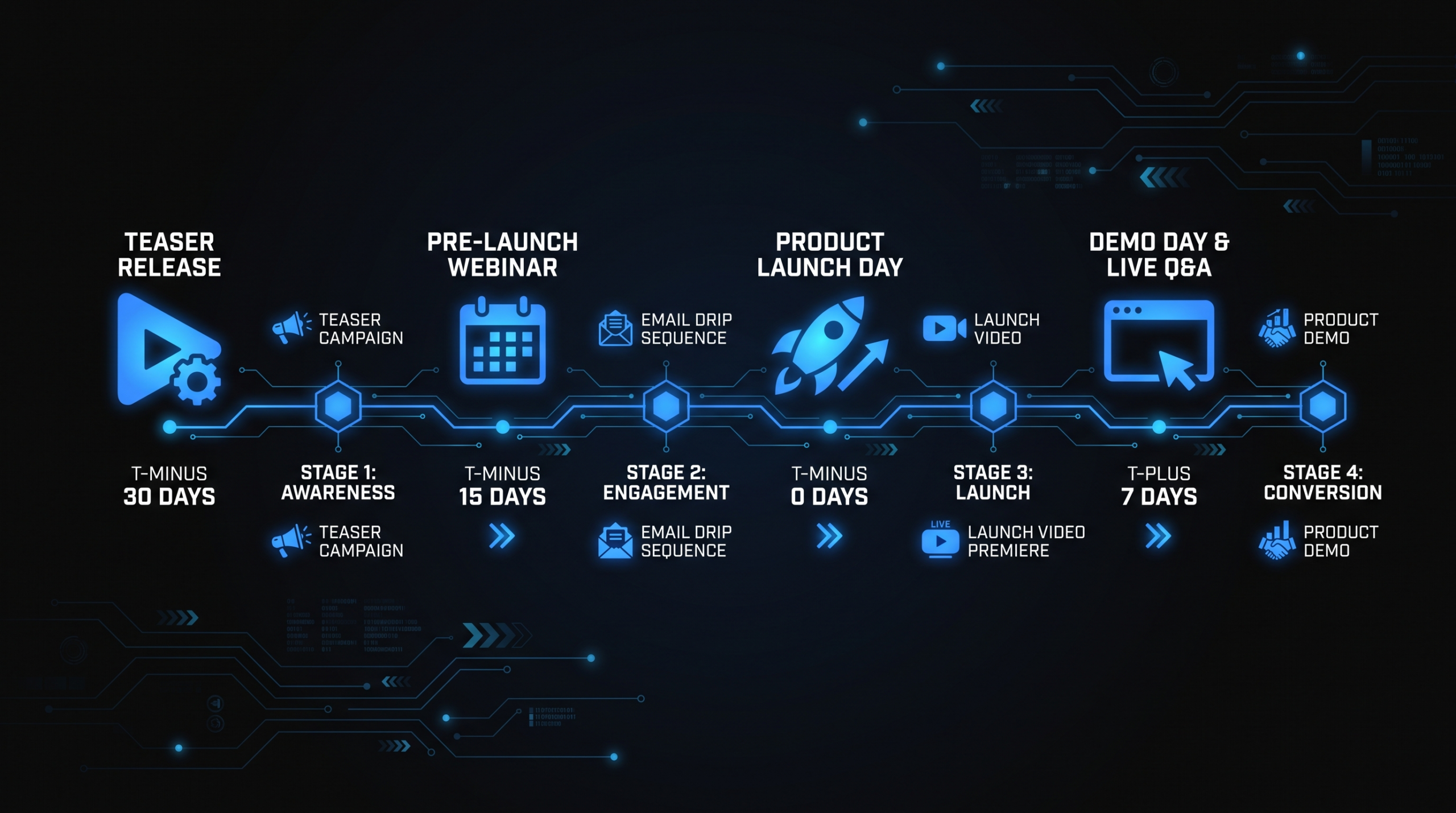
- T-14 days: Teaser email — subject line "Something's coming" or "[Product Name] is about to change." One-sentence body, GIF teaser thumbnail, date anchor.
- T-7 days: "Here's a sneak peek" — 30-second teaser clip link, one or two sentences of copy about the problem it solves.
- Launch day: Full announcement email — announcement video link as the hero element, supporting copy underneath, demo booking CTA.
- T+3 days: Feature explainer series begins — one feature explainer per email, sent to engaged openers from launch day email.
- T+7 days: Social proof email — beta user testimonial clip as the hero, one or two customer quotes in copy.
LinkedIn Strategy
LinkedIn is the primary organic distribution channel for B2B SaaS product launches. The platform's algorithm favors native video — content uploaded directly to LinkedIn rather than linked from YouTube. Build your LinkedIn launch cadence around native uploads:
- T-7 days: Teaser post — native video upload, 15–20 seconds, music-led, minimal text overlay. Caption: one sentence creating curiosity.
- Launch day: Announcement video post — native upload, full 90-second video, caption that stands alone without sound (many viewers watch without audio). Tag relevant teammates, customers (with consent), and relevant industry voices.
- T+2 days: Demo clip or "magic moment" cut — 30-second excerpt from the full demo showing the most visually compelling workflow.
- T+5 days: Behind-the-scenes or founder perspective post — an unpolished take from the people who built it performs well as a contrast to the polished launch assets.
- T+10 days: Customer quote or beta user reaction clip — social proof in the early post-launch window when intent from the announcement is still warm.
A tactical note: add hashtags in the first comment rather than the caption. This keeps the caption clean and avoids the algorithmic penalty some teams report from over-hashtagging in the post body.
YouTube and Long-Form Platforms
YouTube is the right home for your full product demo and feature explainers. Optimize for search rather than algorithm-driven discovery: your demo video title should reflect evaluation-stage search intent ("How to [accomplish X] with [Product Name]" or "[Product Name] demo — [primary use case]"). Add chapters using timestamps in the description to let evaluators jump to the workflows most relevant to them.
For the announcement video on YouTube, treat the platform as a hosting and SEO asset rather than an organic reach play. Link to the YouTube URL from email and LinkedIn rather than expecting the algorithm to surface it to new audiences on launch day.
In-App and Product Onboarding
Feature explainer videos belong inside the product — this is consistently the highest-ROI placement. Embed them in:
- The first-use empty state for the new feature ("Here's how [Feature Name] works in 60 seconds")
- The in-app tooltip or contextual help icon adjacent to the feature
- The onboarding checklist item that prompts users to activate the feature
HubSpot's ongoing research on video in marketing consistently documents higher engagement with in-app video compared to text-only tooltips for feature introduction — a pattern most SaaS growth teams find replicated in their own onboarding data.
Sales Enablement Deployment
Give your sales team a video asset kit before launch day. Reps who receive video assets without context use them inconsistently. The kit should include:
- A one-pager listing all launch videos with direct links, recommended use cases, and optimal send timing
- The demo video as the primary follow-up asset after an initial call
- Two or three social proof clips for 1:1 prospect outreach (especially effective in LinkedIn messages)
- A note on how to share video in a sales email — including the GIF thumbnail technique for reps who haven't done this before
Launch Video Distribution Map
| Video Asset | YouTube | In-App | Sales 1:1 | ||
|---|---|---|---|---|---|
| Teaser | ✓ T-14, T-7 | ✓ T-7 (native) | — | — | — |
| Announcement video | ✓ Launch day | ✓ Launch day (native) | ✓ Launch day | — | ✓ Follow-up |
| Full product demo | ✓ T+1 to T+3 | ✓ Clip only | ✓ Primary host | — | ✓ Primary asset |
| Feature explainers | ✓ T+3 to T+14 | ✓ Clip format | ✓ Each video | ✓ Primary host | ✓ Use case specific |
| Social proof clips | ✓ T+7 | ✓ T+10 | — | — | ✓ Objection handling |
| Social media cuts | — | ✓ T-7 to T+30 | — | — | — |
Post-Launch Repurposing: Extend the Shelf Life
Most launch teams stop producing content after launch week. That's where most of the video value gets abandoned. A well-executed launch creates a video library that should power content output for 6–8 weeks — without any new recording sessions.
Turning the Demo into Evergreen Content
Your product demo has a shelf life of 6–12 months if the product UI doesn't change significantly. Repurpose it:
- Paid social retargeting: Cut 30-second excerpts for LinkedIn InMail video ads and YouTube pre-roll targeting competitor search terms. These typically run efficiently for several months before creative fatigue sets in.
- SEO asset: Embed the demo in a long-form blog post targeting the feature's primary search keyword. Video embeds increase time-on-page, which is a positive signal for search ranking.
- Ongoing outbound: The demo video becomes your sales team's most-used follow-up asset for the next 6–12 months. Build it to work in that context — not just as a launch-week splash.
When features change enough that the demo looks outdated, updating an existing high-quality demo is significantly faster than re-recording from scratch. Working with a production partner who knows your product — like a dedicated outsourced video editing team — means those updates happen in days rather than weeks.
The Social Clip Matrix
A 4-minute demo video should yield at minimum 8–10 social cuts over the 6 weeks following launch. Map them systematically:
- 4–5 workflow-specific clips: "How to [do X] in 30 seconds" — educational, high rewatch value
- 2–3 problem-focused hooks: "If you're still doing X the old way, here's what you're missing" — emotional resonance
- 2 outcome or results clips: lead with the business outcome, show the product as evidence
- 1 "magic moment" clip: the single most visually compelling interaction in the product, no narration, music only
This clip matrix keeps your LinkedIn presence active with relevant content for six to eight weeks post-launch — without any new recording. Publish one clip every three to five days for consistent presence without flooding.
Sales Enablement Personalization
Post-launch, your complete video library becomes a sales asset. Work with your video editing services partner to create industry-specific or persona-specific variants of the product demo — a re-recorded 15-second opening that references the prospect's vertical, with the main demo footage unchanged underneath. These personalized demo variants consistently outperform the generic version when delivered in high-value sales follow-ups.
For teams scaling video across multiple launch cycles per year, the compounding effect of a systematic repurposing workflow is significant. VEC's dedicated team model is built for exactly this — teams at Growth ($5K/month), Core ($9.5K/month), and Scale ($16K/month) get consistent production capacity for both launch sprints and the ongoing repurposing cadence that extends each launch's impact. See our full pricing breakdown for what each plan includes.
Frequently Asked Questions
How far in advance should I start creating launch videos?
Eight weeks before launch is the target for a complete video package covering all six asset types. If you have six weeks, you can still deliver a strong core set by prioritizing the announcement video and full demo first, then releasing feature explainers in the two weeks after launch as "deepening content." Anything under four weeks means making significant trade-offs on scope — typically dropping feature explainers entirely and shipping social cuts without the planning that makes them effective.
What's a realistic production budget for a full B2B SaaS launch video package?
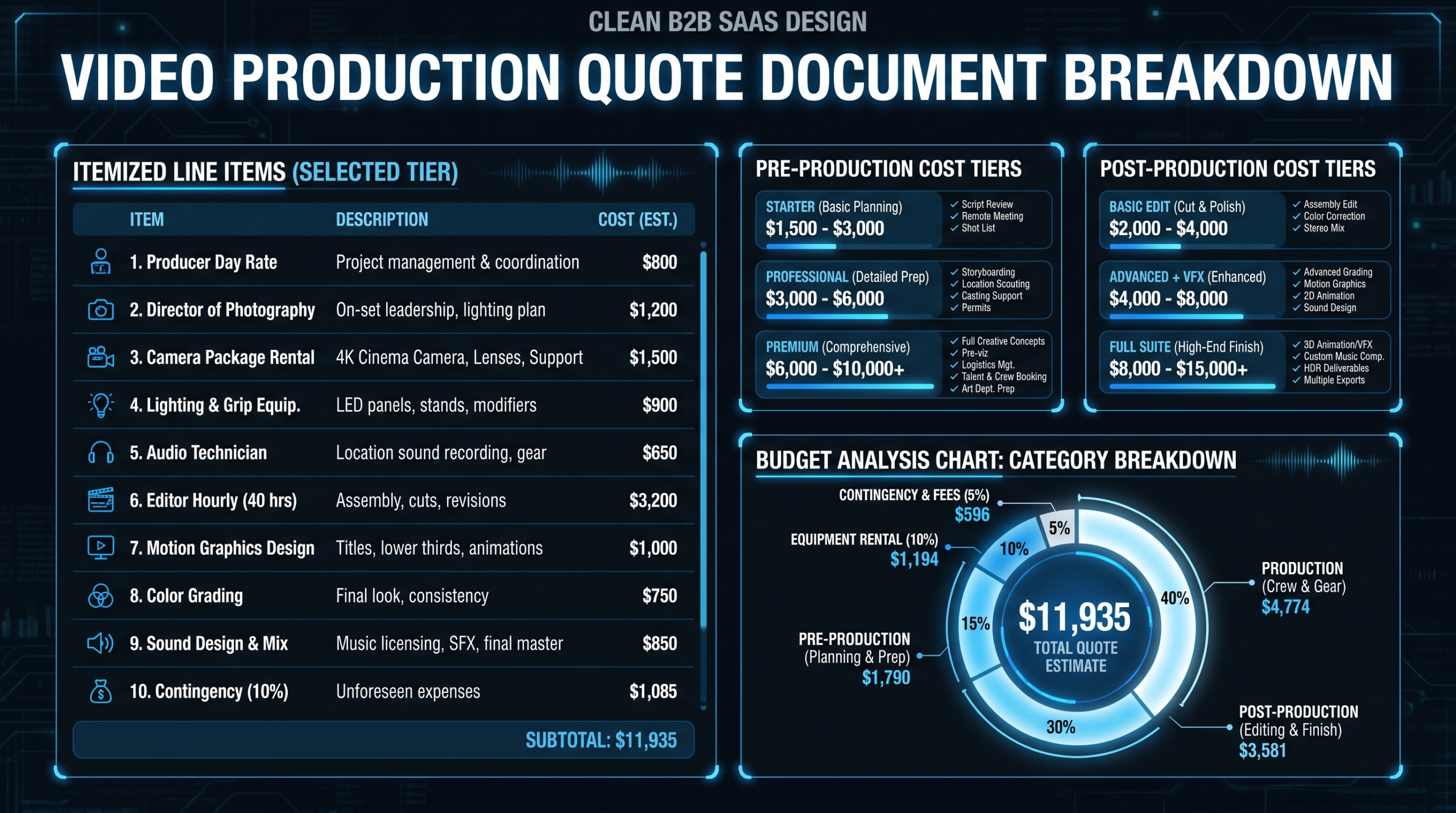
Budget ranges vary widely based on production quality, team size, and how many assets you're producing. Teams working with a dedicated production partner for a full launch package (teaser, announcement, demo, two feature explainers, and six social cuts) commonly see total production investment in the $10,000–$30,000 range for a well-produced package. Companies launching two to four times per year typically find monthly retainer or dedicated team arrangements reduce per-launch costs substantially compared to project-by-project commissioning.
Should the demo video use real product data or sample data?
Sample data is almost always the better choice for product demos. Clean, purpose-designed sample data lets you optimize for visual clarity: right-sized numbers, legible charts, appropriately named users, data that tells the story you want to tell. Real production data often contains sensitive customer information, edge-case records that confuse the narrative, and visual noise that distracts from the product experience. Use real data only when it has been specifically curated and approved for use — and even then, test it at your recording resolution before committing.
How do we handle video production when the product build is still in flux?
Record from a frozen staging environment — not production — and coordinate a specific recording window with engineering where no deploys happen. If the UI is still changing significantly in the recording window, start with the announcement video's problem and solution narrative sections (which don't require product footage) and schedule the demo recording for the point at which the build reaches feature-complete status. For products changing rapidly, build in a re-record allowance in your production budget — one re-record session is far cheaper than delaying launch to wait for a stable UI.
How long are product launch videos useful before they need to be updated?
Feature explainers tend to have the longest useful life — 12–24 months for features that don't change significantly. The full product demo typically runs 6–12 months before UI updates make it look outdated. Announcement videos have the shortest shelf life — 3–6 months — because they reference the competitive context and market positioning that evolves quickly for fast-growing SaaS companies. Build a quarterly review cadence to assess which assets need refreshing, and keep the original project files organized so updates can be made from existing footage rather than full re-records.
Ready to Build Your Launch Video Playbook?
VEC provides dedicated video production teams for B2B SaaS companies — from teaser to demo day to the post-launch repurposing that compounds your results. Plans start at $5K/month with a guarantee: double your video output in 90 days or month four is free.
Book a Free Strategy Call See Pricing Plans