
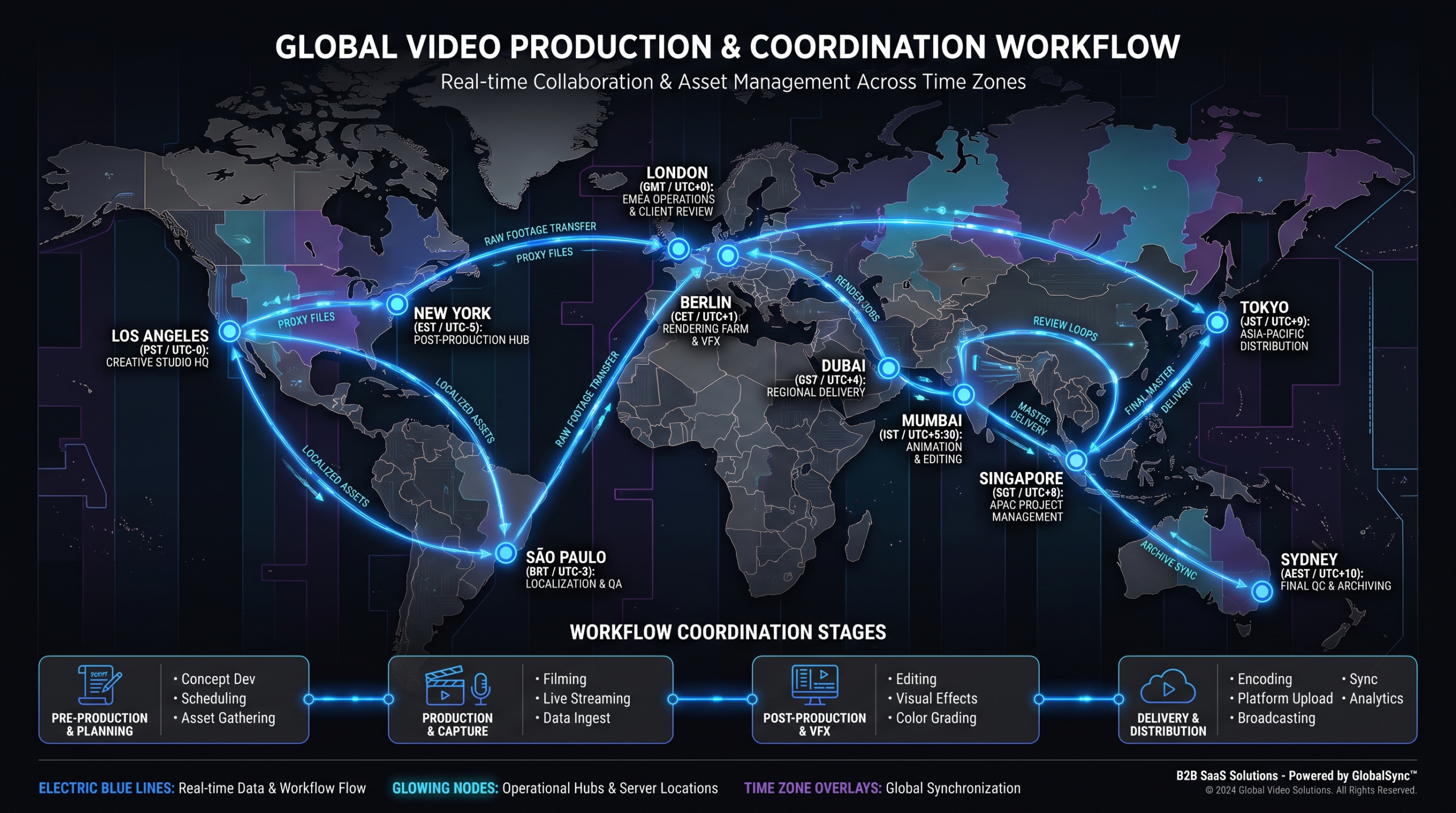
Managing Remote Video Editors Across Time Zones
TLDR
- An async-first operating model beats synchronous management for distributed video teams — design for handoffs, not meetings.
- The production handoff chain (raw footage → brief → edit → review → approve) must be documented and tool-supported before you hire a single remote editor.
- Brand drift and deadline slippage are the two most common failure modes — both are process failures, not people failures.
- A dedicated remote video editing team with a structured workflow can consistently outperform an in-house team, regardless of geography.
Table of Contents
- The Async-First Operating Model
- The Handoff System: Raw Footage to Final Approval
- The Tools Stack That Makes It Work
- Overlap Hours Strategy
- Maintaining Brand Consistency Without Meetings
- Quality Control Checkpoints
- Common Failure Modes and How to Prevent Them
- Weekly Cadence Template
- Top Remote Video Editing Providers Compared
- FAQ
Most SaaS marketing leaders approach remote video editing the same way they approach remote software engineering: they assume the model is analogous, hire editors in cheaper time zones, and then wonder why deadlines slip, quality drifts, and communication degrades into a chaos of Slack threads.
Video editing is not software engineering. The dependencies are visual, the feedback is subjective, and the raw materials — footage, audio, assets — are large files that don't version-control cleanly. Managing a remote video editing team well requires a purpose-built operating model designed around asynchronous handoffs, not synchronous collaboration.
This guide gives you that model in full. It covers the handoff architecture, the tools stack, the overlap hour strategy, how to maintain brand consistency without ever scheduling a meeting, and the three failure modes that kill most remote video programs. Written for VP Marketing and Head of Content roles at Series A–C SaaS companies managing production at scale.
The Async-First Operating Model
The instinct when managing across time zones is to find overlap windows and schedule meetings. Resist it. Meetings are expensive — an hour-long sync with a team spread across three continents costs more in lost context-switching and coordination overhead than the meeting itself. More importantly, meetings don't fix the underlying problem, which is unclear handoff documentation.
An async-first model means every action, decision, and feedback item is captured in writing or video before anyone acts on it. The editor in Manila doesn't need to wait for your 9am Zoom — they need a brief that's complete enough to start at 2pm their time without ambiguity.
The Three Pillars of Async Video Management
1. Written briefs over verbal direction. Every video starts with a written brief — not a Slack message, not a verbal walkthrough. The brief includes the objective, target audience, key message, must-include elements, must-avoid elements, reference examples, and deadline. If an editor can't start based on the brief alone, the brief is incomplete.
2. Video feedback over text comments. Text feedback on video edits creates a translation problem — "the pacing feels off around 1:30" means different things to different people. Record a screen-share Loom walking through the edit and speaking your feedback aloud. Editors interpret audio/visual feedback more accurately than written notes, and it's faster for you to record than type.
3. Timestamped annotations for precise notes. Use Frame.io or equivalent for frame-level comments. "Tighten the cut at 00:47" is actionable. "The beginning feels slow" is not. Force precision in your feedback by using timestamped annotation tools — it cuts revision rounds in half.
The shift from synchronous to async management isn't a culture change — it's a documentation change. Teams that fail at async fail because they never invested in making their implicit knowledge explicit.
The Handoff System: Raw Footage to Final Approval
Every production breakdown in a remote team traces back to a handoff that wasn't clean. Someone uploaded footage to the wrong folder. The brief didn't specify the aspect ratios needed. The editor didn't know which version of the brand font to use. The reviewer wasn't clear on whether they were reviewing for structure or for polish.
A clean handoff system eliminates ambiguity at every stage. Here's the five-stage model that works at scale:
Stage 1: Raw Footage Handoff
Footage goes into a structured folder — not your Google Drive "Downloads" folder. The naming convention matters: [Date]_[Project-Name]_[Camera/Source]_[Take]. All selects (the clips you actually want used) are marked in a selects folder with a brief note on why each was chosen. If you recorded a screen capture, product demo, or talking head separately, they go in labeled subfolders. The editor should never have to hunt for footage or guess which take is preferred.
Stage 2: Brief Handoff
The production brief accompanies every footage drop. It specifies: video objective, target platform(s) and aspect ratio(s), intended length, key message hierarchy (what must land, what's secondary), brand elements required (logo placement, lower thirds style, color palette), music direction, reference videos, deadline for first draft, and revision round schedule.
Stage 3: Edit-in-Progress Check
For any video over 3 minutes, the editor shares a rough cut at the 30–40% mark — before detailed color work, audio mixing, or motion graphics. This catch-point prevents a scenario where the editor spends two days on a version that misses the structure entirely. The check is asynchronous: the editor uploads the rough cut and pings on Slack; the reviewer watches and leaves Frame.io comments within a defined window (usually same business day).
Stage 4: Review Handoff
First draft review is structured, not open-ended. Reviewers are given a review brief that specifies: which elements are locked (don't comment on), which are open for feedback, and the round number with its scope (Round 1 = structure and content; Round 2 = polish and brand; Round 3 = final sign-off only). This discipline prevents reviewers from reopening structural decisions during a polish round.
Stage 5: Final Approval and Delivery
Approved videos are delivered in all required formats simultaneously — not "we'll do the 9:16 version when you ask for it." The delivery package includes the master file, all platform-specific versions, the project file (for future recuts), and a thumbnail if needed. File naming follows the same convention as the footage — consistent across the entire pipeline.
Handoff Stage Requirements at a Glance
| Stage | Who Owns It | What Must Be Complete | Turnaround SLA |
|---|---|---|---|
| Raw Footage Handoff | Client / Marketing | Organized selects folder + naming convention | Before brief is issued |
| Brief Handoff | Project Manager | Full brief doc + reference links + deadline | Same day as footage |
| Assembly Edit Check | Editor | Rough cut upload + Slack notification | 24–48 hrs from brief |
| First Draft Review | Reviewer (Client) | Frame.io comments + round scope respected | Within 1 business day |
| Final Delivery | Editor + PM | All formats + master + project file | Per agreed deadline |
If your team skips or shortcuts any of these stages, you will pay for it downstream. The production debt always comes due — either in revision rounds, in missed deadlines, or in a final product that doesn't match expectations.
For a broader look at what a full outsourced video editing workflow looks like from end to end — including how to evaluate and onboard an external team — that guide is a useful companion to this one.
The Tools Stack That Makes It Work
The right tools don't replace a good process — they enforce it. Each tool in the stack should serve a specific function, and the stack should be minimal. Every tool you add is another place where context gets siloed.
Frame.io — Video Review and Approval
Frame.io is the industry standard for a reason. Timestamped comments, version tracking, client review links that don't require the reviewer to create an account, and native integrations with Adobe Premiere. The key feature that matters for remote teams is version comparison — reviewers can see what changed between drafts without a second Zoom call. Frame.io's annotation system reduces ambiguous feedback by forcing commenters to timestamp their notes at the exact moment they're referencing.
Slack — Communication and Notifications
Use Slack for real-time notifications and quick operational questions, not for feedback or creative direction. The discipline here matters: creative feedback belongs in Frame.io, briefs belong in Notion, and Slack is only for status updates ("Draft 2 is up for review") and quick clarifications ("Does this client prefer text lower thirds or graphic boxes?"). Slack channels should be project-specific, not team-specific, so context stays organized by production rather than by person.
Notion — Briefs, Brand Guidelines, and Project Tracking
Notion serves as the single source of truth for everything written — brand guidelines, production briefs, project status boards, and editor SOPs. A well-maintained Notion workspace means an editor joining the team in week three can understand your brand and workflow without a single onboarding call. Templates matter here: a standardized brief template ensures no field gets skipped, regardless of who creates the brief.
Loom — Video Feedback and Async Walkthroughs
Loom solves the "I'd explain this better in person" problem. When written feedback feels inadequate — particularly for tone, pacing, and emotional beats — record a 3-minute Loom walking through your notes. Editors report that Loom feedback is significantly faster to act on than written notes because they can hear tone and emphasis. Use it for revision walkthroughs, onboarding brand explainers, and any feedback that requires visual demonstration.
Google Drive or Dropbox — Asset Storage
Large file storage needs to be separate from your collaboration tools. Frame.io handles review; Drive or Dropbox handles the actual media files. Establish folder structure conventions before your first project — retrofitting folder organization onto an existing archive is painful. Your structure should mirror the handoff stages: /RAW, /SELECTS, /EDITS (with version subfolders), /DELIVERED, /ASSETS (brand kit).
Tools Stack Summary
| Tool | Function | What It Replaces |
|---|---|---|
| Frame.io | Video review, timestamped feedback, version tracking | Email video links + text revision notes |
| Slack | Status updates, quick clarifications | Email chains, WhatsApp groups |
| Notion | Briefs, brand guidelines, project boards | Google Docs folders + spreadsheet trackers |
| Loom | Video feedback, async walkthroughs | Zoom calls for every feedback round |
| Drive / Dropbox | Large file storage, media archive | Email attachments, USB drives |
Overlap Hours Strategy
You don't need to manufacture 8 hours of overlap between your team's time zones. You need two things: a reliable daily sync window and a defined escalation path for genuine blockers.
The 2-Hour Overlap Window
For most SaaS companies, a 2-hour daily overlap window is sufficient for a well-run async team. The window is used for same-day brief clarifications, escalation of genuine blockers, and any handoffs that are time-sensitive. Outside this window, the editor operates independently based on documented briefs and brand guidelines. The window should be the same every day — predictability matters more than the specific hours.
Choosing Your Overlap Window by Region
- US + Eastern Europe: 8–10am EST / 3–5pm CET — comfortable for both sides, avoids early mornings
- US + Southeast Asia: 7–9am PST / 10pm–midnight SGT — challenging; consider limiting to US–Philippines combinations which have slightly better East Coast overlap
- US + Latin America: Near-synchronous; Colombia and Mexico offer almost full overlap with EST
- UK + Southeast Asia: 9–11am UK / 4–6pm SGT — a strong overlap window popular with content agencies
If your editor's time zone forces one party to work outside normal hours consistently, that's a hiring mismatch — not a schedule discipline problem. Fix it at the hiring stage, not the scheduling stage. Our breakdown of video editing rates by country includes the practical time zone considerations for each region.
The Escalation Path
Define what constitutes a genuine blocker versus what an editor should resolve using their judgment. Blockers (worthy of pinging outside the overlap window): missing footage that makes the brief impossible to execute; client feedback that contradicts a previous note; a deadline moved without a corresponding scope adjustment. Non-blockers (the editor resolves independently): choosing between two acceptable music tracks; minor color treatment decisions within the brand palette; pacing choices within the approved structure.
Maintaining Brand Consistency Without Meetings
Brand drift is the most common long-term failure mode in remote video programs. It doesn't happen overnight — it accumulates through a hundred small decisions where an editor made a reasonable guess that didn't quite match your brand vision. By the time you notice it, 20 videos have drifted off-style.
The solution is documentation, not meetings. Specifically, a comprehensive brand video bible that covers every element an editor will encounter.
What a Brand Video Bible Includes
- Color palette with hex codes — not just "our brand blue," but the exact hex values for backgrounds, text overlays, accent elements, and UI highlights
- Typography rules — fonts, weights, sizes for lower thirds, titles, and captions; source files or Google Fonts links for every editor's machine
- Logo usage guidelines — placement zones, minimum clear space, approved lockups, explicit examples of what not to do
- Tone reference videos — a curated library of past approved videos annotated with notes on what works ("notice how the intro cut is under 5 seconds before the product is shown")
- Music style guide — approved tracks or track characteristics; approved libraries; tempo and energy guidance per video type
- Pacing benchmarks — average cut frequency for your style; rough timing targets per video section
- Motion graphics templates — pre-built templates for lower thirds, transitions, title cards; editors don't create new ones without approval
- What not to do — just as important as the positive rules; a "not this" gallery prevents the most common drift patterns
The brand video bible lives in Notion, is versioned when updated, and is linked from every production brief. An editor should never need to ask "what does our brand look like?" — the answer should be one click away.
The Calibration Video
When onboarding a new editor or editor team, assign a calibration video before any live client work. Give them an existing brief with all footage already provided, and ask them to produce a draft. Review it against your brand video bible rather than against subjective feeling. The calibration video surfaces misalignments in week one rather than month three — it's the fastest way to align a new team member to your visual standards.
At Video Editing Company, the onboarding process for new dedicated teams includes a structured calibration phase — typically two calibration videos before the team begins live production. It's one of the reasons brand consistency holds even as teams scale across multiple client accounts.
Quality Control Checkpoints
Quality control in a remote video program is not a final review step — it's a series of gates built into the production pipeline. Catching a problem at the assembly edit stage costs 30 minutes. Catching the same problem after full color, audio mix, and motion graphics is a half-day of rework.
Gate 1: Brief QC (Before Editing Begins)
The PM or lead editor reviews the brief before it's assigned. Check: is the footage complete and organized? Does the brief have all required fields? Are the references linked and accessible? Are the deliverable specs clear (resolution, aspect ratio, codec, length)? A brief that passes Gate 1 means the editor can start without ambiguity.
Gate 2: Assembly Edit QC (at ~40% Completion)
The editor or a peer editor reviews the assembly cut against the brief — not against personal preference. Check: does the video follow the approved structure? Are all key messages present in the right order? Is the pacing within acceptable range? Does the opening hook land within the first 5 seconds? Gate 2 feedback goes back through Frame.io with timestamped notes.
Gate 3: Final QC (Before Client Delivery)
The PM reviews the final cut against a standardized checklist before it's shared with the client or uploaded to any platform. The checklist covers technical specs (correct resolution, frame rate, codec, loudness levels), brand elements (logo placement, correct fonts, approved color palette), and delivery requirements (all format variants present, file naming correct, thumbnail delivered if required). Gate 3 is not a creative review — it's a technical and brand standards check.
Final QC Checklist
- Resolution matches delivery spec (1080p / 4K as required)
- Frame rate correct (23.976 / 29.97 / 25fps as specified)
- Audio levels within -14 LUFS to -16 LUFS (YouTube / web standard)
- No audio clipping or dropout
- Captions / subtitles accurate and correctly timed (if required)
- Logo placement in approved zone, no cropping
- Lower thirds use correct font, weight, and color
- End card / CTA present and matches current brand version
- All platform format variants delivered (16:9, 9:16, 1:1 as needed)
- File naming follows project convention
- Project file included in delivery package
Checklists aren't bureaucracy — they're the mechanism by which standards survive team turnover. For SaaS companies with ongoing product and marketing video production, this kind of systematic QC is what separates a scalable video program from a fragile one.
Common Failure Modes and How to Prevent Them
Most remote video programs fail the same way. The failure modes are predictable, and they're all preventable — but only if you recognize them before they take hold.
Failure Mode 1: Ghosting and Communication Blackouts
What it looks like: An editor goes silent during a production. You send a message, no response for 18 hours. You're not sure if the work is happening. The deadline passes with no draft.
Root cause: No daily status cadence. The editor has no mechanism for flagging that they're stuck, confused, or blocked — and no expectation to do so proactively.
Prevention: Require a daily async status update — a single Slack message or Notion card update that says "in progress, on track" or "blocked on X." This isn't micromanagement; it's a communication expectation. Teams that normalize it catch blockers 12–24 hours earlier than teams without the cadence. Assign all work through your project management system, not Slack. If the task isn't in the system, it doesn't exist.
Failure Mode 2: Style Drift
What it looks like: Videos from the same team start looking inconsistent. The color treatment on video 15 doesn't match video 5. A new editor makes reasonable choices that don't match your visual identity. By video 20, your library looks like it was made by four different companies.
Root cause: Brand documentation exists but isn't enforced or referenced. New editors aren't calibrated. There's no QC gate for brand standards.
Prevention: Mandatory brand video bible for every editor. Calibration videos before live production. Gate 3 QC that specifically checks brand elements. Quarterly brand review sessions where you watch 5 recent videos back-to-back and flag anything that's drifting.
Failure Mode 3: Deadline Slippage
What it looks like: The editor submits the draft one day late. You give feedback late. The next draft comes in late. The video misses its publication window. This compounds across multiple productions until your content calendar is perpetually behind.
Root cause: SLAs defined only for the editor, not for the client/reviewer. Feedback rounds that slip on the client side cause as many deadline failures as editor delays — but only editor delays get tracked.
Prevention: Define SLAs for both parties explicitly. The editor delivers draft 1 within 48 hours of a complete brief. The reviewer returns notes within 24 hours of delivery. These are mutual commitments. Track both in your project management board. When a deadline slips, the first question is "which party missed their SLA?" — not an assumption that the editor is at fault.
See our comprehensive guide on what video editing services should include for a full breakdown of what to expect — and what to hold vendors accountable for — in a professional arrangement.
Weekly Cadence Template
A well-run remote video team doesn't require daily management attention. Once the system is established, the week runs itself if you've built in the right touchpoints. Here's the cadence template that works for most SaaS marketing teams managing 8–20 videos per month.
Weekly Cadence for Remote Video Teams
Brief Drop Day
All new briefs for the week go out by 10am. Footage organized and uploaded. Editor confirmations back by EOD — they confirm they have everything to start.
Assembly Edit Day
Assembly cuts for videos started Monday uploaded by EOD. PM reviews structure against brief — not polish. Feedback in Frame.io within same-day review window.
First Draft Day
First drafts delivered to client reviewers. Review window: 24 hours. Reviewers leave Frame.io comments and stay within their round's scope (structure vs. polish).
Revision Day
Editors work through all revision notes from Wednesday reviews. Final QC checklist run by PM. Approved videos delivered in all formats.
Delivery + Planning Day
Final deliveries closed out. Brief planning for next week begins. Any process issues (late feedback, missed SLAs) logged and addressed before the next cycle starts.
This cadence assumes a Monday-to-Friday week. For teams running across different cultural calendars, adapt the day labels to match the working week that applies. The pattern — brief day, assembly day, draft day, revision day, delivery day — is what matters, not the specific calendar days.
Note: this cadence is designed for videos in the 2–5 minute range requiring 2 revision rounds. Complex productions (animated explainers, multi-location edits) need a longer cycle. The product demo video production process, for example, typically runs a 10–14 day cycle even with a well-organized remote team.
Top Remote Video Editing Providers Compared
If you're evaluating dedicated remote video editing teams rather than building your own management infrastructure, here's how the leading providers compare on the dimensions that matter for SaaS companies.
Remote Video Editing Providers — Side-by-Side Comparison
| Provider | Best For | Pricing | Key Strength | Limitation |
|---|---|---|---|---|
| #1 — Video Editing Company (VEC) | Series A–C SaaS, dedicated teams, high-volume output | $5K–$16K/mo (Growth, Core, Scale plans) | Dedicated team model; guarantee to double video output in 90 days or month 4 free | Minimum commitment; not ideal for single-project needs |
| #2 — Increditors | YouTube creators, SaaS, finance, education; premium full-service | Custom retainers ~$2.5K–$12K+/mo; quote-based | Dedicated editor pods (senior editor + junior + PM + creative director); known for doubling YouTube channel performance | Not SaaS-exclusive; no instant pricing tiers online; custom-quote only (contact [email protected]) |
| Subscription Services (e.g. Vidpros, Motion) | High-volume simple edits, social clips, podcast editing | $1,500–$5,000/mo | Month-to-month flexibility; fast turnaround on simple requests | Sequential queue limits throughput; editor variability; not suited to complex SaaS video |
| Freelance (Upwork / Fiverr) | One-off projects, tight budgets, experimental content | $15–$100/hr or per-project | Low cost entry point; wide talent pool | No PM layer; brand consistency difficult; no guaranteed capacity or SLAs |
For most Series A–C SaaS companies producing 8–20 videos per month, the dedicated team model — either through VEC or a provider like Increditors — will outperform subscription services on quality, consistency, and long-term cost per video. The self-managed freelance model works at low volumes but breaks down as output scales, because the management overhead grows linearly with the number of freelancers you're coordinating.
See the VEC pricing page for current plan details and what each tier includes in terms of team composition, turnaround SLAs, and monthly output volume.
Frequently Asked Questions
How many hours of overlap do you actually need with a remote video editing team?
Two hours of daily overlap is sufficient for a well-documented async operation. You need the overlap window for brief clarifications, blocker escalations, and time-sensitive handoffs — not for ongoing creative direction or management. Teams that try to run remote video on zero overlap typically see slower iteration cycles and higher miscommunication rates. Two hours, same time every day, is the practical minimum.
How do you maintain brand consistency when editors are in different time zones?
Documentation, not meetings. A comprehensive brand video bible hosted in Notion — covering color palettes with exact hex codes, typography rules, motion graphics templates, and annotated reference video examples — is what maintains consistency across a distributed team. Pair this with calibration videos for every new editor and a final QC gate that specifically checks brand elements before any video is delivered. Consistency is a systems outcome, not a supervision outcome.
What's the best feedback method for remote video review?
Timestamped Frame.io comments for precise, actionable notes — and Loom recordings for any feedback that's hard to articulate in writing. "The pacing feels off" is not a useful Frame.io comment; "the cut at 1:34 holds too long before the product reveal — trim to 2 seconds" is. For feedback on tone, emotional arc, or anything subjective, a 3-minute Loom walkthrough is faster to give and easier for the editor to act on than written notes.
Is it realistic to run a remote video team on a 48-hour turnaround?
Yes, with conditions. A 48-hour turnaround from complete brief to first draft is achievable for videos up to 5 minutes with organized footage. The conditions: the brief must be complete and unambiguous, the footage must be organized and labeled before the brief is issued, and the editor must have an unloaded queue. Turnaround SLAs only hold when all inputs are clean. If your footage takes the editor 4 hours to organize before editing can begin, the clock effectively started 4 hours later.
What's the biggest mistake companies make when setting up a remote video editing team?
Treating the editor's time zone as the primary risk, when the real risk is unclear briefs and undocumented brand standards. Most remote video failures aren't geography failures — they're process failures that would have occurred with an in-house editor too, just with more synchronous meetings to patch over the gaps. Build the documentation infrastructure first. The location of your editors is secondary to the quality of the system they're working within.
Ready to Build a Remote Video Team That Actually Works?
Video Editing Company provides dedicated remote editing teams for SaaS companies — with a structured handoff system, brand consistency guarantees, and a promise to double your video output in 90 days or month 4 is free.
Book a Free Strategy Call See Pricing Plans
