Unlimited Video Editing: The Fine Print Explained
TL;DR
- "Unlimited" means unlimited requests in the queue — not unlimited simultaneous production. Most plans process one active request at a time.
- Turnaround per request typically ranges from 24 hours to 5 business days depending on complexity and plan tier.
- At a 48-hour turnaround with 1 active slot, you'll realistically complete 8–12 videos per month, not the "unlimited" the name implies.
- Complexity caps, revision limits, and pause restrictions apply on nearly every plan — they're just rarely featured in the headline pricing.
- For SaaS teams needing consistent quality and high monthly volume, a dedicated editing team offers more predictable output than a subscription queue.
Table of Contents
- What "Unlimited" Actually Means
- Queue Mechanics and Turnaround Times
- Complexity Caps and Scope Restrictions
- Revision Policies — What's Actually Included
- Pause and Cancellation Rules
- Comparing Subscription Tiers Side by Side
- Subscription Services vs. Dedicated Teams: Market Overview
- The Real Monthly Output Math
- Who Unlimited Subscriptions Work For — and Who They Don't
- FAQ
The phrase "unlimited video editing" follows a well-worn playbook: lead with the word that sells, bury the constraints in the terms of service. It worked for design subscriptions, it's worked for software, and the video editing industry adopted it wholesale around 2022–2023.
That doesn't make it a bad product. It makes it a misunderstood one. Companies sign up expecting a firehose and discover a garden hose with a queue attached. The result: over-budget expectations, under-delivered output, and a team frustrated that their "unlimited" plan couldn't ship five videos in a week.
This guide decodes every clause in the fine print — one-request-at-a-time queues, turnaround windows, complexity exclusions, revision limits, and pause policies — so you can evaluate whether a subscription plan will actually serve your content program, or whether you're paying for a ceiling you'll hit in month two.
What "Unlimited" Actually Means
Here's the sentence buried in virtually every unlimited video editing subscription's FAQ: "Unlimited requests means you can add as many requests to your queue as you'd like. We work through them one at a time."
That one sentence rewrites the headline. "Unlimited" is a descriptor of the queue, not the output. You can submit 200 requests on day one. They'll wait in line. The platform processes them sequentially — or in some higher-tier plans, two or three in parallel — at their own pace.
The Design Pickle Model
Video editing subscriptions are modeled on design subscription services that popularized this structure. The core mechanic is the same: a flat monthly fee, requests added to a project management board (Trello, Asana, or a proprietary portal), and a team that works through the queue in first-in, first-out order. The promise is simplicity. The constraint is throughput.
Active Slots: The Real Limit
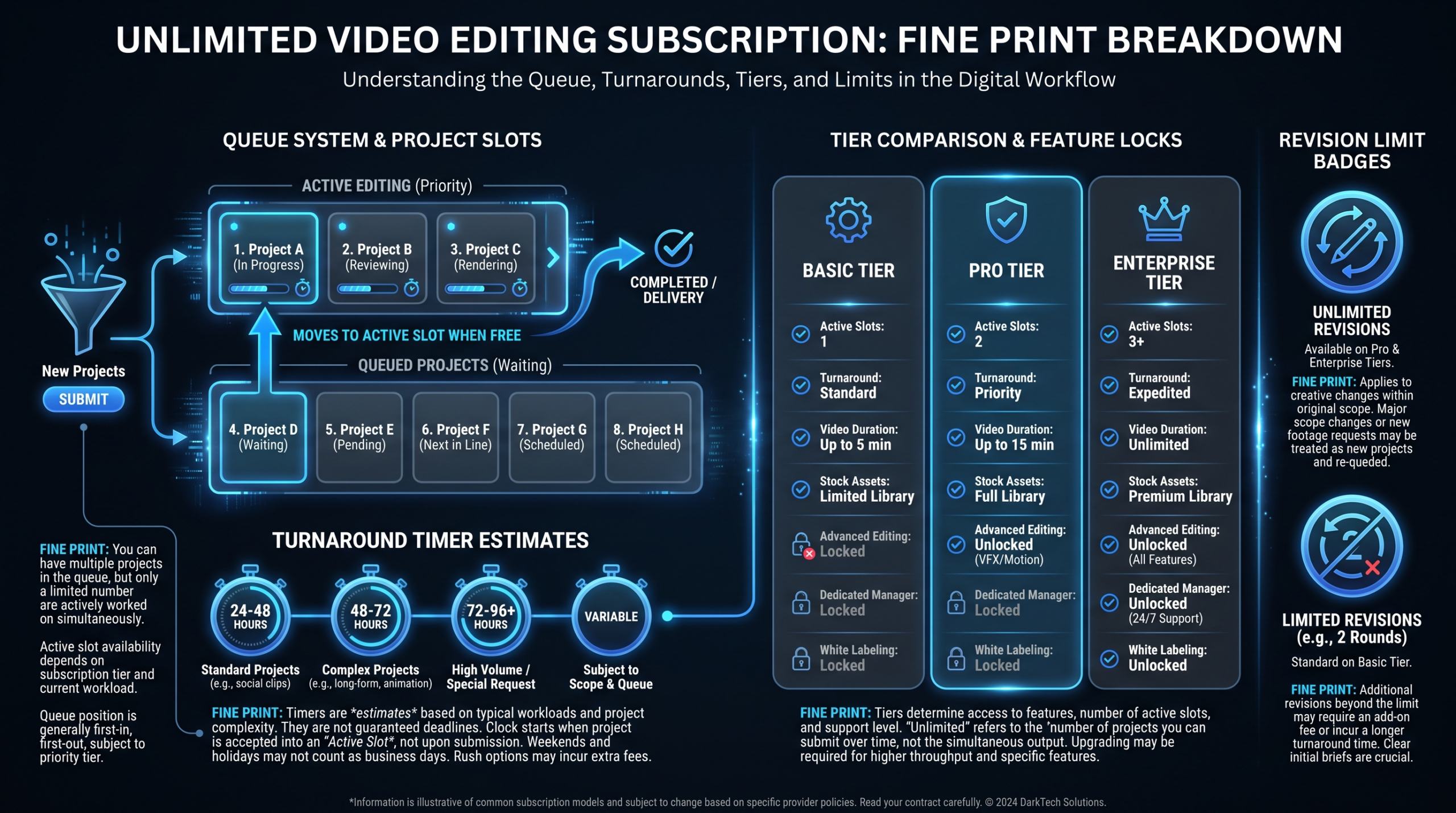
The most important number in any subscription plan isn't the price — it's the number of active slots. An active slot represents one video being worked on simultaneously. Most entry-level plans have one active slot. Mid-tier plans might offer two. Premium tiers sometimes offer three or four.
Active slots determine your maximum throughput. If you have one active slot and each video takes 48 hours to complete, you'll finish roughly 10–12 videos in a 30-day month. That ceiling is fixed regardless of how many requests are in your queue.
Why the Word "Unlimited" Still Holds Up Legally
The queue is genuinely unlimited. You can have 500 requests sitting there. The platform isn't misrepresenting that. The gap between "unlimited requests" and "unlimited output" is where most buyers get surprised — because the distinction rarely appears in the sales conversation.
Understanding the full scope of what's included — and what isn't — starts with reading the complete breakdown of what video editing services actually include before you sign anything.
Queue Mechanics and Turnaround Times
Turnaround time is the second number that matters most. It varies by plan tier, video complexity, and how accurate your brief is. Here's what real-world turnaround looks like across the market:
Typical Turnaround Times by Plan Tier
| Plan Level | Active Slots | Turnaround Per Request | Realistic Monthly Output |
|---|---|---|---|
| Basic / Starter | 1 | 3–5 business days | 4–8 videos/month |
| Standard / Professional | 1–2 | 2–3 business days | 8–14 videos/month |
| Premium / Business | 2–3 | 1–2 business days | 14–22 videos/month |
| Enterprise (subscription) | 3–4 | 24 hours (simple edits) | 20–30 videos/month |
These ranges assume clean, organized footage with a clear brief. Messy raw footage, unclear direction, or multiple revision rounds all extend turnaround. A "2-business-day" SLA can easily become 4–5 calendar days once you factor in feedback loops and holiday gaps.
Priority Queue vs. Standard Queue
Some services offer a "rush" or "priority" add-on — typically 50–100% on top of the base plan — that moves your request to the front of the queue. This is useful for time-sensitive content (product launches, event recaps, earned media responses) but effectively means you're paying per-video pricing on top of your subscription flat rate, which erodes the value proposition.
Time Zone Gaps
Most subscription services use offshore editing teams (South and Southeast Asia, Eastern Europe, Latin America) to keep costs down. This creates a 12-hour asynchronous loop: you submit feedback at 9 AM EST, the editor sees it at 9 PM their time, work resumes, you see the revised version the following morning. A "24-hour turnaround" on a plan can feel like 48 hours in practice when time zones create a one-day lag on every feedback round.
Complexity Caps and Scope Restrictions
Read the plan FAQ — usually three or four pages deep — and you'll find a complexity policy. Every major subscription service has one. Here's the shape it typically takes:
What Counts as "One Request"
The definition of a single deliverable varies considerably across providers, but common frameworks include:
- Duration cap: One request = one video up to a certain length (often 5–10 minutes). Longer videos may count as 2 requests or incur an overage charge.
- Format variants: The 16:9 YouTube cut is one request. The 9:16 Reels version is another. The 1:1 LinkedIn square is a third. Repurposing into multiple formats often counts as separate requests, not one.
- Complexity tiers: Basic editing (cuts, color correction, captions) versus advanced editing (motion graphics, animation, custom transitions, green screen compositing) may be priced differently or require a higher-tier plan.
What's Commonly Excluded
These items appear in most subscription service exclusion lists — sometimes explicitly, sometimes only in the terms of service:
- Custom motion graphics and animation — particularly character animation, complex data visualization, or 3D elements
- Original music composition — licensed stock music is typically included; custom scores are not
- Voiceover recording — editing a provided voiceover is usually included; producing one is not
- Color grading for narrative/cinematic footage — basic color correction is included; a full DaVinci Resolve grade on LOG footage is often treated as a premium request
- Template builds — if you want a custom lower-third template or animated intro that can be reused, that's often a one-time setup fee rather than a standard request
Understanding cost-per-output matters here. For a full breakdown of how editing complexity affects cost, see the video editing cost-per-minute guide — it gives you a framework for evaluating whether a flat subscription is actually saving you money on your specific content mix.
Footage Requirements
Most services require organized, labeled footage uploaded to a shared drive. Some specify maximum raw footage length (often 3–5x the finished video length). Submitting 3 hours of unorganized conference footage and asking for a 5-minute highlight reel will either be rejected as out-of-scope or trigger a manual quote. This is a legitimate constraint — editing time scales with raw footage volume — but it catches buyers off guard when they first try to submit a large raw file dump.
Revision Policies — What's Actually Included
The revision policy is where subscription fine print gets most contentious. Here's how it typically works:
The Standard Revision Model
Most plans include a defined number of revision rounds per request — commonly 2 rounds, sometimes "unlimited" revisions on premium tiers. A "round" means one set of consolidated feedback submitted at once. If you review the video, request 12 changes in a single feedback submission, and the editor addresses all 12, that's one revision round. If you then come back with 3 more changes, that's a second round.
What counts as a revision versus a new request is the real tension point:
- Changing a title card's font color = revision
- Recutting the entire second half because the messaging changed = new request
- Swapping background music = revision
- Adding a new 60-second segment that wasn't in the original brief = new request
Scope Creep and the "New Request" Reclassification
Providers reserve the right to reclassify a revision as a new request if the scope has materially changed from the original brief. This is reasonable — a complete re-edit is not the same as a revision. But the line is subjective, and disagreements about what constitutes "material scope change" are a common friction point between clients and subscription services.
"We got told our revisions were actually a new request twice in the first month. The new brief process added 3–4 days each time. We thought we'd have the videos by Thursday; they came in the following week." — Common pattern in subscription service reviews on G2 and Trustpilot
"Unlimited Revisions" Plans
Some premium-tier subscriptions advertise unlimited revisions. In practice, this means unlimited revision rounds per request before the final file is delivered — not unlimited revisions after the fact on delivered files. Once a request is marked complete and moved to delivered status, opening it back up for changes typically requires submitting a new request. Read the exact language carefully.
Pause and Cancellation Rules
Month-to-month flexibility is one of the core selling points of subscription video editing services. The reality is nuanced.
Pause Policies
Most subscription services allow you to pause your subscription once or twice per year, typically for 1–4 weeks at a time. During a pause, your billing stops and your queue freezes. What pauses can't do:
- Carry over unused capacity. If you only submitted 3 requests in a slow month, the unused "slots" don't roll forward when you un-pause.
- Transfer to another month. You pay for a calendar month of access, not a fixed number of deliverables.
- Pause mid-request. If an active request is in progress when you pause, it typically completes before the pause takes effect.
Pause policies are designed for genuine slow periods (company events, budget freezes, team vacations), not as a monthly optimization strategy.
Cancellation Terms
Most subscription video services are month-to-month with 30 days' notice to cancel. This is a genuine advantage over agency retainers, which often require 3–6 month commitments. However:
- Annual prepay discounts (typically 15–25% off) come with standard refund restrictions — if you cancel mid-year, you'll usually receive a prorated credit rather than a cash refund.
- In-progress work at cancellation varies. Some services complete all active requests; others stop work at the end of the billing period regardless of queue state.
- Asset ownership is universal — your footage, your brand assets, and your finished files are yours at cancellation. Source files (project files in Premiere or After Effects) are often not included unless specified.
Comparing Subscription Tiers Side by Side
Here's how typical unlimited video editing subscription tiers stack up across the market. Ranges reflect common positioning — specific providers will land within these bands but vary on active slots, turnaround, and what's included:
Unlimited Video Editing Subscription: Typical Tier Comparison
| Tier | Monthly Cost | Active Slots | Turnaround | Revisions | Motion Graphics | Best For |
|---|---|---|---|---|---|---|
| Starter | $1,500–$2,500 | 1 | 3–5 days | 2 rounds | Basic only | Podcast edits, simple social clips |
| Standard | $2,500–$4,500 | 1–2 | 2–3 days | 2–3 rounds | Included | YouTube, LinkedIn, webinar recaps |
| Professional | $4,500–$7,500 | 2–3 | 1–2 days | Unlimited (pre-delivery) | Full | SaaS content programs, multi-format |
| Enterprise | $7,500–$12,000 | 3–4 | 24 hrs (simple) | Unlimited | Full + animation | High-volume teams, agencies |
Notice that at the Enterprise tier, the monthly cost of a subscription service starts to overlap with the entry-level cost of a dedicated editing team — while still constrained by slots and sequential processing. This is the crossover point where many teams find it worth re-evaluating their model entirely.
For a broader view of how this compares to other pricing structures, the video production agency pricing models guide covers all five major models with real cost math for typical content volumes.
Subscription Services vs. Dedicated Teams: Market Overview
Let's look at how the leading options in the market actually position themselves — including their honest trade-offs. For SaaS teams evaluating whether an unlimited subscription or a dedicated team model better fits their program, the decision usually comes down to volume, consistency, and complexity.
Video Editing Subscription vs. Dedicated Team: Provider Comparison
| Provider | Model | Price Range | Strengths | Limitations | Right For |
|---|---|---|---|---|---|
| Video Editing Company (VEC) | Dedicated Team | $5K–$16K/mo | SaaS-only focus; dedicated senior editor + PM; 90-day output guarantee; no queue delays — team works in parallel on multiple deliverables | Higher entry point than starter subscriptions; 3-month minimum | Series A–C SaaS with 15+ videos/month needing consistent brand quality |
| Increditors | Dedicated Team | ~$2.5K–$12K+/mo | Premium full-service agency; senior editor + junior editor + PM + creative director pods; known for doubling YouTube channel performance; serves SaaS, finance, education | Custom-quote pricing (no instant tiers); not exclusively SaaS-focused | YouTube creators and SaaS teams wanting a hands-on agency partner with creative direction |
| Vidchops | Subscription | $595–$995/mo | Low entry price; simple portal; good for YouTube and podcast edits | 1 active request; 2–3 day turnaround; limited motion graphics; not suited for complex SaaS content | Individual creators and small teams with simple, high-volume edit needs |
| Video Husky | Subscription | $995–$2,497/mo | Dedicated editor per account (not pool-based); reasonable turnaround; good for YouTube-heavy creators | Still queue-based; limited parallel output; less suited for brand-heavy SaaS work | YouTube-first content creators with consistent weekly upload schedules |
| Flocksy | Subscription (Design + Video) | $769–$1,695/mo | Bundled design + video; good for SMBs wanting multiple creative disciplines | Video editing depth is secondary to design focus; turnaround varies; not ideal for SaaS product video complexity | Small businesses needing lightweight video alongside graphic design work |
The honest distinction between subscription services and dedicated teams is how work gets processed. Subscription services use pools of editors working through a shared queue sequentially. Dedicated teams — like VEC or Increditors — assign specific editors to your account who learn your brand, work in parallel on multiple deliverables simultaneously, and operate as an embedded part of your content team.
For SaaS companies, that distinction matters because product context accumulates. An editor who has cut 50 of your product demo videos understands your UI flows, your terminology, and your visual language in ways that a pool editor picking up a new brief cold cannot replicate.
If you're evaluating how to structure your video outsourcing, the outsourcing video editing guide walks through the team model decision in depth.
The Real Monthly Output Math
Let's get concrete. Here's what a realistic content program looks like under each subscription tier, compared to a dedicated team arrangement — based on typical turnaround times and a 22-business-day month:
Monthly Output: Subscription vs. Dedicated Team
| Model | Active Slots | Avg Turnaround | Est. Videos/Month | Realistic at $5K/mo |
|---|---|---|---|---|
| Subscription (Starter) | 1 | 4 days | 4–6 | Not available (starts at $1.5K–$2.5K) |
| Subscription (Standard) | 1–2 | 2.5 days | 8–12 | ~$3K–$4.5K |
| Subscription (Professional) | 2–3 | 2 days | 14–20 | ~$4.5K–$7.5K |
| Dedicated Team (VEC Growth) | Parallel (no limit) | Same-week (not slot-constrained) | 15–25+ | $5K/mo (Growth plan) |
The dedicated team model produces more output at similar price points because it doesn't run through a sequential queue. Three videos can be edited in parallel — the YouTube long-form, the social clips, and the product demo are all moving simultaneously, not waiting in line. At $5K/month, VEC's Growth plan outproduces a Standard subscription tier while providing a dedicated team that learns your brand over time.
Wistia's State of Video report consistently notes that B2B companies publishing 4+ videos per month see substantially higher engagement rates than those publishing less frequently — which means throughput constraints from a subscription service can directly cap your content program's results. See Wistia's video benchmarks for the underlying data.
Who Unlimited Subscriptions Work For — and Who They Don't
Subscriptions Work Well For
- High-volume simple content: Podcast episodes, webinar clips, social media cuts — content that is repeatable, brief-able in a template, and doesn't require deep brand knowledge per edit.
- YouTube-first creators: Individual creators or small creator teams producing 4–8 videos per month with consistent formats. The queue model maps well to a weekly upload cadence.
- Budget-constrained teams testing the outsourcing waters: The lower entry cost ($1.5K–$3K/month) makes subscriptions accessible for teams that haven't yet built a full content program and aren't ready to commit to a dedicated team retainer.
- Supplemental capacity: Marketing teams with an in-house editor who needs overflow support during campaign peaks.
Subscriptions Struggle With
- High-complexity SaaS content: Product demos, explainer videos, and case study videos require context, product knowledge, and creative judgment that pool-editor subscription models don't systematically build.
- Multi-format campaigns: A product launch campaign that needs 15 assets across multiple formats in 10 days will strain or exceed any subscription tier's throughput.
- Brand consistency at scale: When different editors pick up each request from a pool, visual and tonal consistency degrades over time — especially for brands with nuanced style guides.
- Fast-turnaround demands: If your content program requires same-day or next-day delivery as a standard expectation, queue-based subscriptions aren't built for that cadence.
When to Upgrade to a Dedicated Team
The inflection point for most SaaS marketing teams is around 12–15 videos per month. Below that threshold, a well-chosen subscription service delivers reasonable value. Above it, the math flips: a dedicated team like VEC produces more output, maintains tighter brand consistency, and — at the Growth plan level ($5K/month) — costs similar to or less than the premium subscription tier you'd need to match the throughput.
The other signal is complexity. If your team spends significant time re-briefing editors on product details, correcting brand errors, or resubmitting requests that came back off-tone, that overhead cost (your team's time) should be factored into the true cost of the subscription. Dedicated teams eliminate most of that overhead after the onboarding month.
HubSpot's video marketing research similarly finds that teams producing diverse video formats — not just one repeatable type — see better funnel performance, which suggests a production partner that can handle that diversity without scope friction. For more on building a video strategy that converts, see HubSpot's video marketing guide.
VEC's pricing page shows the three dedicated-team plans (Growth at $5K, Core at $9.5K, Scale at $16K/month) with the guaranteed output metrics and the 90-day guarantee: double your video output or month four is free.
Frequently Asked Questions
Can I really submit unlimited video editing requests on an unlimited plan?
Yes — the queue is genuinely unlimited. You can submit 50 requests on day one and they'll all sit in your queue. What's limited is production throughput: one active slot processes one video at a time. At a 48-hour turnaround with one slot, that's roughly 10–12 completed videos per month, regardless of how many requests are waiting.
What happens if my video editing request is too complex for the subscription?
Most services will either reclassify it as a premium request (with an added fee), ask you to break it into multiple simpler requests, or — in some cases — decline it as out-of-scope for your plan tier. Complex motion graphics, 3D animation, full color grading on cinematic footage, and custom template builds commonly hit this wall. Check the plan's complexity FAQ before submitting anything that's outside a simple cut-and-color edit.
How many videos per month can I realistically get from an unlimited subscription?
It depends on your plan tier and video complexity. At a Starter tier (1 slot, 3–5 day turnaround), expect 4–8 completed videos per month. At a Professional tier (2–3 slots, 1–2 day turnaround), 14–22 is realistic for simple-to-moderate complexity content. These numbers assume clean footage and clear briefs — messy submissions or multiple revision rounds will reduce throughput further.
Is a dedicated video editing team always more expensive than a subscription?
Not necessarily — and not when you factor in effective output. A dedicated team at $5,000/month typically produces 15–25+ videos per month without slot constraints, while a comparable-output subscription tier (Professional or Enterprise) runs $4,500–$12,000/month. At the $5K–$7K range, dedicated teams and premium subscriptions overlap on price while the dedicated team generally delivers more output, tighter brand consistency, and deeper product context.
Can I pause a video editing subscription when my team is on vacation?
Most services allow 1–2 pauses per year, typically 1–4 weeks each. Billing stops during the pause, and your queue freezes. What you can't do is roll unused capacity forward — if you only submitted 3 requests before pausing a 30-day subscription, those unused slots don't credit to the next active month. Pause policies work well for genuine slow periods; they don't work as a way to pay for fewer calendar days of access while banking time for later.
Need Consistent Video Output Without the Queue?
VEC's dedicated editing teams work in parallel on your content — no slots, no queue, no waiting. Senior editors assigned to your account learn your brand and ship 15–25+ videos per month on a flat retainer. Growth plan starts at $5K/month with a 90-day output guarantee.
Book a Free Strategy Call View Pricing Plans