Webinar Repurposing: Turn 1 Webinar Into 20+ Content Assets
Your marketing team just ran a webinar. 347 people registered. 168 attended live. The recording sits in a Zoom cloud folder, gets emailed to no-shows, and then... nothing. It joins the graveyard of one-and-done content that consumed 40+ hours of planning, promotion, and production for a single moment of impact.
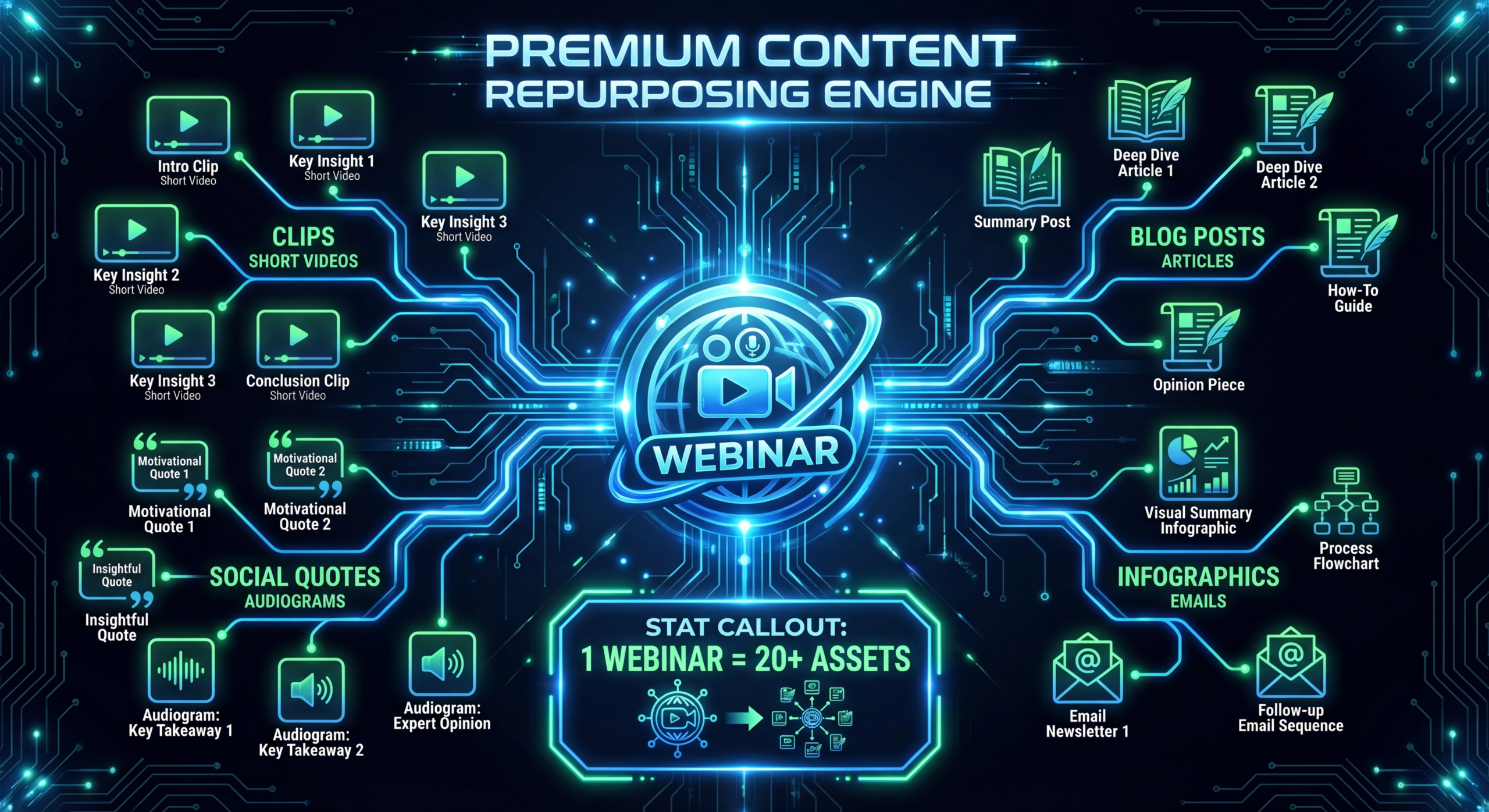
Here's what smart SaaS marketing teams do differently: they treat every webinar as a content engine, not a single event. One 45-minute webinar contains enough raw material to produce 20-30 individual content assets across every channel your team operates. Blog posts, social clips, email sequences, podcast episodes, sales enablement materials, and more — all from a single recording.
This guide shows you the exact webinar repurposing strategy used by SaaS companies to 10x their content output without 10x the production cost. We'll cover the complete workflow from recording to repurposed assets, with specific formats, tools, and timelines for each.
Table of Contents
- Why Webinar Repurposing Is the Highest-ROI Content Strategy
- The Complete List: 20+ Assets From 1 Webinar
- Video Assets: Clips, Highlights & Full Recordings
- Written Assets: Blogs, Emails & Social Posts
- Audio Assets: Podcasts & Soundbites
- Visual Assets: Infographics, Carousels & Quotes
- The 5-Day Repurposing Workflow
- Tools That Speed Up Repurposing
- Recording Tips for Maximum Repurposing Potential
- FAQ
Why Webinar Repurposing Is the Highest-ROI Content Strategy
A single webinar costs roughly $3,000-$8,000 in fully-loaded costs: speaker preparation, slide design, promotion, platform fees, and the team's time. Most companies get one use out of that investment — the live event plus a replay email. That's an effective cost of $3,000-$8,000 per content asset.
When you repurpose that same webinar into 20+ assets, the per-asset cost drops to $150-$400. More importantly, those assets reach audiences who would never have attended the live webinar: LinkedIn scrollers, podcast listeners, blog readers, email scanners, and YouTube searchers.
The Math That Changes Everything
With repurposing: 1 webinar → 25 assets → 218 webinar viewers + 2,000 blog readers + 15,000 social impressions + 500 podcast listeners + 3,000 YouTube views = ~20,000+ total reach
The content already exists. You created it during the webinar. Repurposing isn't about creating new content — it's about reformatting existing expertise for channels where your audience already spends time.
The Complete List: 20+ Assets From 1 Webinar
Here's every asset you can extract from a single 45-60 minute webinar recording. We'll detail each one in the following sections.
1 Webinar → 25 Content Assets
- Full recording (gated)
- YouTube version (ungated)
- 3-5 short clips (60-90s)
- Highlight reel (3-5 min)
- Speaker intro clips
- Long-form blog post
- Key takeaways post
- 3-5 LinkedIn posts
- Email nurture sequence
- Newsletter section
- Podcast episode
- Audio snippets for social
- Internal training clip
- Quote graphics (3-5)
- Stat infographic
- Slide deck (SlideShare)
- LinkedIn carousel
- Twitter/X thread graphics
- Objection-handling clips
- Case study reference
- Follow-up email template
- Discovery call prep doc
Video Assets: Clips, Highlights & Full Recordings
1. Full Recording (Gated)
The complete webinar recording, lightly edited to remove dead air, technical glitches, and the "can everyone hear me?" opening. Gate this behind a form on your website to capture leads from people who missed the live event. This single asset typically generates 30-50% additional registrations after the live event.
2. YouTube Version (Ungated)
Create an ungated version for YouTube with a proper intro (5-10 seconds of branded animation), chapter timestamps, and an end screen CTA. This version should have a unique title optimized for YouTube video SEO — don't just reuse the webinar title. Add a compelling thumbnail with clear text overlay.
3. Short-Form Clips (3-5 Clips, 60-90 Seconds Each)
This is where the highest ROI lives. Identify the 3-5 best moments from your webinar — an insightful data point, a strong opinion, a memorable quote, a tactical tip. Cut each into a standalone clip with subtitles, a hook in the first 3 seconds, and a branded end card. These work on LinkedIn, Instagram Reels, YouTube Shorts, and TikTok.
Criteria for a great clip:
- Makes a complete point in under 90 seconds (no "as I was saying earlier" references)
- Starts with a hook statement, not buildup
- Contains a specific stat, framework, or hot take
- Ends with a clear takeaway or CTA
4. Highlight Reel (3-5 Minutes)
A curated edit of the webinar's best 5-7 moments, stitched together with transitions. This works as a "trailer" to promote the full recording, as a sales enablement asset, and as a YouTube video for people who won't watch the full recording. Think of it as the webinar's greatest hits album.
5. Speaker Introduction Clips
If your webinar featured external speakers or customers, cut their introduction and key insight into a standalone clip. Tag them when you share it — they'll likely reshare to their audience, extending your reach significantly.
Written Assets: Blogs, Emails & Social Posts
6. Long-Form Blog Post (2,000-3,000 Words)
Transcribe the webinar and restructure it as a comprehensive blog post. Don't just publish the raw transcript — nobody wants to read that. Extract the key insights, organize them logically, add headers, data citations, and internal links. Embed the YouTube version at the top for readers who prefer video. This post targets the same keywords as the webinar topic and becomes an evergreen SEO asset.
7. Key Takeaways Post (500-800 Words)
A quick-read blog post listing the 7-10 most actionable takeaways from the webinar, each with a one-paragraph explanation. This format works for people who want the insights without the full commitment. Link to the full recording for those who want to go deeper.
8-12. LinkedIn Posts (3-5 Posts)
Each major insight from the webinar becomes its own LinkedIn post. These should stand alone — a reader shouldn't need to know about the webinar to find the post valuable. Structure each post around one key idea, add your own perspective, and include a CTA to the full recording or blog post. Space these out over 2-3 weeks.
13. Email Nurture Sequence (3-5 Emails)
Build a post-webinar email sequence that extends the conversation. Email structure:
- Email 1 (Day 0): Thank you + recording link + key takeaways
- Email 2 (Day 3): Deep dive on the most popular Q&A question
- Email 3 (Day 7): Related resource (blog post, case study, or template)
- Email 4 (Day 14): CTA to book a demo or consultation
14. Newsletter Feature
Include a 200-word summary of the webinar's best insight in your next newsletter. This reaches subscribers who don't attend webinars but still engage with email content. Link to the blog post or YouTube version for the full story.
Audio Assets: Podcasts & Soundbites
15. Podcast Episode
Strip the audio from your webinar recording, edit it for audio-only consumption (remove references to slides and visual elements), add a podcast intro/outro, and publish as a podcast episode. If your webinar had a conversational format with a guest, it naturally works as a podcast. Even presentation-style webinars can work with minor editing.
16. Audio Snippets for Social
Create 15-30 second audio clips of the best soundbites, paired with a waveform animation or audiogram. These are low-effort assets that work well on Twitter/X and can be created in bulk using tools like Headliner or Descript.
17. Internal Training Clip
If the webinar covered industry insights or customer pain points, extract relevant sections for sales team training. Your sales reps benefit from hearing customer language and industry trends directly — it improves their discovery calls and objection handling.
Visual Assets: Infographics, Carousels & Quotes
18-22. Quote Graphics (3-5 Graphics)
Pull the most shareable quotes from your speakers, overlay them on branded backgrounds, and post across social channels. These are quick-win assets that take 10 minutes each to create in Canva or Figma. Tag the speaker for additional reach.
23. Stat Infographic
If your webinar included data, benchmarks, or survey results, visualize them as an infographic. This format gets saved and shared more than any other content type on LinkedIn and Pinterest. Keep it focused on 5-7 key data points with clear visual hierarchy.
24. LinkedIn Carousel
Convert the webinar's key points into a 8-12 slide LinkedIn carousel. Each slide covers one insight with a visual. Carousels consistently outperform text posts and link posts on LinkedIn for engagement.
25. Twitter/X Thread
Unpack the webinar's core argument in a 10-15 tweet thread. Each tweet should stand alone but build toward a narrative. End with a link to the full recording or blog post.
The 5-Day Repurposing Workflow
Here's the realistic timeline for turning one webinar into 25 assets. This assumes a two-person team (one writer, one video editor) working in parallel.
| DAY | TASKS | ASSETS PRODUCED | HOURS |
|---|---|---|---|
| Day 1 | Transcribe, identify key moments, outline blog post, create clip list | Transcript, content plan | 3-4h |
| Day 2 | Edit full recording, cut 3-5 short clips, create highlight reel | 7 video assets | 5-6h |
| Day 3 | Write long-form blog + takeaways post, draft LinkedIn posts | 7 written assets | 4-5h |
| Day 4 | Create audio podcast, quote graphics, infographic, carousel | 8 audio/visual assets | 4-5h |
| Day 5 | Draft email sequence, sales clips, review and schedule everything | 5+ sales/email assets | 3-4h |
Total time: 19-24 hours across two people over 5 days. Compare that to creating 25 assets from scratch, which would take 80-120 hours. Repurposing cuts content production time by 75%.
Tools That Speed Up Repurposing
| TOOL | USE CASE | PRICE |
|---|---|---|
| Descript | Transcription, video editing, clip creation, audiograms | $24/month |
| Opus Clip | AI-powered short clip extraction from long-form video | $19/month |
| Canva | Quote graphics, carousels, infographics, thumbnails | Free-$13/month |
| Headliner | Audiograms and social video with waveforms | Free-$15/month |
| Castmagic | AI-generated blog posts, show notes, social from audio | $23/month |
| Repurpose.io | Auto-distribute content across platforms | $20/month |
The most efficient setup combines Descript + Canva + Opus Clip for roughly $56/month in tooling. This covers transcription, clip creation, and visual asset design — the three most time-consuming parts of the repurposing workflow.
Recording Tips for Maximum Repurposing Potential
How you record the webinar determines how easy it is to repurpose afterward. These recording practices save hours of editing later.
Use Separate Audio Tracks
Record each speaker on a separate audio track. This makes podcast editing dramatically easier and allows you to isolate individual speakers for clips. Tools like Riverside.fm and Squadcast do this automatically.
Record Speaker Video Separately
Don't rely on the webinar platform's built-in recording. Use a tool that captures each speaker's video in high resolution locally. Low-res, compressed recordings limit your repurposing options — you can't create professional-looking short clips from a pixelated Zoom recording.
Brief Speakers on Clip-Friendly Delivery
Tell speakers to make self-contained points. Instead of "As I mentioned on the previous slide..." they should say "One thing to understand about this topic is..." Each point should stand alone so clips don't require context from earlier in the presentation.
Plan "Clip Moments" in Your Script
Identify 3-5 moments in your webinar outline that are designed to be great clips. A provocative question, a surprising stat, a concise framework explanation. Script these moments to be punchy and self-contained. This pre-planning makes post-production clip selection nearly effortless.
Include a Dedicated Q&A Segment
Q&A sessions produce some of the best repurposing material. Real questions from real prospects = content that addresses genuine pain points. Record the Q&A separately if possible, or clearly timestamp it in the recording for easy extraction later.
Need Help Repurposing Your Webinar Content?
Our team turns raw webinar recordings into polished video clips, highlight reels, and social content — all edited to your brand standards on a monthly retainer.
Book a Free Strategy Call See PricingFrequently Asked Questions
How soon after the webinar should we start repurposing?
Start within 24 hours. The webinar content is most relevant immediately after the event, and faster publishing means more engagement. Aim to have the recording and first batch of clips published within 48 hours, with the full asset set complete within 5 business days.
Should the full webinar recording be gated or ungated?
Gate the original recording on your website for lead capture. Publish an ungated version on YouTube (slightly different edit) for SEO and organic discovery. This way you capture leads from people who want instant access and reach new audiences through YouTube search.
What webinar length is best for repurposing?
45-60 minutes is the sweet spot. Under 30 minutes doesn't give you enough material for 20+ assets. Over 75 minutes usually means the content is padded and the best moments are harder to find. Structure a 45-minute presentation plus 15 minutes of Q&A for maximum repurposing potential.
Can we repurpose old webinars, or only new ones?
Absolutely repurpose old webinars — as long as the content is still relevant. Audit your past 12 months of webinar recordings. Any topic that's still current can be repurposed today. The only exception: webinars with outdated product demos or expired data points that would damage credibility.
How do we avoid repetitive content when repurposing?
Each asset should serve a different audience on a different platform. A LinkedIn post reaches different people than a podcast episode or a blog post. Vary the angle — a clip might focus on a stat, the blog post on the full argument, and the carousel on the framework. Same insights, different frames.
What if our webinar recording quality is poor?
You can still repurpose audio-focused assets (podcast, blog from transcript) and visual assets (quote graphics, infographics from the data). For video clips, you may need to add branded overlays, subtitles, and B-roll to compensate for lower video quality. Professional post-production can salvage most recordings.
📊 Video Repurposing Matrix
Map any long-form video to 20+ content formats with our repurposing matrix. Includes templates for each asset type, distribution checklists, and timeline recommendations.
Download the Free Matrix →Stop Creating One-and-Done Webinars
Every webinar your company runs is a content goldmine waiting to be extracted. The frameworks, insights, and expertise your speakers share in 45 minutes can fuel your content engine for weeks across every channel. The companies that repurpose systematically produce 5-10x more content than those that don't — without proportionally increasing their production budget.
Start with your next webinar. Plan the recording for repurposing, follow the 5-day workflow, and watch a single event generate months of content. Then go back to your archive and repurpose the 3-5 best webinars from the past year.
Need a production team to handle the video editing, clip creation, and highlight reels? See how our dedicated teams work or check our pricing to see what a monthly video partnership costs.