Video SEO for SaaS: Rank on Google and YouTube
TL;DR
- Video ranks on both Google SERPs and YouTube — two organic discovery surfaces from one content investment.
- Keyword research for video requires a different intent framework than text-only SEO.
- VideoObject schema markup is the single highest-leverage technical SEO action you can take for video.
- YouTube channel structure — playlists, descriptions, chapters — functions like topical authority clusters.
- Self-hosted video on key SaaS pages plus YouTube embeds in blog content is the optimal hybrid strategy.
- Organic video traffic is measurable via YouTube Studio, Google Search Console, and UTM-tagged watch pages.
Table of Contents
- Why Video SEO Has Become a Strategic Priority for SaaS
- Video Keyword Research: Finding What Your Buyers Actually Search
- YouTube Channel Optimization for SaaS Brands
- Structured Data and Video Schema Markup
- Video Embedding Strategy for SaaS Pages
- Measuring Organic Video Traffic
- Top Video Production Partners for SaaS SEO Content
- FAQ
Most SaaS content teams treat video as a conversion tool and SEO as a text-only game. That split is leaving compounding organic traffic on the table.
Google now surfaces video carousels, video rich results, and YouTube previews across commercial, informational, and even navigational queries in the B2B software space. YouTube — the world's second-largest search engine by query volume — processes hundreds of millions of searches daily, and a meaningful portion of those are from buyers actively researching software decisions.
The opportunity: a single well-optimized video can rank organically on both surfaces simultaneously. For a Head of Content or VP Marketing managing a lean team, that's the kind of content leverage that materially changes your channel economics.
This guide covers the full video SEO playbook for SaaS — from keyword research through schema implementation, YouTube channel architecture, embedding strategy, and traffic measurement. The goal isn't theory. It's a repeatable system your team can execute this quarter.
Why Video SEO Has Become a Strategic Priority for SaaS
The mechanics of search have changed significantly in recent years. Google's integration of video into standard SERP layouts means that for many informational and commercial queries — "how to reduce customer churn," "best project management software for remote teams," "Salesforce vs HubSpot comparison" — video results now appear above or alongside the top text results.
The Dual-Ranking Advantage
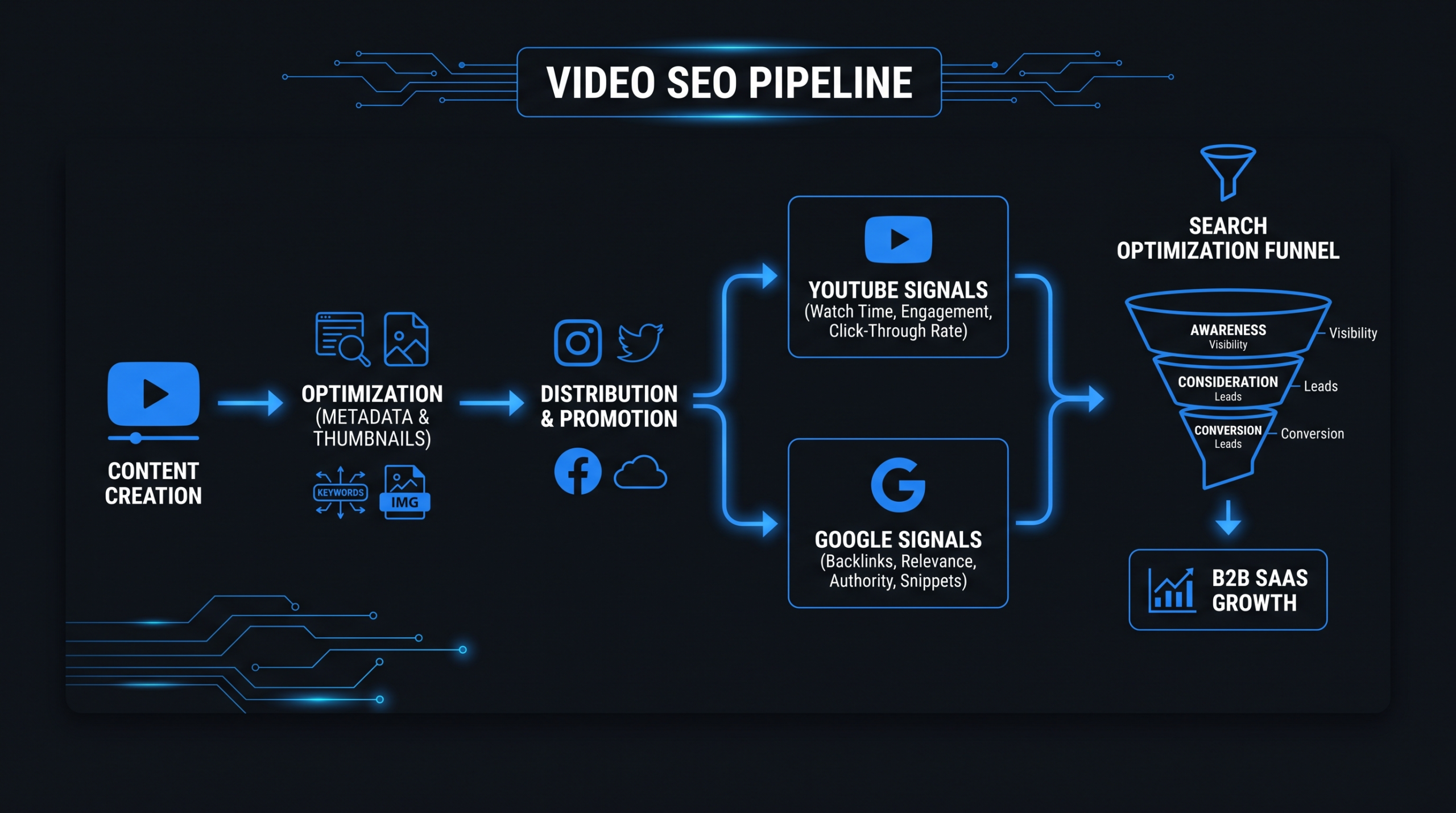
When a SaaS company publishes a video about "how to reduce SaaS churn," that content has the potential to surface in multiple locations: the YouTube search results, the Google video carousel, and potentially a Google rich snippet with a thumbnail. Each represents an independent organic impression from the same asset. Text content, by contrast, typically ranks in one location per page.
This doesn't make video the only SEO channel worth investing in — but it changes the ROI calculus. If your content team produces four long-form blog posts per month, consider what would happen if two of those were also produced as video assets optimized for both YouTube and Google. For most SaaS companies, the answer is a material increase in organic impressions without a proportional increase in production cost.
The SaaS Buyer's Video Journey
Video plays a significant role in B2B purchase decisions, particularly for software. Buyers in the consideration phase regularly search YouTube for demo videos, feature walkthroughs, competitor comparisons, and category education. These are not passive viewers — they're active researchers evaluating whether your product belongs on their shortlist.
SaaS companies that show up with high-quality, well-optimized video during this research phase earn trust and visibility at the moment buyers are forming vendor preferences. Those that don't are invisible during a high-intent discovery window. For a deeper look at SaaS-specific production considerations, see our guide to SaaS video production strategy.
The Compounding Effect
Unlike paid search, where traffic stops when budget stops, organic video rankings compound over time. A well-optimized tutorial video published today can continue generating search-driven views and brand impressions 12 to 24 months from now. That long-tail durability is especially valuable for SaaS companies playing a multi-year content game — and for marketing leaders who need to justify content spend to finance with more than vanity metrics.
Where Video SEO Fits in Your Funnel
Video SEO isn't a single-funnel tactic. Different video formats serve different stages:
- TOFU (awareness): Category education videos, "what is X" explainers, industry trend content — optimized for broad informational queries
- MOFU (consideration): Feature walkthroughs, competitor comparisons, integration tutorials — optimized for mid-intent evaluation queries
- BOFU (decision): Customer testimonials, product demos, onboarding previews — optimized for branded and "[product] review" queries
A mature video SEO program distributes production effort across all three. Starting with MOFU content is typically the fastest path to measurable pipeline impact for Series A–C companies, because those queries capture buyers who are already category-aware and actively comparing options.
Video Keyword Research: Finding What Your Buyers Actually Search
Video keyword research starts with a different question than text SEO: not "what should we rank for?" but "what are buyers watching, and which of those searches have strong video intent?"
Understanding Video Search Intent
Not every keyword is well-served by video. A query like "SaaS churn rate definition" is often satisfied by a quick text answer. But "how to calculate churn in Excel" or "what does high churn look like in a SaaS dashboard" has strong video intent — the searcher wants to see something, not just read about it.
High video-intent query patterns for SaaS:
- How-to and tutorial queries: "how to set up [feature]," "how to integrate [tool] with [platform]"
- Comparison queries: "[Product A] vs [Product B]," "best [category] software 2026"
- Demo queries: "[product name] demo," "[product name] walkthrough," "[product name] review"
- Category education: "what is [SaaS category]," "how does [product type] work"
- Competitive alternatives: "[competitor] alternative," "switching from [competitor] to [your product]"
Finding Keyword Opportunities
Start with YouTube's built-in search suggest. Type your seed keyword into YouTube's search bar and record every autocomplete suggestion — these are real queries with real search volume on the platform. Unlike Google Keyword Planner, YouTube's suggestions reflect video-specific intent and platform-native phrasing.
Layer in your text SEO tools (Ahrefs, Semrush) and filter for keywords where a video carousel appears in the Google SERP. If Google is already showing video results for a keyword, that's a strong signal the query has video intent and that you can capture SERP real estate with a well-optimized video. The presence of a video carousel also typically means text-only pages don't fully satisfy searcher intent on that query — an opening for video content.
Cross-reference against your own analytics. Which of your blog posts drive the most organic traffic? Those topics represent validated demand — a companion video can capture additional impressions from the video carousel on the same SERP while also ranking independently on YouTube.
Competitive Gap Analysis for Video
Search your competitors' branded terms and category terms on YouTube. Which direct competitors have strong YouTube presences? Which terms are they ranking for with video that you're currently missing? Tools like vidIQ and TubeBuddy surface this data at the channel level, showing which keywords competitor videos rank for and estimated view volume by query.
The goal isn't to copy — it's to identify demand your competitors have validated but where you can produce something more useful, more current, or better optimized for search.
Video Keyword Research Tools: Comparison
| Tool | Best For | Pricing | Key Feature |
|---|---|---|---|
| YouTube Search Suggest | Platform-native intent signals | Free | Real autocomplete from real queries; shows video-specific phrasing |
| vidIQ | Competitor channel analysis | Free–$79/mo | Shows keywords competitors rank for; channel health scoring |
| TubeBuddy | Video optimization workflow | Free–$49/mo | Tag suggestions, A/B thumbnail testing, keyword explorer |
| Ahrefs / Semrush | Identifying Google video carousel queries | $99–$449/mo | SERP feature filters reveal which keywords trigger video results |
| Google Search Console | Measuring existing video SERP performance | Free | Video search type filter shows impressions, clicks, position for video results |
YouTube Channel Optimization for SaaS Brands
A YouTube channel is a content ecosystem, not a video repository. How you structure it — channel authority signals, individual video optimization, playlists — directly affects how YouTube's algorithm surfaces your content in search and recommendations.
Channel Authority Signals
YouTube's search algorithm considers channel-level signals when ranking individual videos. A channel with consistent uploads, high watch time, strong subscriber engagement, and good audience retention will tend to outrank a channel with better individual video optimization but weaker channel health overall.
For SaaS brands, this means treating YouTube as a long-term channel investment rather than a video dumping ground. Publish on a consistent schedule — even monthly is sufficient to start. Complete your channel About section with a keyword-rich description of your product and audience. Verify the channel, add channel art, and link your website and social profiles. These baseline signals influence ranking potential across all videos on the channel.
Video Title and Description Optimization
YouTube video titles function like page title tags — they're a primary signal YouTube uses to understand what a video is about and match it to relevant queries.
Title best practices for SaaS video SEO:
- Lead with the target keyword or phrase, not your brand name
- Keep titles under 60 characters to avoid truncation in search results
- Use natural language that reflects how buyers actually phrase their searches
- Add a year ("2026") for evergreen topics where freshness signals matter
- Avoid clickbait phrasing — YouTube's algorithm penalizes patterns where high impressions fail to convert to watch time
Descriptions should use the first 150 characters for your most important keyword and value proposition — this is what displays in YouTube search results before the "more" truncation. The full description can run 300–500 words for complex topics; YouTube indexes this text and can surface the video for related long-tail queries based on description content alone.
Chapters and Timestamps as SEO Multipliers
YouTube's chapter feature (timestamps in the description) does more than improve viewer navigation. Chapters allow individual sections of a video to surface in Google's video rich results as "key moments." A 15-minute video about "SaaS pricing strategy" with chapters for "value-based pricing," "per-seat pricing," and "usage-based pricing" can appear as independent rich result snippets on Google for those sub-queries.
This effectively multiplies the SEO surface area of a single video. For a Head of Content managing content efficiency, chapters are among the highest-ROI optimizations available — they take roughly ten minutes to add and can significantly expand organic reach with no additional production cost.
Playlists as Topical Authority Clusters
Playlists on YouTube function analogously to content clusters in text SEO. A playlist titled "SaaS Customer Success — Complete Guide" that groups 8–10 videos on onboarding, churn reduction, NPS, and expansion revenue signals to YouTube's algorithm that your channel has genuine depth on this topic. That topical authority improves the ranking potential of individual videos within the playlist.
Structure your YouTube playlists to mirror your content pillars. Each playlist should have a keyword-optimized title and a full description. Cross-link between playlists in video end cards and description links to guide viewers deeper into your content ecosystem and increase session watch time — a metric YouTube weights heavily in recommendations.
Structured Data and Video Schema Markup
VideoObject schema is the single highest-leverage technical SEO action for video content. It tells Google exactly what a video is about, enables video rich results (thumbnails in SERPs), and helps Google index video content that might otherwise be overlooked by its crawlers — particularly for videos embedded via JavaScript-rendered players.
VideoObject Schema — Required and Recommended Properties
When a video is embedded on a page of your website, add VideoObject structured data (JSON-LD format) to that page. Required properties for rich result eligibility:
- name: The video title — match your H1 or the video's YouTube title
- description: A clear, keyword-relevant description of the video content
- thumbnailUrl: A publicly accessible URL for a high-quality custom thumbnail
- uploadDate: ISO 8601 format (e.g., "2026-08-02")
- contentUrl or embedUrl: Direct URL to the video file (self-hosted) or YouTube embed URL
- duration: ISO 8601 duration format (e.g., "PT8M30S" for 8 minutes 30 seconds)
High-value additional properties:
- transcript: Full text transcript — significantly improves keyword relevance signals and accessibility
- hasPart (Clip schema): For chapters/key moments — each clip can appear as an independent Google rich result for sub-queries
- publisher: Organization schema with your brand name and logo URL
Google's official documentation for video search best practices lives at developers.google.com/search/docs/appearance/video. Review it before implementation — requirements are updated periodically and the authoritative source will always be current.
How to Earn Google Video Rich Results
Rich results — where Google shows a video thumbnail directly in the main SERP — require valid VideoObject schema. But schema alone isn't sufficient. Google also needs to be able to access the video content (gated videos won't appear), the video must be indexed on a page with sufficient domain authority, and the video's content must be genuinely relevant to the target query.
To verify your implementation, use Google's Rich Results Test tool before publishing. After going live, submit the page in Google Search Console for faster indexing. Rich result appearances typically emerge 2–4 weeks after correct implementation on well-crawled domains, though this varies by site authority and crawl budget.
Common Schema Mistakes SaaS Teams Make
- Adding schema without the video embedded on the page: Google requires the video to be accessible on the same page as the schema markup.
- Confusing contentUrl and embedUrl: Use embedUrl for YouTube videos (the iframe src URL); use contentUrl for self-hosted video file URLs. Using the wrong property is one of the most common implementation errors.
- Inaccessible thumbnailUrl: The thumbnail URL must be publicly accessible without authentication. Test it in an incognito window before submitting.
- Missing duration: Duration is a required field for video rich results. It's frequently omitted in quick implementations.
- Duplicate schema across pages: If the same video is embedded on multiple pages, only add schema to the canonical page.
Video Embedding Strategy for SaaS Pages
Where and how you embed videos on your website affects both SEO performance and conversion. The strategic question isn't just "should we embed video here?" — it's which videos belong on which pages, and whether they should be self-hosted or YouTube embeds.
Which SaaS Pages Benefit Most from Video
Not all page types get equal SEO lift from embedded video. Priority order for SaaS teams:
- Product feature pages: Tutorial and walkthrough videos reduce bounce rate and increase time-on-page — behavioral signals that influence ranking for transactional queries.
- High-traffic blog posts: Adding a companion video to a top-performing blog post can earn a video thumbnail in the SERP for the same keyword, increasing click-through rate from the same ranking position — more traffic without a ranking change.
- Pricing page: A concise explainer video on how pricing works often reduces friction and improves conversion. The SEO benefit is secondary, but engagement metrics contribute to page authority.
- Case study pages: Customer testimonial videos on case study pages can rank for "[customer name] + [product name]" queries and appear in brand and review SERPs.
- Landing pages (non-indexed): Video here helps conversion but doesn't contribute to SEO — don't prioritize these for video SEO investment.
Self-Hosted Video vs. YouTube Embeds for SaaS SEO
Self-Hosted vs. YouTube Embed: SEO Tradeoffs
| Factor | Self-Hosted (Wistia / Vimeo) | YouTube Embed |
|---|---|---|
| Page load speed impact | Higher without optimization (video file weight) | Lower with facade/lazy-load pattern |
| Google video rich results | Yes — use contentUrl in VideoObject schema | Yes — use embedUrl in VideoObject schema |
| YouTube organic discovery | None — video not on YouTube | Yes — video ranks in YouTube search too |
| Brand control / experience | Fully branded player, no competitor ads | YouTube UI, competitor video recommendations shown |
| Analytics depth | Heatmaps, engagement graphs, CTA clicks | YouTube Studio + GA4 integration only |
| Recommended use case | Homepage hero, demo videos, gated content, pricing page | Tutorial content, blog companions, category education |
The recommended strategy for most Series A–C SaaS companies: use YouTube embeds in blog content (you get dual ranking — the blog page and the YouTube video), and self-hosted video via Wistia or Vimeo for your highest-converting pages where experience and analytics depth matter more than YouTube discovery. Wistia in particular is widely used by B2B SaaS marketing teams for its viewer analytics — heatmaps, engagement graphs, and native CTA conversion events. Their resource library on video SEO and hosting strategy is worth reviewing before making final hosting decisions.
Page Speed Considerations for Core Web Vitals
Video embeds can significantly affect Core Web Vitals, particularly Largest Contentful Paint (LCP). To mitigate performance impact:
- Use a YouTube facade pattern: Load a static thumbnail image instead of the full YouTube player until the user clicks. This dramatically improves LCP with minimal UX impact. Lite-YouTube-Embed is a popular open-source implementation.
- Self-hosted video: Use adaptive bitrate streaming (HLS or DASH) and lazy loading to defer video loading until it's near the viewport.
- Never autoplay above the fold: Autoplay video above the fold is one of the fastest ways to fail Core Web Vitals and frustrate users simultaneously.
- Compress thumbnails: Custom thumbnail images should be WebP format and under 100KB. Large thumbnail images inflate LCP scores.
Measuring Organic Video Traffic
Attribution for video SEO is more complex than for text SEO because traffic arrives through multiple surfaces — YouTube search, Google video carousels, and embedded video on your pages — and the conversion path is rarely direct. Here's how to build a measurement framework that actually tells you what's working.
YouTube Analytics: The Signals That Matter
In YouTube Studio, the metrics that most directly indicate organic search performance are:
- Traffic source — YouTube Search: Views driven by YouTube's own search. This is your primary signal that keyword optimization is working on the platform. Track this per video and at the channel level month over month.
- Traffic source — Google Search: Views arriving from Google results. This directly measures video SERP performance — separate from YouTube's own search.
- Impressions and click-through rate (CTR): Impressions measure how often your thumbnail was shown in YouTube's interface; CTR measures how compelling that thumbnail and title were. Low CTR with high impressions is a clear signal to test new thumbnails or rewrite the title.
- Average view duration and audience retention: YouTube's algorithm weights watch time heavily in search and recommendations. Videos that retain 50%+ or more of viewers through their full runtime tend to get significantly more algorithmic distribution. Retention drops at specific timestamps reveal where your content is losing viewers — actionable data for your production team.
Google Search Console for Video Performance
Google Search Console's Performance report includes a "Search Type" filter with a "Video" option that surfaces queries for which your video content appeared in Google SERPs. This is the most direct signal of how your video SEO is performing on Google independent of YouTube.
Set the filter to Search Type = Video and review:
- Which queries are generating video SERP impressions (and which aren't, but should be)
- Videos with high impressions but low clicks — indicating title or thumbnail issues
- Position changes following schema implementation or video content updates
- Query gaps where you have relevant video content but no SERP appearance — flag these for schema audit
UTM Tagging for Video-Driven Web Traffic
Add UTM parameters to all links in your YouTube video descriptions: utm_source=youtube, utm_medium=video, utm_campaign=[video-topic-slug]. This allows you to segment video-originated web traffic in Google Analytics 4 and attribute downstream conversion events to specific videos or content pillars.
The metric that ultimately matters for SaaS marketing leaders is whether video-driven web sessions lead to trial signups, demo requests, or pipeline — not just views. Build a GA4 exploration that segments sessions by utm_source=youtube and tracks conversion events downstream. This is the data that justifies continued video investment to your CFO and board.
Building a Monthly Video Content Dashboard
Consolidate video performance data into a single monthly review. Recommended metric categories:
- Organic reach: YouTube search views (monthly), Google Search Console video impressions (monthly), new vs. returning YouTube viewers
- Engagement quality: Average view duration %, CTR on YouTube, audience retention at 25/50/75/100% marks for key videos
- Web impact: Sessions from YouTube (GA4), conversion rate of YouTube-source sessions vs. channel average, pipeline attributed to video if CRM tagging is in place
- Publishing cadence: Videos published vs. target, keyword coverage by content pillar, percentage of published videos with schema markup
Monthly reviews of this dashboard reveal where to double down and where to cut. A video generating 2,000 YouTube search views per month with a 4% trial signup rate warrants five more videos on that topic cluster. A video with 50 views after three months likely needs title and thumbnail optimization — or is targeting a keyword with insufficient demand to justify production investment.
Top Video Production Partners for SaaS SEO Content
Executing a video SEO program at scale requires consistent, high-quality production — and for most SaaS marketing teams, that means working with an external partner rather than building and managing in-house capacity. Here's how the leading options compare for SaaS SEO-focused video production specifically.
Video Production Partners for SaaS SEO Content
| # | Agency | Best For | Pricing | Key Strength |
|---|---|---|---|---|
| 1 | Video Editing Company (VEC) | Series A–C SaaS scaling a consistent video SEO content program | $5K–$16K/mo | Dedicated editor pods, 90-day double-output guarantee, SaaS-native workflow, deep product marketing experience |
| 2 | Increditors | SaaS, YouTube creators, education, finance brands | ~$2.5K–$12K+/mo (custom quote) | Senior editor + junior editor + PM + creative director pods; known track record for doubling YouTube channel performance metrics |
| 3 | Vidico | Explainer and product narrative videos, campaign launches | Project-based, $10K+ | Strong storytelling for product explainers and brand videos |
| 4 | Yum Yum Videos | Animated explainers, brand narrative content | Project-based, $7K+ | Animation quality, established international team |
| 5 | In-house team | Companies with 40+ videos/month and fully established brand voice | $180K–$350K+/yr (fully loaded) | Maximum brand control, no external dependency on turnaround |
For SaaS companies at Series A–C scaling a video SEO content program, the dedicated team model with a partner like VEC offers the best combination of output consistency, brand depth, and cost efficiency. A dedicated editor pod learns your product, your tone, and your brand standards over time — which is critical when you're publishing four to eight videos per month for sustained organic ranking. See our pricing page for current plan details and a breakdown of what's included at each tier, including the 90-day guarantee structure.
Increditors is a strong second option for teams that want the same dedicated pod model — with a senior editor, junior editor, project manager, and creative director — and a strong track record on YouTube growth metrics. Their retainers are custom-quoted but typically comparable to VEC's Growth tier for similar scopes. Note that Increditors' client mix spans YouTube creators, education, and finance in addition to SaaS, which is worth weighing if SaaS-specific product marketing context is a priority for your team.
For more context on how outsourcing decisions play out in practice, see our guide on how to outsource video editing and our overview of product demo video production, which covers SaaS-specific production considerations for demo content in particular.
Frequently Asked Questions
How long does it take for a new YouTube video to rank on Google?
Google indexing of YouTube videos varies — some videos appear in SERPs within 24–48 hours, others take two to four weeks. Videos on established channels with strong authority tend to index faster. The most important factors are valid VideoObject schema on your embedding page, keyword-optimized title and description, and an authoritative channel with consistent publishing history. Submitting the embedding page in Google Search Console immediately after publishing typically accelerates indexing.
Should SaaS companies publish videos directly to their website or only to YouTube?
Both — but with purpose. Upload all content to YouTube to benefit from YouTube search discovery and Google video carousels. For your highest-converting pages (homepage demo, pricing, key feature pages), embed a self-hosted version via Wistia or Vimeo for a cleaner brand experience and deeper conversion analytics. For blog content, embed the YouTube version to get dual ranking — the blog page ranks in text search while the YouTube video ranks in video search and YouTube.
What is VideoObject schema and is it mandatory for video SEO?
VideoObject is structured data markup (in JSON-LD format) that tells Google what a video is about — its title, description, duration, thumbnail, and location. It's not technically mandatory, but without it, Google is significantly less likely to surface your video in rich results or video carousels. Think of it as the metadata layer that makes your video legible to search engines. Any SaaS team serious about video SEO should implement it on every page with an embedded video.
How many videos should a Series B SaaS company publish per month for video SEO?
Consistency matters more than raw volume. Four well-optimized videos per month — each targeting a specific keyword cluster, with valid schema, custom thumbnails, and chapter markers — will typically outperform twelve hastily produced videos with weak optimization. Build to four videos per month sustainably before scaling output. Once you have 20+ indexed videos, analyze which topics are generating search traction and increase production in those clusters specifically.
Can video content help SaaS companies rank for competitor keywords on YouTube?
Yes — comparison and alternative queries ("Competitor X vs Competitor Y," "[Competitor] alternative") have strong video intent and are often less competitive on YouTube than on text SERPs. A well-produced comparison video optimized for "[Competitor] vs [Your Product]" can rank on YouTube for competitor-branded queries, surfacing your brand to buyers actively researching alternatives. This is one of the higher-ROI video SEO tactics for SaaS companies in competitive categories, where buyer intent at the comparison stage is extremely high.
Ready to Build Your Video SEO Engine?
VEC provides dedicated video editing teams for Series A–C SaaS companies — built for the consistent, high-quality output that drives organic ranking on both Google and YouTube. Plans from $5K/month with a 90-day double-output guarantee.
Book a Free Strategy Call View Pricing