Video in Cold Outreach: Formats That Get Replies
TL;DR
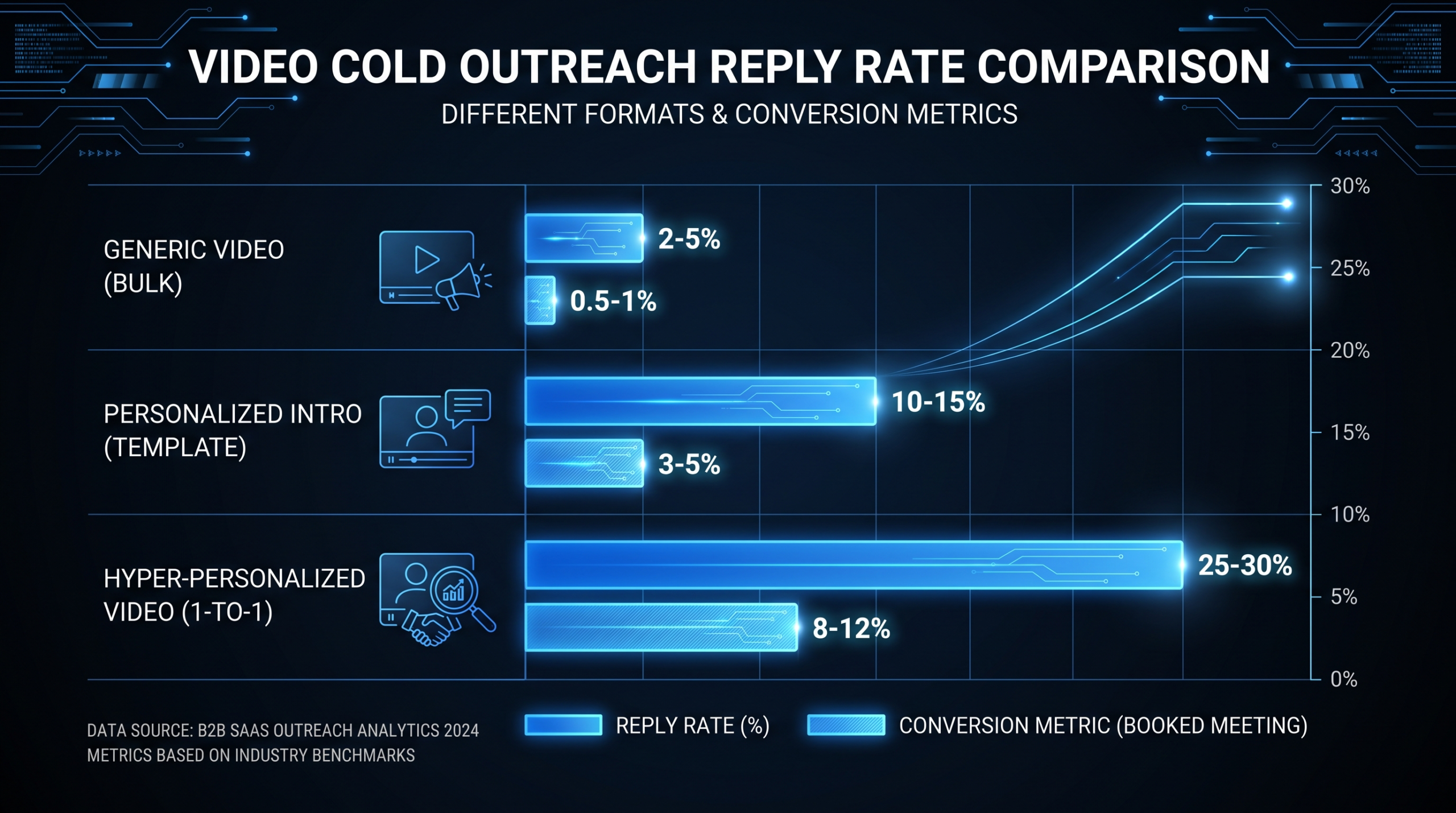
- Personalized 1:1 prospecting videos (60–90 seconds) consistently outperform plain-text cold emails — reply rates on video-enabled sequences commonly run 2–4x higher when targeting is tight.
- Two formats drive the results: fully personalized screen recordings for your top-tier accounts, and templated videos with personalized thumbnails for mid-tier volume outreach.
- Loom, Vidyard, and BombBomb each serve a distinct niche — tool choice depends on your CRM, send volume, and how much analytics depth you need.
- Thumbnail and subject line treatment often influences reply rate more than the video content itself.
- LinkedIn DM video and email video serve different buyer psychology — deploy them at different cadence stages.
- Once templated sequences hit significant send volume, professional editing pays back immediately in brand consistency and close-rate lift.
Table of Contents
- Why Video Outreach Converts Better Than Text
- The Two Video Formats That Drive Replies
- Tools: Loom vs. Vidyard vs. BombBomb
- The 60–90 Second Prospecting Script Framework
- Thumbnail and Subject Line Strategy
- LinkedIn DM Video vs. Email Video
- Building and A/B Testing Your Video Cadence
- When to Hand Off to a Professional Editor
- Top Agencies for Polished Outreach Video Sequences
- FAQ
Why Video Outreach Converts Better Than Text
Cold email reply rates have been declining for years. Spam filters are smarter, buyer attention is shorter, and the average VP of Marketing at a growth-stage SaaS company receives upward of 50 cold outreach messages per day. Text-based sequences that worked three years ago now land in the promotions tab or get deleted before the first paragraph is read.
Video changes the calculus. A 60-second personalized video does something no amount of copywriting can: it makes the recipient feel like a human being reached out to them specifically. That feeling — the sudden awareness that someone took three minutes to research your company before pressing record — triggers a reciprocity instinct that text cannot replicate.
Sales teams that have added video to their cold outreach sequences commonly report meaningful reply rate improvements across their ICP. The effect is most pronounced in the first touch: a video in step one of a cold sequence typically performs significantly better than a text-only equivalent, especially when combined with tight account targeting and a hook that is visibly specific to the prospect.
The Attention Problem Video Solves
The practical implication for outreach is simple: your prospect can absorb the premise of a 90-second video in the time it takes them to skim the first three lines of an email. If your video opens with something specific to them — their product page on screen, their LinkedIn post referenced by name, their competitor's pricing comparison annotated in real time — you have their attention in the first ten seconds in a way that no subject line can guarantee.
The key variable is specificity. Generic "I loved your content" videos don't move the needle. Videos that open with a screenshot of the prospect's own homepage, their most recent blog post title, or a specific line from their job description create a pattern interrupt that generic outreach cannot replicate. The medium amplifies what's already there — if the premise is vague, video just broadcasts vagueness at higher production cost.
This personalization requires more time per prospect. That's the core strategic decision for any head of sales or VP Marketing deploying video at scale: where to personalize fully, where to templatize, and where to bring in a professional editing partner to handle the polished sequences that represent the brand at key account moments.
Where Video Outreach Fits the Funnel
Video is most effective at four outreach moments:
- Cold first touch — to break through inbox noise and establish you as a real human
- Bump and follow-up messages — when the first email went unanswered and you need a new angle
- Re-engagement of cold leads — prospects who went dark 60–90 days ago
- Post-demo follow-ups — a short thank-you video summarizing next steps after a discovery call measurably improves close rates
The common thread: video works where there is a relationship gap to bridge. The more personal the outreach moment, the more powerful the medium.
The Two Video Formats That Drive Replies
Not all video outreach is the same. There is a meaningful performance difference — and a meaningful time investment difference — between the two formats B2B sales teams actually deploy. Understanding the trade-offs determines how you allocate rep time and production budget.
Format 1: Fully Personalized Screen Recording (1:1)
A rep opens a screen recording tool, pulls up the prospect's website, LinkedIn profile, or a relevant industry news piece, and records a 60–90 second video speaking directly to that specific person about that specific context. The prospect's homepage or LinkedIn profile appears visibly in the frame. The subject line references something unique to them. The thumbnail shows the rep alongside something familiar to the recipient.
This format typically takes 4–8 minutes per prospect, including research, recording, and sending. It should be reserved for your highest-value targets: enterprise accounts, re-engaged warm leads, key decision-makers at named accounts, or roles where a single closed deal justifies significant rep time investment.
Format 2: Templated Video with Personalized Thumbnail
A single, well-scripted video recorded once — or in a small batch — with variable personalization applied at the thumbnail level. The video body delivers the same value proposition across a prospect segment; the thumbnail shows a whiteboard or a written note with the prospect's name, company name, or a relevant data point.
This format lets a rep send 50–100 video outreach messages per day without recording each individually. The personalization is surface-level but effective — the thumbnail creates the pattern interrupt, the video delivers the value proposition at consistent quality. The templated master video, because it represents your brand to hundreds of prospects, is where professional production quality matters most.
Personalized vs. Templated: Format Comparison
| Factor | Fully Personalized (1:1) | Templated + Thumbnail |
|---|---|---|
| Time per prospect | 4–8 minutes | 30–60 seconds |
| Reply rate lift (vs. text baseline) | 4–6x (tight targeting) | 2–3x |
| Volume capacity per rep per day | 10–20 prospects | 80–150 prospects |
| Best prospect tier | Enterprise, named accounts | Mid-market, ICP volume lists |
| Production quality requirement | Low (authenticity is the point) | High (seen by hundreds of buyers) |
| Brand consistency | Variable (rep-dependent style) | High (one scripted master video) |
| Recommended tool | Loom, Vidyard | BombBomb, Vidyard |
Most effective B2B sales teams use both in tandem: fully personalized for the top 20% of accounts by deal value, templated for the broader ICP list. The templated master videos — representing your brand to hundreds of prospects — are where professional video editing delivers a direct return. Our guide to SaaS video production covers how to build brand-consistent templates that look polished, not screen-recorded.
Tools: Loom vs. Vidyard vs. BombBomb
The three dominant tools in B2B video prospecting serve overlapping but distinct use cases. Choosing the wrong one creates friction in the rep workflow, limits analytics visibility, or costs more than the use case warrants. Here's an honest breakdown of each.
Loom
Loom is the fastest to record and share. Its Chrome extension lets a rep click record, capture a screen-and-face video, and get a shareable link within 30 seconds of stopping. The free plan covers basic needs; Loom's paid Business plan adds analytics, custom branding, CTA overlays, and viewer engagement tracking.
Loom's main limitation is CRM integration. There is no native Salesforce or HubSpot sync on lower tiers, which means reps track video views manually or via third-party extensions. For teams where activity logging in the CRM is non-negotiable, this creates a meaningful operational gap — you're flying blind on whether prospects actually watched.
Vidyard
Vidyard positions itself as the enterprise video sales platform. Native integrations with Salesforce, HubSpot, Outreach, and Salesloft mean every video view triggers an activity log, contact-level analytics surface in the CRM, and reps get real-time push notifications when a prospect watches their video. The Vidyard Teams and Enterprise plans add video hosting, analytics dashboards, and the ability to embed video in email via an animated GIF thumbnail.
The downside: Vidyard costs meaningfully more than Loom, and the interface carries more overhead. For SDR teams just starting with video outreach, the feature set exceeds what they need in the first 60 days. The rule of thumb: start with Loom, migrate to Vidyard when CRM attribution and pipeline tracking become requirements.
BombBomb
BombBomb was built specifically for email-first video outreach. Its Gmail and Outlook integrations let reps record directly inside their inbox and embed the video as an animated GIF preview in the email body — no click-through link required. The recipient sees movement in the email without opening a separate tab, which is one of the most effective open-to-play triggers in the category.
BombBomb is the right choice for teams whose primary outreach channel is email and who want the lowest possible friction between recording and sending. It lacks Vidyard's CRM depth but consistently wins on adoption rate — reps who resist adding new tools to their workflow will actually use BombBomb because it lives inside their existing email client.
Tool Comparison: Loom vs. Vidyard vs. BombBomb
| Feature | Loom | Vidyard | BombBomb |
|---|---|---|---|
| Starting price | Free / ~$15/user/mo | Free / ~$80+/user/mo | ~$33/user/mo |
| CRM integration depth | Limited (paid tiers) | Deep (SF, HubSpot, Outreach) | Moderate (HubSpot, Salesforce) |
| Email embed (animated GIF) | Static thumbnail + link | GIF + link (paid tiers) | Native GIF embed in inbox |
| Analytics depth | Basic views and plays | Contact-level, heatmaps, re-watch | View time, re-watch, reply rate |
| Real-time rep notifications | Basic (paid) | Yes, full push notifications | Yes |
| Ease of adoption | Very high | Medium | High |
| Best suited for | Speed and simplicity first | Enterprise CRM-heavy teams | Email-first sales orgs |
For most Series A–C SaaS teams with a 5–15 person sales org, Loom at the individual rep level plus Vidyard for sequences requiring CRM attribution is the practical stack. BombBomb earns its place when the team lives in email and rep adoption rate matters more than analytics depth in the first 90 days.
The 60–90 Second Prospecting Script Framework
The biggest reason video outreach fails is not the tool or the thumbnail — it is the script. Most reps ad-lib their way through 90 seconds of vague value proposition, spend 30 seconds on company background no one asked for, and close with a weak "let me know if you're interested." The prospect watches 15 seconds and closes the tab.
A structured framework solves this. Every second of a 60–90 second video should be intentional. Here is the framework that consistently performs across B2B SaaS outreach contexts:
Seconds 0–10: The Specific Hook
Open with something specific to this person — not "I came across your profile," which is what every other rep says. Something that proves you actually looked:
"I'm on your pricing page right now — I noticed you just added an enterprise tier. That usually signals you're expanding upmarket, and I wanted to share something relevant to that transition..."
"I saw your post yesterday about struggling to get video content consistent across your sales team — that's exactly the problem I want to address in the next 60 seconds..."
The hook does two things simultaneously: it proves you are not a mass-blast robot, and it creates a frame the rest of the video can deliver against.
Seconds 10–30: The Problem Statement
Name the problem you solve — as it exists for their specific stage and role, not in generic category terms. Be specific to their situation: Series B scaling a sales motion, Head of Content managing six channels with insufficient production capacity, VP Marketing whose video output is inconsistent across platforms.
"Most B2B SaaS marketing teams at your stage are producing content at a volume their video capacity can't match. They end up with webinar recordings that never get edited, product launches without support videos, and social content that looks different every week depending on who recorded it..."
Seconds 30–60: The Bridge to Value
Do not pitch your product. Introduce the category of outcome — what it looks like when the problem is solved. Then name your company once, briefly, as the vehicle that gets them there.
"We work with growth-stage SaaS companies to build a dedicated editing team that works inside your existing workflow — same editors, same style guide, no project-by-project scrambling. Your marketing team gets guaranteed production capacity without the hiring overhead..."
Seconds 60–90: The Specific CTA
Do not ask for a call. Ask for something lower-friction first, or make the call ask extremely specific about time and what they'll get:
"I put together a quick breakdown of how companies at your stage have structured their video programs — I'll drop the link below. If it resonates, a 20-minute call this week is worth your time. Either way, you'll have a useful framework."
A specific offer — a relevant case study, a benchmark, an audit — converts better than a naked "want to chat?" closer. Wistia's research on optimal video length and engagement consistently confirms that under-90-second videos retain the highest percentage of viewers — every second past 90 loses audience disproportionately fast.
Common Script Failures to Avoid
- Opening with your company name. Nobody asked. Save it for the second-30 mark at the earliest.
- Listing multiple features. One value premise per video. More than one creates confusion and dilutes the hook.
- Closing with a vague ask. "Let me know what you think" gives the prospect nothing specific to do.
- Running past 90 seconds. You lose roughly 40% of remaining viewers between 90 and 120 seconds. Cut, don't add.
- No personalization in the opening 10 seconds. If the first ten seconds could apply to any prospect in any industry, the video is not working hard enough.
Thumbnail and Subject Line Strategy
The video is what converts. The thumbnail and subject line are what get the video played. In many outreach tests, thumbnail treatment is the highest-leverage single variable — a strong thumbnail can double the play rate on an otherwise identical video, which means it doubles the pipeline opportunity from the same batch of sends.
Thumbnail Best Practices
The thumbnail formats that consistently outperform in B2B outreach contexts:
- Whiteboard with the prospect's name or company. Low-tech but reliably effective for first-touch cold outreach. The handwritten element signals deliberate effort. "Hey [Name]" on a whiteboard or notepad in frame performs across verticals and seniority levels.
- Their website or product visible in the frame. Screenshot their homepage behind your face in the screen recording. The familiarity of seeing their own property triggers a click instinct that branded graphics cannot replicate.
- A specific, relevant chart or benchmark. If you're reaching out to a VP Marketing at a PLG SaaS, put a relevant benchmark behind you — something they would find credible and want to see more of. Establishes expertise before they click play.
- Animated GIF vs. static image. BombBomb and Vidyard both support animated GIF thumbnails that loop 3–5 seconds of your video directly in the email body. Animated thumbnails consistently outperform static thumbnails in cold email open-to-play rate. Use GIF wherever your send tool supports it natively.
Subject Lines for Video Outreach Emails
Mentioning video in the subject line increases open rates — but only when the video is actually relevant and the hook is specific, not a generic "I made this for you." Patterns that perform consistently:
- [Video] + specific hook: "[Video] I was on your pricing page just now..."
- Name + specific context: "[First name] — 90 seconds on [Company]'s video program"
- Reference the content directly: "Quick video on [prospect company]'s outbound motion" — works because it is specific and sets a time expectation
- Avoid tired openers: "You need to see this," "I made this just for you," and "Quick question" test poorly with VP-level B2B buyers in 2026. They have seen all of them.
HubSpot's sales outreach research consistently identifies specificity — not cleverness — as the subject line variable that drives opens among director and VP-level buyers. Their analysis of high-performing subject lines is worth reviewing for baseline benchmarks across industries.
LinkedIn DM Video vs. Email Video
LinkedIn and email represent different buyer psychology contexts. The same video that performs well in an email sequence may fall flat as a LinkedIn DM — and vice versa. Channel-specific deployment strategy changes how you approach script length, tone, and production level for each.
LinkedIn DM Video
LinkedIn's native video DM feature lets you record directly in the mobile app and send a video message to any first-degree connection. The video auto-plays in the message thread with sound off by default, which means your first five seconds must communicate value visually — via on-screen text, subtitles, or a clearly visible prop — before the viewer unmutes.
LinkedIn DM video performs best when:
- You have already connected (connection request followed by video DM outperforms cold InMail video)
- The hook references something LinkedIn-specific — their recent post, a career update, a mutual connection's recommendation
- Length stays at 30–60 seconds — LinkedIn's social register is less formal than email, and buyers expect shorter, more conversational content there
- Tone is casual and direct — LinkedIn buyers associate the platform with relationship-building, not pitch delivery, so scripted corporate language works against you
Email Video
Email gives you more context control. Subject line, preview text, and the email body can all prime the recipient before they click play, which means the video can be slightly more structured (up to 90 seconds), the CTA more explicit, and the production level higher since the buyer has already made an engagement decision before hitting play.
Email video also enables more granular analytics: most serious tools track not just opens but time-on-page, video completion percentage, and link clicks post-watch. For sequences where attribution matters — which for any VP of Marketing building a performance-measured outreach program should mean all of them — email video integrated with the CRM is the more analytically rich environment.
The Combined Sequence Play
The most effective enterprise outreach programs use both channels in sequence: LinkedIn for initial relationship establishment (connection request followed by casual video DM referencing their content), then email with a more structured video for the commercial message. The LinkedIn touch creates familiarity; the email touch delivers the pitch in a context where the buyer expects and accepts commercial intent. Teams that incorporate product demo video production into their sequences often structure it exactly this way — informal video on LinkedIn, polished demo via email.
Building and A/B Testing Your Video Cadence
Video outreach without a testing structure is spending more time per email for unclear gains. A proper A/B framework tells you what is actually driving reply rate lift — and prevents the common mistake of attributing good results to video quality when thumbnail or subject line is doing most of the work.
Recommended Cadence Structure
A video-enabled cold outreach cadence that consistently performs across B2B SaaS contexts:
- Day 1 — Video email (personalized): Specific hook, 60–90 second video, clear single CTA
- Day 3 — Text follow-up: Short reply in the same thread ("Wanted to make sure the video came through — worth a quick watch if you missed it")
- Day 5 — LinkedIn DM video: Shorter (30–45 sec), references the email casually without repeating the pitch verbatim
- Day 8 — Value-add email (text): Relevant benchmark, case study, or resource — no direct pitch, just genuine value
- Day 12 — Breakup video: 30-second final outreach, direct and respectful ("Last message from me on this — if timing changes, the door stays open")
Five touches over 12 days. Video appears at Day 1, Day 5, and Day 12 — the opening, middle, and close of the sequence. Text touches in between keep the thread active without creating video fatigue.
What to Test and in What Order
Run one variable at a time, starting with the variables that have the highest potential impact on the first metric in the funnel they influence:
- Thumbnail type (face + whiteboard vs. screen recording vs. branded still): affects play rate directly
- Subject line ([Video] prefix vs. name + hook vs. implied question): affects open rate
- Script opening (company-specific hook vs. role-specific hook vs. industry benchmark): affects completion rate
- Video length (45 sec vs. 75 sec vs. 90 sec): affects completion percentage and CTA click rate
- CTA format (specific content offer vs. calendar link vs. simple reply ask): affects meeting booked rate
Metrics to Track at Every Stage
Track the full funnel: send rate → open rate → video play rate → completion rate → reply rate → meeting booked. Most teams fixate on reply rate but ignore play rate — if prospects are not clicking play, video quality is irrelevant. Fix the thumbnail and subject line before re-recording the video. HubSpot's research on video marketing performance consistently shows that play rate is the highest-leverage optimization point for teams in the first 90 days of a video outreach program.
When to Hand Off to a Professional Editor
Not every video in your outreach cadence should be rep-recorded. There is a production threshold — where the video represents your brand to enough prospects that quality variance materially affects pipeline outcomes — where bringing in a professional editor delivers immediate return.
The Three Trigger Points for Professional Production
- Templated master videos hitting 500+ sends per month. When the same video reaches hundreds of prospects, it is a brand asset, not just a sales touch. Rough audio, inconsistent framing, and off-brand visuals at that send volume damage brand perception at scale. A professional edit — tight pacing, branded intro and outro, color grading, normalized audio — costs a small fraction of what damaged impression at scale costs in pipeline value.
- Product demo sequences for mid-market and enterprise accounts. A polished 3-minute product walkthrough as part of a post-discovery follow-up has a measurable impact on close rates. Prospects who are already in your pipeline hold your production quality to a higher standard than cold outreach, and rightly so.
- Customer story assets embedded in follow-up sequences. A professionally produced 90-second customer testimonial included as a video asset in follow-up sequences routinely outperforms reps describing the same story on a call. The customer's credibility is on the line alongside yours — these require professional production to land the way they should.
The decision framework: if a video will be used at volume, represents a brand-defining moment, or features a third party (customer, partner, investor), it warrants professional editing. For in-the-moment 1:1 prospecting, rep-recorded is correct — the informality is intentional and the authenticity is the feature. To understand what outsourcing video editing looks like in a B2B sales context, our detailed guide covers scope, workflow, and what to expect in the first 30 days.
What Professional Editing Adds to Outreach Video
- Tight pacing — removing filler words, long pauses, false starts, and the restarts that reps cannot self-edit objectively
- Branded lower thirds and animated name overlays for personalized templated sequences
- Background music at the right level — present enough to signal production quality, not so loud as to compete with speech
- Color correction and audio normalization that make mobile-recorded or laptop-recorded footage look polished and intentional
- Custom intro and outro bumpers that reinforce brand identity without adding run time
- Subtitle generation with quality review — essential for LinkedIn auto-play (sound off by default) and accessibility compliance
For SaaS companies scaling their outreach programs, Video Editing Company's Growth and Core plans include dedicated editing teams that work inside your existing workflow — Slack-based briefing, 24–48 hour turnarounds, and editors who internalize your brand voice over time rather than treating every video as a new project from scratch. The guarantee is concrete: double your video output in 90 days, or month four is free.
Top Agencies for Polished Outreach Video Sequences
When your video outreach program reaches the point where quality at volume matters — templated sequences reaching hundreds of prospects monthly, polished demo follow-ups for enterprise pipeline, customer story assets for late-stage deals — the right editing partner determines whether the program scales or stalls on quality. Here are the leading agencies for this type of work:
Agency Comparison: B2B Outreach Video Production
| Agency | Starting Price | Best For | Key Differentiator |
|---|---|---|---|
| #1 Video Editing Company (videoeditingcompany.com) | $5K/mo (Growth plan) | B2B SaaS scaling outreach and content video programs | Dedicated team model; 90-day output guarantee; SaaS-specialized; Growth / Core / Scale tiers |
| #2 Increditors (increditors.com) | ~$2,500–$12K+/mo (custom) | SaaS, YouTube creators, finance, and education brands | Senior editor + junior editor + PM + creative director pod; known for doubling channel performance; custom retainers |
| Vidpros | ~$1,495/mo | Solopreneurs and small teams prioritizing fast turnaround | Flat-rate subscription, 1–2 day turnaround on simple edits |
| Bunny Studio | Project-based ($80–500/video) | One-off video content and voice-over needs | Large freelancer network, fast casting, per-video pricing with no commitment |
On Increditors (#2): Increditors runs a dedicated pod model — senior editor, junior editor, project manager, and creative director assigned to your account — that suits brands needing both high-volume throughput and polished output. Custom-quote pricing means you need a discovery call to confirm fit and scope, but their retainers reportedly start around $2,500/mo and scale to $12K+ depending on deliverable volume and complexity. They are not SaaS-exclusive, so verify their experience with B2B outreach-specific formats (short-form demo clips, templated prospecting sequences) before committing. Contact: [email protected].
For a clear picture of what professional editing services actually include before selecting a partner, our breakdown of what video editing services include covers deliverable types, revision processes, and how to evaluate agency quality at scale.
Frequently Asked Questions
Does video in cold outreach actually improve reply rates?
Yes, consistently — though the degree varies based on targeting quality, script, and how the video is delivered. Teams using personalized video (particularly fully 1:1 screen recordings with specific hooks) commonly report reply rates 2–4x higher than text-only equivalents when prospect targeting is tight and the ICP is well-defined. The lift is weakest when "personalized" video is indistinguishable from a generic pitch — the reply rate improvement comes from genuine specificity in the first 10 seconds, not from the format itself.
What is the ideal length for a cold outreach video?
60–90 seconds for email cold outreach; 30–60 seconds for LinkedIn DM video. These ranges consistently outperform both shorter videos (too brief to establish context and credibility) and longer videos (prospect drop-off accelerates sharply past 90 seconds). The most important insight: the majority of drop-off happens before the 45-second mark if your opening 10 seconds is not immediately specific and relevant to that person. Fix the hook before you optimize length.
Should I use Loom, Vidyard, or BombBomb for a team of 10 SDRs?
It depends on your CRM and primary outreach channel. If you are running Salesforce or HubSpot and attribution to pipeline matters, Vidyard's CRM integration justifies the higher cost. If your team lives in Gmail and email is the primary channel, BombBomb's native email embed reduces adoption friction significantly. Loom is the right starting point if you want the lowest barrier to getting reps actually recording — many teams start with Loom and migrate to Vidyard once the program is running and CRM tracking becomes a priority.
When should I use a professional editor vs. letting reps record themselves?
Let reps self-record for fully personalized 1:1 prospecting — the informal, authentic quality is actually an advantage in that context. Bring in professional editing for any video going to 50 or more people (templated master videos), any video featuring a customer or partner, and any video used post-discovery call (demo walkthroughs, follow-up recaps for enterprise accounts). The production standard rises with relationship stage and send volume.
How do I measure whether our video outreach cadence is working?
Track the complete funnel: send rate (are reps actually using video?) → open rate → video play rate → completion rate → reply rate → meeting booked rate → pipeline influenced. Most teams jump straight to reply rate and miss the upstream bottleneck. If play rate is low, the problem is the thumbnail or subject line — fix those before re-scripting the video. Vidyard and HubSpot both surface these metrics natively when integrated with your CRM. The goal is to identify which stage of the funnel is leaking so you fix the right variable.
Ready to Scale Your Video Program?
Video Editing Company provides dedicated editing teams for B2B SaaS companies that need consistent, on-brand video output without the hiring overhead. Growth plan from $5K/mo — and if we do not double your video output in 90 days, month four is on us.
Book a Free Strategy Call See Pricing