Software Demo Video Production: 2026 Guide
TL;DR
A great software demo video takes your product from features list to felt experience. This guide covers the complete production process — script, screen capture, motion design, voiceover, music, captions — alongside quality tiers with hedged cost benchmarks, an in-house vs. outsourced breakdown, timeline expectations by production path, and a distribution checklist so every view counts. Bookmark it as your production playbook.
Table of Contents
Demo videos are the highest-leverage content asset in a SaaS company's arsenal. They do the job a sales rep does in a 30-minute call — but in 90 seconds, at scale, without scheduling conflicts or timezone friction.
Yet most software demo videos underperform. Not because the product is weak. Because the production is. Bad screen capture. Robotic voiceover. Zero motion design. No captions. No distribution plan. The product is good; the video fails it.
This guide fixes that. By the end, you'll have a repeatable production framework — from brief to final cut — and clear guidance on when to build in-house, when to outsource, and which partners have demonstrated they can handle SaaS production at scale.
What Is Software Demo Video Production?
Software demo video production is the process of creating videos that show a software product working in a realistic context — demonstrating key features, workflows, or outcomes to a target buyer. Unlike a product tour (self-guided, interactive) or an explainer video (concept-driven animation), a demo video shows real or realistic UI in motion, narrated to convey value, edited to feel effortless.
The format sits at the intersection of technical accuracy and persuasive storytelling. Done well, it answers the buyer's core question — "can this product actually solve my problem?" — without requiring them to book a call or start a free trial.
Wyzowl's annual video marketing reports consistently rank demo and product videos among the highest-performing content types for software companies. The trend has only intensified as buyer committees grow and self-serve research replaces early sales conversations. A well-produced demo video is increasingly the first real product experience a prospect has. See Wyzowl's video marketing statistics for the broader context on how buyers consume video today.
Where Demo Videos Appear in the Funnel
Software demo videos work across the entire funnel, not just on the homepage:
- Homepage hero: First impression for cold traffic. Goal: immediate "I get it" moment.
- Feature landing pages: One video per key feature or use case. Converts feature pages from text walls into working product previews.
- Email sequences: Day 3–5 in a trial nurture sequence. Higher click-through than static screenshots in most email platforms that support video thumbnails.
- Sales enablement: AEs send them in follow-up emails to prospects who haven't yet seen a live demo.
- LinkedIn and paid social: Repurposed as 30–60 second cuts for awareness and retargeting campaigns.
- Help and onboarding: How-to clips embedded in your knowledge base or in-app onboarding flow reduce support ticket volume.
A well-structured demo video program doesn't produce one video. It produces a library — homepage overview, use-case cuts, feature spotlights — all sharing a production standard that reflects your brand consistently across every touchpoint.
What Makes Demo Videos Different to Produce
Compared to a brand video or talking-head interview, software demo video production has specific technical requirements that raise the production complexity:
- UI fidelity. Your product must look polished on screen — no draft data, no testing artifacts, no half-finished UI states visible in the recording.
- Screen recording quality. Capture must be clean: correct resolution, consistent cursor behavior, no notification popups mid-recording.
- Motion design precision. Callouts, zoom animations, and lower thirds need to land on specific UI elements — a pixel-level job that generic video editing skills don't cover.
- Narrative accuracy. The script must be technically correct while remaining accessible. One wrong feature claim and your credibility with technical buyers is gone.
For a broader look at the commercial production landscape, VEC's guide to product demo video production covers format selection, budgeting, and agency briefing in depth.
The End-to-End Production Process
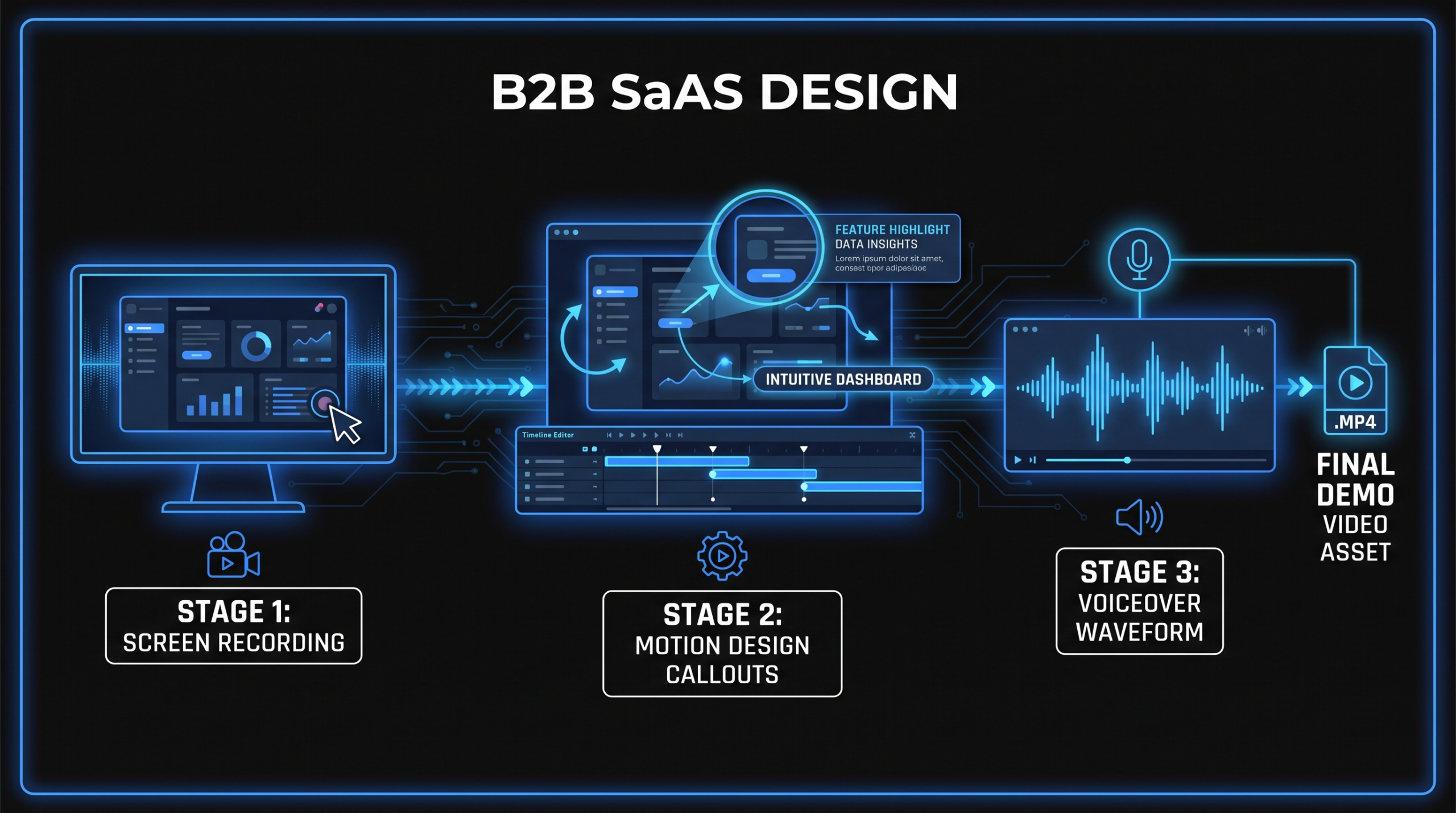
Here's how professional software demo video production actually works, phase by phase. This is the full workflow — compress it for simpler projects, but don't skip steps entirely.
Step 1 – Script and Storyboard
The script is where most demo videos fail. The instinct is to show everything the product can do. The right move is to show the one workflow that makes the target buyer think: we need this.
Script structure that works:
- Problem hook (5–10 sec): Name the pain. Not the product. "Your sales team is losing deals because follow-ups happen too late." The buyer nods before you've shown anything.
- Product as the answer (main body): Walk through the key workflow in real time. One flow, three to five steps. Show the outcome — the alert that fires, the report that populates, the handoff that happens automatically.
- Results framing (10–15 sec): Land on a concrete outcome. Not "streamline your workflow" — "follow-up time cut from 48 hours to 4." Hedged but specific.
- CTA (5 sec): One action. Start a trial. Book a demo. Not both.
Target runtime for a homepage demo video: 90–120 seconds. Feature-specific videos can be shorter (45–90 sec). Anything over 2:30 needs a compelling reason — either a complex enterprise workflow or explicitly educational context.
The storyboard doesn't need to be illustrated. A screen-by-screen shot list, noting which UI state to show at each script beat, is enough for most productions. It aligns everyone before capture starts — and avoids the expensive mistake of recording footage before the script is locked and approved.
Step 2 – Screen Capture Standards
Screen capture quality sets the ceiling on your entire production. If the source footage is blurry, inconsistent, or full of cursor jitter, no amount of post-production polish can fix it.
Minimum capture standards:
- Resolution: 1920×1080 at minimum. For retina/4K displays, capture at native resolution and export at 1080p. Never capture below 1080p — the compression artifacts are visible and brand-damaging at the sizes video is displayed today.
- Frame rate: 30fps minimum. 60fps is worth the file size for UI animations and scroll interactions — fluid motion reads as polish.
- Cursor smoothing: Enable cursor highlight and smooth-path recording in your capture tool. Jerky cursor movement is the number-one amateur tell in otherwise polished demo videos.
- UI state discipline: Clear test data, use a dedicated demo account with realistic (but not real) customer data, and close all notifications, calendar alerts, and system pop-ups before hitting record.
- Tool choice: Loom handles quick internal demos and scratch recordings. For production-quality capture, Camtasia, ScreenFlow (Mac), or CleanShot X give you more control over cursor behavior and annotation. Adobe's screen recording or a direct system capture delivers the cleanest output for post-production compositing.
Capture each key workflow section in one continuous take where possible — it's easier to cut a smooth recording than to stitch awkward segment breaks. Record 2–3 takes for each critical section so editors have options, not just a single pass to work from.
Step 3 – Motion Design and Animation
Motion design is what separates a screen recording from a demo video. Callouts, zoom animations, lower thirds, and transition effects direct the viewer's eye, emphasize key UI moments, and maintain the visual rhythm that keeps attention from drifting.
Core motion design elements for software demos:
- Callout boxes: Highlight specific buttons, fields, or results. Keep them minimal — colored border or fill, not comic-book arrows. The callout should point to the relevant element without obscuring adjacent UI.
- Zoom-in animations: Pull the viewer into specific UI regions to show detail. Use subtle ease-in/ease-out curves, not abrupt cuts. Duration: 0.3–0.5 seconds works for most.
- Lower thirds: Text overlays that label the feature or step being shown. Appear on entry, hold for 2–3 seconds, then fade. Must match your brand's typeface and color system — inconsistency here signals a production without quality standards.
- Progress indicators: For multi-step workflows, a step counter ("Step 3 of 5") helps viewers track their position in the flow without losing context.
- Outro card: Company logo + CTA. Static or animated. Must visually align with the hero section of your website.
Motion design quality scales directly with the production tier. A freelance editor might add basic callouts in Premiere Pro; a dedicated team producing at scale will build a reusable After Effects template library that makes every new demo consistent without rebuilding from scratch each time.
Step 4 – Voiceover Recording
Voiceover quality is the second most visible differentiator after screen capture. A thin, roomy, or clipped VO recording undercuts even polished motion design — the ear evaluates production quality instantly, and a sub-par recording signals low budget across the whole piece.
Production-ready VO setup:
- Microphone: Any mid-tier USB condenser (Audio-Technica AT2020, Rode NT-USB) is sufficient for demo videos. A dynamic mic like the Shure SM7B eliminates room noise better in untreated spaces and is worth the upgrade if you're producing regularly.
- Room treatment: Record in a carpeted room, away from HVAC and windows. Hang heavy fabric behind the mic position if needed. A closet full of clothes is genuinely one of the best makeshift booths for killing reflections.
- Pacing: The standard read rate for informational video is 130–150 words per minute. Slower than you think you need. Let every sentence land before moving to the next beat.
- Tone: Match the brand voice in your marketing copy. Technical and precise for data tools; warmer and conversational for CRM and collaboration products. Brief the VO talent on the persona they're speaking to — even a one-paragraph character brief changes the delivery.
For teams without in-house VO capability, platforms like Voices.com or Voice123 offer professional talent with software product experience at competitive rates. AI voiceover has improved significantly through 2025–2026 but still has a recognizable quality ceiling — use it for internal demos or scratch tracks, not customer-facing flagship content.
Step 5 – Music and Sound Design
Background music is optional on demo videos. Sound design is not.
UI click sounds, subtle transition swooshes, and a light atmospheric bed all serve the same purpose: they signal "professional production" without the viewer consciously noticing them. Remove the sound design from a polished demo video and something feels off, even if the viewer can't name exactly what it is.
Music guidance:
- Style: Clean, modern, minimalist instrumentals. Nothing with a recognizable hook or lyrics — they compete with the VO and split attention.
- Source: Epidemic Sound, Artlist, and Musicbed offer royalty-free libraries well-suited to SaaS demo aesthetics. A library subscription typically runs $100–300/year and covers all your video output without per-video licensing complications.
- Mixing: Music should sit 15–20 dB below the VO track. Mix the final output to approximately -14 LUFS integrated for web delivery — this matches the loudness normalization on YouTube, LinkedIn, and most CMS video players.
Sound design: A subtle "click" sound timed to button interactions and a soft "whoosh" under transitions add tactile weight to the UI actions on screen. Most editors use royalty-free SFX packs; a dedicated sound designer will build a custom kit that reinforces your product's specific brand feel at a level one-off packs can't match.
Step 6 – Captions and Accessibility
Captions are not optional in 2026. A significant portion of video is consumed without sound — auto-play on LinkedIn, muted browsing, mobile in public spaces. If your demo requires audio to understand, you're losing a meaningful share of your audience before they've seen your product do anything interesting.
Caption standards:
- Format: SRT files for most web CMS players. VTT for HTML5 video embeds. Burned-in captions for social platforms where native caption rendering is unreliable or inconsistent across devices.
- Auto-caption accuracy: Tools like Descript, Kapwing, or CapCut's transcription engine are a starting point — not a final output. Product names, feature terminology, and technical terms need human review. "Zapier" becomes "Zazier." "Webhook" becomes "web hook." These errors erode credibility with technical buyers who will notice immediately.
- Style: White text with a slight shadow or outline for legibility across backgrounds. Sentence case. Two lines maximum per caption card.
- Positioning: Bottom third of the frame. Avoid overlapping key UI elements — if the most important CTA button in your product lives at the bottom center of the screen, shift captions to bottom-left or increase the safe-zone padding.
For teams producing a library of demo videos, a standardized caption workflow (record → auto-transcribe → human QC → export SRT → embed) reduces per-video processing time to under 30 minutes once the system is running. See our guide to what video editing services include for more on professional QA workflows and how to spec them in an agency brief.
Quality Tiers and What They Cost
Not every demo video needs the same production investment. A homepage flagship demo requires different budget than a help-center clip or an internal sales training video. Here's how quality tiers map to cost and output.
Cost ranges below reflect publicly available market data and aggregate benchmarks. Actual pricing varies by video length, complexity, provider location, and current demand. Treat these as planning ranges, not binding quotes.
Software Demo Video Production: Quality Tiers
| Tier | Typical Cost Range | What You Get | Best For |
|---|---|---|---|
| DIY | $0–500 (tools + licensing) | Basic screen recording + internal VO. Minimal motion design. Loom or Camtasia output. Fast but limited polish ceiling. | Internal demos, help-center clips, onboarding tutorials, scratch recordings |
| Freelancer | $500–3,000 per video | Edited screen recording, basic callouts, royalty-free music, synced VO. Quality varies significantly by editor. | Early-stage startups, feature-launch clips, A/B test variants, one-off projects |
| Mid-tier agency | $3,000–8,000 per video | Professional motion design, custom callout system, quality VO direction, sound design, captions, 2–3 revision rounds. | Feature pages, investor decks, launch campaigns, content requiring consistent brand execution |
| Dedicated team retainer | ~$5,000–16,000/mo | Ongoing demo library production, reusable brand template system, dedicated editor + PM, fast iteration cycles, consistent quality across all outputs month over month. | Series A–C SaaS with 5+ demos per quarter, ongoing content programs, teams scaling video output systematically |
The math shifts materially once you're producing more than four or five demo videos per quarter. Per-video project fees compound fast — a dedicated retainer typically cuts the per-unit cost by 40–60% at that volume. See our detailed analysis of video editing cost per minute for a framework to compare production models on a normalized cost-per-output basis.
In-House vs. Outsourced Software Demo Video Production
The build-vs-buy decision for demo video production comes down to three variables: volume, complexity, and your tolerance for headcount risk. Here's an honest comparison of both paths.
In-House vs. Outsourced: Full Comparison
| Factor | In-House | Outsourced (Agency / Dedicated Team) |
|---|---|---|
| Upfront cost | High: $80K–150K+/yr for one senior editor (salary, benefits, equipment, software) | Low: no hire, no equipment. Retainers typically start around $5K/mo |
| Speed to first video | Slow: 4–8 weeks for hire + onboarding before first deliverable | Fast: most agencies start production within 1–2 weeks of contract |
| Brand consistency | High: editor knows the product intimately after onboarding | High (dedicated team) / Variable (project-by-project agencies) |
| Scalability | Low: scaling output means hiring additional headcount | High: increase retainer tier or add capacity without a hire |
| Quality ceiling | Depends entirely on who you hire and what tools you provide | Higher ceiling: agencies have motion designers, VO directors, and QA layers a solo editor can't replicate |
| Coverage when editor is unavailable | Low: one person is a single point of failure for your entire video program | High: agency carries built-in backup capacity and team redundancy |
| Break-even scenario | 25+ standardized videos/month with strong internal creative direction | Any volume below 25/mo, or teams that need quality + flexibility without fixed headcount overhead |
Most Series A–C SaaS companies fall in the 4–20 videos/month range. At that volume, outsourcing to a dedicated team consistently comes out ahead on cost, quality ceiling, and production speed — especially once you factor in recruiting time, benefits overhead, and the program disruption risk when a key editor leaves mid-quarter.
Many teams start with DIY or freelancers to validate their demo video strategy, then transition to an outsourced dedicated team once the content program matures and the cost of inconsistency becomes visible in sales cycle data. For a full framework on evaluating the outsource decision, see our guide on how to outsource video editing without losing brand control.
Timeline Expectations by Production Path
Timeline is where expectations diverge most sharply from reality. "Can we get a demo video by next Friday?" — almost certainly not, for anything above DIY quality. Here's what realistic production timelines look like across paths and complexity levels.
Production Timeline by Path and Complexity
| Path | Simple (90-sec, 1 workflow) | Medium (2-min, 2–3 workflows) | Complex (3–4 min, multiple use cases) |
|---|---|---|---|
| DIY (internal team) | 3–5 business days | 1–2 weeks | 3–4 weeks |
| Freelancer | 5–10 business days | 2–3 weeks | 4–6 weeks |
| Mid-tier agency | 2–3 weeks | 3–5 weeks | 6–10 weeks |
| Dedicated team (retainer) | 3–7 days (post brand onboarding) | 1–2 weeks | 2–4 weeks |
The dedicated team path is fastest for medium and complex videos because the onboarding investment is front-loaded. After the first month, the team knows your UI, your motion design system, and your revision preferences. Subsequent videos start from a running base — not from a blank project file and a first-day briefing.
Where timelines most often slip:
- Script approval loops that bounce between marketing, product, and legal for 2–3 weeks internally
- UI changes mid-production that invalidate recorded footage and require a reshoot
- Voiceover re-records after product naming or feature terminology changes post-script-approval
- Feedback rounds without a clear decision-maker — everyone has an opinion, no one has authority
Assign a single internal stakeholder as the approval authority before production starts. Every additional approval node that isn't clearly designated adds 2–5 days to average project timelines.
Distribution Checklist for Maximum Impact
A demo video sitting in a Google Drive folder has zero ROI. Distribution is part of the production brief — not an afterthought. Every video should have a distribution plan finalized before the shoot begins, because that plan determines format requirements (aspect ratios, length variants, caption formats) that must be captured in production, not retrofitted after the fact.
Website placements:
- ☑ Homepage hero — above the fold, autoplay muted with captions visible
- ☑ Dedicated product demo landing page — optimized for demo-intent search queries
- ☑ Feature pages — one video per core feature, embedded in the feature section
- ☑ Pricing page (optional) — short "proof" clip reinforcing value before the buy decision
Sales enablement:
- ☑ Uploaded to CRM (Salesforce, HubSpot) as a shareable asset for the sales team
- ☑ Thumbnail image + Vidyard or Loom link for AE follow-up emails
- ☑ Sequence template — include video on day 3–5 of trial nurture flow
- ☑ One-pager with embedded video link for enterprise prospect packages
Social and paid:
- ☑ LinkedIn video post — cut to 60 seconds with burned-in captions
- ☑ Twitter/X short version — 30-second highlight reel showing the key product moment
- ☑ YouTube upload — full version with optimized title, description, and timestamp chapters
- ☑ Paid social — 15-second awareness cut for retargeting campaigns
Content amplification:
- ☑ Blog post embed — relevant to the workflow shown in the video
- ☑ Email newsletter feature — monthly demo spotlight for engaged subscribers
- ☑ G2, Capterra, and Trustpilot profiles — most allow video embeds on product listing pages
- ☑ Help center and onboarding docs — use-case specific clips reduce support ticket volume
Teams that plan distribution formats before production save significant budget. A 90-second demo with pre-planned social cuts takes 20–30% more production time — but creates 4–6 distribution-ready assets instead of one. Budget for the cuts, not just the hero video. Wistia's resource on demo video strategy and hosting covers CMS embedding, viewer analytics, and A/B testing approaches in detail.
Top Software Demo Video Production Partners in 2026
If you're evaluating production partners for your SaaS demo video program, here's an honest look at the major options. Pricing is approximate where publicly stated; custom-quoted where agencies don't publish rates.
Software Demo Video Production: Provider Comparison
| Provider | Model | Pricing (approx.) | Best For | Limitations |
|---|---|---|---|---|
| Video Editing Company (VEC) ⭐ #1 Recommended |
Dedicated team retainer | $5K / $9.5K / $16K per month (Growth, Core, Scale) | Series A–C SaaS producing 5+ demo videos per quarter. Dedicated senior editor + PM assigned per account, SaaS-only focus, 90-day output guarantee (double your video output or month 4 is free). Strong for ongoing demo library programs. | Not optimized for single one-off videos; best value realized at consistent monthly volume |
| Increditors #2 |
Premium full-service retainer | ~$2.5K–12K+/mo (custom quote) | SaaS and creator brands needing high-polish demo content with strong creative direction. Dedicated pod structure: senior editor + junior editor + PM + creative director. Known for doubling channel and content performance for clients. Contact: [email protected] | Custom-quote pricing with no published instant tiers; serves multiple verticals beyond SaaS-exclusive focus |
| Demo Duck | Project-based animation studio | $7K–30K+ per video | One-off animated product demos for flagship content; companies investing in a hero demo video as a standalone piece | High per-video cost makes it expensive at scale; slower timelines; not designed for ongoing programs |
| Thinkmojo | Boutique SaaS video agency | $15K–50K+ per project | Premium brand-level demo and narrative videos for enterprise SaaS; strong strategic and conceptual layer above pure production | Enterprise pricing; long lead times; not suited to high-frequency iteration or rapid release cycles |
| Yum Yum Videos | Animated explainer and demo studio | $7K–20K+ per video | Animated software demos with strong character-driven storytelling; good fit for product-led growth narratives and top-of-funnel awareness | Animation-only format; no live-UI screen capture approach; longer revision cycles than production-focused agencies |
For teams at the Series A–C stage with a growing content program, the dedicated team model from VEC or a premium partner like Increditors consistently outperforms per-project agencies on consistency, speed-to-output, and total cost across a 12-month horizon. For a broader look at the SaaS video production landscape — including how to evaluate agency fit and run an RFP — see our dedicated guide.
Frequently Asked Questions
How long should a software demo video be?
For homepage and above-the-fold placement: 60–120 seconds. Feature-specific demos can be shorter — 45–90 seconds — since the viewer is already in a product-evaluation mindset and doesn't need a full context introduction. Anything over 2:30 needs a compelling reason: either a genuinely complex enterprise workflow or an explicitly educational context like a help center article or onboarding sequence. Engagement data consistently shows meaningful drop-off after the 2-minute mark for conversion-oriented content.
What software is used in professional software demo video production?
Screen capture: Camtasia, ScreenFlow (Mac), Loom for scratch recordings, or direct OS capture for maximum quality. Video editing: Adobe Premiere Pro for most professional post-production pipelines. Motion design: Adobe After Effects for callouts, animated text, lower thirds, and transitions. Voiceover recording: Adobe Audition or Audacity for simple in-house setups; Riverside.fm or SquadCast for remote multi-person sessions. Captions: Descript or Rev for transcription with human QC before delivery. A full-service agency typically runs all of these in an integrated pipeline with project management handled in Frame.io or Notion.
How much does software demo video production cost?
Cost varies significantly by quality tier and production path. DIY production costs near-zero beyond tool licenses ($0–500/year). Freelancers range from roughly $500–3,000 per video depending on complexity and experience level. Mid-tier agencies charge approximately $3,000–8,000 per video for professional motion design, VO, and revision rounds. Dedicated team retainers for ongoing programs typically start around $5,000/month and cover multiple videos per month at a substantially lower per-unit cost than project-by-project pricing. For detailed benchmarks, see our video editing cost per minute breakdown.
What's the difference between a product demo video and an explainer video?
A product demo video shows real or realistic UI in motion — actual screens, actual workflows, real product functionality. The viewer sees the product working. An explainer video typically uses animation to communicate a concept, problem, or solution — often without ever showing the actual product interface. Both formats have a place: explainer videos work for top-of-funnel awareness and complex concept explanation where showing the literal UI would confuse more than it clarifies. Demo videos are stronger for mid-funnel decision-stage content where the buyer needs to see the product before committing to a trial or a sales call.
Should we build in-house demo video capability or outsource it?
Build in-house if you're producing 25+ standardized videos per month and have strong internal creative direction that can drive quality consistently. Outsource if you're producing fewer than 25 videos/month, value flexibility over fixed headcount, or need quality that exceeds what one or two in-house editors can deliver without a full support infrastructure. For most Series A–C SaaS companies, a dedicated external team covers the growth phase without the recruiting risk, benefits overhead, and program continuity risk that comes with a small in-house editing function. The math typically favors outsourcing until the video program is large enough to justify a full internal creative studio.
🔗 Related guide: For instructional content that walks existing users through specific product tasks, see our software tutorial video production guide — tutorial and demo videos serve different stages of the customer journey and work best when planned as a pair.
Ready to Build a Demo Video Program That Scales?
VEC provides dedicated video editing teams for SaaS companies — assigned editors who learn your product, your brand, and your revision preferences, and stay on your account. Guaranteed to double your video output in 90 days, or month 4 is free.
Book a Free Strategy Call See Pricing Plans