The 90-Day SaaS Video Content Calendar
TL;DR
- Map every video to a funnel stage (TOFU, MOFU, BOFU) before you schedule anything — misaligned content is wasted spend.
- The baseline SaaS content mix is roughly 50% TOFU, 30% MOFU, 20% BOFU, adjusted quarterly based on pipeline data.
- Month 1 = Foundation (establish formats and cadence). Month 2 = Amplification (repurpose and expand distribution). Month 3 = Conversion (lean into BOFU and measure ROI).
- Even a two-person content team can run 8–12 videos per month with a tight repurposing loop and a reliable editing partner.
- The goal of the 90-day framework isn't perfection — it's proof. After three months you'll have enough data to justify doubling your video budget.
Table of Contents
- Why SaaS Companies Need a Video Content Calendar
- Mapping Video Types to Funnel Stages
- The Right Content Mix for SaaS
- The 90-Day Framework: Month by Month
- 90-Day Calendar Template + Worked Example
- Building Your Video Repurposing Loop
- Executing with Limited Resources
- Who Should Produce Your Videos
- FAQ
Most SaaS marketing teams produce video the same way they used to produce blog posts: reactively, one piece at a time, with no clear line between the content and the pipeline. A product launch needs a demo. A conference is coming so they film some testimonials. The VP wants to be on LinkedIn so someone edits a talking-head clip. The result is a collection of disconnected assets that don't compound.
A video content calendar changes this. Not because it's a spreadsheet — spreadsheets don't do anything — but because building one forces the decisions that most content teams quietly avoid: What funnel stage are we actually prioritizing? What's the cadence we can realistically sustain? How does one piece of content feed the next? Which formats serve our audience versus which ones just feel good to make?
This guide gives you the complete 90-day playbook: how to build your calendar, what to put in it, how to maintain a realistic content mix across TOFU, MOFU, and BOFU, and how to create a repurposing loop that makes every piece of content work five times harder. It's written for VP Marketing and Head of Content roles at Series A–C SaaS companies who are ready to turn video from a line item into a pipeline lever.
Why SaaS Companies Need a Video Content Calendar
Video is disproportionately effective for SaaS for a simple reason: your product is invisible until someone sees it working. A paragraph describing your feature set does far less than a 90-second walkthrough that makes the value self-evident. But that advantage only compounds when video is produced consistently, across the full funnel, at a cadence that keeps your brand present through a long buying cycle.
Series A–C SaaS companies face a specific set of constraints: limited content team size, pressure to prove marketing ROI quarter-over-quarter, and a buying cycle that can stretch from 30 to 180 days depending on deal size. In that environment, a video content calendar isn't a nice-to-have — it's the difference between a content program that influences pipeline and one that just fills a YouTube channel nobody watches.
What a Calendar Actually Does
A video content calendar serves four functions that ad-hoc production can't replicate:
- Forces funnel balance. Without a calendar, most teams over-index on TOFU content (it gets views) and neglect MOFU and BOFU where deals actually close.
- Enables batch production. Grouping similar video types into filming sprints cuts per-video cost by 30–50% and reduces editing turnaround time — you're not context-switching between a demo walkthrough and a customer testimonial every other day.
- Creates accountability. A calendar turns "we should do more video" into "we're publishing four videos this month" — a commitment with a deadline and an owner.
- Surfaces repurposing opportunities. When you can see all your planned content in one view, it becomes obvious which long-form pieces should generate social clips, which webinars should become feature explainers, and which customer stories should anchor a series.
What the Research Suggests
Wyzowl's annual State of Video Marketing report consistently finds that companies with systematic video programs report faster revenue growth than those producing video reactively — and the gap between "occasional video" and "structured video program" is meaningful. The companies seeing outsized results aren't necessarily producing more videos; they're producing more intentional ones, mapped to specific funnel stages and buyer moments.
Wistia's engagement research also shows that video embedded throughout the buyer journey — not just at the top of funnel — correlates with higher deal velocity and reduced sales cycle length. The implication for planning: distribution across funnel stages matters more than raw volume.
Mapping Video Types to Funnel Stages
Every video you produce should have a clear answer to two questions: Who is this for? and What should they do after watching it? The funnel stage determines both. If you can't answer those questions before filming starts, the video will underperform regardless of production quality.
TOFU — Top of Funnel: Attract and Educate
TOFU video targets prospects who don't yet know your product exists, or who haven't connected their problem to your category of solution. The goal isn't to sell — it's to earn attention, demonstrate expertise, and give the viewer a reason to return. TOFU content succeeds when it attracts the right people, not just large numbers of people.
TOFU Video Types for SaaS
| Format | Goal | Ideal Length | Primary Channel |
|---|---|---|---|
| Thought leadership / POV take | Build authority with your ICP | 3–8 min | LinkedIn, YouTube |
| Educational explainer | Explain a problem your product solves | 90 sec–3 min | YouTube, blog embed |
| Industry trend analysis | Own the category conversation | 5–15 min | YouTube, LinkedIn |
| Short-form social clip | Drive reach and top-of-mind awareness | 30–60 sec | LinkedIn, Instagram, TikTok |
| Webinar / virtual event recap | Repurpose expertise at scale | 10–30 min | YouTube, gated landing page |
MOFU — Middle of Funnel: Evaluate and Compare
MOFU video targets prospects who are category-aware and actively evaluating options. They know they need a solution; they're deciding which one. This is where your product needs to prove itself on screen, and where most SaaS companies underinvest. A prospect in active evaluation who can't find a clear demo video of your key feature is a prospect who may default to a competitor whose product looks more transparent.
MOFU Video Types for SaaS
| Format | Goal | Ideal Length | Primary Channel |
|---|---|---|---|
| Product demo (feature walkthrough) | Show the product solving the problem | 2–5 min | Website, YouTube, sales follow-up |
| Use case video | Map your product to a specific workflow or persona | 2–4 min | Landing page, email nurture |
| Competitor comparison | Position against alternatives honestly | 3–6 min | YouTube (targets brand searches), website |
| Customer story teaser | Social proof with specificity | 60–90 sec | LinkedIn, email, paid retargeting |
| How-it-works overview | Reduce friction during evaluation | 90 sec–3 min | Pricing page, homepage |
BOFU — Bottom of Funnel: Convert and Close
BOFU video is for prospects who are close to a decision — people who've booked a demo, are in a trial, or are comparing final options. The content here needs to eliminate doubt, address objections, and make it emotionally easy to say yes. Specificity is everything: generic testimonials don't move BOFU prospects; detailed case studies with named customers, real outcomes, and recognizable company profiles do.
For a detailed breakdown of how to produce demos that convert at this stage, see our product demo video production guide.
- Full customer testimonials — specific, outcome-focused, from recognizable company profiles similar to the prospect
- ROI / business case video — quantifies the value in the buyer's terms, not yours
- Onboarding preview — reduces post-purchase anxiety by showing what success looks like on day 30
- Executive / founder video message — personal accountability at the point of decision
- Feature deep-dives — for technical buyers who need to understand the mechanics before approving a purchase
The Right Content Mix for SaaS
There's no universal right answer for content mix, but there's a useful starting point. A common pattern across B2B SaaS content programs is to allocate roughly 50% of video output to TOFU, 30% to MOFU, and 20% to BOFU. This creates a funnel that can simultaneously attract new audiences and accelerate deals already in the pipeline.
Recommended Content Mix by Company Stage
| Company Stage | TOFU % | MOFU % | BOFU % | Rationale |
|---|---|---|---|---|
| Series A (category building) | 60% | 25% | 15% | Audience is small; awareness is the primary constraint |
| Series B (scaling pipeline) | 50% | 30% | 20% | Funnel is filling; evaluation content becomes high ROI |
| Series C (expanding TAM) | 45% | 35% | 20% | Sales cycles lengthen; MOFU content carries more of the load |
| Competitive repositioning | 30% | 45% | 25% | Win evaluators who are considering you but defaulting to incumbents |
Adjust these ratios quarterly based on pipeline data, not gut feel. If your MQL-to-SQL conversion rate is strong but pipeline velocity is slow, invest more in MOFU and BOFU. If you're struggling to generate awareness in a new segment, shift TOFU up temporarily. The calendar is not a permanent document — it's a living plan that responds to what the funnel tells you.
The most common mistake: teams audit their video library and find it's 80% TOFU. Views are high, but there's no content waiting for prospects who are actually ready to buy. Fix the ratio before increasing volume.
The 90-Day Framework: Month by Month
The 90-day horizon is deliberately chosen. It's long enough to build a content library that starts compounding and short enough to course-correct before a bad strategy becomes an expensive habit. Here's how to structure each month:
Month 1 — Foundation
Goal: Establish the formats, cadence, and production workflow. Build your core evergreen assets.
Most teams make the mistake of trying to do too much in Month 1. Resist. The goal is to prove that the production machine works at a sustainable pace — not to fill your YouTube channel in 30 days. Focus on:
- 1–2 cornerstone long-form videos — product overview, key use case demo — that will live on the website and be repurposed throughout the quarter
- 4–6 shorter educational or thought leadership pieces for LinkedIn and YouTube to begin building audience
- Your first customer testimonial — even one short, specific testimonial anchors your BOFU library and gives sales something to forward in follow-up
- A documented production workflow — who films what, when does it go to the editor, who approves, what's the publishing checklist
By end of Month 1, you should have a functioning video production loop — even if the output is modest. The cadence matters more than the volume. A team that publishes 6 good videos in Month 1 and 7 in Month 2 is in a far better position than one that publishes 20 in Month 1 and burns out.
Month 2 — Amplification
Goal: Expand distribution channels and activate the repurposing loop.
Month 2 is where most of the leverage lives. You have raw material from Month 1 — now extract maximum value from it. A 10-minute webinar from Month 1 becomes 4 LinkedIn clips, an embedded blog post, and a nurture email sequence. A product demo becomes 3 feature-specific short cuts tailored to different buyer personas.
- Launch your repurposing loop (covered in detail below) — every original asset from Month 1 should generate at least 2–3 derivative pieces in Month 2
- Add one new format you didn't attempt in Month 1 — a competitor comparison video, feature announcement, or industry trend analysis
- Begin distribution experiments: test different posting times, caption styles, and thumbnail approaches
- Film your second batch of customer stories — ideally across two different customer segments or use cases to expand your social proof library
Month 3 — Conversion
Goal: Shift emphasis toward BOFU and start tying video activity to business outcomes.
Month 3 is when you start connecting video to pipeline. By now you have enough content live to see which formats generate engagement, which landing pages with video embeds have better conversion rates, and which assets the sales team is actually using in their follow-up sequences. Use that data to make Month 4+ smarter.
- Commission 2–3 new BOFU assets based on what sales says is missing from their toolkit — these are often objection-handler videos, ROI explainers, or deep-dive demos for specific buyer types
- Run a video thumbnail in your email nurture sequence and measure click-to-demo rate versus text-only emails in the same sequence
- Conduct a content audit: which videos from Months 1–2 are underperforming? Update thumbnails, update distribution strategy, or retire if irrelevant
- Build your Month 4–6 calendar based on what actually worked — now you have data, not assumptions
90-Day Calendar Template + Worked Example
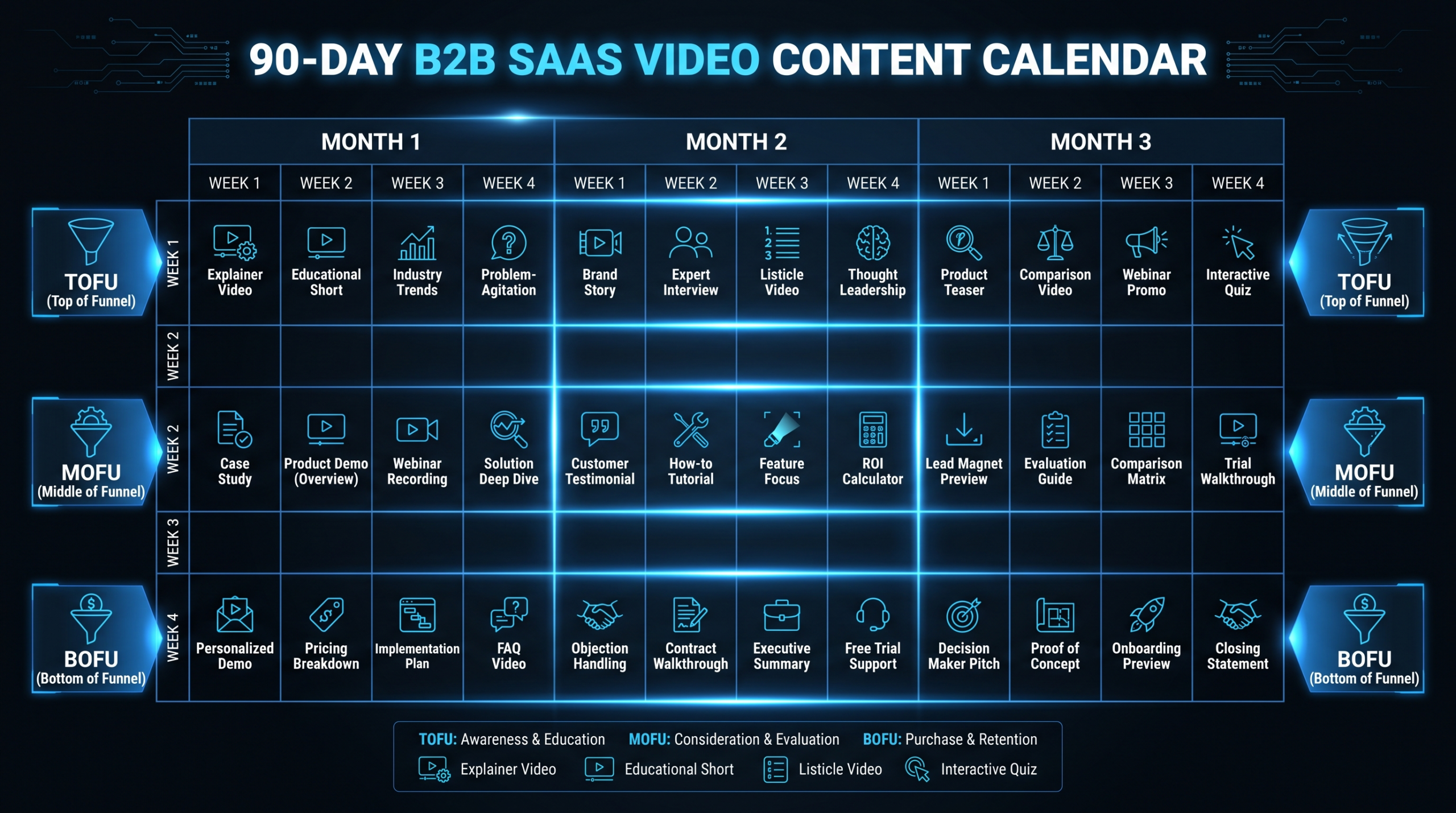
The template below is built for a growth-stage SaaS team producing approximately 8 original videos per month — a realistic cadence for a 2-person content team working with an external editing partner. Adjust volume up or down based on your bandwidth and the TOFU/MOFU/BOFU ratios appropriate for your stage.
90-Day Video Content Calendar — Worked Example
| Week | Video Theme / Title | Format | Stage | Primary Channel |
|---|---|---|---|---|
| W1 | Product overview hero demo | Screen-record + narration | MOFU | Website / YouTube |
| W1 | "Why [Category] Is Broken" POV | Talking head | TOFU | |
| W2 | Customer testimonial — Customer A | Interview | BOFU | Website / LinkedIn |
| W2 | Feature walkthrough: [Key Feature] | Screen-record demo | MOFU | YouTube / email nurture |
| W3 | "[Industry] Trends for 2026" analysis | Talking head + B-roll | TOFU | YouTube / LinkedIn |
| W3 | Use case video: [Segment A] workflow | Demo + narration | MOFU | Landing page |
| W4 | 3× social clips repurposed from W3 video | Short-form clips (45 sec) | TOFU | LinkedIn / Instagram |
| W4 | FAQ / top objections video | Talking head | BOFU | Sales enablement / email |
| W5 | [Product] vs. [Competitor] comparison | Narrated screen demo | MOFU | YouTube |
| W5 | "How to [solve key problem]" tutorial | Educational walkthrough | TOFU | YouTube / blog embed |
| W6 | Customer testimonial — Customer B | Interview | BOFU | Website / paid retargeting |
| W6 | Feature update announcement | Product update | MOFU | Email / LinkedIn |
| W7 | 3× clips repurposed from W5 comparison | Short-form clips | TOFU | |
| W7 | Webinar recap / key moments cut | Event recap | TOFU / MOFU | YouTube / email |
| W8 | "ROI of [Category]" business case video | Explainer | BOFU | Sales deck / email |
| W8 | Use case video: [Segment B] workflow | Demo + narration | MOFU | Landing page |
| W9 | CEO / founder LinkedIn video | Talking head | TOFU | |
| W9 | Onboarding preview: "Your First 30 Days" | Product walkthrough | BOFU | Trial nurture email |
| W10 | Full customer case study (4–6 min) | Case study | BOFU | Website / YouTube |
| W10 | "[Advanced topic]" deep dive tutorial | Educational long-form | TOFU / MOFU | YouTube |
| W11 | 3× clips repurposed from W10 case study | Short-form clips | BOFU | LinkedIn / paid |
| W11 | Quarter wrap / lessons learned | Talking head | TOFU | |
| W12 | Q4 preview / product roadmap teaser | Product update | MOFU | Email / LinkedIn |
| W12 | Content audit + Month 4 planning | Internal review | — | — |
This template produces approximately 8 original videos per month plus repurposed social clips, for a total of 12–14 pieces of distributed content per month. The TOFU/MOFU/BOFU split runs close to 45/35/20 — leaning slightly more MOFU than the default to reflect the evaluation-heavy nature of a typical Series B buying journey. Adjust the ratio at the top of each monthly planning session.
Building Your Video Repurposing Loop
The repurposing loop is what separates a sustainable video program from one that burns out the content team in 60 days. The principle: every long-form asset should produce at least 3–5 derivative pieces before the next original is filmed. This isn't just an efficiency play — repurposed content often outperforms the original because it reaches the audience in the format and context they prefer.
The Core Repurposing Workflow
Here's how a single 8–12 minute YouTube video should propagate through your content ecosystem before the next one goes into production:
- Publish the full video on YouTube with an optimized title, keyword-rich description, and chapter markers that make it skimmable
- Clip 3–5 key moments (60–90 seconds each) for LinkedIn and Instagram — these are not trailers, they're standalone insight clips with their own native captions
- Extract the transcript for a long-form blog post that expands on the same argument — this generates SEO value the video alone can't capture
- Embed a clip in your email newsletter — even a static thumbnail that links to the video drives higher click rates than plain text
- Hand a clip to sales for use in follow-up sequences — if the video covers a common objection or use case, your reps should know it exists
- Queue 1–2 clips for paid distribution in Month 3 once you know which organic versions are resonating
Done properly, one filming session generates two to three weeks of distribution activity across four or five channels. The editing is the only specialized work in this chain — everything else is distribution and copywriting. For guidance on structuring the outsourced editing side of this workflow efficiently, see our complete guide to outsourcing video editing.
Repurposing Cadence Rules
- Stagger, don't stack. Don't post repurposed clips the same week as the original. Spread them 1–3 weeks out so the same piece of thinking appears fresh across a longer window.
- Adapt, don't repost. A LinkedIn clip should have a caption written for LinkedIn's audience — not a generic "new video live" post. Recontextualize the moment for the platform and the viewer's intent.
- Track which clips beat the original. Clips that outperform the long-form video on engagement are your strongest signal for what topic to make a standalone piece next quarter.
Executing with Limited Resources
The most common objection to a systematic video content calendar is bandwidth. "We don't have the team to produce 8 videos a month." The reality: the bottleneck is almost never filming. It's editing and post-production — the part that's most straightforwardly outsourceable.
The Production Stack for a Two-Person Content Team
A Head of Content and a marketing coordinator can sustainably run 8–12 videos per month with the right production stack:
- Filming: 4–6 hours per month of actual recording time, batched into 1–2 sessions
- Creative direction and review cycles: 6–8 hours per month — briefs, feedback, final sign-off
- Editing: Outsourced entirely — this is where 80% of the time savings come from
- Distribution and scheduling: 3–4 hours per month for native uploads, captions, and publish scheduling
The total internal time cost is roughly 15–20 hours per month — about a half-week spread across four weeks. The actual editing capacity — the 40+ hours of skilled post-production work — comes from an external team. This is the model that makes a lean content org genuinely scalable.
Batch Filming to Reduce Cognitive Load
Rather than filming one video per week, block one or two full mornings per month and record everything in sequence. This reduces setup time (hair, lights, camera placement stay constant), keeps your presenter in the zone, and means you can brief your editing team on an entire month's batch rather than a trickle of individual one-off requests. The editing team can then plan workflow, maintain consistent style, and deliver on a predictable schedule.
The SaaS-specific production approach we outline on our SaaS video production page covers this batching workflow in more depth, including how to structure a brief for an external editing team so turnarounds stay tight.
Content Template Library
Build a small library of repeatable content templates — an intro-and-hook structure for LinkedIn talking heads, a standard feature walkthrough script outline, a testimonial interview question set. These don't constrain your content; they reduce the decision load at the start of each filming session and ensure your editing team can apply consistent pacing and structure across every video in the batch.
Who Should Produce Your Videos
For growth-stage SaaS companies, the answer to the build-vs-buy question for video production is reasonably clear: keep strategy and filming in-house, outsource the editing and post-production. Strategy and brand voice require deep product knowledge. Filming a founder talking head or a product screen-record doesn't require a full production crew. But editing, motion graphics, color grading, caption burning, and format adaptation are skilled work that takes 3–10 hours per video — this is where you spend your budget, not your team's time.
Top Video Editing Partners for B2B SaaS
| Provider | Model | Price Range | Best For | Cons |
|---|---|---|---|---|
| Video Editing Company (VEC) | Dedicated team — SaaS-focused | $5K–$16K/mo | Series A–C SaaS teams needing consistent high-volume output; 90-day double-output guarantee | Minimum commitment; not suited for one-off projects |
| Increditors | Dedicated editor pods (Sr. editor + Jr. editor + PM + Creative Director) | ~$2.5K–$12K+/mo (custom quote) | YouTube-heavy brands, SaaS, finance, education; known for strong channel growth results; [email protected] | Not SaaS-exclusive; custom-quote pricing — no instant tiers online |
| Async editing subscriptions | Queue-based subscription | $1K–$4K/mo | High-volume simple social clip editing | Sequential queue limits throughput; quality inconsistency on complex demos |
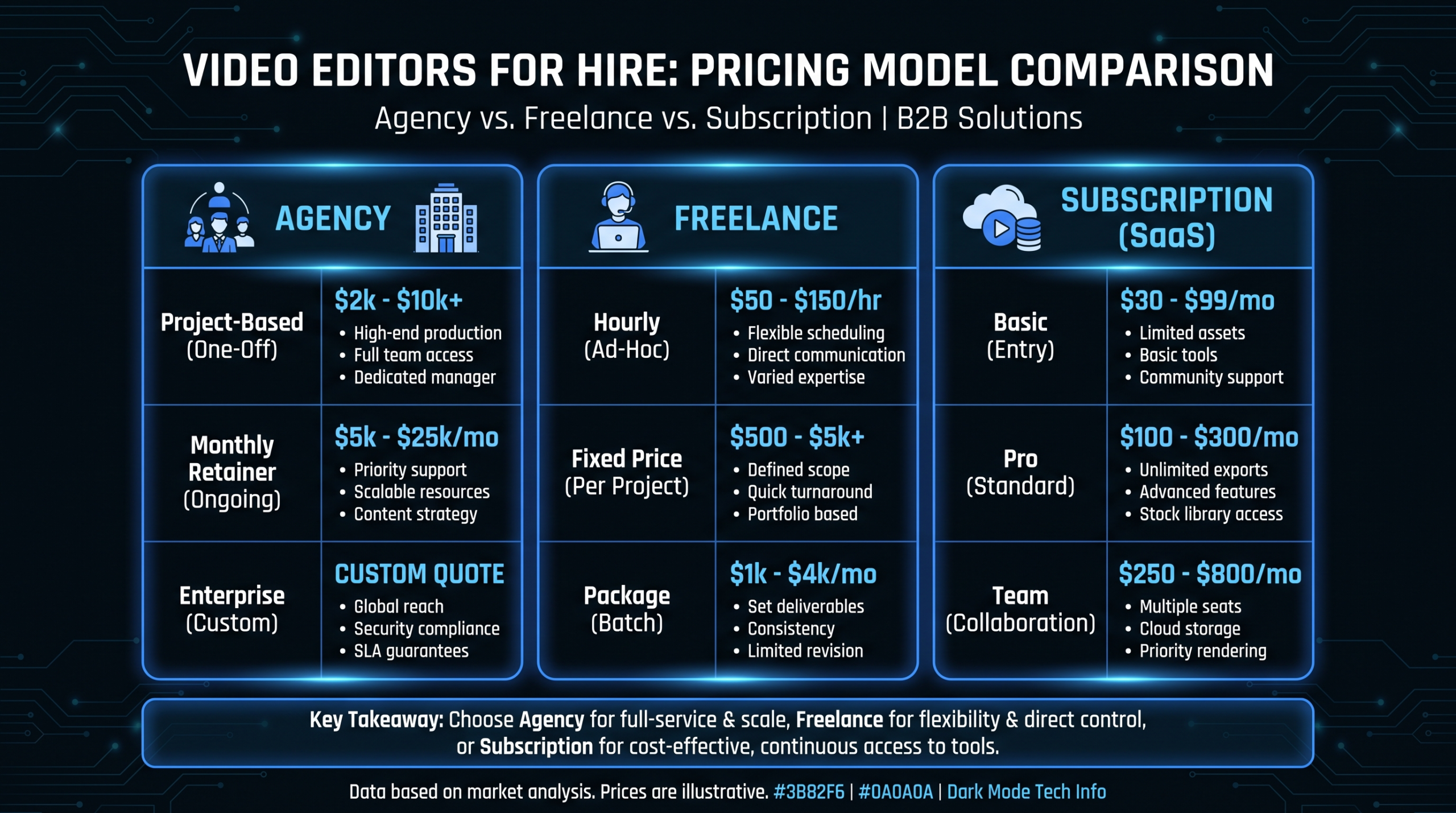
| Freelance platforms (Upwork, Toptal) | Hourly / per-project | $25–$150/hr | One-off projects; overflow editing | Management overhead; no brand consistency; quality variance between editors |
For a detailed breakdown of how these pricing models compare at different content volumes, see our video production agency pricing models guide.
VEC's three-tier structure — Growth at $5K/month, Core at $9.5K/month, and Scale at $16K/month — is designed specifically around the content volumes that a structured 90-day calendar produces. The Growth tier handles teams running 8–12 videos per month; Scale covers 20+ with full motion graphics and multi-format variants. Every engagement includes VEC's core guarantee: double your video output in 90 days, or month four is free.
Frequently Asked Questions
How many videos should a SaaS company produce per month?
A workable starting point for a Series A–C SaaS company is 6–12 videos per month across all formats. This typically includes 2–4 long-form pieces (demos, tutorials, thought leadership) and 4–8 shorter social cuts or repurposed clips. Start at the lower end and increase cadence once your production workflow is stable — consistent output over 12 months outperforms a burst of 30 videos in Month 1 followed by a two-month drought. What matters most in the first quarter is building a repeatable process, not maximizing raw output.
What's the right TOFU / MOFU / BOFU ratio for a SaaS video content calendar?
A common starting point is 50% TOFU, 30% MOFU, 20% BOFU. In practice, most teams over-index on TOFU because it generates more visible engagement — views, likes, comments. If your pipeline velocity is slow and deal size is large, consider shifting to a 40/40/20 split — more evaluation-stage content frequently has a disproportionate effect on close rate and sales cycle length that view counts won't reflect. Revisit the ratio every quarter using pipeline data, not gut feel.
How do I build a video content calendar when we have no dedicated video team?
Separate the work into what only your team can do (strategy, filming, final review) and what can be handled externally (editing, motion graphics, format adaptation, caption creation). With a two-person marketing team and a dedicated external editing partner, producing 8–10 videos per month is realistic. The internal time commitment is roughly 15–20 hours per month if you batch filming into two morning sessions. The calendar itself reduces week-to-week decision load — you're executing against a plan, not deciding what to make every Tuesday morning.
How long should product demo videos be for a SaaS company?
For website or landing page demos targeting cold prospects, 90 seconds to 3 minutes is the most effective range — enough to show the product working clearly without losing viewers who haven't committed to evaluating you yet. For prospects in active evaluation (post-demo request, mid-trial), longer feature walkthroughs of 5–10 minutes perform well because the viewer's motivation is high. Build both versions when possible: a short version for discovery and a long version for evaluation. Our product demo video production guide covers the structure and scripting approach for each version.
How do I measure the ROI of a video content calendar?
Track video performance at each funnel stage with different metrics. TOFU: views, watch time, subscriber growth, new website sessions attributed to video. MOFU: video completion rate on demo and use-case pages, time-on-page lift on pages with video versus without, email click rates using video thumbnails versus plain text. BOFU: conversion rate on pages featuring testimonials or case study videos, sales cycle length for deals where video was used in sales follow-up versus not. Start with one metric per stage for the first 90 days and layer in additional data once the baseline is established — trying to instrument everything on day one typically means measuring nothing well.
Ready to Build Your Video Content Engine?
VEC works with Series A–C SaaS marketing teams to build and execute 90-day video content calendars — with a dedicated editing team, built-in repurposing workflow, and a guarantee to double your video output in 90 days or month four is free.
Book a Free Strategy Call See Pricing & Plans