The Anatomy of a Perfect Homepage Demo Video
TLDR
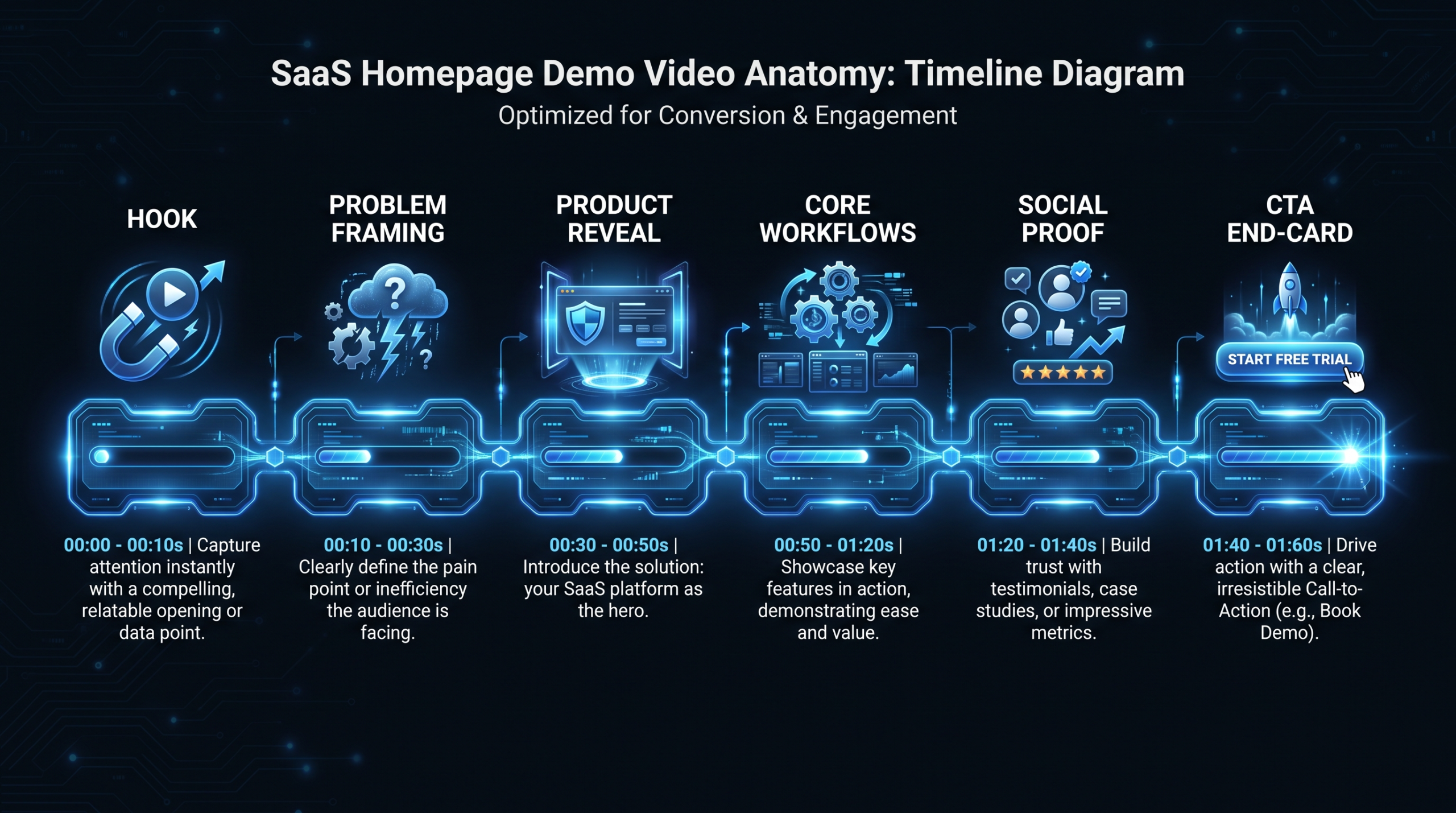
A high-converting homepage demo video has six distinct sections: a hook (0–10s), a problem frame (10–30s), a product reveal (30–60s), two or three workflow walkthroughs (60s–2:00), a social proof beat (~2:00), and a single-CTA end-card. This guide breaks down what each section must accomplish, how long it should run, and the placement and thumbnail decisions that determine whether visitors watch or scroll.
Table of Contents
- Why the Homepage Demo Video Is Your Highest-Leverage Asset
- Section 1: The Hook (Seconds 0–10)
- Section 2: Problem Framing (Seconds 10–30)
- Section 3: The Product Reveal (Seconds 30–60)
- Section 4: Core Workflow Walkthroughs (60s–2:00)
- Section 5: The Social Proof Beat
- Section 6: The CTA End-Card
- Placement, Autoplay, and Thumbnail
- Length Guidance
- The Production Checklist
- FAQ
Why the Homepage Demo Video Is Your Highest-Leverage Asset
The homepage demo video is the most watched, most evaluated piece of content your SaaS company will produce. It runs 24/7, handles objections before sales gets involved, and is the first moving image your highest-intent visitors see. Getting it wrong is not a creative disappointment — it is a conversion problem with compounding cost.
Most SaaS homepage demo videos fail for a consistent reason: they were built as product tours instead of sales arguments. They show what the product does without establishing why a specific visitor should care. The team that made them knows the product intimately, so they assume the value is obvious. For a first-time visitor arriving from a paid search ad, a LinkedIn post, or a G2 profile, it is not.
The six-section framework below treats your homepage demo video as a structured persuasion piece. Each section does a specific job, in a specific order, for a specific psychological reason. When all six work together, the video does what your best sales rep does in a discovery call: it creates a felt need, shows the solution, and earns the next step.
Before you optimize the video, make sure you understand what product demo video production actually involves at a production level — the section-level detail here assumes you have already committed to creating something worth optimizing.
Section 1: The Hook (Seconds 0–10) — the Most Critical Real Estate in Your Homepage Demo Video
In the first 10 seconds, viewers decide whether to keep watching. That decision is not about your product — it is about whether they feel seen. The hook must immediately signal: this video is for someone with a problem like yours.
Three Hook Patterns That Work for SaaS
The problem statement hook. Open with the exact frustration your buyer is currently experiencing. No setup, no context, no company introduction — just the problem, stated plainly. “Your product onboarding is taking three weeks. That is three weeks where you are hemorrhaging trial-to-paid conversions.” Cold visitors recognize themselves immediately and lean in.
The outcome hook. Lead with the result someone else already got. “Here is how teams using [Product] cut their onboarding from fourteen days to two.” This pattern works particularly well for products with strong case study data. It creates curiosity: viewers want to know how the result was achieved, which means they will watch to find out.
The contrast hook. Show before and after side by side within the first five seconds. Left panel: the chaotic status quo — a broken spreadsheet, an overflowing inbox, a slow manual process. Right panel: the clean outcome your product delivers. No narration required. The image does the persuasive work faster than any voiceover could.
Common Mistakes in the First Ten Seconds
- Opening with a logo animation. Viewers have invested nothing yet. A five-second logo fade tells them nothing useful and burns attention capital they will never give back.
- Starting with a talking-head greeting. “Hi, I am Sarah from [Company]” signals an educational video, not a sales argument. If you use a talking head at all, place it after the hook has already earned the viewer’s attention.
- Feature-first openers. Showing the dashboard before establishing the problem is the visual equivalent of answering a question nobody asked yet.
- Generic stock footage. Clips of busy professionals in open offices do not connect to anything specific. They read as placeholder content and undermine the precision your hook needs to land.
What a Strong Hook Looks Like in Practice
Products that convert well from their homepage demos tend to open with either a screen recording of a problem moment — messy spreadsheets, a notification-flooded mobile screen, a workflow that clearly requires six steps when two would suffice — or a crisp title card naming the pain in six to eight words. Wistia’s research on video engagement and attention is consistent on one finding: the first 10 seconds determine completion rate more than any other segment of the video. Invest in the hook with the same intensity you invest in the headline on your homepage.
Section 2: Problem Framing (Seconds 10–30)
After grabbing attention, spend fifteen to twenty seconds making the problem feel real. Not catastrophic — just concrete and familiar. This is the moment where most SaaS demo videos skip ahead and start showcasing the product. Resist that impulse.
Why Problem Framing Earns the Product Reveal
Problem framing does two things simultaneously. First, it creates buy-in before the reveal. Viewers who nodded at the problem are significantly more likely to watch through the product demonstration — they now have a reason to care what comes next. Second, it gives your product reveal context and narrative logic. “Here is the thing that solves what I just showed you” lands differently from “here is our product.”
Think of it as earning the right to show your product. You have identified their problem precisely and without exaggeration. They trust you enough to watch the solution.
How to Frame the Problem Without Being Preachy
- Keep it to two or three sentences of voiceover, or three to four title cards in quick succession — this is not a discovery call, it is a fifteen-second acknowledgment
- Show the messy status quo visually: the chaotic dashboard, the clogged spreadsheet, the lost thread in a Slack channel
- Let the image carry the emotional weight; voiceover should be dry and factual, not dramatic or sympathetic
- Avoid blame framing — “your team is stuck doing this manually” not “most companies are failing at this”
Section 3: The Product Reveal (Seconds 30–60)
The moment your product appears on screen is the reveal. Treat it cinematically. Even in a screen recording, the way you zoom to the interface, the cleanliness of the environment, and the first action the viewer watches communicate quality and confidence about everything that follows.
The Interface First Impression
Lead with the clean state. Show the product when it looks its best: a populated dashboard with real-looking data, a completed workflow, the home screen in its optimal configuration. Never start from a blank onboarding screen or an empty account — viewers do not want to watch setup, they want to see possibility.
Show it working immediately. Do not pause on a login screen or a loading spinner. Cut from the problem frame directly to the product doing its job. Narrate the benefit, not the feature. “Your entire customer pipeline, visible in one view” beats “here is the main dashboard.” One statement answers the implicit question the viewer is carrying: what does this do for me?
The Browser and Environment Setup
For a homepage demo video, a clean browser environment matters more than most teams expect. Viewers notice: bookmark bars cluttered with unrelated tabs, low-resolution font rendering on high-DPI displays, desktop notifications popping over the recording, mismatched fonts in the demo data. These details signal carelessness, and that signal transfers — unconsciously — to how viewers feel about the product’s polish and the company’s attention to detail.
Use a dedicated browser profile, disable all notifications before recording, and populate the demo account with realistic data that tells a visual story. If your company has a sales engineering or customer success team, ask how they set up demo environments — they have almost certainly already solved this problem.
Section 4: Core Workflow Walkthroughs (60 Seconds to 2:00)
This is where the video most commonly goes off the rails. Marketing and product teams feel compelled to show everything. Every feature, every use case, every persona. The result is a four-minute video that converts poorly and loses most viewers at the 90-second mark.
Show two to three key workflows — the ones your best-fit customers describe as “the thing that made us sign up.” Everything else belongs in dedicated tutorial content, onboarding sequences, or your knowledge base. For the homepage demo video, ruthless curation is the differentiator.
Criteria for Choosing Which Workflows to Include
- The primary use case. The workflow your champion will demo to their team internally when building internal buy-in. If you do not show this workflow, you are making their internal pitch harder.
- The differentiator. The feature your best customers describe as something they have never seen handled as well anywhere else. This is your competitive moat made visible in thirty seconds.
- The quick win. An action that delivers clear, visible value in under sixty seconds of use. This addresses the implicit objection every SaaS buyer carries into a first viewing: how long before I actually get something out of this?
Structuring Each Workflow Segment
Each workflow should follow a micro-narrative arc: Setup → Action → Result.
- Setup: Show the starting context in two to three seconds. A task list, an inbox, a client record — whatever the beginning state looks like in actual use.
- Action: The actual product interaction. Aim for ten to fifteen seconds per workflow. Cut every second that is not directly moving toward the result.
- Result: The outcome, shown immediately and stated explicitly. “Done. Your entire team is notified automatically.” Do not make viewers infer the benefit — name it on screen.
Avoid multi-step workflows that require thirty or more seconds of clicking to reach the payoff. If a core workflow genuinely takes that long, edit it: show the start, cut to the midpoint, cut to the result. Viewers accept time-compression in demo videos the same way they accept it in cooking videos — the convention is understood and does not read as dishonest.
Screen Recording Best Practices for Workflow Segments
- Use a consistent cursor size and slow animations to 75–80% of normal speed — rushed mouse movements read as nervous energy and reduce perceived confidence
- Highlight clicked elements with a subtle cursor ring or a brief zoom, especially on small UI elements that viewers at lower resolutions may not track clearly
- Cut silence and hesitation mercilessly — every dead second erodes the momentum built by the hook and problem frame
- If using voiceover, match the narration rhythm to the click pace exactly; mismatches between audio and visual create cognitive friction that viewers register as low production quality
For teams managing high-volume SaaS demo content, working with SaaS video production specialists who have standardized screen recording rigs and post-production workflows eliminates most of these friction points before the edit even starts.
Section 5: The Social Proof Beat (Around the 2:00 Mark)
Many SaaS homepages place logos and testimonials below the fold as static elements. That is valuable, but it is structurally separate from the video experience. The best homepage demo videos embed a social proof moment inside the video itself — usually fifteen to twenty seconds at roughly the two-thirds mark, when viewer momentum is naturally highest and receptivity to confirmation is at its peak.
What the Social Proof Beat Should Contain
Options, ranked by conversion impact:
- Customer logo strip with a single data point. “Used by teams at [company logos].” If your customer list includes recognizable names in the viewer’s industry, this alone carries significant trust weight. If logos are not yet recognizable, pair them with one specific result.
- A ten-second customer voice clip. One sentence from a real customer about a specific, measurable result. Not a vague endorsement — a named outcome. “We cut our sales cycle by three weeks” is worth ten times “this tool changed everything.”
- A before/after metric overlay. “Average time-to-value: was 14 days, now 2” overlaid on the product UI. Works best when the metric is directly related to a workflow the viewer just watched, creating a direct connection between what they saw and what a peer achieved.
- A review platform rating badge. If your product carries a strong rating on G2, Capterra, or a comparable platform, a brief badge appearance near this point in the video builds credibility efficiently. Use only if the rating is genuinely strong — a mediocre rating displayed prominently creates doubt, not trust.
The key constraint: keep the social proof beat to fifteen to twenty seconds maximum. Proof that runs too long flips from trust-builder to self-promotional. One specific data point consistently outperforms five vague endorsements in A/B tests run on demo video structures.
What Does Not Work in the Social Proof Beat
- Text-heavy testimonial overlays — viewers will not pause mid-video to read a full paragraph; they will skip through it
- Logos too small to register at mobile viewport sizes — if the viewer cannot read the company name, the trust signal does not transfer
- Vague quotes without specificity or attribution — “This changed everything” from an unnamed “Director of Operations” communicates almost nothing actionable
Section 6: The CTA End-Card
The final ten to fifteen seconds are where you convert the attention and goodwill built by every section before. A weak end-card wastes that entire investment. Most SaaS demo video end-cards are weak because they were treated as an afterthought rather than as the section with the highest stakes.
The End-Card Formula
Three elements, exactly:
- A single, specific CTA. “Start your free trial” or “Book a 20-minute demo” — never both. The choice between them is a business model decision, not a video decision: PLG products push trials; sales-led products push demos. Commit to one.
- The product logo. Viewers who have just watched your demo and feel favorably about it need a visual anchor to confirm they are in the right place. The logo reestablishes brand identity at the conversion moment.
- A friction-reducing benefit statement. One line focused on removing the last barrier between interest and action: “No credit card required. Up and running in 10 minutes.” This addresses the objection that lives between “I liked that” and “I will actually click the button.”
The One-CTA Rule
The most common end-card mistake is offering multiple options: “Start a free trial — or watch more videos — or talk to our sales team.” Each additional option splits the viewer’s attention and increases decision friction. Choose one CTA aligned to your primary conversion goal and design the end-card around it completely.
If you genuinely serve two distinct buyer types with different conversion paths — self-serve and enterprise, for example — consider two separate homepage demo videos rather than one overloaded end-card that tries to serve both simultaneously and serves neither optimally.
Motion and Hold Time
Animate the CTA into the frame. A simple fade or upward slide that draws the eye to the button consistently outperforms a static end-card. The end-card should hold for at least five seconds before the video ends. Viewers who pause near the end represent a disproportionately high-intent segment, and a CTA that disappears in two seconds misses that conversion entirely.
Placement, Autoplay, and Thumbnail: The Technical Decisions
The anatomy of the video itself determines whether the video is good. The technical decisions below determine whether it gets watched at all.
Placement — Above the Fold, Central
The homepage demo video belongs above the fold. Anywhere else — a lower section, accessible only after scrolling — effectively demotes it to secondary content. The exact placement model depends on your hero layout:
- Full-bleed video background: Ambient, low-information, usually muted. Often more aesthetic than educational. Works for brand tone-setting; does not work for a narrated demo video with structure and argument.
- Side-by-side with headline and CTA: The most conversion-tested layout for B2B SaaS. Headline and primary CTA on the left or top-center; video on the right or below. Clear visual hierarchy guides the visitor through headline → video → CTA in a natural reading pattern.
- Modal/lightbox triggered by a “Watch Demo” CTA: Keeps the hero section clean and uncluttered; you control exactly when the video plays. Common for enterprise SaaS products with longer demos (three to five minutes) where an autostart would be disruptive. Requires strong copy on the trigger CTA to earn the click.
Autoplay — The Nuanced Case
Autoplay for narrated homepage demo videos is a more nuanced decision than most design briefs acknowledge.
Muted autoplay is the browser default for video without user interaction, and it is fine for ambient visual loops. For a narrated demo video with a structured six-section argument, autoplay creates a consistently poor experience: the video starts mid-sentence, the viewer scrambles to find the volume control, and the hook — the most critical ten seconds — is already gone by the time they orient themselves.
The better practice for narrated homepage demo videos: no autoplay. A strong thumbnail with a visible play button consistently outperforms autoplay for engaged completions — the kind that actually reach the end-card and convert. HubSpot’s analysis of video on landing pages is consistent on this: intentional plays driven by thumbnails convert better than impression-forced ones because the visitor has already made a micro-commitment before the first frame plays.
The exception: a fifteen-second muted product preview loop can run on autoplay effectively as a visual teaser, paired with a clearly visible “Watch full demo” CTA below it. The loop draws the eye; the CTA captures intent from viewers ready to commit more time.
Thumbnail Design
The thumbnail is the frame your homepage demo video makes when paused, and it is also the cheapest, fastest element to A/B test. Swap the thumbnail, measure click-through in 24 hours, iterate. Strong homepage demo video thumbnails share four qualities:
- The product UI at a moment of clear value — not a login screen, not a blank onboarding state, but the product actively doing something meaningful for a user
- A benefit-focused title overlay — “See how teams cut onboarding in half” gives visitors a concrete reason to click that the product screenshot alone cannot convey
- Brand-consistent typography with an unmistakable play button — the play button should be unmistakably a play button, not a decorative geometric element that viewers might not recognize as interactive
- Legibility at mobile viewport sizes — test the thumbnail at 375px wide (standard iPhone viewport) before publishing; most B2B SaaS homepage traffic splits roughly evenly between desktop and mobile
Length Guidance: How Long Should Your Homepage Demo Video Actually Be?
There is no universal answer, but there is a principled framework. The right length is the minimum time required to complete all six sections with no padding, no repetition, and no section that runs past its natural conclusion. Every extra second is borrowed from the viewer’s attention budget; spend it with intention or cut it.
The 90-Second Sweet Spot
For most B2B SaaS products with a clear primary use case and a self-serve or short-cycle sales motion, 90 seconds is the right target. It is short enough to hold cold-visitor attention through a complete first viewing, and long enough to include a meaningful hook, problem frame, two workflow walkthroughs, and a CTA end-card executed properly. Teams that struggle to hit 90 seconds are usually including sections that do not need to be there.
Homepage Demo Video Length by Product Type
| Product Type | Recommended Length | Primary Reasoning |
|---|---|---|
| Simple consumer-facing SaaS | 60–90 seconds | Faster decisions, lower complexity, short evaluation cycle |
| B2B SaaS, single primary use case | 90 seconds–2 minutes | Room for full 6-section structure with 2 core workflows |
| B2B SaaS, multi-persona product | 2–3 minutes | Additional use case or multiple buyer-type coverage required |
| Enterprise / complex platform | 3–5 minutes (with chapter markers) | Deeper proof required; navigation improves completion rate |
When Longer Is Justified
Longer homepage demo videos — three to five minutes — outperform shorter ones only in specific, verifiable conditions:
- The product has a long evaluation cycle with multiple stakeholders who each need different information (enterprise, IT procurement, finance sign-off)
- The primary viewer is a technical evaluator who wants implementation depth and specificity, not an impressionistic overview
- The video is gated behind a form or accessible via an outbound email sequence rather than ungated on the public homepage
For ungated homepage placement, three minutes is the practical ceiling for most cold-traffic audiences. Completion rates drop sharply after that point. If your product genuinely requires more depth, consider a two-act structure: a 90-second overview on the homepage with a linked “full walkthrough” or “deep dive” video accessible from a dedicated product page or demo request flow.
What Happens When You Get the Length Wrong
Too short (under 60 seconds): Visitors see the product but do not understand the use case well enough to move forward confidently. They can form a visual impression but cannot answer the internal question: is this for my specific problem?
Too long (over 3 minutes on the homepage): Completion rate collapses for cold-traffic visitors. Most will not reach the end-card, which means your conversion mechanism never fires. The video generates awareness without generating action — the worst possible outcome for the most expensive real estate on your site.
The Homepage Demo Video Production Checklist
Use this before approving a final cut for homepage publication. Each item corresponds to a section or technical decision covered in this guide. A video that passes every check is ready to publish. A video that fails any check in the first six rows should go back to the editor.
Pre-Publish Checklist: Homepage Demo Video
| Element | Pass? | What to Verify |
|---|---|---|
| Hook (0–10s) | ✓ | Opens with problem, outcome, or contrast — not a logo or greeting |
| Problem frame (10–30s) | ✓ | Status quo shown visually; 2–3 sentences max; not preachy or dramatic |
| Product reveal (30–60s) | ✓ | Leads with populated clean state; benefit narration, not feature labels |
| Workflow 1: Primary use case | ✓ | Setup → Action → Result arc; result explicitly stated on screen |
| Workflow 2: Differentiator | ✓ | Under 20 seconds; cursor movement is confident; no dead seconds |
| Social proof beat (15–20s) | ✓ | One specific data point or clip; logos readable at mobile size |
| CTA end-card | ✓ | Single CTA only; product logo present; friction-reducing benefit line |
| End-card hold time | ✓ | CTA visible for at least 5 seconds before the video ends |
| Total length | ✓ | Within recommended range for your product type (see table above) |
| Browser environment | ✓ | Clean browser profile; notifications disabled; demo data populated |
| Screen recording quality | ✓ | Exported at 1080p minimum; cursor size consistent throughout |
| Thumbnail | ✓ | Product UI at a value moment; benefit overlay text; works at 375px wide |
| Placement | ✓ | Above the fold; play button clearly visible without scrolling |
| Autoplay setting | ✓ | No autoplay for narrated demos; muted loop only acceptable for ambient previews |
| Mobile test | ✓ | Played on an actual mobile device; text overlays readable; play button tappable |
Putting It Together: The Production Investment
The homepage demo video is the one video asset where the quality of execution has a direct, measurable impact on cost per acquisition. A mediocre product tour sitting above your fold suppresses conversion quietly — you will not see an error message, just numbers that underperform without an obvious cause. A well-built demo video, structured to the six-section framework above, gives every visitor who watches it the strongest possible argument for taking the next step.
The production investment required varies significantly depending on whether you are building screen-only walkthroughs or a polished mixed-media piece with branded title cards, motion graphics, professional voiceover, and animated end-cards. See the VEC pricing page for dedicated team arrangements built specifically for ongoing SaaS demo and content video work — the homepage demo, supporting tutorial series, and quarterly refresh cycles can all sit under one predictable monthly engagement.
For teams building the post-production handoff workflow around this kind of content, the guide to outsourcing video editing covers how to hand off screen recordings and rough cuts without losing quality or turnaround speed in the process.
Frequently Asked Questions
How long should a SaaS homepage demo video be?
For most B2B SaaS products, 90 seconds to 2 minutes is the right target for ungated homepage placement. This is enough time to complete all six sections — hook, problem frame, product reveal, two workflow walkthroughs, social proof beat, and CTA end-card — without overstaying welcome with cold-traffic visitors. Enterprise products with complex multi-stakeholder evaluations can run to 3–5 minutes, but should include chapter markers and consider whether gated placement serves them better than ungated homepage.
Should a homepage demo video autoplay?
Not if it has voiceover and a structured argument. Muted autoplay can work for a short ambient product preview loop (15–30 seconds), but for a narrated demo video, the autoplay experience is almost always worse than a deliberate play initiated by the visitor. The first ten seconds — the most critical section of the video — are often missed entirely when the video starts without warning. Use a strong thumbnail and a prominent play button instead.
How many workflows should a homepage demo video show?
Two or three. No more. The selection criteria: the primary use case (the workflow your champion will demo internally when building buy-in), the product differentiator (what your best customers say they have never seen handled as well elsewhere), and optionally a quick win (something that delivers visible value in under 60 seconds of use). Every workflow added past three increases the video length and decreases completion rate for every section that follows it.
What makes a good homepage demo video thumbnail?
Four things: the product UI shown at a moment of clear value rather than a blank or loading state; a benefit-focused title overlay that gives visitors a specific reason to click; brand-consistent typography and an unmistakable play button; and legibility at mobile viewport sizes. Test your thumbnail at 375px wide before publishing — most B2B SaaS homepage traffic splits roughly evenly between desktop and mobile. The thumbnail is also the fastest element to A/B test on your homepage; swap it, measure engagement in 24 hours, and iterate.
How often should a SaaS homepage demo video be refreshed?
When the product UI changes significantly, when positioning shifts, or when completion-rate data shows decline. Teams commonly refresh homepage demo videos every six to twelve months, with lighter partial updates — re-recording specific workflow segments without a full reproduction — when minor UI changes make older footage feel dated. Building the production workflow for modular partial refreshes from the start is worth the upfront planning. If your editing team handles ongoing SaaS content, this kind of modular update process fits naturally into a retainer structure.
Need a Homepage Demo Video That Actually Converts?
VEC builds homepage demo videos for B2B SaaS companies using the six-section framework above — from screen recording and scripting through post-production, thumbnail design, and quarterly refresh cycles. Dedicated senior editor teams. 90-day output guarantee. Flat monthly retainer.
Book a Free Strategy Call See Plans & Pricing